AWS Database Blog
Replication instance sizing for optimal database migrations with AWS DMS
AWS Database Migration Service (AWS DMS) provides database migration capabilities with minimal downtime and helps maintain security throughout the replication process while the source database remains fully operational during migration. However, despite the current migration tool’s capabilities, it’s still important to properly benchmark and size your AWS DMS replication instances because overprovisioning can lead to unnecessary costs, whereas undersizing resources can cause performance degradation and memory-related issues.
In this post, I show you how to use the new AWS DMS instance estimator tool for initial sizing recommendations, review monitoring strategies to collect accurate benchmark data, and present considerations on how to optimize your database migrations.
Understanding replication instances and AWS DMS tasks
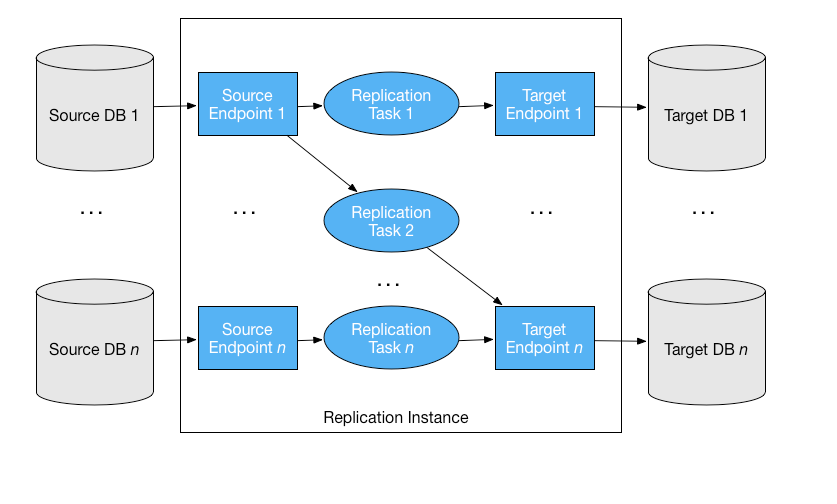
Before exploring the key points related to instance sizing, it’s important to review the integration between replication instances, AWS DMS tasks, and resource usage. An AWS DMS task is the process that consumes compute resources to perform one of these three operations:
- One-time migration for existing data (full load).
- Change data capture (CDC) only. (CDC captures and replicates ongoing changes from the source database in near real-time.)
- Full load with CDC. (Combines initial data migration with continuous replication.)
AWS DMS allocates task resources on the replication instance, which provides the compute power needed, as illustrated in the following diagram.
Choose the right instance type for your workload
AWS DMS offers various instance types to suit different migration needs. C-family instances (C5, C6i, C7i), are compute-optimized instances focused on delivering high CPU performance for compute-intensive workloads with each generation offering improved performance. These instances are ideal for AWS DMS tasks involving heavy data transformations, datatype conversions, and high-throughput processing. For memory-optimized instances designed for workloads requiring intensive memory access, perfect for AWS DMS tasks involving large databases, high-volume concurrent transactions, and extensive memory buffer requirements, use R-family instances (R5, R6i, R7i).
Key factors affecting migration performance
Several factors significantly affect AWS DMS task performance. Understanding these helps you make informed sizing decisions.
Your infrastructure significantly affects migration performance. Consider how your migration time windows and acceptable lag will shape your configuration choices. Both source and target database performance play crucial roles in determining migration speed, and network conditions between the components can either accelerate or bottleneck data transfers.
Dataset characteristics: Source dataset characteristics directly impact migration resource requirements, key factors include, but are not limited to:
- Data size and table count increase workload during full load operations
- Primary key presence improves processing efficiency, especially for CDC
- Transaction volume per table affects memory and processing requirements
- Large Objects (LOBs) like CLOB or JSON significantly increase memory needs
AWS DMS task configuration settings control replication performance, data validation rules, thread allocation, and other parameters to optimize the migration task for specific loads and requirements:
- Parallel table loading (configurable from 8 to 49 concurrent tables using the MaxFullLoadSubtasks setting)
- Task optimization parameters (such as batch processing and parallel loading settings)
- Enabling AWS DMS data validation requires additional resources for query comparisons
- How many tasks you plan to run on each replication instance
Get initial sizing recommendations with the instance estimator
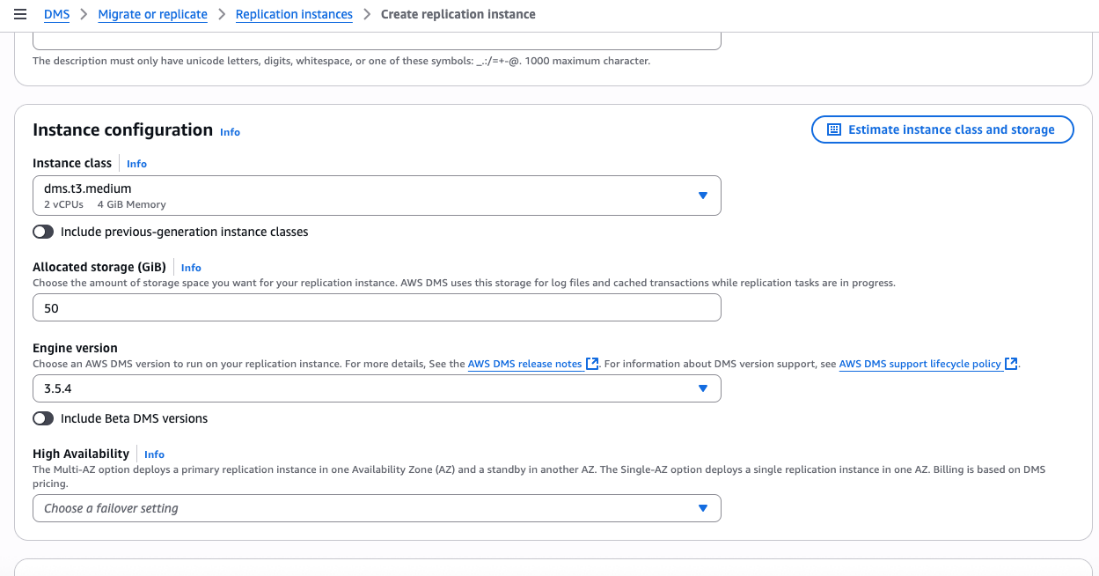
To assist with the initial sizing related to AWS DMS replication instances, AWS now provides an estimation tool, available on the AWS DMS Replication instance creation console, that can recommend instance class or size, storage, and cost based on a few questions such as type of migration, LOB size, and validation.
To estimate your AWS DMS instance size:
- Navigate to the AWS DMS console, then choose Get Started, Migrate or Replicate, Provisioned Instances, Create replication instance, and Estimate instance class and storage, as shown in the following screenshot.
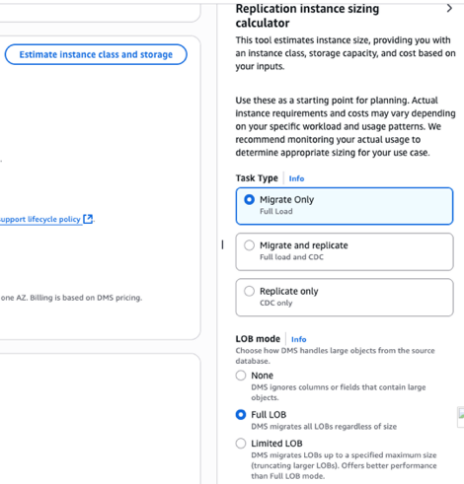
- Select your migration strategy from the available options: Migrate Only, which is full load, one-time migration, Migrate and replicate, which is full load and CDC, initial load with continuous replication, or Replicate only, which is CDC only, as shown in the following screenshot.
- Next, select how you want to handle LOBs. You have three options: None, which ignores LOBs entirely, Full LOB, which migrates the LOBs regardless of size, or Limited LOB, which migrates LOBs up to a specific size limit. The AWS DMS LOB documentation offers detailed guidance on each approach.
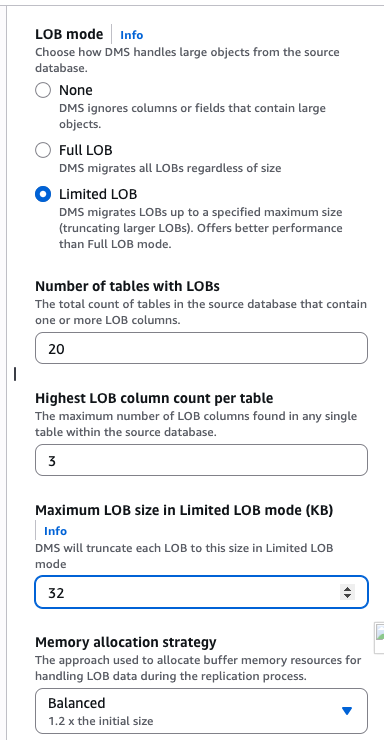
- Configure your task parameters by specifying the memory allocation strategy based on the migration project, an estimated number of concurrent tasks followed by the expected number of tables on each task. Tuning these numbers might require several interactions, as covered in the Optimize your migration strategy section. Additionally, choose whether to select Include data validation in resource estimates for your migration tasks. To learn more, refer to data validation.
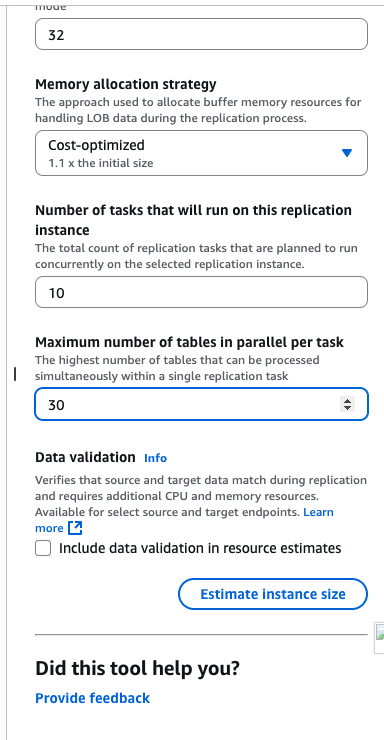
- Choose Estimate instance size to receive recommendations for your instance class, size, and storage with associated costs. Choose Apply Estimates, as shown in the following screenshot, to automatically apply these configurations to your instance creation page.
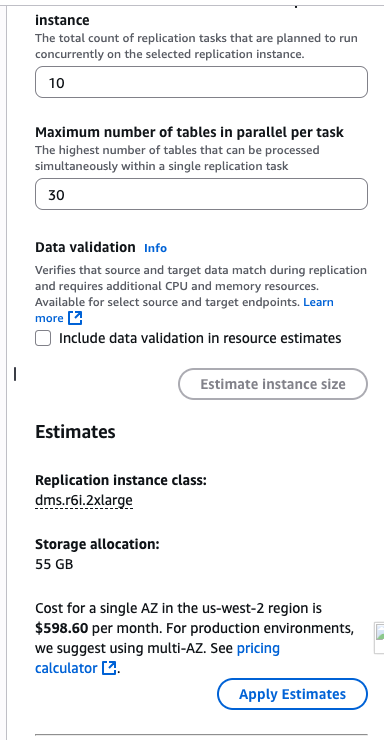
The AWS DMS instance estimator provides a starting point for your sizing decisions. Actual instance requirements and costs vary depending on your specific workload and usage patterns. The monitoring section below explains how to collect precise usage data to fine-tune your instance and task parameter changes.
Monitor and measure your migration performance
As discussed on the previous section, Key factors affecting migration performance, migrations can significantly vary based on your source database size, transaction volume, and network configuration. Therefore, testing on your environment and collecting information related to these executions is still necessary to give you the right overview for further adjustments.
For observability, AWS DMS integrates with other AWS services to provide a full set of features. Amazon CloudWatch provides metrics, logs, and alarms to monitor your replication instance performance and task progress, and Amazon EventBridge delivers real-time notifications about AWS DMS events such as task state changes or errors, and Amazon Simple Notification Service sends alerts by email, SMS, or other channels when specific events occur.
You can learn about these integrations in our AWS DMS monitoring documentation. To learn more about which metrics you should focus on, refer to AWS DMS key troubleshooting metrics and performance enhancers. AWS DMS also has documentation on best practices and troubleshooting scenarios that can be an interesting read!
Optimize your migration strategy
After you’ve sized your initial instance using the AWS DMS estimator and started collecting test data, there are still additional factors that can be verified. Be prepared to adjust your strategy based on observed performance. Adjustments might include resizing instances, tweaking task settings, or even restructuring your migration tasks. The trade-offs should be carefully evaluated based on your specific migration requirements and workload patterns. Planning your migration strategy:
- Tables with foreign keys or application requirements should be replicated in the same task, especially for CDC. After this is set, you can keep those large, frequently changing tables separate in dedicated tasks.
- Focus on tables with the highest transaction volumes, largest sizes, and LOBs to use specific techniques such as parallel loading.
Testing and optimization:
- Create a test environment using a snapshot of your source database.
- Run full load and CDC tests to verify the performance and integrity of your datasets.
- Monitor and set up alarms for key metrics to identify bottlenecks. Prioritize memory capacity by monitoring metrics such as
FreeableMemoryandSwapUsageto handle peak transaction volumes,CPUUtilizationto track CPU consumption and disk metrics from workload, and performance such asDiskQueueDepth,WriteLatency, andReadLatency.
Smart sizing approach:
- Start with small or less critical tables to validate configuration before migrating complex objects
- Use AWS DMS task settings to optimize your load and reduce migration time, for example, increase thread parallelism for large datasets and increase memory allocation settings for highly transactional databases
- Balance performance gains against cost implications when selecting instance sizes. Because AWS DMS allows resizing replication instances, larger instances can be used for full loads and later reduced to a smaller size depending on the transaction volumes
Conclusion
In this post, you learned how to use the new AWS DMS instance estimator tool to get initial replication instance sizing recommendations for different database migrations. We explored key factors that impact migration performance, along with monitoring and optimization strategies to help reduce migration time and avoid common performance issues.
For next steps, start with the instance estimator for initial sizing recommendations, then monitor memory usage closely because it’s often the most critical factor. Test with less critical data before migrating complex objects and balance performance requirements with cost considerations.
AWS continues enhancing AWS DMS, so make sure to stay current with new features and best practices to use the service efficiently. Happy migrations!