AWS Cloud Financial Management
Improve Your Monthly Cloud Variance Analysis with a Weekly FinOps Checkpoint
Cloud cost variability presents a unique challenge for FinOps and Finance professionals. Monthly variance analysis may reveal cost trends too late for timely course correction, while daily cost tracking may produce limited actionable insights.
Implementing a FinOps weekly checkpoint is a proactive approach to catch spend trends sooner and generates more meaningful insights for your monthly variance analysis. Gathering variance context throughout the month leads to a clearer, more impactful analysis. This weekly checkpoint involves regularly reviewing cost data, identifying anomalies or trends, and engaging with technical teams to understand cost change drivers.
A FinOps weekly checkpoint is a process, not a tool. Importantly, establishing a weekly checkpoint is a people-led formal review process to supplement tooling such as AWS Cost Explorer Cost Comparison and AWS Cost Anomaly Detection.
In this blog, we’ll walk through:
- Cloud cost variance analysis from a Finance perspective
- Key stakeholders and responsibilities for establishing weekly reviews
- Using AWS FinOps Agent to create a weekly checkpoint
- Manual creation of a weekly checkpoint using AWS Cost Explorer
- How to enhance your checkpoint process with AI-powered tooling
By implementing a structured weekly checkpoint process, you can improve your ability to stay on top of cloud spending, work closer with technical teams, and drive sustainable cost optimization.
Cloud Cost Variance Analysis
A key Finance responsibility is variance analysis across your general ledger, from headcount to your cloud costs. Variance analysis involves understanding why costs differ from the expected, be it forecast, the prior month, trailing six weeks, or other, and identifying the main drivers behind the changes. Cloud cost variance analysis can be particularly challenging, as costs are often highly dynamic, requiring close collaboration between Finance, FinOps, and Technical teams.
Why Weekly?
Introducing a regular weekly checkpoint and focusing on medium-term changes with potential long-term impacts adds a strategic monitoring mechanism to existing processes.
This approach filters out short-term fluctuations and noise, allowing teams to focus on persistent trends and anomalies that may not trigger immediate alerts but can have a substantial impact on costs over time. Furthermore, Finance teams who may not have access to tools such as AWS Cost Anomaly Detection can establish a monitoring process tailored to their specific needs.
A weekly review also provides a normalized view of cost changes compared to a daily cost review, as you smooth weekend usage elasticity. Additionally, a weekly review allows you to identify and understand cost trends earlier for clearer monthly variance analysis. Rather than waiting until the compressed timelines of month-end closing, you’ll engage technical teams throughout the month. With consistent engagement, you will have clearer variance explanations, versus defaulting to a variance explanation of ‘higher/lower usage’ or ‘timing’ as you wait for further details from stakeholders.
We recommend operating on a weekly cadence, but removing friction is key. You can adapt these principles and strategies to fit within your team’s existing cadence(s) (bi-weekly, SCRUM Sprints, etc.), but remember, more frequent monitoring and communication is better than less.
Key Stakeholders and Responsibilities
The weekly checkpoint process involves two key stakeholder groups, each with a unique perspective and set of responsibilities. In this model, the Central FinOps team or Finance team creates the checkpoint and holds a weekly meeting to identify variances requiring an explanation. This meeting can be limited to a core team or expanded to Cloud Cost Champions or key technical contacts.
Below is an example of common roles and teams. However, your teams and organizational structure may differ. The primary focus should be on the responsibilities each role holds and how they collaborate.
- Central FinOps/Finance Team: The central FinOps or Finance team is responsible for aggregating and analyzing cost data, identifying major variances, and reaching out to application owners to understand the drivers and expected duration of cost changes. They should track the responses received and incorporate the insights into their reporting and analysis. This team is also responsible for the overall variance analysis and reporting to executive leadership.
- Technical Teams: As the workload owners, technical teams and application owners are responsible for providing timely responses to the central team’s inquiries, explaining cost changes and remediation plans. Their input is crucial for the Finance team to understand the underlying reasons for the cost changes and determine the appropriate course of action. Technical teams should rely on tools such as AWS Cost Anomaly Detection to automate cost anomaly detection and root cause analysis as part of their infrastructure monitoring.
Using AWS FinOps Agent to Create a Weekly Checkpoint
AWS FinOps Agent is an AI agent that investigates anomalies automatically, answers cost questions and runs recurring FinOps workflows on a schedule you define. We can use natural language prompts to create a variance report within the agent. Enable AWS FinOps Agent by following this ‘Getting Started’ process.
Create Your Checkpoint with AWS FinOps Agent
Our example assumes a Central FinOps or Finance persona with a focus on central cost monitoring. Figure 1 shows how you can create a weekly cost variance report within the FinOps Agent using the following natural language prompt: Show me a weekly amortized cost breakdown for all accounts for the past 3 weeks. Use last Sunday as the end of the most recent week. Put accounts as rows and weeks as columns. Each week column should show the date range in the header with total spend below. Show the weekly costs of week 1,2, and 3 then add a WoW % change column and an Annualized Impact column (weekly $ difference × 52) for week 3 vs. 2 and week 3 vs. week 1. Add a Total Impact row at the bottom.
Once you standardize a format, schedule it to generate a cost summary aligned with your weekly cadence and let it identify initial variance drivers so you can focus on the strategic follow-ups.
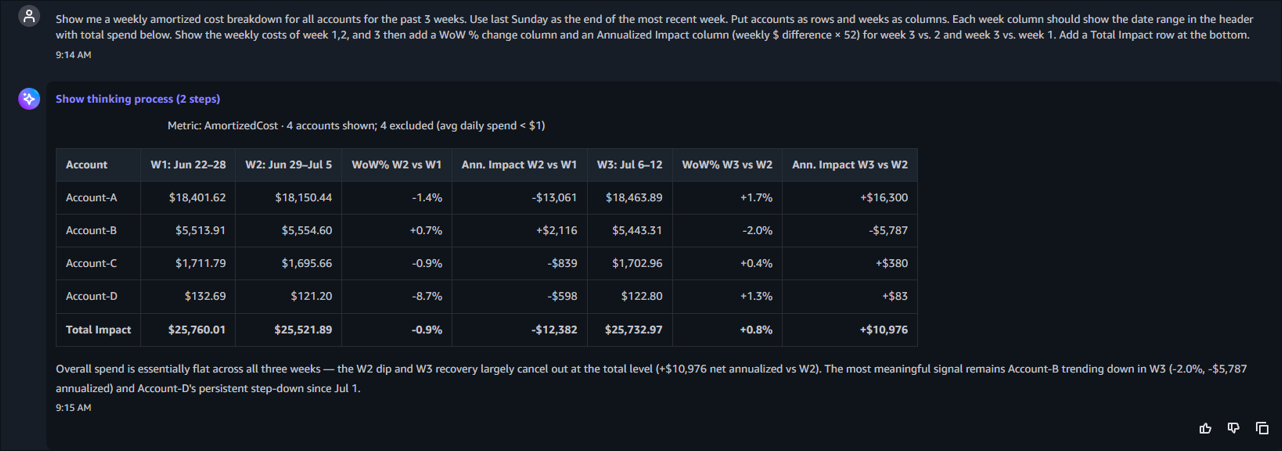
Figure 1. Creating a weekly variance report using AWS FinOps Agent
Note that your weekly checkpoint reviews include both weekly percentage variance and annualized impact. An annualized impact amount is more intuitive than weekly figures, as Account owners and Finance typically plan against yearly budgets. Additionally, an annualized impact illustrates the magnitude of seemingly-small variances, especially on large workloads or services. A two-week trend helps identify emerging patterns.
Engage Account Owners to Understand Cloud Variances
After gathering and formatting the data, it is critical to reach out to Account owners for details. Your goal is to understand cost fluctuation drivers and to determine whether variances are planned events and expected to continue.
Set up a weekly cadence to review the completed analysis and determine which Accounts necessitate further review and context from the Account owners. Use your judgement based on weekly variance percentage or annualized materiality impact.
When reaching out to the Account owner for more details, provide a high-level view of the services variances. Use AWS FinOps Agent to dig into the variance drivers by Service, by Tag, or other dimensions such as Region or Purchase Option.
In your message to the Account owner, along with details behind the cost increase and annualized impact, set expectations for a response with context and expected duration. Below is an example engagement message.
Hello [Account Owner]
The FinOps (or Finance) team has implemented a weekly checkpoint process to review cost trends and better understand variance drivers.
Your Account, Account x, saw a x% weekly increase, resulting in a $y annualized impact. We see the increase is due to increased xyz service, beginning on xx/xx/xxxx date.
Let us know:
- What is the driver behind this increase?
- How long is this increase expected to continue?
- Was this increase planned and incorporated into your latest forecast?
Track responses and escalate material impacts as needed. Ensuring the right stakeholders are aware of changes to the current cost trajectory is an important function of the FinOps and Finance teams. Additionally, begin building your monthly variance commentary based on the response from the Account owner.
Operational Considerations
When implementing the weekly checkpoint process, you should consider several critical factors to ensure the long-term success and effectiveness of the program.
- Balance automation and human analysis: While automation can streamline data aggregation and anomaly detection, maintaining a process for qualitative investigation and context gathering is crucial. Cost without context is just a number. Your goal is to identify the ‘why’ behind variances.
- Focus on the material: You don’t need to chase every variance. Set appropriate materiality thresholds, reviewing both variance percentage and annualized impact.
- Build organizational knowledge: The process of regularly reviewing cost data and engaging with teams can help Finance and technical teams develop a deeper understanding of cloud cost drivers and behaviors. This knowledge can be used to train new team members and improve the overall effectiveness of the weekly checkpoint process.
Your weekly checkpoint scales with your organization. We know of customers with hundreds of accounts who initially implemented this checkpoint centrally, focusing on the top 5-10 account variances. As the central team established the process and demonstrated success, Business Unit (BU) teams began their own weekly checkpoints with a narrower focus.
Manual creation using AWS Cost Explorer
If you don’t have access to AWS FinOps Agent, you can create a manual checkpoint using AWS Cost Explorer using an AWS Cost Explorer CSV download.
First, set up your AWS Cost Explore parameters:
- Specify your Data Range. We recommend starting with a two-week look-back.
- Choose a Daily granularity which you will then aggregate into weekly spend for review.
- Select your Group by Dimension. This can be Linked Account, AWS Service, AWS cost allocation tags, or AWS Cost Categories, depending on how you report monthly costs.
Next, download the cost data CSV file by clicking on the ‘Download as CSV button’ in the Cost and usage breakdown table.
Finally, in Excel take the daily granularity, group it into a weekly view, and calculate the weekly spend variance and annualized impact. With this data, you can begin reaching out to Account Owners to gather variance context.
Future State of the Weekly Check
As you develop your review rhythm, you can incorporate additional data sources to understand cost variances and enhance your process. While establishing a weekly cost review is more about driving a cross-functional partnership rather than the data presentation, tooling can help you gather data faster and shift to a strategic focus.
Use AI-Powered Tools to Accelerate Your Initial Variance Analysis
Your weekly checkpoint generates questions of what changed, why, and how long will it last. In addition to AWS FinOps Agent, recent AWS releases bring AI directly into that investigation workflow.
- AWS Cost Explorer now includes “Analyze with Amazon Q,” which reads your current filters, time period, and grouping to explain in simple language what changed and potential reasons for ‘why.’ Point it at the Account and week you’re reviewing, and you’ll have a starting variance narrative for your outreach email.
- AWS Cost Anomaly Detection now includes AI-powered cost investigation. When an anomaly fires, click “Investigate with Amazon Q.” It tells you in plain language what caused the spike, whether it’s a usage or rate change, which API calls are involved, and which principals triggered it. Instead of manual log correlation you can walk through a conversational investigation.
- AWS Billing and Cost Management Dashboards now support scheduled email delivery. Configure weekly delivery, add your Finance leadership and Account owners as recipients, and they’ll receive password-protected PDF reports in their inbox with no console access required. Stakeholders heading into a weekly review will get standardized cost visibility.
If you have already deployed the AWS Cost and Usage Dashboard Operations Solution (CUDOS) dashboard, you can change the ‘Trends’ type to ‘Weekly’ under the ‘Executive: Trends’ as shown in Figure 2, rather than building a new report.
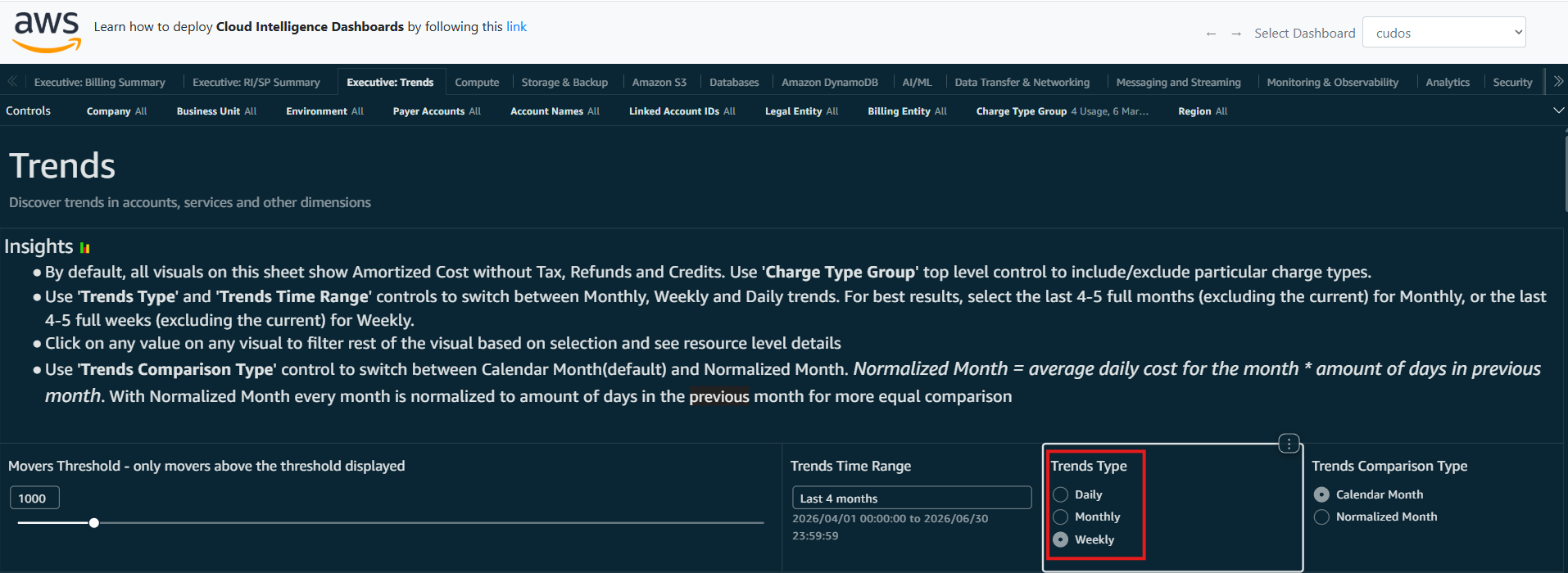
Figure 2. The AWS CUDOS ‘Executive: Trends’ tab showing a Weekly Trend Type
You can also use weekly variances explanations along with the AWS Cost Explorer Cost Comparison feature to complete your monthly variance analysis. Additionally, reviewing key performance indicators (KPIs) through the Cloud Intelligence Dashboard (CID) or identifying optimization opportunities using the AWS Cost Optimization Hub can help bring additional context to cost trends.
Conclusion
Your weekly checkpoint review is not a static implementation, nor should it be treated as a ‘check the box’ review. You should iterate and evolve based on what is valuable to the attendees and stakeholders. Developing consistent cost review practices is important, but the context explanations and partnership building due to increased communication is your strategic advantage.
By implementing a structured FinOps weekly checkpoint process with clear roles and responsibilities, you can improve your ability to proactively identify and address cost changes, create clearer variance analysis, partner across Finance and engineering, and drive sustainable optimization.