AWS News Blog
AWS Security Hub now generally available with near real-time analytics and risk prioritization

|
Today, AWS Security Hub is generally available, transforming how security teams identify and respond to critical security risks across their AWS environments. These new capabilities were first announced in preview at AWS re:Inforce 2025. Security Hub prioritizes your critical security issues and unifies your security operations to help you respond at scale by correlating and enriching signals across multiple AWS security services. Security Hub provides near real-time risk analytics, trends, unified enablement, streamlined pricing, and automated correlation that transforms security signals into actionable insights.
Organizations deploying multiple security tools need to manually correlate signals across different consoles, creating operational overhead that can delay detection and response times. Security teams use various tools for threat detection, vulnerability management, security posture monitoring, and sensitive data discovery, but extracting value from the findings these tools generate requires significant manual effort to understand relationships and determine priority.
Security Hub addresses these challenges through built-in integration that unifies your cloud security operations. Available for individual accounts or entire AWS Organizations accounts, Security Hub automatically aggregates and correlates signals from Amazon GuardDuty, Amazon Inspector, AWS Security Hub Cloud Security Posture Management (AWS Security Hub CSPM), and Amazon Macie, organizing them by threats, exposures, resources, and security coverage. This unified approach reduces manual correlation work, helping you quickly identify critical issues, understand coverage gaps, and prioritize remediation based on severity and impact.
What’s new in general availability
Since the preview announcement, Security Hub has added several new features.
Historical trends
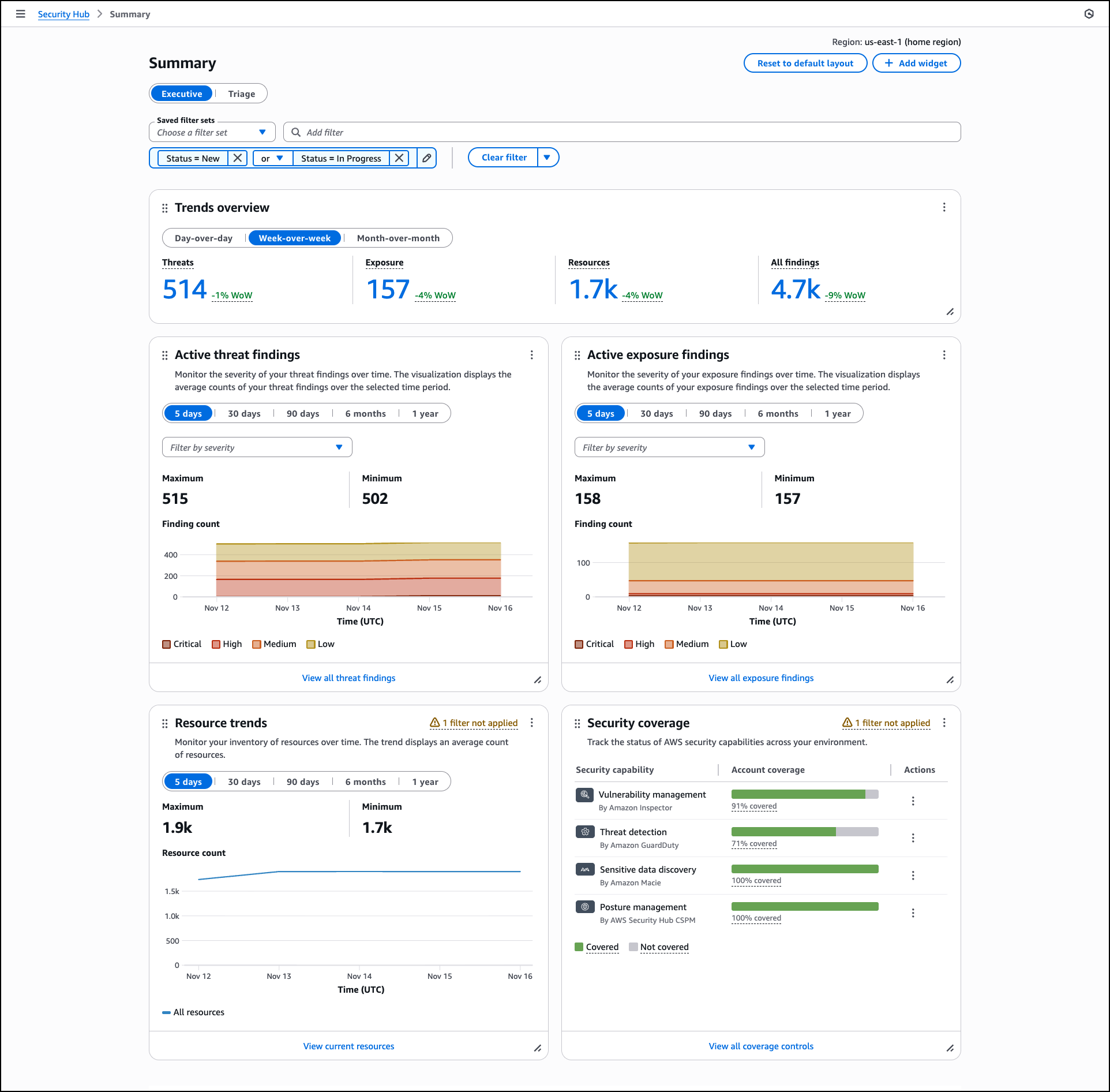
Security Hub includes a Trends feature through the Summary dashboard that provides up to 1 year of historical data for findings and resources across your organization. The Summary dashboard displays an overview of your exposures, threats, resources, and security coverage through customizable widgets that you can add, remove, and arrange based on your operational needs.
The dashboard includes a Trends overview widget that displays period-over-period analysis for day-over-day, week-over-week, and month-over-month comparisons, helping you track whether your security posture is improving or degrading. Trend widgets for Active threat findings, Active exposure findings, and Resource trends provide visualizations of average counts over selectable time periods including 5 days, 30 days, 90 days, 6 months, and 1 year. You can filter these visualizations by severity levels such as critical, high, medium, and low, and hover over specific points in time to review detailed counts.
The Summary dashboard also includes widgets that display current exposure summaries prioritized by severity, threat summaries showing malicious or suspicious activity, and resource inventories organized by type and associated findings.
The Security coverage widget helps you identify gaps in your security service deployment across your organization. This widget tracks which AWS accounts and Regions have security services enabled, helping you understand where you might lack visibility into threats, vulnerabilities, misconfigurations, or sensitive data. The widget displays account coverage across security capabilities including vulnerability management by Amazon Inspector, threat detection by GuardDuty, sensitive data discovery by Amazon Macie, and posture management by AWS Security Hub CSPM. Coverage percentages show which security checks passed or failed across your AWS accounts and Regions where Security Hub is enabled.
You can apply filters to widgets using shared filters that apply across all widgets, finding filters for exposure and threat data, or resource filters for inventory data. You can create and save filter sets using and/or operators to define specific criteria for your security analysis. Dashboard customizations, including saved filter sets and widget layouts, are saved automatically and persist across sessions.
If you configure cross-Region aggregation, the Summary dashboard includes findings from all linked Regions when viewing from your home Region. For delegated administrator accounts in AWS Organizations, data includes findings for both the administrator account and member accounts. Security Hub retains trends data for 1 year from the date findings are generated. After 1 year, trends data is automatically deleted.
Near real-time risk analytics
Security Hub now calculates exposures in near real-time and includes threat correlation from GuardDuty alongside existing vulnerability and misconfiguration analysis. When GuardDuty detects threats, Amazon Inspector identifies vulnerabilities, or AWS Security Hub CSPM discovers misconfigurations, Security Hub automatically correlates these findings and updates associated exposures. This advancement provides immediate feedback on your security posture, helping you quickly identify new exposures and verify that remediation actions have reduced risk as expected.
Security Hub correlates findings across AWS Security Hub CSPM, Amazon Inspector, Amazon Macie, Amazon GuardDuty, and other security services to identify exposures that could lead to security incidents. This correlation helps you understand when multiple security issues combine to create critical risk. Security Hub enriches security signals with context by analyzing resource associations, potential impact, and relationships between signals. For example, if Security Hub identifies an Amazon Simple Storage Service (Amazon S3) bucket containing sensitive data with versioning disabled, Object Lock disabled, and MFA delete disabled, remediating any component triggers automatic calculation, helping you verify remediation effectiveness without waiting for scheduled assessments.
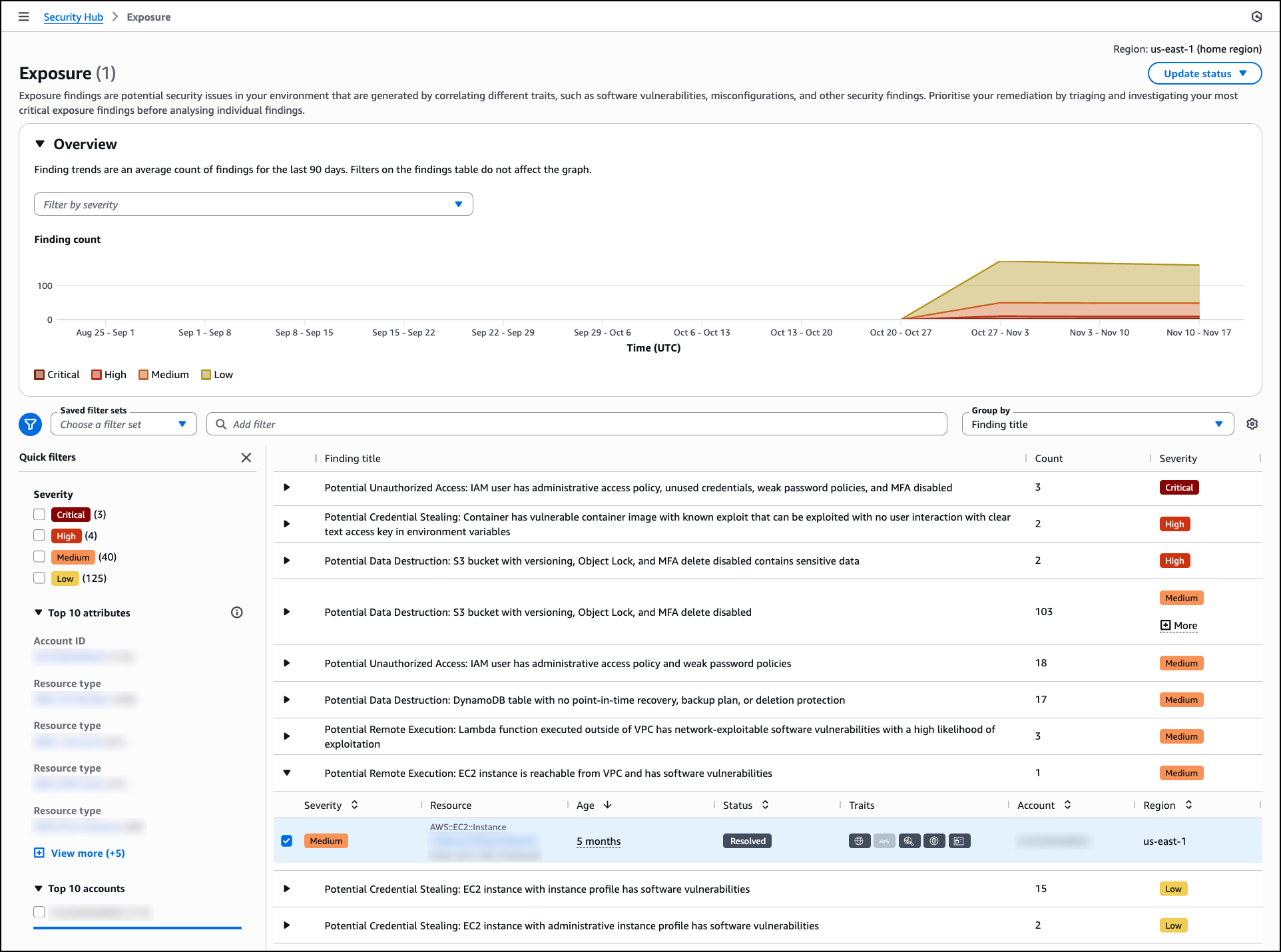
The Exposure page organizes findings by title and severity, helping you focus on critical issues first. The page includes an Overview section with a trends graph that displays the average count of exposure findings over the last 90 days, segmented by severity level. This visualization helps you track changes in your exposure posture over time and identify patterns in security risk.
Exposure findings are grouped by title with expandable rows showing the count of affected resources and overall severity. Each exposure title describes the potential security impact, such as “Potential Data Destruction: S3 bucket with versioning, Object Lock, and MFA delete disabled” or “Potential Remote Execution: EC2 instance is reachable from VPC and has software vulnerabilities.” You can filter exposures using saved filter sets or quick filters based on severity levels including critical, high, medium, and low. The interface also provides filtering by account ID, resource type, and accounts, helping you quickly narrow down exposures relevant to specific parts of your infrastructure.
Security Hub generates exposures as soon as findings are available. For example, when you deploy an Amazon Elastic Compute Cloud (Amazon EC2) instance that is publicly accessible and Amazon Inspector detects a highly exploitable vulnerability while AWS Security Hub CSPM identifies the public accessibility configuration, Security Hub automatically correlates these findings to generate an exposure without waiting for a scheduled assessment. This near-real time correlation helps you identify critical risks in newly deployed resources and take action before they can be exploited.
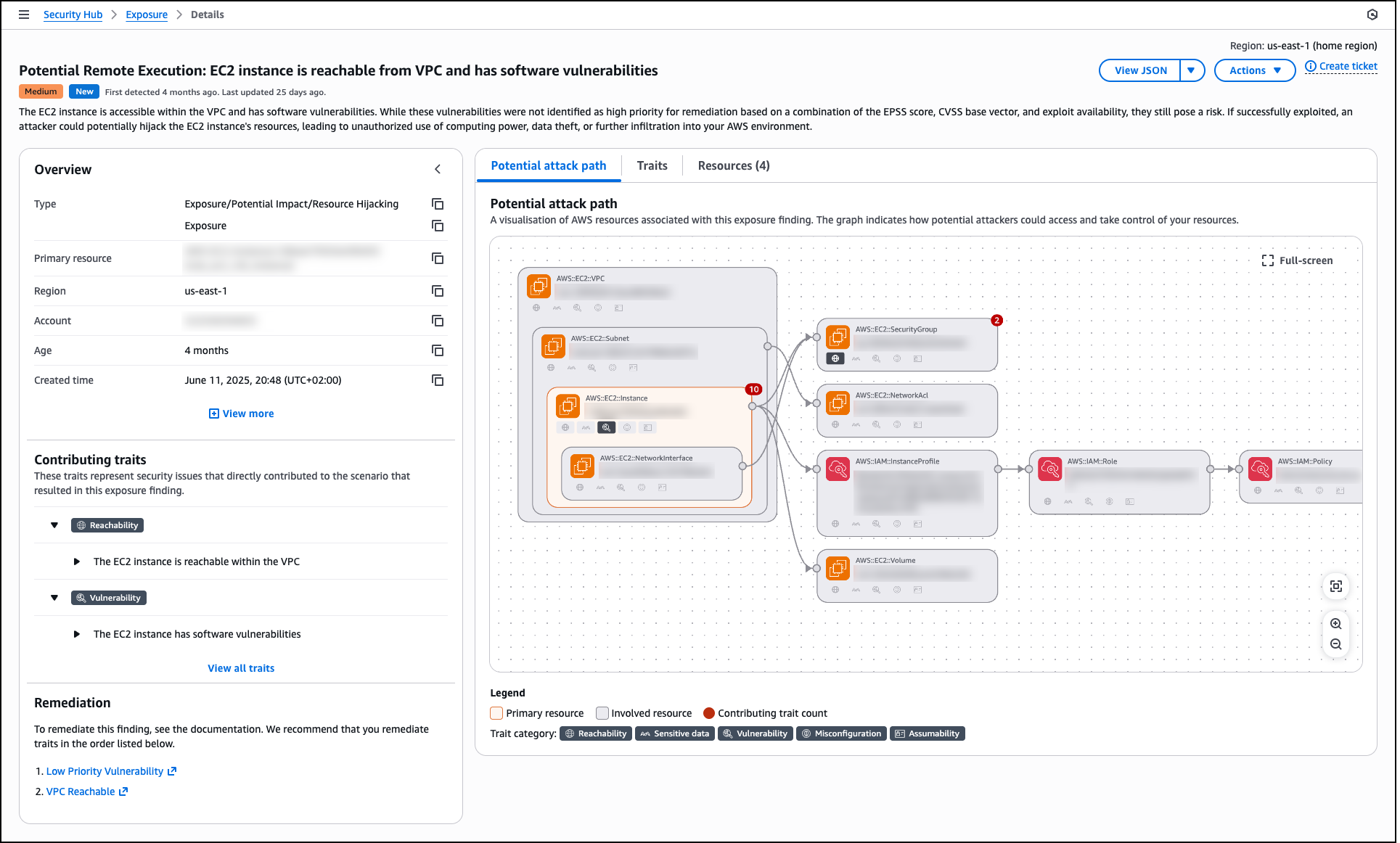
When you select an exposure finding, the details page displays the exposure type, primary resource, Region, account, age, and creation time. The Overview section shows contributing traits that represent the security issues directly contributing to the exposure scenario. These traits are organized by categories such as Reachability, Vulnerability, Sensitive data, Misconfiguration, and Assumability.
The details page includes a Potential attack path tab that provides a visual graph showing how potential attackers could access and take control of your resources. This visualization displays the relationships between the primary resource (such as an EC2 instance), involved resources (such as VPC, subnet, network interface, security group, AWS Identity and Access Management (IAM) instance profile, IAM role, IAM policy, and volumes), and contributing traits. The graph helps you understand the complete attack surface and identify which security controls need adjustment.
The Traits tab lists all security issues contributing to the exposure, and the Resources tab shows all affected resources. The Remediation section provides prioritized guidance with links to documentation, recommending which traits to address first to reduce risk most effectively. By using this comprehensive view, you can investigate specific exposures, understand the full context of security risks, and track remediation progress as your team addresses vulnerabilities, misconfigurations, and other security gaps across your environment.
Expanded partner integrations
Security Hub supports integration with Jira and ServiceNow for incident management workflows. When viewing a finding, you can create a ticket in your preferred system directly from the AWS Security Hub console with finding details, severity, and recommended remediation steps automatically populated. You can also define automation rules in Security Hub that automatically create tickets in Atlassian’s Jira Service Management and ServiceNow based on criteria you specify, such as severity level, resource type, or finding type. This helps you route critical security issues to your incident response teams without manual intervention.
Security Hub findings are formatted in the Open Cybersecurity Schema Framework (OCSF) schema, an open-source standard that enables security tools to share data seamlessly. Partners who have built integrations with the OCSF format with Security Hub include Cribl, CrowdStrike, Databee, DataDog, Dynatrace, Expel, Graylog, Netskope, Securonix, SentinelOne, Splunk a Cisco company, Sumo Logic, Tines, Upwind Security, Varonis, DTEX, and Zscaler. Additionally, service partners such as Accenture, Caylent, Deloitte, Optiv, PwC, and Wipro can help you adopt Security Hub and the OCSF schema.
Security Hub also supports automated response workflows through Amazon EventBridge. You can create EventBridge rules that identify findings based on criteria you specify and route them to targets such as AWS Lambda functions or AWS Systems Manager Automation runbooks for processing and remediation. This helps you act on findings programmatically without manual intervention.
Now available
If you currently use AWS Security Hub CSPM, Amazon GuardDuty, Amazon Inspector, or Amazon Macie, you can access these capabilities by navigating to the AWS Security Hub console. If you’re a new customer, you can enable Security Hub through the AWS Management Console and configure the security services appropriate for your workloads. Security Hub automatically consumes findings from enabled services, making the findings available in the unified console and creating correlated exposure findings based on the ingested security data.
For Regional availability, visit our AWS Services by Region page. Near real-time exposure calculation and the Trends feature are included at no additional charge. Security Hub uses a streamlined, resource-based pricing model that consolidates charges across integrated AWS security services. The console includes a cost estimator to help you plan and forecast security investments across your AWS accounts and Regions before deployment. For detailed information about capabilities, supported integrations, and pricing, visit the AWS Security Hub product page and technical documentation.
— Esra