AWS Marketplace
How to reduce AWS Marketplace costs by automating AMI subscription monitoring
Managing Amazon Machine Image (AMI) subscriptions in AWS Marketplace can be challenging when Amazon Elastic Compute Cloud (Amazon EC2) instance types change frequently. Without automation, organizations risk unexpected costs from on-demand licenses when agreements aren’t updated.
This post shows you how to build an automated AWS Marketplace AMI monitoring solution that tracks EC2 instance type changes and alerts you when subscription amendments are needed. Using Amazon EventBridge, AWS Lambda, and Amazon Simple Email Service (Amazon SES) in a hub-and-spoke architecture, you can reduce AWS Marketplace costs by up to 72% while eliminating manual monitoring efforts.
In this post, we show you how to capture instance modifications in real-time, compares them against active subscriptions, and notifies you when action is required—helping you maintain purchased subscriptions that provide significant discounts compared to on-demand pricing. Learn how to deploy this across multiple AWS accounts.
Prerequisites for AWS Marketplace AMI subscription monitoring
Before you get started, make sure you have the following prerequisites:
- An AWS account
- AWS Organizations enabled
- Basic familiarity with AWS services including AWS Lambda, Amazon EventBridge, and Amazon EC2
AWS Marketplace AMI monitoring solution overview
This solution automates AMI subscription monitoring by capturing EC2 instance type changes and triggering notifications when amendments are needed.
How it works:
When you stop an EC2 instance, Lambda records its current state (instance type and AMI license) into Amazon DynamoDB. When you modify the instance type, EventBridge captures the change, Lambda compares the new configuration against the stored state, and if an amendment is needed, sends a notification via Amazon SES with instance details and a direct link to amend the agreement.
The hub account components:
- EventBridge custom event bus with resource policies
- Lambda function for state management and change detection
- DynamoDB table for instance state persistence
- Amazon SES for notifications
The following architecture diagram shows the integration between EventBridge, Lambda, DynamoDB, and Amazon SES.
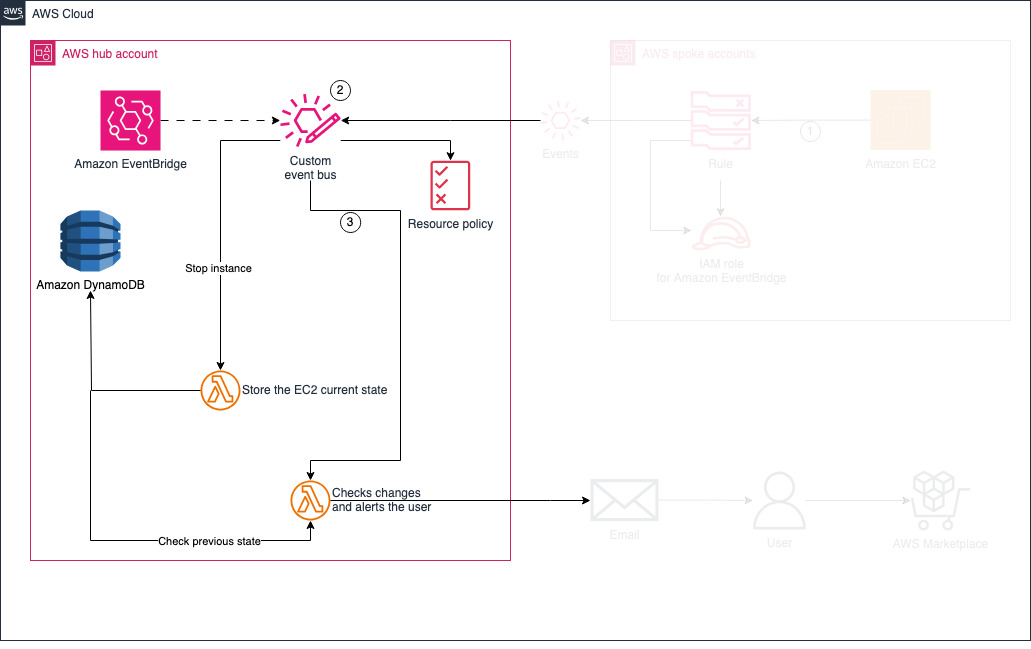
Figure 1: AWS Marketplace AMI monitoring hub account architecture diagram
Spoke accounts require only Amazon EventBridge rules that forward Amazon EC2 lifecycle events to the hub account’s event bus. This design centralizes monitoring logic and supports scaling across multiple accounts. The following diagram illustrates this architecture.
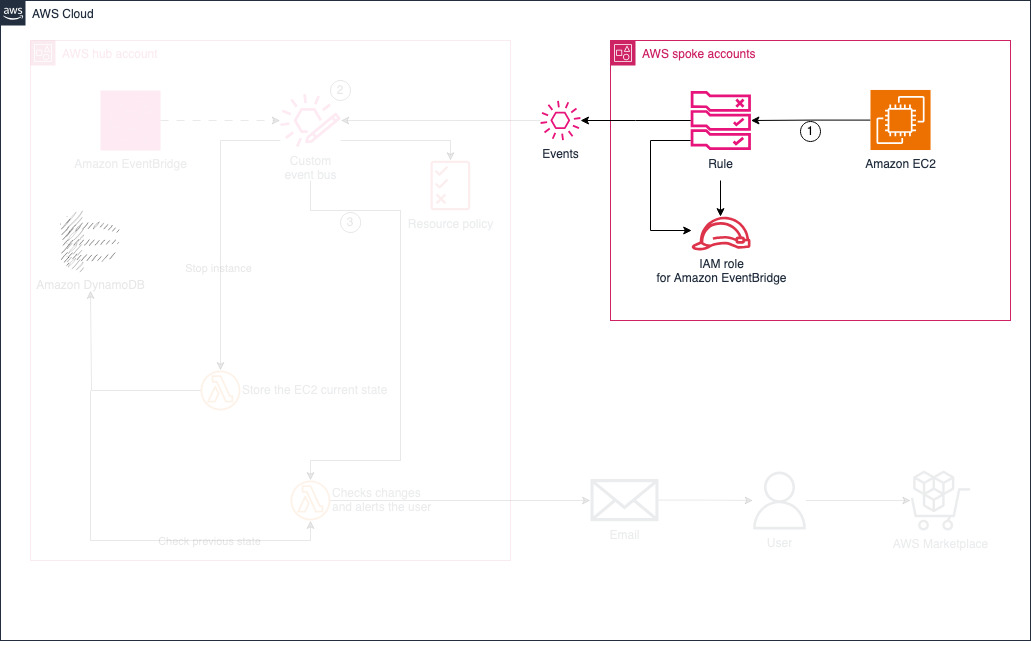
Figure 2: AWS Marketplace AMI monitoring spoke account architecture with Amazon EventBridge rules forwarding to hub account
Note: You can configure the Lambda function with a SkipAgreementVerification parameter. When set to true, the solution sends notifications for all EC2 instance type changes on instances with AWS Marketplace AMI annual subscriptions, enabling comprehensive monitoring across all instances.
Step-by-step guide: Deploy AWS Marketplace AMI monitoring solution
The solution uses AWS CloudFormation templates to deploy the hub-and-spoke architecture. You’ll deploy the hub account resources first, then the Amazon SES email validation, and finally deploy the spoke account resources in each AWS account you want to monitor.
To deploy the hub account resources, follow these steps:
- Download CloudFormation templates hub-account-template.yaml and spoke-account-template.yaml from the GitHub repository.
- Sign in to the AWS Management Console and open the CloudFormation console in your hub account.
- Choose Create stack, then choose With new resources (standard), as shown in the following screenshot.
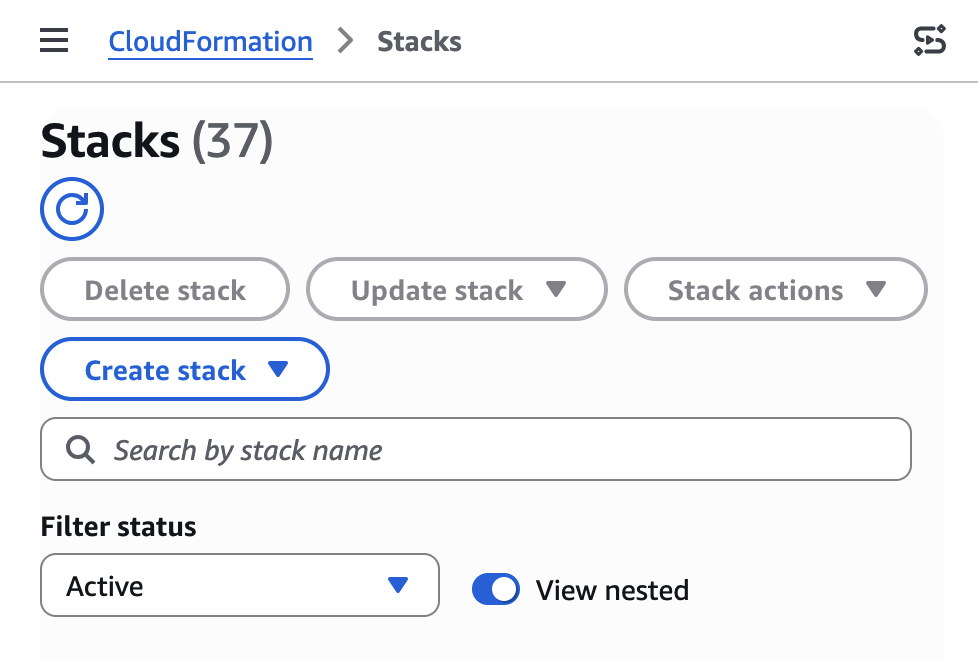
Figure 3: AWS CloudFormation console create stack interface for AWS Marketplace monitoring deployment
- Under Specify template, select Upload a template file.
- Choose Choose file and upload the
hub-account-template.yamlThen choose Next. - On the Specify stack detail page, enter a stack name (for example,
ec2-monitoring-hub). This name serves as the prefix for all created resources. - Configure the following parameters:
-
- EmailFrom: The sender email address for alert notifications
- EmailRecipient: Email address(es) to receive notifications (separate multiple emails by comma)
- EnableEmailNotifications: When set to true, sends email notifications. When set to false, email notifications are disabled.
- SkipAgreementVerification: When set to true, the solution tracks all EC2 instance type changes for instances launched from AWS Marketplace AMIs, regardless of whether an active subscription exists. Leave this set to false (default) to only track instances with active annual AMI subscriptions.
- Choose Next.
- On the Configure stack options page, configure any additional options as needed, then choose Next. Under Capabilities, select the acknowledgment checkbox because the solution creates AWS Identity and Access Management (IAM) Then choose Next.
- On the Review page, review your configurations and choose Submit.
Note: AWS CloudFormation will automatically create the Amazon SES email identity for the sender address (EmailFrom parameter). You must verify this email address before the solution can send notifications.
Repeat the following steps for each email address that should receive notifications:
- Sign in to the AWS Management Console and navigate to the Amazon Simple Email Service console in your hub account.
- Choose Identities, then choose Create identity
- Under Identity details, choose the Email address
- Enter the email address you specified in the EmailRecipient parameter described in the previous step. Then choose Create identity
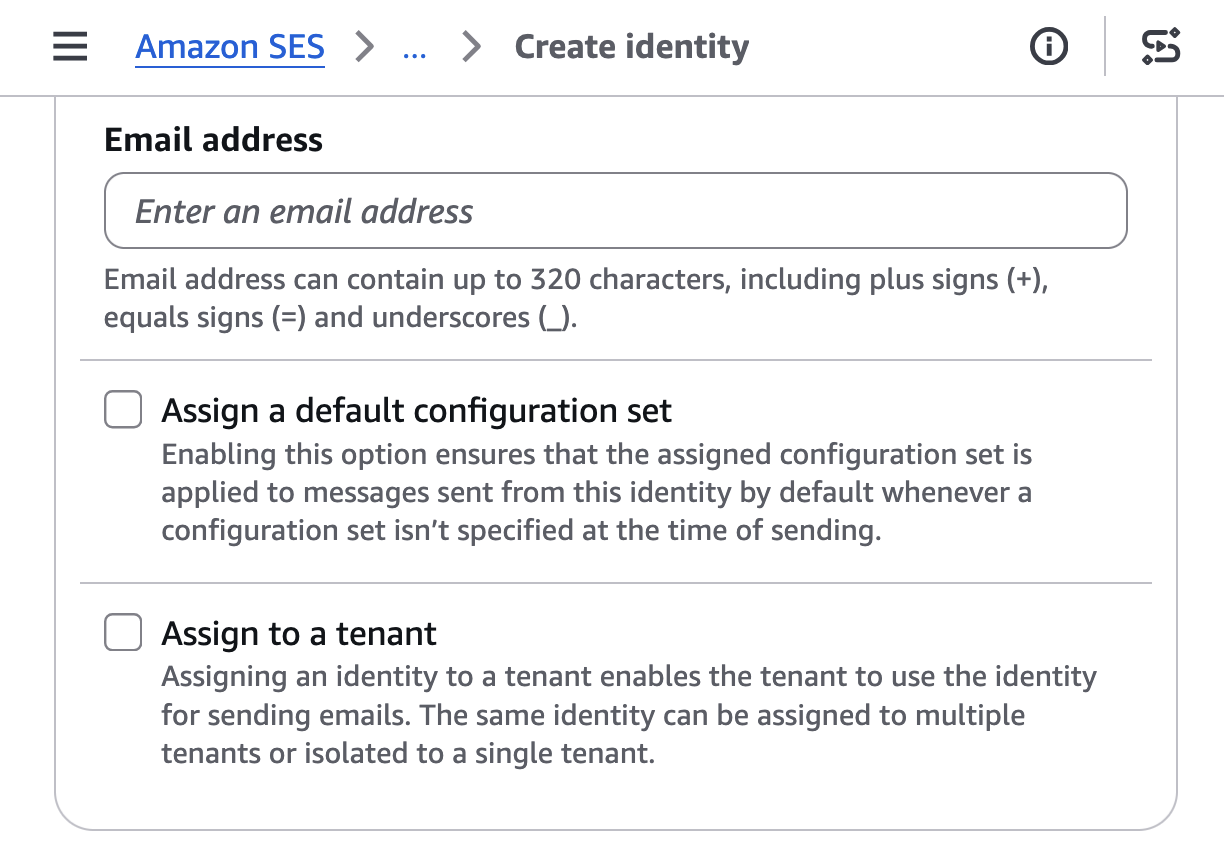
Figure 4: Amazon SES Create Identity
- To complete verification, click the link in the confirmation email you receive.
To deploy the spoke accounts resources, follow these steps:
Repeat the following steps in each AWS account where you want to monitor EC2 instance type changes for AMI subscriptions.
- Sign in to the AWS Management Console and navigate to the AWS CloudFormation console in your spoke account.
- Choose Create stack, then choose With new resources (standard).
- Under Specify template, select Upload a template file.
- Choose Choose file and upload the
spoke-account-template.yamlThen choose Next. - On the Specify stack details page, enter a stack name (for example,
ec2-monitoring-spoke). - Configure the following parameters:
-
- HubAccountId: The AWS account ID where you deployed the hub account stack (from the previous procedure).
- HubEventBusName: The name of the EventBridge event bus in the hub account. This is automatically generated by the hub stack as
<HubStackName>-Bus(for example, if your hub stack is namedec2-monitoring-hub, the event bus name isec2-monitoring-hub-Bus). - HubRegion: The AWS Region where you deployed the hub account stack
- Choose Next.
- On the Configure stack options page, configure any additional options as needed, then choose Next. Under Capabilities, select the acknowledgment checkbox because the solution creates IAM resources. Then choose Next.
- On the Review page, review your configurations and choose Submit.
After completing these steps, your solution is ready to monitor EC2 instance type changes and send notifications when AMI subscription amendments are needed.
How to test your AWS Marketplace AMI monitoring setup
To verify the solution is working correctly, follow these steps to simulate an EC2 instance type change:
- Identify a test Amazon EC2 instance that was launched from an AWS Marketplace AMI with an active subscription.
- On the Amazon EC2 console, select the instance and choose Instance state, then Stop instance.
- Wait for the instance to reach the stopped state.
- With the instance still selected, choose Actions, then Instance settings, then Change instance type.
- Select a different instance type from the dropdown menu and choose Apply.
- Within 5–10 minutes, you should receive an email notification at the address you configured during deployment.
The email will include details about the instance change, including the instance ID, previous instance type, new instance type, and the associated AMI subscription that might require amendment alongside the link to amend it.
Key benefits of automated AWS Marketplace AMI monitoring
This automated monitoring solution delivers three key advantages:
- Cost control – Automated alerts provide visibility into when amendments may be needed, helping you maintain purchased subscriptions that provide discounts compared to On-Demand pricing
- Risk mitigation – Because AWS Marketplace amendments are contract modifications involving financial decisions, the solution notifies you rather than automatically amending agreements, providing human oversight for subscription changes
- Reduced manual effort – Manually tracking whether EC2 instance type changes require agreement amendments is error-prone and time-consuming. This solution eliminates the need for constant manual monitoring
With this approach, you can maintain control over your AWS Marketplace AMI subscriptions while maximizing the value of your license investments.
Cleanup
To avoid charges to your account, delete the CloudFormation stack and resources. For more information, see Deleting a stack on the AWS CloudFormation console in the AWS CloudFormation User Guide.
Conclusion
This automated monitoring solution delivers the three key benefits outlined above: cost control, reduced manual effort, and maintained oversight. Download the CloudFormation templates from the GitHub repository to get started and share your feedback with your AWS account team.
About the authors
 Richard Ferraresi
Richard Ferraresi is a Senior Technical Account Manager at Amazon Web Services (AWS), where he helps large enterprise customers optimize their cloud infrastructure. With a passion for making technology accessible to all, Richard focuses on innovative solutions that drive sustainable growth and measurable business outcomes. Outside of work, he enjoys playing tennis and chess, watching cult classic films, and exploring business strategy and sales methodologies.
 Luis Duarte
Luis Duarte is a Senior Solutions Architect at Amazon Web Services (AWS), where he helps customers design secure, resilient, and cost-effective solutions. He combines deep technical expertise with business knowledge, holding an MBA and a master’s degree in business innovation, alongside his software engineering background. When not helping energy customers innovate with AI and cloud technologies, Luis enjoys exploring the intersection of technology and business strategy using domain-driven design.