AWS Marketplace
How to use AWS Partner Central Agents
Amazon Web Services (AWS) recently launched AWS Partner Central agents, a capability partners can use to take advantage of generative AI to advance their business outcomes and streamline the AWS Partner Central experience. AWS Partner Central agents support pipeline insights, opportunity summaries, sales play generation, customer profile creation, and funding recommendations. To learn more, refer to Introducing AWS Partner Central agents.
AWS Partner Central agents streamline how you manage opportunities by helping you focus on business outcomes. Instead of manually navigating complex processes and waiting for updates, you can get instant guidance designed to accelerate deal velocity and remove bottlenecks. You can access AWS Partner Central agents directly through the AWS Partner Central console or programmatically through the Model Context Protocol (MCP) server.
AWS Partner Central agents improve opportunity management by streamlining deal progression and accelerating deal velocity across your pipeline. The agents provide proactive coaching through targeted recommendations that identify missing qualification criteria while delivering instant pipeline insights that put critical sales data at your fingertips. Intelligent funding recommendations analyze program eligibility and fit, streamlining the fund request process by generating draft requests that reduce final review and submission time.
AWS Partner Central agents support partners at every stage of the opportunity lifecycle. From building refined customer profiles and recommending tailored solutions to surfacing next steps aligned with AWS co-sell processes, the agents keep deals moving forward. They ingest meeting transcripts, emails, and notes so you can quickly check funding availability and generate applications without the hours of manual research previously required. We’ve streamlined data compilation and operational tasks while maintaining partner control through human-in-the-loop review, so you can focus on what matters most: building customer relationships and closing deals.
Partners have used customer relationship management (CRM) systems and integrated with AWS Partner Central to streamline co-selling, manage leads, and share opportunities. In this post, we demonstrate how you can adopt an agentic workflow into your current systems and present a view of what AWS sees from the shared data. The use case illustrates how you can use AWS Partner Central agents to query your data and opportunities, and how partners are guided to provide the necessary information.
Prerequisites
Before you begin, you must have the following in place:
- You have completed the AWS Partner Central migration
- You (alliance leads, sales team, and others) have the required permissions for access
- You have the AWS Identity and Access Management (IAM) actions listed in Setting up permissions for AWS Partner Central agents
- You’re already using a CRM, such as Salesforce or HubSpot, and have integrated it with AWS Partner Central (optional)
- Your organization uses a chat service such as Slack
- You have existing opportunities that have been approved and are ready for the next stage
Use case walkthrough
In this scenario, a partner who already uses AWS Partner Central daily has active opportunities and customer data available and has established a relationship with their AWS sales team. This partner is looking to scale their operations and find a way to accelerate deal progression. The following walkthrough shows one way to use AWS Partner Central agents.
We walk through an example workflow using an existing opportunity, integrate it with Slack, and show how agents can improve your processes and outcomes.
The following sections outline the workflow in four high-level steps:
- Access your AWS Marketplace seller account
- View your opportunities
- Select an opportunity and engage the agents
- Feed communications into the agents
Access your AWS Marketplace seller account
To access your AWS Marketplace seller account, follow these steps:
- Sign in to your AWS Management Console.
- Enter “AWS Partner Central” in the search bar on the top left as shown in the following screenshot:
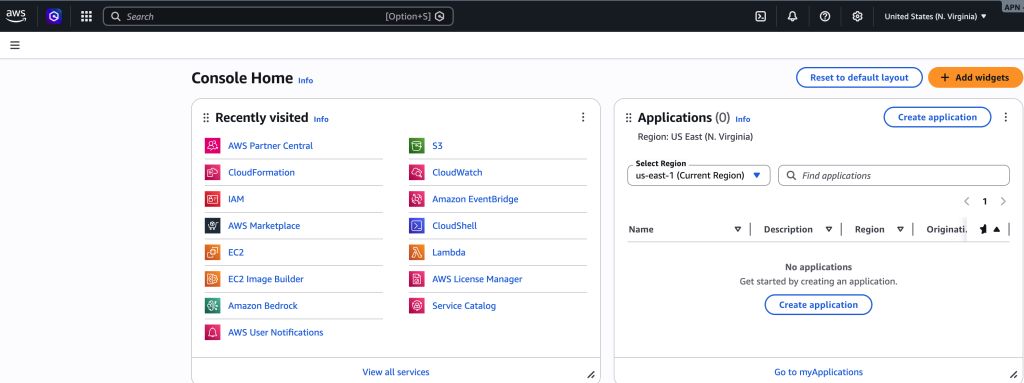
Figure 1: AWS Management Console Home page
- In your AWS Partner Central dashboard, confirm that both the partner account status and the AWS Marketplace account status are active. If both are not active, complete your Registration as an AWS Marketplace Seller and partner central migration to the AWS Console.
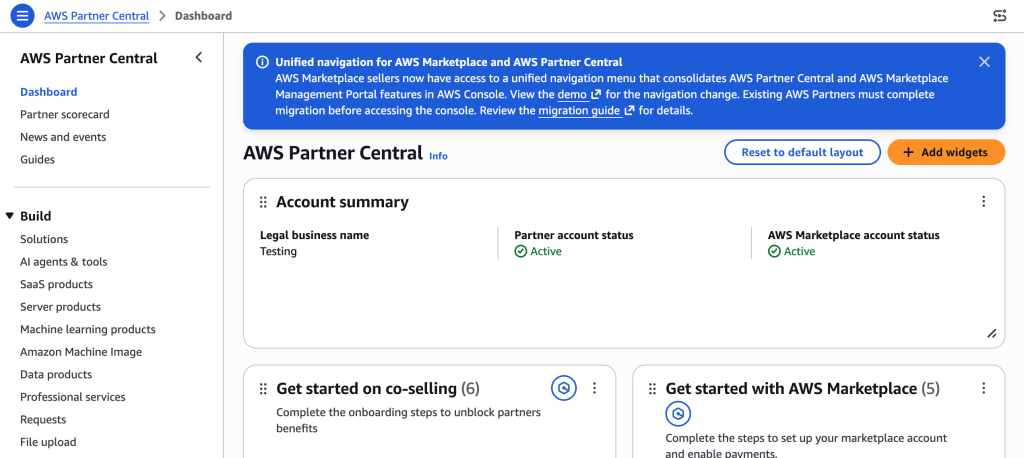
Figure 2: AWS Partner Central dashboard account summary
View your opportunities
To view your opportunities, follow these steps:
- In the left navigation pane under Sell, choose Opportunities.
- View your opportunity IDs, status, and other details in Opportunities as shown in the following screenshot:
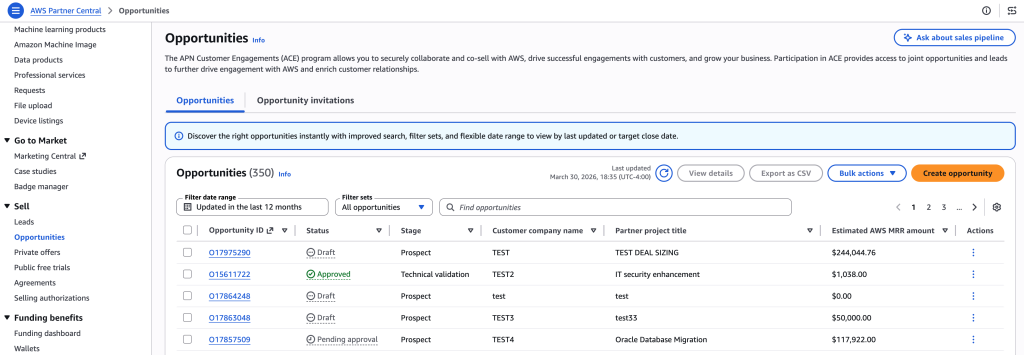
Figure 3: List of opportunities in AWS Partner Central
Select an opportunity and engage the agents
Select an opportunity with Approved status to view its detailed information. Review the insights generated by AWS Partner Central agents, then scroll to the Funding recommendation section. Click on a three-star widget to query the agent.
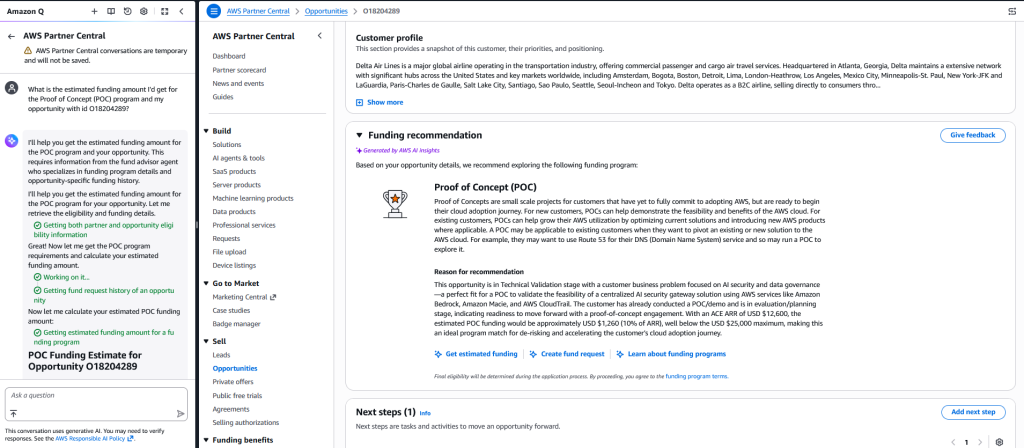
Figure 4: Screenshot of the Funding recommendation section
You can query the agents to get assistance with the progression of the opportunity, recommendations for next steps, or to generate a sales play. You can also get more insights into your pipeline, such as which opportunities have the highest value and what’s needed to close them.
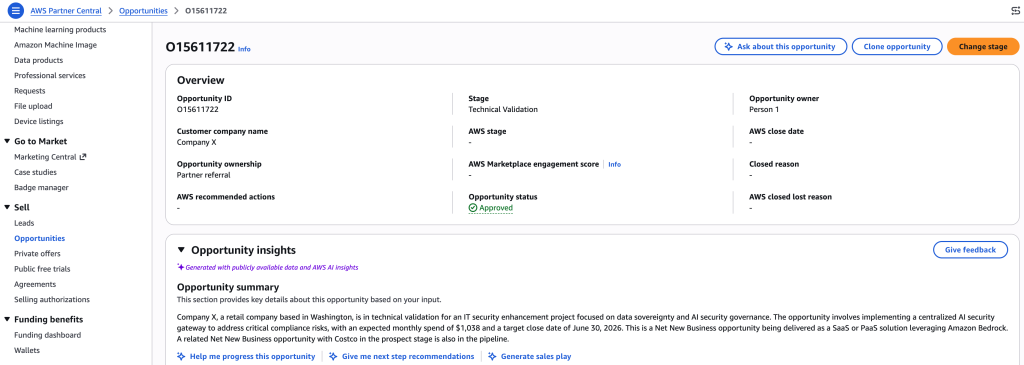
Figure 5: Overview of an opportunity
Feed communications into the agents
Use AWS Partner Central agents to incorporate Slack messages or text-based communications such as summarized meetings, alliance lead conversations, or business discussions into your opportunities. These inputs are processed and integrated into the opportunity record for enhanced insights. Follow these steps:
- Navigate to AWS Partner Central using the AWS Management Console.
- Open the Opportunities section.
- Choose the desired opportunity to view its details.
- Find the agent widget (such as the Funding Recommendation widget) on the opportunity details page.
- Enter your text-based input or query prompt following the example format shown in the provided screenshot.
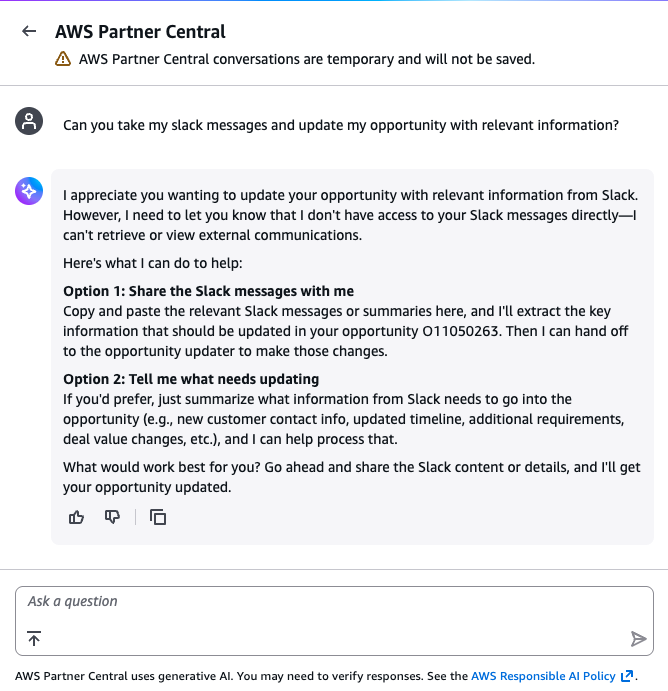
Figure 6: Communication with the agent
Extending with automation
We’ve shown you the manual approach, but you can create your own agents that pull data from different messaging platforms and feed that information into AWS Partner Central agents to target specific opportunities you want to complete or update. You can automate and update all opportunities by integrating these agents with different data sources so you don’t need to remember what was said in a message or an email.
Programmatically, you can access AWS Partner Central agents to apply different use cases. For example, if you want to surface agent insights within your own CRM and environment, you can create an MCP client that accesses the AWS Partner Central agents MCP server directly through API calls. If you have multiple data sources you want to compile and store, you can do that and then call the agents to run against the data that AWS has access to. This provides you with a holistic view of all data sources at your disposal. If you already have a mature pipeline that connects to all the software and services you need, you can keep your existing infrastructure and access the MCP server as an additional service to take advantage of all the benefits and capabilities from AWS Partner Central agents.
Conclusion
With AWS Partner Central agents, partners can streamline time to revenue, enhance productivity, and access coaching and assistance capabilities. For flexibility, partners can access these agents directly from the console or programmatically to integrate with their own existing applications and workflows. To learn more about AWS Partner Central agents, you can review these resources:
- Using agents for funding recommendations and fund requests
- Using agents for opportunity insights
- AWS Partner Central agents MCP server
For a hands-on example with step-by-step instructions on how to access Partner Central agents programmatically, you can review this workshop:
Programmatic Access to Partner Central Agents via MCP Workshop
AWS Partner Central agents provide the tools partners need to act on the data they have. Steps in an opportunity can be reviewed, helping partners map out what’s missing and what’s needed to complete the deal. Partners can use the agents to help refine their workflow and automate the progression of workloads within defined guardrails.
The use cases and ideas presented in this post are a starting point for how partners can use AWS Partner Central agents. We look forward to seeing how you incorporate these agents into your day-to-day activities.