AWS Big Data Blog

Author: Aarthi Srinivasan
Aarthi Srinivasan is a Senior Big Data Architect working on data, analytics and GenAI topics with the worldwide Specialists Org at AWS. She works with AWS customers and partners to architect data lake solutions, enhance product features, and establish best practices for data governance and analytics services adoption.
Introducing AWS Glue 6.0 for faster and more cost-effective data integration
AWS Glue 6.0 is now available, lowering AWS Glue pricing by 30%, adding an AWS optimized build of Apache Spark 4.1, and introducing Apache Iceberg V3 capabilities suitable for enterprise adoption. This post covers the key capabilities and performance benefits, with code examples to help you get started.
Automate creating AWS Glue Data Catalog views with AWS SDK for data mesh use case
This post shows you how to use the Catalog objects API CreateTable() to programmatically create ATHENA and SPARK dialects using cross-account IAM definer roles, and how to add the ATHENA dialect programmatically for the views that were created earlier with only SPARK dialect.
Access Amazon S3 data files directly using AWS Lake Formation permissions
In this post, we demonstrate reading from and writing to Lake Formation-managed S3 locations using Apache Spark jobs from EMR. Lake Formation credential vending for S3 location access is available in EMR release label 7.13 and later, Boto3 1.42.29 and later, AWS Java SDK 2.41.32 and later, and AWS Command Line Interface (AWS CLI) version 2.33.1 and later.
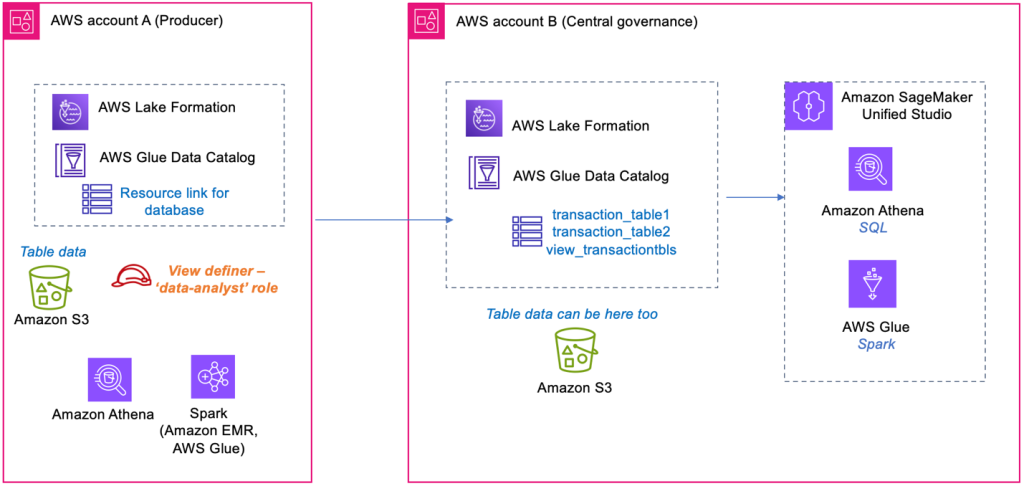
Create AWS Glue Data Catalog views using cross-account definer roles
In this post, we demonstrate how to use cross-account IAM definer roles with AWS Glue Data Catalog views. We show how data owner accounts can create and manage views in a central governance account while maintaining security and control over their data assets.

Create and update Apache Iceberg tables with partitions in the AWS Glue Data Catalog using the AWS SDK and AWS CloudFormation
In this post, we show how to create and update Iceberg tables with partitions in the Data Catalog using the AWS SDK and AWS CloudFormation.

Use trusted identity propagation for Apache Spark interactive sessions in Amazon SageMaker Unified Studio
In this post, we provide step-by-step instructions to set up Amazon EMR on EC2, EMR Serverless, and AWS Glue within SageMaker Unified Studio, enabled with trusted identity propagation. We use the setup to illustrate how different IAM Identity Center users can run their Spark sessions, using each compute setup, within the same project in SageMaker Unified Studio. We show how each user will see only tables or part of tables that they’re granted access to in Lake Formation.

Using AWS Glue Data Catalog views with Apache Spark in EMR Serverless and Glue 5.0
In this post, we guide you through the process of creating a Data Catalog view using EMR Serverless, adding the SQL dialect to the view for Athena, sharing it with another account using LF-Tags, and then querying the view in the recipient account using a separate EMR Serverless workspace and AWS Glue 5.0 Spark job and Athena. This demonstration showcases the versatility and cross-account capabilities of Data Catalog views and access through various AWS analytics services.

Configure cross-account access of Amazon SageMaker Lakehouse multi-catalog tables using AWS Glue 5.0 Spark
In this post, we show you how to share an Amazon Redshift table and Amazon S3 based Iceberg table from the account that owns the data to another account that consumes the data. In the recipient account, we run a join query on the shared data lake and data warehouse tables using Spark in AWS Glue 5.0. We walk you through the complete cross-account setup and provide the Spark configuration in a Python notebook.

Read and write Apache Iceberg tables using AWS Lake Formation hybrid access mode
In this post, we demonstrate how to use Lake Formation for read access while continuing to use AWS Identity and Access Management (IAM) policy-based permissions for write workloads that update the schema and upsert (insert and update combined) data records into the Iceberg tables.

AWS Lake Formation 2023 year in review
AWS Lake Formation and the AWS Glue Data Catalog form an integral part of a data governance solution for data lakes built on Amazon Simple Storage Service (Amazon S3) with multiple AWS analytics services integrating with them. In 2022, we talked about the enhancements we had done to these services. We continue to listen to […]