AWS Big Data Blog
Build billion-scale vector databases in under an hour with GPU acceleration on Amazon OpenSearch Service
AWS recently announced the general availability of GPU-accelerated vector (k-NN) indexing on Amazon OpenSearch Service. You can now build billion-scale vector databases in under an hour and index vectors up to 10 times faster at a quarter of the cost. This feature dynamically attaches serverless GPUs to boost domains and collections running CPU-based instances. With this feature, you can scale AI apps quickly, innovate faster, and run vector workloads leaner.
In this post, we discuss the benefits of GPU-accelerated vector indexing, explore key use cases, and share performance benchmarks.
Overview of vector search and vector indexes
Vector search is a technique that improves search relevance, and is a cornerstone of generative AI applications. It involves using an embeddings model to convert content into numerical encodings (vectors), enabling content matching by semantic similarity instead of just keywords. You can build vector databases by ingesting vectors into OpenSearch Service to build indexes that enable searches across billions of vectors in milliseconds.
Challenges with scaling vector databases
Customers are increasingly scaling vector databases to multi-billion-scale on OpenSearch Service to power generative AI applications, product catalogs, knowledge bases, and more. Applications are becoming increasingly agentic, integrating AI agents that rely on vector databases for high-quality search results across enterprise data sources to enable chat-based interactions and automation.
However, there are challenges on the way to billion-scale. First, multi-million to billion-scale vector indexes take hours to days to build. These indexes use algorithms like Hierarchal Navigable Small Worlds (HNSW) to enable high-quality, millisecond searches at scale. However, they require more compute power than traditional indexes to build. Furthermore, you have to rebuild your indexes whenever your model changes, such as switching between vendors, versions, or after fine-tuning. Some use cases such as personalized search require models to be fine-tuned daily and adapt to evolving user behaviors. All vectors must be regenerated when the model changes, so the index must be rebuilt. HNSW can also degrade following significant updates and deletes, so indexes must be rebuilt to regain accuracy.
Lastly, as your agentic applications become more dynamic, your vector database must scale for heavy streaming ingestion, updates, and deletes while maintaining low search latency. If search and indexing use the same infrastructure, these intensive processes will compete for limited compute and RAM, so search latency can degrade.
Solution overview
You can overcome these challenges by enabling GPU-accelerated indexing on OpenSearch Service 3.1+ domains or collections. GPU acceleration will dynamically activate, for instance, in response to a reindex command on a million-plus-size index. During activation, index tasks are offloaded to GPU servers that run NVIDIA cuVS to build HNSW graphs. Superior speed and efficiency are achieved through parallelization of vector operations. Inverted indexes will continue using your cluster’s CPU for indexing and search on non-vector data. These indexes operate alongside HNSW to support keyword, hybrid, and filtered vector search. The resources required to build inverted indexes is low compared to HNSW.
GPU acceleration is enabled as a cluster-level configuration, but it can be disabled on individual indexes. This feature is serverless, so you don’t need to manage GPU instances. You simply pay-per-use through OpenSearch Compute Units (OCUs).
The following diagram illustrates how this feature works.
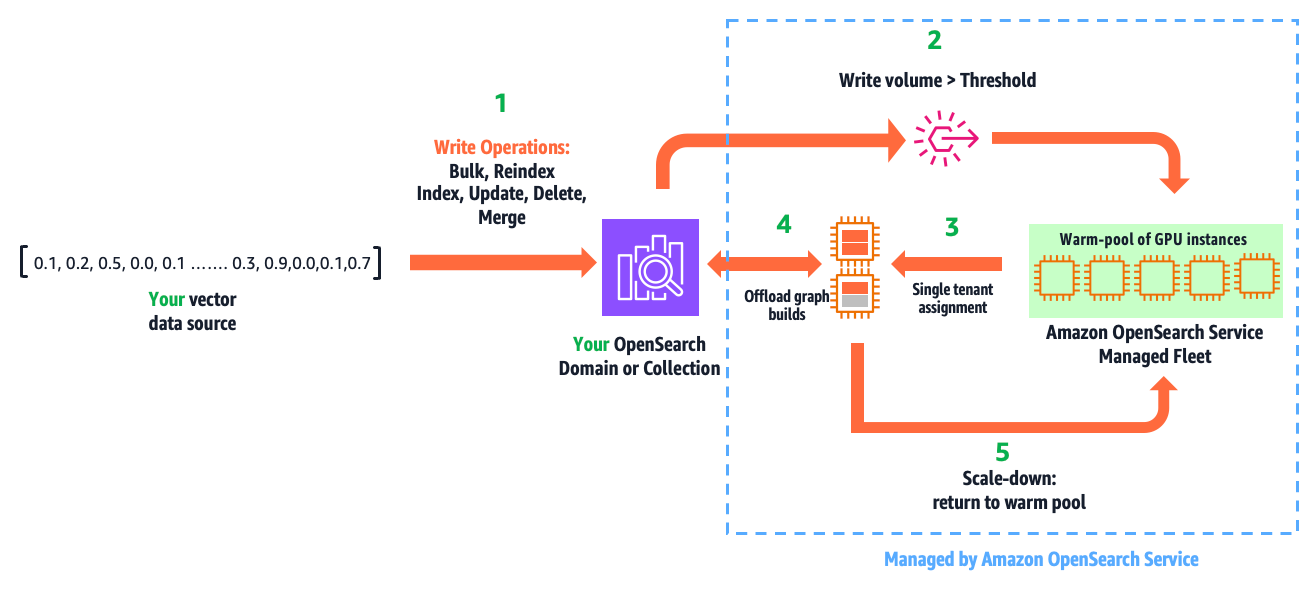
The workflow consists of the following steps:
- You write vectors into your domain or collection, using the existing APIs: bulk, reindex, index, update, delete, and force merge.
- GPU acceleration is activated when the indexed vector data surpasses a configured threshold within a refresh interval.
- This leads to a secure, single-tenant assignment of GPU servers to your cluster from a multi-tenant warm pool of GPUs managed by OpenSearch Service.
- Within milliseconds, OpenSearch Service initiates and offloads HNSW operations.
- When the write volume falls below the threshold, GPU servers are scaled down and returned to the warm pool.
This automation is fully managed. You only pay for acceleration time, which you can monitor from Amazon CloudWatch.
This feature isn’t just designed for ease of use. It enables GPU acceleration benefits without economic challenges. For example, a domain sized to host 1 billion (1,024 dimension) vectors compressed 32 times (using binary quantization) takes three r8g.12xlarge.search instances to provide the required 1.15 TBs of RAM. A design that requires running a domain on GPU instances, would need six g6.12xlarge instances to do the same, resulting in 2.4 times higher cost and excessive GPUs. This solution delivers efficiency by providing the right amount of GPUs only when you need them, so you gain speed with cost savings.
Use cases and benefits
This feature has three primary uses and benefits:
- Build large-scale indexes faster, increasing productivity and innovation velocity
- Reduce cost by lowering Amazon OpenSearch Serverless indexing OCU usage, or downsizing domains with write-heavy vector workloads
- Accelerate writes, lower search latency, and improve user experience on your dynamic AI applications
In the following sections, we discuss these use cases in more detail.
Build large-scale indexes faster
We benchmarked index builds for 1M, 10M, 113M, and 1B vector test cases to demonstrate speed gains on both domains and collections. Speed gains ranged from 6.4 to 13.8 times faster. These tests were performed with production configurations (Multi-AZ with replication) and default GPU service limits. All tests were run on right-sized search clusters, and the CPU-only tests had CPU utilization maxed exclusively for indexing. The following chart illustrates the relative speed gains from GPU acceleration on managed domains.
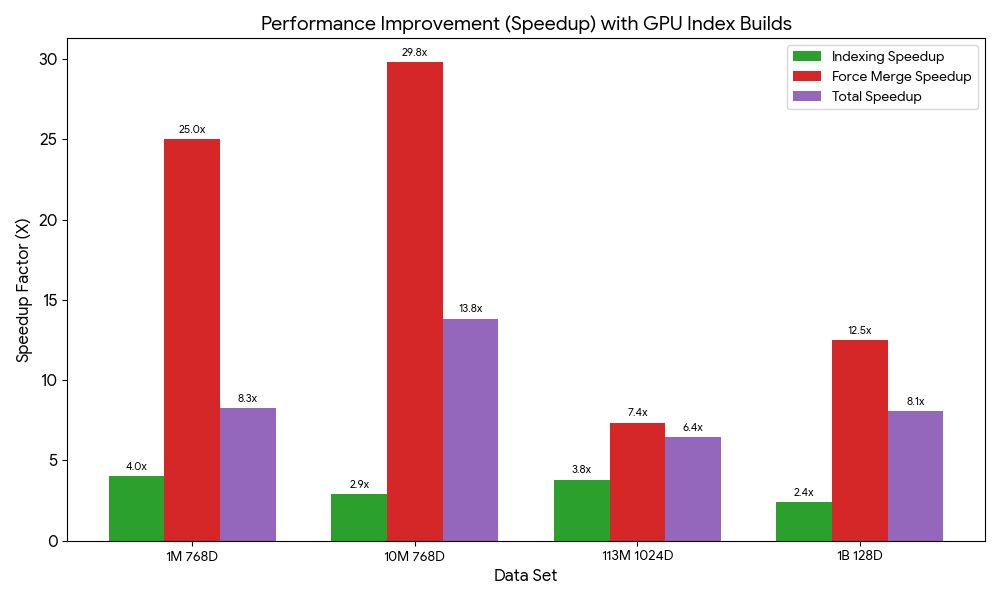
The total index build time on domains includes a force merge to optimize the underlying storage engine for search performance. During normal operation, merges are automatic. However, when benchmarking domains, we perform a manual merge after indexing to make sure merging impact is consistent across tests. The following table summarizes the index build benchmarks and dataset references for domains.
| Dataset | CPU-Only | With GPU | Improvements | ||||
| Index (min) | Force Merge (min) | Index (min) | Force Merge (min) | Index | Force Merge | Total | |
| Cohere Embed V2: 1M 768D Vectors generated from Wikipedia | 32.0 | 50.0 | 7.9 | 2.0 | 4.1X | 25.0X | 8.3X |
| Cohere Embed V2: 10M 768D Vectors generated from Wikipedia | 64.1 | 444.5 | 21.9 | 14.9 | 2.9X | 29.8X | 13.8X |
| Cohere Embed V3: 113M 1024D Vectors generated from MSMARCO v2.1 | 262.2 | 1460.4 | 68.9 | 198.6 | 3.8X | 7.4X | 6.4X |
| BigANN Benchmark (SIFT: 1B 128D Vectors generated from Flickr dataset) | 251.6 | 1665.0 | 35.5 | 133.0 | 7.1 X | 12.5X | 11.4X |
We ran the same performance tests on collections. The performance is different on OpenSearch Serverless because its serverless architecture involves performance trade-offs such as automatic scaling, which introduces a ramp-up to reach peak performance. The following table summarizes these results.
| Dataset | Changes to Default Settings | Index Time (min) | Improvements | |
| CPU-Only | With GPU | |||
| Cohere Embed V2: 1M 768D Vectors generated from Wikipedia | – | 60 | 17.25 | 3.48X |
| Cohere Embed V2: 10M 768D Vectors generated from Wikipedia | Minimum OCUs: 32 | 146 | 38 | 3.84X |
| Cohere Embed V3: 113M 1024D Vectors generated from MSMARCO v2.1 | Minimum OCUs: 48 | 1092 | 294 | 3.71X |
| BigANN Benchmark (SIFT: 1B 128D Vectors generated from Flickr dataset) | Minimum OCUs: 48 | 732 | 203 | 3.61X |
OpenSearch Serverless doesn’t support force merge, so the full benefit from GPU acceleration might be delayed until the automatic background merges complete. The default minimum OCUs had to be increased for tests beyond 1 million vectors to handle higher indexing throughput.
Reduce cost
Our serverless GPU design uniquely delivers speed gains and cost savings. With OpenSearch Serverless, your net indexing costs will be reduced if you have indexing workloads that are significant enough to activate GPU acceleration. The following table presents the OCU usage and cost consumption usage from the previous index build tests.
| Data Set | Changes to Defaults | CPU-only | With GPU | Less Cost | ||
| Total OCU/hrs. | Cost
(OCU at $0.24/hr.) |
Total OCU/hrs. | Cost
(OCU at $0.24/hr.) |
|||
| Cohere Embed V2: 1M 768D Vectors generated from Wikipedia | – | 8 | $1.92 | 1.5 | $0.36 | 5.3X |
| Cohere Embed V2: 10M 768D Vectors generated from Wikipedia | Minimum OCUs: 32 | 78 | $18.72 | 20.3 | $4.87 | 3.8X |
| Cohere Embed V3: 113M 1024D Vectors generated from MSMARCO v2.1 | Minimum OCUs: 48 | 2721 | $653.04 | 304.5 | $73.08 | 8.9X |
| BigANN Benchmark (SIFT: 1B 128D Vectors generated from Flickr dataset) | Minimum OCUs: 48 | 1562 | $374.88 | 201 | $48.24 | 7.8X |
The vector acceleration OCUs offload and reduce indexing OCUs. The total OCU usage is less with GPU because the index is built more efficiently, resulting in cost savings.
With managed domains, cost savings are situational because search and indexing infrastructure isn’t decoupled like on OpenSearch Serverless. However, if you have a write-heavy, compute-bound vector search application (that is, your domain is sized for vCPUs to sustain write throughput), you could downsize your domain.
The following benchmarks demonstrate the efficiency gains from GPU acceleration. We measure the infrastructure costs during the indexing tasks. GPU acceleration has the additional cost of GPUs at $0.24 per OCU/hour. However, because indexes are built faster and more efficiently, it’s more economical to use GPU to reduce CPU utilization on your domain and downsize it.
| Data Set | CPU-only | With GPU (OCU at $0.24/hr.) | Less Cost | ||
| Index and Merge | *Domain Cost during Index Build | Index and Merge | Total Costs during Index Build | ||
| Cohere Embed V2: 1M 768D Vectors generated from Wikipedia | 1.4hr. | $1.00 | 9.9 min | $0.13 | 12.0X |
| Cohere Embed V2: 10M 768D Vectors generated from Wikipedia | 8.5 hr. | $37.82 | 36.8 min | $3.10 | 12.2X |
| Cohere Embed V3: 113M 1024D Vectors generated from MSMARCO v2.1 | 28.7hr | $712.47 | 4.5 hr. | $121.70 | 5.9X |
| BigANN Benchmark (SIFT: 1B 128D Vectors generated from Flickr dataset) | 31.9hr | $1118.09 | 2.8 hr. | $109.86 | 10.2X |
*Domains are running a high-availability configuration without any cost-optimizations
Accelerate writes, lower search latency
In experienced hands, domains offer operational control and the ability to achieve great scalability, performance, and cost optimizations. However, operational responsibilities include managing indexing and search workloads on shared infrastructure. If your vector deployment involves heavy, sustained streaming ingestion, updates, and deletes, you might observe higher search times on your domain. As illustrated in the following chart, as you increase vector writes, the CPU utilization increases to support HNSW graph building. Concurrent search latency also increases because of competition for compute and RAM resources.
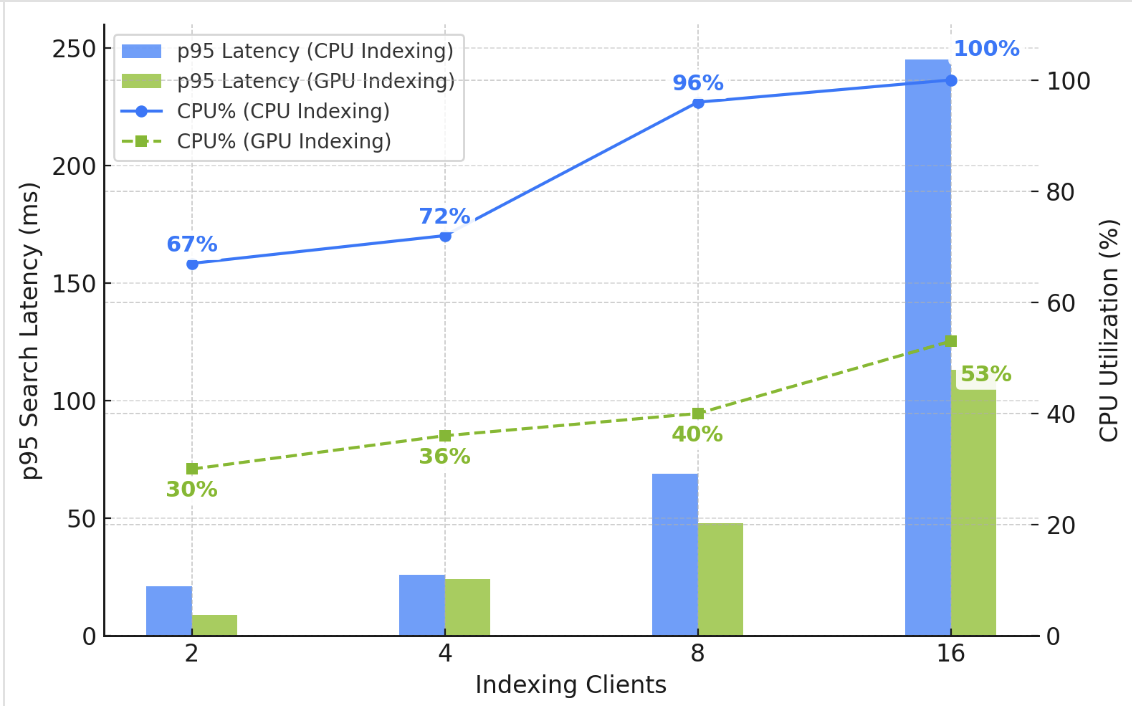
You could solve the problem by adding data nodes to increase your domain’s compute capacity. However, enabling GPU acceleration is simpler and cheaper. As illustrated in the chart, GPU frees up CPU and RAM on your domain, helping you sustain low and stable search latency under high write throughput.
Get started
Ready to get started? If you already have an OpenSearch Service vector deployment, use the AWS Management Console, AWS Command Line Interface (AWS CLI), or API to enable GPU acceleration on your OpenSearch 3.1+ domain or vector collection. Test it with your existing indexing workloads. If you’re planning to build a new vector database, try out our new vector ingestion feature, which simplifies vector ingestion, indexing, and automates optimizations. Check out this demonstration on YouTube.
Acknowledgments
The authors would like to thank Manas Singh, Nathan Stephens, Jiahong Liu, Ben Gardner, and Zack Meeks from NVIDIA, and Yigit Kiran and Jay Deng from AWS for their contributions to this post.
About the authors
Authors would like to add special thanks to Manas Singh, Nathan Stephens, Jiahong Liu, Ben Gardner, Zack Meeks NVIDIA and Yigit Kiran and Jay Deng from AWS.