AWS Big Data Blog
Introducing the Apache Spark troubleshooting agent for Amazon EMR and AWS Glue
The newly launched Apache Spark troubleshooting agent can eliminate hours of manual investigation for data engineers and scientists working with Amazon EMR or AWS Glue. Instead of navigating multiple consoles, sifting through extensive log files, and manually analyzing performance metrics, you can now diagnose Spark failures using simple natural language prompts. The agent automatically analyzes your workloads and delivers actionable recommendations. transforming a time-consuming troubleshooting process into a streamlined, efficient experience.
In this post, we show you how the Apache Spark troubleshooting agent helps analyze Apache Spark issues by providing detailed root causes and actionable recommendations. You’ll learn how to streamline your troubleshooting workflow by integrating this agent with your existing monitoring solutions across Amazon EMR and AWS Glue.
Apache Spark powers critical ETL pipelines, real-time analytics, and machine learning workloads across thousands of organizations. However, building and maintaining Spark applications remains an iterative process where developers spend significant time troubleshooting. Spark application developers encounter operational challenges due to a few different reasons:
- Complex connectivity and configuration options to a variety of resources with Spark – Although this makes Spark a popular data processing platform, it often makes it challenging to find the root cause of inefficiencies or failures when Spark configurations aren’t optimally or correctly configured.
- Spark’s in-memory processing model and distributed partitioning of datasets across its workers – Although good for parallelism, this often makes it difficult for users to identify inefficiencies. This results in slow application execution or root cause of failures caused by resource exhaustion issues such as out of memory and disk exceptions.
- Lazy evaluation of Spark transformations – Although lazy evaluation optimizes performance, it makes it challenging to accurately and quickly identify the application code and logic that caused the failure from the distributed logs and metrics emitted from different executors.
Apache Spark troubleshooting agent architecture
This section describes the components of the troubleshooting agent and how they connect to your development environment. The troubleshooting agent provides a single conversational entry point for your Spark applications across Amazon EMR, AWS Glue, and Amazon SageMaker Notebooks. Instead of navigating different consoles, APIs, and log locations for each service, you interact with one Model Context Protocol (MCP) server through natural language using any MCP-compatible AI assistant of your choice, including custom agents you develop using frameworks such as Strands Agents.
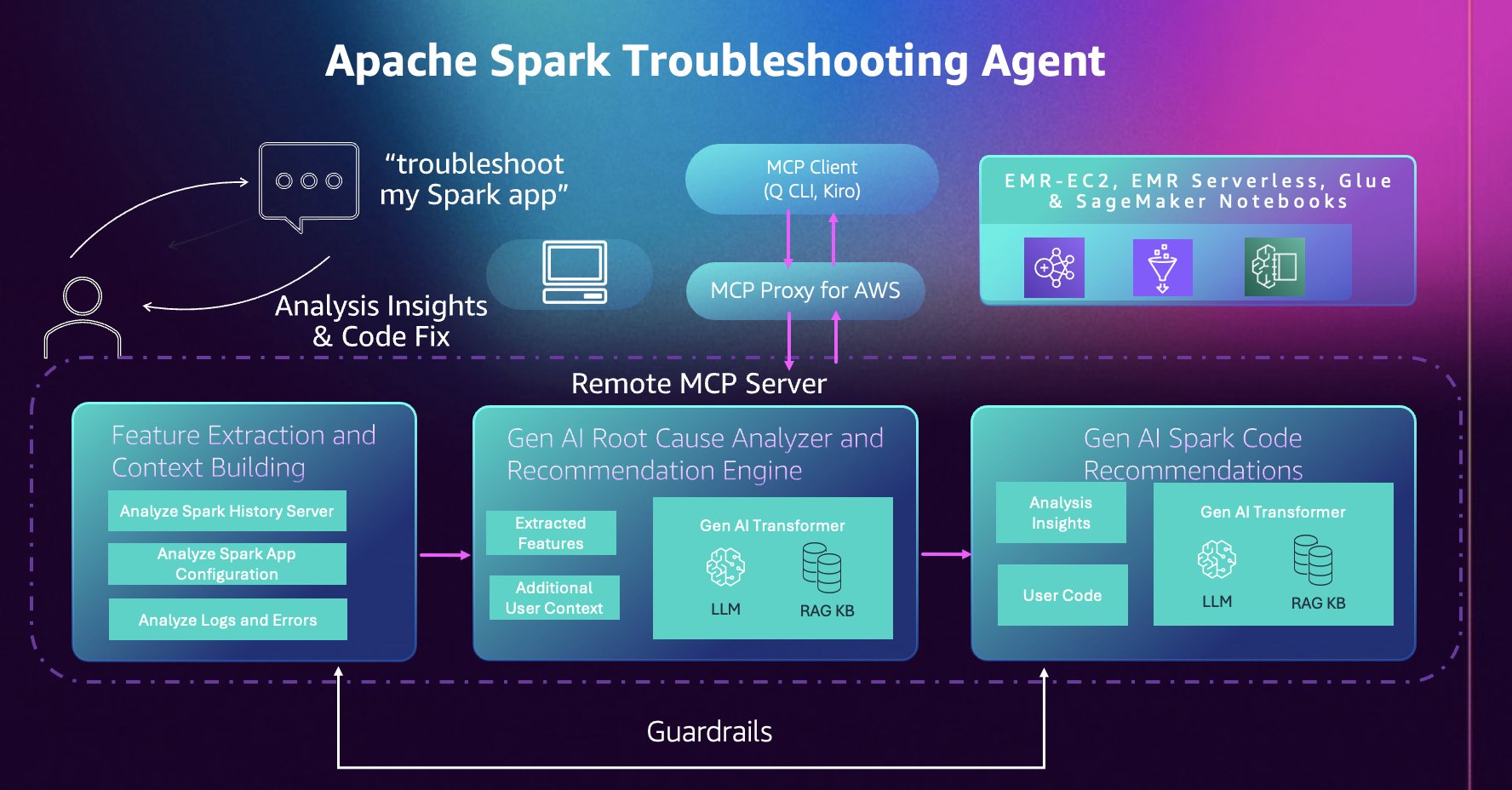
Operating as a fully managed cloud-hosted MCP server, the agent removes the need to maintain local servers while keeping your data and code isolated and secure in a single-tenant system design. Operations are read-only and backed by AWS Identity and Access Management (IAM) permissions; the agent only has access to resources and actions your IAM role grants. Additionally, tool calls are automatically logged to AWS CloudTrail, providing complete auditability and compliance visibility. This combination of managed infrastructure, granular IAM controls, and CloudTrail integration confirms your Spark diagnostic workflows remain secure, compliant, and fully auditable.
The agent builds on years of AWS expertise running millions of Spark applications at scale. It automatically analyzes Spark History Server data, distributed executor logs, configuration patterns, and error stack traces and extracts relevant features and signals to surface insights that would otherwise require manual correlation across multiple data sources and deep understanding of Spark and service internals.
Getting started
Complete the following steps to get started with the Apache Spark troubleshooting agent.
Prerequisites
Verify you meet or have completed the following prerequisites.
System requirements:
- Python 3.10 or higher
- Install the uv package manager. For instructions, see installing uv.
- AWS Command Line Interface (AWS CLI) (version 2.30.0 or later) installed and configured with appropriate credentials.
IAM permissions: Your AWS IAM profile needs permissions to invoke the MCP server and access your Spark workload resources. The AWS CloudFormation template in the setup documentation creates an IAM role with the required permissions. You can also manually add the required IAM permissions.
Set up using AWS CloudFormation
First, deploy the AWS CloudFormation template provided in the setup documentation. This template automatically creates the IAM roles with the permissions required to invoke the MCP server.
- Deploy the template within the same AWS Region you run your workloads in. For this post, we’ll use us-east-1.
- From the AWS CloudFormation Outputs tab, copy and execute the environment variable command:
- Configure your AWS CLI profile:
Set up using Kiro CLI
You can use Kiro CLI to interact with the Apache Spark troubleshooting agent directly from your terminal.
Installation and configuration:
- Install Kiro CLI.
- Add both MCP servers, using the environment variables from the previous Set up using AWS CloudFormation section:
- Verify your setup by running the
/toolscommand in Kiro CLI to see the available Apache Spark troubleshooting tools.
Set up using Kiro IDE
Kiro IDE provides a visual development environment with integrated AI assistance for interacting with the Apache Spark troubleshooting agent.
Installation and configuration:
- Install Kiro IDE.
- MCP configuration is shared across Kiro CLI and Kiro IDE. Open the command palette using
Ctrl + Shift + P(Windows / Linux) orCmd + Shift + P(macOS) and Search forKiro: Open MCP Config - Verify the contents of your
mcp.jsonmatch the Set up using Kiro CLI section.
Using the troubleshooting agent
Next, we provide 3 reference architectures for solutions to use the troubleshooting agent in your existing workflows with ease. We also provide the reference code and AWS CloudFormation templates for these architectures in the Amazon EMR Utilities GitHub repository.
Solution 1 – Conversational troubleshooting: Troubleshooting failed Apache Spark applications with Kiro CLI
When Spark applications fail across your data platform, your debugging approach would typically involve navigating different consoles for Amazon EMR, Amazon EMR-EC2, Amazon EMR Serverless, and AWS Glue, manually reviewing Spark History Server logs, checking error stack traces, analyzing resource usage patterns, then correlating this information to find the root cause and fix. The Apache Spark troubleshooting agent automates this entire workflow through natural language, providing a unified troubleshooting experience across the three platforms. Simply describe your failed applications, for example:
The agent automatically extracts Spark event logs and metrics, analyzes the error patterns, and provides a clear root cause explanation along with recommendations, all through the same conversational interface. The following video demonstrates the complete troubleshooting workflow across Amazon EMR-EC2, Amazon EMR Serverless, and AWS Glue using Kiro CLI:
Solution 2 – Agent-driven notifications: Integrate the Apache Spark troubleshooting agent into a monitoring workflow
In addition to troubleshooting from the command line, the troubleshooting agent can plug into your monitoring infrastructure to provide improved failure notifications.
Production data pipelines require immediate visibility when failures occur. Traditional monitoring systems can alert you when a Spark job fails, but diagnosing the root cause still requires manual investigation and an analysis of what went wrong before remediation can begin.
With the Apache Spark troubleshooting agent, you can integrate it into your existing monitoring workflows to receive root causes and recommendations as soon as you receive a failure notification. Here, we demonstrate two integration patterns that result in automatic root cause analysis within your existing workflows.
Apache Airflow Integration
This first integration pattern uses Apache Airflow callbacks to automatically trigger troubleshooting when Spark job operators fail.
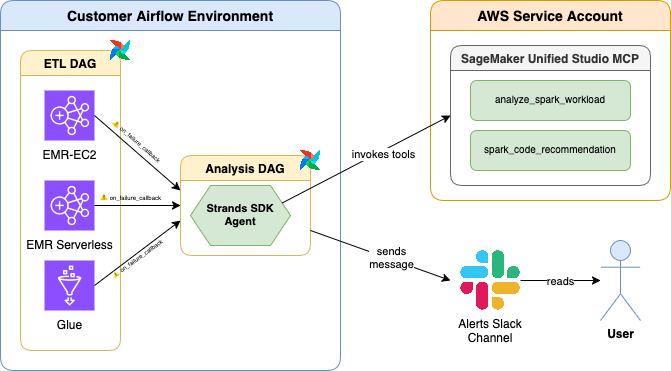
When any Amazon EMR, Amazon EMR-EC2, Amazon EMR Serverless, or AWS Glue job operator fails in an Apache Airflow DAG,
- A callback invokes the Spark troubleshooting agent within a separate DAG.
- The Spark troubleshooting agent analyzes the issue, establishes the root cause, and identifies code fix recommendations.
- The Spark troubleshooting agent sends a comprehensive diagnostic report to a configured Slack channel.
The solution is available in the Amazon EMR Utilities GitHub repository (documentation) for immediate integration into your existing Apache Airflow deployments with a 1-line change to your Airflow DAGs. The following video demonstrates this integration:
Amazon EventBridge integration
For event-driven architectures, this second pattern uses Amazon EventBridge to automatically invoke the troubleshooting agent when Spark jobs fail across your AWS environment.
This integration uses an AWS Lambda function that interacts with the Apache Spark troubleshooting agent through the Strands MCP Client.
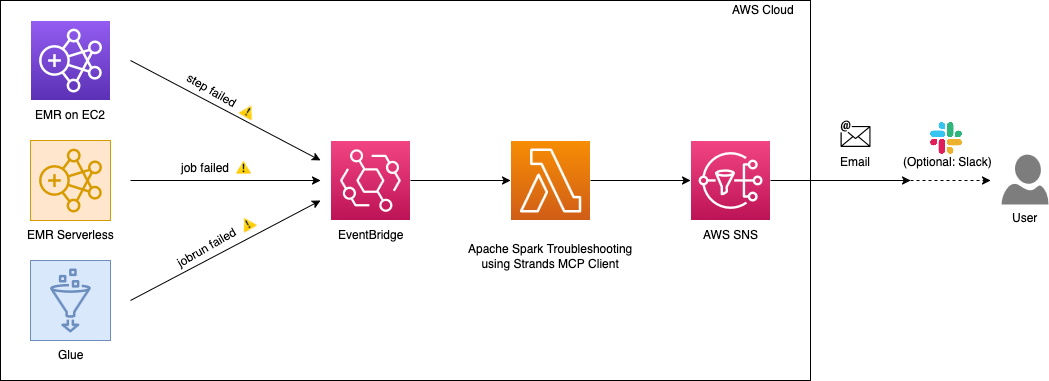
When Amazon EventBridge detects failures from Amazon EMR-EC2 steps, Amazon EMR Serverless job runs, or AWS Glue job runs, it triggers the AWS Lambda function which:
- Uses the Apache Spark troubleshooting agent to analyze the failure
- Identifies the root cause and generates code fix recommendations
- Constructs a comprehensive analysis summary
- Sends the summary to Amazon SNS
- Delivers the analysis to your configured destinations (email, Slack, or other SNS subscribers)
This serverless approach provides centralized failure analysis across all your Spark platforms without requiring changes to individual pipelines. The following video demonstrates this integration:
A reference implementation of this solution is available in the Amazon EMR Utilities GitHub repository (documentation).
Solution 3 – Intelligent Dashboards: Use the Apache Spark troubleshooting agent with Kiro IDE to visualize account level application failures: what failed, why failed and how to fix
Understanding the health of your Spark workloads across multiple platforms requires consolidating data from Amazon EMR (both EC2 and Serverless) and AWS Glue. Teams typically build custom monitoring solutions by writing scripts to query multiple APIs, aggregate metrics, and generate reports which can be time consuming and require active maintenance.
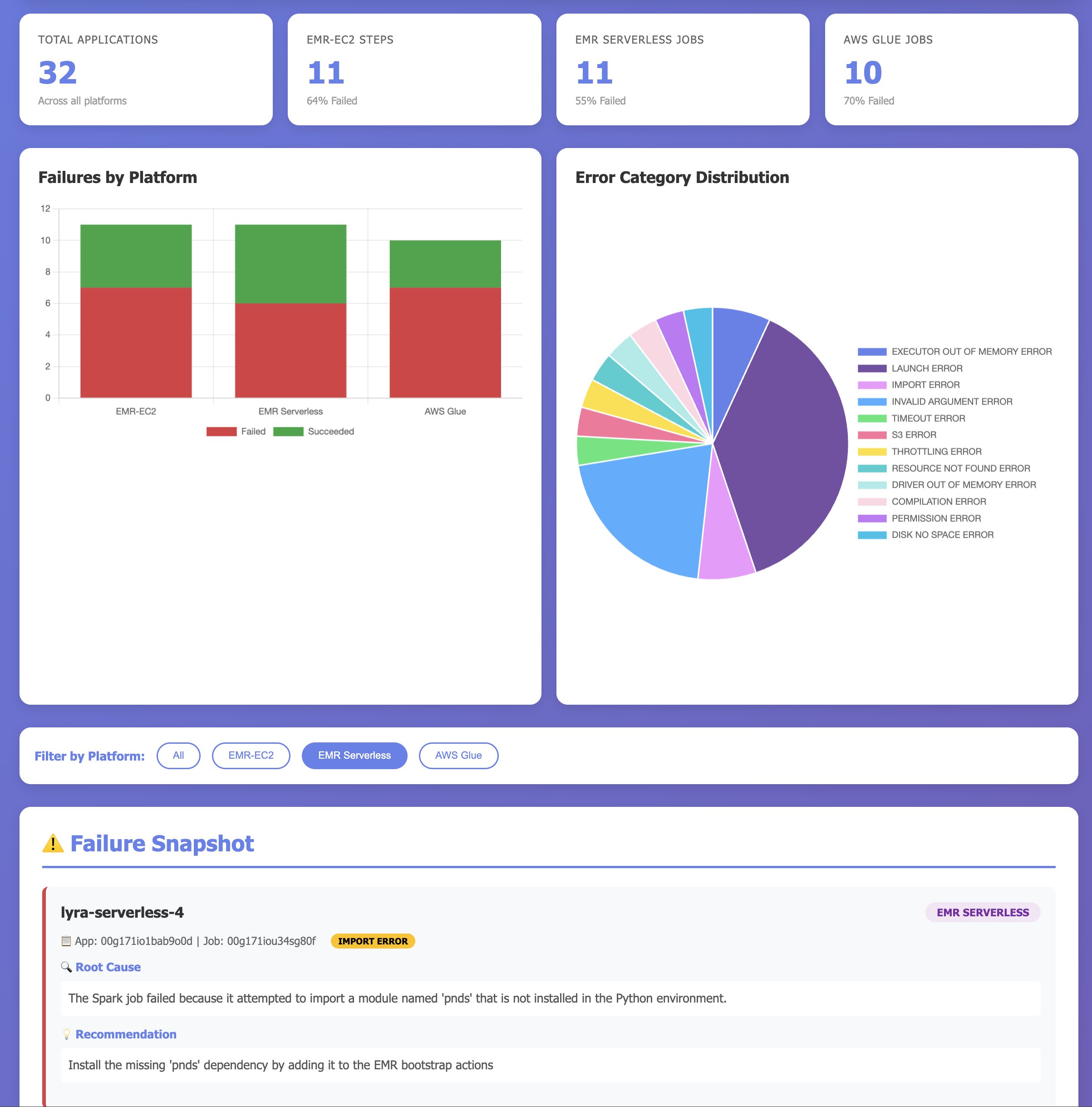
With Kiro IDE and the Apache Spark troubleshooting agent, you can build comprehensive monitoring dashboards conversationally. Instead of writing custom code to aggregate workload metrics, you can describe what you want to track, and the agent generates a complete dashboard showing overall performance metrics, error category distributions for failures, success rates across platforms, and critical failures requiring immediate attention. Unlike traditional dashboards that only show traditional KPIs and metrics on what application failed, this dashboard uses the Spark troubleshooting agent to provide insights to users on why the applications failed, and how they can be fixed. The following video demonstrates building a multi-platform monitoring dashboard using Kiro IDE:
The prompt used within the demo:
Clean up
To avoid incurring future AWS charges, delete the resources you created during this walkthrough:
- Delete the AWS CloudFormation stack.
- If you created an Amazon EventBridge rule for integration, delete those resources.
Conclusion
In this post, we demonstrated how the Apache Spark troubleshooting agent transforms hours of manual investigation into natural language conversations, significantly reducing troubleshooting time from hours to minutes and making Spark expertise accessible to all. By integrating natural language diagnostics into your existing development tools—whether Kiro CLI, Kiro IDE, or other MCP-compatible AI assistants—your teams can focus on building innovative applications instead of debugging failures.
- Get started with the setup guide in the Apache Spark troubleshooting agent documentation
- Configure the MCP server in your development environment and experience how conversational AI can transform Spark troubleshooting
- Use the solutions within Amazon EMR Utilities GitHub repository based on your requirements
Special thanks
A special thanks to everyone who contributed from engineering and science to the launch of the Spark troubleshooting agent and the remote MCP service: Tony Rusignuolo, Anshi Shrivastava, Martin Ma, Hirva Patel, Pranjal Srivastava, Weijing Cai, Rupak Ravi, Bo Li, Vaibhav Naik, XiaoRun Yu, Tina Shao, Pramod Chunduri, Ray Liu, Yueying Cui, Savio Dsouza, Kinshuk Pahare, Tim Kraska, Santosh Chandrachood, Paul Meighan and Rick Sears.
A special thanks to all of our partners who contributed to the launch of the Spark troubleshooting agent and the remote MCP service: Karthik Prabhakar, Suthan Phillips, Basheer Sheriff, Kamen Sharlandjiev, Archana Inapudi, Vara Bonthu, McCall Peltier, Lydia Kautsky, Larry Weber, Jason Berkovitz, Jordan Vaughn, Amar Wakharkar, Subramanya Vajiraya, Boyko Radulov and Ishan Gaur.