AWS Big Data Blog
Using Amazon EMR DeltaStreamer to stream data to multiple Apache Hudi tables
In this post, we show you how to implement real-time data ingestion from multiple Kafka topics to Apache Hudi tables using Amazon EMR. This solution streamlines data ingestion by processing multiple Amazon Managed Streaming for Apache Kafka (Amazon MSK) topics in parallel while providing data quality and scalability through change data capture (CDC) and Apache Hudi.
Organizations processing real-time data changes across multiple sources often struggle with maintaining data consistency and managing resource costs. Traditional batch processing requires reprocessing entire datasets, leading to high resource usage and delayed analytics. By implementing CDC with Apache Hudi’s MultiTable DeltaStreamer, you can achieve real-time updates; efficient incremental processing with atomicity, consistency, isolation, durability (ACID) guarantees; and seamless schema evolution while minimizing storage and compute costs.
Using Amazon Simple Storage Service (Amazon S3), Amazon CloudWatch, Amazon EMR, Amazon MSK and AWS Glue Data Catalog, you’ll build a production-ready data pipeline that processes changes from multiple data sources simultaneously. Through this tutorial, you’ll learn to configure CDC pipelines, manage table-specific configurations, implement 15-minute sync intervals, and maintain your streaming pipeline. The result is a robust system that maintains data consistency while enabling real-time analytics and efficient resource utilization.
What is CDC?
Imagine a constantly evolving data stream, a river of information where updates flow continuously. CDC acts like a sophisticated net, capturing only the modifications—the inserts, updates, and deletes—happening within that data stream. Through this targeted approach, you can focus on the new and changed data, significantly improving the efficiency of your data pipelines.There are numerous advantages to embracing CDC:
- Reduced processing time – Why reprocess the entire dataset when you can focus only on the updates? CDC minimizes processing overhead, saving valuable time and resources.
- Real-time insights – With CDC, your data pipelines become more responsive. You can react to changes almost instantaneously, enabling real-time analytics and decision-making.
- Simplified data pipelines – Traditional batch processing can lead to complex pipelines. CDC streamlines the process, making data pipelines more manageable and easier to maintain.
Why Apache Hudi?
Hudi simplifies incremental data processing and data pipeline development. This framework efficiently manages business requirements such as data lifecycle and improves data quality. You can use Hudi to manage data at the record-level in Amazon S3 data lakes to simplify CDC and streaming data ingestion and handle data privacy use cases requiring record-level updates and deletes. Datasets managed by Hudi are stored in Amazon S3 using open storage formats, while integrations with Presto, Apache Hive, Apache Spark, and Data Catalog give you near real time access to updated data. Apache Hudi facilitates incremental data processing for Amazon S3 by:
- Managing record-level changes – Ideal for update and delete use cases
- Open formats – Integrates with Presto, Hive, Spark, and Data Catalog
- Schema evolution – Supports dynamic schema changes
- HoodieMultiTableDeltaStreamer – Simplifies ingestion into multiple tables using centralized configurations
Hudi MultiTable Delta Streamer
The HoodieMultiTableStreamer offers a streamlined approach to data ingestion from multiple sources into Hudi tables. By processing multiple sources simultaneously through a single DeltaStreamer job, it eliminates the need for separate pipelines while reducing operational complexity. The framework provides flexible configuration options, and you can tailor settings for diverse formats and schemas across different data sources.
One of its key strengths lies in unified data delivery, organizing information in respective Hudi tables for seamless access. The system’s intelligent upsert capabilities efficiently handle both inserts and updates, maintaining data consistency across your pipeline. Additionally, its robust schema evolution support enables your data pipeline to adapt to changing business requirements without disruption, making it an ideal solution for dynamic data environments.
Solution overview
In this section, we show how to stream data to Apache Hudi Table using Amazon MSK. For this example scenario, there are data streams from three distinct sources residing in separate Kafka topics. We aim to implement a streaming pipeline that uses the Hudi DeltaStreamer with multitable support to ingest and process this data at 15-minute intervals.
Mechanism
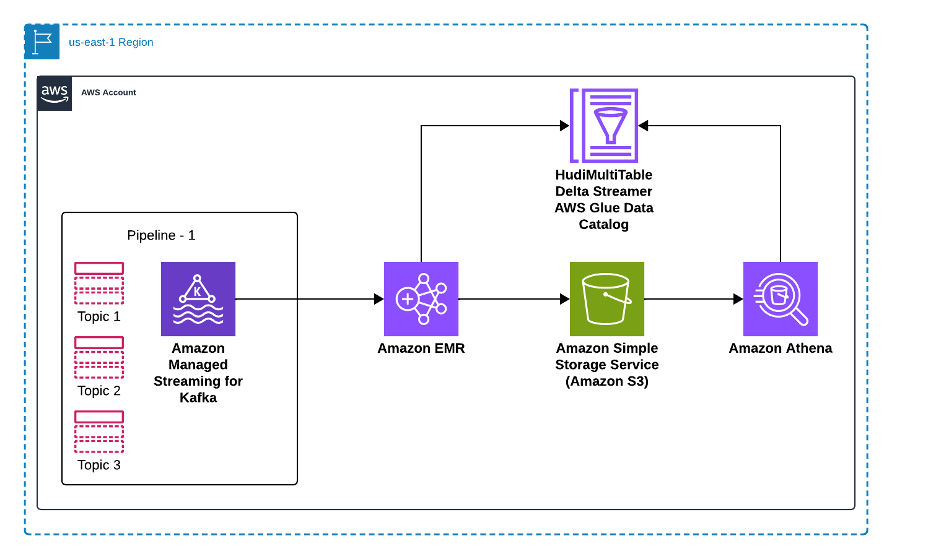
Using MSK Connect, data from multiple sources flows into MSK topics. These topics are then ingested into Hudi tables using the Hudi MultiTable DeltaStreamer. In this sample implementation, we create three Amazon MSK topics and configure the pipeline to process data in JSON format using JsonKafkaSource, with the flexibility to handle Avro format when needed through the appropriate deserializer configuration
The following diagram illustrates how our solution processes data from multiple source databases through Amazon MSK and Apache Hudi to enable analytics in Amazon Athena. Source databases send their data changes—including inserts, updates, and deletes—to dedicated topics in Amazon MSK, where each data source maintains its own Kafka topic for change events. An Amazon EMR cluster runs the Apache Hudi MultiTable DeltaStreamer, which processes these multiple Kafka topics in parallel, transforming the data and writing it to Apache Hudi tables stored in Amazon S3. Data Catalog maintains the metadata for these tables, enabling seamless integration with analytics tools. Finally, Amazon Athena provides SQL query capabilities on the Hudi tables, allowing analysts to run both snapshot and incremental queries on the latest data. This architecture scales horizontally as new data sources are added, with each source getting its dedicated Kafka topic and Hudi table configuration, while maintaining data consistency and ACID guarantees across the entire pipeline.
To set up the solution, you need to complete the following high-level steps:
- Set up Amazon MSK and create Kafka topics
- Create the Kafka topics
- Create table-specific configurations
- Launch Amazon EMR cluster
- Invoke the Hudi MultiTable DeltaStreamer
- Verify and query data
Prerequisites
To perform the solution, you need to have the following prerequisites. For AWS services and permissions, you need:
- AWS account:
- Amazon MSK. Refer to Getting started with Amazon MSK.
- Amazon EMR (version 6.15.0 or later recommended).
- Amazon S3.
- Data Catalog.
- IAM roles and policies.
- IAM roles:
- Amazon EMR service role (EMR_DefaultRole) with permissions for Amazon S3, AWS Glue and CloudWatch.
- Amazon EC2 instance profile (EMR_EC2_DefaultRole) with S3 read/write access.
- Amazon MSK access role with appropriate permissions.
- S3 buckets:
- Configuration bucket for storing properties files and schemas.
- Output bucket for Hudi tables.
- Logging bucket (optional but recommended).
- Network configuration:
- Amazon Virtual Private Cloud (Amazon VPC) with appropriate subnets.
- Security groups allowing traffic between Amazon EMR and Amazon MSK.
- NAT gateway or VPC endpoints for Amazon S3 access.
- Development tools:
- AWS CLI configured.
- Access to Amazon EMR console or AWS CLI.
- Kafka client tools for testing.
Set up Amazon MSK and create Kafka topics
In this step, you’ll create an MSK cluster and configure the required Kafka topics for your data streams.
- To create an MSK cluster:
- Verify the cluster status:
aws kafka describe-cluster --cluster-arn $CLUSTER_ARN | jq '.ClusterInfo.State'
The command should return ACTIVE when the cluster is ready.
Schema setup
To set up the schema, complete the following steps:
- Create your schema files.
input_schema.avsc:output_schema.avsc:
- Create and upload schemas to your S3 bucket:
Create the Kafka topics
To create the Kafka topics, complete the following steps:
- Get the bootstrap broker string:
- Create the required topics:
Configure Apache Hudi
The Hudi MultiTable DeltaStreamer configuration is divided into two major components to streamline and standardize data ingestion:
- Common configurations – These settings apply across all tables and define the shared properties for ingestion. They include details such as shuffle parallelism, Kafka brokers, and common ingestion configurations for all topics.
- Table-specific configurations – Each table has unique requirements, such as the record key, schema file paths, and topic names. These configurations tailor each table’s ingestion process to its schema and data structure.
Create common configuration file
Common Config: kafka-hudi config file where we specify kafka broker and common configuration for all topics as below
Create the kafka-hudi-deltastreamer.properties file with the following properties:
Create table-specific configurations
For each topic, create its own configuration with a topic name and primary key details. Complete the following steps:
cust_sales_details.properties:cust_sales_appointment.properties:cust_info.properties:
These configurations form the backbone of Hudi’s ingestion pipeline, enabling efficient data handling and maintaining real-time consistency. Schema configurations define the structure of both source and target data, maintaining seamless data transformation and ingestion. Operational settings control how data is uniquely identified, updated, and processed incrementally.
The following are critical details for setting up Hudi ingestion pipelines:
hoodie.deltastreamer.schemaprovider.source.schema.file– The schema of the source recordhoodie.deltastreamer.schemaprovider.target.schema.file– The schema for the target recordhoodie.deltastreamer.source.kafka.topic– The source MSK topic namebootstap.servers– The Amazon MSK bootstrap server’s private endpointauto.offset.reset– The consumer’s behavior when there is no committed position or when an offset is out of range
Key operational fields to achieve in-place updates for the generated schema include:
hoodie.datasource.write.recordkey.field– The record key field. This is the unique identifier of a record in Hudi.hoodie.datasource.write.precombine.field– When two records have the same record key value, Apache Hudi picks the one with the largest value for the pre-combined field.hoodie.datasource.write.operation– The operation on the Hudi dataset. Possible values includeUPSERT,INSERT, andBULK_INSERT.
Launch Amazon EMR cluster
This step creates an EMR cluster with Apache Hudi installed. The cluster will run the MultiTable DeltaStreamer to process data from your Kafka topics. To create the EMR cluster, enter the following:
Invoke the Hudi MultiTable DeltaStreamer
This step configures and starts the DeltaStreamer job that will continuously process data from your Kafka topics into Hudi tables. Complete the following steps:
- Connect to the Amazon EMR master node:
- Execute the DeltaStreamer job:
For continuous mode, you need to add the following property:
With the job configured and running on Amazon EMR, the Hudi MultiTable DeltaStreamer efficiently manages real-time data ingestion into your Amazon S3 data lake.
Verify and query data
To verify and query the data, complete the following steps:
- Register tables in Data Catalog:
- Query with Athena:
You can use Amazon CloudWatch alarms to alert you of issues with the EMR job or data processing. To create a CloudWatch alarm to monitor EMR job failures, enter the following:
Real-world impact of Hudi CDC pipelines
With the pipeline configured and running, you can achieve real-time updates to your data lake, enabling faster analytics and decision-making. For instance:
- Analytics – Up-to-date inventory data maintains accurate dashboards for ecommerce platforms.
- Monitoring – CloudWatch metrics confirm the pipeline’s health and efficiency.
- Flexibility – The seamless handling of schema evolution minimizes downtime and data inconsistencies.
Cleanup
To avoid incurring future charges, follow these steps to clean up resources:
Conclusion
In this post, we showed how you can build a scalable data ingestion pipeline using Apache Hudi’s MultiTable DeltaStreamer on Amazon EMR to process data from multiple Amazon MSK topics. You learned how to configure CDC with Apache Hudi, set up real-time data processing with 15-minute sync intervals, and maintain data consistency across multiple sources in your Amazon S3 data lake.
To learn more, explore these resources:
- Apache Hudi documentation
- Amazon EMR with Apache Hudi
- Amazon MSK Developer Guide
- AWS Glue Data Catalog integration
By combining CDC with Apache Hudi, you can build efficient, real-time data pipelines. The streamlined ingestion processes simplify management, enhance scalability, and maintain data quality, making this approach a cornerstone of modern data architectures.