AWS Contact Center
Unified Voice, SMS, and WhatsApp on Amazon Connect Customer
Building a unified multi-channel agent experience
Building a unified agent workspace for voice, SMS, and WhatsApp requires connecting three distinct communication channels — each with its own provisioning path, compliance model, and throughput characteristics — into a single routing and analytics experience. This post shows how to architect that unified workspace on Amazon Connect Customer, so agents handle every customer interaction from one view regardless of how the customer reaches out.
Amazon Connect Customer delivers exactly this: a unified agent workspace where every customer interaction, regardless of channel, appears in one view. In this architecture, agents handle up to 10 concurrent chat or messaging conversations alongside a voice call, significantly increasing agent utilization compared to a voice-only model.
Under the hood, Amazon Connect Customer optimizes each channel independently. Voice runs on real-time telephony infrastructure. SMS and WhatsApp operate as asynchronous messaging protocols with their own compliance models (10-digit long code (10DLC), toll-free verification, WhatsApp Business Account (WABA) approval) and throughput characteristics. This separation means each channel performs at its best while agents enjoy a consolidated experience.
Note: This post complements Build Unified Voice, Video and Chat Communications with Amazon Connect by focusing specifically on messaging channels (SMS and WhatsApp), which require distinct provisioning paths through AWS End User Messaging SMS and AWS End User Messaging Social.
Architecture: Multi-channel, unified workspace
Use three separate origination identities (one per channel) all routing into the same Amazon Connect Customer instance, routing profiles, and queues. Agents see a unified inbox for all configured channels.
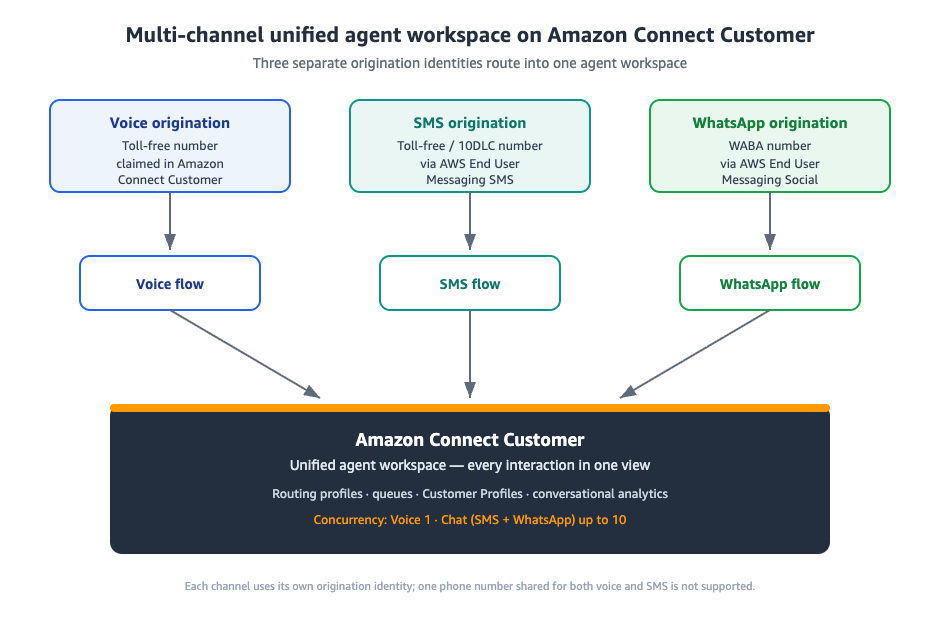
Agents win with this unified experience: no context switching, cross-channel contact history via Amazon Connect Customer Profiles, consistent routing rules, and unified analytics through Amazon Connect Customer conversational analytics.
Prerequisites
Before you begin, ensure you have the following:
- An active Amazon Connect Customer instance in a supported AWS Region for SMS and WhatsApp. As of May 2025, SMS and WhatsApp are available in 12 Regions including US East (N. Virginia), US West (Oregon), Europe (Frankfurt), Europe (London), Asia Pacific (Tokyo, Seoul, Singapore, Sydney), Canada (Central), and Africa (Cape Town).
- An AWS account with permissions to access Amazon Connect Customer, AWS End User Messaging SMS, and AWS End User Messaging Social
- For SMS: A toll-free or 10DLC number registered in AWS End User Messaging SMS. Registration can take up to 15 business days. See Best practices for requesting SMS numbers.
- For WhatsApp: A WhatsApp Business Account with a verified business identity. Meta’s automated verification can take up to 2 weeks. You also need a phone number capable of receiving a voice call or SMS for Meta’s verification process. See Best practices for AWS End User Messaging Social.
- An AWS Identity and Access Management (IAM) role granting permissions between End User Messaging and Amazon Connect Customer. See IAM policies for Connect.
- At least one inbound contact flow configured in your Amazon Connect Customer instance
Important: Using one phone number shared for both voice and SMS is not supported. Each channel requires its own origination identity. See Set up SMS messaging in Amazon Connect Customer.
How to set it up
Step 1: Provision SMS via AWS End User Messaging SMS
You use AWS End User Messaging SMS to procure an SMS-enabled phone number, enable two-way SMS with Amazon Connect Customer as the destination, and import it into your Connect instance. For complete instructions, see Set up SMS messaging in Amazon Connect Customer.
Request a number:
- Open the AWS End User Messaging SMS console in the same AWS Region as your Amazon Connect Customer instance.
- In the navigation pane, under Configurations, choose Phone numbers, then Request originator.
- On the Select country page, choose the Message destination country and choose Next.
- On the Messaging use case page:
- Under Number capabilities, choose SMS.
- For Two-way messaging, choose Yes.
- Choose Next.
- Under Select originator type, choose your preferred number type (toll-free, 10DLC, etc.) based on availability. Choose Next.
- On Review and request, verify your configuration and choose Request. Complete any required registration form.
Enable two-way SMS with Amazon Connect Customer as the destination:
- After the number is active, in the AWS End User Messaging SMS console, navigate to Configurations → Phone numbers and choose your number.
- On the Two-way SMS tab, choose Edit settings.
- Choose Enable two-way message.
- For Destination type, choose Connect Customer.
- For Two-way channel role, choose Choose existing IAM roles and select a role that grants permissions to deliver messages to Connect.
- Choose Save changes.
- In the Import Phone Number to Connect Customer window that appears, choose your Connect instance from the Incoming messages destination dropdown, then choose Import Phone Number.
The number now appears in your Amazon Connect Customer phone number inventory under Channels → Phone numbers.
Assign a contact flow:
- In the Amazon Connect Customer console, choose Channels → Phone numbers.
- Choose your imported SMS number, then choose Edit.
- Under Contact flow / interactive voice response (IVR), select the inbound contact flow for SMS routing.
- Choose Save.
Inbound SMS messages now route through your assigned contact flow and appear in the agent workspace as chat contacts.
Step 2: Integrate WhatsApp via AWS End User Messaging Social
WhatsApp integration uses AWS End User Messaging Social to link a WhatsApp Business Account to your Amazon Connect Customer instance. For complete instructions, see Set up WhatsApp Business messaging.
Enable Amazon Connect Customer as the event destination:
- Open the AWS End User Messaging Social console.
- In the navigation pane, choose WhatsApp Business accounts, then choose your account.
- On the Event destination tab, choose Edit destination.
- For Destination type, choose Connect Customer.
- For Connect instance, choose your Amazon Connect Customer instance from the dropdown.
- For Role ARN, choose an IAM role that grants permissions to deliver messages and events, and to import phone numbers. See Add a message and event destination.
- Choose Save changes. This starts the phone number import process.
After the operation finishes, the number appears in the Amazon Connect Customer console under Channels → Phone numbers with WhatsApp in the Active Channels column.
Configure an inbound contact flow:
- In the Amazon Connect Customer console, navigate to Channels → Phone numbers.
- Choose your WhatsApp number, then choose Edit.
- Under Flow/IVR, select the contact flow for WhatsApp routing.
- Choose Save.
Optional — branch by channel type: To handle SMS and WhatsApp differently within the same flow, add a Check contact attributes block. Set Namespace to Segment attributes, Key to Subtype, and branch on the value connect:WhatsApp. See Set up WhatsApp Business messaging for details.
Step 3: Unify routing
Add voice and chat channels to the same routing profile so agents receive all interaction types in one workspace. For background on cross-channel routing, see Channels and concurrency.
- In the Amazon Connect Customer console, navigate to Users → Routing profiles.
- Edit your routing profile (or create a new one). Under Set channels and concurrency, configure:
- Voice: 1 (maximum supported value is 1)
- Chat: 1–10 (SMS and WhatsApp both use the chat channel; maximum supported value is 10)
- For example, setting Chat concurrency to 5 means an agent can handle up to 5 SMS and WhatsApp conversations simultaneously while also on a voice call.
- Optionally configure Cross-channel behavior to control whether agents receive contacts from other channels while handling their current channel. Options are
ROUTE_CURRENT_CHANNEL_ONLYorROUTE_ANY_CHANNEL. - Under Queues, add the same queue(s) for both Voice and Chat channels.
- Choose Save.
- Navigate to Users → User management and assign this routing profile to your agents.
Agents now receive voice calls and concurrent messaging conversations in a single workspace.
Optional — Add self-service with Amazon Lex: Attach Amazon Lex bots to SMS and WhatsApp contact flows for automated replies. This enables patterns like SMS-to-Callback, where a Lex bot collects customer information via text and triggers an outbound Amazon Connect Customer voice call.
Step 4: Test the integration
- In the Contact Control Panel (CCP), set your agent status to Available.
- From a mobile phone, send an SMS to your provisioned number. Verify it appears in the CCP as a chat contact.
- From WhatsApp on a mobile phone, send a message to your WhatsApp number. Verify it appears in the CCP alongside SMS contacts.
- Confirm that voice calls continue routing normally while messaging contacts are active.
Summary: The unified workspace in action
With these steps complete, agents work from a single Amazon Connect Customer workspace where voice calls, SMS messages, and WhatsApp conversations appear in one unified inbox. Routing profiles govern channel concurrency, Amazon Connect Customer Profiles provides cross-channel contact history, and Amazon Connect Customer conversational analytics delivers unified analytics across all interactions.
Choosing your approach
| Option | Unified Agent View | Best For |
|---|---|---|
| Multi-channel (recommended) | Yes | Most organizations. Separate numbers per channel, all in one agent workspace. |
| Hybrid (third-party messaging + Connect voice) | No | Organizations with existing messaging contracts transitioning to Connect. Consider migrating for full workspace unification. |
| SMS-to-Callback (Amazon Lex) | Partial | SMS as entry point to voice conversations. Ideal for appointment scheduling and callback requests. |
Note: Using one phone number shared for both voice and SMS is not supported.
Channel reference
| Channel | Provisioned Via | Imported To Connect As | Key Detail |
|---|---|---|---|
| Voice | Amazon Connect Customer (claimed directly) | Voice | Standard IVR, routing, queuing |
| SMS | AWS End User Messaging SMS | Chat | Requires toll-free verification or 10DLC registration (up to 15 business days) |
| AWS End User Messaging Social | Chat | Requires Meta business verification (up to 2 weeks). Supports rich templates, media, interactive buttons. |
Recent launches that extend this architecture
These generally available features build on the multi-channel architecture described in this post:
- Outbound Campaign Journey Builder (November 2025) — Build multi-step, multi-channel journeys (SMS, voice, email, WhatsApp) visually in the Amazon Connect Customer console. Learn more
- WhatsApp Outbound Campaigns (December 2025) — Proactively reach customers on WhatsApp with automated campaigns, using the same interface as SMS, email, and voice campaigns. Learn more
- RCS Business Messaging (March 2026) — Branded, verified rich messaging in customers’ native SMS apps with automatic SMS fallback, available through AWS End User Messaging. Learn more
- Conversational analytics for email (March 2026) — Amazon Connect Customer conversational analytics extends analytics to email contacts with categorization, PII redaction, and generative AI summaries. Learn more
Amazon Connect Customer brings voice, messaging, and email channels into a single agent experience with unified AI, analytics, and campaign management. The multi-channel architecture in this post is the foundation for adopting new capabilities as they launch.
Conclusion
Customers connect on their preferred channel. Agents work from one workspace. Your business benefits from unified analytics, consistent routing, and a service that supports new channels as they become available.
Ready to get started? Visit the Amazon Connect Customer documentation to begin building your multi-channel contact center.
Clean up resources
If you created resources for testing and no longer need them:
- In the Amazon Connect Customer console, navigate to Channels → Phone numbers. Release any imported SMS or WhatsApp numbers.
- In the AWS End User Messaging SMS console, release your toll-free or 10DLC number if no longer needed. Note: You are billed the monthly lease fee regardless of usage.
- In the AWS End User Messaging Social console, remove the Connect event destination from your WhatsApp Business Account if you are removing the integration.
- Delete or disable any Amazon Lex bots created for testing.
- Remove test routing profiles and queue associations if they are not in production use.
 Michael Araba is a Sr. Technical Account Manager at Amazon Web Services and a member of the Applied AI Communications Technical Field Community (TFC). He works with enterprise customers to design and unify multi-channel contact centers on Amazon Connect Customer, bringing voice, SMS, and WhatsApp into a single agent workspace. He wrote this post to help teams architect that unified experience across AWS End User Messaging SMS, AWS End User Messaging Social, and Amazon Connect Customer.