AWS Database Blog
Accelerate your DynamoDB workloads with DynamoDB caching with Amazon ElastiCache Serverless for Valkey
When reads dominate your Amazon DynamoDB workload, hot keys can trigger throttling and read costs keep climbing, even when the underlying items rarely change. The traditional fix is to put a cache in front of DynamoDB. But that means writing cache-population, invalidation, and fallback logic for every access path and keeping the cache consistent with your table. That’s a significant engineering investment that pulls focus away from your core application.
DynamoDB caching with Amazon ElastiCache Serverless for Valkey does that work for you. It brings write-through caching to DynamoDB with sub-millisecond read latency and minimal application changes. Your application keeps calling the DynamoDB API through the AWS SDK as it does today. DynamoDB caching serves cached results and keeps the cache up to date as your DynamoDB data changes.
In this post we will cover what DynamoDB caching is and why it’s useful, how it handles hot keys, walk through a sample DynamoDB workload that benefits from it, show you how to set it up, and share the performance and cost impact you can expect.
What is DynamoDB caching, and why is it useful?
DynamoDB caching is a feature of Amazon ElastiCache Serverless for Valkey that transparently caches DynamoDB item, query, and scan results. Your application keeps calling the DynamoDB API through the AWS SDK exactly as it does today, with no changes to the application logic. DynamoDB caching supports GetItem, BatchGetItem, Query, Scan, PutItem, UpdateItem, DeleteItem, BatchWriteItem, TransactGetItems, and TransactWriteItems. Requests for tables you haven’t configured for caching, or that use other APIs, go directly to DynamoDB. A lightweight ElastiCache integration client, configured once at startup, routes requests to an Amazon ElastiCache Serverless for Valkey cache. It returns cached results when available and automatically updates the cache as your DynamoDB data changes. Cached results are returned for eventually consistent reads. Strongly consistent reads (ConsistentRead set to true) are sent to DynamoDB, and the result refreshes the cache.
DynamoDB caching gives you three things that are otherwise expensive to build and operate:
- Sub-millisecond reads for hot data – Frequently read items are served from ElastiCache for Valkey instead of DynamoDB.
- Reduced risk of hot-key throttling – When a subset of DynamoDB items experiences heavy read traffic, DynamoDB caching absorbs that read traffic in the cache, reducing the read pressure that leads to DynamoDB throttling.
- Lower read costs – Reads served from cache don’t consume DynamoDB read capacity.
You get all three with minimal application change: you add a client library and a few lines of configuration. You don’t rewrite your data access layer.
As a write-through cache, DynamoDB caching automatically updates cache contents when your application writes DynamoDB data. A write goes to DynamoDB first, and then the cache updates the affected entries. Because the cache is serverless, it scales automatically with your workload with no nodes to size or manage.
DynamoDB caching removes the undifferentiated heavy lifting of managing cached data without requiring significant application changes.
Handling hot keys
Hot keys are a common source of read throttling on DynamoDB. DynamoDB spreads a table’s data across partitions, and each partition can serve a limited amount of read traffic. When a small set of items, such as a flash-sale product or a viral post, receives a large share of reads, requests for those items can be throttled. This happens even if the table as a whole has spare capacity. With DynamoDB caching, repeated reads of those items are served from the cache and never reach the partition. This reduces throttling and smooths tail latency during traffic spikes, without changes to your key design or application code. Reads served from the cache are eventually consistent, and writes still go to your table.
A sample workload: A read-heavy product catalog
Consider a product catalog with the following characteristics:
- Approximately 20,000 requests per second, of which 95 percent are reads and 5 percent are writes.
- Items are small, around 1 KB each.
- Traffic is skewed toward a hot set: a small fraction of products (today’s deals, trending items, logged-in users) account for the majority of reads.
This workload has two pain points on DynamoDB alone. First, the hot keys drive repeated reads of the same handful of items, which is exactly the pattern that triggers throttling and inflates read capacity. Second, you’re paying DynamoDB read charges for data that barely changes between requests.
This is the sweet spot for DynamoDB caching. The hot items stay resident in cache and are served in microseconds, the repeated reads stop reaching DynamoDB, and writes still flow through to the table so your data stays authoritative. With a typical 90 percent cache hit ratio on a workload like this, only one in ten reads ever reaches DynamoDB.
Setting up DynamoDB caching
Getting started takes three steps: create a serverless cache with DynamoDB caching enabled, add the client library, and configure which tables to cache. For the complete reference, including AWS Identity and Access Management (IAM) policies, supported APIs, the consistency model, and monitoring, see the DynamoDB caching section of the Amazon ElastiCache User Guide.
DynamoDB caching requires Amazon ElastiCache Serverless for Valkey version 9 or later, and you must enable DynamoDB caching when you create the cache. It can’t be turned on for an existing cache.
1. Create a serverless cache with DynamoDB caching
Using the AWS CLI:
You can also do this in the ElastiCache console: choose Valkey caches, and then choose Create cache. Select Serverless, set the engine version to 9 or later, choose Customize default settings, and select DynamoDB caching under Integrations. Access control is set to IAM Authentication automatically. DynamoDB caching requires IAM authentication and doesn’t support password-based authentication.
Wait for the cache to reach Available:
Note the cache endpoint. You will need it in step 3.
2. Grant permissions and import the library
Your application principal needs elasticache:Connect on the cache, plus the usual DynamoDB permissions on the tables you cache. (The ElastiCache User Guide includes an example IAM policy.)
Then add the DynamoDB caching client library for your language. Client libraries are available for several languages. The examples here use Python.
3. Configure caching
Configure DynamoDB caching once at application startup by installing the client on your SDK client with the cache endpoint and cache name. By default, every table the client accesses is cached. To limit caching, set cached_tables (and optionally cached_operations). You can set ttl and the negative-caching options globally or per table. The default time to live (TTL) is 5 minutes, and negative caching is on by default. Tables you don’t cache are accessed directly through the SDK, unchanged. The fallback period and the other configuration settings are described in the DynamoDB caching section of the Amazon ElastiCache User Guide.
That’s all that’s required to get DynamoDB caching up and running. From here, reads and writes to your tables, such as UserProfiles and ProductCatalog, are cached automatically. If the cache is ever briefly unavailable, the client falls back to DynamoDB directly and resumes using the cache when it recovers.
Performance and cost impact
Both read latency and cost improve with DynamoDB caching. Here’s what to expect on each.
Latency
Cache hits are served from ElastiCache for Valkey, so hot-item reads drop from single-digit-millisecond DynamoDB reads to sub-millisecond responses. In our sample workload, 90 percent of reads become cache hits, so the large majority of your read traffic sees the faster path. Just as importantly, those reads no longer compete for DynamoDB read capacity, which reduces throttling on hot keys and smooths tail latency during traffic spikes.
Cost
DynamoDB caching changes where you spend. Cache hits consume ElastiCache processing units (ECPUs) instead of DynamoDB read units, and ECPUs for small items are inexpensive. The DynamoDB caching billing model is straightforward:
| Request | What it does | ECPUs used |
| Cache hit | Returns a cached entry | 1× (entry size in KB + overhead) |
| Cache miss | Reads from DynamoDB, then stores the result | 2× (entry size in KB + overhead) |
| Write | Writes to DynamoDB, then updates the cache | 1× (write size in KB + overhead) + sum(updated entry sizes in KB + overhead) |
Let’s put numbers on the sample workload: 20,000 req/s, 95 percent reads, 1 KB items with 1 KB of overhead per cache entry, 90 percent cache hit ratio, and 5–10 GB of cached data. Using DynamoDB on-demand pricing (eventually consistent reads) and Amazon ElastiCache Serverless pricing in US East (N. Virginia):
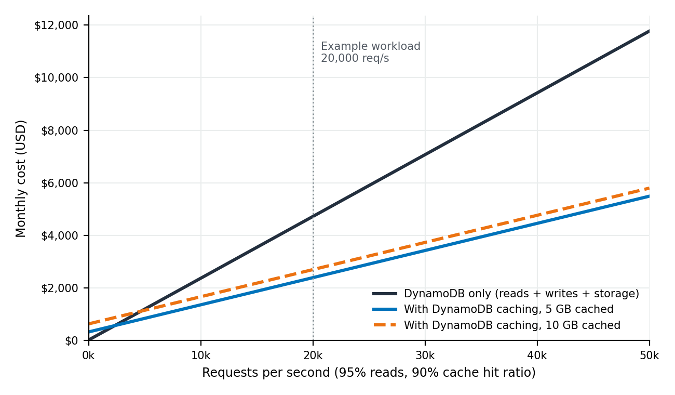
Figure 1: Monthly cost by request rate, DynamoDB alone compared with DynamoDB caching with 5 GB and 10 GB of cached data. Assumes 95% reads and 5% writes, 1 KB items, a 90% cache hit ratio, 100 GB of DynamoDB table storage, DynamoDB on-demand pricing, and Amazon ElastiCache Serverless pricing in US East (N. Virginia)
At 20,000 req/s, DynamoDB alone costs about $4,723 per month. With DynamoDB caching it costs about $2,533 with 5 GB cached (46 percent lower) or $2,839 with 10 GB cached (40 percent lower), on top of the latency improvement. DynamoDB read charges drop from $3,078 to $308 because only cache misses reach the table. ECPUs add about $273 whatever the cache size, and cache storage adds about $307 for 5 GB or $613 for 10 GB. Writes ($1,620) and table storage ($25) cost the same either way. Below roughly 2,500 req/s with 5 GB cached, or 4,900 req/s with 10 GB, the fixed cost of cache storage outweighs the read savings.
A few honest caveats, because the result depends on your workload:
- Hit ratio is the biggest lever – A higher cache hit ratio means fewer DynamoDB reads and a bigger saving. A low hit ratio (large, cold working set) saves less and might not pay off.
- Writes still cost the same at DynamoDB – DynamoDB caching is write-through, so every write still reaches the table. Write-heavy workloads see smaller savings, and items with many cached projections cost more ECPUs per write.
- Storage scales with your resident hot set – The cache bills for the data it holds (plus 1 KB of overhead per entry). A large resident dataset can offset read savings, so size the hot set deliberately with TTLs.
Get started
DynamoDB caching is available today at no additional charge. You pay only for the Amazon ElastiCache Serverless resources you use. To try it:
- Create an Amazon ElastiCache Serverless for Valkey (v9+) cache with DynamoDB caching enabled.
- Add the DynamoDB caching client library and configure your cached tables.
- Watch the
DynamoDBCachingHitRateandDynamoDBCachingMissesAmazon CloudWatch metrics as your cache warms up.
For step-by-step instructions, IAM policies, supported APIs, and monitoring guidance, see the DynamoDB caching section of the Amazon ElastiCache User Guide. We’re excited to see what you build faster and cheaper with DynamoDB caching.