AWS Database Blog
Building search experiences for JSON data with Amazon OpenSearch Service
In this post, you learn how to use Amazon OpenSearch Service as a discovery layer that combines full-text, vector, and geospatial search across JSON documents in a single query, using a restaurant discovery app as a working example.
Modern applications rarely rely on a single data store. A restaurant discovery app, for example, stores user sessions in Amazon DynamoDB for single-digit millisecond key-value lookups. It maintains catalog records in Amazon DocumentDB (with MongoDB compatibility) for flexible document operations, and processes transactions in Amazon Aurora for relational integrity. Each store excels at its operational workload, but none provides the multi-modal search experience your users expect. Amazon OpenSearch Service fills this gap as a dedicated discovery layer. It receives data from operational stores, and you can then run full-text, vector, and geospatial search across those same documents in a single query.
Imagine you’re building that restaurant discovery app. A user types “vegan Thai food” while standing in downtown Austin. They want results that are relevant to their intent, near their location, and well-reviewed. A traditional database struggles here. It cannot match “vegan” to “plant-based,” does not understand that “Thai” relates to “Asian cuisine,” and treats geographic proximity as an afterthought.
Each restaurant in your catalog is a JSON document with a name, description, cuisine tags, location coordinates, rating, hours, and a nested array of menu items. You want all of that searchable, filterable, and rankable, without flattening the document, splitting it across tables, or running separate queries against separate systems.
Amazon OpenSearch Service solves this discovery challenge. Built on Apache Lucene, OpenSearch Service exposes a Representational State Transfer (REST) API. Documents, queries, mappings, and results are all expressed as JSON. This end-to-end JSON interface removes the mismatch between your application objects and how those objects are stored and queried. Your application sends a JSON document in, OpenSearch Service indexes it, and you get JSON back.
This post explores what makes the JSON API support in OpenSearch Service well suited to discovery workloads. It then walks through building a restaurant discovery app that combines full-text, vector, and geospatial search in a single query.
How Amazon OpenSearch Service supports JSON workloads
Many systems “support JSON.” OpenSearch is built around it. Four characteristics set OpenSearch Service apart for JSON workloads:
- Per-field indexing strategy. Every field in a single JSON document can be indexed differently. One field undergoes full-text analysis for natural language, while others are stored as multi-dimensional vectors, exact-match keywords, or geospatial points. You can also disable indexing entirely (
index: false) on fields used only for display payloads, such as a hero image URL or a formatted display string. Those fields stay stored and retrievable without the overhead of building an index for them. Traditional databases lock an entire column into a single indexing strategy. OpenSearch Service evaluates and indexes each field independently within the same document context. - Nested objects and arrays preserve their structure. A restaurant document with an array of menu items, each with its own name, price, and dietary tags, stays queryable as a structured object. When standard object schemas flatten arrays during indexing, traditional engines collapse boundaries and cross-match values across separate items incorrectly. The
nesteddata type preserves array element boundaries, so queries across distinct items return accurate results. - Schema is flexible but controllable. You don’t need to declare every field up front. New fields can be auto-mapped as documents arrive, or you can lock the schema with
dynamic: "strict". You can evolve the document shape over time without migrations, while still controlling exactly how each field is indexed. - The query language is itself JSON. Queries mirror the structure of documents. They compose and nest naturally, which makes complex queries readable and programmatically constructible without string concatenation or object-relational mapping (ORM) abstractions.
Together, these properties mean a single JSON document can support full-text, semantic, geospatial, and faceted search at the same time. You query the same fields in one request, with no extract, transform, and load (ETL) process between specialized systems.
Architecture: Amazon OpenSearch Service as a discovery layer
Amazon OpenSearch Service functions as a discovery and relevance-ranking layer on top of operational data stores, rather than a primary transactional database. This separation of concerns keeps transactional workloads on dedicated source databases optimized for specific application contexts. DynamoDB handles user state, Amazon DocumentDB handles product catalogs, and Aurora handles transactions. Search traffic targets OpenSearch Service independently, without competing for resources with transactional operations.
Data flows into OpenSearch Service through Change Data Capture (CDC) pipelines managed by OpenSearch Ingestion (OSI). DynamoDB uses zero-ETL links. Amazon DocumentDB, Aurora PostgreSQL, and Aurora MySQL use the continuous CDC synchronization in OSI, through Change Streams and CDC logs. Amazon Simple Storage Service (Amazon S3) connects through the OSI S3 Source Connector, which supports batch and incremental ingestion of data files and application logs. That connector makes Amazon S3 a first-class source for log analytics and archival search workloads. OSI transforms, normalizes, and indexes the raw source JSON documents directly into your destination OpenSearch Service domain.
This architectural separation preserves strict data integrity inside your transactional databases. OpenSearch Service handles advanced search functionality independently, including full-text matching, vector similarity, complex filtering, and geospatial calculations, without adding query load to operational stores.
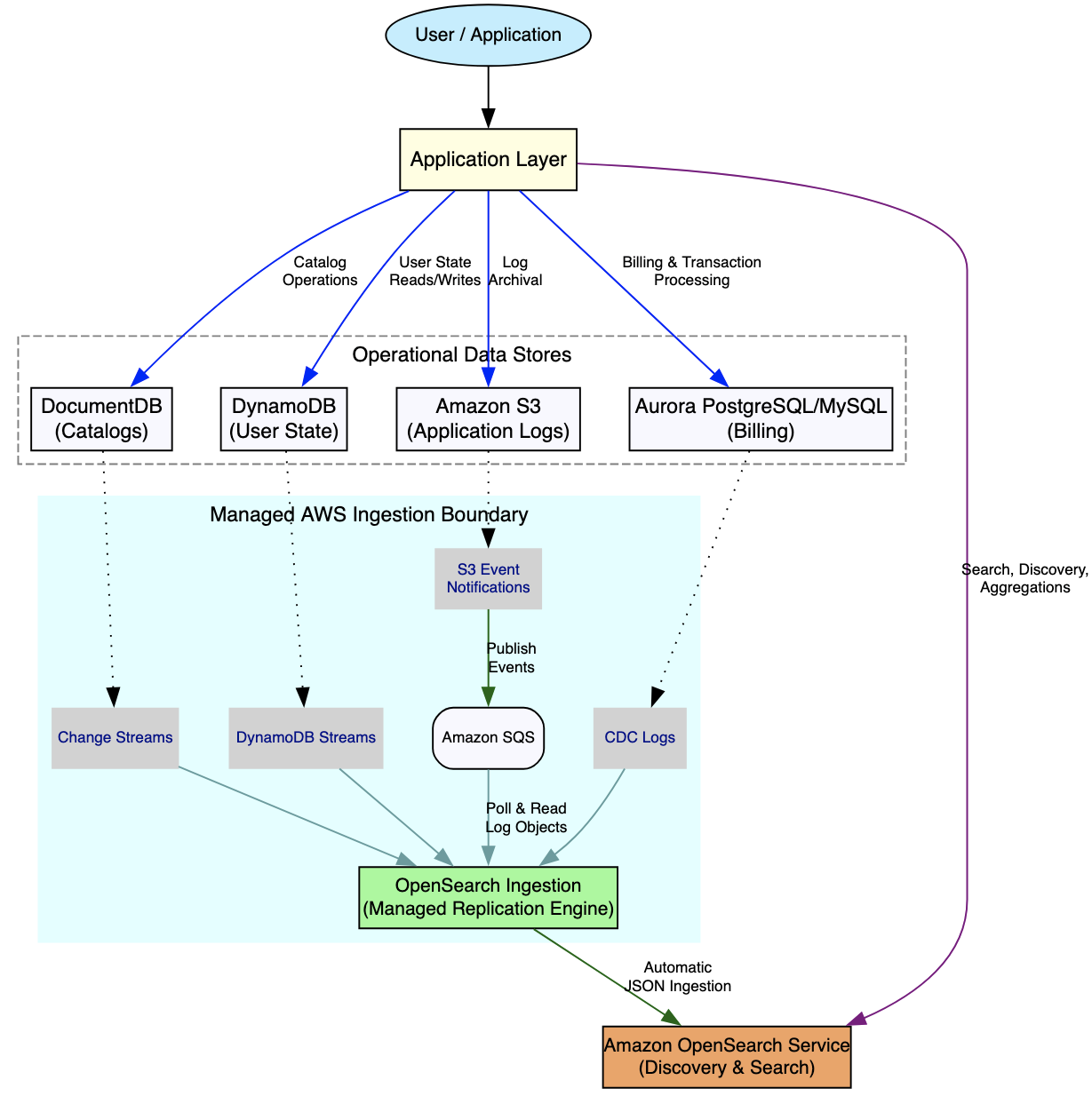
Figure 1: Amazon OpenSearch Service as a discovery layer, with CDC pipelines synchronizing data from DynamoDB, Amazon DocumentDB, Aurora, and Amazon S3 into the OpenSearch index
Building the restaurant discovery app
With the architecture in place, let’s design an index that puts these properties to work. A single mapping supports text, vector, and geospatial search over the same documents.
Each field is indexed for its purpose, all within one document type. The following table summarizes the mapping strategy.
| Field | Type | Purpose |
name |
text |
Fuzzy matching for restaurant names |
description |
text + English analyzer |
Stemming and linguistic normalization |
cuisine |
keyword |
Exact-match filtering and faceting |
location |
geo_point |
Distance filtering and proximity sorting |
rating |
float |
Numeric range filtering |
menu_items |
nested |
Structured queries across distinct array elements |
description_embedding |
knn_vector |
Semantic similarity scoring with ML embeddings |
Text analysis: Handling vocabulary and language
The preceding English analyzer tokenizes text, lowercases it, and applies English stemming. As a result, “running” matches “run” and “restaurants” matches “restaurant.” You get built-in linguistic intelligence without writing custom filter chains.
To make “vegan” match “plant-based,” apply a synonym_graph filter inside a search-time analyzer. For more information, see synonym expansion. The filter intercepts incoming search phrases dynamically, so you can update synonyms at any time without forcing a cluster-wide reindex. For autocomplete experiences, use edge_ngram tokenization instead of standard n-grams. Standard n-grams split characters globally across words and can increase index storage size by 3 to 10 times.
Note: use the _analyze API to inspect exactly how your analyzer tokenizes any input phrase before you commit to a mapping. The output surfaces stemming behavior, stop-word removal, and synonym expansion, so you can tune the analyzer iteratively without reindexing the entire dataset.
Vector search for semantic understanding
Traditional keyword search fails when your users describe what they want in different vocabulary than what your data contains. Someone searching for “budget-friendly Italian food” does not find a restaurant described as “affordable pasta and pizza” through keyword matching alone. Vector search addresses this by storing machine learning (ML)-generated embeddings directly inside the same JSON document, alongside the text fields.
OpenSearch Service orchestrates embedding generation through four approaches:
- Automatic semantic enrichment provides semantic search without requiring machine learning infrastructure or vector expertise. It expands raw text into AI-powered neural sparse vector embeddings during data ingestion, which adds context-aware intent to traditional keyword matching and improves search relevance.
- The neural search plugin manages embedding pipeline orchestration natively inside Amazon OpenSearch Service, during both the ingestion and search phases.
- Ingest pipelines with ML connectors call external managed foundation models hosted on Amazon Bedrock, Amazon SageMaker, or providers such as Cohere.
- AWS Lambda invokes custom ML models from OSI pipelines programmatically.
Hierarchical Navigable Small World (HNSW), used in the preceding mapping, provides recall of more than 95% with sub-millisecond query latency. For datasets larger than 1 billion vectors, consider Inverted File Index (IVF) or quantization algorithms. IVF reduces search scope by partitioning the vector space. Quantization reduces memory footprint by compressing vector representations. Choose IVF when latency is the bottleneck, and quantization when memory is constrained.
Geospatial search for proximity
With the geo_point type, you can express queries such as “within 5 km” (geo_distance), “in this rectangle” (geo_bounding_box), or “in this polygon” (geo_shape). You can also sort results by distance from the user. All of these use the same field, embedded directly in the document.
Because the coordinates live inside the same document as the restaurant name, description, and rating, a geospatial filter requires no join and no secondary lookup. OpenSearch Service evaluates the distance constraint as an efficient cached filter, pruning ineligible venues before any relevance scoring occurs.
| Query type | Use case | Example scenario |
geo_distance |
Radius filter | “Show restaurants within 5 km of my location” |
geo_bounding_box |
Rectangle filter | “Show all venues in the downtown map view” |
geo_shape |
Polygon filter | “Show restaurants inside a drawn neighborhood boundary” |
sort by _geo_distance |
Proximity ranking | “Rank by nearest first, then by rating” |
Hybrid search: Combining modalities in one query
Now back to the original use case. A user searches for “vegan Thai food” near downtown Austin, with a 4-star minimum. The following single compound query combines all three modalities, full-text, vector, and geospatial, with efficient filtering.
Breaking down what each component contributes:
- Text search (
multi_match) provides built-in fuzzy matching and field-level boosting. Thename^2setting weights the restaurant name twice as heavily as the description. - Vector search (
neural) provides semantic matching, so “plant-based” correctly maps to “vegan” even when the exact keyword is absent. - Geospatial filter (
geo_distance) prunes venues beyond the 5 km radius before scoring begins. - Rating filter (
range) enforces a hard business rule requiring a minimum review quality of 4.0 stars.
Efficient filtering in OpenSearch Service applies non-relevance constraints directly within the sub-query execution of the hybrid query. Ineligible documents are pruned before scoring occurs rather than after. For versions before OpenSearch Service 3.x, efficient filtering was more complex to configure. Consider upgrading so that you can place inline filter clauses directly inside the hybrid query.

Figure 2: The multi_match text sub-query and the neural vector sub-query are scored separately, combined by the normalization processor, then filtered by geospatial and rating constraints
Common search mistakes and best practices
Place non-relevance constraints inside filter clauses rather than scoring loops. OpenSearch Service automatically caches structural filters, which bypasses expensive score evaluations. The filter clause removes documents before the scoring phase executes.
Multi-field mappings index the same field multiple ways to support different query patterns without document duplication.
One logical field, multiple indexed views. Use name for fuzzy text search, name.keyword for exact-match aggregations, and name.edge_ngram for autocomplete, all without duplicating the document. The following table consolidates common pitfalls with additional best practices.
| Mistake | Better approach |
| Indexing every field as standard text | Use keyword fields for exact phrases and structured calculations |
| Processing structural rules inside scoring loops | Route non-relevance boundaries through cached filter components |
Running custom script_score blocks for hybrid queries |
Use native hybrid queries with search pipeline normalization |
| Using text fields for aggregations | Use keyword or multi-field mappings for exact-match operations |
| Leaving display-only fields searchable | Set index: false for fields retrieved but never queried |
| Relying on dynamic mapping in production | Define mappings explicitly to avoid type conflicts and unexpected behavior |
Integrating with operational data stores
Operational data stores handle transactional workloads such as key-value lookups, document create, read, update, and delete (CRUD) operations, relational integrity, and durable object storage. Those stores are Amazon DynamoDB, Amazon DocumentDB, Amazon Aurora, and Amazon S3. OpenSearch Service complements them by adding full-text search, semantic similarity, geospatial calculations, and multi-field weighted rankings for monitoring, analysis, and key performance indicator (KPI) discovery. The following table captures when each store is the right fit. Amazon S3 is included as a source for log analytics and archival search workloads, with ingestion handled through the OSI S3 Source Connector.
| Source | Use OpenSearch Service for | Keep in source for |
| Amazon DynamoDB | Full-text search across user interaction history | High-speed key-value lookups, point-in-time states |
| Amazon DocumentDB | Full-text exploration across flexible product catalogs | Atomic transaction updates and document CRUD |
| Amazon Aurora PostgreSQL | Multi-faceted full-text searching across semi-structured JSONB columns |
Atomicity, consistency, isolation, and durability (ACID) guarantees, and complex joins |
| Amazon S3 | Log analytics, archival search, and full-text exploration across stored data files | Durable object storage for raw files. Not suited for low-latency query workloads |
Synchronize when: Your users require full-text search, vector similarity, geospatial calculation, or multi-field weighted result rankings.
Skip synchronization when: Your core query pattern is ID-based point lookups, or your operations demand multi-row ACID compliance.
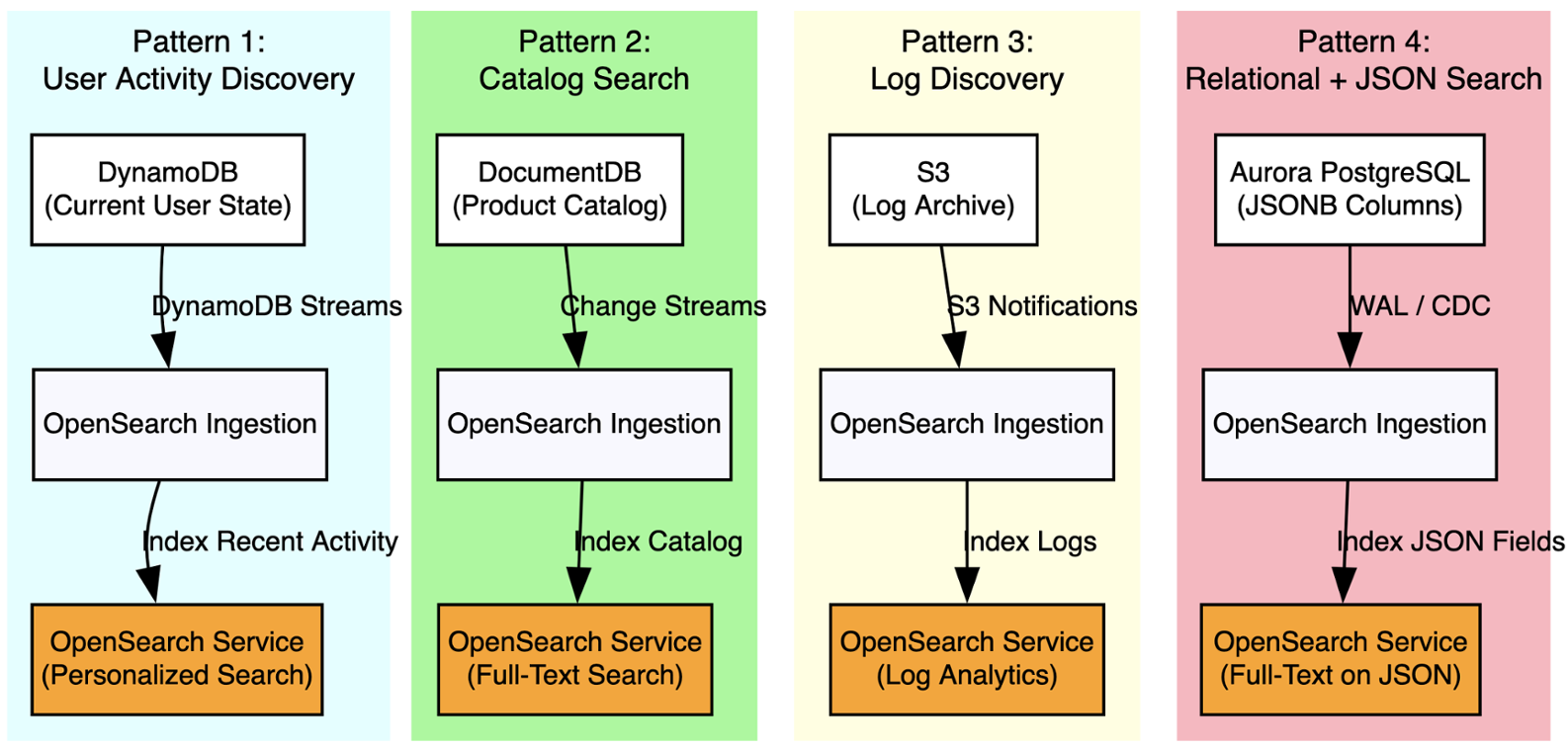
Figure 3: Ingestion patterns by operational store, all converging on one OpenSearch index
Conclusion
Amazon OpenSearch Service is built on Apache Lucene and exposes a full JSON REST API. It treats documents, queries, mappings, and results as JSON from start to finish. With that coherent interface, your applications can combine full-text indexing, vector representations, and geospatial processing within a single query. You avoid stitching together multiple specialized systems or writing transformation layers between them.
The restaurant discovery app in this post illustrates the pattern: one index, one query, three search modalities working together. The same approach applies to ecommerce catalog search, content discovery platforms, location-based services, and any workload where users expect intelligent, context-aware results from richly structured data.
As a discovery layer on top of your operational stores, OpenSearch Service gives you both the transactional guarantees of purpose-built databases and the search intelligence of a dedicated relevance engine. CDC pipelines keep the index current without coupling your application logic to the ingestion process.
To stand up your first discovery layer, follow the steps in Getting started with Amazon OpenSearch Service. What are you building with these query types? Let us know in the comments.