AWS Database Blog
Features and workflows with Amazon Timestream for InfluxDB 3
This technical deep dive into Amazon Timestream for InfluxDB 3 explores the architectural decisions, features, and capabilities that make this release a significant evolution in time series database technology. This next-generation time series database represents an architectural redesign from the previous engine version; built from the ground up with modern technologies including Rust for core performance, Apache Arrow for columnar data processing, Apache Parquet for efficient storage, and Apache Arrow Flight SQL for high-performance querying.
The managed service combines InfluxData’s latest database offering with AWS infrastructure and tooling to support your time series data workflows. Visit our documentation to get started using the Amazon Timestream for InfluxDB 3 today.
New engine features
InfluxDB 3 core engine is a truly open-source solution designed from the ground up, using open-source technologies for storage format, query engine, and network protocol. Apache Arrow Flight SQL is the new high-performance SQL interface for querying InfluxDB 3, removing the need for a version 2 domain-specific language such as Flux. Native SQL support not only eases adoption by creating fewer barriers for database interactions, but also facilitates analytics-driven use cases that benefit from the engine’s ability to store large amounts of data in object storage solutions like Amazon S3. This makes it affordable to retain massive datasets while delivering excellent performance through Parquet’s efficient columnar format and Apache Arrow’s in-memory capabilities.
Building upon the learnings gained from InfluxDB 2, the third iteration database solution provides an expansion of use-cases where the version 2 variant could not. With the change in architecture, InfluxDB 3 can support virtually unlimited cardinality. You no longer need to tradeoff between indexed tags and database performance hits for highly variable datasets. InfluxDB 3 uses S3 as its core storage layer, providing the benefits of the S3 multi-AZ architecture and 99.999999999% data durability, along with improved savings on persistent storage.
InfluxDB 3 integrates a powerful new processing engine for time series collection, organization, and transformation. The processing engine is an embedded Python virtual machine in InfluxDB 3 that can perform zero-copy actions on time series data. This engine enables real-time data processing capabilities including downsampling to reduce storage costs and data volume, and alarming to trigger notifications based on threshold conditions or anomaly detection. Plugins written in Python define how and what the processing engine performs on the data based on trigger events. Trigger event types include scheduled events and WAL flush events. Amazon Timestream for InfluxDB 3 includes a curated set of processing engine plugins that have undergone security hardening. See the processing engine documentation for the complete list of available plugins with Timestream for InfluxDB 3.
With the wealth of new features available, InfluxDB 3 is a great match for systems with high variance data, workflows requiring optimized queries for recent data, and high ingestion demands requiring a multi-node solution. Use cases include systems monitoring, application monitoring, IoT sensor data, and much more. InfluxDB 3 also serves as the ideal replacement for Amazon Timestream for LiveAnalytics, which is currently in maintenance mode, offering enhanced capabilities, greater flexibility, and a path forward for time series workloads on AWS.
Core and Enterprise offerings
AWS offers InfluxDB 3 in either Core or Enterprise editions, with each offering a different set of capabilities optimized for distinct use cases. Both editions use S3 as their storage layer, but differ significantly in their architecture, intended workloads, and pricing models.
Amazon Timestream for InfluxDB Core is designed for real-time monitoring scenarios where you need to constantly and efficiently query recent data, typically the last 3-5 days depending on aggregation requirements and timestamp granularity. Core provides the essential features for time series workloads including fast query response times, diskless architecture, Parquet file persistence, and the processing engine. However, Core clusters are restricted to single-node deployments where the four key functions, ingestion, querying, compaction, and processing run on the same instance and compete for shared compute resources. Notably, Core does not include a compactor, which limits its ability to efficiently store and query large amounts of historical time series data, making it optimal for use cases focused on the most recent data.
For Core clusters, your costs are driven primarily by compute and storage charges. For example, a single db.influx.large instance (2 vCPUs) in the N. Virginia Region (us-east-1) would cost approximately $0.264 per hour × 730 hours per month = $192.72 for compute, plus storage costs at $0.023 per GB. Learn more about Core pricing on our pricing page.
Amazon Timestream for InfluxDB Enterprise extends the Core capabilities with features designed for production workloads requiring historical data retention and analysis. Enterprise clusters include a compactor that enables the engine to store massive amounts of historical data and efficiently query the data with minimal performance impact. Enterprise also supports multi-node cluster deployments where you can assign distinct roles to different nodes, separating ingestion, querying, compaction, and processing functions to optimize resource utilization. Additional Enterprise features include fine-grained access control, highly configurable data retention policies, and enhanced scalability for demanding production environments.
InfluxDB 3 Enterprise is available in cluster configurations up to 15-nodes to match your ingestion and query load requirements. You can choose to have between 1-4 writer nodes, 0-13 read-only nodes, and 1 compactor node. All multi-node deployments distribute your instances across different availability zones in order to maximize the availability of your cluster.
Enterprise pricing includes both compute and storage costs, plus an InfluxDB 3 Enterprise license that activates automatically via AWS Marketplace. Enterprise licenses are pay-as-you-go, charged on a node per hour basis. For example, a 3-node cluster of db.influx.large instances in the N. Virginia Region (us-east-1) would cost approximately:
- Compute: $0.264/hour × 3 nodes x 730 hours = $578.16/month
- License: $0.264/hour × 1.5 × 3 nodes × 730 hours = $867.24/month
- Total compute + license: $1,445.4/month, plus storage at $0.023 per GB
Learn more about Enterprise pricing on the AWS Marketplace listing.
Writing time series data to InfluxDB 3
One of the advantages of using InfluxDB for time series data is the human-readable line protocol text format used for ingestion. The simplicity and readability of line protocol eases getting started if you’re new to InfluxDB, you can quickly test data ingestion, fine-tune your data model, and debug your ingestion path without complex formatting requirements. Line protocol has been used since InfluxDB 1 and remains the standard in InfluxDB 3, facilitating continuity for existing users. When migrating workflows from InfluxDB 1 or 2, not only can you continue using line protocol, but you can also use InfluxDB 3’s backwards-compatible write endpoints for version 1 and version 2 databases. This compatibility means your existing applications, scripts, and tools can continue writing data without modification, providing a straightforward migration path for existing time series workflows when upgrading to InfluxDB 3.
InfluxData provides a set of client libraries for ingesting data to InfluxDB 3. These libraries integrate with your applications for writing and querying data without requiring additional code for batching, constructing line protocol, or boiler plate for using Arrow Flight protocol with gRPC for queries. The client libraries are available in C# .NET, Go, Java, JavaScript and Python. See Client libraries for InfluxDB 3 for additional information regarding client libraries.
Queries and DSL
InfluxDB 3 transforms the querying experience by adopting standard SQL as its primary query language, powered by Apache DataFusion as the query engine and delivered through Apache Arrow Flight SQL as the network protocol. This architectural shift replaces InfluxDB 2’s Flux scripting language with familiar SQL syntax, dramatically lowering the learning curve and enabling seamless integration with existing SQL tools and business intelligence applications.
Apache Arrow Flight SQL uses efficient columnar data transfer and gRPC-based communication to deliver exceptional performance improvements over traditional HTTP-based interfaces. The underlying Apache Arrow columnar format enables vectorized execution and predicate pushdowns, providing improved performance on large datasets for both raw and aggregated queries. Apache DataFusion’s query optimizer further helps enhance performance by pushing down filters and projections to minimize data processing.
InfluxDB 3 optimizes query performance for time-series workloads through specialized caching strategies designed for real-time analytics. Two in-memory caches accelerate the most common query patterns: The Last Value Cache (LVC) stores the most recent value for each field, delivering millisecond response times for “last point” queries that drive real-time dashboards. The Distinct Value Cache (DVC) maintains unique tag and field values within a table, accelerating metadata queries like listing hostnames or sensor IDs. Together, these caches make sure common query patterns execute nearly instantaneously, keeping dashboards responsive even during high-ingestion workloads. These optimizations make InfluxDB 3 particularly effective for monitoring use cases focused on recent data, typically the last 3-5 days, aligning with the Core edition’s design for real-time analytics.
For migration compatibility and broad deployment scenarios, InfluxDB 3 provides a v1-compatible InfluxQL endpoint alongside its modern SQL interface, allowing legacy applications to continue operating without modification. See InfluxData’s documentation for getting started with the InfluxDB 3 Explorer and Timestream for InfluxDB.
Explorer user interface
InfluxDB 3 can be managed through a graphical interface with the InfluxDB 3 Explorer. The InfluxDB 3 explorer allows you to manage the databases, ingest query and visualize data, and more. In order to use the InfluxDB 3 Explorer with Timestream for InfluxDB 3, follow InfluxData’s quick start guide to running the Explorer with Docker.
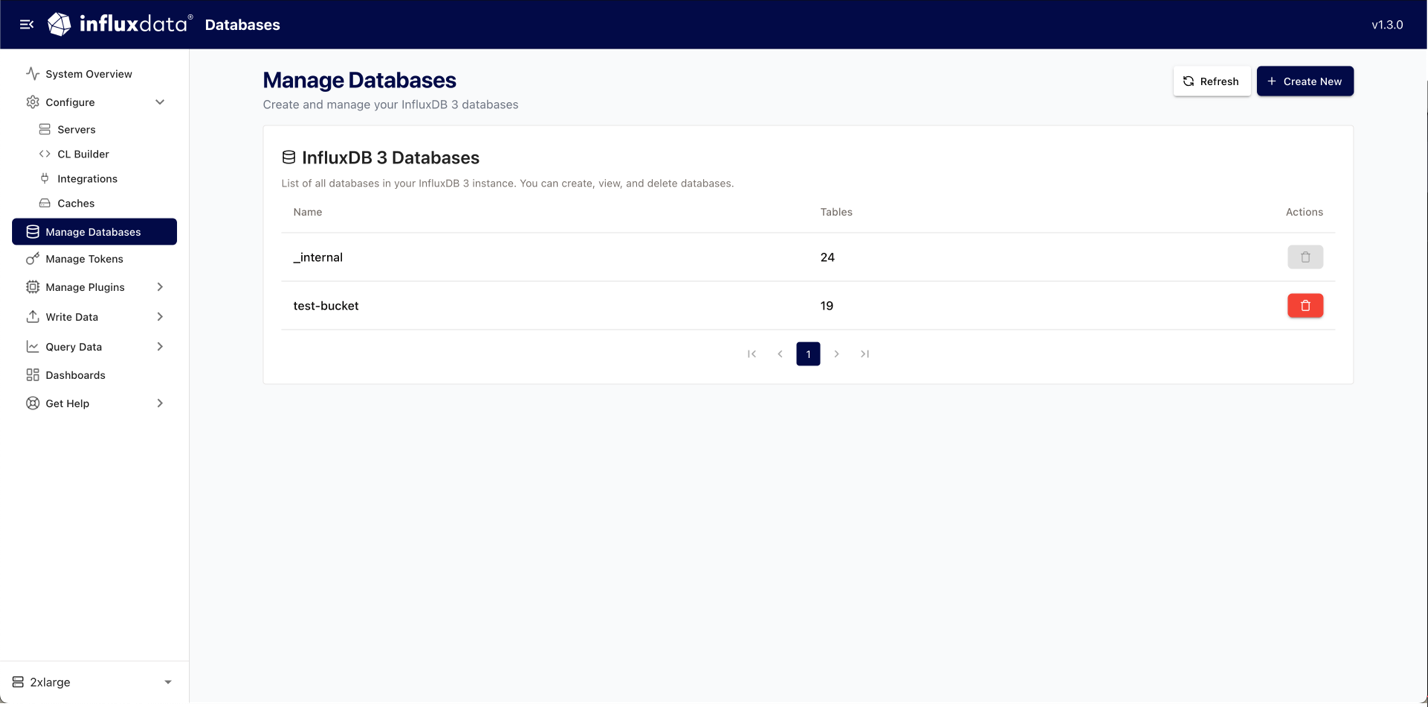
Managing databases
In the Explorer you can provide the host address of your InfluxDB 3 instance and the associated token for a new connection. Once your instance has been added and verified, you can use the Explorer to manage your databases. The Explorer provides a method for creating new databases and deleting old databases.
Querying and visualizing data
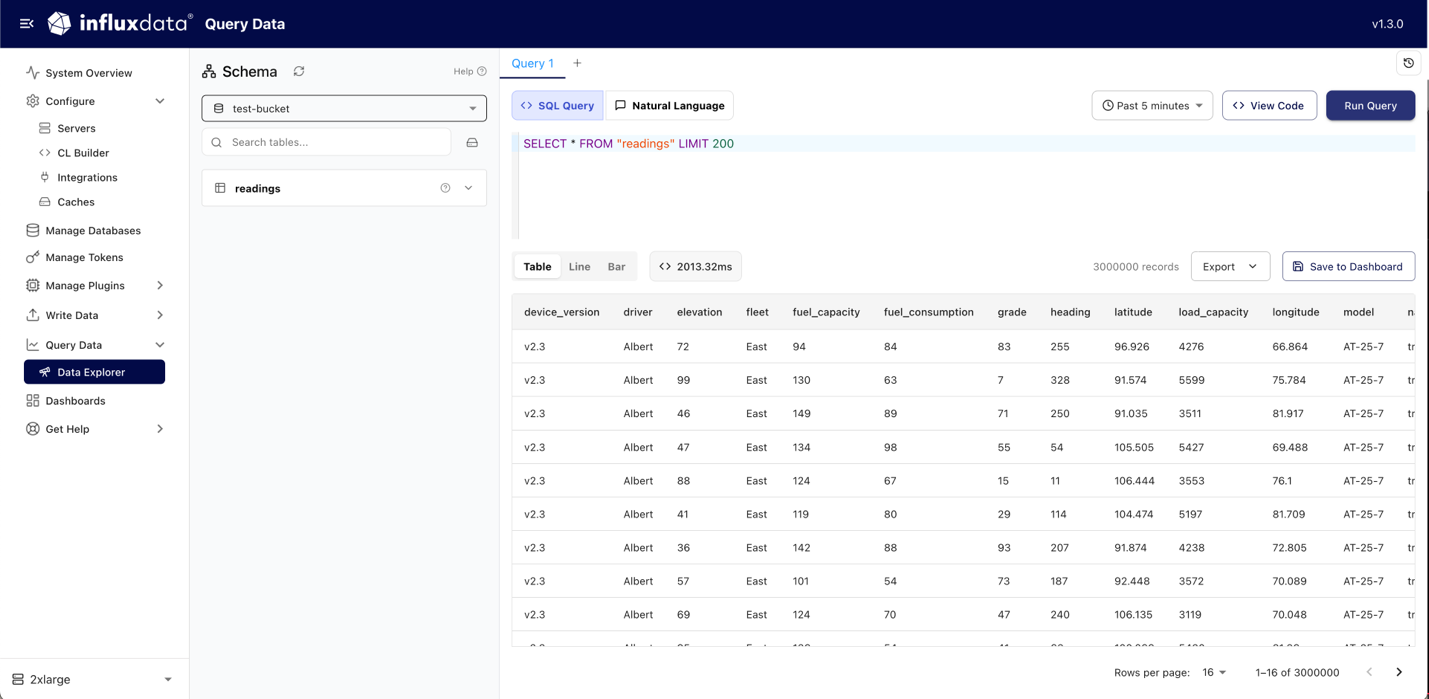
Within the InfluxDB 3 Explorer, the Data Explorer allows you to run SQL queries or use natural language to explore your data. See InfluxData’s SQL reference documentation for more information on InfluxDB 3’s SQL implementation.
Results can be displayed in a line or bar chart in the Explorer or exported to CSV, JSON, or Parquet. Additionally, results can be added to dashboards, helping organize data insights.
Keep in mind that the Explorer in the current iteration is designed to help you understand the basics of the Timestream for InfluxDB 3 engine, experiment with query syntax, and familiarize yourself with management options. For performance testing, complex query patterns, or production workloads, the InfluxDB CLI or API provides the full capabilities and control you’ll need. Consider the Explorer for your learning environment where you can safely explore the system’s fundamentals before moving to more advanced tooling.
Ingesting data
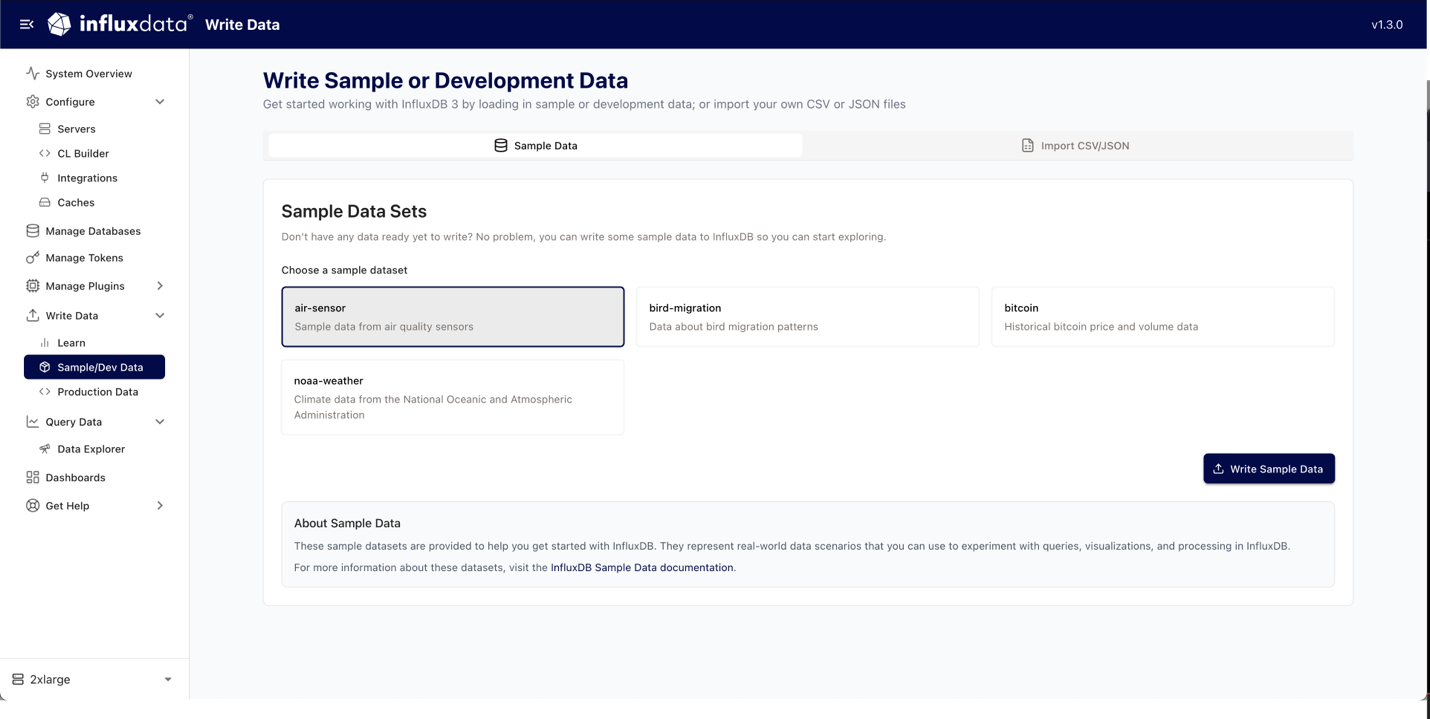
You can ingest data directly from the Explorer. The Explorer offers guides to help write data to InfluxDB, including a guide covering line protocol, InfluxDB 3’s client libraries, InfluxDB 3’s REST API, how to use Telegraf, how to import CSV or JSON data, and how to ingest sample data.
To get you started, sample data can be ingested from within the Explorer. Sample datasets include air quality sensor data, bird migration data, historical bitcoin price and volume data, and climate data.
Monitoring your deployment
After deploying your instance, monitoring performance is crucial for validating your sizing decisions and identifying optimization opportunities. Amazon CloudWatch provides essential metrics for Timestream for InfluxDB 3 including CPU utilization and memory usage. The System Metrics Plugin included with InfluxDB 3’s processing engine collects server-level performance data similar to CloudWatch, including detailed CPU statistics (overall and per-core), memory usage breakdowns, disk I/O performance, and network interface statistics.
For deeper insights into database-specific performance metrics, you can scrape the metrics endpoint to collect comprehensive internal metrics that help you closely monitor query performance, write throughput, and other service-level indicators. We provide a comprehensive metrics collection solution that scrapes the /metrics endpoint from your Timestream for InfluxDB instances. This solution deploys an EC2 instance running Telegraf to continuously collect internal engine metrics such as query performance, write throughput, and memory usage patterns, then ingests them into CloudWatch for visualization in a pre-configured Grafana dashboard. The dashboard includes panels for monitoring key performance indicators aligned with instance sizing specifications, helping you validate your sizing decisions and identify optimization opportunities.
For deployment instructions, configuration options, and example scripts, visit our GitHub repository. The repository includes a complete CDK application that automates the setup process, from Telegraf configuration to Grafana dashboard creation.
Summary
The re-design of InfluxDB 3 which adopts Apache Arrow, Parquet, and Flight SQL creates an open-source framework that delivers performance benefits and long-term interoperability for your business needs. Native SQL support aids in reducing the friction of learning proprietary query languages, and the processing engine’s embedded Python runtime enables zero-copy data transformations.
You can use the InfluxDB 3 Explorer for database management, query experimentation, and data visualization. As you move toward production, the monitoring solutions available through CloudWatch integration and the metrics collection approach ensure visibility into performance characteristics.
InfluxDB 3 delivers powerful new capabilities with its integrated processing engine, unlimited cardinality support, and cost-effective S3 data storage. Visit Amazon Timestream for InfluxDB 3 and deploy your cluster to test firsthand all the features available with this new time series database offering.