AWS Database Blog
Introducing Oracle Exadata on Exascale for Oracle AI Database@AWS
Today, we are announcing the general availability of Oracle Exadata Database Service on Exascale Infrastructure (ExaDB-XS) for Oracle AI Database@AWS. ExaDB-XS brings Exadata-class performance and availability through a consumption-based model. With ExaDB-XS, you can scale compute and storage independently in small increments and pay only for what you consume. There is no dedicated infrastructure to provision upfront. You can start with as little as 8 Elastic CPUs (ECPUs) and 300 GB of storage with a public or a private offer from AWS Marketplace.
With Oracle AI Database@AWS, you can run Oracle Exadata infrastructure natively within AWS Availability Zones, purchased through AWS Marketplace and managed alongside the rest of your workloads. You can migrate Oracle Exadata and RAC workloads without re-architecture, consolidate your Oracle database estate, and connect directly to AWS analytics, AI, and operational services. With your database running in-Region, you get low-latency access to the full depth of AWS: Amazon Bedrock for generative AI and retrieval-augmented generation (RAG), and monitoring and governance services including Amazon CloudWatch, AWS KMS, AWS IAM, and AWS CloudTrail.
Customers have asked us for Exadata capabilities without the cost and commitment barrier of dedicated infrastructure, which requires a minimum of 2 database servers and 3 storage servers to get started, a significant upfront investment that not every workload justifies. ExaDB-XS addresses that directly, delivering the same Exadata performance, availability, and security (including RAC, Smart Scan, and Hybrid Columnar Compression (HCC)) in a pooled, shared model that scales in increments as small as individual ECPUs and gigabytes, letting you add compute and storage independently. It is ideal for workloads where you want to start without a large upfront infrastructure commitment, expand into new AWS Regions cost-effectively, take advantage of space-efficient rapid database cloning, or run a cost-effective cross-Region disaster recovery standby for Exadata database service on Dedicated (ExaDB-D) service.
How ExaDB-XS fits the Oracle AI Database@AWS portfolio
ExaDB-XS extends the Oracle AI Database@AWS portfolio to workloads of every size, filling the gap beneath dedicated infrastructure and completing a full spectrum of Oracle deployment options on the same underlying Exadata hardware.
| Service | Model | What it means for you |
| ExaDB-XS (new) — Exadata on Exascale Infrastructure | Customer-managed VM clusters on shared, pooled Exadata compute and storage |
|
| Oracle Exadata Database Service on Dedicated Infrastructure (ExaDB-D) | Customer-managed VM clusters on dedicated Exadata infrastructure |
|
| Oracle Autonomous AI Database on Dedicated Exadata (ADB-D) | Fully autonomous database on dedicated Exadata infrastructure |
|
| Oracle Autonomous AI Database Serverless (ADB-S) | Fully autonomous, serverless, multitenant |
|
ExaDB-XS gives you the same level of control and database management familiarity as ExaDB-D, on shared, pooled infrastructure, so you get Exadata economics that scale down to small workloads without sacrificing the features that make Exadata valuable.
What’s new with ExaDB-XS
ExaDB-XS launches with every Oracle Exascale feature available on Oracle Cloud Infrastructure (OCI) and AWS integrations supported for Oracle AI Database@AWS. This means you can migrate production workloads to ExaDB-XS from day one, with the same security, operational, and compliance capabilities you require for your most critical Oracle databases. The following three sections describe the key new capabilities ExaDB-XS introduces to Oracle AI Database@AWS.
Elastic compute and storage scaling
ExaDB-XS decouples compute and storage at the infrastructure level. You provision an Exascale Storage Vault, a single logical pool of shared Exadata intelligent storage. You also provision one or more VM Clusters that draw compute from a shared pool of Exadata database-optimized compute and storage from that vault. Unlike the Automatic Storage Management (ASM) disk groups used in dedicated deployments, a Storage Vault auto-scales with high redundancy applied automatically per object, with no disk-group planning or capacity partitioning required. A single vault can serve multiple VM Clusters, so storage is shared across compute while workloads remain isolated.
Compute is measured in ECPUs and storage is measured in GB. You can start a VM Cluster with 8 ECPUs and 300 GB of storage, and then independently adjust each dimension as your workload changes. Scaling is available through the AWS Management Console, AWS Command Line Interface (AWS CLI), and AWS APIs.
Instant thin cloning
ExaDB-XS introduces thin cloning for Oracle AI Database@AWS. Using redirect-on-write technology, you can create instant copies of a database without duplicating storage. When you create a clone, the system creates pointers to the original data blocks in Storage Vault. The clone appears and behaves as a complete, independent database but initially consumes no additional storage. Additional storage is consumed only as data in the clone diverges from the source. Thin cloning works across read/write databases, read-only databases, primary and standby databases, pluggable databases, and even clones of existing clones.
A team running 10 parallel development branches against production data pays for 10 databases worth of changes, not 10 full copies. Teams can provision fresh database clones as part of automated continuous integration and continuous delivery (CI/CD) pipelines and tear them down when tests complete.
AWS service integrations and AI readiness from day one
ExaDB-XS launches with the complete set of AWS service integrations available for Oracle AI Database@AWS. Automated database backups route to Amazon Simple Storage Service (Amazon S3). AWS KMS handles encryption with customer-managed keys. Amazon CloudWatch and Amazon EventBridge provide metrics and event monitoring. AWS IAM controls access, and AWS CloudTrail captures API audit logs. Network connectivity options include AWS Transit Gateway, Amazon VPC Lattice, and AWS Cloud WAN. ExaDB-XS also integrates with AWS Secrets Manager, so you can supply your database and Oracle Database Vault passwords securely from a managed secret during create and update operations. This keeps sensitive credentials out of scripts and configuration files.
ExaDB-XS puts your Oracle database at the heart of the next generation of AI-powered and agentic applications. With Oracle AI Database 26ai, AI Smart Scan offloads AI Vector Search to Exadata intelligent storage. Vector search and Retrieval Augmented Generation (RAG) run on your operational data with the same storage-side intelligence that accelerates analytics and online transaction processing (OLTP). Because your database runs in-Region on AWS, it sits alongside services like Amazon Bedrock and Amazon Bedrock AgentCore for generative AI and agents. AI agents and applications get low-latency access to your most valuable business data without ever moving or duplicating it.
Getting started with ExaDB-XS
ExaDB-XS is available through AWS Marketplace using Public Offers for self-service procurement or negotiated Private Offers. Both License Included (Oracle Enterprise Edition with all options) and Bring Your Own License (BYOL) are supported. The following steps walk through creating your first ExaDB-XS environment using the AWS Management Console. For AWS CLI and CloudFormation instructions, see the Oracle AI Database@AWS documentation.
Step 1: Create an ODB network
If you are new to Oracle AI Database@AWS, start by creating an ODB network, the private, isolated network that hosts your Oracle infrastructure within an AWS Availability Zone. On the AWS Management Console, navigate to Oracle AI Database@AWS, choose ODB Networks, and choose Create ODB network. Specify your Availability Zone, Classless Inter-Domain Routing (CIDR) ranges for client and backup connections, and optionally configure Amazon S3 backup and Amazon Redshift zero-ETL connectivity on the network. If you already have an ODB network from an existing Exadata Dedicated deployment, you can provision ExaDB-XS resources into that same network.
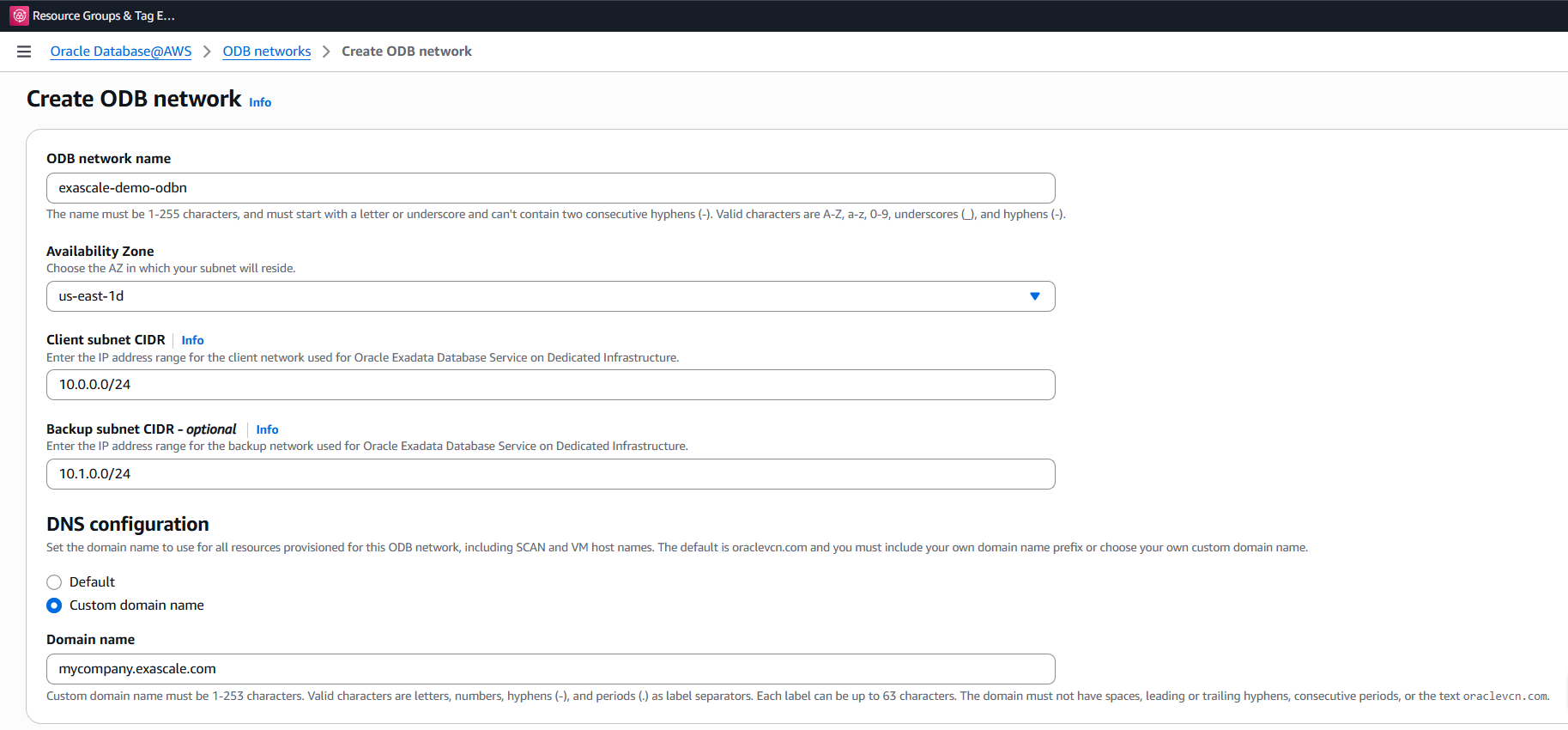
Figure 1: Creating an ODB network with client and backup subnet ranges
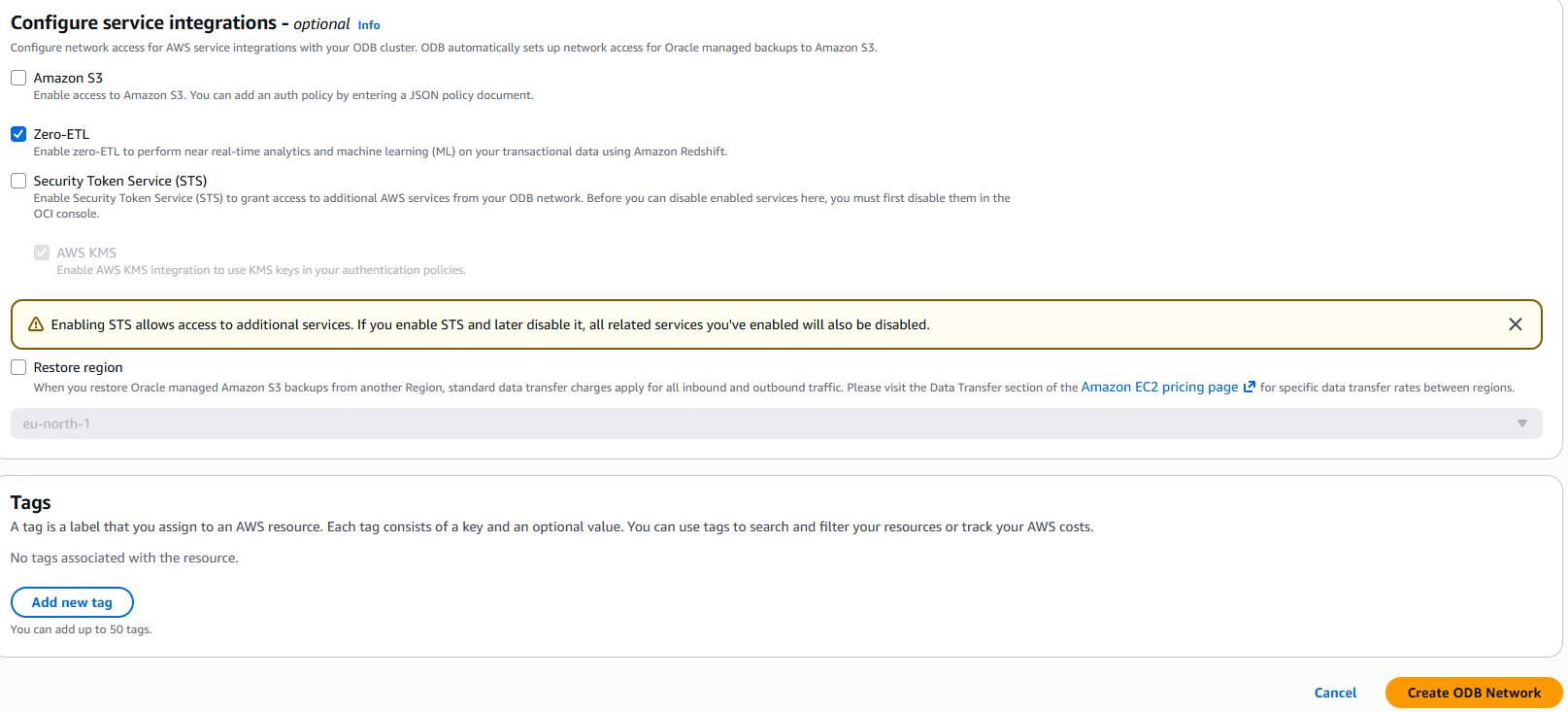
Figure 2: Configuring service integrations for the ODB network
Step 2: Create an Exascale Storage Vault
The Storage Vault is the pooled storage resource from which your VM Clusters draw capacity. On the console, navigate to Exascale Storage Vaults and choose Create Storage Vault. Specify the initial storage capacity in GB and associate the vault with your ODB network. You can expand the vault’s capacity at any time after creation.
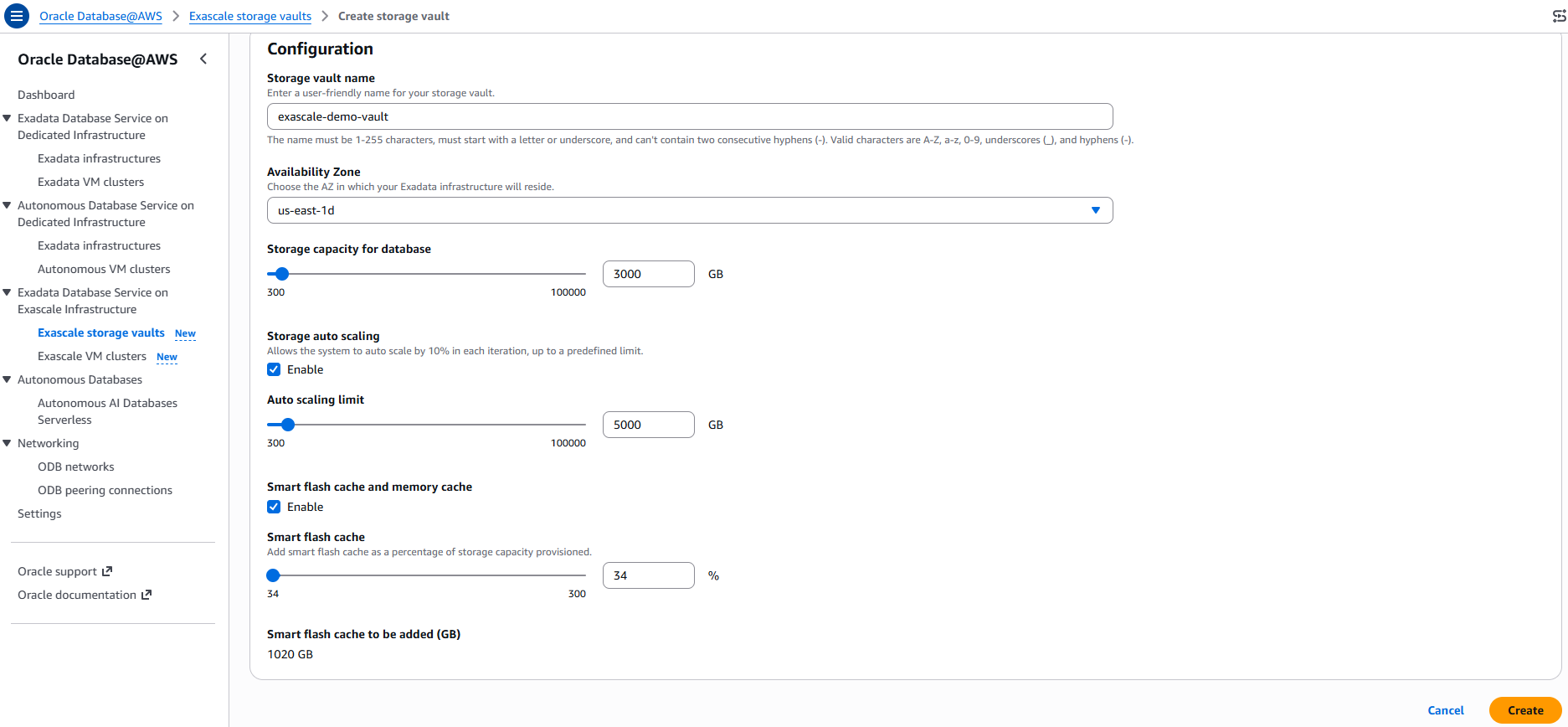
Figure 3: Creating an Exascale Storage Vault and setting storage capacity
Step 3: Create an Exascale VM Cluster
With a Storage Vault in place, create a VM Cluster by navigating to VM Clusters and choosing Create VM Cluster, then selecting Exascale. You specify the number of ECPUs (minimum 8 per VM), storage allocation in GB (minimum 300 GB total), Oracle Database version (19c or 26ai), and license type. You also select your ODB network and provide a Secure Shell (SSH) key pair for VM access.
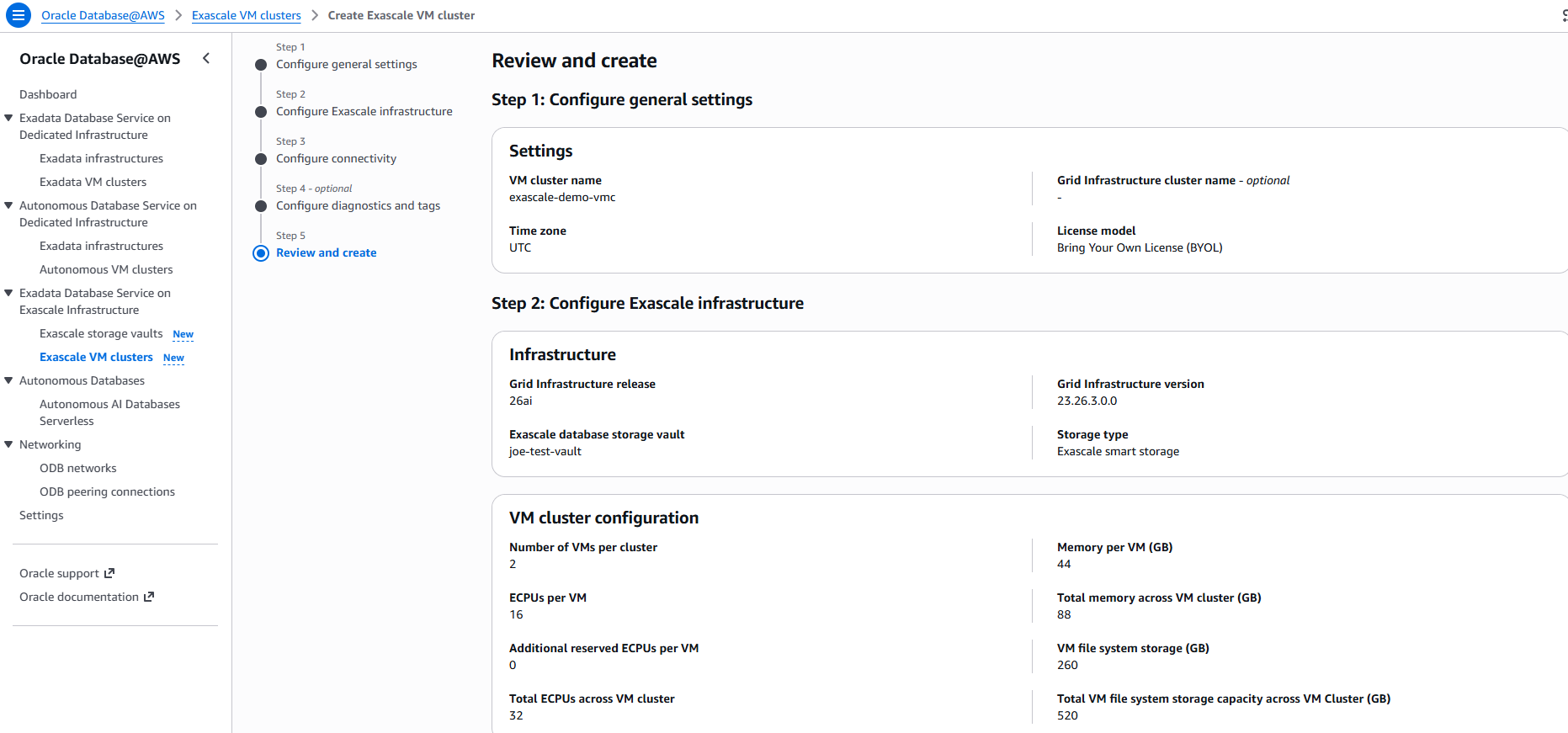
Figure 4: Reviewing the Exascale VM cluster general settings and configuration
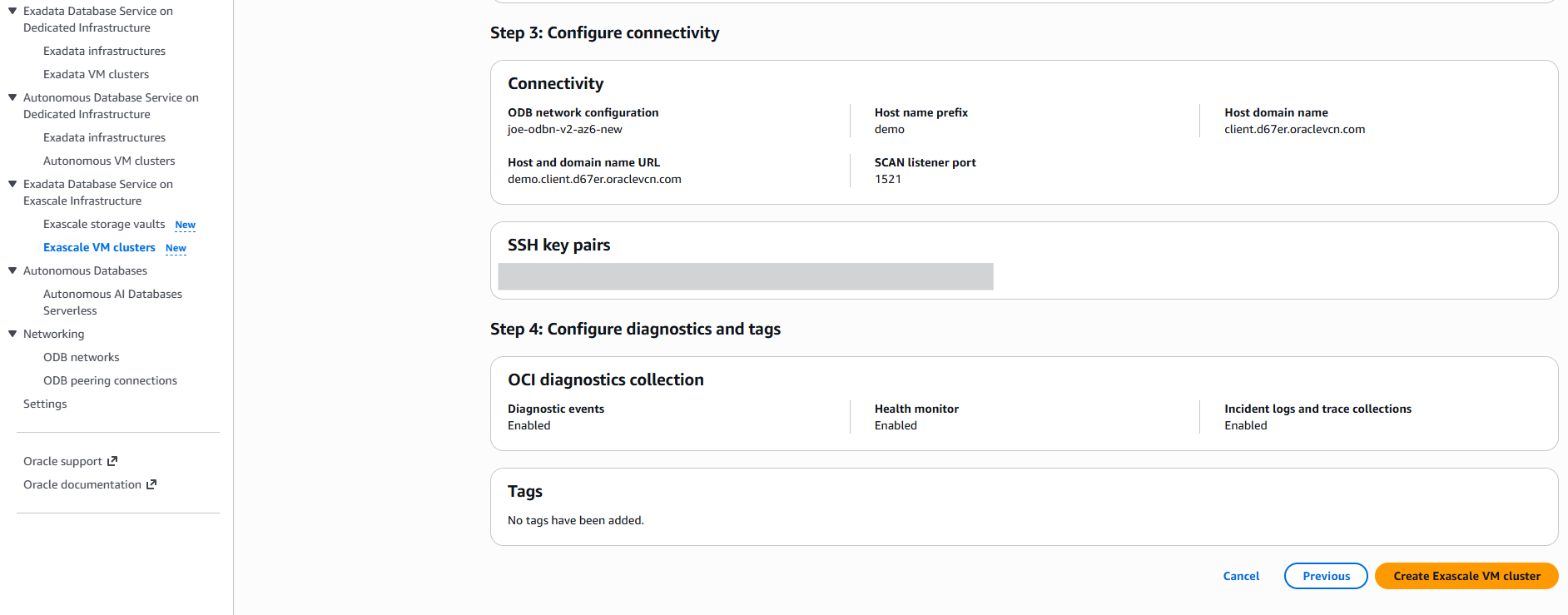
Figure 5: Reviewing VM cluster connectivity and diagnostics before creation
Step 4: Create your Oracle database
Once the VM Cluster is ready, navigate to the VM Cluster detail page on the AWS Management Console and choose Manage in OCI. This takes you to the OCI Console, where you create and manage Oracle databases. Select your Oracle Database version, configure automated backups to your Amazon S3 bucket, and create your database. Infrastructure resources (Storage Vault, VM Cluster, and ODB network) remain visible and manageable through both the AWS Management Console and AWS APIs.
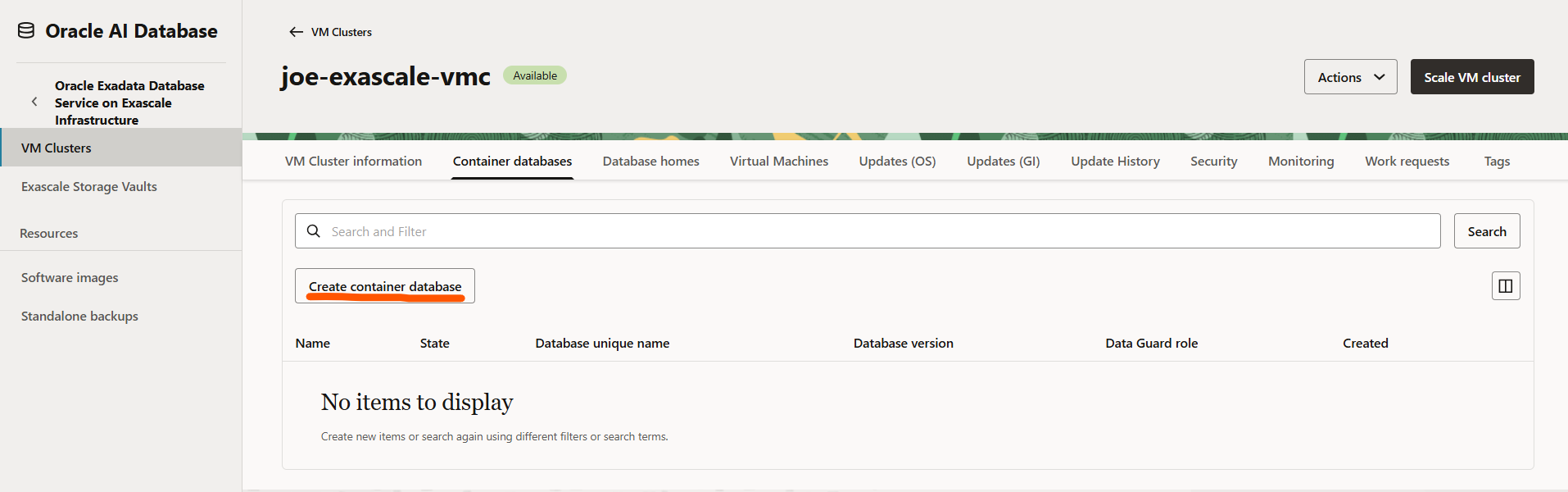
Figure 6: Creating an Oracle database from the VM cluster in the OCI Console
Pricing
ExaDB-XS pricing is consumption-based. You pay for the ECPUs and storage your VM Clusters consume, with no minimum infrastructure commitment and no separate charge for I/O operations per second (IOPS). Both License Included and Bring Your Own License options are available. Pricing is the same as Oracle Exadata Database Service on Exascale Infrastructure on OCI. For current unit prices, visit the Oracle AI Database@AWS pricing page.
Things to know
Availability. ExaDB-XS is available in all 22 AWS Regions where Oracle AI Database@AWS is available: US East (N. Virginia), US East (Ohio), US West (Oregon), US West (N. California), Canada (Central), South America (São Paulo), Europe (Frankfurt), Europe (Ireland), Europe (London), Europe (Milan), Europe (Paris), Europe (Spain), Europe (Stockholm), Europe (Zurich), Asia Pacific (Hyderabad), Asia Pacific (Mumbai), Asia Pacific (Osaka), Asia Pacific (Seoul), Asia Pacific (Singapore), Asia Pacific (Tokyo), Australia (Melbourne), and Australia (Sydney).
Storage vault capacity. Each Exascale Storage Vault supports up to 100 TB of intelligent storage. Customers requiring larger dedicated capacity can also use Oracle Exadata Database Service on Dedicated Infrastructure within the same ODB network.
Database versions. Oracle Database 19c and 26ai are supported at launch. We plan to add support for additional database versions over time.
Monitoring. ExaDB-XS resources publish metrics to Amazon CloudWatch in the AWS/ODB namespace. AWS CloudTrail captures API calls. You can configure Amazon EventBridge rules to trigger automated responses to database lifecycle events such as provisioning completion, patching, or scaling operations.
Start building today
ExaDB-XS is available today across all 22 Oracle AI Database@AWS Regions worldwide. Visit the Oracle AI Database@AWS service page, or navigate to Oracle AI Database@AWS on the AWS Management Console and choose Create Storage Vault to begin.
To learn more, visit the Oracle AI Database@AWS documentation for the Exascale section, or explore the resources below.
- Oracle AI Database@AWS documentation
- Oracle Exadata on Exascale documentation (OCI)
- Oracle AI Database@AWS pricing