AWS Database Blog
Migrate from Amazon EC2 to Amazon ElastiCache Serverless with zero downtime
When you run self-managed Valkey or Redis OSS on Amazon Elastic Compute Cloud (Amazon EC2), you size, patch, scale, and replace every node. Amazon ElastiCache takes on that work for you, giving you fully managed Valkey and Redis OSS with two ways to run it. With node-based clusters, you stay in control of capacity, choosing your node type, size, and number of replicas. With Amazon ElastiCache Serverless, there are no nodes to manage. You can create a highly available cache in under a minute. ElastiCache scales capacity and patches software for you, and you pay only for the data you store and the compute your workload uses.
For years, ElastiCache online migration has helped you move your self-managed Valkey and Redis OSS workloads on Amazon EC2 into a node-based cluster. But until now, there was no managed online option to move a live workload to Amazon ElastiCache Serverless.
On October 20, 2026, Amazon ElastiCache introduced online migration to Amazon ElastiCache Serverless for Valkey from self-managed Valkey and Redis OSS on Amazon EC2 with zero downtime*. With online migration, you get:
- One endpoint and fully managed replication. You change your application’s endpoint only once, with no maintenance window to switch over and no third-party replication tool. ElastiCache provisions the migration infrastructure and gives you one endpoint. You point your application at it while your source keeps serving traffic, and ElastiCache runs the replication and switches the endpoint to your serverless cache when you’re ready.
- A guided experience from start to finish. In the ElastiCache console, you enter the address of one node in your source, ElastiCache discovers the rest of your cluster, and three steps take you from prepare to cutover.
- The security controls you already have. Online migration connects to your source using encryption in transit (TLS) and authentication, and reads credentials from AWS Secrets Manager, so your existing security controls stay in place.
- Valkey 9.0 in the same move. You can migrate straight to Valkey 9.0 from a source in cluster mode running Redis OSS 4.0 through 7.2 or Valkey 7.2 through 8.1.
- Free for 180 days per account. Migration usage is free for 180 days from the first time your account prepares a migration. That gives you time to rehearse on test caches first, then migrate your production workloads.
In this post, we show what’s supported at launch, how online migration works, and how to run a migration in the ElastiCache console. We finish with tips for a smooth migration, and then pricing and availability.
What’s supported at launch
Online migration now gives you two targets for a self-managed cache on Amazon EC2. Choose Amazon ElastiCache Serverless for zero infrastructure management and instant scaling to any application demand, or a node-based cluster for fine-grained control over node type and replicas. In the following diagram, you can see which source engine versions and configurations online migration supports today, for Amazon ElastiCache Serverless and for node-based clusters.
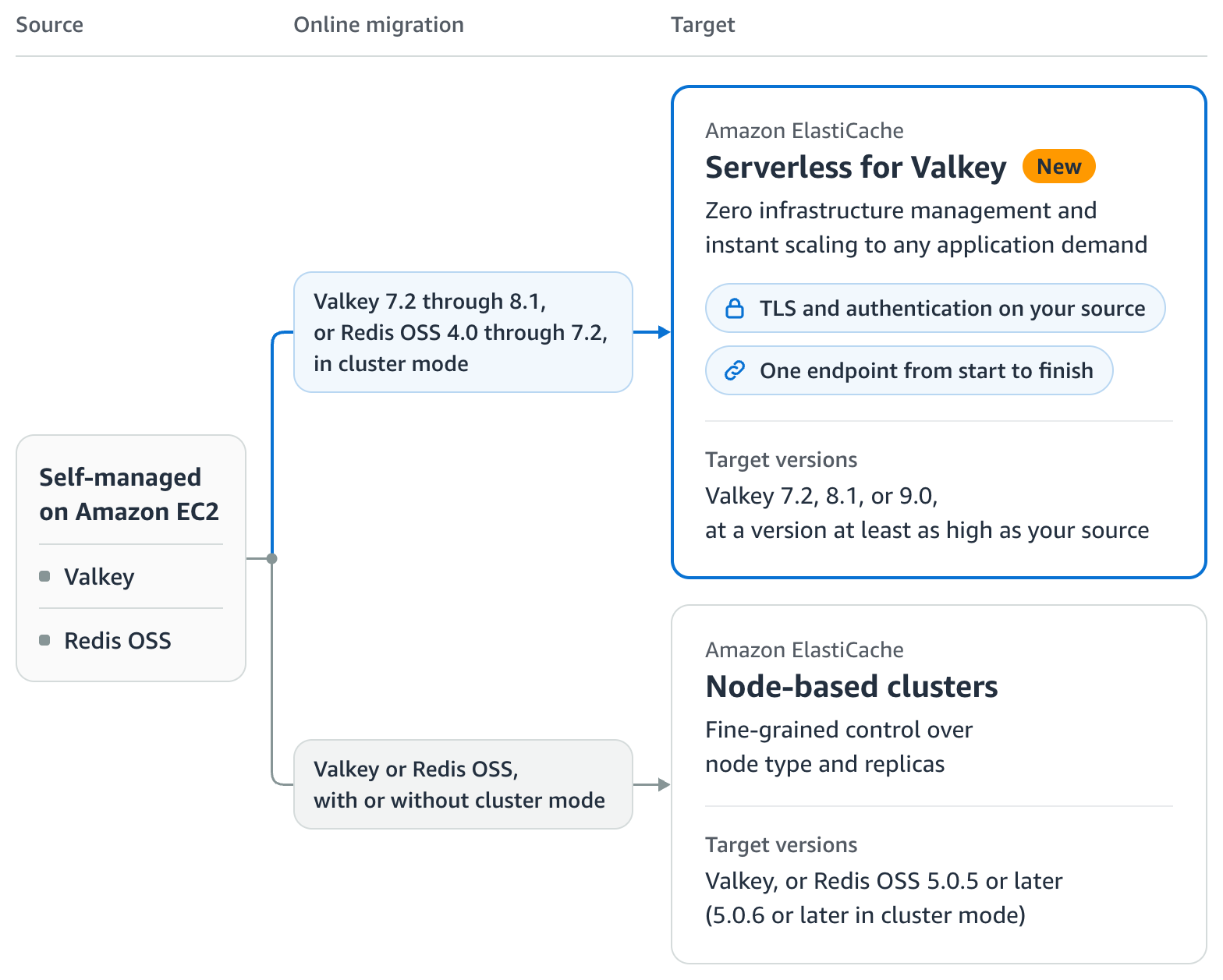
Figure 1: Sources and targets that online migration supports at launch
For Amazon ElastiCache Serverless, your source runs in cluster mode on Valkey 7.2 through 8.1 or Redis OSS 4.0 through 7.2, and your target runs Valkey 7.2, 8.1, or 9.0, at a version at least as high as your source. For node-based clusters, your source can run with or without cluster mode, and your target runs Valkey, or Redis OSS 5.0.5 or later for cluster mode disabled and 5.0.6 or later for cluster mode enabled.
For more details and prerequisites, see Prerequisites for online migration for Amazon ElastiCache Serverless and Online migration to node-based clusters.
How online migration works
Online migration runs in three steps:
- Prepare – ElastiCache validates your source, provisions the migration infrastructure, and gives you the migration endpoint, which is your serverless cache’s standard endpoint. You point your application at it, and until cutover, ElastiCache serves your requests from your source.
- Sync – ElastiCache replicates your data to your serverless cache, starting with a full sync and then keeping up with your writes.
- Cut over – You trigger the cutover yourself, which is the default option. Alternatively, you can have ElastiCache trigger it automatically for you, switching the endpoint to serve from your serverless cache at the next fully synced window. All shards cut over at the same time. During the cutover, your application keeps reading and writing on the same endpoint, and traffic flows continuously throughout.
ElastiCache monitors your migration along the way, checks its health before the sync and before cutover, and publishes an event at every step. The ElastiCache Service Level Agreement (SLA) applies to your serverless cache during a migration on the same terms as at any other time.
The following diagram shows how requests flow before and after cutover.
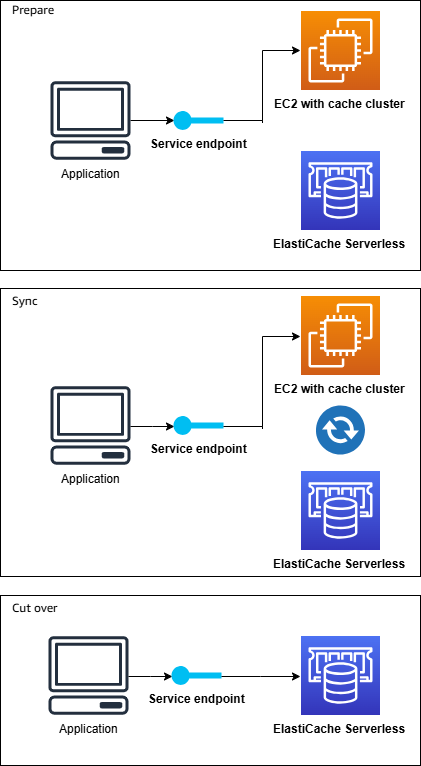
Figure 2: Online migration architecture
Before cutover, the migration endpoint routes requests to the self-managed source on Amazon EC2 while data replicates to Amazon ElastiCache Serverless. After cutover, the same endpoint serves from Amazon ElastiCache Serverless.
Performing a migration to Amazon ElastiCache Serverless
You can perform an online migration to Amazon ElastiCache Serverless in three steps using the ElastiCache console, the AWS Command Line Interface (AWS CLI), the AWS SDKs, or the ElastiCache API. Let’s look at an example on the console.
Before you start, have the following ready:
- An empty Amazon ElastiCache Serverless for Valkey cache in a virtual private cloud (VPC) that can reach your source.
- If your source requires authentication, its credentials in an AWS Secrets Manager secret encrypted with a customer managed AWS Key Management Service (AWS KMS) key. The console can create the secret for you.
- If your source uses TLS, the certificate authority (CA) certificates that issued its server certificate.
- Clients that can connect over TLS, because Amazon ElastiCache Serverless always encrypts data in transit.
For the full checklist, including network settings, your application’s users on your serverless cache, and supported commands, see Prerequisites for online migration and Source authentication for online migration.
Your clients might require some configuration changes to prepare for the cutover, such as reconnect handling for blocking commands and pub/sub subscribers. Valkey GLIDE, an open source client library for Valkey and Redis OSS, handles connection reestablishment and resubscribes pub/sub connections for you. To learn more, see Cutover modes.
Step 1: Prepare the migration
In the ElastiCache console, choose Migrations, Create migration, and then Migrate to serverless. Enter the address and port of one node in your source, and ElastiCache discovers the rest of the topology for you. Choose an authentication method and a TLS option, choose your serverless cache as the target, and choose Create. ElastiCache then provisions the resources the migration needs.
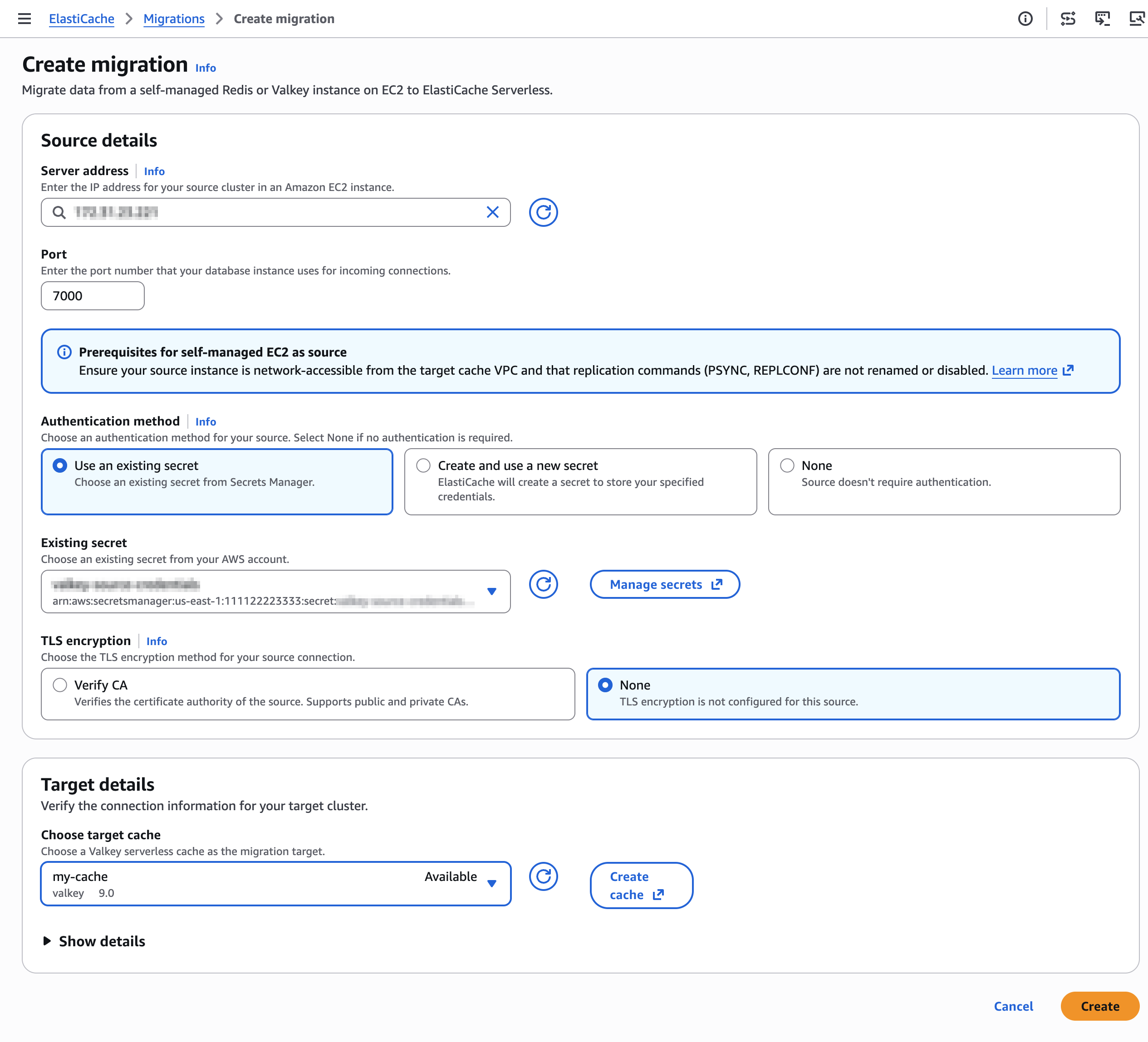
Figure 3: The Create migration page
When Current state reads Ready to sync, choose Copy migration endpoint and update your application to connect to it over TLS. Move every client to the migration endpoint, so they all switch to your serverless cache together at cutover.
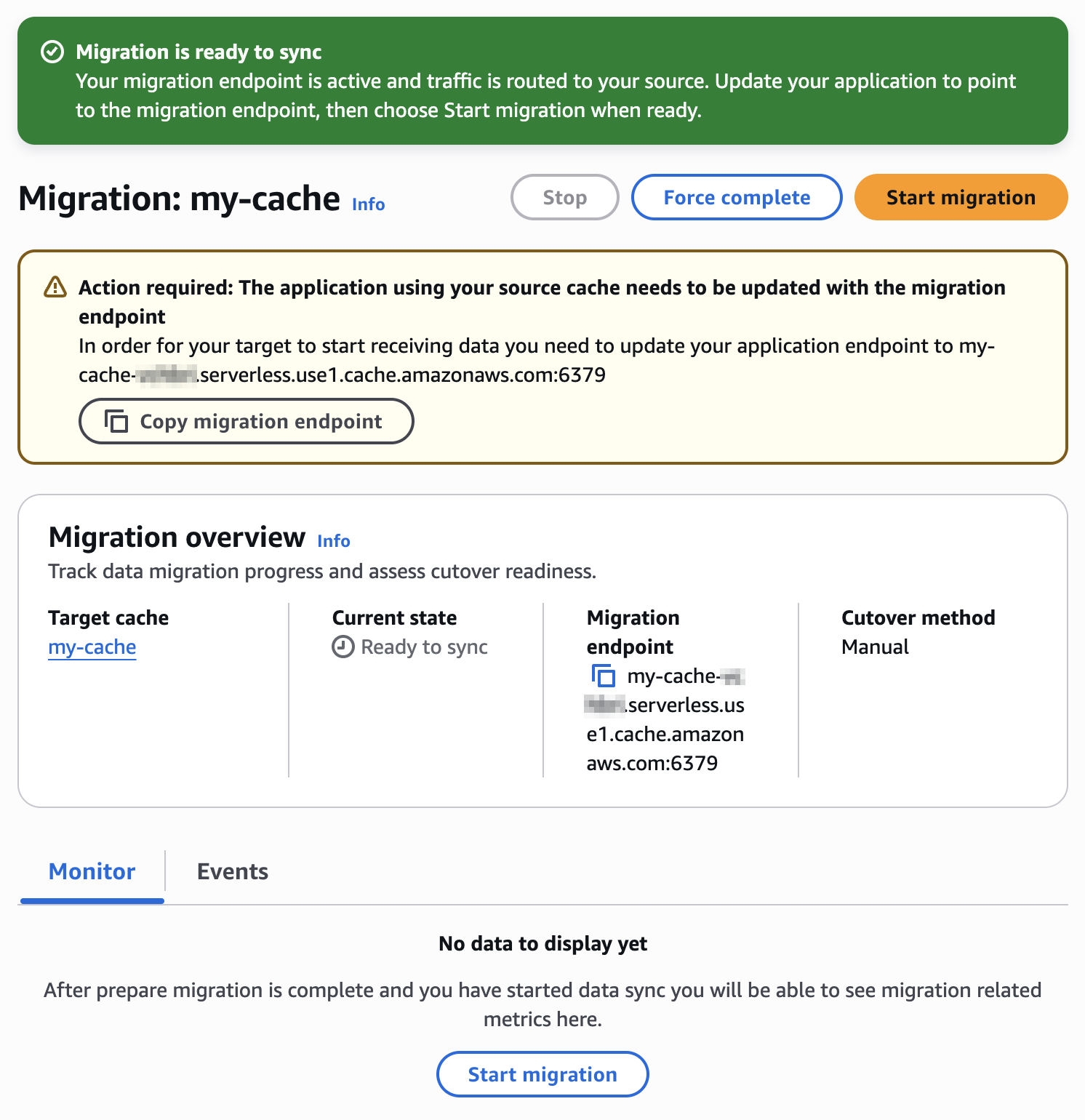
Figure 4: The migration details page in Ready to sync
Step 2: Start the data sync
Choose Start migration, select Manual cutover or Auto-cutover, and confirm. Choose manual cutover if you want to validate your serverless cache before you switch, for example by watching its metrics on the Monitor tab, or to choose the moment yourself. Choose auto-cutover when you don’t need to validate first.
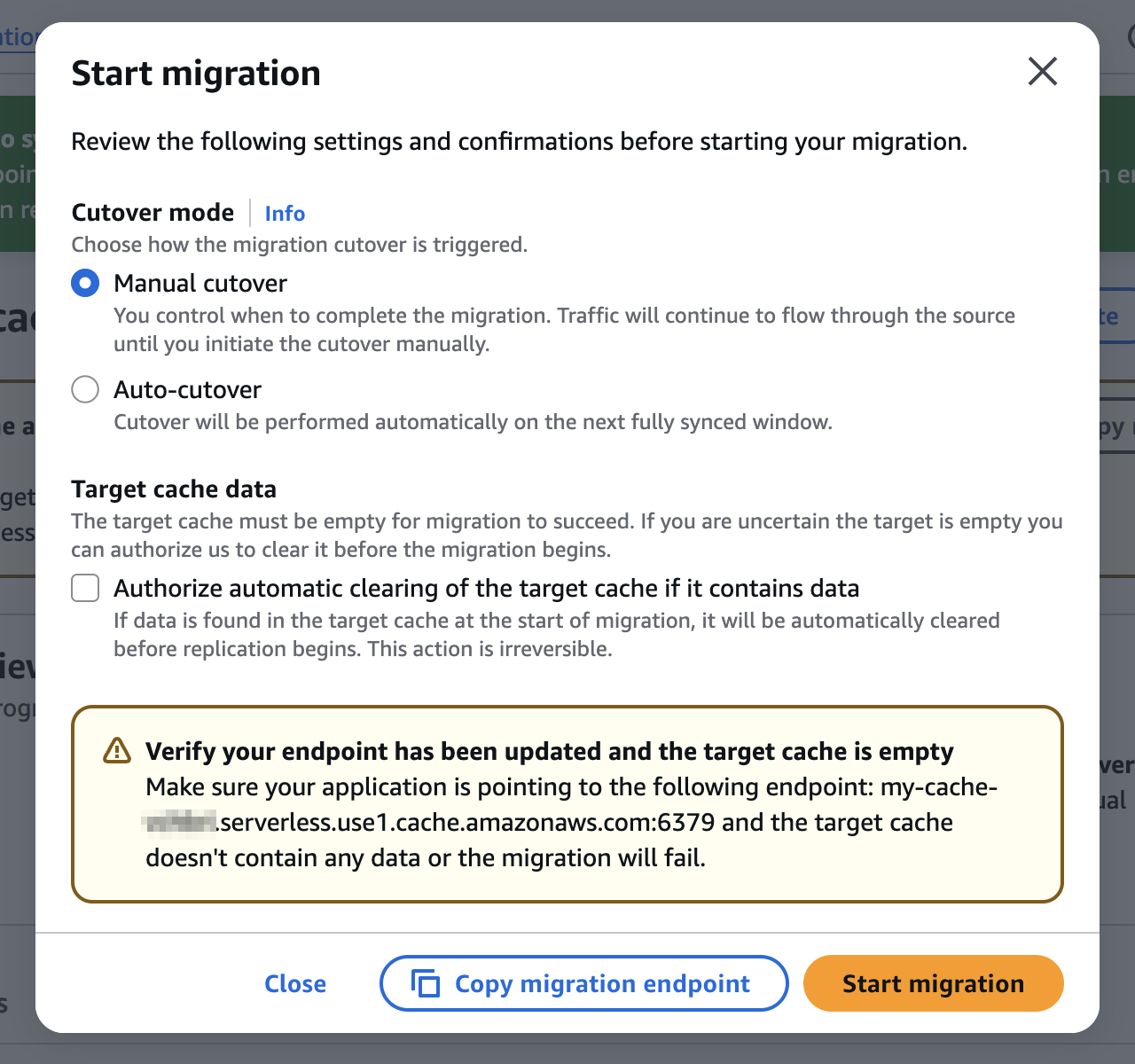
Figure 5: The Start migration dialog box
On the Monitor tab, BytesUsedForCache, CurrItems, and NetworkBytesIn show your data arriving, and the Events tab records every step, so you can follow your migration from start to finish.
Step 3: Complete the cutover
With manual cutover, choose Complete migration when you’re ready. With auto-cutover, there’s nothing to do. Either way, ElastiCache cuts over at the next fully synced window. Traffic moves to your serverless cache within seconds once the cutover starts, and ElastiCache then cleans up the migration infrastructure. When the migration finishes, the cache details page shows a completion banner.
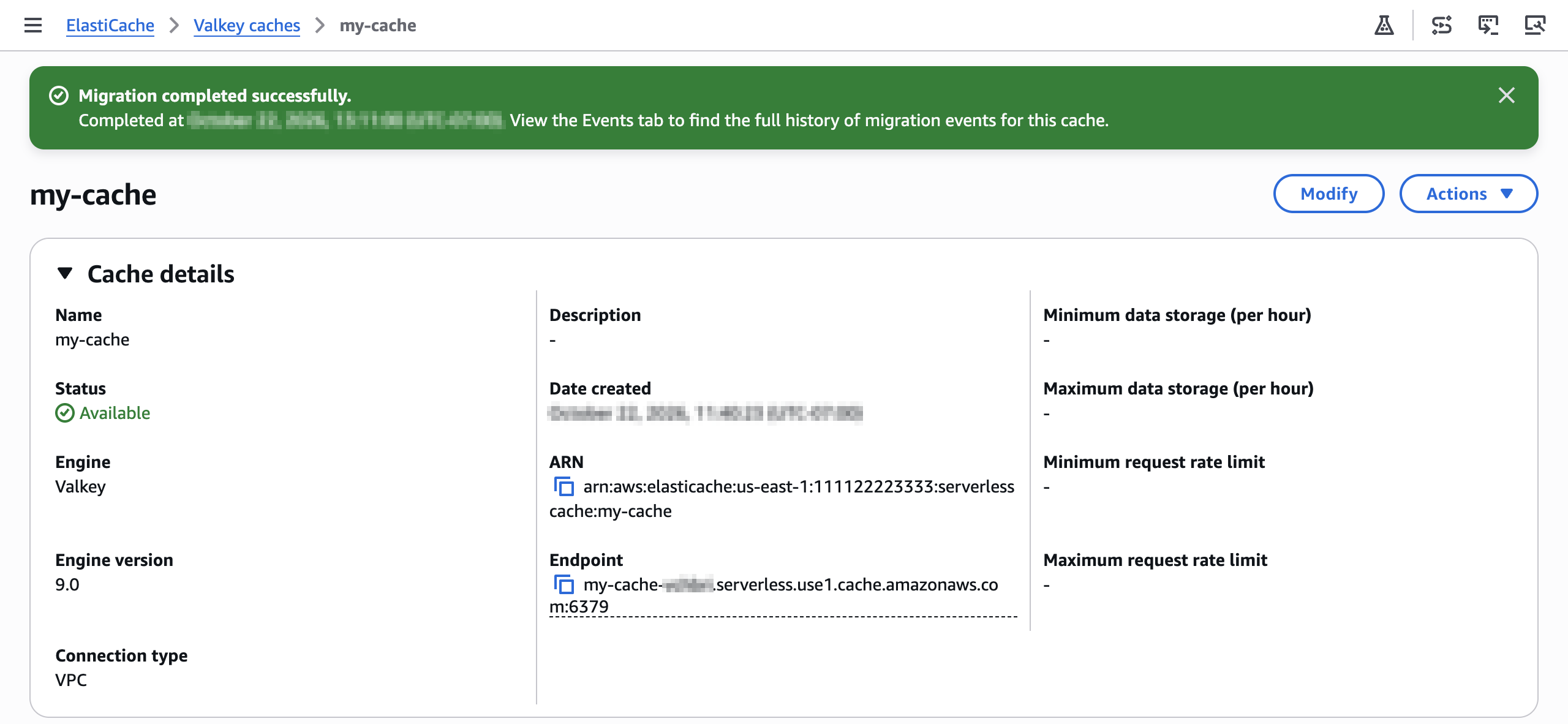
Figure 6: The completion banner on the cache details page
From cutover on, your serverless cache holds the authoritative copy of your data and serves your application on the same endpoint. You can decommission your source after you’ve confirmed your application is healthy.
With the AWS CLI, you run prepare-migration, start-migration, and complete-migration. For example, the following command prepares a migration from a source that requires authentication:
For start-migration, stop-migration, and complete-migration, which triggers a manual cutover, see the examples in Cutover modes.
Tips for a smooth migration
Keep the following in mind as you plan your migration:
- Give your source headroom. Your source serves your full workload until cutover, so give it CPU and memory to spare.
- Keep your source steady. Leave your source’s network, credentials, certificates, and shard layout as they are until the migration completes, and send every write through the migration endpoint.
- Pick a quieter time for cutover. Lighter writes help ElastiCache reach a fully synced window sooner.
For the complete guidance, including connection pools, pipelining, shard counts, and how to start a migration over, see Prerequisites for online migration and Cutover modes.
Pricing and availability
Migration usage is free for 180 days from the first time your account prepares a migration. After the free period, you pay per node-hour for the migration nodes that ElastiCache runs, until you complete the migration. ElastiCache bills your serverless cache separately at the standard data storage and ElastiCache Processing Unit (ECPU) rates, including during the free period. For details, see Amazon ElastiCache pricing.
Online migration is available in all commercial AWS Regions, the China Regions, and the AWS GovCloud (US) Regions.
Conclusion
With the new fully managed online migration from ElastiCache, you can move your self-managed Valkey and Redis OSS workloads on Amazon EC2 to Amazon ElastiCache Serverless for Valkey with zero downtime*. When you move them to Amazon ElastiCache Serverless, you no longer need to size, patch, scale, or replace nodes yourself. Create an empty Amazon ElastiCache Serverless for Valkey cache, then start your migration in a few steps from the ElastiCache console, or use the AWS CLI. With migration usage free for 180 days from the first time your account prepares a migration, you can try it on your next cache today. To learn more, see Online migration to Amazon ElastiCache Serverless, and tell us how your migration goes in the comments.
*Zero downtime means zero Errors returned to the client during migration, measured the same way the ElastiCache SLA measures availability. Your application continues reading and writing through cutover.