AWS Database Blog
Offline assessment and conversion with AI agents in AWS DMS
During the discovery and design phases of a database migration, you often can’t connect to the source database yet, and the target isn’t provisioned. That connectivity gap can stall early planning. AWS Database Migration Service (AWS DMS) Schema Conversion (DMS SC) closes it with offline source and virtual target modes. You assess and convert database schemas with AI agents before your infrastructure is ready. Early visibility into migration effort and readiness helps you plan more effectively, reduces dependencies on infrastructure timelines, and lowers idle resource costs.
AWS released offline source in July 2026. As of this writing, it supports Microsoft SQL Server and Oracle as the source and applies to any supported conversion direction, independent of the target engine. Virtual target mode launched in August 2025. With both modes, you can complete assessment and conversion end to end, without any live database connections.
Setting up this offline workflow requires several steps in the AWS DMS console: creating data providers with Virtual Mode, configuring an instance profile, and launching a migration project. You complete these steps before you can assess or convert a single object. With agentic AI, you can now drive the same workflow through natural language. An AI agent loads the DMS Schema Conversion skill and manages the full lifecycle. It creates data providers in Virtual Mode, builds the migration project, assesses and converts objects, and exports results. The agent does all of this from a conversational prompt in your IDE or terminal.
In this post, we show you how to use an AI agent with the DMS Schema Conversion skill to configure offline source and virtual target mode, assess and convert database objects, and transition to the actual target when it becomes available. You do all of this without navigating the AWS Management Console.
Solution overview
In this post, we use the offline source for Microsoft SQL Server, with data definition language (DDL) scripts exported using SQL Server Management Studio (SSMS) or SQL Server Management Objects (SMO).
Virtual target mode supports additional engines including Amazon Aurora MySQL, RDS for MySQL, RDS for Db2, and Amazon Redshift. It’s available in AWS Regions where AWS DMS Schema Conversion is supported.
Your AI agent connects to AWS through the AWS MCP server, which implements the Model Context Protocol (MCP). The agent loads the DMS Schema Conversion skill, a curated package of API patterns, system schema exclusions, operation sequencing rules, and best practices. It translates your natural-language intent into DMS SC API calls, manages the asynchronous operations, and returns structured results without console switching. The agent handles orchestration, the rule-based engine handles known patterns, and generative AI resolves the edge cases.
In the following sections, we walk through how to drive offline source and virtual target mode with an AI agent. The high-level steps are:
- Export source DDL scripts and upload to Amazon Simple Storage Service (Amazon S3).
- Install the DMS Schema Conversion skill in your AI agent.
- Ask the agent to set up the migration project. From a single request, the agent creates the source and target data providers in Virtual Mode, then creates and launches the migration project.
- Assess and convert database objects through the agent.
- Transition to the actual target database.
For a complete end-to-end walkthrough with the actual assessment and conversion output from a sample database, refer to the Example: Assessing and converting the SalesDB sample database section later in this post.
Prerequisites
To set up AWS DMS Schema Conversion, you must complete multiple configuration steps. For detailed instructions to plan, configure, create, and launch your database migration project using AWS DMS Schema Conversion, refer to the prerequisites section of the AWS DMS Schema Conversion user guide.
To drive the workflow with an AI agent, you need:
- An AI coding agent that supports MCP (such as Kiro CLI, Claude Code, Cursor, or Codex) with the AWS MCP Server configured.
- AWS credentials with permissions for AWS DMS, AWS Secrets Manager, Amazon S3, and Amazon Relational Database Service (Amazon RDS) operations.
For offline source, you need:
- DDL scripts exported from your SQL Server database, with each object stored as a separate .sql file with Unicode encoding.
- Each file starts with a USE [database_name] statement and contains one CREATE statement using schema-qualified names.
- A separate .sql file with a CREATE DATABASE statement for each database.
- An Amazon S3 bucket to store the DDL scripts.
- An AWS Identity and Access Management (IAM) role allowing the DMS service principal (dms.amazonaws.com) to assume it, with a policy granting s3:GetObject and s3:ListBucket permissions scoped to your S3 bucket.
Export and upload source DDL scripts
Export your SQL Server database objects using SSMS or SMO. Each object should be exported as a separate .sql file following the preceding format requirements. Store scripts for each database in a separate folder to avoid file name collisions, then upload them to your S3 bucket. In this post we use a sample SalesDB database whose objects (the Sales and HR schemas, tables, indexes, views, functions, and stored procedures) are exported as individual .sql files.
Install the DMS Schema Conversion skill
If your agent uses the AWS MCP server, ask it to load the skill:
Alternatively, install it locally from the AWS Agent Toolkit:
The skill works with Kiro CLI (.kiro/skills/), Claude Code (.claude/skills/), Cursor (.cursor/skills/), and Codex (.agents/skills/). With the skill loaded, the agent understands DMS SC-specific context, sequences operations correctly, and completes the offline workflow reliably with fewer errors.
Set up the data providers and migration project
In Virtual Mode, DMS Schema Conversion loads source metadata from DDL scripts in Amazon S3 (offline source) and stores the target database type without a provisioned target (virtual target), so you can assess and convert without connecting to a source or target database.
You don’t need to create each resource with a separate prompt. Describe the offline migration you want, and the agent automatically creates both the source data provider (Virtual Mode, offline source) and the target data provider (Virtual Mode, virtual target). It then creates and launches the migration project that links them with your instance profile and Amazon S3 access. You can still guide the agent one resource at a time if you prefer, but a single high-level request is enough.
Note: When it creates the migration project, the agent specifies an AWS Secrets Manager secret and an IAM role for all data providers, including those with Virtual Mode turned on. The DMS API requires them. For data providers in Virtual Mode, DMS never uses these credentials to connect to a database. They only satisfy the API contract. To avoid creating unused credentials, the agent can generate a placeholder secret in Secrets Manager. If you’d rather use your own, tell the agent which Secrets Manager secret and IAM roles to reference.
Note: The first operation on a new migration project takes a few minutes while DMS Schema Conversion allocates compute resources.
Assess and convert database objects
After schema conversion is launched, the agent works from the source metadata loaded from your DDL scripts in S3 and from the virtual target. You can explore, assess, convert, and export conversationally. This is the equivalent of navigating the source and target trees in the DMS SC console but done in natural language.
Browse the source before converting to understand migration scope:
Generate and export an assessment report to understand the level of effort of modernization:
Convert objects and export the generated code as SQL scripts for review before you apply it to the target:
For objects that require manual action after conversion, ask the agent for help. It can also activate generative AI-assisted conversion to maximize the automated conversion rate:
The agent analyzes the source SQL, identifies incompatible constructs, and returns a converted version with explanations of the changes made, reducing the manual effort needed to complete the migration.
Assessment and conversion can take several minutes for large schemas. You don’t need to wait idle. Press Ctrl+C to pause the agent’s polling and the operation keeps running server-side. Ask the agent to check the status later or instruct it up front not to wait: “Start converting the Sales schema but don’t wait for it to finish. I’ll ask you to check the status later.”
Example: Assessing and converting the SalesDB sample database
This section walks through an actual run: an offline assessment and conversion of a sample SQL Server database (SalesDB) to Amazon Aurora PostgreSQL using virtual target mode, in the US West (Oregon) Region (us-west-2). An AI agent with the DMS Schema Conversion skill loaded drove the entire flow.
Prompt
We asked the agent to run the whole offline workflow with a single prompt:
From this prompt, the agent created the offline SQL Server source data provider (Virtual Mode) pointing at the DDL prefix and a virtual Amazon Aurora PostgreSQL target data provider. It then created the supporting IAM roles, an Amazon S3 artifacts bucket, the instance profile, and the migration project. It also copied the DDL files into a dedicated s3://amzn-s3-demo-bucket/offline-ddl/ prefix so that only CREATE statements were imported.
Data providers on the console
The following screenshot shows the AWS DMS console Data providers page. Both the offline SQL Server source data provider and the Aurora PostgreSQL target data provider appear in the list, each with Virtual Mode turned on.
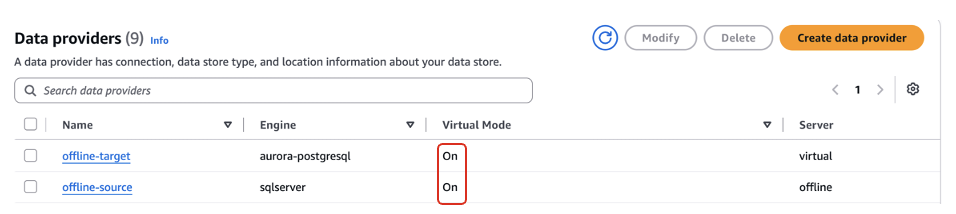
Figure 1: AWS DMS console Data providers page showing the offline SQL Server source and virtual Aurora PostgreSQL target
Imported metadata
The agent imported the DDL and confirmed the discovered structure: the SalesDB database containing the Sales and HR schemas, with five tables, two indexes, one view, one scalar function, and two stored procedures.
Assessment output
We asked the agent to assess the schemas and export the report:
Assessing the SalesDB schemas produced the following summary:
| Object category | Objects | Automatically converted | Objects with action items |
| Schema | 2 | 2 | 0 |
| Table | 5 | 5 | 0 |
| Constraint | 9 | 9 | 0 |
| Index | 2 | 2 | 0 |
| View | 1 | 1 | 0 |
| Scalar function | 1 | 1 | 0 |
| Stored procedure | 2 | 1 | 1 |
In this example, the exported assessment report showed 786 of 792 SQL syntax elements (about 99 percent) converting automatically. Only one object required manual action, the Sales.usp_PlaceOrder stored procedure, for three related items:
- The procedure ends a transaction inside a block with exception handlers (simple).
- BEGIN TRAN and SAVE TRAN transaction-management commands are not supported inside PostgreSQL functions (simple).
- The @@TRANCOUNT function is not supported and needs a user-defined replacement (complex).
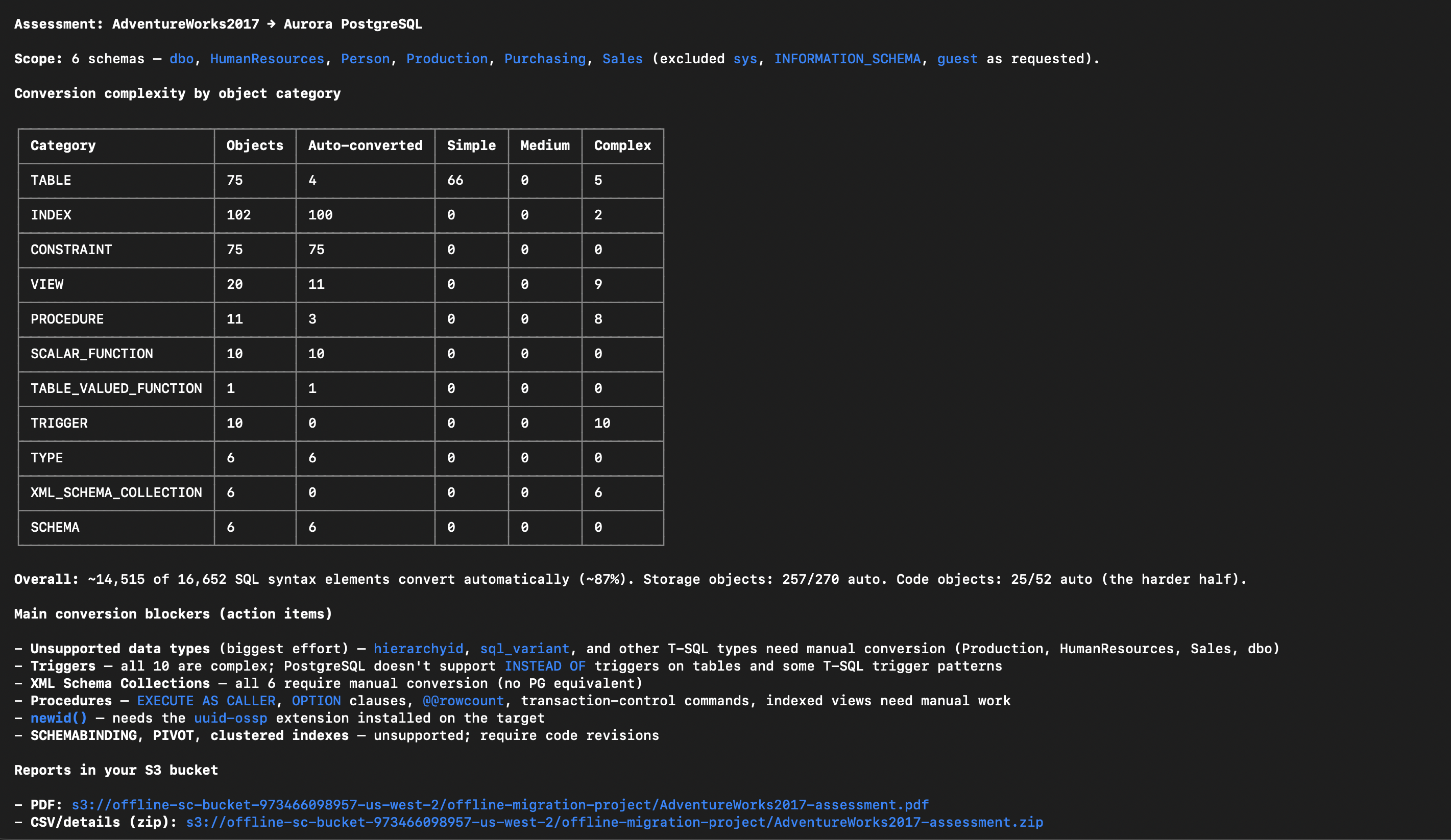
Figure 2: Assessment action items flagged for the Sales.usp_PlaceOrder stored procedure
Conversion output
Then we asked the agent to convert the schemas:
The conversion completed successfully. Every object except Sales.usp_PlaceOrder was converted automatically. That procedure was flagged with the preceding action items for manual rework. The agent exported both the assessment and post-conversion reports (PDF and CSV) to the project’s S3 artifacts bucket:
Because the target was virtual, the converted code can be reviewed or exported as SQL scripts. Applying it to a live database will come later, after the code has been validated and you’re ready to move to the actual target environment.
Converted usp_PlaceOrder
Finally, we asked the agent for the converted procedure code:
For the one object that needed manual attention, here is the PostgreSQL code the agent generated for Sales.usp_PlaceOrder. DMS Schema Conversion converts what it can and leaves clearly marked action-item comments where you must intervene. In this case, those are the explicit BEGIN, COMMIT, and ROLLBACK TRANSACTION statements and the @@TRANCOUNT function. The recommended fix is to move transaction control to the application side and replace @@TRANCOUNT with equivalent PL/pgSQL logic.
Transition to the actual target database
When your target database is ready, you have two options for applying the validated converted code. You can apply it yourself using the exported SQL, or you can have AWS DMS Schema Conversion apply it by switching the virtual target to a direct database connection.
To have the agent switch the virtual target to your actual database and apply the converted code, describe the transition:
The agent closes the schema conversion project and reconfigures the target. On the target data provider, it turns off Virtual Mode and sets the actual server name, port, and database name of your Aurora PostgreSQL instance. On the migration project, it sets the AWS Secrets Manager secret for the target database, which DMS Schema Conversion uses to connect. When the agent relaunches the project, the target tree switches from virtual to a live connection with all conversion results preserved. The agent then applies the converted code to the target objects.
Important: After you turn off Virtual Mode and save the data provider, you cannot turn it back on. Make sure your target database is ready before completing this step.
Clean up
When the migration is complete, ask the agent to clean up the AWS DMS Schema Conversion resources:
Also remove the DDL scripts from your S3 bucket if they are no longer needed.
Conclusion
In this post, we demonstrated how to use an AI agent with the DMS Schema Conversion skill to assess and convert SQL Server database objects to Aurora PostgreSQL using offline source and virtual target mode. You do all of this without connecting to the source database, provisioning a target, or navigating the console. We also covered how to transition from Virtual Mode to the actual target database and apply the converted code, all through natural language.
By combining offline-first assessment with agentic orchestration, you can accelerate migration timelines and reduce idle resource costs during discovery and design. The agent handles orchestration, and the rule-based engine handles known patterns. Generative AI resolves what rules alone cannot, minimizing manual effort at every level. This approach is especially valuable when direct connectivity to the source is not yet available. It also helps when you want to begin assessment while infrastructure provisioning proceeds in parallel, or when you need to avoid any load on production source systems during early planning.
To learn more, refer to Using AI agents with DMS Schema Conversion in the AWS DMS User Guide and Virtual mode for offline source and virtual target in the AWS DMS documentation.