AWS Database Blog
Troubleshooting Data Mismatches with tablediff on Amazon RDS for SQL Server
Amazon Relational Database Service (Amazon RDS) for SQL Server Enterprise Edition implements read replicas using SQL Server Distributed Availability Groups (a feature built on Always On technology) configured in asynchronous-commit mode. Each RDS instance operates within its own domain-independent Windows Server Failover Cluster (WSFC), and the distributed AG spans both clusters. The secondary replica receives transaction log blocks from the primary through a dedicated log transport session, hardens them to local persistent storage, and replays them through the redo thread. This applies to both same-Region and cross-Region read replicas, for example, a primary in us-east-1 replicating to a disaster recovery replica in eu-west-1. Under sustained write pressure or network degradation, particularly over cross-Region links with higher latency, the redo queue depth grows, manifesting as ReplicaLag in Amazon CloudWatch.
After lag recovery, the replica’s redo_queue_size may take additional time to drain even after all log blocks have been delivered (ReplicaLag = 0). Under normal operation, once redo completes, the data should be consistent. For regulated workloads, relying solely on synchronization_health = HEALTHY may not satisfy independent verification requirements. For an asynchronous-commit replica, HEALTHY means only that log data movement is active (synchronization_state = SYNCHRONIZING). It does not mean the replica has caught up, and it doesn’t mean the row values on both sides match.
This post demonstrates how to use the tablediff command-line utility for deterministic, clustered-index-ordered row comparison between an Amazon RDS for SQL Server primary and its read replica, producing T-SQL remediation scripts that correct divergence on a promoted replica instance.
Note: The generated fix scripts contain bare data manipulation language (DML) statements and require manual transaction wrapping before execution.
Why tablediff over LSN comparison
A common question is whether comparing last_commit_lsn from sys.dm_hadr_database_replica_states is sufficient to confirm data consistency. When last_commit_lsn matches on both primary and secondary AND redo_queue_size = 0, the replica should be consistent under normal operation. This is how Distributed Availability Group replication is designed to work.
However, tablediff serves a different purpose. It provides independent, row-level evidence of data parity. Replication metrics show whether log is moving and how far behind the replica is, but they don’t compare data. Microsoft also notes that dynamic management view (DMV) values can be out of date depending on replica state, and that secondary_lag_seconds reports 0 while data movement is suspended. This is valuable in the following scenarios:
- After forced failover: in asynchronous-commit mode, forced failover carries documented risk of data loss. tablediff quantifies exactly which rows were lost.
- Post-promotion validation: before routing production traffic to a promoted replica, tablediff provides auditable evidence that the promoted instance matches the source.
- Regulatory compliance: financial services, payments, and healthcare workloads often require independent data integrity verification beyond relying on a single system’s self-reported metrics.
- After infrastructure events: following storage subsystem errors, instance restarts during high write activity, or OS-level patches, tablediff confirms no residual divergence exists.
On Amazon RDS for SQL Server, CloudWatch publishes the ReplicaLag metric, which RDS calculates as the highest secondary_lag_seconds value across the replica’s databases. This metric, combined with redo_queue_size from the DMV, tells you replication has caught up. tablediff answers the next question: can you prove it at the data level?
Use case
Consider a scenario where your Amazon RDS for SQL Server read replica experienced a replication lag spike during a heavy write burst on the primary. The replica eventually caught up (ReplicaLag returned to zero, redo_queue_size drained), but you need to answer a critical question before your next reporting or reconciliation cycle: did every row make it across correctly? This is especially critical for in-Region as well as cross-Region replicas used for disaster recovery. For example, a payment processing primary in us-east-1 with a DR replica in eu-west-1 must maintain data parity for regulatory compliance.
Without validation, you risk serving stale or inconsistent data to downstream consumers: reporting dashboards showing incorrect balances, reconciliation jobs flagging false mismatches against external ledger systems, or audit queries returning incomplete result sets that trigger regulatory findings. You need a fast, deterministic mechanism to compare source and replica at the row level, identify exactly which rows diverged and how, and generate a targeted surgical fix, without the cost of rebuilding the replica from a fresh snapshot.
In this post, we use an in-Region read replica to demonstrate the validation and remediation workflow. However, the same process works for cross-Region scenarios as well.
Solution architecture
The solution positions an Amazon Elastic Compute Cloud (Amazon EC2) Windows instance as the tablediff execution client. The EC2 instance must have network connectivity (TCP 1433) to both RDS endpoints. For cross-Region replicas, this requires VPC peering, AWS Transit Gateway, or running tablediff from a location with routes to both endpoints. The EC2 instance opens two concurrent SQL connections, one to the source (primary) endpoint and one to the read-replica endpoint, over TCP port 1433. tablediff performs a sequential comparison by scanning both tables in clustered-index order through forward-only server-side cursors, with minimal client-side memory requirements (rows are streamed, not buffered in full). No cross-instance linked servers or direct RDS-to-RDS connectivity is required.
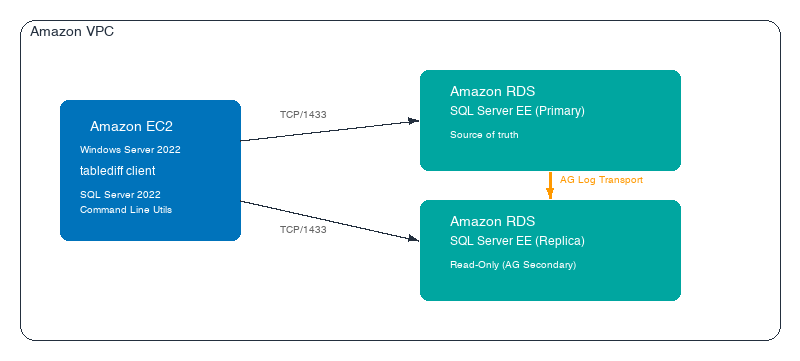
Figure 1: EC2 executes tablediff against both RDS endpoints. Distributed AG readable secondaries default to snapshot isolation.
Prerequisites
Before following this walkthrough, make sure the following requirements are met:
- Amazon RDS for SQL Server Enterprise Edition running one of the following supported versions:
- SQL Server 2016 (build 13.00.6300.2 or higher)
- SQL Server 2017 (build 14.00.3281.6 or higher)
- SQL Server 2019 (build 15.00.4073.23 or higher)
- SQL Server 2022 (all versions)
- SQL Server 2025 (all versions)
- Source instance configured as either Multi-AZ (Always On Availability Groups) or Single-AZ with automated backups enabled. Both deployment modes support read replica creation. Note: Single-AZ read replicas are supported on Enterprise Edition with automatic backup retention > 0 days.
Note: Single-AZ replica support was introduced April 2024. Confirm version-specific minimums in the AWS Single-AZ read replica documentation before proceeding.
- Automated backups enabled on the source instance with backup retention period > 0 days.
- At least one read replica provisioned. You can create up to 15 read replicas from one source DB instance.
- Amazon EC2 Windows Server 2022 instance with the SQL Server 2022 Replication feature installed (provides tablediff.exe). Optionally install Command Line Utilities for sqlcmd/bcp. No SQL Server Database Engine instance is required.
- Security group configuration: EC2 instance must have outbound TCP/1433 access to both the primary RDS endpoint and the replica RDS endpoint within the same VPC.
- SQL authentication accounts:
- db_datareader role on both the source and replica databases (for tablediff comparison reads).
- db_datawriter role on the promoted replica instance (for applying INSERT/UPDATE/DELETE fix scripts). Additionally, db_owner on the destination database, or at minimum CREATE TABLE + ALTER permission on the destination schema (per Microsoft’s tablediff documentation).
Note: Amazon RDS for SQL Server does not provide sysadmin access. All operations in this walkthrough work within the RDS permission model.
- Clustered primary key or unique index on all target tables. tablediff requires a deterministic row ordering for its sequential traversal. Heap tables can’t be compared.
- Make sure VIEW SERVER STATE is granted to the service account on the primary before creating the replica, so the permission propagates through the seeding snapshot.
- Login synchronization awareness
Important: Amazon RDS doesn’t synchronize user logins to read replicas. Logins that existed in the snapshot used to seed the replica will be present on the replica. Logins created on the primary after the seeding snapshot aren’t available on the replica and must be manually recreated with a matching SID. DAG replication operates at the database level. The master database (which stores logins) is never part of a DAG. For existing replicas where the login is missing, you can’t CREATE LOGIN on a read-only replica. You must either (a) drop and recreate the replica so the new snapshot includes the login, or (b) promote the replica first, then create the login.
Best practice: Create the tablediff service account on the primary before creating the read replica, or manually create it on existing replicas:
Validation pipeline
After a replication lag event recovers, follow this manual validation sequence to confirm data consistency before resuming production reads from the replica.
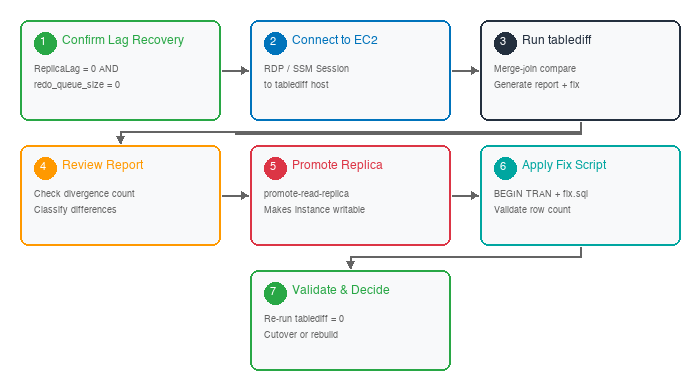
Figure 2: Manual validation pipeline: seven steps from lag recovery to remediation.
- Verify that both the transport layer and the redo layer have fully caught up before running any comparison. A zero
ReplicaLagmetric in CloudWatch alone is insufficient. It reflects the send queue (log block delivery), not the redo queue (log block replay into data pages). - Run the following query on the primary RDS instance (not the replica):
Note: On RDS, the primary exposes the remote replica state through the distributed AG forwarder. This query pattern is validated for the RDS implementation and might behave differently in non-RDS distributed AG configurations.
- Only proceed to the next step when:
ReplicaLag= 0 in Amazon CloudWatch ANDredo_queue_size= 0 ANDlog_send_queue_size= 0
- Connect to the EC2 tablediff client instance through RDP or AWS Systems Manager Session Manager. The client must have network connectivity (TCP/1433) to both the primary and replica RDS endpoints within the same VPC.
- Run tablediff against each critical table. tablediff compares each row on both sides and classifies it as matching, source-only, dest-only, or column-mismatched.
- Important:
-etflag restriction. The -et parameter instructs tablediff to create a results logging table on the destination server. When the destination is a read-only replica, this write operation will fail. Don’t use -et when the destination is a read-only replica. Reserve -et for post-promotion runs when the destination is writable. - Database owner check: Before running tablediff, verify the database owner on both instances. If owners differ after promotion, run:
EXEC msdb.dbo.rds_changedbowner_to_rdsa 'PaymentsDB';
- Important:
- Review the generated report file (-o output) for divergence count. The report summarizes total rows compared and differences found. Zero differences means the replica is consistent, with no further action needed.
- If divergence is found, promote the read replica to a standalone writable instance using
aws rds promote-read-replica. This severs the AG replication link and converts the instance to accept DML operations.- Warning: Promotion is irreversible. After promoted, the instance becomes a standalone DB instance with no relationship to the original primary. You can’t revert it back to a read replica. Only promote if the replica is being adopted as the new production instance, or you have confirmed a fresh replica can be recreated afterward. Don’t promote solely to apply fix scripts if the replica is still needed for production read offloading. A fix script generated before promotion can be stale, because the replica keeps applying changes until it is promoted. Always regenerate it against the promoted instance before applying it.
- Apply the generated fix script (-f output) on the promoted instance within an explicit transaction.
- Validate row count parity post-remediation using COUNT(*) comparison or CHECKSUM_AGG. Re-run tablediff to confirm zero divergence, then either use the promoted instance as the new primary or create a fresh replica from the source.
Walkthrough
Create the source table
Connect to an RDS for SQL Server instance using SQL Server Management Studio (SSMS). We use the database PaymentsDB, as shown in the following screenshot.
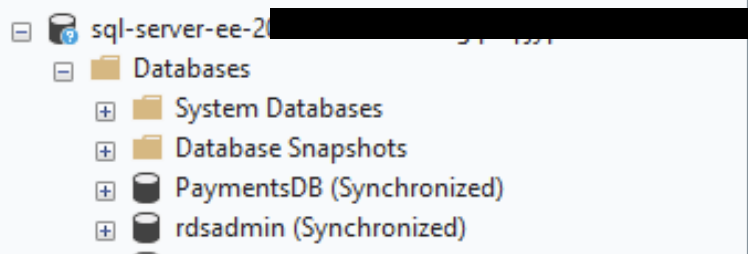
Figure 3: The PaymentsDB database on the source Amazon RDS for SQL Server instance in SSMS.
The source table uses a clustered primary key on TransactionID (identity column) which provides the deterministic row ordering that tablediff requires for its merge-join. PAGE compression reduces I/O during the full-table scan, and the covering index supports account-based reconciliation queries without touching the clustered index.
Simulate divergence on the replica
Note: Before simulating divergence, promote the read replica to a standalone writable instance using aws rds promote-read-replica. An active read replica is read-only and doesn’t accept DML. Promotion severs the AG replication link and makes the instance writable, so you can inject test divergence scenarios.
We now promote sql-server-ee-2022-rr1 as a standalone database instance for demonstration purposes. You can refer to the guide on “Promoting a Read Replica to a Standalone DB Instance” to learn more about the steps involved in promoting a read replica.

Figure 4: Promoting the read replica sql-server-ee-2022-rr1 to a standalone DB instance in the Amazon RDS console.
The following statements simulate divergence patterns for demonstration purposes, so we can test tablediff’s ability to detect and classify different types of row-level differences.
- Scenario A: Stale column value, where Amount differs from source.
- Scenario B: Missing rows, where rows are absent from the replica.
- Scenario C: Incorrect column value, where Status differs from source.
- Scenario D: Orphaned row, which exists on the replica but not on the source.
Connect to the promoted RDS for SQL Server instance using SQL Server Management Studio (SSMS).
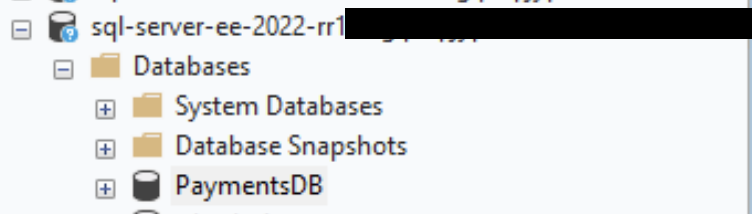
Figure 5: Connecting to the promoted instance in SSMS before injecting the divergence scenarios.
Install tablediff on Amazon EC2
The tablediff utility is not included in MsSqlCmdLnUtils.msi (which provides only sqlcmd and bcp). It is part of the SQL Server Replication tools. Install it by running SQL Server Setup (Developer or Express edition) and selecting only the Replication feature. No Database Engine instance is required. After installation, tablediff.exe is at
C:\Program Files\Microsoft SQL Server\160\COM\tablediff.exe. See Microsoft Learn — tablediff Utility for full installation details and version-specific paths.
Run tablediff
The tablediff invocation below opens two forward-only cursors, one against the source primary and one against the replica. The -c flag turns on column-level difference reporting so the output identifies exactly which columns differ for each mismatched row. The -strict flag enforces strict schema matching, ensuring the source and destination column data types are identical (disabling the default type-mapping leniency).
Note: Before running the tablediff utility, check the database owners of the source and target databases, because they might have changed as part of the read-replica promotion. If the database owners are different, use the following command: msdb.dbo.rds_changedbowner_to_rdsa 'YourDatabaseName', as documented in the section on Changing the db_owner to the rdsa account for your Amazon RDS for SQL Server database.
Parameter reference
| Parameter | Description |
| -c | Turns on column-level difference reporting. When set, tablediff reports which specific columns differ for each mismatched row. This is a boolean flag. It doesn’t accept a column list. tablediff always compares all columns in both tables. |
| -strict | Enforces strict schema validation. Disallows the default data-type mappings (for example, tinyint ↔︎ int, varchar(max) ↔︎ text). Both tables must have matching column data types. Also requires the destination table to have a PK, identity, or ROWGUID column. |
| -f | Generates a T-SQL fix script with bare DML statements (INSERT/UPDATE/DELETE). The script is NOT idempotent. Apply only once after verifying divergence. |
| -o | Human-readable report file with row counts and divergence classification. |
| -dt | Drops the results logging table (specified by -et) if it already exists, then re-creates it. Requires write access to the destination. Don’t use when the destination is a read-only replica. Always used in combination with -et. |
Because tablediff has no column-exclusion flag, use one of these approaches to omit columns (for example, RowVersion):
Approach 1: View. Create a view on each instance that excludes the unwanted column, then pass the view name to -sourcetable / -destinationtable:
Approach 2: Staging table. SELECT … INTO the needed columns into local staging tables on the EC2 instance (requires a local SQL Server instance), then run tablediff locally. Avoids creating views on production.
Approach 3: Post-filter. Run tablediff against the full table with -c, then programmatically discard mismatches involving only the excluded column. Lightweight but requires scripted output parsing.
Review the generated sync script
tablediff generates a T-SQL fix script containing bare INSERT, UPDATE, and DELETE statements, without transaction boundaries or idempotent guard clauses. The following sample script has been manually enhanced with WHERE NOT EXISTS and column-value check guards for safe re-execution.
The report file and sync script will be available in the following locations: C:\diff\report and C:\diff\sync.
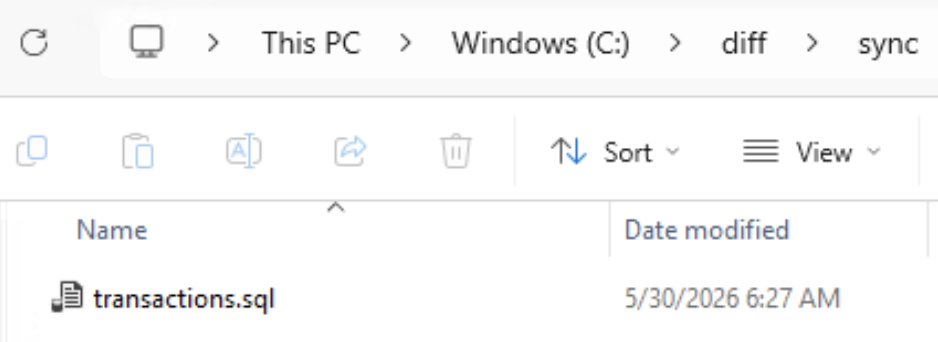
Figure 6: The tablediff report file in the C:folder.
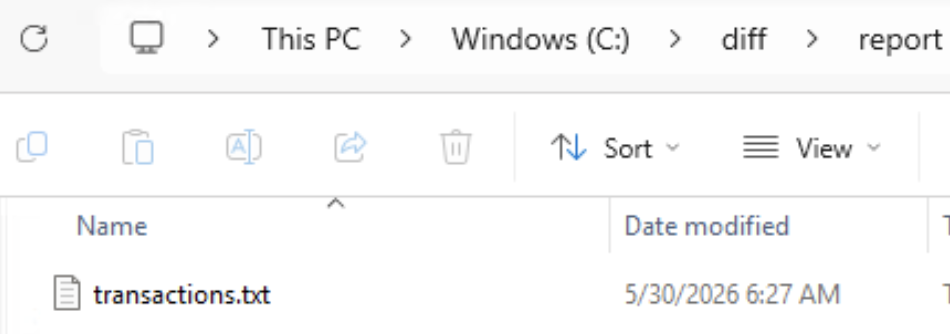
Figure 7: The tablediff-generated sync script in the C:folder.
Understand the expected comparison output
When tablediff completes, it produces a report file (-o) and a fix script (-f). The report summarizes the comparison result with a line like: “Mismatch – Loss: 2, Orphan: 1, Updates: 2”. Here is how to interpret each classification:
- Source Only (Loss): Rows that exist on the source primary but are missing from the destination replica. These represent log blocks that were never delivered or redo failures that skipped entire INSERT operations. tablediff emits an INSERT statement to restore these rows on the destination.
- Dest Only (Orphan): Rows that exist on the destination replica but not on the source primary. These typically result from split-brain writes during promotion windows or uncommitted transactions that were rolled back on the primary but persisted on the replica. tablediff emits a DELETE statement to remove these rows.
- Column Mismatch (Update): Rows where the primary key matches on both sides but one or more non-key column values differ. These occur when the redo thread partially applied a log record (for example, updated the page header but crashed before writing the in-row data) or skipped a log record entirely. tablediff emits an UPDATE statement setting the destination column to the source value.
In our test scenario, tablediff classifies 5 divergences across these three categories:
| TransactionID | Classification | Source Value | Possible Cause |
| 5 | Column mismatch (UPDATE) | Amount: -$5,000 compared to -$4,500 | Stale column value |
| 9 | Column mismatch (UPDATE) | Status: COMPLETED compared to PENDING | Incorrect column value |
| 8 | Source Only (INSERT) | Row missing from replica | Missing rows |
| 10 | Source Only (INSERT) | Row missing from replica | Missing rows |
| 11 | Dest Only (DELETE) | Row not on source (orphan) | Split-brain write during promotion |
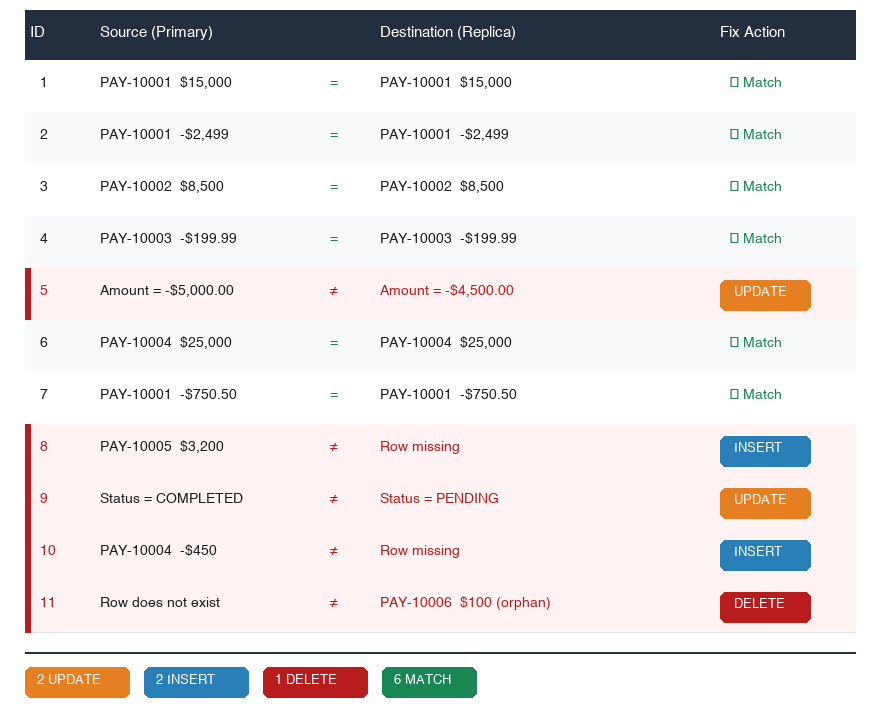
Figure 8: Merge-join traversal classifies 5 divergences: 2 UPDATEs, 2 INSERTs, 1 DELETE.
Note: tablediff identifies WHAT diverged but can’t determine WHY. Root cause analysis requires correlating with SQL Server error logs, AG health events, and CloudWatch metrics from the lag window. The preceding classifications are illustrative examples for this walkthrough.
Choose a remediation path
Note: In this walkthrough, the replica was already promoted during “Simulate divergence.” The following steps describe the production workflow. In production, run tablediff against the read-only replica first, then promote only if remediation is needed. Promotion is irreversible. After promoted, the instance is no longer a replica. To re-establish replication, you must create a new read replica from the source.
Step 1: Promote the read replica
Before applying any remediation, promote the read replica to a standalone writable instance. An active read replica operates in ALLOW_CONNECTIONS = READ_ONLY mode, so no DML can execute against it. Promotion converts the instance to an independent RDS instance that accepts writes.
Step 2: Apply fixes on the promoted instance
With the replica now promoted and writable, apply the tablediff-generated fix script. Wrap the entire script in an explicit transaction with a validation gate so the operation is atomic, with either all fixes applying or none:
CRITICAL: Fix script safety
tablediff’s -f output contains bare INSERT, UPDATE, and DELETE statements without transaction boundaries and without idempotent guard clauses. The raw script isn’t safe to execute directly because:
- If execution is interrupted, the database is left in a partially corrected state with no rollback.
- If the script is re-run after partial or full execution, duplicate key violations or incorrect overwrites will occur.
You must wrap the fix script in an explicit transaction with a validation gate.
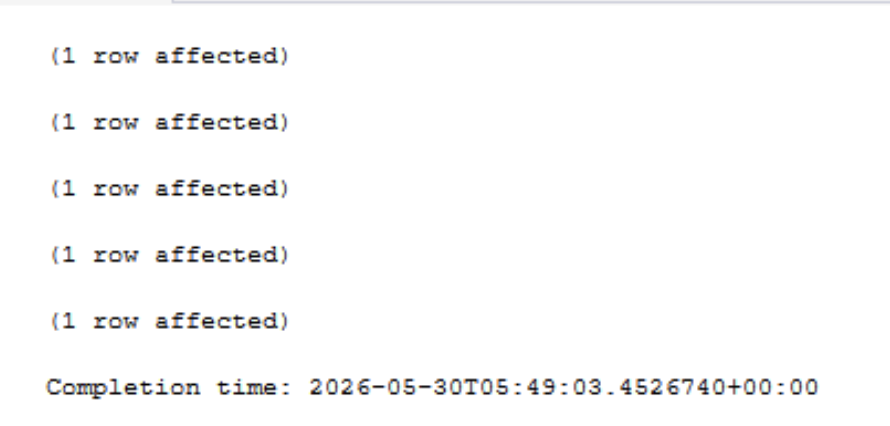
Figure 9: Successful execution of the wrapped fix-script transaction on the promoted instance.
Validate data after applying the fix
After executing the fix script, validate that the promoted instance now matches the source. Run the following queries separately on each instance, then re-run tablediff to confirm zero divergence:
Compare the RowCount and TableChecksum values manually. If both match, the data is likely consistent, but CHECKSUM_AGG is not collision-free. Always confirm with the following tablediff re-run for definitive validation. CHECKSUM_AGG reads every row and covers only the columns listed in CHECKSUM() (here TransactionID, AccountNumber, Amount, and Status), so run it off-peak on large tables.
Source:
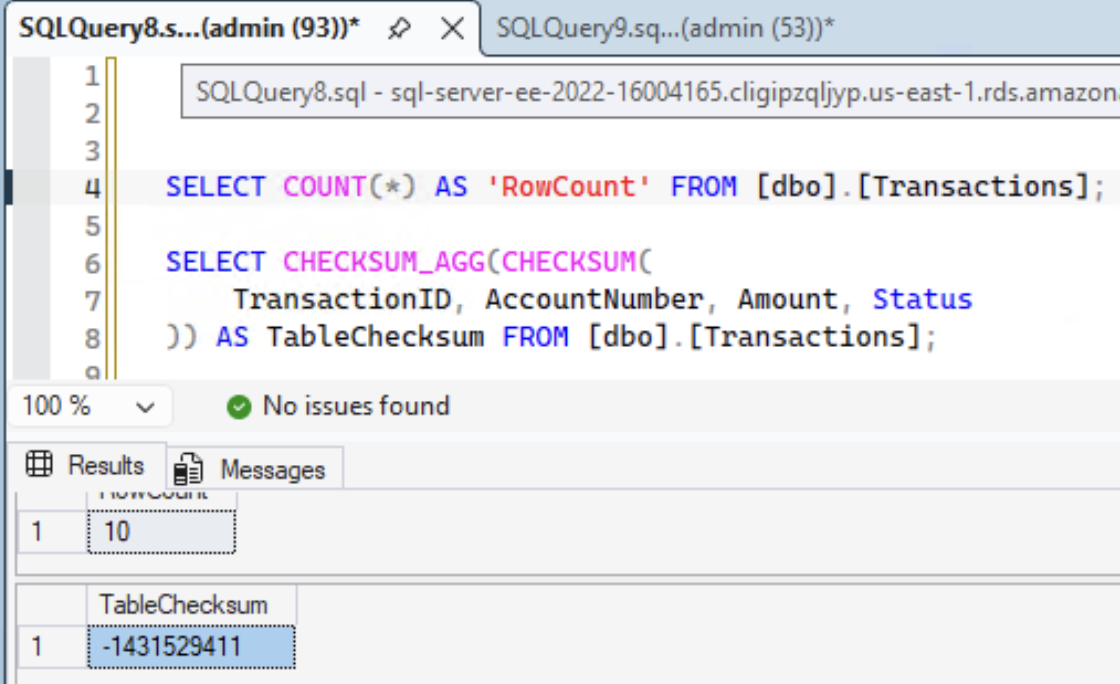
Figure 10: Row count and CHECKSUM_AGG results on the source (primary) instance.
Promoted Read-Replica:
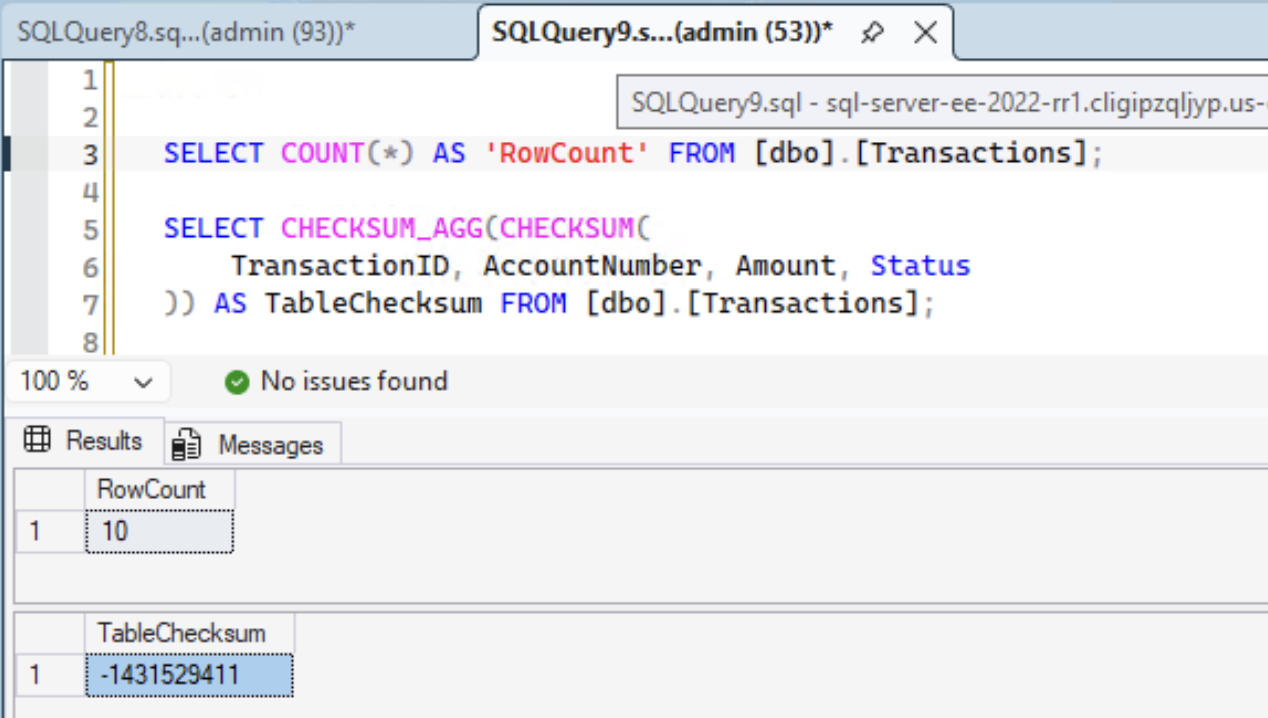
Figure 11: Row count and CHECKSUM_AGG results on the promoted instance, matching the source.
Only proceed with DNS cutover or production traffic routing after tablediff reports zero differences.
Step 3: Validate and decide next action
After successful remediation, choose one of the following paths:
- Use the promoted instance as the new primary: Update application connection strings to point to the promoted instance. Create a new read replica from it if needed.
- Discard and rebuild: If the promoted instance was only used for validation, delete it and create a fresh read replica from the original source.
- Re-run tablediff: Point tablediff at the original source and the promoted instance to confirm zero divergence before cutting over.
When to skip promotion and rebuild instead
Promotion and targeted DML remediation is not always the right approach. Consider rebuilding the replica from a fresh source snapshot when any of the following conditions apply:
- Divergence spans a large number of tables or rows: If tablediff reports mismatches across hundreds of tables or millions of rows, the fix script becomes unwieldy to review, test, and validate. Each fix statement must be verified against the source. At scale, this manual review burden exceeds the cost of a clean rebuild.
- Divergence includes structural or schema-level inconsistencies: If the replica shows missing indexes, altered constraints, or schema drift beyond row-level data mismatches, targeted DML can’t resolve the issue. A rebuild from snapshot restores the complete physical and logical structure.
- The workload on the replica can’t tolerate fix script execution overhead: Applying thousands of UPDATEs and INSERTs on a promoted instance generates significant transaction log volume, consumes tempdb for version store, and may trigger autogrow events. If the instance is undersized or the storage subsystem is already saturated, the fix script itself can degrade performance or fail mid-execution.
- You can’t adequately test the fix script before production use: In a regulated environment, every DML change applied to a production-bound instance must be tested in a non-production environment first. If you lack a test instance that mirrors the promoted replica’s state, you can’t validate that the fix script produces the expected outcome without unintended side effects.
- The root cause of divergence is unresolved: If the underlying cause (network instability, storage subsystem errors, AG configuration issues) has not been identified and remediated, a promoted and patched instance may diverge again when re-established as a replica. A rebuild after root cause resolution provides a clean baseline with confidence that the issue won’t recur.
To rebuild: Delete the existing replica (aws rds delete-db-instance, skip final snapshot if source is healthy), then recreate it (aws rds create-db-instance-read-replica) or through AWS Console. The new replica initializes from a fresh source snapshot and replays subsequent transaction logs.
Verify convergence with tablediff once redo_queue_size reaches zero. Monitor for lag recovery before running tablediff.
Before running tablediff, confirm that both the transport queue and redo queue have fully drained. A zero ReplicaLag metric alone is insufficient. It reflects the send queue, not the redo queue. Query the replica directly:
Edge cases: when tablediff produces false results
tablediff is a point-in-time comparison tool, not a transactionally consistent snapshot across both endpoints. Several scenarios can produce false positives (reporting divergence that does not actually exist) or false negatives (missing real divergence):
In-flight transactions on the source
The default isolation level used by tablediff for source reads isn’t explicitly documented. If your environment uses READ UNCOMMITTED or if tablediff internally uses NOLOCK hints, actively modifying rows on the primary during the comparison may produce dirty reads. This produces false positives: tablediff reports a mismatch for a row whose committed value actually matches the replica. Mitigation: run tablediff during a maintenance window or low-write period. For critical validations, quiesce writes on the source before running the comparison.
Active redo on the replica
If redo_queue_size is not zero when tablediff runs, the replica is still catching up. Rows that have been committed on the source but not yet replayed on the replica will appear as Source Only (false positives). The replica’s snapshot isolation ensures a consistent read within itself, but that snapshot may trail the source by the current redo queue depth. Mitigation: always confirm redo_queue_size = 0 before running tablediff.
Page splits during scan
On the source (NOLOCK), if a page split occurs while tablediff’s cursor is scanning that Region of the clustered index, rows can be skipped or read twice. A skipped row produces a false Source Only result. A double-read is harmless (same key, same values). This is inherent to READ UNCOMMITTED scans on actively modified tables. Mitigation: if tablediff reports a small number of Source Only rows during a high-write period, re-run the comparison during quiescence to confirm.
ROWVERSION not excluded
RDS read replicas use Distributed AGs (physical/log-level replication), where
ROWVERSIONbytes are replayed and should be identical. IncludingROWVERSIONcan help detect divergence. Caution: after promotion, new writes generate localROWVERSIONvalues that diverge.
Collation and precision differences
tablediff comparison semantics are governed by the SQL Server collation and connection settings, not by the -strict flag. By default, ANSI_PADDING and the column’s collation determine trailing-space significance. DECIMAL values with equivalent numeric magnitude may compare as equal. Verify collation/ANSI settings match. Consider HASHBYTES for independent byte-level validation.
Identity gap after promotion
After promoting a replica, the IDENTITY seed might differ from the source because of identity caching. The identity cache gap size varies by data type and SQL Server version. Consult the Microsoft documentation on IDENTITY_CACHE for current behavior. This can be disabled per-database with ALTER DATABASE SCOPED CONFIGURATION SET IDENTITY_CACHE = OFF. This does not affect existing rows but new inserts on both instances might collide if both remain active.
Best practices
Exclude ROWVERSION columns
For AG-based replicas,
ROWVERSIONvalues should match through log replay. For post-promotion comparisons between independently writable instances, excludeROWVERSIONusing a view.
Redirect stdout for large tables
For large-scale comparisons, tablediff outputs row-level progress to the console. Redirect to NUL to prevent buffer saturation. The -o report file and -f fix script capture all actionable output independently.
Verify redo completion before comparison
Don’t run tablediff when ReplicaLag = 0 alone. The transport queue might be empty while the redo queue still has pending log blocks. Always query sys.dm_hadr_database_replica_states and confirm redo_queue_size = 0 before starting.
Wrap fix scripts in explicit transactions
Wrap fix scripts in explicit transactions, because tablediff output contains bare DML without transaction boundaries or idempotent guards. Always wrap in BEGIN TRAN / COMMIT with a validation gate.
Partition-level parallelism
For partitioned tables, create views scoped to partition ranges and run N parallel tablediff processes.
Credential management
Don’t hardcode passwords. Retrieve from AWS Secrets Manager at runtime. Rotate on a 90-day schedule through an AWS Lambda rotation function.
Retain reports for audit
Upload to Amazon Simple Storage Service (Amazon S3) with lifecycle policies (Glacier after 90 days, expire after 7 years). Tag with timestamp, table_name, divergence_count for Amazon Athena queryability.
Limitations and considerations
Read-only replica constraint
Active replicas operate in ALLOW_CONNECTIONS = READ_ONLY. tablediff detects divergence but remediation requires promotion or source-side correction. This is a fundamental constraint of AlwaysOn AG readable secondaries.
Enterprise Edition requirement
Read replicas require EE 2016–2025 with ≥4 vCPU. Standard, Web, Express don’t support AG-based read replicas.
Primary key requirement
tablediff requires a PK or unique index for merge-join ordering. Heap tables can’t be compared. Workaround: create a temporary unique index for the comparison window.
Full table scan cost
Complete ordered scan of both tables. Scan duration scales linearly with row count, bounded by sequential clustered-index IO throughput on the RDS storage layer. Not suitable for continuous monitoring. Use it as a point-in-time validation tool. For enterprise-scale tables, partition-level parallelism (described in Best practices) reduces wall-clock time proportionally.
Scalability note: tablediff imposes no hard row-count or table-size ceiling. The utility streams rows through forward-only server-side cursors with constant client-side memory. Scan duration scales linearly with row count. For enterprise-scale tables, partition-level parallelism (described in Best practices) provides proportional speedup distributing the comparison across independent partition ranges.
No native WHERE filter
Compares entire tables. For incremental validation, create a filtered view and use it as -sourcetable.
LOB column performance
VARCHAR(MAX)/VARBINARY(MAX) compared byte-by-byte in full. tablediff has no column-exclusion flag, so use a view to exclude LOB columns (see Approach 1 in the Parameter reference section), or compare HASHBYTES separately for large BLOBs.
User login synchronization
RDS doesn’t auto-sync logins to replicas. Create the tablediff service account on source with an explicit SID. It replicates through the AG. Verify SID match on replica.
Conclusion
tablediff provides a deterministic, linear-scan validation mechanism for SQL Server table pairs that processes both tables in a single ordered pass with minimal client-side memory requirements. When integrated with Amazon RDS read replicas and CloudWatch composite alarms, it supports a post-lag convergence validation pipeline.
Important: The fix scripts generated by tablediff’s -f flag contain bare DML statements (INSERT, UPDATE, DELETE) without idempotent guard clauses or transaction boundaries. Before applying any fix script, wrap the statements in an explicit transaction with a validation gate as discussed earlier. Don’t assume the raw output is safe to execute multiple times.
The two remediation paths, direct fix on a promoted replica (Path A) or full rebuild (Path B), provide flexibility based on divergence scope and operational constraints.