AWS DevOps & Developer Productivity Blog
AI-driven software delivery with Kiro, AWS DevOps Agent and Bluebox by Dynatrace
This post was co-written with Michael Stephan, Senior Principal Product Manager, and Christian Kreuzberger, Principal Software Engineer, at Dynatrace.
AI-driven software delivery changes how code gets written, but not what production demands of it. A generated change still has to fit the traffic your service receives, the dependencies it calls, and the capacity limits it runs within. Without that context, you validate the change after it ships, which adds rework and deployment risk.
Kiro turns intent into specifications, code, and pull requests. AWS DevOps Agent investigates incidents and proposes mitigations. Bluebox by Dynatrace supplies the runtime topology, dependency, and traffic data that both draw on, so each change and each investigation is grounded in how the system behaves rather than how it’s expected to behave. In this post, we will follow a travel-booking example from feature design through post-deployment remediation. You’ll see how telemetry from Bluebox shapes a change in Kiro, how AWS DevOps Agent investigates an incident, and where human review and existing CI/CD controls remain in the process.
What are Kiro and AWS DevOps Agent?
Kiro is an agentic development environment that applies AI across the software development lifecycle. Its spec-driven workflow organizes a feature request into requirements, design, and implementation tasks before generating any code.
AWS DevOps Agent is a frontier agent for software delivery and operations across AWS, multicloud, and on-premises environments. It investigates incidents, identifies likely root causes, and recommends mitigations. Its release management capability (Preview) reviews code for release readiness and runs release tests before deployment.
Bluebox by Dynatrace: Helps agents ship the code you trust to production
To close the loop between code generation and production context, Kiro and AWS DevOps Agent rely on real-time production intelligence. This is where Bluebox by Dynatrace fits in. Bluebox provides the observability foundation that detects problems, measures their impact, and surfaces the runtime application topology, service dependencies, and actual traffic patterns that make AI-generated code and autonomous investigations truly production-aware.
Without production telemetry, AI-generated code operates in a vacuum – it cannot know that an endpoint handles 40:1 read-to-write ratios, that a service dependency has specific latency characteristics, or how API traffic fluctuates throughout the day. Bluebox grounds actions taken by Kiro and AWS DevOps Agent in how the system actually behaves, not in assumptions about how it should behave.
How the closed loop works
The combination of Kiro, AWS DevOps Agent, and Bluebox creates a continuous cycle from development through production and back:
- Production-aware code generation: Before code is written, Kiro retrieves runtime context from Bluebox – service topology, traffic patterns, and resource utilization. Kiro’s spec-driven workflow translates this context into requirements and generates code that aligns with real production conditions from the first commit.
- Confident code review: Kiro generates pull requests with production evidence attached. The release management capability in AWS DevOps Agent reviews the change for dependency impacts, drifts from internal standards, and production readiness – running autonomous tests in isolated environments.
- Continuous monitoring: After deployment, Dynatrace continuously monitors application behavior. When an anomaly occurs, Bluebox detects it and surfaces full production context.
- Autonomous investigation: Bluebox triggers AWS DevOps Agent with the relevant observability and topology data. AWS DevOps Agent performs a deep investigation, correlating telemetry, logs, infrastructure changes, and deployment history to pinpoint the root cause.
- Automated remediation: AWS DevOps Agent generates the mitigation plan from the observability and runtime data that Bluebox provides. Bluebox adds that plan to the investigation report and files it as a GitHub issue. Kiro then proposes a production-aware fix as a pull request for your review, completing the loop.
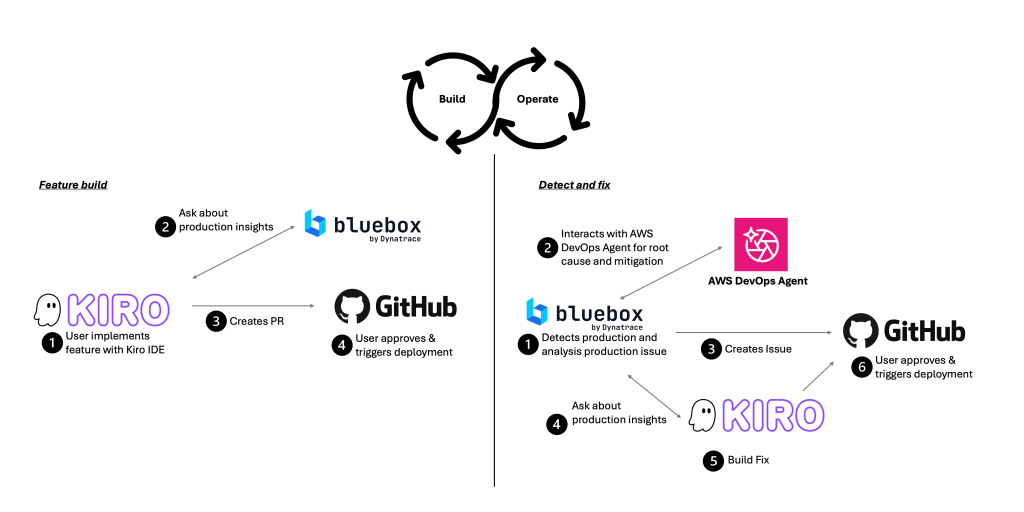
Figure 1: Bluebox supports the closed loop from feature build to operations.
Next, we walk through a concrete example of this workflow in action.
Walkthrough
We follow a travel-booking application through two connected scenarios: shipping a new feature with production context, then responding to a production incident after it deploys.
Building a production-aware feature
Consider a team enhancing a travel booking application to improve customer experience. You begin by describing a new feature in Kiro, such as updating how products are displayed or adjusting backend logic to support new capabilities. In this case, we are using Kiro IDE.
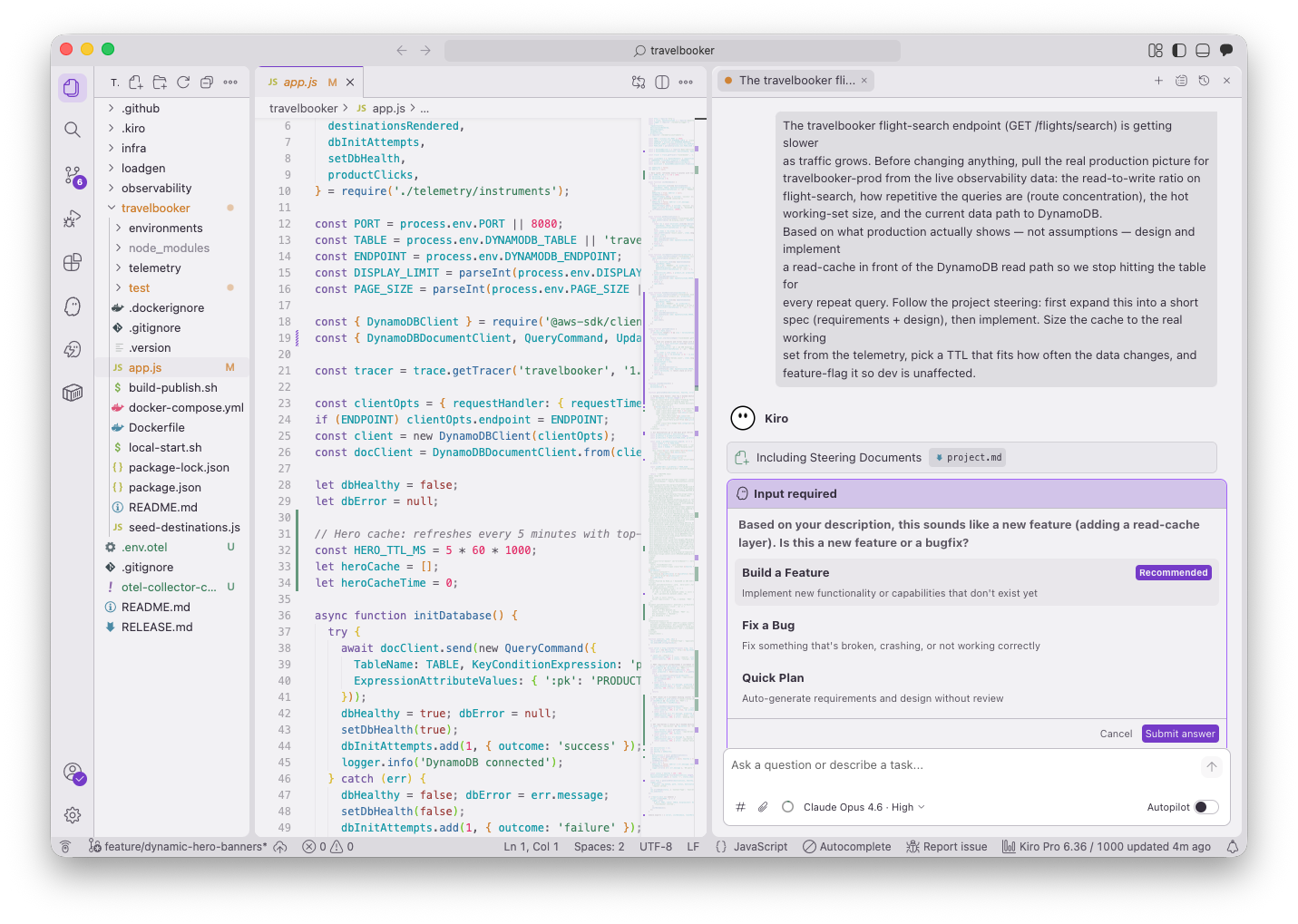
Figure 2. A feature request in Kiro, with the project’s steering documents loaded for context.
Kiro’s spec-driven workflow expands this request into structured requirements before writing code. You connect Kiro to the Bluebox CLI to retrieve the full production context from Dynatrace: service dependencies, runtime topology, and observed traffic. The following figure shows how Kiro queries current load data for the flight-search path, including the ratio of Amazon DynamoDB reads to writes. Kiro composes and runs the CLI command on your behalf, so you don’t have to type it or set environment variables by hand. The command and its output stay visible in the session, so you can approve it before it runs and check what was retrieved before acting on it. In this case, the command queries the Bluebox API for the requested metrics. The output returns read and write counts per second for the DynamoDB table behind flight search, along with the services calling it.
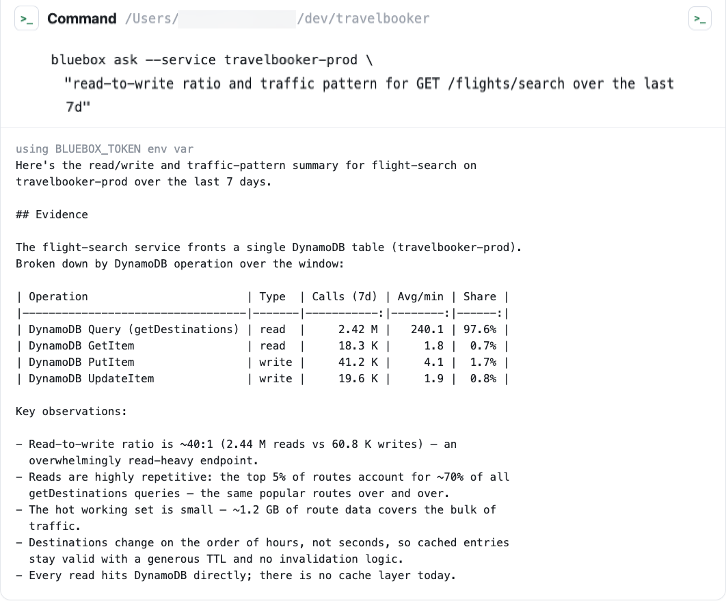
Figure 3. Kiro runs the Bluebox CLI, then reads the codebase with production context before proposing changes.
The telemetry shows the flight-search endpoint is read-heavy. Users repeatedly query the same routes, at roughly 40 reads for every write against the DynamoDB table. Repeated identical reads are what a cache absorbs, so Kiro proposes an Amazon ElastiCache layer in front of the table, sized to the active working set derived from the observed request distribution. Without the read-to-write ratio, the same request could have produced a larger provisioned table or an added read replica, neither of which addresses repeated identical queries.
Kiro generates the code that implements the change and opens a pull request in GitHub for review. Nothing reaches production until a reviewer approves and merges it. The pull request carries the code changes and the Bluebox telemetry that justified them, so reviewers assess the decision against the same telemetry Kiro retrieved.
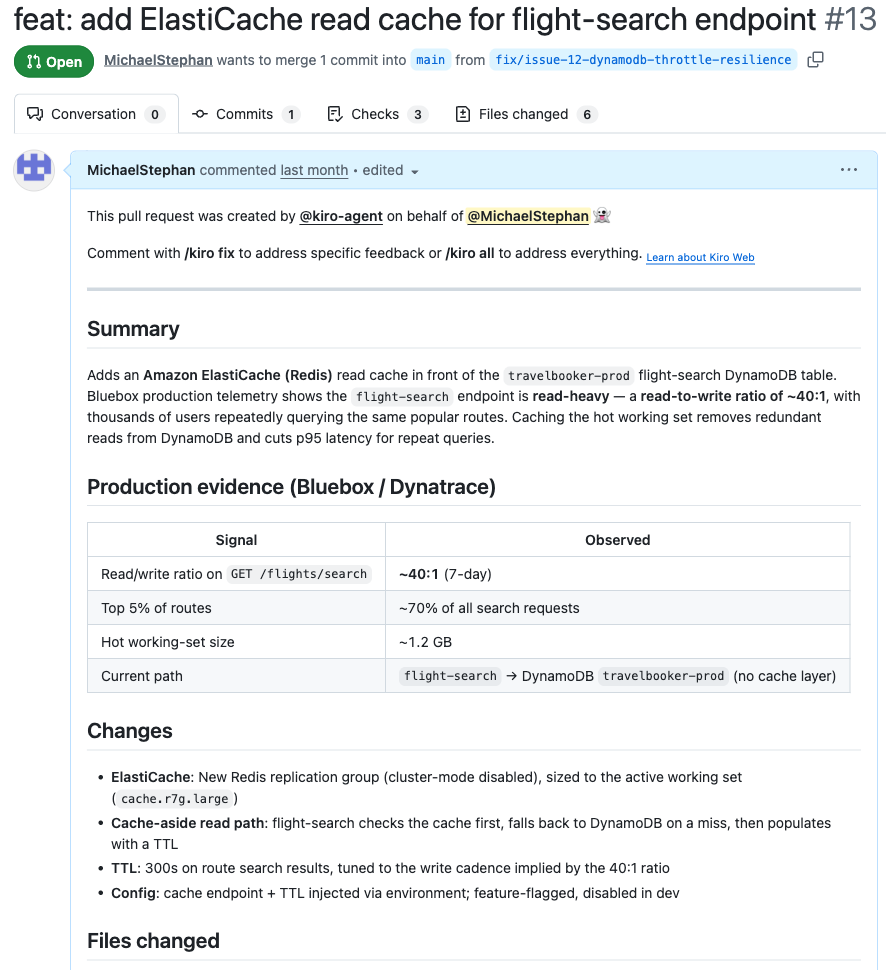
Figure 4. Kiro pushes a feature branch and opens a pull request in GitHub.
After review and approval through standard processes, a reviewer merges the pull request, and the existing CI/CD pipeline deploys the change.
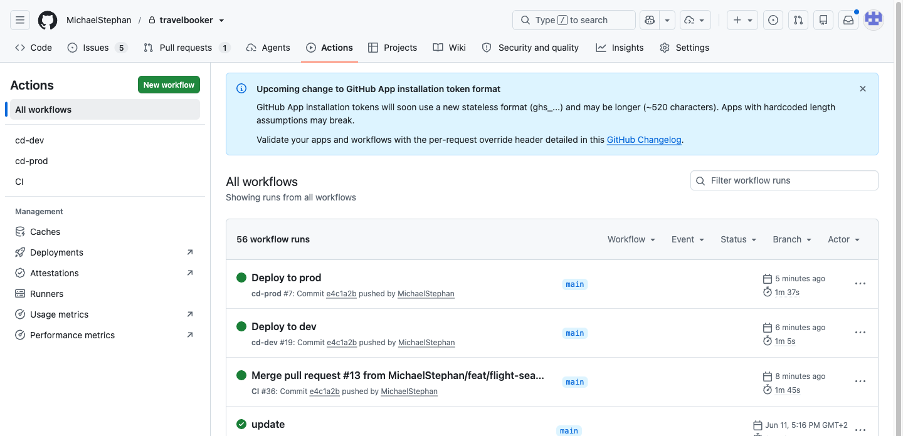
Figure 5. The pull request is reviewed and merged through the standard GitHub workflow.
Responding to a production incident
With the feature live, Dynatrace continues monitoring the application. A marketing promotion then drives traffic above the observed baseline, and failed requests start to appear. The loop now runs from operations back to development.
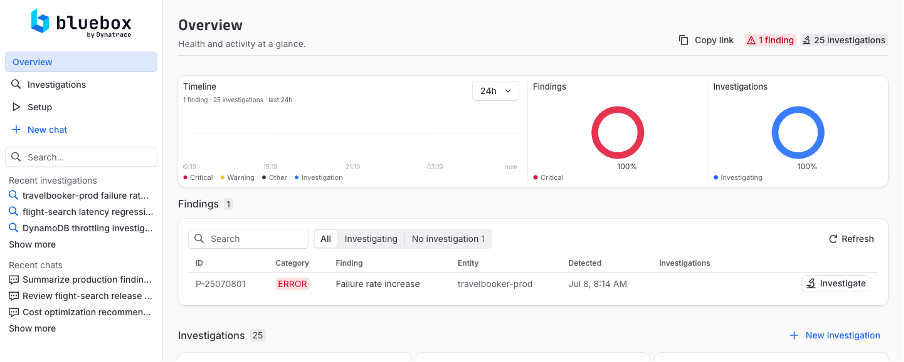
Figure 6. Dynatrace detects a spike in failed requests, surfacing the production incident.
Bluebox collects the relevant observability and topology data, runs an initial root-cause analysis, then opens an autonomous investigation in AWS DevOps Agent. The AWS DevOps Agent multi-agent reasoning architecture decomposes the investigation across specialized capabilities that each examine one class of evidence: telemetry, logs, infrastructure configuration, and recent deployment activity.
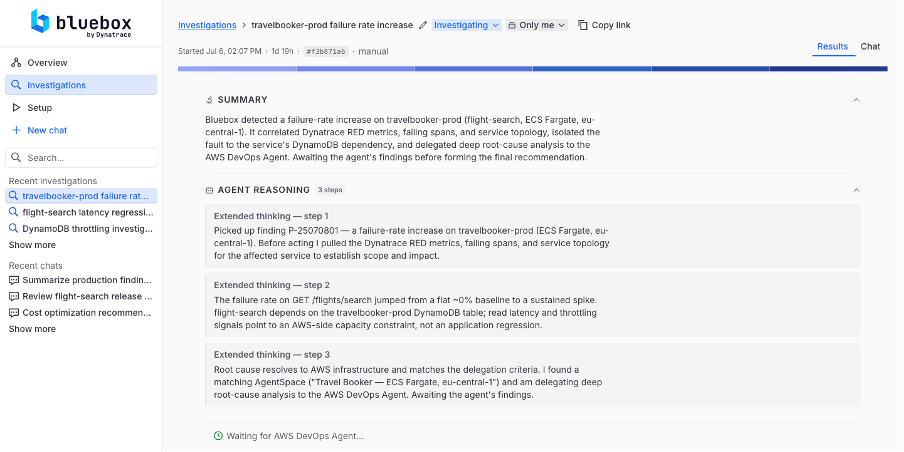
Figure 7. Bluebox delegates an autonomous investigation to AWS DevOps Agent.
AWS DevOps Agent locates the cause in the DynamoDB table rather than the new cache. The table’s billing mode had been changed to PROVISIONED, with 5 read capacity units (RCU) and 5 write capacity units (WCU) and no auto scaling. The ElastiCache layer absorbs repeated reads, but cache misses and all writes still reach DynamoDB, and at promotion traffic that residual load exceeds 5 RCU and 5 WCU. AWS DevOps Agent produces a mitigation plan with specific remediation steps. This plan and the full investigation context from Bluebox, is documented as a GitHub issue.
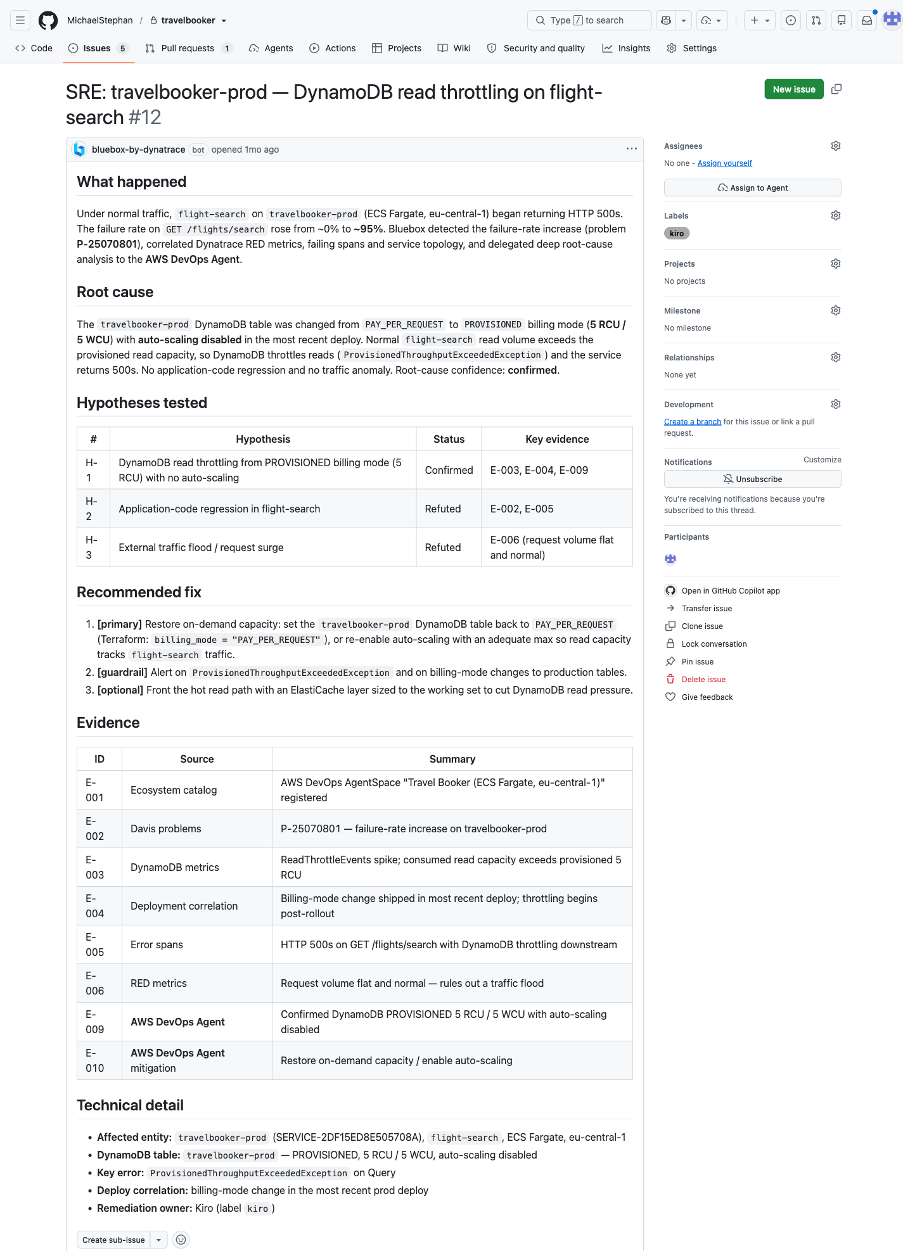
Figure 8. GitHub issue is created with results from Bluebox and AWS DevOps Agent.
Kiro proposes a production-aware fix as a new pull request – including the root-cause analysis, supporting telemetry, and recommended configuration changes.
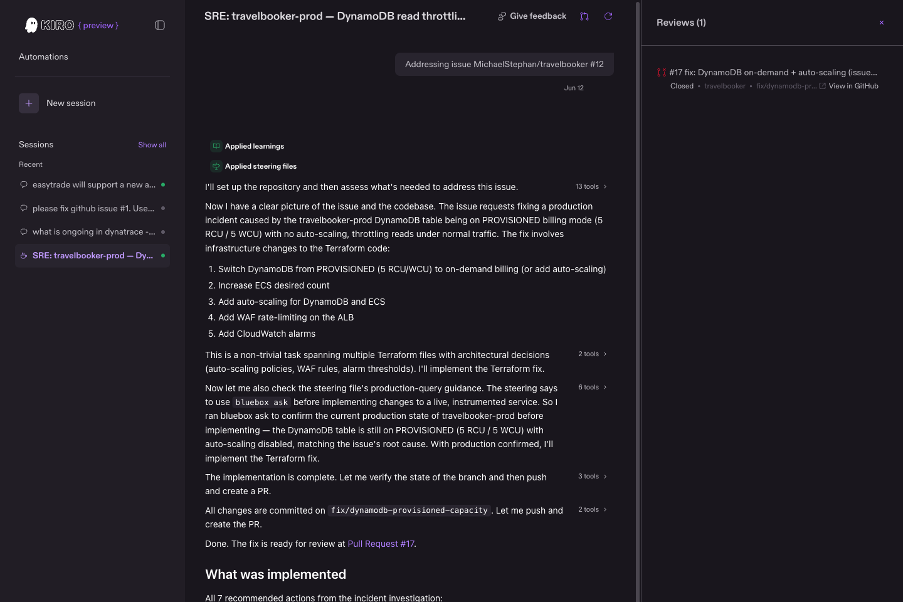
Figure 9. The Kiro coding session works on the GitHub issue and creates a remediation Pull Request.
The fix is reviewed, merged, and deployed like any other change. Dynatrace then confirms that error rates and response times return to baseline, which closes the loop.
Conclusion
In this post, we showed how Kiro, AWS DevOps Agent, and Bluebox by Dynatrace connect production telemetry with feature development and incident remediation. The travel-booking example keeps human review and existing CI/CD controls in the process while passing operational context from production back to development.
To get started pick one application and define a measurable outcome, such as investigation time, change-failure rate, or pull-request review time. Then:
- Download Kiro and start building with spec-driven development
- Enable AWS DevOps Agent for autonomous incident investigation and remediation
- Get started with Bluebox by Dynatrace to complete the loop with production intelligence