AWS for Games Blog
Agentic Arcade: Building playable 3D games with an agentic pipeline on AWS
Game developers are figuring out how to use AI in game production while keeping human creativity front and center. Across studios of every size, the same questions keep coming up:
- How do we keep the creativity human? The best results come from AI that speeds up people’s work instead of replacing it. Teams are determining which repetitive steps agents should handle, so people can focus on the creative work.
- How can artists prototype faster? Generating 2D concept art is a start. Turning the image into a game-ready 3D model and then into an animated character is much harder.
- How do we control the cost? Tokens and GPU hours add up quickly. Many studios are curious about how to mix cloud AI for scale with local hardware, such as NVIDIA DGX Spark machines, in the right parts of the pipeline.
- How do we make NPC dialogue responsive and meaningful? Characters that can really talk with players are a new design opportunity, and they bring new questions about quality and safety.
- How do I get my game noticed? A finished game still has to find players on the devices they use.
Agentic Arcade is a hands-on way to explore all of these. Last year’s Agentic Arcade demo appeared at events in the United States, France, Japan, Spain, Mexico and China, and attendees built more than 2,500 games. They told us they wanted the agentic pipeline behind the games and how the assets were made.
This year’s expanded and elevated edition, debuting at AWS re:Invent 2026, is built to answer these questions and feedback. Attendees carry their game on a near-field communication (NFC) coin through four zones. A crew of AI agents works with them in each zone, and the attendee makes every decision.
- Zone 1: Build. On a touchscreen, attendees create a prototype of a 3D game. They plan the idea, pick a hero and a rival from a library of AI-generated 3D models, choose cover art and a soundtrack, and finish in minutes. A second touchscreen shows the architecture behind the scenes. It covers the agent pipeline that takes each asset from a 2D image to a reviewed 3D model to an animated character, and how the mix of cloud and local NVIDIA DGX Spark compute keeps costs in check.
- Zone 2: Play. Attendees play their own game on an arcade machine, with their own hero, rivals, palette and music.
- Zone 3: Grow. A great game also needs players. In this zone, attendees’ games appear on screens next to ways to reach more players on more devices with the whole of Amazon. This includes Twitch, Amazon Luna, Amazon.com, and instant playable demos with Amazon GameLift Streams.
- Zone 4: Talk. Attendees speak in real time with an NPC in a life-size holographic Proto Box, powered by Amazon Nova Sonic speech-to-speech.
Along the way, the booth shows the balance that makes AI useful in production. Agents do the heavy lifting, such as generating, reviewing, rigging and animating assets. People stay in control, choosing, rerolling and deciding what ships.
In this post, we cover the attendee experience in each zone, how it works under the hood, and how an attendee’s choices become a playable game.
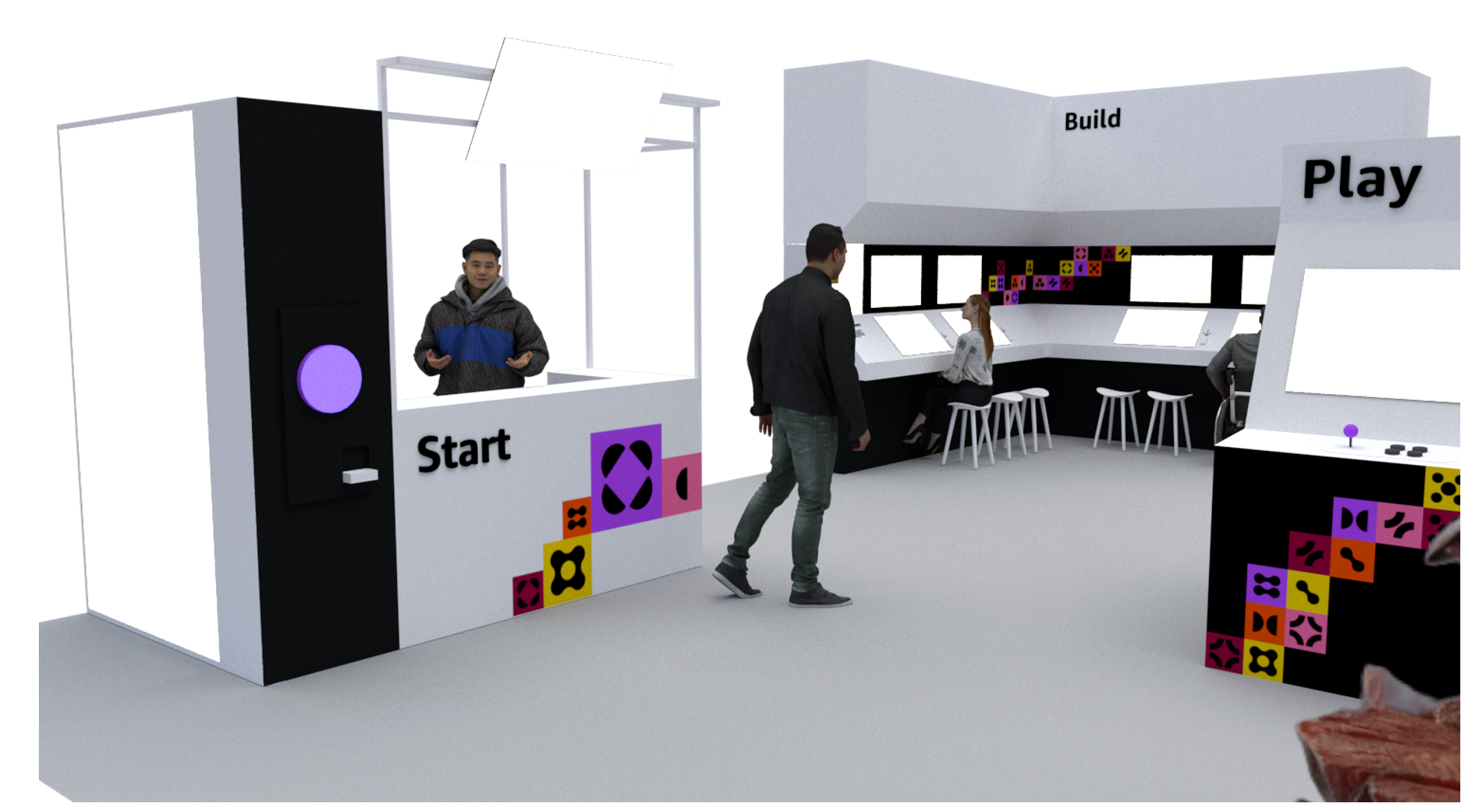
Figure 1: Agentic Arcade 2.0 at re:Invent 2026 (rendered visualization)
Zone 1: BUILD a 3D game
How it works
The solution has two parts:
Part 1 – The Prototype screen: the Agentic Arcade application is what attendees use at each station. It makes real-time AI calls and searches the library to build each attendee’s game.
Attendees build their game in four steps, each run by an AI agent personified as a member of a crew:
- Plan with Kaze. The attendee picks what they want to do: explore, race, fight, play to the rhythm, fly through space or blast through a vertical shooter. The agent asks about the setting, the enemies and the mood, reacts to each answer, and writes a title and a pitch.
- Design with Hana. The attendee picks a color palette, then a hero and a rival from a lineup of spinning 3D models. The agent builds an asset pack for their world, with characters, enemies, props and rewards, and offers a set of cover art to choose from.
- Build with Tetsu. The attendee picks a soundtrack, adds layers to it, and chooses their power-ups.
- Play with Rai. The game appears on a virtual storefront with its cover art and title. Then the attendee plays it full screen on an arcade machine, with their own hero, rivals, palette and music.
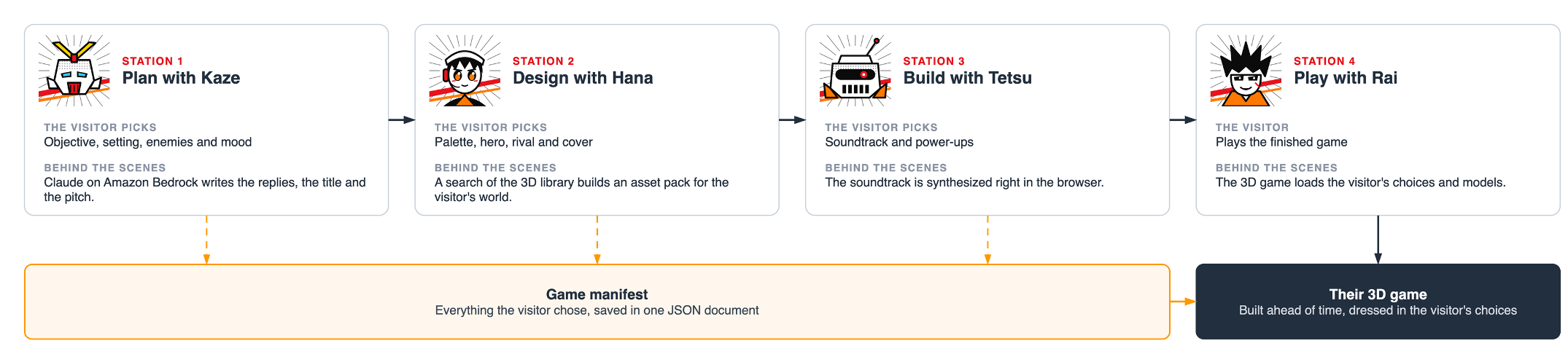
Figure 2: The attendee experience – four stages building a personalized game.
Part 2 – The Interactive architecture screen: This interactive view shows the asset pipeline which builds the 3D library. It generates, reviews, rigs and animates each asset, and stores it so it can be searched. Most of the library is built before the event.
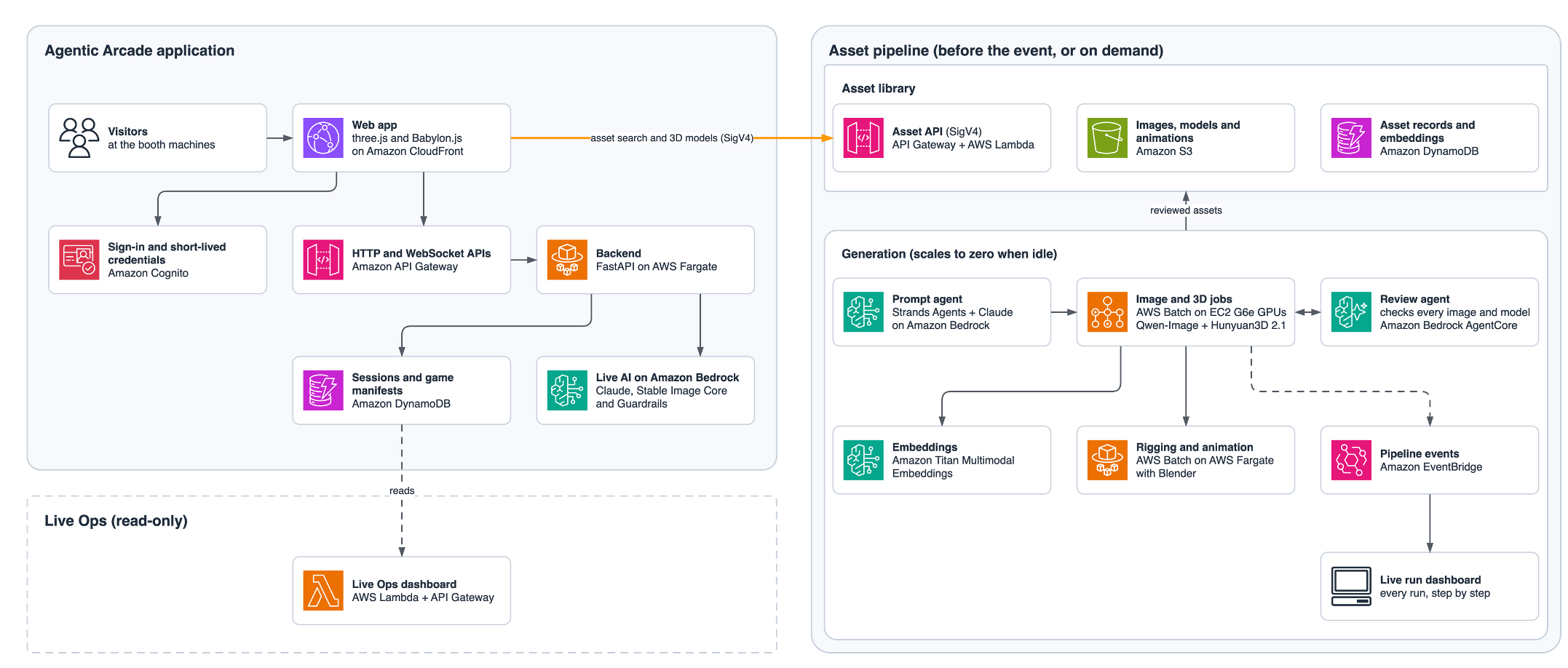
Figure 3: Architecture overview.
Here is an overview of the primary components:
- Frontend: A browser application built with three.js and Babylon.js loads from Amazon Simple Storage Service (Amazon S3) through Amazon CloudFront.
- Identity: Amazon Cognito user pools sign in booth machines. Identity pools give browsers and games temporary credentials.
- API and compute: Amazon API Gateway fronts a FastAPI backend on AWS Fargate, which makes the AI calls.
- Data: Amazon DynamoDB stores sessions, games, asset records and the vector index. Amazon S3 stores images and 3D models.
- AI: Amazon Bedrock provides Claude by Anthropic, Amazon Nova, Amazon Titan and Stability AI models. Amazon Bedrock AgentCore runs review agents, while Amazon Bedrock Guardrails screens content.
- Asset factory: AWS Batch runs the cloud GPU jobs on Amazon Elastic Compute Cloud (Amazon EC2) G6e instances, and NVIDIA DGX Spark machines run the same models locally. Amazon EventBridge carries pipeline events.
Building the 3D library
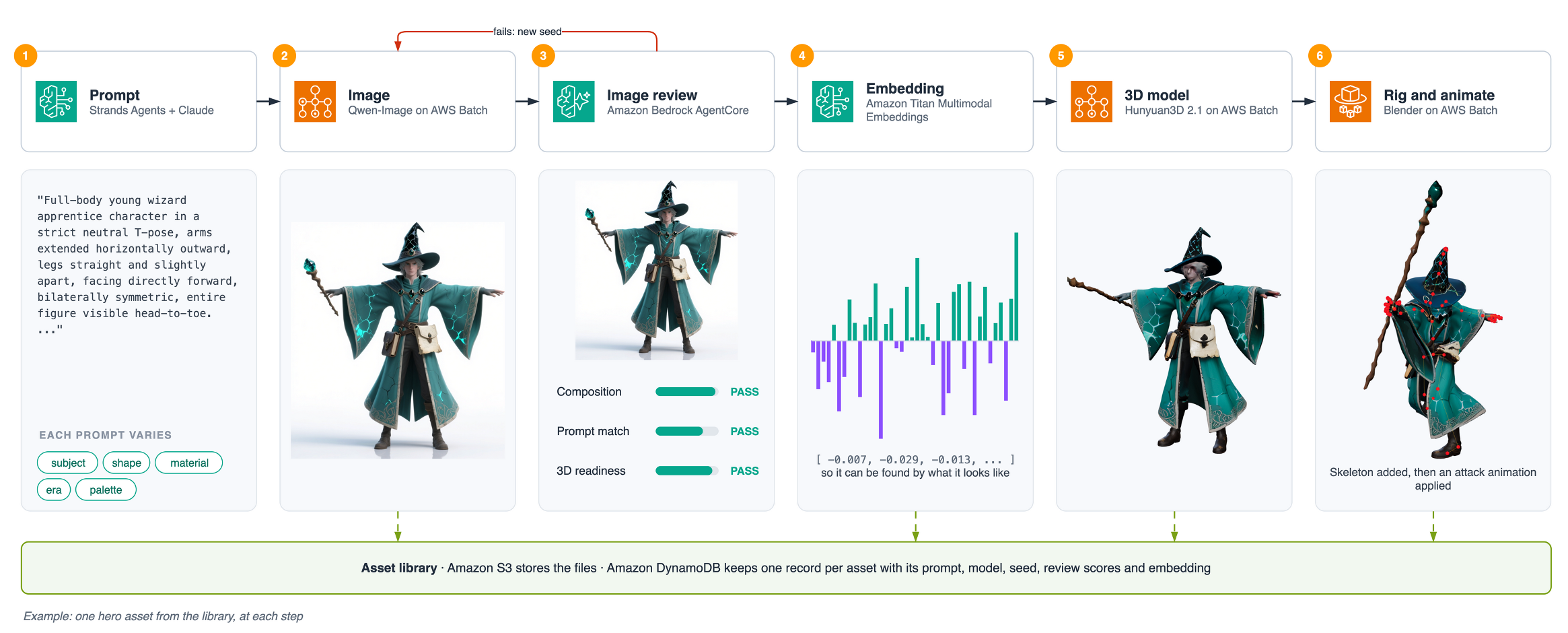
Figure 4: Asset pipeline showcasing the creation of an animated 3D character.
Each asset goes through the same steps:
- Prompt. An agent built with Strands Agents and Claude Sonnet 5.5 on Amazon Bedrock writes the prompts for a category and theme. Each prompt varies the subject, shape, material, era and palette, so a batch of enemies doesn’t come out as copies of the same idea. Character prompts request a symmetric, full-body T-pose for later rigging.
- Image. An AWS Batch array job on Amazon EC2 G6e instances, with NVIDIA L40S GPUs, generates the image with Qwen-Image, a publicly available model. BiRefNet removes the background.
- Image review. A review agent hosted on Amazon Bedrock AgentCore checks the image’s composition, how well it matches the prompt, and whether it will make a good 3D model. If an image fails, it’s generated again with a new seed, up to three attempts.
- Embedding. Amazon Titan Multimodal Embeddings G1 turns the image into a vector, so the asset can be found later by what it looks like.
- 3D model. Hunyuan3D 2.1, a publicly available image-to-3D model, turns the image into a textured .glb file. The review agent also scores rendered views of the model from several angles for geometry, texture and fidelity, and the scores are saved with the asset.
- Rigging and animation. Characters get a skeleton and skin weights from SkinTokens, an auto-rigging model with a custom script for Mixamo skeleton retargeting. Then a separate AWS Batch job on AWS Fargate running Blender maps each skeleton to a standard bone layout, so one set of animations fits every character’s body shape.
Each step sends an event to Amazon EventBridge, which feeds a live dashboard of every run. The GPU instances scale to zero between runs, so you only pay for GPU compute while the library is growing.
Finding the right assets for each attendee
As the attendee designs their game, the application converts the selected game type, setting and enemies into a search query and runs a vector similarity search against the asset embeddings. It searches each category separately, so a kart game gets karts and rival racers, and a space game gets starfighters. Descriptive answers find better matches, which is why the planning agent asks about the setting, enemies and mood.
The browser calls the asset library directly. Amazon Cognito identity pools give it short-lived credentials, and it signs each request with AWS Signature Version 4 (SigV4). The library returns time-limited Amazon S3 links to the images and models. The games use the same credentials to load the attendee’s models, so the browser and the games use temporary credentials instead of long-lived access keys.
People stay in control
The agents suggest, and the attendee decides. Every step is a choice, and the attendee can reroll a pitch or an asset pack they don’t like.
The library follows the same idea:
- Review before use. Only images that pass the review agent’s checks become 3D assets.
- Provenance. Each asset record keeps its prompt, the model and seed that made it, and the review results, so you can always see where an asset came from and how it scored.
- Content safety. Every AI reply passes through Amazon Bedrock Guardrails before it’s shown. Attendees mostly answer with suggested replies, which limits free-form input.
Local and cloud models together
Many studios mix local hardware and the cloud: local machines for data that has to stay on site or on local file systems, and the cloud for scale. The demo shows this with NVIDIA DGX Spark machines running the pipeline’s three publicly available GPU models: Qwen-Image for images, Hunyuan3D 2.1 for meshes and SkinTokens for rigging. The models are baked into the machine image, so each stage can run offline with no model download at run time.
A Spark takes one request at a time from an Amazon Simple Queue Service (Amazon SQS) queue. For one asset, local and cloud paths take about the same time, while a Spark has no job to submit or bill per attempt. This suits an artist refining one asset at a time. For a whole library, AWS Batch spreads an array job across many GPU instances and scales to zero when the queue drains. Spot Instances are optional for bulk runs because interrupted work can be resubmitted while finished assets are skipped. Cloud review agents check assets from both paths using one review process.
Live ops: knowing what’s happening
Live operations, or live ops, is what keeps a game alive after launch: events, updates, balance changes and fixes. All of it depends on knowing what’s happening in the game right now.
The booth shows a small version of that idea. A live ops dashboard tracks the games attendees create as they happen: which game types they pick, how many games are made each hour, and an estimate of the AI tokens those games use. It updates every few seconds, using AWS Lambda, Amazon API Gateway and Amazon DynamoDB. It only reads the application’s data, so it doesn’t slow the application down.
Zone 2: PLAY – From choices to a playable game
The application prepares the game for play on the arcade machines in the Play zone. Each Build station adds to a game manifest, a JSON document with the game type, title, pitch, palette, cover art, music and asset pack. The 3D games are built ahead of time, one per game type, and each one reads the manifest and dresses itself in the attendee’s choices.
The manifest is the contract between two teams that move at different speeds. Game developers can tune difficulty or add a boss without touching the application. The application team can change the questions, the cover art, or the asset search without touching the games.
A few parts are generated live because they make the game feel personal:
- The crew’s replies. Claude Haiku on Amazon Bedrock writes the agent replies, the title and the pitch from the attendee’s answers.
- The cover art. Stable Image Ultra by Stability AI on Amazon Bedrock generates several cover art selections in the attendee’s color palette. The application then embeds the title onto each cover in the browser.
- The soundtrack. The attendee chooses from hundreds of tracks across many genres, all synthesized in the browser with the Web Audio API, so there are no audio files to license.
To avoid waiting, the application starts slow work early. The cover art choices start to be generated as soon as the attendee chooses a color palette, so they’re ready by the time the attendee picks one. The game starts loading, in the background and muted, as soon as the attendee reaches the last station where they can play it on an arcade machine. Just tap your coin and your game loads on the arcade cabinet ready to play.
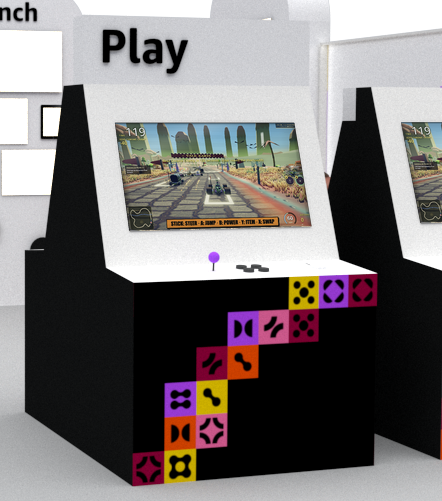
Figure 5: Zone 2 kart racer game on an arcade machine
Zone 3: GROW your game’s reach
A great game also needs players who can discover it. The GROW area shows how partnering with the many parts of Amazon can help you reach new players and put your game on new devices. Phone, tablet and PC screens run the places where players already spend their time: Twitch, where players discover games through streamers and live communities; Amazon.com, where your game can appear in front of a huge shopping audience; Luna, Amazon’s cloud gaming service, which lets players enjoy your game on the screens they already own, without new hardware; and instant playable demos with Amazon GameLift Streams.
GameLift Streams lets players try a game in the browser with no download or install. That removes the biggest hurdle between a player’s curiosity and their first session, and the same demo can run on a phone, a tablet or a PC. Attendees’ own games appear on every screen, with their cover art and 3D hero, so they can see how the game they just built would look to players on each channel. Discovery, trial and play can all work together to bring more players to your game, on more devices.
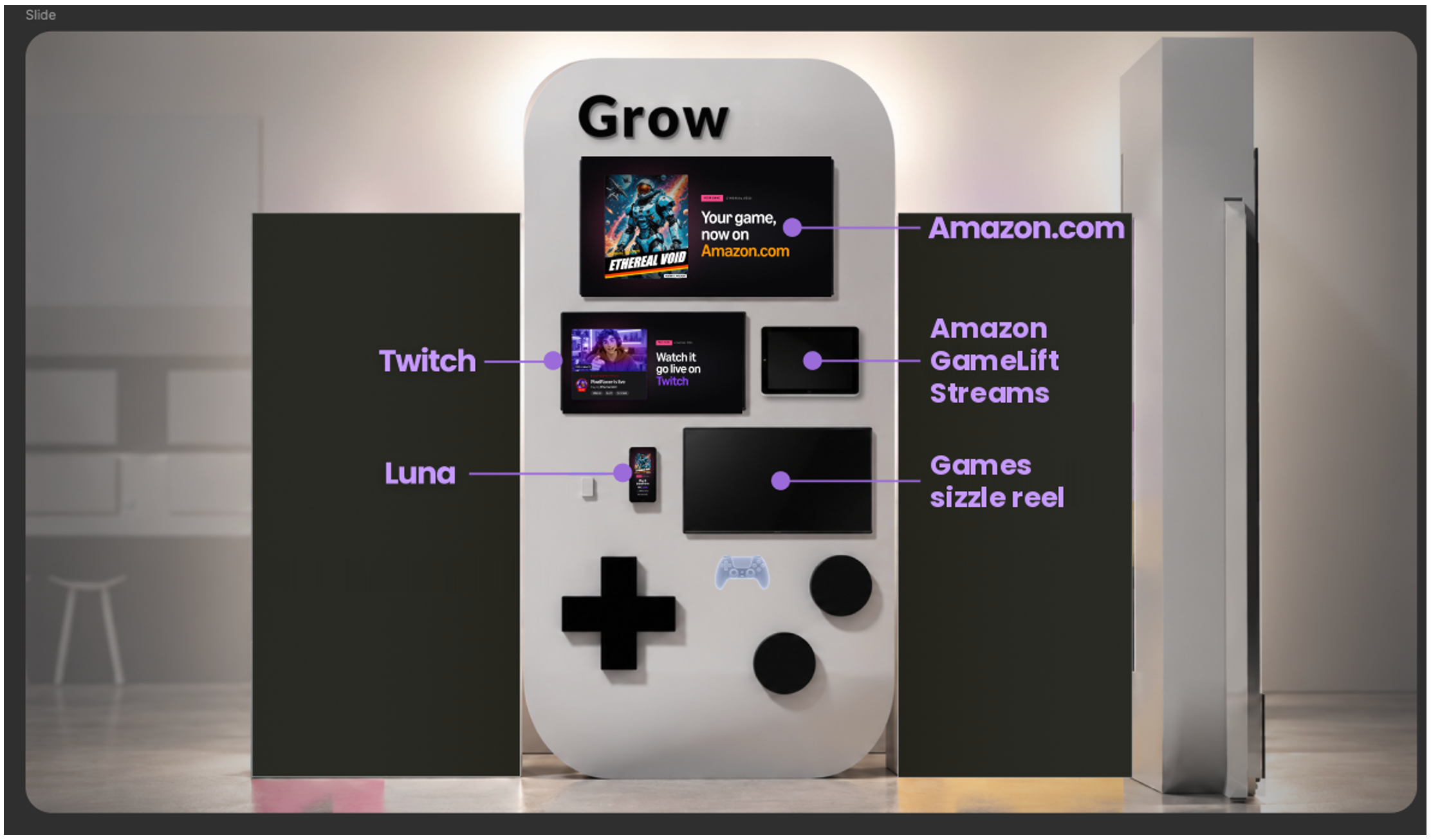
Figure 6: The grow zone with cross Amazon game promotion
Zone 4: TALK to an NPC
In this zone, attendees speak in real time with an NPC in a life-size holographic Proto Box, powered by Amazon Nova Sonic speech-to-speech. Interact with verbal questions and answers are spoken real-time using AWS AI tools and models.
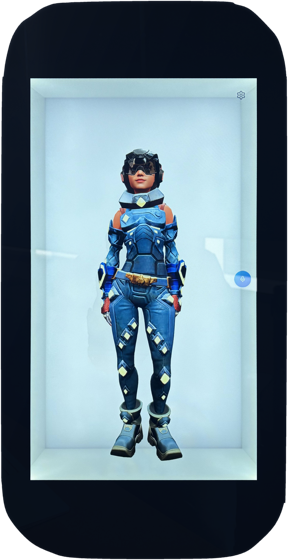
Figure 7: Converse with our AI powered NPC
Conclusion
In this post, we showed how the Agentic Arcade demo takes an attendee through four zones: building a 3D game prototype, playing it on an arcade machine, growing its reach across Amazon, and talking with an NPC in real time. Behind the zones, AI agents build, review and search a 3D library, a manifest turns each attendee’s decisions into a playable game, and speech-to-speech AI brings a character to life. Here are some takeaways for your own pipeline:
- Keep people in charge, and let agents speed them up. Agents generate, review, rig and animate assets, while people choose, reroll and decide what ships. Review every asset and keep a record of how each one was made, so you can trust what the agents produce.
- Generate ahead of time, pick live, and match compute to the job. Bulk generation on GPU instances that scale to zero makes a large library affordable, and a vector search makes it usable in real time. Local hardware such as NVIDIA DGX Spark suits steady, one-asset-at-a-time work, while the cloud handles scale. Mixing the two helps keep token and GPU spending under control.
- Use a manifest to separate tools from games. Your tools and your games can then change on their own schedules, so a prototype can go from idea to playable game in minutes.
- Plan for discovery from the start. Twitch, Amazon.com, Luna and instant playable demos with Amazon GameLift Streams can put your game in front of new players on phones, tablets and PCs, with no download needed.
- Spend live AI where players feel it. A few well-placed calls make each result feel personal, such as the pitch, the cover art and an NPC that talks back in real time.
If you’re building your own AI-assisted game pipeline, these patterns are a good place to start. Come try Agentic Arcade in the AWS for Industries Zone on the re:Invent expo floor at The Venetian or contact your AWS account team to talk through your pipeline.
Further reading
- AI-assisted game production: From static concept to interactive prototype
- Cloud and AI accelerate game development innovation at AWS re:Invent 2026
- How Amazon GameLift Streams is boosting game discoverability on Twitch
- Using vector indexes in DynamoDB
- Host agent or tools with Amazon Bedrock AgentCore Runtime