The Internet of Things on AWS – Official Blog
Tracking fleets in real time with AWS IoT Core and Amazon Location Service
Dispatchers working from location data that’s already minutes or hours old cause missed appointments, wasted fuel, and frustrated customers. Drivers relying on phone-based Global Positioning System (GPS) tracking must keep an app running and a phone charged, so coverage disappears the moment an app is closed or a battery dies. Dedicated GPS hardware that reports directly to an Internet of Things (IoT) broker removes that dependency and keeps reporting continuously. Connecting that hardware to AWS IoT Core, then visualizing the positions it produces with Amazon Location Service, gives operators a live view of where every vehicle is.
AWS publishes a full reference for connected vehicles: Guidance for Connected Mobility on AWS. It uses Amazon Managed Streaming for Apache Kafka (Amazon MSK), Apache Flink, signal catalogs, and Controller Area Network (CAN) bus integration. Original equipment manufacturers (OEMs) and large fleets collecting hundreds of vehicle signals primarily use these components.
This post covers the concepts and architecture for a lightweight, serverless approach for GPS-focused fleet tracking. Visit the companion repository on GitHub for a deployable lab to visualize these concepts. This is a 300-level (intermediate-to-advanced) architecture post directed at operators of small to medium-sized fleets and IoT engineers. By the end, you will understand:
- How a conceptual lightweight serverless approach might fit better than dedicated resources.
- The trade-offs between Amazon Kinesis Data Streams with AWS Lambda and Amazon MSK with Apache Flink.
- How to think about data storage tiers.
Choosing the right approach: Serverless or dedicated resources
Both architectures use AWS IoT Core for device connectivity. The key decision is what happens between the device and the dashboard. Start from the workload, not the AWS console.
The dedicated solution with Connected Mobility Guidance is the right fit when you require:
- Multi-source telemetry ingestion.
- Rich vehicle diagnostics from CAN bus signals.
- Dynamic data collection campaigns.
- Stateful stream processing.
- Enterprise features like multi-tenant isolation and OEM data normalization.
A serverless approach might be better when you’re prioritizing:
- GPS tracking as the primary use case.
- Basic telemetry: position, speed, heading, ignition.
- Low cost for fleets of 20–200 vehicles.
- No clusters or Amazon Managed Streaming for Apache Kafka (Amazon MSK) to manage.
Some serverless concepts
Three architectural principles guide your choice:
Match the cost model to the traffic shape. A GPS fleet produces bursty, low-average traffic. A per-message model bills in proportion to that curve, so you pay for the shift and nothing during idle hours. A dedicated cluster model provisions fixed capacity that you pay for around the clock, whether vehicles are reporting or not. For a small fleet, if most of a cluster’s capacity sits idle, the serverless model might be a better structural fit for a workload that spikes and drains.
Match the processing model to the data. Ingesting a GPS position is fundamentally stateless. Each message updates one vehicle’s current location and appends one history record, with no dependency on the messages around it. Stateful stream processing exists to correlate events across time, and its value only materializes after you actually require that correlation. Adopting it earlier means paying for state management the workload doesn’t yet need.
Push undifferentiated work to managed services. Persistent connections, reconnection, batching, buffering, and scaling can all be used by managed services. That operational advantage matters most for small teams, where every hour spent tuning a cluster is an hour not spent on the dispatch features that differentiate the product.
Solution overview
Figure 1 follows a single GPS reading from the vehicle to the dispatcher’s screen. The numbered groups map to the following five sections. Note the arrow leaving vehicle-current-state: that Amazon DynamoDB stream is what turns a position write into a live dashboard update.
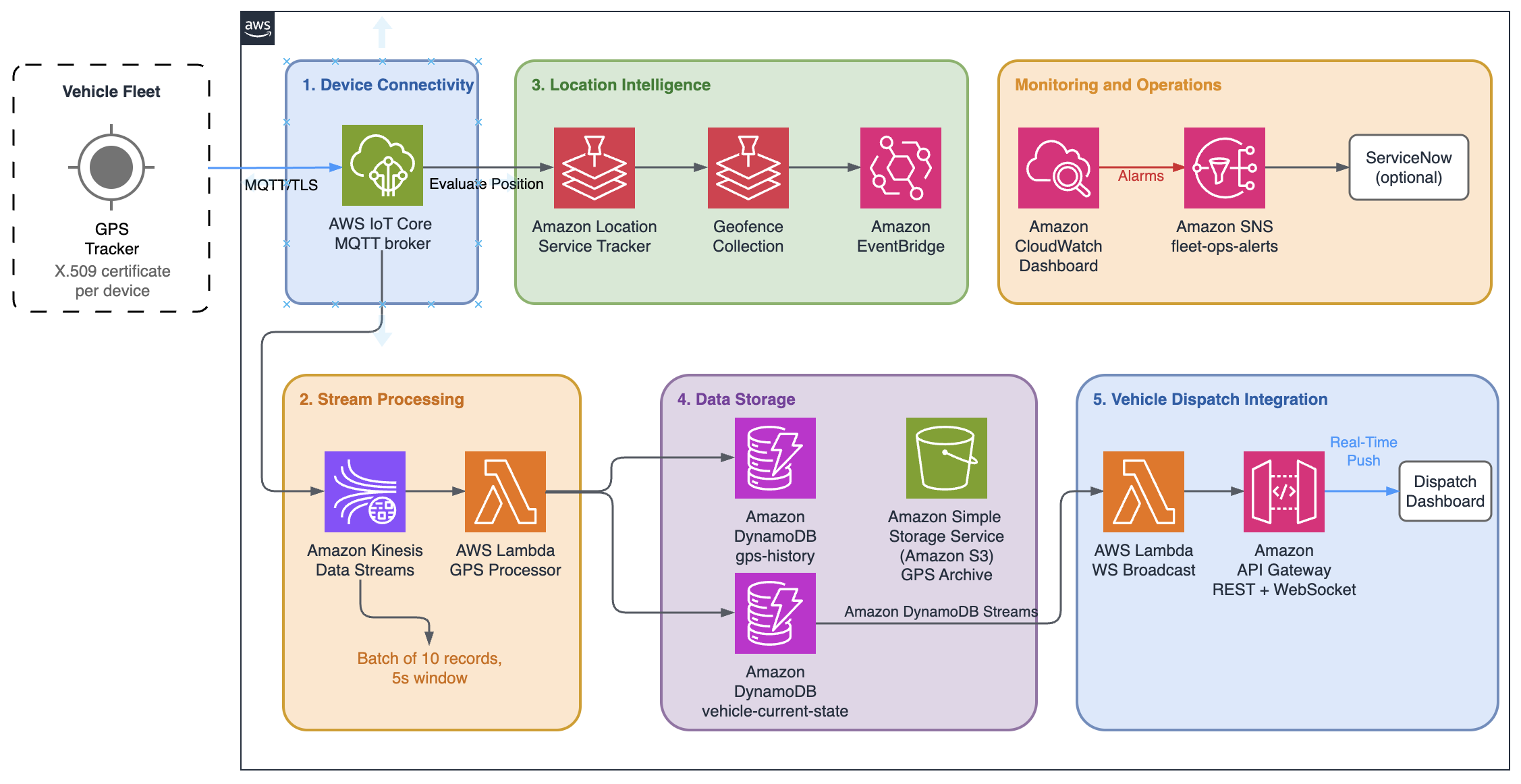
Figure 1: Fleet tracking architecture for real-time GPS ingestion and dispatch integration
There are five infrastructure layers:
1. Device connectivity layer
GPS hardware in each vehicle connects to AWS IoT Core over MQTT and each device authenticates using an X.509 certificate.
AWS IoT Core terminates the persistent MQTT connection and is designed to authenticate each message. Persistent sessions queue Quality of Service (QoS) 1 messages traveling to a subscribed device and dead zone recovery is a device side responsibility.
Devices publish to a basic ingest topic instead of a standard broker topic. A basic ingest topic starts with the reserved prefix $aws/rules/<rule-name>, which names the IoT rule to invoke and delivers the message straight to that rule, bypassing the publish/subscribe message broker. Everything after the rule name is still visible to the rule as a normal topic, so a vehicle authenticated as truck-042 publishes to:
$aws/rules/fleet_gps_to_kinesis/fleet/vehicles/truck-042/gps
The rule fleet_gps_to_kinesis sees fleet/vehicles/truck-042/gps and consumes the message for processing while limiting anything else from subscribing or consuming that message. That’s fine here because a GPS position is only ever needed to reach the ingestion rule. The solution uses AWS IoT Core basic ingest to reduce messaging costs by bypassing the IoT message broker and routing telemetry to IoT rule actions.
AWS IoT Core has a native location rule action that writes directly to a tracker. The device performs local evaluations and determines when the vehicle is close to a geofence such as its destination. We use a second basic ingest topic to trigger positional data updates on the Amazon Location Service API.
| Topic | Rule | Destination | Receives |
$aws/rules/fleet_gps_to_kinesis/... |
fleet_gps_to_kinesis |
Amazon Kinesis Data Streams, then Lambda, then DynamoDB | every position |
$aws/rules/fleet_gps_to_location/... |
fleet_gps_to_location |
Amazon Location Service tracker | positions worth evaluating |
The IoT policy uses thing policy variables, so one policy definition covers every device while scoping each one to its own topic. Granting iot:Publish on $aws/rules/fleet_gps_to_kinesis/fleet/vehicles/${iot:Connection.Thing.ThingName}/gps lets truck-042 publish its own position and nothing else.
2. Stream processing layer
Amazon Kinesis Data Streams sits between AWS IoT Core and Lambda as a buffer. Amazon Kinesis Data Streams offers several advantages over directly triggering a Lambda function with an IoT rule:
- Batching: Amazon Kinesis Data Streams delivers 10 records per Lambda invocation instead of triggering 10 separate invocations.
- Buffering: Amazon Kinesis Data Streams helps absorb traffic spikes and reduces Lambda throttling.
- Replay: Amazon Kinesis Data Streams keeps data for 24 hours at its default retention and is configurable for up to 365 days.
- Multiple consumers: You can add an analytics consumer to the same stream later without touching the ingestion path.
- Partial batch failure: A bad record can be set to retry without replaying the whole batch. This takes two things: ReportBatchItemFailures enabled on the event source mapping, and a handler that returns the failed sequence numbers.
Because basic ingest delivers straight to the ingestion rule, Amazon Kinesis Data Streams rather than the MQTT broker is where additional consumers attach. One caveat: a QoS 1 PUBACK confirms only that the rules engine received the message, not that the write succeeded. Configure a rule error action to catch failed actions.
A Lambda function does two things with each GPS message:
- Updates the vehicle’s current state in DynamoDB.
- Writes position history with a 24-hour time to live (TTL).
3. Location intelligence layer
Amazon Location Service turns GPS coordinates into operational events. The IoT rule writes each position to a tracker, and the tracker evaluates it against any linked geofence collection. When a vehicle crosses a geofence boundary, Amazon Location Service fires an event to Amazon EventBridge.
How the geofence lifecycle works:
Dispatching a job triggers the system to create a geofence around the destination. As the truck enters that geofence, the job status flips to completed and the dispatcher gets notified. After the truck enters the minimum range of the destination, the system removes the geofence.
The geofence parameters account for the tracker’s distance filtering. Because DistanceBased filtering discards movement under 30 meters, arrival can be registered up to 30 meters inside the boundary. That is fine for the 100-meter job sites used here, but a geofence approaching 30 meters would make arrival detection unreliable. Keep the radius several times the filtering threshold or loosen the filter for that collection.
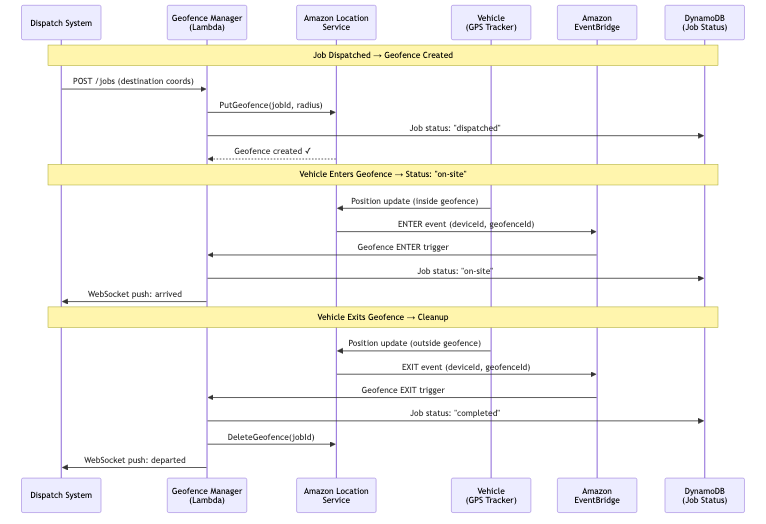
Figure 2: Job dispatch workflow
For a step-by-step walkthrough of connecting AWS IoT Core to Amazon Location Service trackers and geofences, refer to Tracking assets using AWS IoT Core and Amazon Location Service.
Note: Be aware of relevant geofence quotas before you scale. A collection holds a maximum of 50,000 geofences,
PutGeofencedefaults to 50 requests per second, andBatchDeleteGeofenceaccepts 10 IDs per call. For smaller fleets, this is manageable, but a misconfigured cleanup operation can quickly cause these limits to fail fleet updates.
4. Data storage layer
The GPS pipeline writes to two DynamoDB tables, split by access pattern rather than by data type:
- vehicle-current-state is partitioned on
vehicleIdand holds one item per vehicle. A position update overwrites a single item. - gps-history is partitioned on
vehicleIdwithtimestampas the sort key, so route playback reads a time range for one vehicle. A TTL attribute expires rows automatically after 24 hours.
Those two access patterns cover two questions: where is this vehicle now, and where has it been today. A Lambda function writes to both tables in parallel on each received message while a DynamoDB stream on vehicle-current-state powers the real-time push into the vehicle dispatch layer.
You can provision an optional Amazon Simple Storage Service (Amazon S3) bucket for archive beyond the 24-hour window, with server-side encryption, versioning, and a lifecycle policy that transitions objects to Infrequent Access at 30 days.
5. Vehicle dispatch integration layer
Amazon API Gateway exposes two interfaces:
REST APIs for on-demand queries: current positions, historical tracks, and job management. Standard request/response.
WebSocket APIs for real-time push. When a vehicle’s position changes, the update flows through DynamoDB streams to a broadcast Lambda that pushes it to all connected clients.
Note: Simpler push options exist. Dashboards can subscribe directly over MQTT over WebSocket but require standard topics instead of basic ingest.
Stream processing architectural trade-offs
We will compare serverless and non-serverless architectures across the five factors that most often decide the choice.
| Factor | Amazon Kinesis Data Streams + Lambda | Amazon MSK + Apache Flink |
| Suited for | Small or changing fleets | Large dedicated fleets |
| Cost model | Per-message | Fixed infrastructure |
| Processing | Stateless | Stateful |
| Operations | Serverless | Cluster management |
| Consumers | 5 per shard | Unlimited |
The cost crossover number for your fleet size depends on your specific infrastructure and changes as you add features. Consider a cost exercise using the AWS Pricing Calculator specific to your environment. We will cover capabilities to give you a good comparison. Amazon MSK + Apache Flink unlocks things that the stateless Amazon Kinesis Data Streams + Lambda model can’t do:
- Trip detection: Apache Flink keeps state across events to know when trips start and end.
- In-stream geofencing: Evaluate geofence membership directly in Apache Flink using a spatial library like Apache Sedona (
ST_Contains(polygon, point)). The Connected Mobility guidance takes this exact approach with a dedicated Apache Flink geofence processor. The demo in this post’s companion repository calls Amazon Location Service per position, which is cheap at small scale but becomes the dominant cost driver as fleets grow. - Complex Event Processing (CEP): Triggering an alert if vehicle stops for over 15 minutes outside a known location requires correlating events over time windows. Apache Flink keeps per-vehicle state in memory, so it knows
truck-042has hadspeed == 0for the last 14 minutes without querying a database on every event. Its CEP library lets you define these patterns declaratively with time constraints. Event-time processing with watermarks uses out-of-order GPS messages from cellular delays.
Data storage tiers
We have three tiers, each paired with the retention window and access pattern it suits. Many small fleets might only require simple point-in-time lookups, but we will include some more robust options as the business requirements change.
| Storage | Use Case | Retention | Access Pattern |
| Amazon DynamoDB | Current state, recent history | Hours to days | Point lookups, real-time |
| Amazon Timestream for InfluxDB | Time-series analytics | Weeks to months | Aggregations, trends |
| Amazon S3 + Amazon Athena | Archive, AI/ML training | Months to years | Batch queries, ad-hoc |
Let the query pattern decide which tier you need, not the data volume. Each tier exists to serve a question you’re asking of the data, so start from the question:
- “Where is
truck-042right now?” or “what were its last few positions?” These are point lookups on recent data. DynamoDB is designed for single-digit-millisecond reads by key, and a TTL that expires old rows automatically so you’re not paying to store history you don’t query. For a small fleet, this is frequently the sole tier required. - “What was your average speed by route last week?” or “show me a heat map of stops this month.” These are aggregations over time ranges. DynamoDB doesn’t specialize in these types of questions at scale. That’s the signal to add Amazon Timestream for InfluxDB, which is purpose-built for time-range aggregations. It’s worth noting that this option includes provisioned infrastructure, removing the serverless nature of the solution. This might be acceptable overhead for the analytical benefits it provides. DynamoDB with Amazon S3 / Amazon Athena can provide a similar analytical experience while keeping the solution serverless.
- “Train a Machine Learning model on a year of trips” or “retain raw data for compliance.” These are infrequent, large-scale batch reads over long retention. Storing that in DynamoDB or Timestream is expensive for data you rarely touch. Consider an archive using Amazon S3 with Amazon Athena, where storage is cheap and you pay only per query.
Note: Query patterns might not be the only factor. Latency, costs, and access patterns might all have a say when choosing the correct database.
Cost analysis
The companion repository includes a demo configuration you can use to visualize your costs as they grow. Here we will run an exercise on a small demo fleet:
Traffic assumptions
| Metric | Calculation | Result |
| Updates per vehicle per day | 12/min × 60 min × 10 hours | 7,200 |
| Updates per vehicle per month | 7,200 × 22 days | 158,400 |
| Total fleet messages (20 vehicles) | 158,400 × 20 | 3,168,000 |
| 40% of positions are sent (because of resting status) | 3,168,000 × (4h ÷ 10h) | 1,267,200 |
The following service breakdown is an illustrative example for 20 vehicles. Pricing is subject to change, so consult the AWS Pricing Calculator for current rates.
| Line item | Demo (5s, no proximity filter) | Production (30s, proximity filter) |
| Amazon Location Service tracker writes | $51.85 | $2.11 |
| Amazon Location Service geofence evaluations | $151.89 | $6.76 |
| Amazon Location Service geofence | $0.18 | $0.18 |
| AWS IoT Core messaging (basic ingest) | $0.00 | $0.00 |
| AWS IoT Core connectivity | $0.02 | $0.02 |
| AWS IoT Core rules/actions (2 per ping) | $1.90 | $0.32 |
| Amazon Kinesis Data Streams | $10.99 | $10.99 |
| Lambda | $0.42 | $0.09 |
| DynamoDB writes | $5.94 | $0.99 |
| API Gateway WebSocket messages | $6.34 | $1.06 |
| API Gateway Websocket connection-minutes | $0.01 | $0.01 |
| Amazon CloudWatch Logs (ingest+storage) | $0.67 | $0.11 |
| Amazon CloudWatch metrics (6 alarms) | $2.23 | $2.23 |
| Total | ~$235/mo | ~$27/mo |
| Per Vehicle | ~$11.76 | ~$1.37 |
Note: Publishing over basic ingest removes the AWS IoT Core messaging charge for these GPS messages.
The demo in the companion lab sends every GPS position to Amazon Location Service. This shows the full capability, but Amazon Location Service ends up being the majority of the bill, approximately 87 percent. Amazon Location Service bills both per tracker update and per geofence evaluation, so each position counts twice. In production, you might only want to send positions to Amazon Location Service when the vehicle is near an active job site. Vehicles traveling on highways or parked at depots skip geofence evaluation entirely. That cuts Amazon Location Service calls by 80–95 percent as seen in the following table.
Demo costs compared to production costs
| Configuration | 20 vehicles | 100 vehicles |
| Demo (all positions to Amazon Location Service) | ~$235/mo: $11.76 per vehicle | ~$858/mo: $8.58 per vehicle |
| Production (proximity-based geofencing) | ~$27/mo: $1.37 per vehicle | ~$85/mo: $0.85 per vehicle |
At roughly $0.85–$1.37/vehicle/month for AWS infrastructure, a tuned configuration of this architecture sits in the same range as the Guidance for Connected Mobility on AWS, which estimates about $400/month for 1,000 vehicles.
Optimizations
Before any architectural change, check the reporting interval. It sets how many positions exist to be billed, so it moves the bill further than anything else. Decide the interval against what the operation actually needs, then optimize the architecture.
Check the capacity mode for Amazon Kinesis Data Streams. On-demand bills a flat stream-hour charge, no matter how little you send. On a tuned 20-vehicle deployment that single line would cost more than every other pipeline service combined. One provisioned shard carries 1 MB/sec or 1,000 records/sec and 20 vehicles reporting every 5 seconds is 4–20 records per second.
Next, Amazon Location Service trackers have position filtering built in, set once at tracker creation. Choosing DistanceBased makes Amazon Location Service ignore any update where the device moved less than 30 meters, and ignored updates are neither stored nor evaluated against geofences.
The three modes aren’t interchangeable, so it’s worth considering what’s suitable for your use case:
| Mode | Ignores |
| TimeBased (default) | Nothing |
| DistanceBased | Movement under 30 meters |
| AccuracyBased | Movement under the reported accuracy |
How much this saves depends on how much your fleet moves. Slow and parked vehicles get filtered heavily while highway driving is barely affected. It also helps to cut false positives. The docs note that distance filtering suppresses the repeated enter and exit events a parked vehicle triggers when GPS jitter puts it on a geofence edge.
Conclusion
Not everyone requires a dedicated or enterprise solution for a connected vehicle fleet. If you have a small fleet, consider using a low-cost option that makes it straightforward to replace parts as you scale up and as your needs evolve.
The architecture is designed to be modular. Vehicles connect through AWS IoT Core regardless of scale. Device firmware, certificates, and MQTT topics stay the same when you upgrade the cloud-side pipeline. Because the basic ingest topic embeds the ingestion rule name, the topic stays stable too, as long as you keep the rule name and change what the rule points to instead. The stream processing layer is where most of the change happens. Amazon Kinesis Data Streams + Lambda becomes Amazon MSK + Apache Flink, and per-call geofence evaluation moves into the stream itself.
To get started, clone the companion repository and deploy it in your own account. With the simulator running, open the Amazon Location Service console to watch positions land on the tracker and geofence events fire as vehicles cross job-site boundaries.
To go deeper on the services in this post:
- Service overviews: AWS IoT Core, Amazon Location Service, Amazon Kinesis Data Streams, and AWS Lambda
- Developer documentation: AWS IoT Core, Amazon Location Service, Amazon DynamoDB, Amazon Kinesis Data Streams, AWS Lambda, Amazon API Gateway, and Amazon EventBridge
Additional resources
- Guidance for Connected Mobility on AWS: Dedicated, enterprise-scale reference architecture for connected vehicles.
- Tracking assets using AWS IoT Core and Amazon Location Service: Step-by-step walkthrough of connecting trackers and geofences.
- Fleet Tracking Using Amazon Location Service with AWS IoT: Deep dive with implementation using Amazon Location Service.
- Processing geospatial IoT data with AWS IoT Core and Amazon Location Service: Routing position messages between accounts with IoT rules.
- AWS IoT Core thing policy variables: Scoping per-device publish/subscribe permissions with a single policy.
- Amazon Location Service documentation: Trackers, geofence collections, and geofence event evaluation.
- Cost Optimization using Amazon Location Service Tracker Filtering: Strategies for implementing Amazon Location Service tracker filters.