Artificial Intelligence
Announcing the Agentic Catalog Experience in Amazon Quick
As organizations embrace AI-powered analytics, the value of a natural language (Text2SQL) answer is only as good as the business context behind it. We’re entering a phase where semantic richness (table and column descriptions, and relationships) must flow directly from where it’s authored in upstream data catalogs and semantic tools into the AI products that serve end users. Products like Amazon Quick can no longer operate in isolation. They need to natively consume and reason over the definitions, relationships, and governance metadata that data teams curate in systems like AWS Glue Data Catalog and Databricks Unity Catalog. This shift from siloed metadata to connected, catalog-aware AI is what enables intelligent analytics at scale.
The challenge: Bridging the last mile
The investment is done
Enterprise data teams have done the hard work. They have invested heavily in upstream catalog platforms such as AWS Glue, Databricks Unity Catalog, Snowflake Horizon, Collibra, and dbt. On these platforms, they meticulously define table descriptions, column semantics, primary and foreign key relationships, glossary terms, and metric definitions.
Yet when it comes to enabling end users (such as sales managers, marketing directors, and finance leads) for production-ready AI and trusted dashboards, a significant gap remains.
Three compounding challenges
When data curators (business intelligence engineers, analytics leads, and senior analysts) need to enable their business users in Amazon Quick, they face three compounding challenges:
- Limited discoverability: With thousands of tables in enterprise catalogs, discovering the right upstream assets that are curated and approved for reporting is a needle-in-a-haystack problem. There’s no way to describe what you need and have the system find it.
- Semantic fragmentation and manual recreation: Rich metadata that already exists upstream (business descriptions on tables and columns, and primary and foreign key relationships) does not flow through. Curators must recreate assets from scratch, redefine descriptions, and reconcile definitions manually. Does “revenue” mean gross or net? Does “active customer” mean a purchase within 30 days or 90 days? These definitions exist upstream but require manual re-entry.
- Time to insight in weeks, not hours: The combination of manual discovery and manual recreation means that the time from data to actionable insights stretches from hours to weeks. Worse, when upstream definitions change, manually created semantics in Quick Datasets become stale, causing semantic drift that erodes trust in AI answers and dashboards over time.
The gap
The problem isn’t upstream. The metadata exists. The governance is defined. The relationships are mapped.
The problem is the last mile: translating that rich catalog context into a curated, consumable experience that delivers grounded AI answers and deterministic dashboards end users can trust.
Introducing the Agentic Catalog Experience in Amazon Quick
Today, we’re announcing the Agentic Catalog Experience in Amazon Quick, an AI-powered workflow that helps data curators rapidly define their context boundary, inherit upstream semantics, and enable end users for grounded Q&A and trusted dashboards at scale.
At the heart of this experience is the Quick Agent, scoped to discovery, creation, and inheritance tasks within the catalog context. It uses the semantic context from the catalog connection to summarize the entire catalog at a glance, engage the customer in natural language conversation, surface the most relevant tables and relationships based on the customer’s use case, and assess metadata readiness. Then, with a single conversational confirmation, it auto-creates Catalog-Generated Datasets and Topics with targeted metadata inherited from the upstream catalog.
No manual configuration. No context-switching. No weeks of setup.
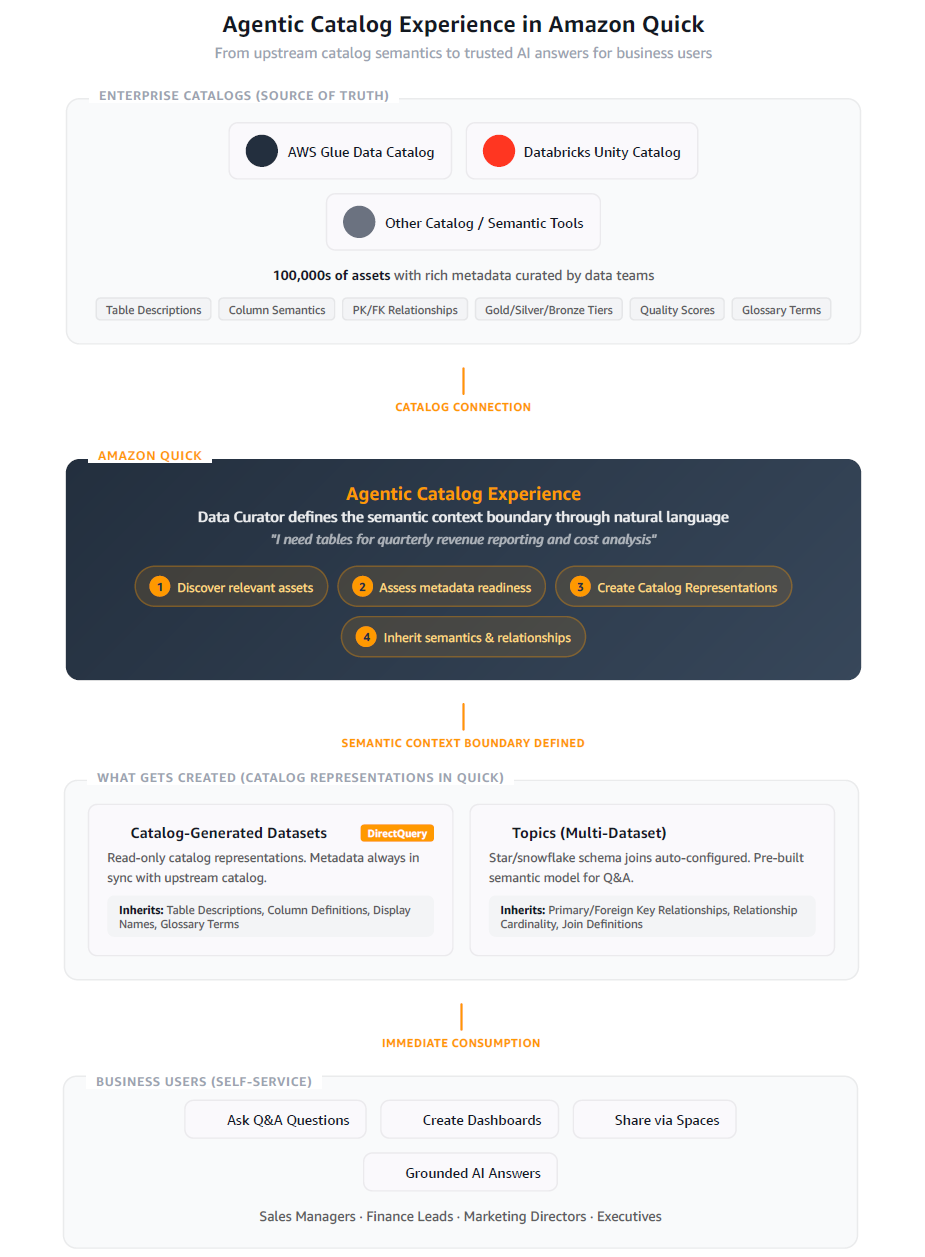
How it works
Natural language asset discovery
Instead of scrolling through thousands of tables to find the right ones, curators use natural language. With the Agentic Catalog Experience, curators describe what they need:
Curator: “I’m a Senior Analyst on the Finance team. I need tables for quarterly revenue reporting and cost analysis.”
The Quick Agent searches across your entire catalog to surface the most relevant tables instantly, using all available metadata including business descriptions, tags, Gold/Silver/Bronze classifications, quality scores, table health scores, and glossary terms. No more manual browsing. No more guessing.
Bulk agentic dataset creation
After the curator selects their tables, the Quick Agent creates catalog representations (Datasets) at scale in a single guided workflow. Your upstream catalog remains the source of truth because the default creation path is Direct Query. Datasets with inherited semantics are flagged with a clear “Semantics Inherited” badge, and their metadata is read-only. Authors can refresh inherited metadata on demand by choosing the sync button to stay aligned with their catalog.
Quick Agent: “Creating 6 Catalog-Generated Datasets now:
revenue_by_regioncreated (DirectQuery, read-only metadata),cost_centerscreated, andgl_transactionscreated.”
Semantic and relationship inheritance
The Quick Agent carries forward targeted metadata from your catalog into the assets it creates. Today, inheritance is deliberately focused on two key areas to avoid noise and keep Datasets clean:
- Table and column definitions to Datasets: Business descriptions and column definitions are inherited directly into the created Datasets, so that curators and end users have the semantic context they need.
- Primary and foreign key relationships to Topics: The Agent detects relationships and uses them to suggest and create multi-dataset constructs (Topics) with star and snowflake schema joins preconfigured.
Note: While all available metadata (Gold/Silver classifications, quality scores, tags, and health scores) is used during discovery to find the right tables, inheritance into Datasets is intentionally scoped to table and column definitions today. We plan to add more metadata types to Datasets over time.
Quick Agent: “I detected 3 relationships between these tables and created a Topic called ‘Finance Revenue Model’ with the star schema joins preconfigured. Table and column definitions have been inherited from the upstream catalog.”
Immediate consumption
The curated Datasets and Topics are ready for use immediately:
- Ask questions: Start a Q&A conversation with your new Datasets. The AI agent uses inherited business descriptions, glossary terms, and quality scores to deliver grounded answers.
- Create dashboards: Build deterministic visualizations with full semantic context already in place.
- Share with end users: Add Datasets to a Space and share them with business users for self-service Q&A.
After creation, the metadata tied to these Datasets and Topics feeds into the Amazon Quick semantic store, which powers re-ranking and unified context for AI-powered Q&A. Getting from catalog connection to the first business question takes minutes, not weeks.
Architecture: Consumer, not catalog
A key design principle underpins this experience: Amazon Quick is a consumer of upstream catalog metadata, not a dedicated catalog itself. This means:
- No data duplication: Catalog-Generated Datasets use DirectQuery. No data is copied or moved.
- Metadata consumed for context: Inherited semantics are read-only in Amazon Quick and flow into the semantic store to power re-ranking and AI answer grounding. Your upstream catalog remains the authoritative source.
- Manual semantic sync: Authors can refresh inherited metadata on demand by choosing the sync button. Scheduled automatic sync is on the roadmap.
- Extensibility with transparency: Catalog-Generated Datasets show inherited semantics as read-only (marked as catalog representations). If an Author chooses to edit a Dataset, Amazon Quick provides a clear notification that editing creates a custom Dataset and that semantic sync no longer applies. This gives Authors full control while preserving catalog integrity by default.
Supported catalogs today
| Catalog platform | Authentication |
| AWS Glue Data Catalog | AWS Identity and Access Management (IAM) Role ARN |
| Databricks Unity Catalog | OAuth 2.0 / Personal Access Token |
Support for additional catalog platforms is coming soon.
What gets inherited
Metadata inheritance is intentionally focused to keep Datasets clean and production-ready:
Into Datasets (table and column definitions)
- Table business and technical descriptions.
- Column descriptions and display names.
- Data types and nullability.
- Glossary terms and synonyms.
Into Topics (relationships)
- Primary and foreign key relationships.
- Relationship definitions and cardinality.
- Star and snowflake schema models.
The end-user experience
Here’s what this means for the business users downstream:
A sales manager asks: “What were our Q4 sales by region?”
Behind the scenes, the AI agent:
- Searches Catalog-Generated Datasets using business descriptions and glossary terms.
- Identifies the
sales.revenue_by_producttable (Gold, 98 percent quality). - Applies preconfigured joins from the Topic to combine relevant dimensions.
- Respects personally identifiable information (PII) masking rules from catalog metadata.
- Returns a grounded, trusted answer in seconds.
No manual dataset configuration required. The curator defined the context boundary once with the Quick Agent, and every end user benefits immediately.
Unified enterprise context
The Agentic Catalog Experience doesn’t exist in isolation. Combined with the broader platform capabilities of Amazon Quick (including integration with Slack, Outlook, documents, and knowledge bases), end users get the full enterprise context:
- Structured data from catalogs through Catalog-Generated Datasets.
- Unstructured context from documents, email messages, and conversations.
- Business rules from glossary terms and metric definitions.
This unified context enables production-ready AI answers, grounded in your organization’s specific data and semantics.
Connecting to AWS Glue Data Catalog
To get started with the Agentic Catalog Experience, create a data source connection to your AWS Glue Data Catalog in Amazon Quick. After you establish the connection, the Quick Agent guides you through discovery, schema exploration, and Topic creation in a single conversational workflow. In this walkthrough, we connect to a Glue Data Catalog and build a Financial Analytics Topic.
In Amazon Quick, create a new data source. From the list of connection types, select Glue Data Catalog (available in preview), and then choose Next. This connection is for the metadata. With it, Amazon Quick can consume the table and column definitions and the relationships your teams have already curated in AWS Glue.
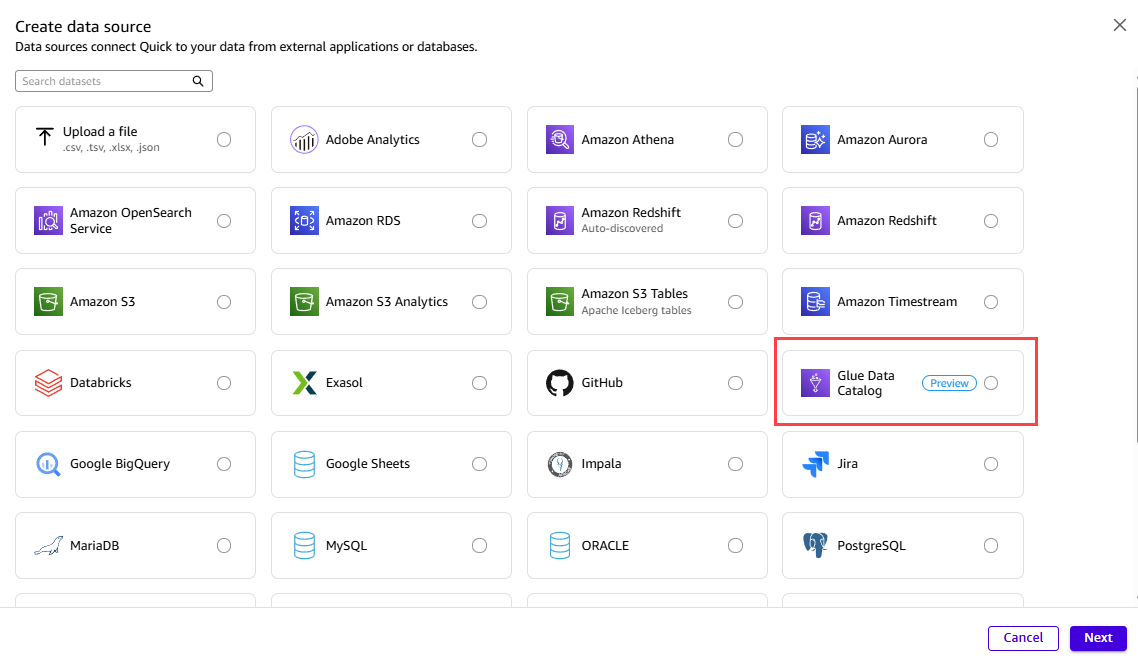
Figure 1: Selecting the Glue Data Catalog connection type in Amazon Quick
A Glue Data Catalog connection works together with an Amazon Athena connection. Glue provides the metadata, and Athena provides the query path to the data itself in Amazon Simple Storage Service (Amazon S3). Create the Athena data source as well, so that Amazon Quick can run queries against the underlying data. After you create both, the Data sources page shows the two entries side by side: the Glue Data Catalog source for the metadata and the Athena source for the data.
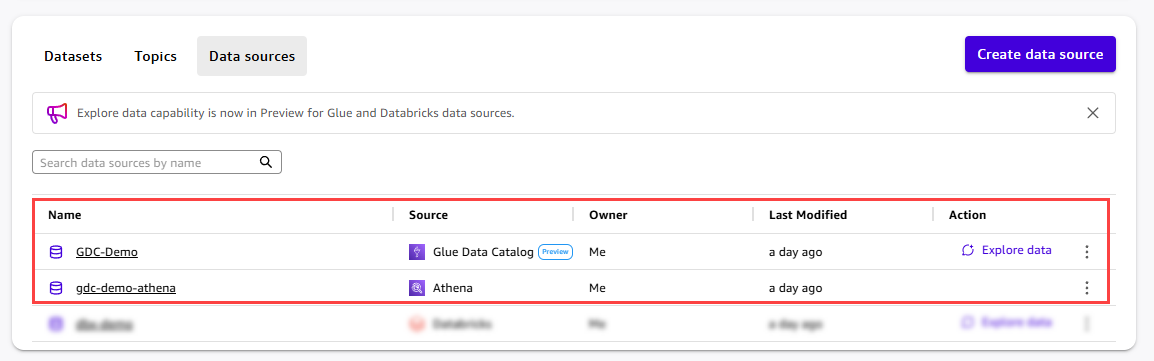
Figure 2: The Glue Data Catalog and Athena data sources listed together
Open the GDC-Demo data source detail page. Under Data connections, you can see the linked Athena data source that Amazon Quick uses to query the data. Choose Explore data to launch the Quick Agent scoped to this data source.
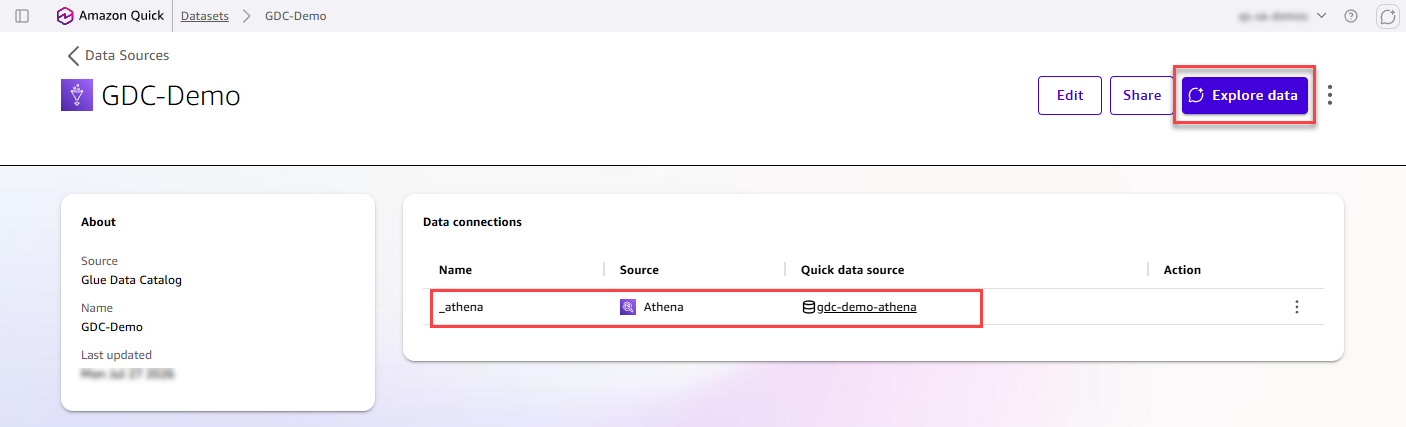
Figure 3: Launching the Quick Agent from the data source detail page
The Quick Agent panel opens on the right side of the screen, automatically scoped to the Glue Data Catalog data source. The “Specific data” mode is selected, with “GDC-Demo” pinned as the context boundary. As a result, the Agent surfaces only metadata from this specific catalog connection.
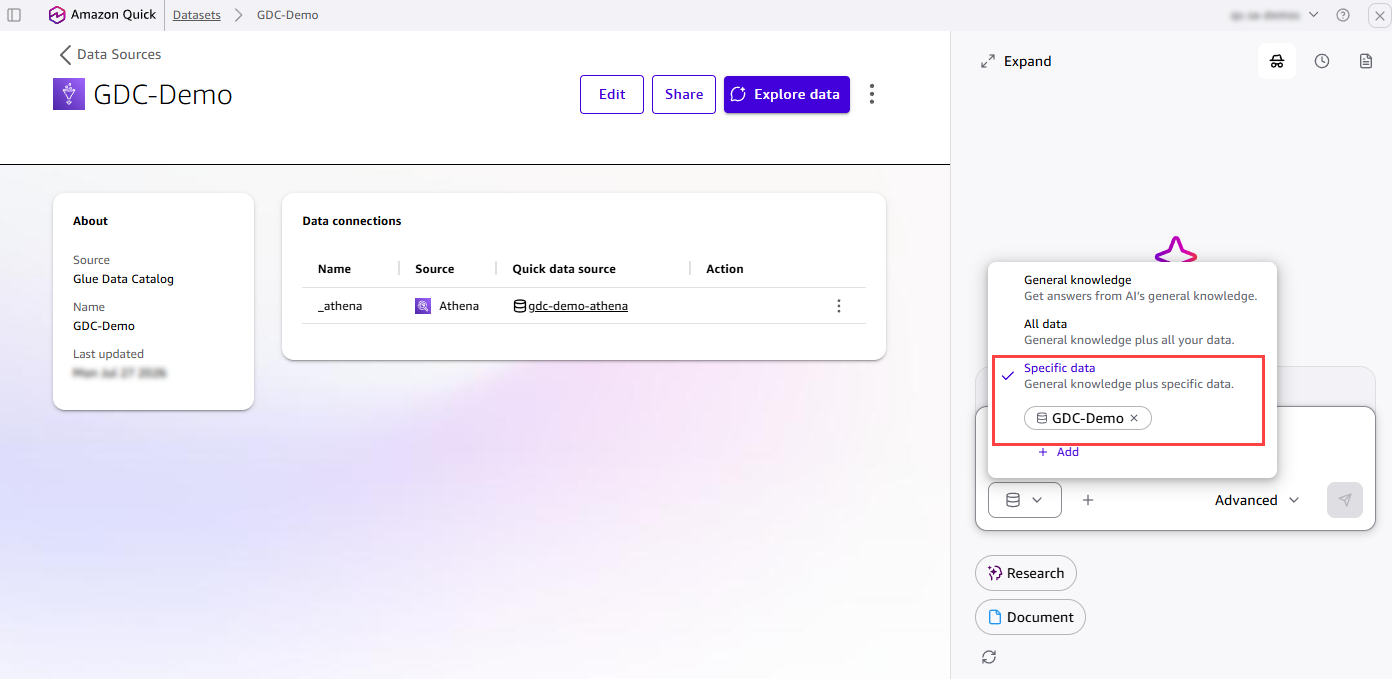
Figure 4: The Quick Agent scoped to a specific catalog connection
Ask the Agent to explore your catalog. The Agent summarizes the available catalogs and databases at a glance, so you can quickly see what is curated in your Glue Data Catalog. For this post, we use the “fa-demo” database as our example, a Finance Analytics Demo star schema for banking analytics. This walkthrough illustrates how the feature works and is not an exact scenario, so you can apply the same steps to your own catalog.
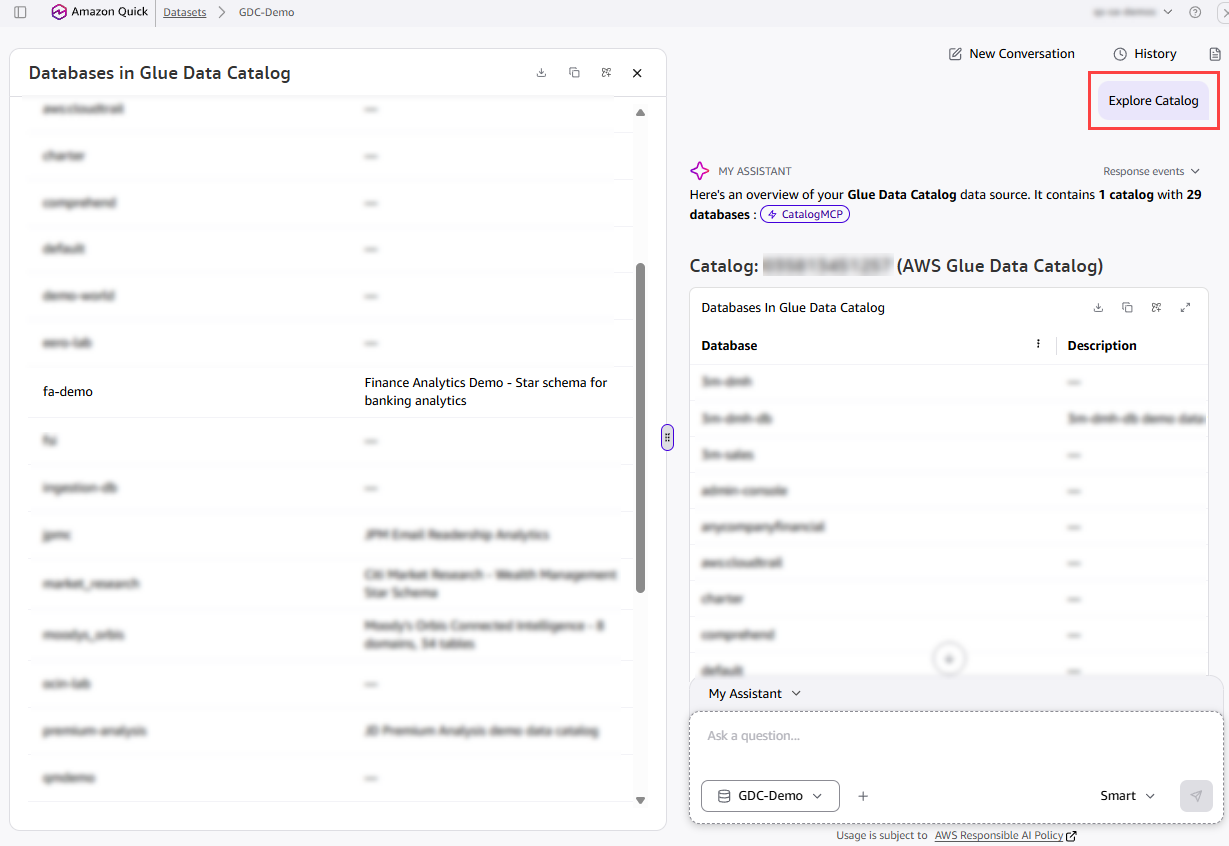
Figure 5: The Agent summarizing available catalogs and databases
Ask the Agent to explore the fa-demo database. The Agent identifies a classic star schema with 7 tables: 2 fact tables (fact_transactions and fact_loans) and 5 dimension tables (dim_account, dim_date_transactions, dim_date_loans, dim_merchant, and dim_txn_category). All are stored as external tables in Amazon S3. The Agent recognizes the schema as covering customer account transactions and loan portfolios, with supporting dimensions for merchants, transaction categories, and date hierarchies.
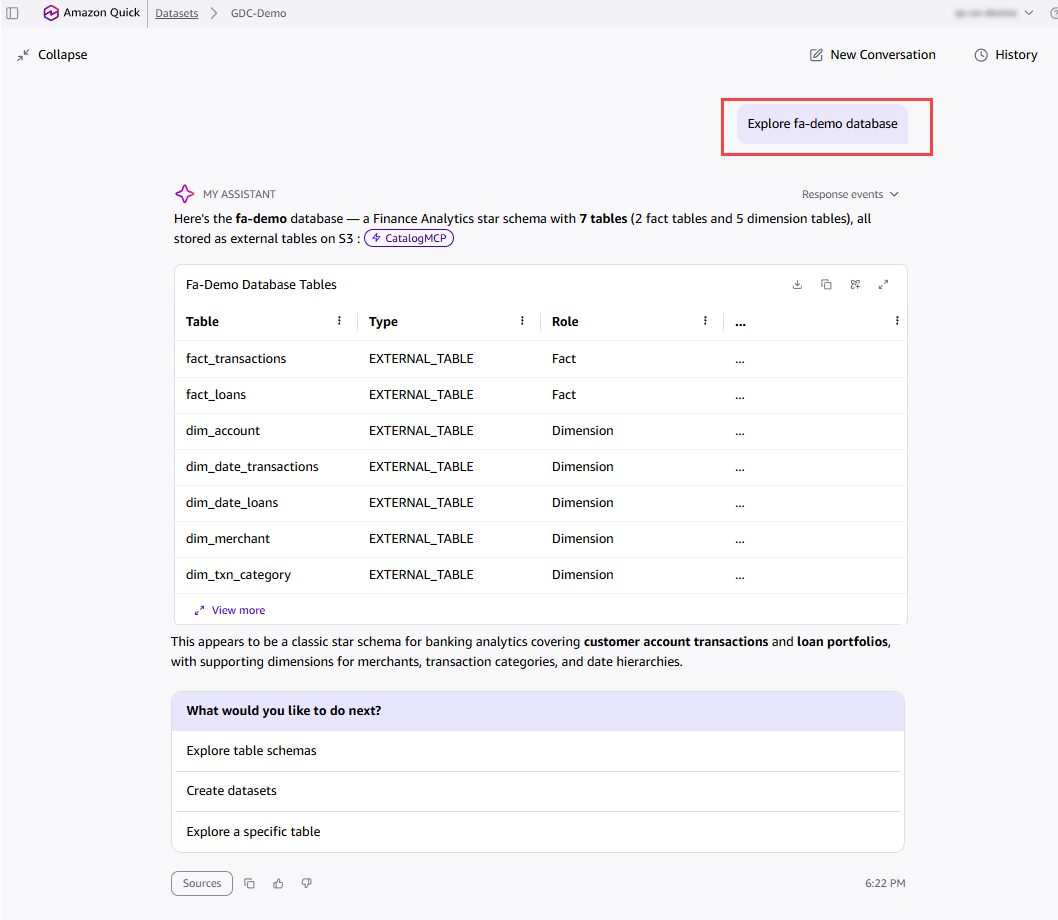
Figure 6: The Agent identifying the fact and dimension tables in the fa-demo database
Ask the Agent to create a star schema diagram for fa-demo. The Agent analyzes the tables, identifies the primary and foreign key relationships, and presents a complete logical data model with a schema summary. It highlights that dim_account is the shared conformed dimension connecting both fact tables. Choose Create datasets & Topic to let the Agent build everything automatically.
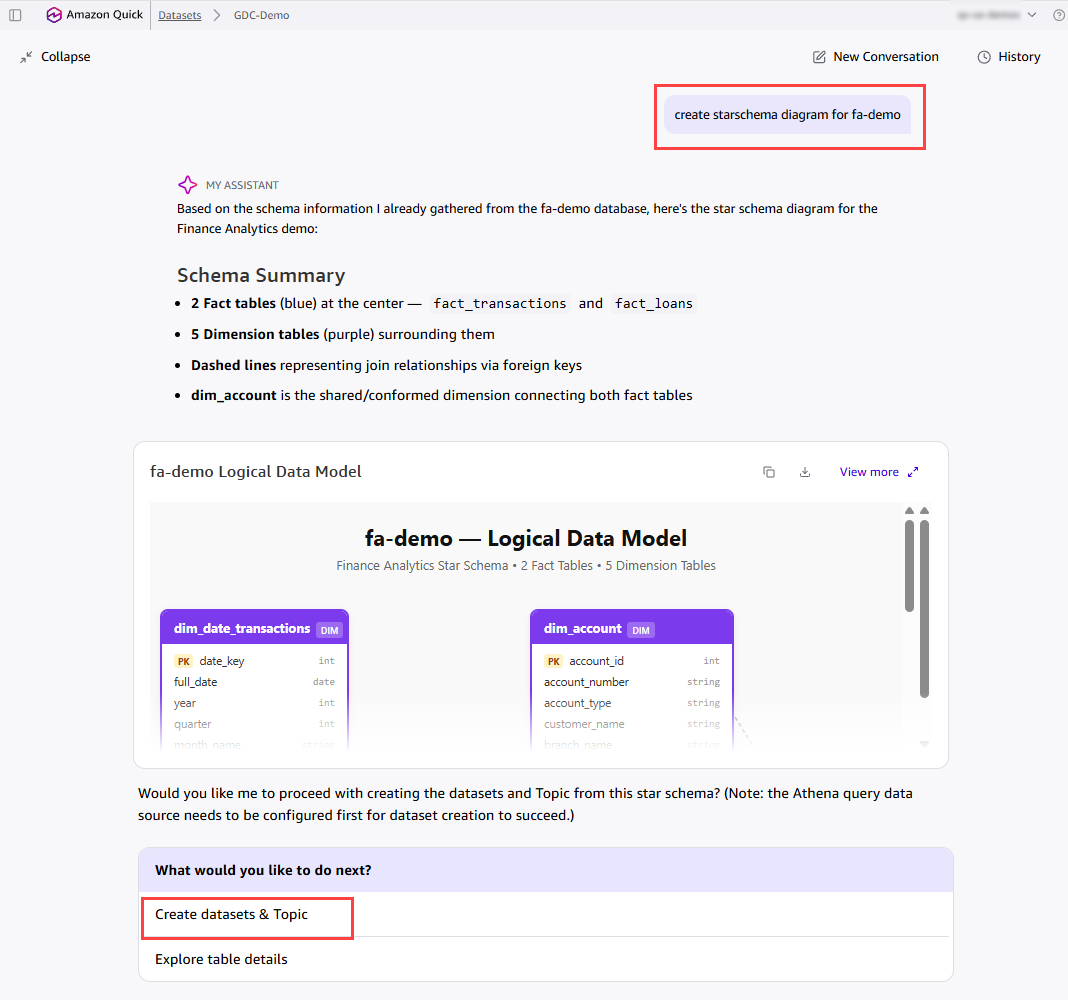
Figure 7: The generated logical data model for the fa-demo schema
The Agent creates a fully configured Topic with all Datasets and relationships in place. In this example, it creates the “Financial Analytics” Topic with all seven Datasets from the fa-demo database and 6 preconfigured star schema joins. Each Dataset carries its inherited business description, and the join relationships between the fact and dimension tables are validated automatically. The Topic is immediately ready for natural language Q&A, so you can ask questions like “What is the total transaction amount by merchant category?” or “Show me delinquent loans by risk rating.”
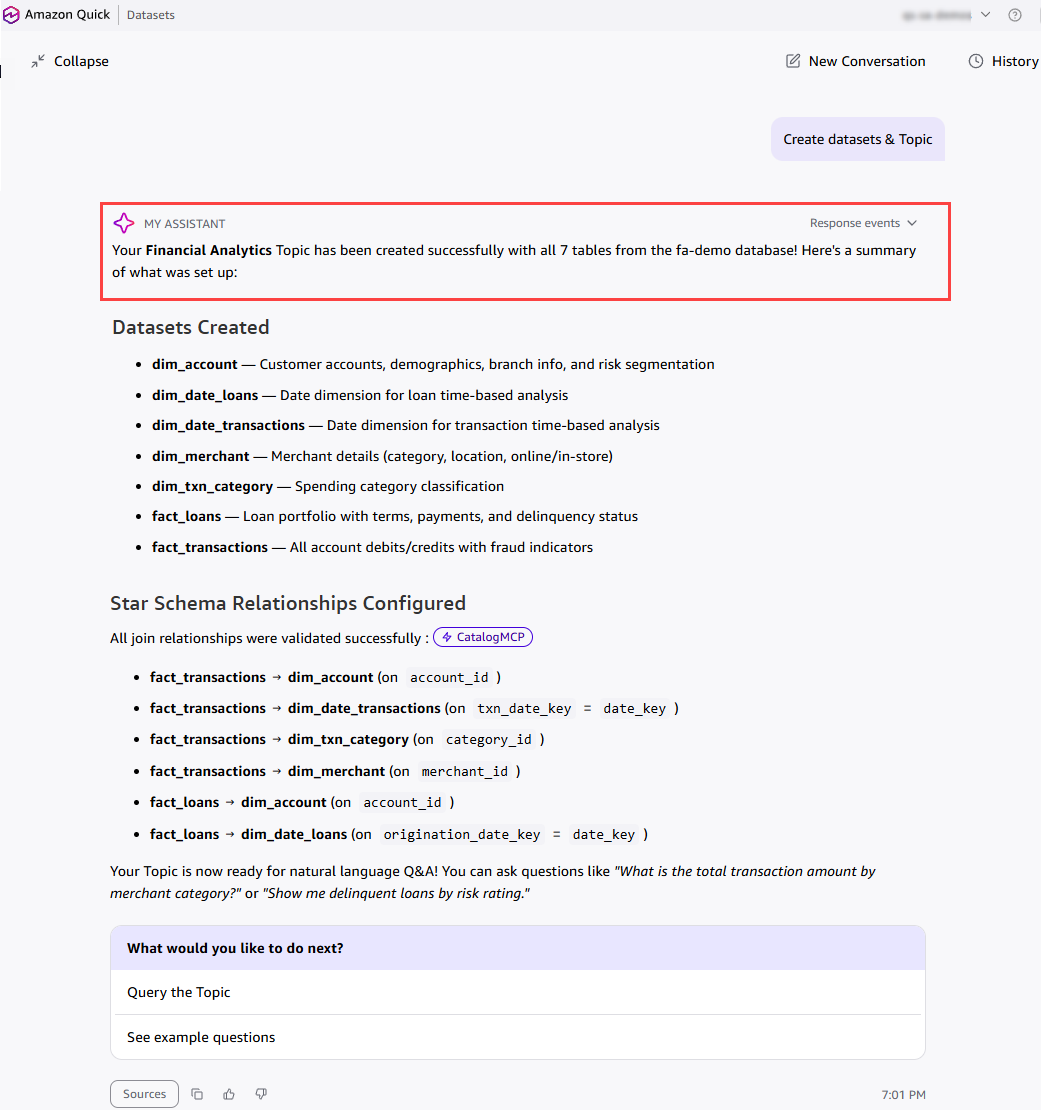
Figure 8: The fully configured Financial Analytics Topic
Now, let’s see how the Financial Analytics Topic created from the Glue Data Catalog works in action. With the Topic pinned as context, end users can ask questions in plain language and get grounded answers instantly. For example, a user can ask “Total transaction amount by merchant category” and the Agent returns a ranked breakdown with key highlights. The user can then follow up with “Delinquent loans by risk rating” to see a risk-level summary with insights. Because the Datasets and relationships were inherited from the catalog, every answer is backed by the trusted schema, joins, and business definitions defined upstream. This is the power of the Agentic Catalog Experience: curators define the context boundary once, and every end user can explore the data conversationally from there.
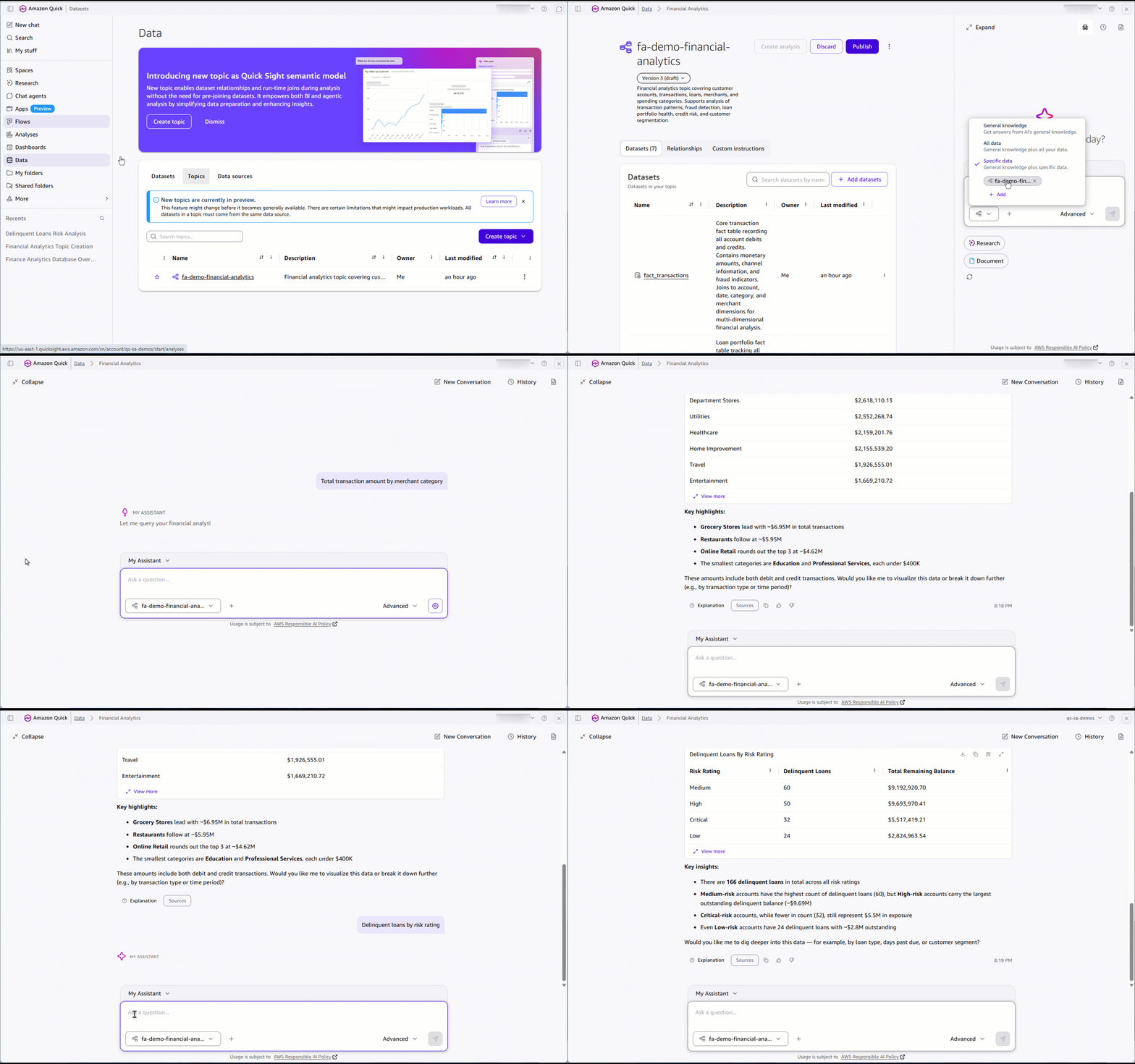
Figure 9: Asking natural language questions against the Financial Analytics Topic
Connecting to Databricks Unity Catalog
The same experience works with Databricks Unity Catalog. Here is a quick example that shows the full flow, from configuring the connection to creating Datasets and a Topic.
Create a Databricks Unity Catalog data source, and then choose Explore data to launch the Quick Agent. The Agent summarizes the catalog, and with a single confirmation it creates the Datasets and a Topic with the star schema joins already configured.
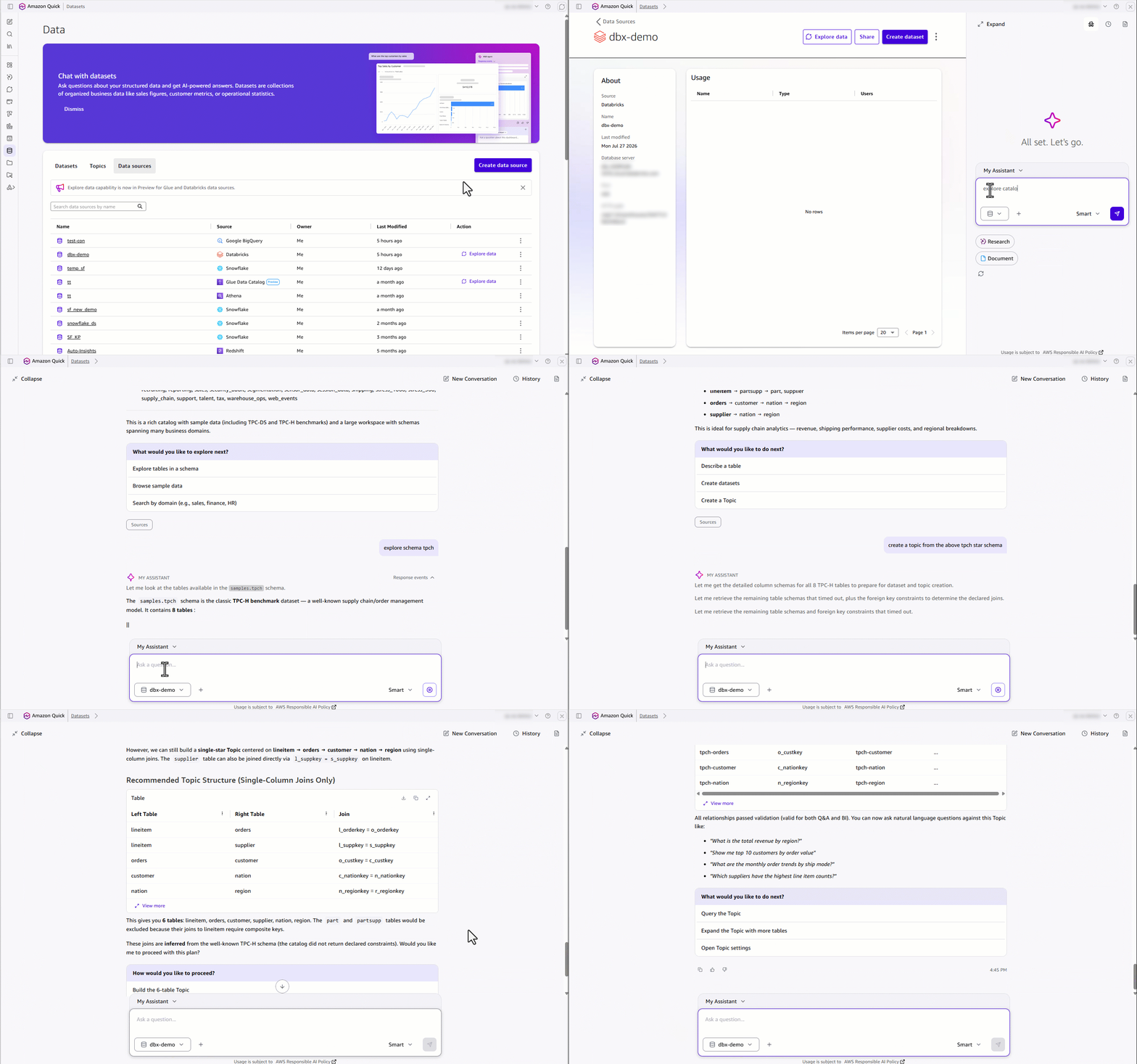
Figure 10: Creating Datasets and a Topic from Databricks Unity Catalog
After the Topic is ready, end users can ask complex questions that span multiple related tables. In this example, the Agent answers “Top 5 brands by revenue per region” by joining across the Topic relationships, and returns a grounded, visual result.
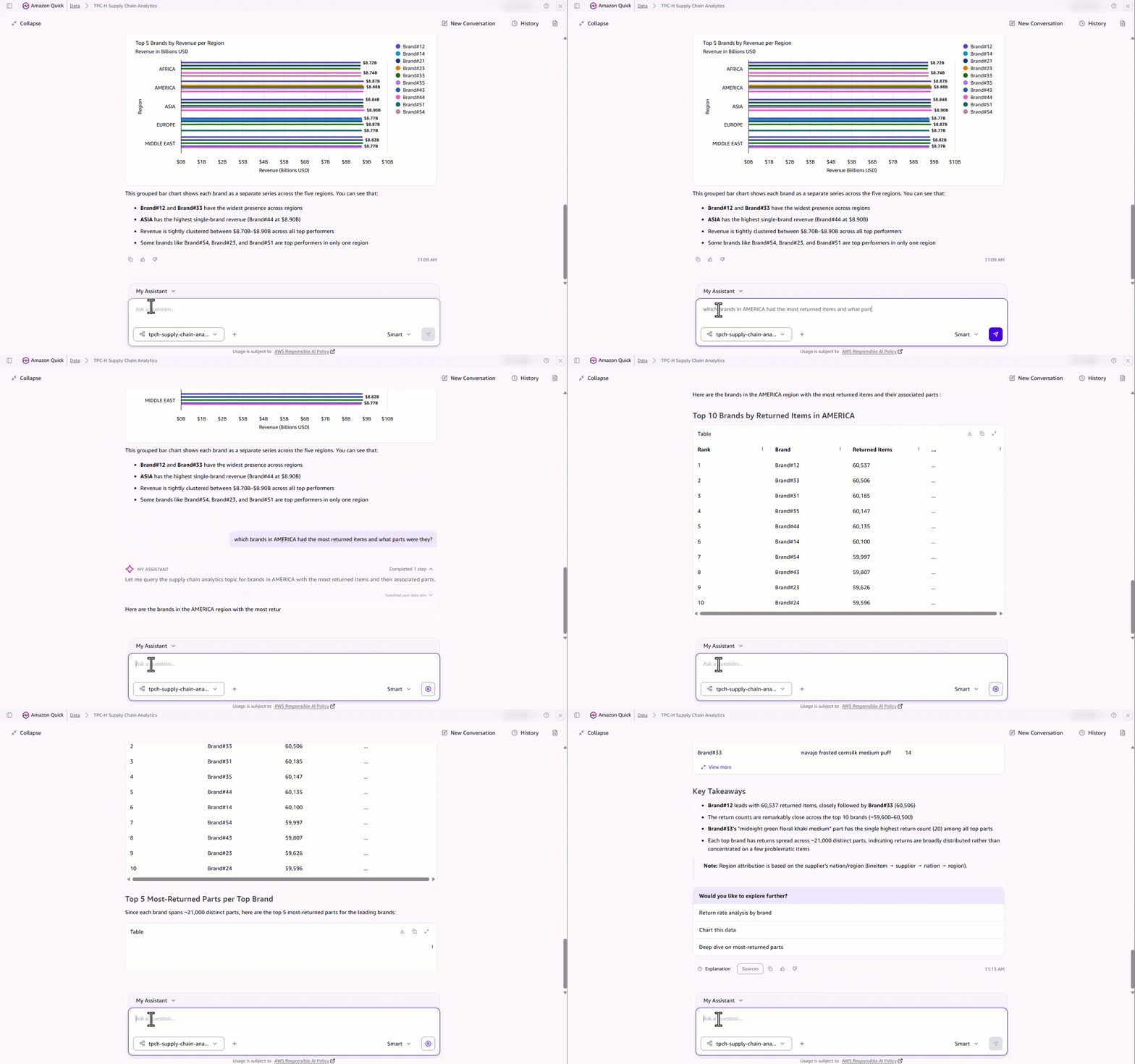
Figure 11: Answering a multi-table question across Topic relationships
The result
Curators deliver trusted data, full enterprise context, and production-ready AI answers and dashboards in a fraction of the time. End users get grounded answers they can trust, backed by Gold-standard data with full semantic lineage.
From weeks of manual configuration to minutes of guided conversation.
That’s the Agentic Catalog Experience in Amazon Quick.