AWS Messaging Blog
Getting started with AWS End User Messaging Notify
One-time passwords (OTPs) are the backbone of modern user verification, from account creation to wallet additions, to password resets. But for businesses operating globally, delivering OTP messages reliably across dozens of countries is complex. It has traditionally meant navigating a maze of country-specific registrations, originator provisioning, and carrier compliance requirements. AWS End User Messaging Notify changes that equation entirely by removing the complexity of global OTP delivery.
Before we dive into the technical implementation, let’s explore what Notify is, why it matters for businesses sending verification codes at scale, and how you can go from zero to sending OTPs in minutes, not weeks.
The problem with traditional OTP sending
Sending OTP messages through traditional SMS channels requires significant upfront investment. For each country you want to reach, you need to research which origination identity types are supported: short codes, long codes, toll-free numbers, sender IDs, or 10DLC. Each has different registration timelines, throughput limits, and costs. Some countries require pre-registered message templates. Others mandate sender ID registration or risk having your messages displayed as “LIKELY-SCAM” to recipients.
For a business targeting multiple countries, that complexity multiplies fast. Each market carries its own registration process, approval timeline, and compliance requirements. A US short code can take 8–12 weeks to provision. India requires Distributed Ledger Technology (DLT) registration with the Telecom Regulatory Authority of India (TRAI), including entity verification, template approval, and header registration. Even straightforward markets like the UK now require sender ID registration to prevent carrier filtering.
The result? Businesses spend weeks or months on registration paperwork before sending their first verification code. And that assumes every registration is approved on the first attempt.
What is Notify?
Notify is a fully managed OTP and verification code sending service within AWS End User Messaging. Instead of provisioning your own phone numbers, managing carrier registrations, and building routing logic, you create a single Notify configuration and AWS handles the rest: the origination identities, carrier compliance, message routing, and even fraud protection.
The core benefit behind Notify is simplicity. You provide your brand name, select your target countries, choose a pre-approved message template, and start sending. AWS automatically validates your account, assigns the appropriate origination identities for each destination country, configures SMS Protect for fraud prevention, and routes your messages through the optimal delivery path. What previously required weeks of registration work now takes minutes.
The business case for Notify
The value of Notify becomes clear when you look at the traditional OTP implementation journey. A business targeting the United States, United Kingdom, Japan, and India would face four completely different registration processes:
- United States: Choose between toll-free (15 business days, best case), 10DLC (moderate timeline), or short code (8-12 weeks or more). Sender IDs are not supported.
- United Kingdom: Sender ID registration is required. Unregistered sender IDs risk being displayed as “LIKELY-SCAM.” Short codes are available through an AWS support case.
- Japan: Sender IDs are still supported without pre-registration, but number display isn’t guaranteed across all carriers (particularly KDDI). Dedicated short codes are available through an AWS support case.
- India: Requires DLT registration including entity verification, content template approval, and header (sender ID) registration. Traditionally one of the longest lead-time markets to onboard.
With Notify, your OTP use case in all four of these countries can be operational in minutes. For markets that previously required weeks, you can send immediately while working through dedicated registrations in parallel.
To illustrate the business impact across industries:
- Hospitality and entertainment: Theme parks and resorts with global audiences can verify guest accounts across 50+ countries without managing individual country registrations, so international visitors can add passes to digital wallets, create accounts, and complete elevated security actions.
- Ecommerce: Global marketplaces can onboard customers from any supported country with verified OTPs, eliminating the registration bottleneck that delays international expansion.
- Financial services: Banks and fintech companies can deploy multi-factor authentication globally, with built-in fraud protection that automatically filters artificially inflated traffic and SMS pumping.
- Healthcare: Patient portals can verify identities across international locations, with pre-approved templates that help maintain compliance without custom message body management.
Where to start?
When evaluating Notify for your OTP program, we recommend starting with your highest-volume verification use case. OTP and code verification messages follow predictable patterns, making them ideal candidates for Notify pre-approved templates. More importantly, they provide the most immediate return on investment (ROI) by eliminating the registration overhead for your most critical customer touchpoint.
Consider a phased approach:
- Phase 1 – Quick win with Notify: Set up Notify for your primary markets. Get OTP sending operational in minutes. Use this to validate your integration and monitor deliverability.
- Phase 2 – Evaluate and scale: As volumes grow, evaluate whether specific high-volume countries benefit from dedicated origination identities for higher throughput or branding purposes. Notify supports a hybrid approach in which you can use your own originators alongside Notify managed identities.
- Phase 3 – Complex markets: For countries with strict registration requirements, begin the dedicated registration process in parallel. After they’re approved, integrate those dedicated identities into your sending architecture while Notify continues to handle the rest.
Now that you have decided where to start, the next sections walk you through setting up your first Notify configuration, from prerequisites to sending your first OTP.
Prerequisites
Before you begin, make sure that you have the following prerequisites in place:
- An active AWS account with billing configured.
- Access to the AWS End User Messaging SMS console.
- AWS Identity and Access Management (IAM) permissions for AWS End User Messaging SMS operations.
- A brand display name for your Notify configuration.
- A planned list of target countries for your OTP messages.
Note: The display name must contain only letters, numbers, spaces, hyphens, or underscores, and can be up to 15 characters.
Understanding Notify tiers
Notify offers two tiers, each designed for different stages of your OTP implementation:
| Feature | Basic tier | Advanced tier |
| Transactions per second (TPS) | 1 | 25 |
| Daily message limit | 200 messages/day | Unlimited |
| Country availability | 30 pre-approved low-risk countries | Full country list |
| Short code access | No | Yes |
| Fraud protection (SMS Protect) | Mandatory – AWS managed | Mandatory – AWS managed |
| Compliance verification | Trust-based with audit | AWS verifies opt-in compliance |
The Basic tier is designed for getting started, testing, and low-volume use cases. It provides immediate access with conservative limits, which is well suited to validating your integration before scaling to production.
The Advanced tier unlocks higher throughput, unlimited daily sending, and access to the full list of supported countries. To upgrade, you complete a streamlined verification process where AWS confirms your opt-in compliance. This is significantly faster than traditional carrier registration because the verification stays within the AWS boundary. No downstream carrier approval is required.
The Basic tier is live almost immediately. The Advanced tier upgrade requires a brand verification registration that demonstrates a compliant opt-in flow, and most requests are processed within 3-5 business days, which is still much faster than traditional carrier registrations.
Spend limits: Notify has a separate spend limit from standard SMS sending. AWS auto-approves more generous limits for Notify, but plan accordingly if you anticipate high volumes at launch.
Testing tip: While testing, keep in mind there is a per-recipient cap of 10 messages per day per Notify configuration (and 10 per day per account) for any single destination phone number. If repeated test sends to your own phone suddenly stop arriving, this limit, not a configuration error, is the likely cause.
A closer look at Advanced tier country coverage
The Advanced tier documentation states it supports all countries available on AWS End User Messaging SMS. While technically accurate, there is an important distinction not immediately obvious from the console: not all countries are fully managed with Notify.
At the time of writing, 68 of the 247 countries available on the Advanced tier (28%) require you to provide your own origination identity. For those destinations, you still need to go through number provisioning and carrier registration. AWS does not automatically assign managed identities for these countries.
To identify which countries require customer-owned identities, use the AWS End User Messaging SMS v2 API:
aws pinpoint-sms-voice-v2 list-notify-countries --tier ADVANCEDFor table view, use:
aws pinpoint-sms-voice-v2 list-notify-countries \
  --tier ADVANCED \
  --output table \
  --query 'sort_by(NotifyCountries, &CountryName)[].{
    "Country Name": CountryName,
    "ISO Code": IsoCountryCode,
    "Supported Channels": join(`, `, SupportedChannels),
    "Supported Use Cases": join(`, `, SupportedUseCases),
    "Supported Tiers": join(`, `, SupportedTiers),
    "Customer Owned Identity Required": CustomerOwnedIdentityRequired
  }'
The output is a formatted table as seen here:
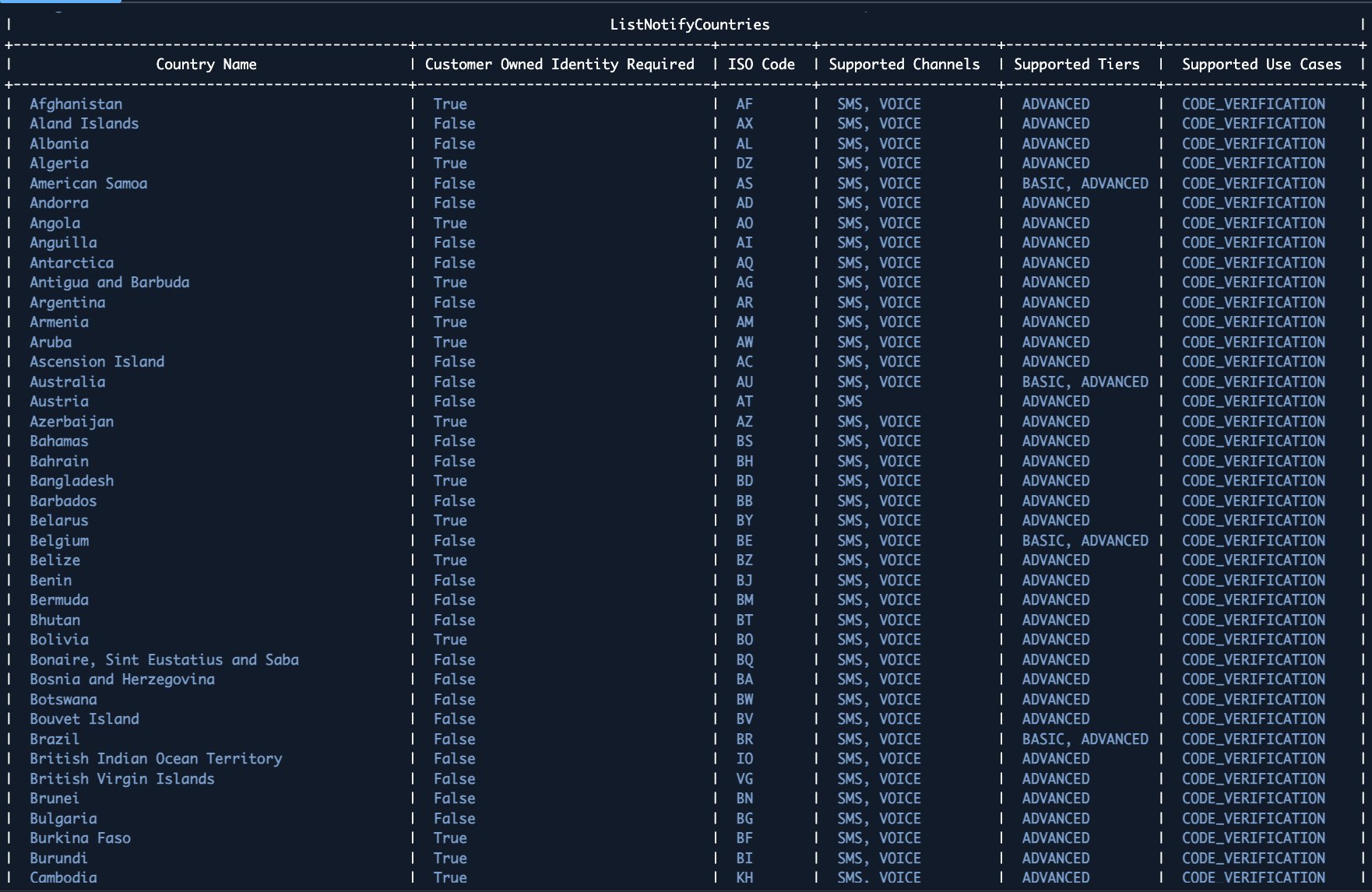
Look for the CustomerOwnedIdentityRequired field in the response.
| Coverage type | Count | Percentage |
| Fully managed by AWS | 179 | 72% |
| Customer-owned identity required | 68 | 28% |
| Total Advanced tier countries | 247 | 100% |
Note: These figures reflect coverage at the time of publication. As AWS continues expanding Notify fully managed coverage, these numbers may change – always use the API for the most current breakdown.
Generating the countries list as a CSV
Because Notify’s country coverage evolves over time as AWS expands fully managed support, we recommend always generating the latest list with the AWS CLI, in a spreadsheet-friendly format, whenever you need it.
aws pinpoint-sms-voice-v2 list-notify-countries \
--tier ADVANCED \
--output json \
--query 'sort_by(NotifyCountries, &CountryName)[].{CountryName: CountryName, IsoCountryCode: IsoCountryCode, SupportedChannels: join(`, `, SupportedChannels), SupportedUseCases: join(`, `, SupportedUseCases), SupportedTiers: join(`, `, SupportedTiers), CustomerOwnedIdentityRequired: CustomerOwnedIdentityRequired}' \
| jq -r '["Country Name","ISO Code","Supported Channels","Supported Use Cases","Supported Tiers","Customer Owned Identity Required"], (.[] | [.CountryName, .IsoCountryCode, .SupportedChannels, .SupportedUseCases, .SupportedTiers, (.CustomerOwnedIdentityRequired | tostring)]) | @csv' > notify-countries.csv
What this means for your planning
- For 179 countries, coverage is turnkey. Create your configuration and start sending immediately.
- For 68 countries, you need a hybrid setup. Provision origination identities and associate them through a phone pool. Notify still handles routing, templates, and fraud protection.
- This reinforces the phased approach: start with the 179 fully managed countries, then register for the remaining 68 in parallel.
- Eight countries support SMS only, with no voice: Austria, China, France, Gabon, Germany, Italy, Pakistan, and Slovenia.
Pro tip: Before committing to your target country list, run the ListNotifyCountries API call and look for
CustomerOwnedIdentityRequired: trueto identify which markets need additional lead time.
How Notify works
Notify simplifies the OTP sending workflow into three steps:
- Create a Notify configuration – Provide your brand display name and select your use case (currently code verification). Optionally configure target countries, preferred templates, and channel settings.
- Enable countries and channels – Select which countries you want to send to and enable SMS, voice, or both. AWS automatically configures the appropriate origination identities and fraud protection for each country.
- Send messages – Use the
SendNotifyTextMessageAPI to deliver OTPs. Pass your Notify configuration ID, the destination phone number, and your template variables (such as the OTP code). AWS handles identity selection, template resolution, and message delivery.
Registration steps
To create your first Notify configuration, open the AWS End User Messaging SMS console, choose Notify configurations, and choose Create configuration.
- Enter your brand display name, which cannot be changed after creation.
- Select the Code verification use case. Optionally, under Advanced, set your target countries, channels, language code, a default template, and a phone pool (for a hybrid setup).
- Choose Create configuration.
For full step-by-step details, see the Getting started with Notify tutorial.
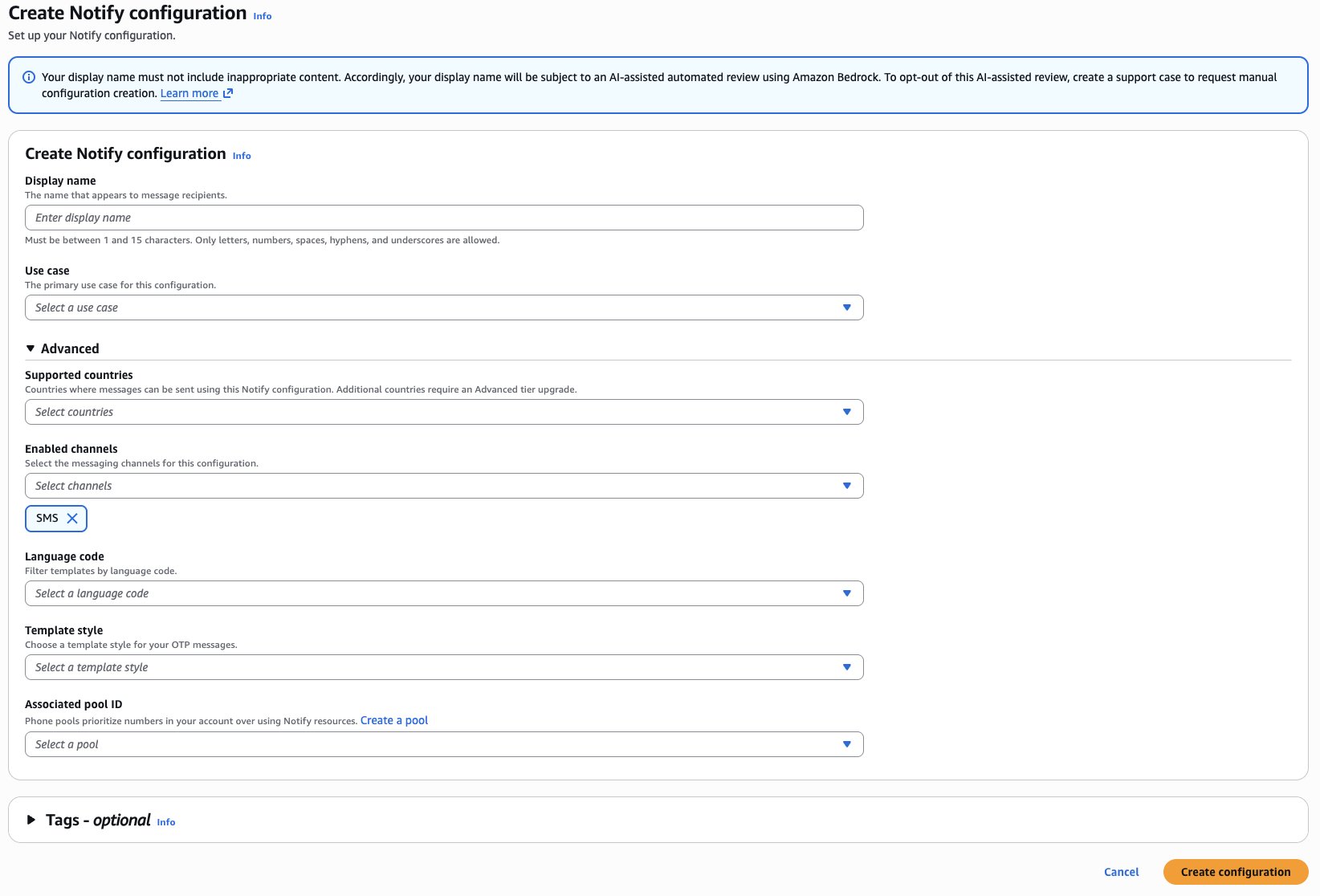
Your configuration activates within moments.
Sending your first OTP
After your configuration is active, you can send a test message directly from the console:
- Navigate to your Notify configuration and choose the Test tab.
- Enter a destination phone number.
- Select a message template and language.
- (Optional) Configure the OTP code value and expiration.
- Choose Send test message.
The recipient receives a message similar to the following:
“[YourBrandDisplayName], your one-time password verification code is [PASSWORD]. Please do not share this message. Sent by Notify.”
Note: This post focuses on delivering the OTP message itself. Generating a secure OTP code and verifying the code the customer submits back are outside the scope of this post. For guidance on that side of the architecture, including code generation, storage, and verification, see Build a Secure One-Time Password Architecture with AWS.
For programmatic sending, use the AWS End User Messaging SendNotifyTextMessage API (this example uses the AWS End User Messaging SMS phone number simulator):
In your terminal (or AWS CloudShell), create a new Python file:
cat > send_notify_message.py << 'EOF'
import boto3

client = boto3.client('pinpoint-sms-voice-v2')

response = client.send_notify_text_message(
    NotifyConfigurationId='notify-config-1234567890',
    DestinationPhoneNumber='+15555550123',
    TemplateId='your-template-id',
    TemplateVariables={
        'otp': '123456'
    },
    MessageFeedbackEnabled=True
)

print(f"Message ID: {response['MessageId']}")
EOF
Before running, replace the placeholder values with your own:
notify-config-1234567890– Your Notify configuration ID.+15555550123– The destination phone number in E.164 format.your-template-id– The template ID you created earlier.123456– Your OTP or variable value.
Run the script:
python3 send_notify_message.pyYou receive output similar to the following:
Message ID: msg-1234567890abcdef0Note: Notify uses the same pinpoint-sms-voice-v2 API namespace as standard AWS End User Messaging SMS. If you have an existing integration, the migration path is straightforward. The primary difference is the API endpoint and parameters.
Notify and standard AWS End User Messaging SMS: Better together
Notify works alongside your existing AWS End User Messaging SMS infrastructure. This hybrid approach combines the strengths of both:
- Notify for rapid global coverage: Use Notify for countries where you don’t have dedicated origination identities. Eliminate registration delays and start sending immediately.
- Dedicated identities for high-volume markets: For countries where you need maximum throughput, custom branding, or two-way messaging, continue using your own short codes, toll-free numbers, or registered sender IDs.
- Pool-based prioritization: Associate your dedicated numbers in a phone pool with your Notify configuration. Notify prioritizes your numbers first and falls back to AWS managed identities only when needed.
This approach works well for businesses expanding internationally. You can launch OTP verification in new markets on day one with Notify, then transition to dedicated identities as volume and requirements justify the investment.
How Notify compares to standard AWS End User Messaging SMS
The following table compares standard SMS sending with Notify across the capabilities that matter most when planning your OTP program.
| Feature | Standard SMS | Notify |
| Number provisioning | Customer managed | AWS managed |
| Carrier registration | Customer managed | AWS managed |
| Time to first message | Days to weeks | Minutes |
| Message templates | Customer created | Pre-approved by AWS |
| Fraud protection | Optional (SMS Protect) | Mandatory (SMS Protect) |
| Country rules | Customer configured | AWS managed with customer controls |
| Throughput (Basic) | Varies by originator | 1 TPS, 200 msgs/day |
| Throughput (Advanced) | Varies by originator | 25 TPS, unlimited daily |
| Hybrid with own numbers | N/A | Supported via phone pools |
| API namespace | pinpoint-sms-voice-v2 |
pinpoint-sms-voice-v2 |
Protecting your OTP traffic
Every Notify configuration includes mandatory SMS Protect integration. This means:
- Country rules: Control which countries can receive messages. We recommend disabling all countries by default and enabling only your target markets. You can adjust these settings at any time through the console, API, or CLI.
- Fraud filtering: AWS automatically filters artificially inflated traffic and SMS pumping. On the Basic tier, filter settings are AWS managed. On the Advanced tier, you retain the same protections with additional controls.
- Spend controls: Notify includes a dedicated spend limit separate from your standard SMS spend limit. Monitor your usage through Amazon CloudWatch metrics and set up billing alerts to track spending.
You can view and manage your country rules directly within the Notify configuration. To allow or block specific countries:
- Navigate to your Notify configuration.
- Choose the Countries tab.
- Toggle countries between Allow and Block status.
Note: SMS Protect is part of all AWS End User Messaging, not exclusive to Notify. If you decide to transition from Notify to dedicated origination identities for specific countries, your Protect configurations carry over without additional configuration.
Important considerations
Display name is permanent: Your display name appears in every message and cannot be changed after creation. If you need to experiment, create a test configuration first, then create a production configuration with your finalized brand name.
Templates are pre-approved: You cannot create custom OTP message bodies with Notify. This is by design. Pre-approved templates help maintain carrier compliance and reduce the risk of message filtering. If you need custom message content, use standard SMS sending with your own origination identities.
Architecture compatibility: Notify uses the same V2 API (pinpoint-sms-voice-v2) as standard AWS End User Messaging SMS. If you have an existing architecture using Amazon API Gateway, AWS Lambda, and Amazon Simple Queue Service (Amazon SQS) for message routing, integrating Notify requires only parameter changes, not an architectural redesign.
Message feedback: Notify supports the Message Feedback API for tracking OTP conversion rates. Pass the MessageFeedbackEnabled parameter when sending to track whether recipients successfully verify their codes. This provides first-party data for measuring authentication success rates across countries and carriers.
Managing costs and usage
Notify pricing includes a per-message service fee on top of standard SMS transport rates. The service fee covers origination identity management, fraud protection, and routing optimization.
Monitor your Notify message volume through Amazon CloudWatch metrics and the analytics dashboard within your Notify configuration. Set up billing alerts to track spending against your budget. For the latest rates, see AWS End User Messaging pricing.
Conclusion
In this post, we showed you how AWS End User Messaging Notify eliminates the registration complexity of global OTP sending. You get a fully managed verification code service with built-in fraud protection, pre-approved templates, and coverage across 200+ countries, operational in minutes instead of weeks.
Evaluate your current OTP sending workflow and identify the countries where registration overhead is delaying your go-to-market. Consider starting with Notify for those markets to establish immediate coverage, then layer in dedicated origination identities for high-volume countries as your program scales.
Get started today
Ready to implement Notify? Here are your next steps:
- If you’re ready to start: Open the AWS End User Messaging SMS console and create your first Notify configuration. You can be sending test OTPs within 5 minutes.
- If you want to learn more: Review the AWS End User Messaging Notify documentation and the Getting started with Notify tutorial.
- If you’re evaluating for a global rollout: Check the Notify supported countries list against your target markets and review the Notify tiers and quotas to plan your throughput requirements.
- If you need to build a complete OTP architecture: Read our related post, Build a Secure One-Time Password Architecture with AWS, for a comprehensive guide to OTP generation, storage, delivery, and verification.
Resources
- What is AWS End User Messaging Notify?
- Getting started with Notify
- Sending messages with Notify
- Notify supported countries
- Notify tiers and quotas
- SendNotifyTextMessage API reference
- How to Build a Compliant SMS Opt-In Process With AWS End User Messaging
- How to Manage Global Sending of SMS with AWS End User Messaging
- Build a Secure One-Time Password Architecture with AWS