Migration & Modernization
Assess and Migrate Storage to the Cloud with AWS Transform
Storage is a crucial component of every enterprise application, and it has the potential to be the most complex part of any cloud migration. Many migration approaches work around that complexity by starting with compute and network, leaving storage as an afterthought — and this can lead to storage becoming a late-stage bottleneck. In addition to this, the complexity of storage across different vendors, different formats, and the lack of a single, clear view of what you have and where it should go adds to the challenge of migrating enterprise applications to the cloud. When it’s time to migrate, storage is frequently handled as a separate stream from compute and networking, adding cost, risk, and re-architecture after landing.
Today, AWS Transform expands its storage capabilities with three key additions: more storage target options for customers, optimal workload-to-target recommendations through enhanced storage assessments, and a direct path from assessment to migration execution, including block storage migration to Amazon FSx for NetApp ONTAP, all within a single workflow.
In this post, we introduce how AWS Transform brings storage into the migration workflow end to end. We’ll look at the expanded set of AWS storage targets you can now migrate to, and how AWS Transform assessments recommend the right target for each workload. We’ll also look at how those recommendations flow directly into the migration execution, including block storage migration to Amazon FSx for NetApp ONTAP, all within the same workflow.
Choose from more storage targets
Migration assessments in AWS Transform now recommend a broader set of AWS storage services based on each workload’s capacity, performance, and operational requirements:
- Amazon EBS as block storage for high-performance, single-instance workloads
- Amazon FSx for NetApp ONTAP (block & file) for workloads requiring enterprise storage capabilities such as Multi-AZ high availability, inline data efficiency, instant clones, and multi-protocol access
- Amazon EFS for shared file workloads requiring NFS access across multiple instances
- Amazon FSx for Windows File Server as managed Windows-native file storage for workloads requiring SMB shares and Active Directory integration
- Amazon FSx for OpenZFS as high-performance file storage for latency-sensitive workloads needing ZFS data management capabilities
- Amazon FSx for Lustre as high-performance file storage for compute-intensive workloads like HPC, machine learning, and analytics
- Amazon S3 for archive, backup, and cold data
Each recommendation includes right-sized configurations and projected monthly cost by region, giving teams the data they need to build a migration business case.
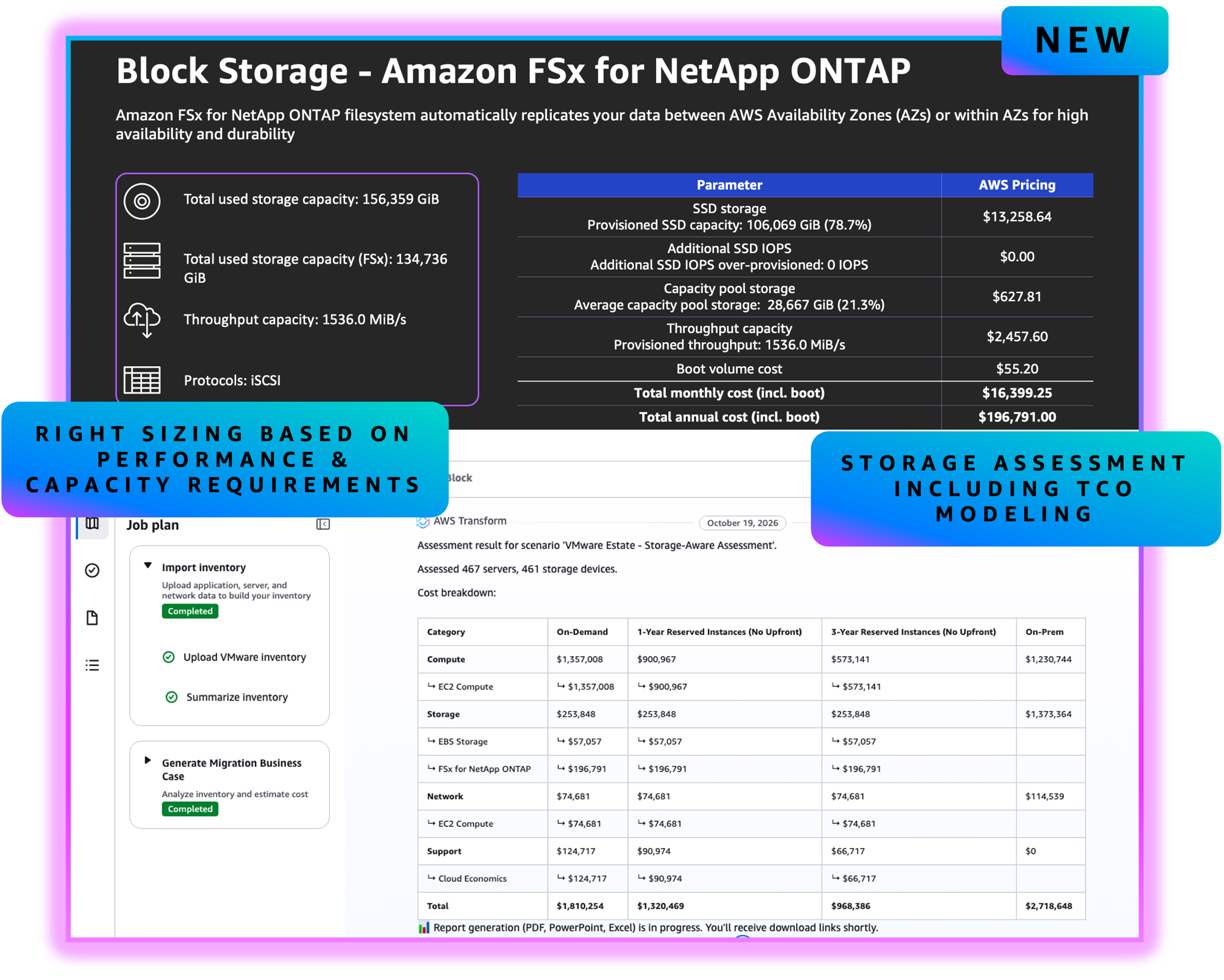
Figure 1. AWS Transform assessment output, downloadable storage assessment with TCO modeling across compute, storage, networking, and support for the assessed VMware estate.
Get the right recommendations for every workload
Getting the right storage target matters. The wrong choice leads to costly re-architecture after landing, or to overpaying for capabilities a workload does not need. AWS Transform removes the guesswork by recommending the right target for each workload.
AWS Transform evaluates each workload using the data collected during discovery: provisioned and used capacity, IOPS and throughput, data reduction ratios, and workload type (database, file server, application server); then recommends the right AWS storage target automatically. For workloads that need enterprise storage capabilities like high availability, data efficiency, instant clones for dev/test, and operational continuity with ONTAP, the assessment recommends Amazon FSx for NetApp ONTAP. Customers like S&P Global Market Intelligence rely on these same capabilities to run SQL Server FCI high availability and DR on FSx for ONTAP. For workloads that are well-served by high-performance block, it recommends Amazon EBS.
AWS Transform understands how different storage platforms represent capacity — everything from deduplication and compression ratios to thin provisioning and vendor-specific efficiency techniques — and normalizes them to your actual data footprint, so recommendations are never based on inflated raw numbers. To learn more about how storage assessments work, see Accelerate storage migration planning with AWS Transform assessments.
Move from assessment to migration in one workflow
This is the key change: storage assessment and migration are no longer separate activities. The same workflow that recommends where each workload belongs also carries it there. This builds on the established capability of block storage migration to FSx for ONTAP with AWS Transform MGN. See Migrate VMware Storage to Amazon FSx for NetApp ONTAP using AWS Transform for a detailed walkthrough of the block storage migration to FSx for ONTAP.
The storage migration begins with an assessment. You bring your inventory data into AWS Transform, and the assessment recommends the right target for each workload, including Amazon FSx for NetApp ONTAP for the workloads that need enterprise storage capabilities. From there, AWS Transform builds a migration wave plan and begins replication. For block workloads targeting FSx for ONTAP, it deploys a replication agent that continuously syncs data from your source servers directly to iSCSI volumes on the FSx file system, while your source environment keeps running.
Before committing, you can launch test instances on the actual target architecture within minutes instead of hours and validate your applications as many times as needed, without any impact to production. With the target network already in place, when you are ready you cut over your compute and storage together in a single coordinated wave, without separate tools or workflows, and your source environment remains your safety net until you explicitly finalize the migration.
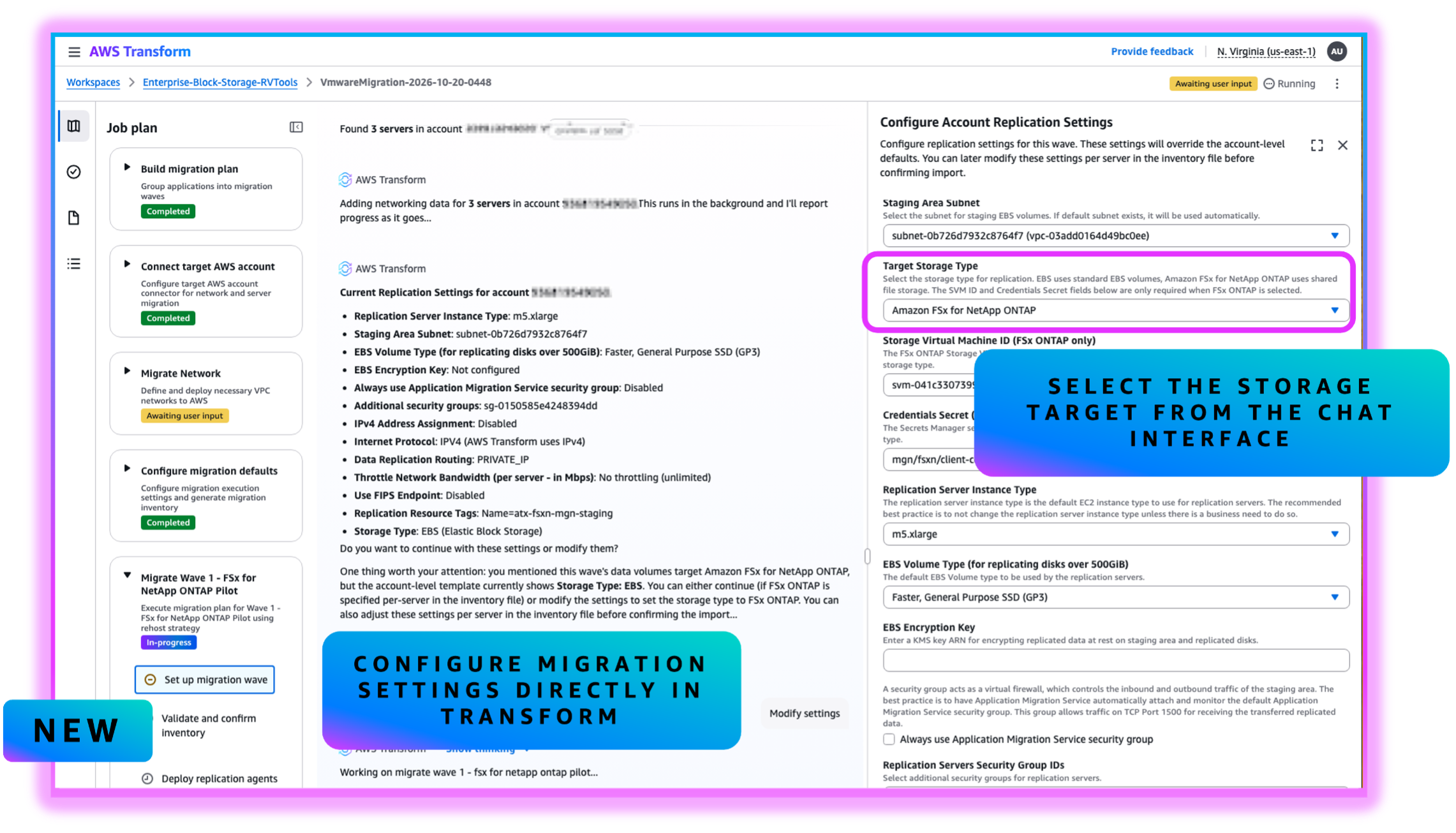
Figure 2: AWS Transform MGN replication settings, where you select Amazon FSx for NetApp ONTAP as the target storage for block workloads.
For the full technical walkthrough of the migration lifecycle, including how FlexClone™ technology enables instant, non-disruptive test instances and how atomic cutover works, see Migrate VMware Storage to Amazon FSx for NetApp ONTAP using AWS Transform.
What this means for storage migrations
Storage no longer has to be the bottleneck in an enterprise application migration. By connecting assessment and migration in one platform, AWS Transform lets teams decide where each workload belongs and move it there with confidence. For workloads that require enterprise storage capabilities, the path from assessment to production on Amazon FSx for NetApp ONTAP is now direct and coordinated, so teams land on the right storage from the start instead of planning a re-architecture at a later stage. In practice, this means:
- No maintenance window for data transfer as replication runs continuously while production stays live.
- Non-disruptive, repeatable testing on the actual target architecture, with zero production impact.
- Built-in rollback at every stage before you finalize. Your source environment stays your safety net.
- Enterprise storage from day 1. Your workloads on FSx for ONTAP land with Multi-AZ high availability, inline data efficiency, and the same ONTAP management tools your teams already use.
Organizations using the AWS Transform discovery tool or uploading data from tools like RVTools, Migration Evaluator, or Cloudamize can start with an assessment and move seamlessly into migration execution within the same workflow.
Getting started
- Upload your inventory data or deploy the AWS Transform discovery tool
- Run a storage assessment to generate per-workload target recommendations
- For block workloads targeting FSx for ONTAP, follow the migration setup guide
- Start migrating your compute, network, and storage in a single wave – AWS Transform MGN is free* of service charge for 90 days per server, so you pay only for the AWS resources you provision.
To learn more, visit the AWS Transform documentation.
FlexClone is a trademark of NetApp, Inc.
* While the use of AWS Transform MGN is free for 90 days, you will incur charges for any AWS infrastructure that is provisioned during migration and after cutover, such as compute (Amazon EC2) and storage (Amazon EBS or FSx for ONTAP) resources. These are billed to your account separately, at your regular rates.