Migration & Modernization
End Manual License Tracking with AWS License Manager
Overview
Are you still tracking software licenses manually? Manual license tracking costs, overprovision licenses without visibility into actual usage, miss renewals, face emergency purchases, and risk compliance violations during vendor audits. Manual license tracking creates chaos, and you waste hours updating spreadsheets. AWS License Manager automate this manual effort.
Your company needs a centralized license management hub to track software spanning AWS accounts, AWS regions, and hybrid environments. Without centralized visibility, you cannot optimize license usage or prevent over-provisioning. Cloud migration makes license tracking complex. Managing licenses for diverse applications, services, and users increases operational effort and costs.
In this blog post, you’ll learn how AWS License Manager, as your centralized license management hub, provides full visibility into license usage within cloud and on-premises environments. It automates license tracking and policy enforcement, controls costs by preventing over-licensing, enforces compliance with vendor agreements, and generates audit reports for stakeholder review.
Introduction to AWS License Manager
AWS License Manager creates a centralized license management hub that reduces costs and compliance risks. Enterprise IT teams track and manage software licenses in cloud, on-premises, and hybrid environments from one location. AWS License Manager centralizes control over software license usage. Since 2018, customers have used it to track, manage, and optimize licenses.
AWS License Manager centralizes software license management in the cloud, enabling organizations to track and optimize vendor licenses. Organizations moving workloads to AWS reduce costs with bring-your-own-license (BYOL) opportunities, reusing existing license inventory with cloud resources. Effective license management requires three things: knowing what you have, understanding how it’s used, and taking action to optimize costs and compliance. AWS License Manager delivers this through its Coverage, Insights, and Actions (CIA) framework to manage commercial software licenses efficiently, as Figure 1 illustrates.
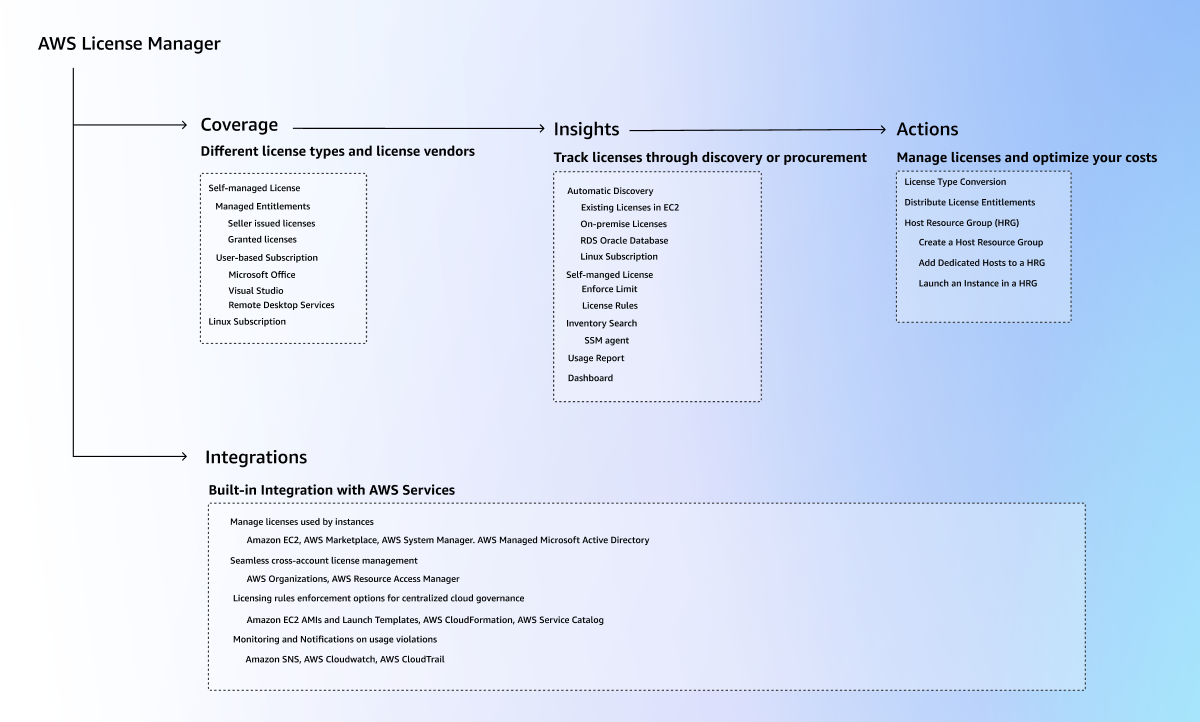
Figure 1: AWS License Manager CIA overview
The Coverage component supports multiple license types such as pay-as-you-go, perpetual, and subscription models, and integrates with major vendors including Microsoft, Oracle, IBM, and SAP. It handles AWS Marketplace and external vendor licenses seamlessly. It also maintains consistent functionality for Amazon Elastic Compute Cloud (Amazon EC2), Amazon Relational Database Service (Amazon RDS), on-premises infrastructure, and other cloud providers.
The Actions component automates license type conversion, entitlement distribution, user authorization, and license transfers to new dedicated hosts. These automations accelerate cloud migration, reduce total cost of ownership, and strengthen license management.
Benefits
AWS License Manager tracks licenses in real-time and provides compliance monitoring. You manage licenses for AWS accounts and on-premises resources from a single dashboard. Custom licensing rules prevent over-provisioning. Usage analysis identifies unused or underutilized licenses. The service monitors vendor agreements and generates audit reports for stakeholders. You maintain continuous compliance and cut software costs through unified license governance for hybrid cloud infrastructure
AWS License Manager Core Features for Centralized License Management
AWS License Manager provides four key features that help you manage licenses more effectively. These features address common licensing challenges while providing automated solutions for license management at a scale.
AWS License Manager service launched License Asset Groups at re:Invent 2025, addressing fragmented visibility spanning multiple AWS regions and accounts. Previously, administrators manually clicked through each region to view the licensing footprint. The feature consolidates licensing data into one unified view, as shown in Figure 2.
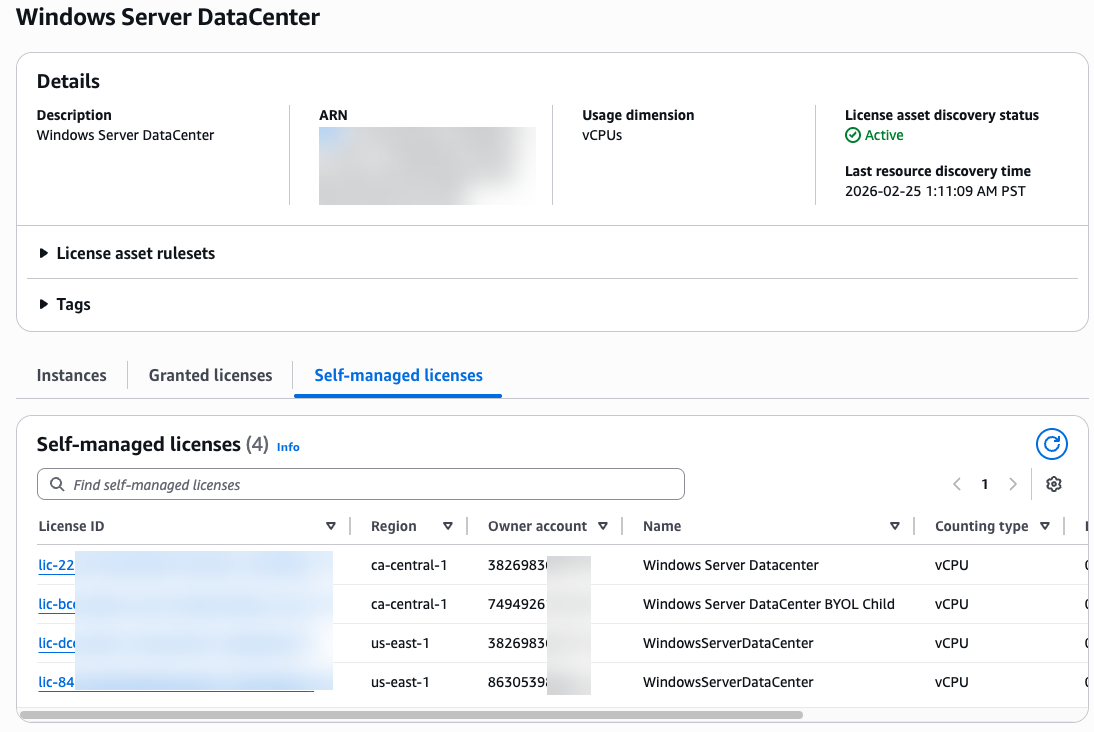
Figure 2: AWS License Asset Group example
Why do license asset groups matter?
With an AWS License Manager license asset group, you can centrally manage, track, and report your software licenses across all your AWS accounts and regions within your organization. Configure license discovery through pre-built Default Asset Groups. These templates cover common enterprise software in your infrastructure. Operating systems include Windows Server, Red Hat Enterprise Linux, and SUSE. Databases include Microsoft SQL Server, Oracle, and IBM DB2. Applications include SAP, Microsoft Dynamics, and SharePoint Server. You select the template, specify your target regions, and License Manager discovers and tracks these licenses. Custom Asset Groups provide flexibility when you have unique requirements. Start with an existing AWS-managed template and customize it. Build entirely new groups from scratch. Define specific asset rules based on EC2 product codes, AWS Marketplace product codes, or AMI IDs. Include your golden AMIs. Combine multiple related products into unified groups. For example, you can consolidate Linux variants like SUSE and RHEL for unified management.
Why use these features
License Asset Groups deliver three key outcomes. First, you replace fragmented manual tracking with automated visibility and eliminate blind spots in regions and accounts. This visibility helps you optimize license usage. Second, you reduce unnecessary spending through data-driven insights. Finally, you make strategic licensing decisions based on complete, accurate information. You stop relying on incomplete spreadsheets and assumptions. A License Asset Ruleset defines how to identify resources in AWS environments. You apply these rules to discover and map licenses and instances to License Asset Groups.
AWS managed rulesets enable deep discovery through AWS Systems Manager (SSM) scripts. They identify instances for specific products, including License Included and Bring Your Own License (BYOL) models. Available managed ruleset templates include Microsoft SQL Server Enterprise, Microsoft SQL Server Standard, Red Hat Enterprise Linux, SUSE Linux Enterprise, Ubuntu Pro, and Windows Server Datacenter (see Figure 3).
Custom rulesets require you to provide attributes such as Amazon Machine Image (AMI) IDs, AWS Marketplace product codes, and AWS Account IDs. Discovery with custom rulesets is less deep than AWS managed rulesets. They provide a valuable starting point. You gain visibility into instances in regions.
User-defined rulesets offer adjustable options. You track granted licenses and self-managed licenses, instance configurations such as EC2 billing codes, AMI IDs, and instance types. Custom rulesets give you full control over discovery criteria. License Manager tracks resources that fall outside AWS-managed product definitions. These include BYOL software, internally packaged AMIs, or non-standard configurations.
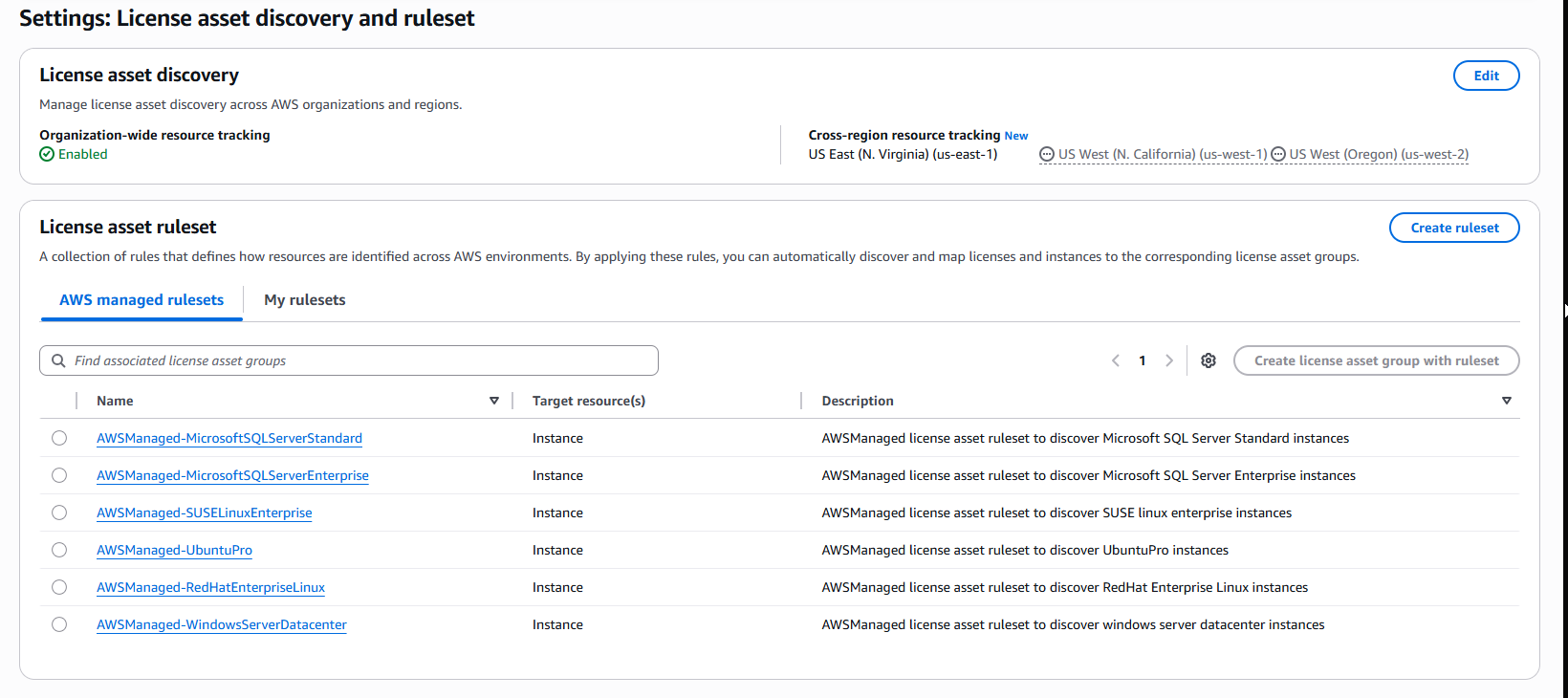
Figure 3: AWS License Asset Group rulesets example
Move from reactive manual license tracking to proactive automated compliance management, reduce costs, and eliminate compliance risks.
In a nutshell, License Asset Groups provide a single pane of glass for your entire licensing estate. The feature aggregates licensing data from all configured accounts and regions into a single dashboard, eliminating manual checks of each region. By configuring a License Asset Group once, the system continuously tracks and updates the view. The built-in analytics dashboard visualizes your licensing footprint, shows granted vs. BYOL licenses, tracks instance counts, and monitors upcoming renewals in one place. You add expiry dates to licenses, so License Manager alerts you before renewals are due. Deep discovery uses EC2 product codes, AWS Marketplace product codes, and AWS Systems Manager for instance, and license discovery, including version-level details like SQL Server edition.
License Analytics
License Analytics provides a new dashboard feature. The dashboard shown in Figure 4 monitors and reports software license usage.
You juggle multiple tools and compile data manually to manage license analytics in complex environments. AWS License Manager Analytics eliminates this complexity. The unified real-time dashboard gives you immediate visibility into license consumption trends, instance inventories, and utilization metrics per License Asset Group. You select flexible date ranges. The instance usage trends chart tracks your infrastructure’s evolution over time. It breaks down counts by AWS License included, Other BYOL, and AWS Marketplace licenses. You understand your complete licensing landscape.
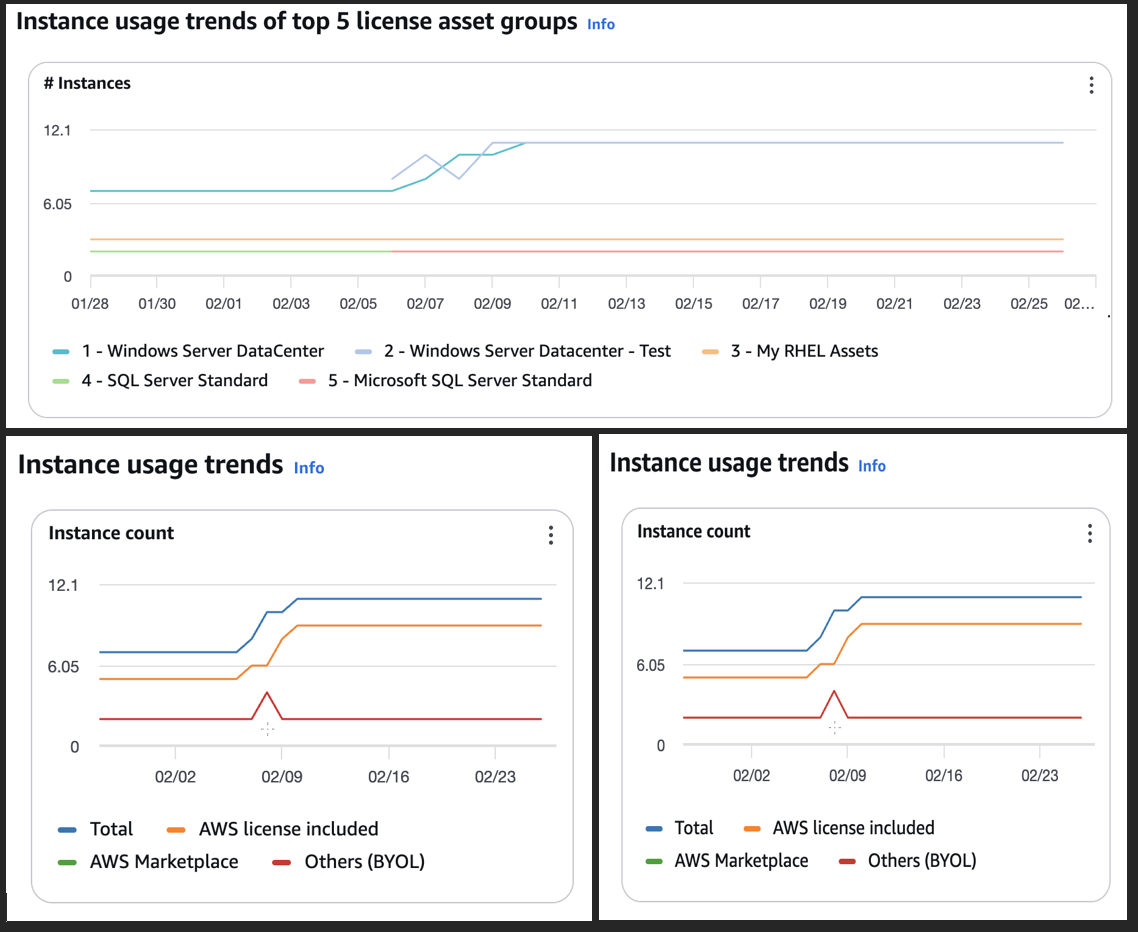
Figure 4: AWS License Manager analytics dashboard example
You view upcoming renewals in a filterable list instead of tracking renewal dates manually. The list shows licenses expiring within 30 days, with license name, type, and expiration details. Configure license expiration dates using Amazon Simple Notification Service (Amazon SNS) sends notifications before licenses expire. For compliance teams, audit-ready reporting generates CSV reports via the Usage Reports → License Asset Group report tab. You schedule automated delivery to Amazon S3.
Self-Managed License and Inventory Search
The self-managed license feature helps you create self-managed licenses that mirror software vendor agreements. You define specific counting rules through vCPU-based, core-based, or instance-based calculations. You set strict usage limits to prevent license over-allocation. The service enforces additional licensing constraints, such as tenancy type requirements. You maintain alignment with vendor agreements and compliance standards. For example, you set a vCPU-based license limit of 10. AWS License Manager blocks new resource deployments once it reaches that limit. The service verifies continuous compliance with the vendor agreement.
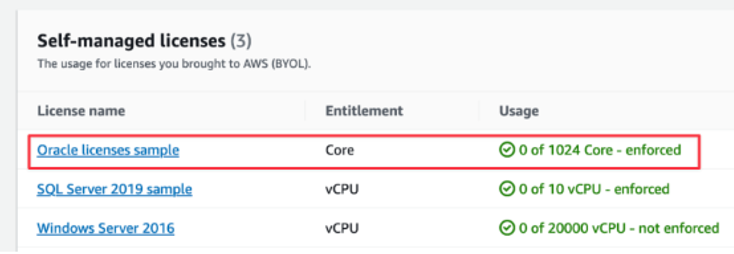
Figure 5: AWS License Manager self-managed licenses example
AWS License Manager integrates with AWS Systems Manager inventory to provide Inventory search. You discover and track application licenses in cloud and on-premises environments. The service supports a hybrid approach and attaches licensing rules to the applications it discovers. It displays them in a centralized dashboard alongside AWS workloads, providing full visibility into license usage in both cloud and on-premises infrastructure.
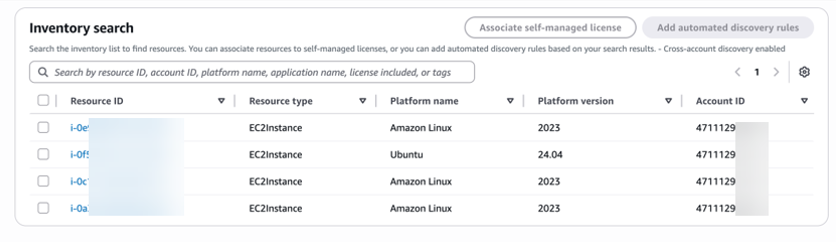
Figure 6: AWS License Manager inventory search example
AWS License Manager Host Resource Group (HRGs)
Managing BYOL software on dedicated hardware requires tracking license assignments, enforcing compliance rules, and ensuring instances land on the right physical hosts while controlling costs. AWS License Manager Host Resource Groups automate this process, letting you manage collections of Amazon EC2 Dedicated Hosts as a single entity, giving you several advantages when managing BYOL workloads.
Managing BYOL licenses manually creates an operational burden and compliance risk that grows with your infrastructure. Host Resource Groups solve this by tracking your core and socket usage while handling the complete host lifecycle from allocation to release. You get enforcement of your self-managed license configurations with clear usage monitoring instead of worrying about license assignment and tracking.
You separate Host Resource Groups by purpose, like development and production, or by different units, ensuring your license tracking remains organized and audit-ready. For Microsoft workloads, License Manager handles the 90-day license affinity requirement, preventing costly compliance violations by reserving terminated instance licenses for the complete required period.
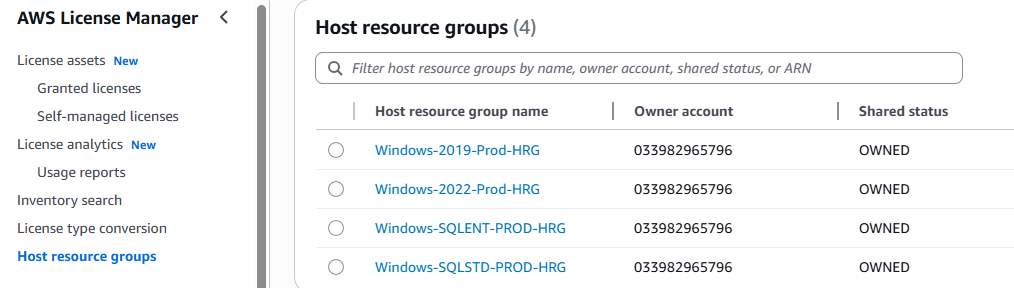
Figure 7: AWS License Manager Host resource group example
AWS License Manager host resource groups take the manual work out of managing BYOL software on EC2 Dedicated Hosts. By grouping hosts into a managed pool, you get automated host lifecycle management, consistent license compliance enforcement, and clear visibility into license usage without tracking individual host assignments yourself.
License Type Conversion
License Manager lets you convert supported instance license types as business needs change. You switch Windows Server and SQL Server licenses between AWS-provided licenses and BYOL. Convert free operating systems such as Ubuntu LTS to AWS-provided licenses or BYOS models without redeploying active workloads, as Figure 8 illustrates.
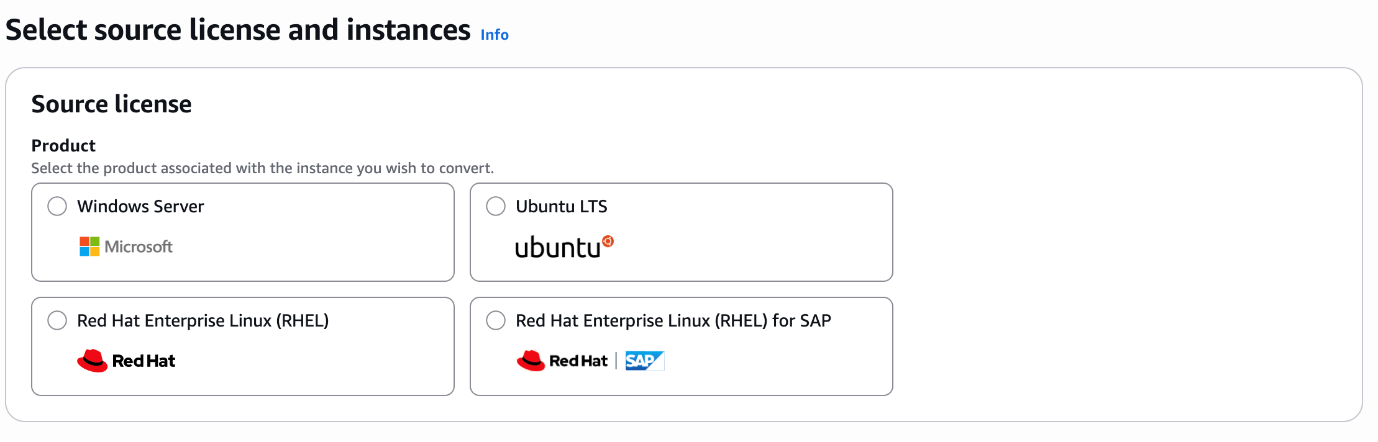
Figure 8: AWS License conversion products example
After selecting your source license type (Figure 8), AWS License Manager guides you through a structured conversion process (Figure 9) that ensures safe, compliant license transitions with full audit tracking.
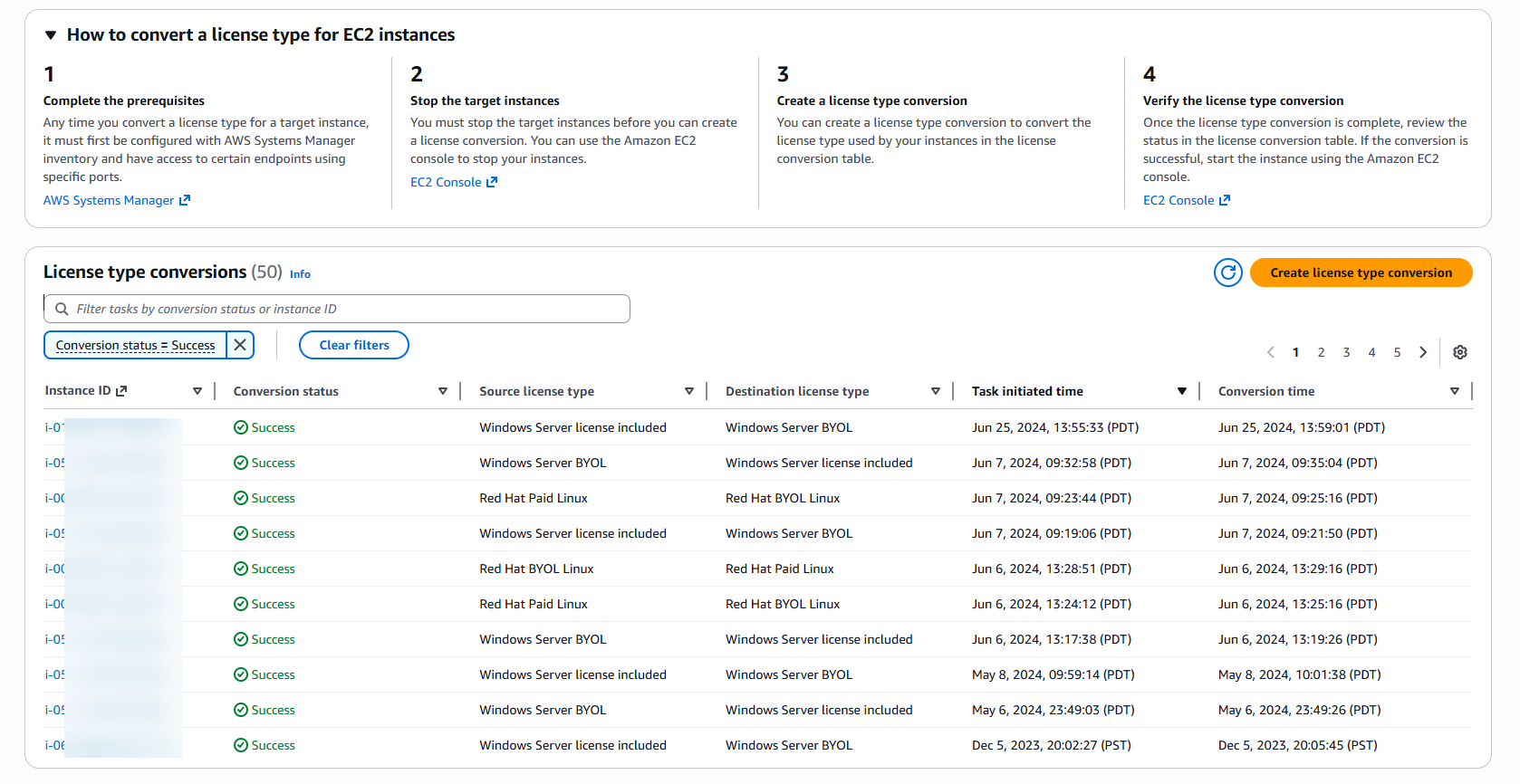
Figure 9: AWS License conversion example
Managed entitlements
AWS License Manager’s managed entitlements govern licenses from AWS Marketplace, AWS Data Exchange, or integrated sellers. The service operates as a licensing-server-as-a-service. It serves both software vendors (sellers) and software users (buyers). The service manages license administration and compliance.
Seller workflows let independent software vendors manage and distribute software licenses to their customers. Sellers use data plane APIs for check-out and check-in operations to verify entitlements. With global data replication, sellers view and verify entitlements in AWS Regions. The service also supports license management for buyers without AWS accounts.
![AWS License Manager seller-issued licenses dashboard displaying one active license entry. The table shows License ID l-3024:9447592f with Available status, assigned to license name A11yseller01 and product name A11y Product01. Additional details include recipient ID [CREDIT_DEBIT_CARD_NUMBER], license start date July 17, 2025, and expiration date October 31, 2025. Interface includes View, Activate, Delete, Edit, and Create license action buttons.](https://d2908q01vomqb2.cloudfront.net/1f1362ea41d1bc65be321c0a378a20159f9a26d0/2026/04/08/image-10-1.png)
Figure 10: AWS License seller example of issuing licenses
The Granted Licenses feature in AWS License Manager gives you a centralized way to view and manage licenses from AWS Marketplace, AWS Data Exchange, or integrated sellers. When a license is granted to your account, it appears in the License Manager console under Granted Licenses. You accept and activate it before use. AWS Marketplace licenses are accepted and activated upon purchase. License Manager replicates each granted license and its metadata to AWS Regions. You get a unified view of licenses granted to you.
For accounts using AWS Organizations, the Aggregated Licenses tab lets management accounts distribute entitlements to member accounts (up to 2,000 grants per license). As you enable features, you can accept licenses in member accounts, letting you centralize the procurement and governance of software licenses at scale.
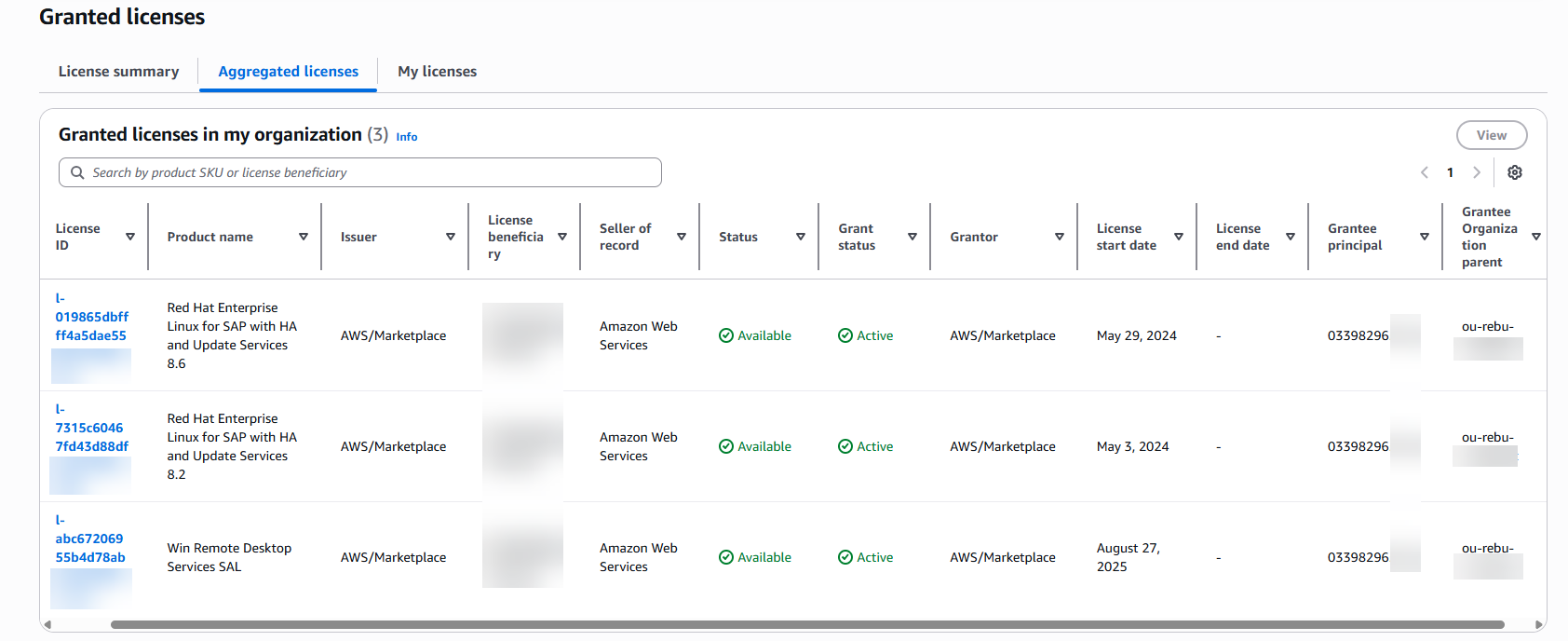
Figure 11: AWS License Grant licenses example
User subscriptions
AWS License Manager’s user subscriptions feature provides compliant, Amazon-provided licenses for selecting software products through per-user subscriptions. You acquire AWS-provided user-based subscriptions for Microsoft Visual Studio, Microsoft Office, and Microsoft Remote Desktop Services through AWS Marketplace.
AWS License Manager user subscription management workflow: You subscribe to License Manager-hosted AMIs through AWS Marketplace for Visual Studio, Office, and Remote Desktop Server products. AWS License Manager tracks instance lifecycles from these AMIs. The service bills monthly based on usage.
Manage Visual Studio, Office, and Remote Desktop Service subscriptions centrally through the AWS License Manager’s interface, as shown in Figure 12.
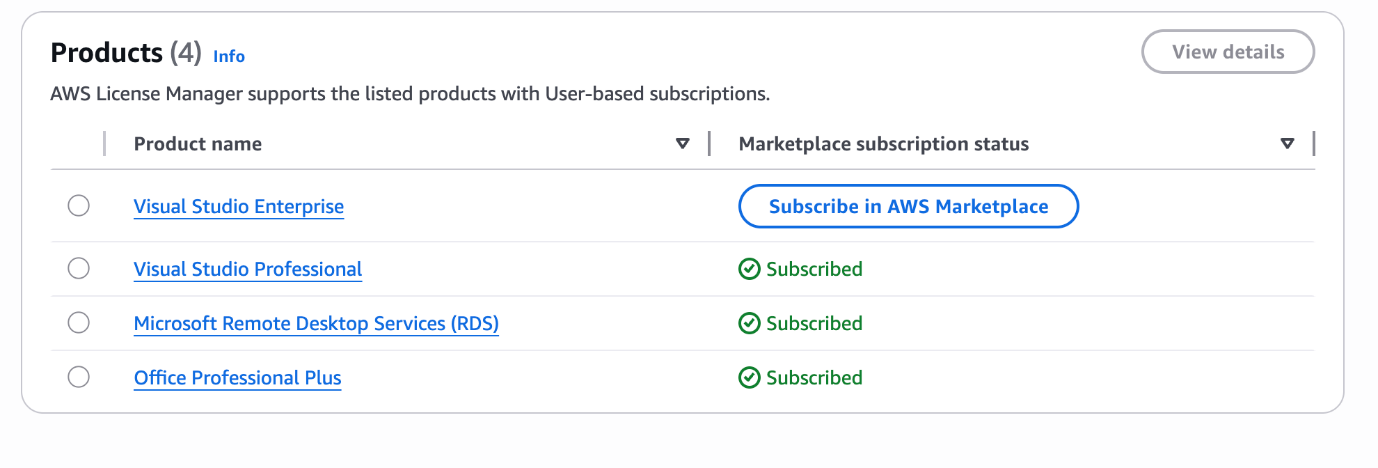
Figure 12: AWS License user subscriptions product example
Linux subscriptions
The Linux subscriptions feature in AWS License Manager monitors and manages commercial Linux subscriptions on EC2 instances. The service tracks Linux subscription utilization in regions and accounts, and the centralized dashboard displays running instances with Linux subscriptions. It identifies instances with multiple subscription assignments (see Figure 13).AWS License Manager manages user subscriptions through a common workflow. You select a source region to aggregate commercial Linux workload data. Amazon CloudWatch metrics track hourly workload statistics for detailed subscription analysis. The service displays global commercial Linux workload licenses in a single region with hourly updates.
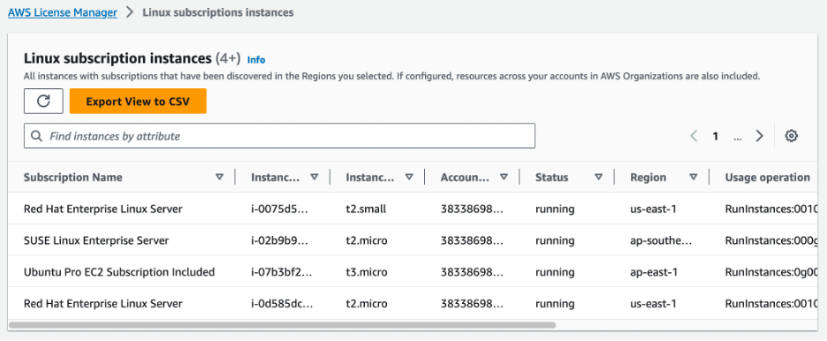
Figure 13: AWS License Linux subscriptions product example
Conclusion
AWS License Manager solves license management chaos. You gain a unified vision into software assets in cloud and on-premises environments from one dashboard. The service prevents overallocation with enforcement rules. You reduce software spending by 20-30% by identifying unused licenses. You maintain vendor compliance without manual tracking. Detailed audit reports keep you prepared. You eliminate blind spots, reduce costs, and verify compliance. AWS License Manager gives you the foundation for a compliant, cost-efficient, and resilient licensing strategy at scale.
Ready to reduce your software licensing costs? Start with the AWS License Manager today. Create your first License Asset Group in the AWS License Manager console. Configure tracking rules for your most expensive software licenses and gain immediate visibility into license usage.
Refer to the following resources for additional information:
- AWS License manager user guide
- AWS License Manager & Dedicated Host Workshop
- AWS License Manager use cases
- How to configure Microsoft RDS using User Subscriptions licenses with AWS License Manager.
- Operating BYOL Windows Server Workloads Effectively on AWS with AWS License Manager.
- AWS License asset group feature to gain organization wide visibility
- AWS License manager additional blogs