Migration & Modernization
How to plan your migration to the AWS Region in Saudi Arabia
If you are planning a migration to the AWS Region in Saudi Arabia, start by understanding which workloads are suitable and what they would cost to run once migrated. You can assess your existing environment before the Region opens, without committing to a migration date.
Amazon Web Services (AWS) has announced that its first Region in Saudi Arabia is on track to launch in December 2026. An in-country Region gives you another location to consider for workloads serving users in the Kingdom or subject to local data residency requirements.

Figure 1: The Region was announced at LEAP 2026 in Riyadh. Source: About Amazon
This post explains which decisions to evaluate and what information to prepare. It also describes how an AWS Optimization and Licensing Assessment (OLA) can help you compare deployment options and projected costs.
Decide which workloads to evaluate
Start with the applications you are considering for migration, rather than assuming the entire environment must move. For each application, establish who owns it, where its data can reside, and what availability and performance it needs. Check which operating systems, versions and platforms its software vendors support. Identify what it depends on elsewhere in your data center, such as shared databases, authentication services, file shares, batch interfaces or network appliances, so that dependent components are assessed together.
Data residency and recovery requirements
For regulated environments, including financial services, healthcare and government, an in-country Region provides customers with the ability to store and process data within the Kingdom, which they can evaluate against their specific regulatory requirements. Location alone does not establish compliance. Under the AWS Shared Responsibility Model, AWS is responsible for security of the cloud, and you remain responsible for security in the cloud, including how you configure services, control access and decide where data is stored.
AWS services provide the underlying capabilities, and the AWS Well-Architected Framework describes the best practices for deploying and configuring those services. Review applicable obligations with your security and compliance teams, including how services process data and where backups and replicas are stored.
Include disaster recovery in this review. Decide where recovery copies may reside and agree on how quickly the application must recover and how much data loss, if any, is acceptable.
Service availability and connectivity
New Regions launch with a core set of services and expand over time, so check that the services and instance types you need are available before you finalize your migration plan. The AWS Regional Services List shows availability as it is published. Record any dependencies that remain unconfirmed.
Hosting closer to users in Saudi Arabia may reduce latency, but the improvement depends on the application and network path. Plan to test connectivity, including connections to applications that remain on premises or in another Region.
Regional cost comparisons
Some applications may remain in their current location while others move to Saudi Arabia. Compare the options against residency and recovery requirements, as well as cost.
Where regional pricing is not yet published, agree on a reference Region for initial modeling and label that assumption clearly. Update the estimate when target-region prices and required services are available. Include data transfer costs as well. Data transferred into AWS from the internet is not charged, but data transferred out to the internet, and data transferred between AWS Regions, is charged per GB. If an application in Saudi Arabia exchanges data with systems in another Region, for example through replication, backups or shared services, include that traffic in the estimate. Rates are listed under data transfer on the Amazon EC2 pricing page.
Prepare the information you already have
An assessment is more useful when it connects infrastructure data with application requirements and licensing records. Gather the following for the workloads you want to evaluate:
- Infrastructure inventory: server names, operating systems, CPU, memory and storage, including provisioned capacity and used capacity where available.
- Utilization data: CPU and memory measurements, the collection period, and known peaks such as month-end processing. Identify whether the measurements represent normal operation.
- Licensing records: software editions, agreements, entitlements, support coverage and renewal dates.
- Application requirements: owners, known dependencies, performance needs and recovery objectives.
- Location and scope: data residency requirements, current hosting locations and any planned retirements or upgrades.
You do not need every item before the first discussion. Identify what is available and where you have gaps. Your AWS account team or assessment partner can help agree on what additional data is needed.
Use an OLA to compare your options
An OLA is a complimentary assessment delivered by AWS or an OLA Certified Partner. The agreed scope determines which workloads and analyses it covers. It can help evaluate resource sizing and licensing options, and develop projected AWS costs from your environment data. Database-focused assessments can also review SQL Server and Oracle estates, including edition requirements, consolidation opportunities and moves to managed services such as Amazon RDS or Amazon Aurora.
The engagement starts by agreeing on scope and reviewing available information. Where necessary, additional data collection fills gaps before the team analyzes the environment and models deployment options. The findings form the basis of a business-case discussion.
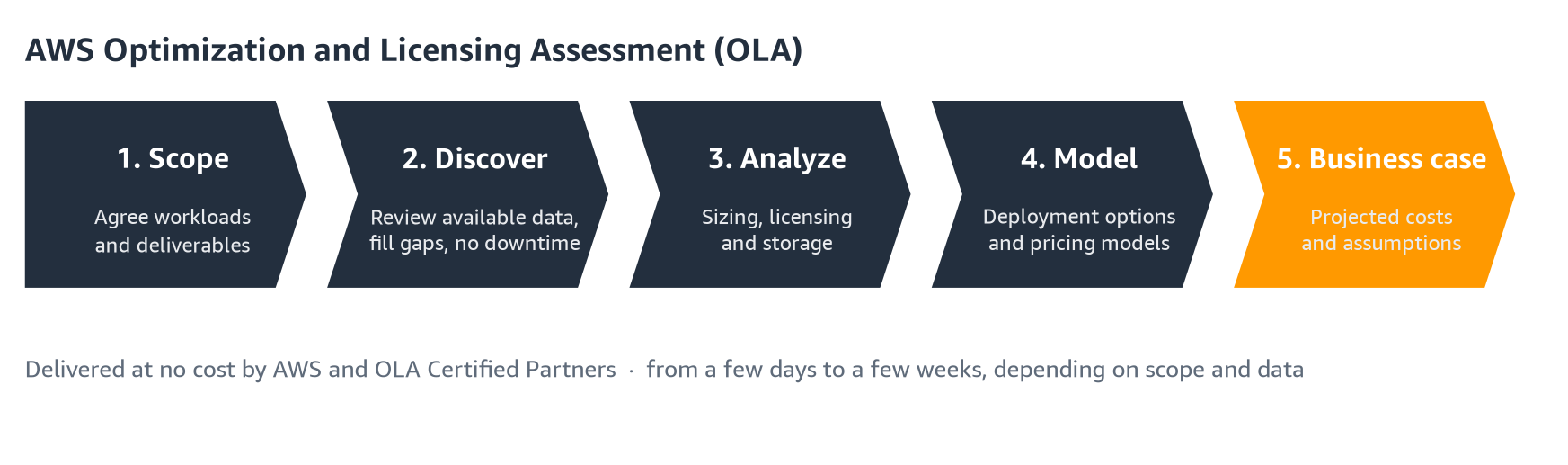
Figure 2: The OLA journey, from scoping to a business case
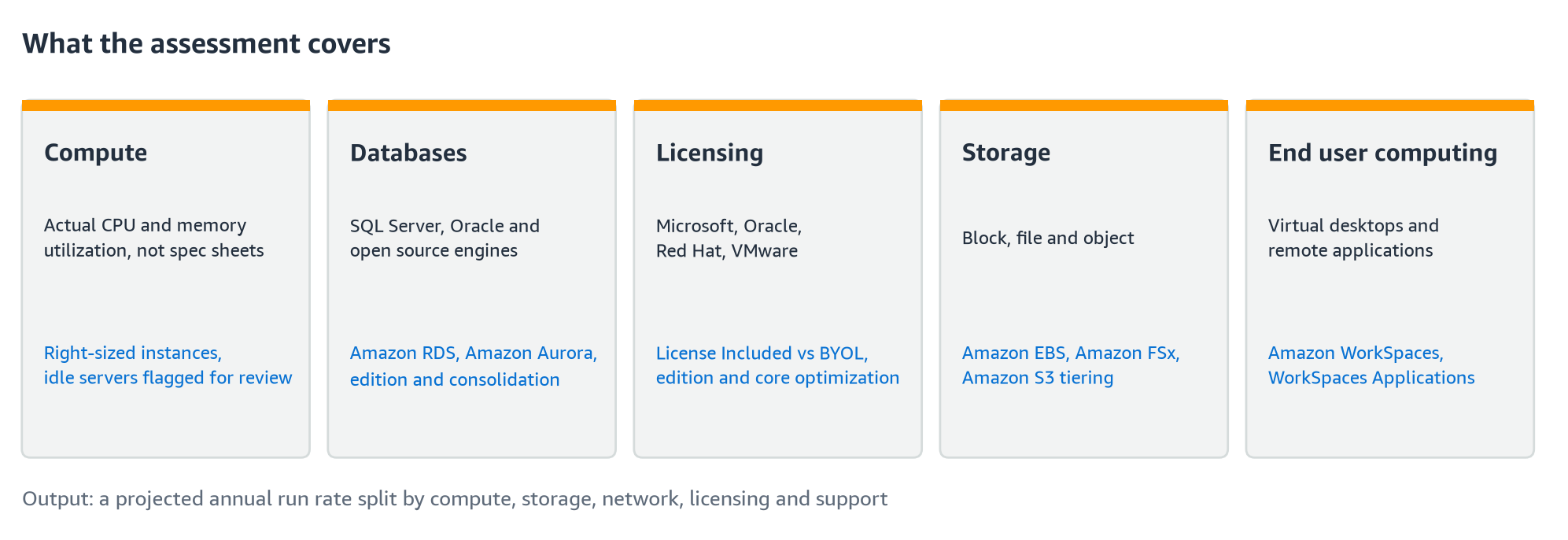
Figure 3: Areas an OLA can cover, depending on the agreed scope
Size resources around workload needs
Review measured utilization alongside application requirements before selecting AWS resources. A lightly used server may be a candidate for a smaller configuration, but low average utilization alone is not enough.
Check peaks, scheduled jobs and required headroom. Confirm with the application owner before treating an apparently idle server as a retirement candidate. Where measurements are missing, make sizing assumptions visible in the estimate.
Evaluate licensing alongside infrastructure
Licensing can change which deployment option is economical. For Microsoft workloads, compare license-included options with bring-your-own-license (BYOL) options where your entitlements permit them. Amazon EC2 Dedicated Hosts may be relevant for eligible licenses, depending on the applicable terms.
For Oracle workloads, review edition, required features and licensing implications before comparing deployment options. For VMware environments, reconcile subscription entitlements and renewal dates with the infrastructure in use. Include the operational changes needed for each proposed target, rather than comparing infrastructure prices alone.
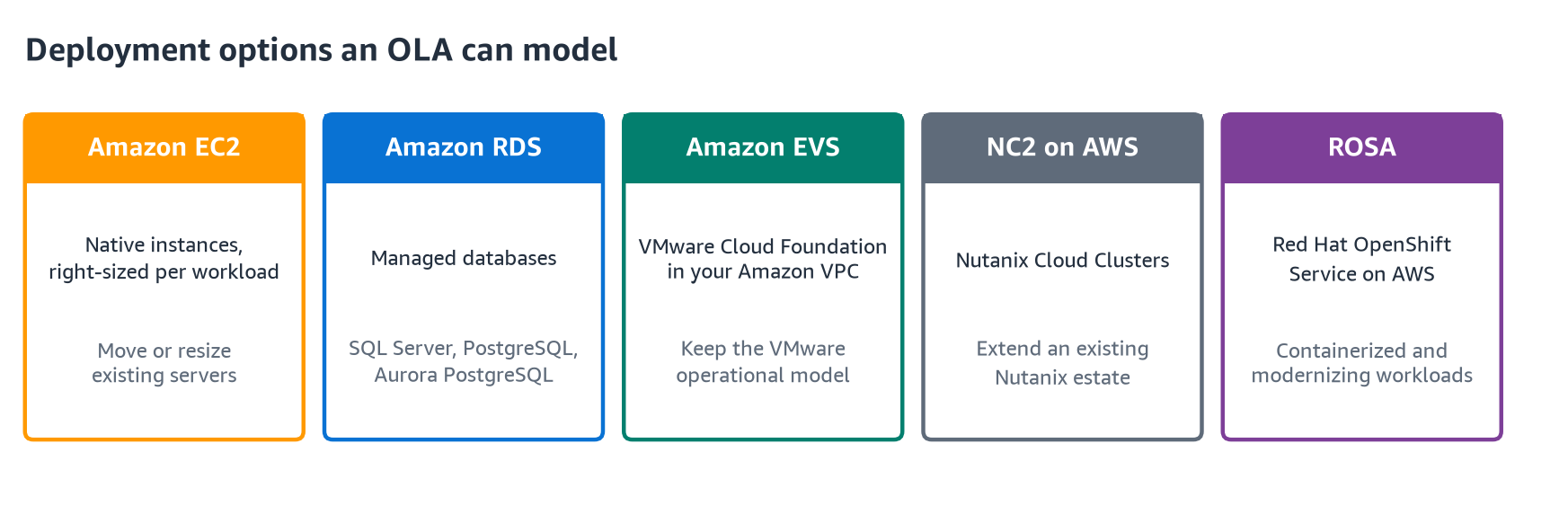
Figure 4: The OLA compares targets side by side rather than prescribing one path
Example: assessing a database server before renewal
Consider an illustrative SQL Server workload with low average CPU utilization, month-end peaks and an approaching license renewal. Moving its current configuration unchanged might preserve capacity that is rarely needed. Sizing only to the average could leave too little capacity at month-end.
The assessment would examine peak demand, memory use and edition requirements, then compare eligible licensing and deployment options. The result is a set of choices for the application owner and finance team to evaluate, with assumptions that can be checked. This example illustrates the decision process, not a customer result or a guaranteed saving.
Agree on the scope and timeline
A focused assessment using complete inventory and utilization data can take as little as one to two days. Engagements requiring further discovery and analysis typically take one to three weeks, depending on scope and complexity. Confirm the schedule with the delivery team; data gaps or additional requirements can extend it.
Know what the assessment report should tell you
Agree on the deliverables at the start. For a migration business case, ask the team to distinguish measured inputs from assumptions and show:
- The workloads included, excluded or proposed for retirement, with reasons.
- Proposed AWS configurations and the sizing and licensing assumptions behind them.
- Projected monthly or annual costs, with the Region, pricing date and purchase options identified.
- Whether storage, network charges, support and migration costs are included or excluded.
- Unconfirmed service availability, missing data and decisions requiring application-owner or licensing review.
What success looks like
A successful assessment ends with decisions, not just a cost estimate. By the end, you should be able to:
- Group workloads into those ready for migration planning, those needing deeper review, and those that stay where they are.
- Present projected costs that your finance team can trace back to stated inputs and assumptions.
- Confirm a licensing approach for each major platform, with renewal dates reflected in the timeline.
- Name the first workloads to migrate, with owners and an agreed next step.
The estimate informs these decisions; it does not replace detailed architecture design, compliance review or application testing.
Start your assessment
Preparing for the Saudi Region starts with understanding your workloads and the requirements that determine where they can run. An assessment helps you compare suitable options before committing to a migration plan.
Ask your AWS account team about an AWS Optimization and Licensing Assessment. Bring your available inventory and utilization data, along with licensing renewal dates and data residency requirements. Your account team can help confirm the scope and next steps. Learn more about the AWS Optimization and Licensing Assessment.