Migration & Modernization
Migration of Tableau Cloud to Salesforce Hyperforce on AWS
This post is co-written with Fatima Calcuttawala, John Robe, and Yi Ding at Salesforce.
Tableau Cloud is a fully hosted, AWS cloud-based analytics solution that offers a platform for data preparation, authoring, analysis, collaboration, publishing, and sharing of analytics content without the need to manage infrastructure or perform software updates. This Software-as-a-Service (SaaS) platform provides scalability, accessibility from anywhere with an internet connection, and incorporates AI-powered features including Tableau Pulse and Tableau Agent to enhance data exploration and understanding. Tableau Cloud is designed for ease of use and fosters a data-driven culture within organizations through enhanced collaboration and data management capabilities.
Salesforce Hyperforce modernizes Salesforce’s infrastructure by shifting from its own data centers to the AWS cloud. This allows for greater scalability, faster deployments, and more control over data residency for customers. Hyperforce provides a common foundation for Salesforce products, enhancing agility, security, and compliance while enabling faster innovation and global expansion. It also offers security features like Zero Trust architecture and encryption both at rest and in transit.
In this post, we will walk you through how Tableau Cloud migrated their existing AWS environment to Salesforce Hyperforce on AWS without customer disruption to accelerate innovation, enabling increased platform reliability and agility for Tableau Cloud. This migration included over 600 TB of data across 15 environments using Amazon Elastic Kubernetes Service (Amazon EKS), Amazon Simple Storage Service (Amazon S3), Amazon Elastic File System (Amazon EFS), Amazon Relational Database Service (Amazon RDS), and Amazon OpenSearch Service. Tableau completed this migration without customer disruption and as a result, was able to improve Tableau Cloud’s scalability, global reach, and security. In this post, you will learn about technical migration approaches, DNS management principles, and cross-account resource management techniques that cloud architects, platform engineers, and IT leaders who manage large-scale SaaS migrations can implement.
Tableau Cloud on Hyperforce
Tableau Cloud on Hyperforce provides customers with benefits including enhanced security and scalability while still getting the same user experience and functionality. Tableau Cloud ensures that the existing compliance certifications are maintained while also achieving new ones, such as PCI-DSS and IRAP. This makes the platform more attractive to industries with strict regulatory requirements, as it can acquire new certifications faster due to compliance parity with Hyperforce. Additionally, Hyperforce expands Tableau Cloud’s global reach by making it available in new AWS Regions like Germany, Singapore, and others, and boosts its resilience with a three availability zone (AZ) architecture. By leveraging Salesforce’s existing innovations and integrations, Hyperforce enables faster feature development for Tableau, as seen with Private Connect for Tableau Cloud, a feature that provides secure, private connections to public cloud data sources. This flexibility is also expected to accelerate the development of new AI-powered analytics innovations, keeping Tableau at the cutting edge of data visualization and business intelligence. Learn more about Tableau Cloud on Hyperforce in the official announcement blog.
An Overview of Tableau Cloud’s Migration
Tableau Cloud migrated 15 environments across seven AWS regions consisting of over 600 TB of data to Hyperforce on AWS with average downtime of four hours per environment during the scheduled maintenance windows. Each environment migration completed within a 90-day window, which included the Hyperforce environment provisioning, data migration, and final traffic switch.
Figure A shows the timeline for each migration. Starting 12 weeks before the migration, the new environment was provisioned (left). Data synchronization then starts two weeks before the migration in the middle. Finally, the migration concluded with the traffic switch on migration day (right).
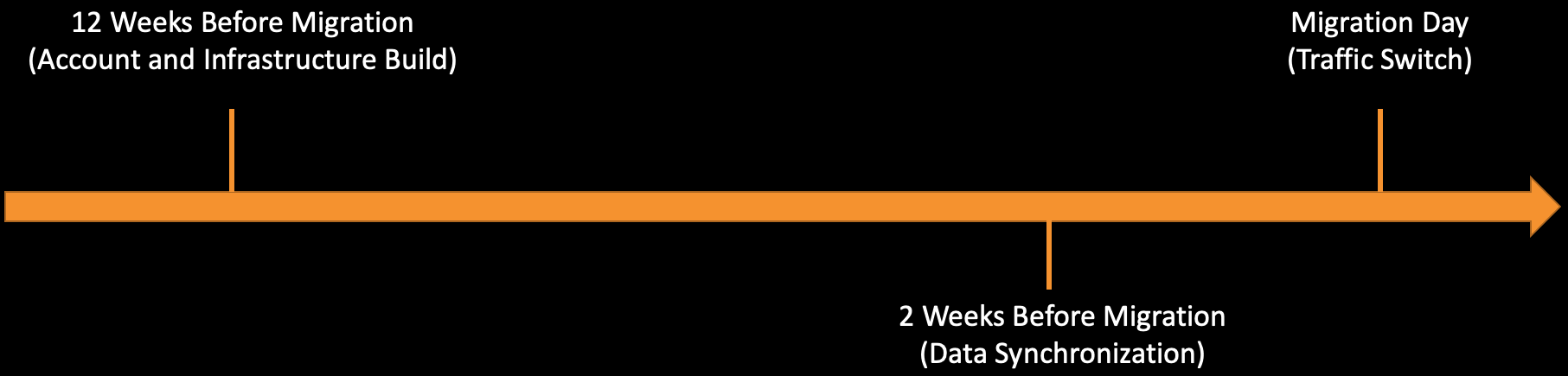
Figure A. Timeline for Tableau Cloud’s Hyperforce Migration per environment.
Environment provision: Tableau teams started 12 weeks before the migration to provision a new destination AWS environment in Hyperforce, including AWS services such as Amazon EKS, Amazon S3, Amazon EFS, Amazon RDS, and OpenSearch Service. Tableau deployed the exact same service versions to ensure the two environments were identical. Tests were performed to validate the configuration and functional parity between the source and destination environments before proceeding.
Data Synchronization: Data synchronization commenced two weeks prior to the scheduled migration windows, moving data from the source to the destination environment. During this period, destination environments were taken offline to prevent data modification. On the migration day, after the last data synchronization, the source environment was taken offline and the destination environment was brought online.
Traffic switch: To ensure the migration had minimal impact on customers, Tableau preserved the existing URLs for their environment. The URL uses a CNAME record that points to the host for the environment. The TTL of the CNAME record was reduced to 60 seconds prior to the migration day to allow the quick host change. Once the destination environment was online, Tableau then switched traffic to point to the new environment.
Next, we will walk you through the data migration process, and how each of the major data sources were migrated.
How Tableau Cloud Migrated Over 600 TB to Hyperforce
Tableau Cloud is built on a microservices container architecture using Amazon EKS, with data stored across various AWS storage services. For the migration, most data transfers occurred between AWS accounts within the same AWS region; however, there were a few migrations that were across AWS regions.
Tableau streamlined its migration processes to ensure limited disruption during each scheduled downtime window. AWS conducted migration planning reviews to determine data migration strategies for the various data sources and provided AWS Countdown as part of AWS Enterprise Support to support these migrations. AWS Countdown provided comprehensive guidance across the entire migration journey from environment readiness assessment to architectural review to post-event optimization, identifying and mitigating operational risks.
Figure B illustrates the data migration methods for Tableau Cloud within the same region. The source account with the Amazon S3, Amazon EFS, Amazon RDS, OpenSearch Service resources on the left and destination account with Amazon S3, Amazon EFS, Amazon RDS, OpenSearch Service resources on the right. For a given region, the following migrations were performed for the different AWS services: Amazon S3 buckets were replicated from source to destination, Amazon EFS source file system was copied to the Amazon S3 bucket in destination using AWS DataSync, then DataSync copied from Amazon S3 bucket to destination Amazon EFS file system, Amazon RDS database snapshots were copied from the source to the database restored in destination, and OpenSearch Service index was snapshot to Amazon S3 bucket in destination account to restore index in the destination.
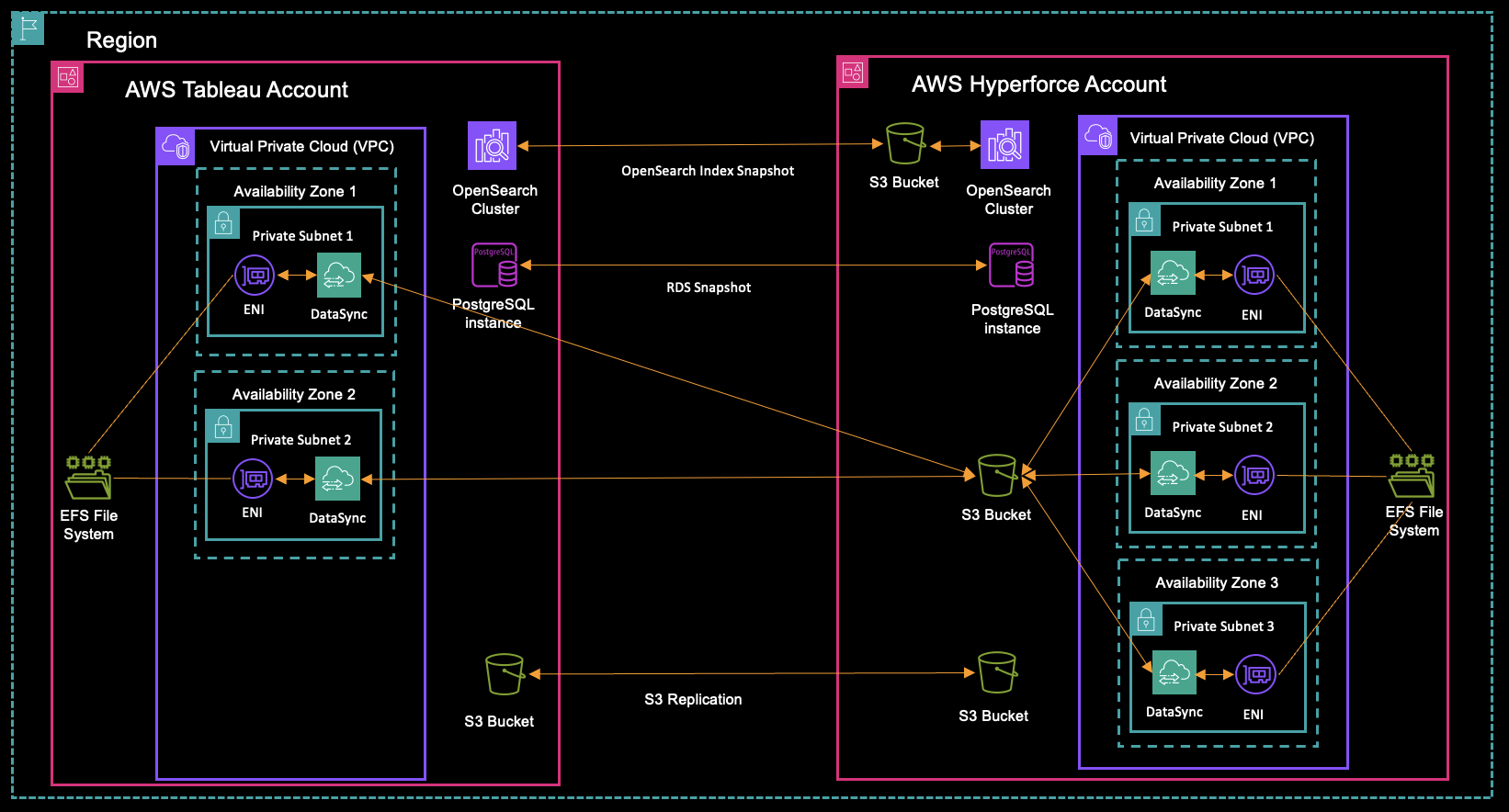
Figure B. Architecture representing Tableau Cloud’s cross-account data migration.
Since Tableau had to support 15 migrations, they custom-built a Hyperforce Migration Orchestrator App to streamline the data migrations. This is Java-based app and was developed to automate data migration processes across multiple AWS accounts and regions. Some of the key features of the Orchestrator included:
- Automated data migration
- Multi-organization, multi-account, multi-region support
- Customizable migration workflows
- Centralized management
- AWS API client application
- Complementary to AWS Management Console
Using the Orchestrator, Tableau was able to streamline and execute the data transfer across the four primary data sources during the migration. Let’s discuss in detail how each of these data sources was migrated:
Amazon S3: Tableau leveraged both native Amazon S3 Batch Replication and Amazon S3 Live Replication features to transfer data between buckets across accounts and regions. The process began with an initial batch job to migrate pre-existing data from source to destination. Between this initial sync and the migration downtime window, continuous live replication ensured new data was synchronized to the destination. During the scheduled downtime, after the source data stopped updating, a final batch sync captured any new data, with the orchestrator performing object count comparisons for validation.
Amazon EFS: Tableau leveraged DataSync with intermediary Amazon S3 buckets for Amazon EFS data migration. This intermediary step was necessary due to security configurations that prevented direct network communication between environments. While the DataSync service provided built-in data integrity assurance, additional validation was performed using AWS Lambda functions as a secondary verification measure. Amazon EFS replication was not utilized as the feature was released after the migration process began.
Amazon RDS: For database migration, Tableau Cloud utilized Amazon RDS snapshots from the source database to create the destination database. To minimize both the final snapshot time and data size, frequent incremental snapshots were taken leading up to the downtime window. Data integrity validation was performed through AWS Lambda functions that queried the source database for the latest table ID values (sequence numbers) and compared those values to the restored database.
OpenSearch Service: The migration approach for the OpenSearch Service involved creating snapshots of the source indexes and storing them in an Amazon S3 bucket. These snapshots were subsequently restored to the destination account. Data integrity was primarily assured by the successful restoration of the snapshots, with a secondary validation performed by comparing document counts in each index.
Finally, two weeks after the migration was complete and following user validation of the new environment, resources in the source environment were deleted. This approach helped minimize any risks to the data and ensured operational stability while maintaining cost efficiency.
Challenges and Lessons Learned
While Tableau had a smooth migration, the following lessons learned can help with planning AWS migrations.
For Amazon RDS, to minimize Amazon RDS snapshot time during the scheduled downtime, increase snapshot frequency before the maintenance window. By taking more frequent snapshots, you can reduce the amount of data that needs to be processed during the final snapshot.
For Amazon S3 Batch Replication, you cannot re-replicate objects that were deleted from destination buckets. If you need to roll back a migration, you must configure a new destination bucket name for Amazon S3 Batch Replication, as the system will not replicate to previously used destinations where objects were deleted.
Conclusion
Tableau Cloud’s migration to Salesforce Hyperforce on AWS allows for modernization, expanded global reach, and strengthened security. Tableau’s methodical approach, planning, and use of the Migration Orchestrator App enabled the migration with 99.9% uptime maintained and zero data loss across all 15 environments. Organizations seeking to optimize cloud deployments can follow Tableau’s blueprint for building robust migration strategies that satisfy immediate needs while positioning for future growth, all while maintaining service quality and enhancing customer capabilities.
To plan and execute your migrations on AWS, collaborate with your AWS Support teams to assess operational readiness, identify and mitigate risks, and plan capacity. For additional resources, refer to the AWS Migration Prescriptive Guidance and the AWS Well-Architected Framework Migration Lens.
About the authors

Fatima Calcuttawala
Fatima Calcuttawala is a Product leader at Salesforce, leading the strategy and delivery of enterprise capabilities across Tableau Cloud and Tableau Server. She focuses on driving product growth, platform scalability, and long-term customer success through enterprise-grade solutions.

John Robe
John Robe is a Principal Software Engineer for Salesforce; specializing in the distributed storage systems, databases, and search services that power Tableau. His primary focus is on enhancing the performance, scalability, and durability of Tableau’s storage and search services.

Yi Ding
Yi Ding is an Architect at Salesforce, working on Tableau Cloud on AWS, where she leads large-scale cloud platform initiatives including platform migrations, service re-architecture, and scalability improvements. She focuses on building resilient, extensible systems and driving cross-team technical alignment across complex cloud ecosystems.