Microsoft Workloads on AWS
Build resilient hybrid workloads with AWS Managed Microsoft AD (Hybrid Edition)
Introduction
In this blog post, we show you how to eliminate Microsoft Active Directory (AD) as a single point of failure in your hybrid architecture using AWS Directory Service for Microsoft Active Directory, specifically AWS Managed Microsoft AD (Hybrid Edition). Many organizations running hybrid workloads on Amazon Web Services (AWS) have a hard dependency on their on-premises AD for authentication, Group Policy processing, and Domain Name System (DNS) resolution. When connectivity to on-premises domain controllers drop, AWS-hosted workloads can no longer authenticate users. This is a critical, yet often overlooked, single point of failure.
You can reduce this risk by deploying domain controllers in AWS. Self-managed domain controllers on Amazon Elastic Compute Cloud (Amazon EC2) provide authentication continuity but require you to patch, monitor, and scale the underlying instances (see Extend your on-premises Active Directory to AWS).
With AWS Managed Microsoft AD (Hybrid Edition), you get the same resilience without the operational overhead. You get authentication continuity, DNS resilience, and multi-Availability Zone (multi-AZ) availability. AWS manages patching, monitoring, and deployment automatically.
Whether you are an architect designing for resilience or an infrastructure team hardening for production, this post provides a production-ready blueprint you can implement immediately.
Solution overview
AWS Managed Microsoft AD (Hybrid Edition) extends your existing on-premises AD forest into AWS as a managed replica. It maintains replication, Group Policy, and forest continuity without you managing domain controller infrastructure. Your AWS workloads authenticate against the same forest, domain, and user objects as on-premises.
This approach differs from two common alternatives:
• Self-managed DCs on Amazon EC2: this approach requires you to patch, monitor, and scale EC2 instances running Microsoft Windows Server with the AD Domain Services role. You bear the full operational burden of maintaining availability and security updates.
• Trust relationships: this approach creates a separate forest in AWS. Users must traverse trust paths for authentication, which can add latency and complexity. Also, Group Policy does not replicate across trusts.
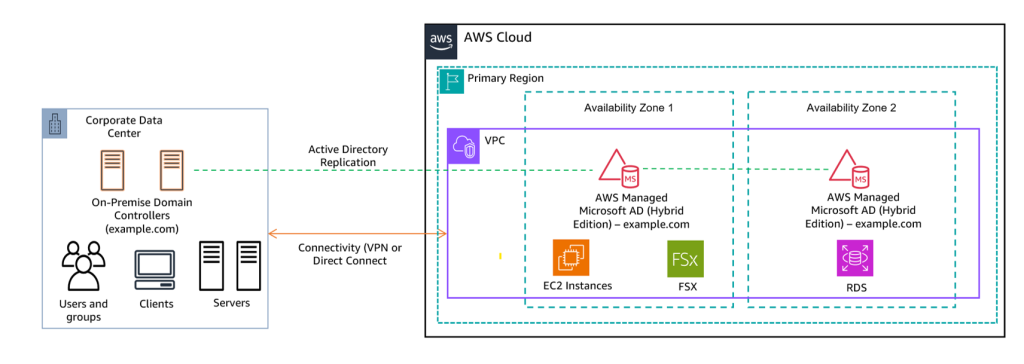
Figure 1: Multi-AZ hybrid AD architecture for high availability
Prerequisites
To implement this pattern, you need the following:
• An existing on-premises AD forest (Windows Server 2012 R2 or 2016 functional level).
• Network connectivity between your on-premises data center and AWS using AWS Direct Connect or AWS Site-to-Site VPN.
• An Amazon Virtual Private Cloud (Amazon VPC) with subnets in at least two Availability Zones.
• Administrative access to on-premises AD for replication configuration.
• Familiarity with DNS conditional forwarding and AD Sites and Services.
Walkthrough
In this section, we walk you through the resilience architecture across multiple dimensions: Availability Zone placement, DNS failover, multi-Region considerations, and real-world failure scenarios.
Extending your on-premises AD to AWS
Extend your on-premises domain to AWS with the following steps:
1. Register your on-premises domain controllers with AWS Systems Manager through hybrid activation, which allows AWS to assess your AD environment.
2. Run a directory assessment from the AWS Directory Service console to validate hybrid configuration requirements.
3. Create the Hybrid Edition directory, specifying your AD DNS name, VPC subnets across two Availability Zones (AZs), and credentials stored in AWS Secrets Manager.
4. Verify replication between on-premises and AWS-hosted domain controllers using AD Sites and Services or Repadmin.exe.
5. Configure DNS forwarding with Amazon Route 53 Resolver conditional forwarder rules to direct AD-specific queries to the AWS-hosted domain controllers.
Visit the Hybrid directory prerequisites page for the full details.
Once replication is healthy and DNS resolves locally (review Active Directory Sites and Services), your AWS workloads authenticate against the Hybrid Edition domain controllers.
Multi-AZ resilience
When you deploy AWS Managed Microsoft AD (Hybrid Edition), AWS automatically provisions domain controllers across two Availability Zones within your selected Region. This gives you high availability out of the box. If one AZ experiences a disruption, the domain controller in the surviving AZ continues processing authentication requests without interruption.
The Hybrid Edition already deploys domain controllers across two AZs, which makes it highly available. The low latency between AZs (typically sub-millisecond) means you do not need to create a separate AD site for each AZ. Instead, configure AD Sites and Services to map all your VPC subnets to a single regional AD site. Replication between on-premises and AWS-hosted domain controllers follows standard inter-site replication intervals, which you can tune based on change frequency and bandwidth.
Multi-Region considerations
The figure below shows the multi-Region AD replication topology for disaster recovery and high availability.
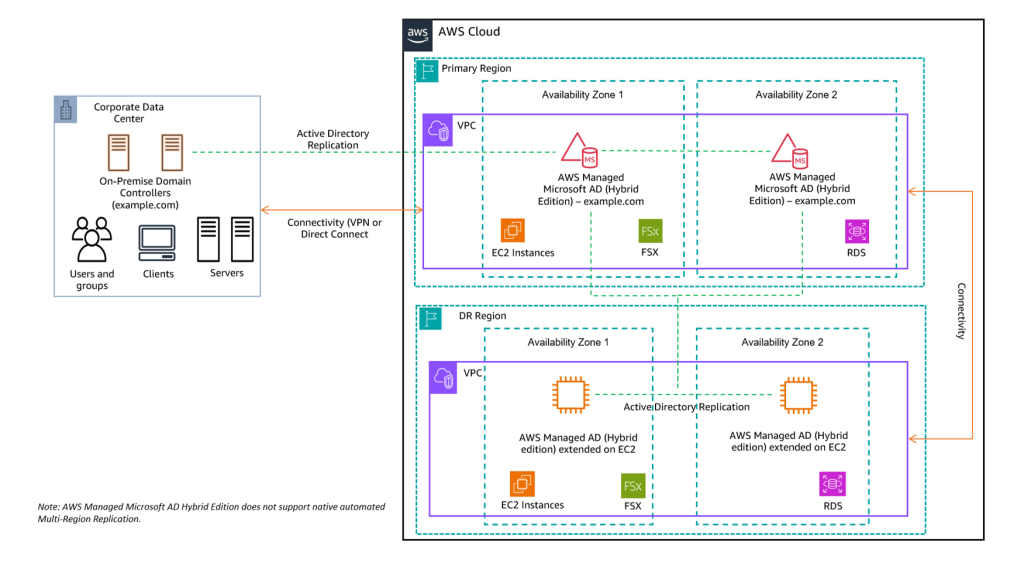
Figure 2: Multi-Region hybrid AD with self-managed DR Region on EC2
For workloads spanning multiple Regions, deploy self-managed domain controllers on Amazon EC2 in a secondary Region (Figure 2). This provides regional resilience: if there is a service disruption in an AWS region, workloads in the secondary region continue authenticating locally.
On-premises DCs replicate to Hybrid Edition in the primary region; the secondary region participates in standard AD multi-site replication. SYSVOL replication (Group Policy objects) follows the same topology. Consider placing a Global Catalog server in each region for universal group membership lookups.
Note: AWS Managed Microsoft AD (Hybrid Edition) currently supports single-Region deployment. Secondary Regions require self-managed DCs on Amazon EC2.
DNS failover strategy
AD-joined workloads rely on DNS SRV records to locate domain controllers. If DNS resolution fails, authentication fails even if the domain controllers are healthy. Create an Amazon Route 53 Resolver conditional forwarding rule that forwards your AD DNS zone (for example, corp.example.com) to the Hybrid Edition domain controller IP addresses. Route 53 Resolver selects a target IP at random and retries another if the first does not respond, so keep the target list current by removing any non-reachable DNS servers rather than creating granular entries. Once the query reaches a domain controller, the native DC Locator process uses your AD Sites and Services configuration to direct clients to the nearest healthy DC (see Optimizing DC location on Microsoft Learn).
Failure scenarios and authentication continuity
The following scenarios show how authentication stays active under real-world failure conditions.
Scenario 1: Site-to-site connectivity loss. There is a disruption in your VPN or Direct Connect connection. AWS-hosted DCs hold a full replica. Workloads continue to authenticate locally, process Group Policy, and resolve DNS requests. After restoring connectivity, replication converges automatically.
Scenario 2: Full on-premises outage. All on-premises DCs go offline. Hybrid Edition maintains a writable replica, so AWS workloads including Amazon FSx for Windows File Server and Amazon Relational Database Service (Amazon RDS) are unaffected. Replication re-establishes bidirectionally on recovery.
Scenario 3: Single AZ failure. One Availability Zone becomes unavailable. The surviving DC takes over all authentication and DNS requests. AD Sites and Services routes clients to the healthy domain controller automatically.
Scenario 4: Ransomware isolation. Your security team needs to sever on-premises connectivity for event containment. With Hybrid Edition, the team can isolate the on-premises environment without impacting cloud operations. AWS workloads continue to authenticate locally during incident response.
Scenario 5: DNS resolution failure. Domain controllers can be healthy but unfindable if SRV record resolution breaks. Route 53 Resolver conditional forwarding rules ensure AD queries resolve locally; therefore, workloads never lose the ability to discover authentication endpoints.
Scenario 6: Network latency or misconfiguration. Kerberos has a 5-minute clock skew tolerance; elevated latency on congested links can cause intermittent authentication failures. AD also requires multiple ports (Kerberos 88, LDAP 389/636, SMB 445, dynamic RPC), making it fragile to firewall rule changes. With Hybrid Edition, authentication traffic stays local to the VPC with sub-millisecond response times. On-premises network changes cannot break AWS workload authentication.
Cleanup
If you deployed this architecture in a test environment, complete the following steps to remove resources:
1. Delete the Hybrid Edition directory from the AWS Directory Service console.
2. Remove Route 53 Resolver conditional forwarder rules.
3. Remove AD Sites and Services entries for the deleted AWS subnets.
4. Delete associated VPC resources (subnets, security groups) created exclusively for this deployment.
Conclusion
In this post, we showed you how to use AWS Managed Microsoft AD (Hybrid Edition) to eliminate Active Directory as a single point of failure in hybrid architectures. By combining multi-AZ domain controller placement, DNS failover through Amazon Route 53 Resolver, and self-managed DCs in additional Regions where needed, you can make sure your AWS workloads remain fully operational regardless of on-premises disruptions. All without the overhead of managing domain controller infrastructure.
To get started, visit the AWS Directory Service documentation and deploy AWS Managed Microsoft AD (Hybrid Edition) in your environment today.