Networking & Content Delivery
AWS Load Balancer Controller adds general availability support for Kubernetes Gateway API
AWS recently announced the general availability of Amazon Web Services (AWS) Load Balancer Controller support for Kubernetes Gateway API. Previously, AWS Load Balancer Controller satisfied Kubernetes Ingress and Service resource requirements by provisioning Application Load Balancer (ALB) and Network Load Balancer (NLB) respectively. With this new capability, you can now define your AWS load balancing capabilities using the standard Kubernetes Gateway API. In this post, we introduce the AWS Load Balancer Controller support for Kubernetes Gateway API. We share configuration best practices, features, and use cases for the Gateway API integration to help you modernize and streamline your Kubernetes deployments on AWS.
Prerequisites
We that assume you’re familiar with Kubernetes concepts including the Kubernetes API, controllers, and resource types such as Deployments, Services, and custom resources. You should also have a basic understanding of Amazon Elastic Kubernetes Service (Amazon EKS) and AWS load balancing services. If you need to review these concepts, then we recommend starting with the Kubernetes documentation and the Amazon EKS User Guide.
Gateway API overview
The Gateway API is the next-generation framework for managing L4 (TCP/UDP) and L7 (HTTP/gRPC) traffic routing in Kubernetes clusters. It offers a more flexible, expressive, and role-oriented approach than the older Ingress API, while addressing previous limitations of Ingress. It provides a standardized, portable, and extensible specification for a wide variety of traffic management needs, including ingress (north-south traffic) and service-to-service connectivity (east-west traffic).
Although the Ingress API has served Kubernetes users well for years, it has several limitations that the Gateway API addresses. Ingress relies on vendor-specific annotations for advanced features, making configurations less portable across different implementations. Furthermore, it lacks native support for role-based resource management, which means that cluster operators and application developers share the same configuration surface. The Gateway API introduces a role-oriented design with distinct resources for infrastructure providers (GatewayClass), cluster operators (Gateway), and application developers (Routes). This separation enables better organizational policies and security boundaries. Moreover, Gateway API provides native support for cross-namespace routing, weighted traffic splitting, header-based routing, and both L4 and L7 protocols. These capabilities previously required complex workarounds or weren’t possible with Ingress alone. In turn, these improvements make Gateway API more expressive, extensible, and suitable for modern cloud architectures.
Amazon VPC Lattice, AWS’s fully managed application networking service, already provides support for the Kubernetes Gateway API through the Amazon VPC Lattice Gateway API Controller. This is a separate controller that enables service-to-service connectivity across EKS clusters in your VPCs and accounts. With the AWS Load Balancer Controller also supporting the Gateway API specification, you have comprehensive coverage for both ingress (north-south) traffic management with ALB and NLB, and the flexibility to use VPC Lattice for east-west service mesh capabilities. And this is all using the same standardized Gateway API resources.
Gateway API components
The Gateway API introduces three core resources that work together to define how traffic flows into and through your Kubernetes cluster. Understanding these components and how they map to AWS infrastructure helps you design effective traffic management strategies. Figure 1 shows the Gateway API specification components:
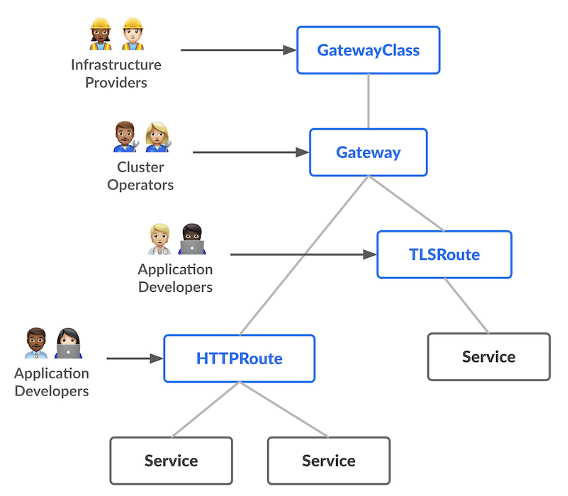
Figure 1: Gateway API controller components [source]
GatewayClass
GatewayClass defines a template for creating Gateways with common configuration and behavior. Platform teams use GatewayClass to establish organizational policies and infrastructure templates. For example, a GatewayClass specifies which controller manages the Gateway (such as the AWS Load Balancer Controller) and what type of load balancer to provision (ALB or NLB).
The following is an example GatewayClass that provisions ALBs:
apiVersion: gateway.networking.k8s.io/v1
kind: GatewayClass
metadata:
  name: aws-alb
spec:
    controllerName: gateway.k8s.aws/alb
Gateway
Gateway instantiates the load balancer and defines how traffic enters your cluster. Cluster operators configure Gateways to specify listeners (protocol and port combinations), hostnames, and TLS settings. When you create a Gateway, the AWS Load Balancer Controller provisions the corresponding AWS load balancer with the specified listeners.
The following is an example Gateway that creates an ALB with HTTP and HTTPS listeners:
apiVersion: gateway.networking.k8s.io/v1
kind: Gateway
metadata:
  name: my-gateway
  namespace: default
spec:
  gatewayClassName: aws-alb
  listeners:
  - name: http
    protocol: HTTP
    port: 80
  - name: https
    protocol: HTTPS
    port: 443
    hostname: example.com
Routes
Routes define routing rules that map listeners to backend Kubernetes Services. Application developers create Routes (HTTPRoute, GRPCRoute, TCPRoute, UDPRoute, and TLSRoute) to control how traffic is distributed to their services based on request attributes such as path, headers, or hostname.
The following is an example HTTPRoute that routes traffic from the Gateway’s HTTP listener to a Kubernetes Service:
apiVersion: gateway.networking.k8s.io/v1beta1
kind: HTTPRoute
metadata:
  name: my-route
  namespace: default
spec:
  parentRefs:
  - name: my-gateway
    sectionName: http
  rules:
  - matches:
    - path:
        type: PathPrefix
        value: /app
    backendRefs:
    - name: my-service
      port: 8080
The AWS Load Balancer Controller supports reconciliation for Kubernetes Gateway API objects. It satisfies the following:
- L4 routes such as TCPRoute and UDPRoute with an AWS NLB
- L7 routes such as HTTPRoute and GRPCRoute with an AWS ALB
How it works
Understanding how the AWS Load Balancer Controller translates Gateway API resources into AWS infrastructure helps you design more reliable applications and troubleshoot issues faster. The controller’s reconciliation model ensures that your Kubernetes definitions stay synchronized with your AWS load balancers, providing continuous validation and real-time status feedback.
At a high-level the following steps show how the reconciliation loop works:
- API monitoring: The Kubernetes API is continuously monitored for Gateway API resources being created, modified, or deleted.
- Queueing: The controller adds identified resources to an internal queue for processing.
- Processing: For each item in the internal queue:
- The controller checks the associated GatewayClass to verify if the user is requesting an AWS load balancer.
- If yes, then the Gateway API definition of the corresponding Gateway resource is mapped to AWS resources such as NLB/ALB, Listeners, Listener Rules, Target Groups, or Addons.
- These mapped resources are compared with the actual state in AWS. Any deltas result in the controller making the AWS state match the desired state set by the Gateway objects.
- Status updates: After reconciliation, the AWS Load Balancer Controller updates the status field of the corresponding Gateway and Route resources. This provides real-time feedback on the provisioned AWS resources, such as the ALB’s DNS name and Amazon Resource Name (ARN), and any error details to aid in debugging. For example, when you create an HTTPRoute, the status field immediately shows whether the route was accepted, the Gateway to which it’s attached, and when it’s provisioned the ALB’s DNS name that you use for traffic routing. If there’s a configuration error, such as invalid certificate ARN, then the status field provides actionable error messages.
Figure 2 shows this reconciliation flow in detail. The controller establishes watches on Gateway API resources, processes changes through an internal queue, builds an intermediate representation of your desired state, and materializes the corresponding AWS resources. Throughout this process, status conditions are updated to reflect provisioning progress and any errors encountered.
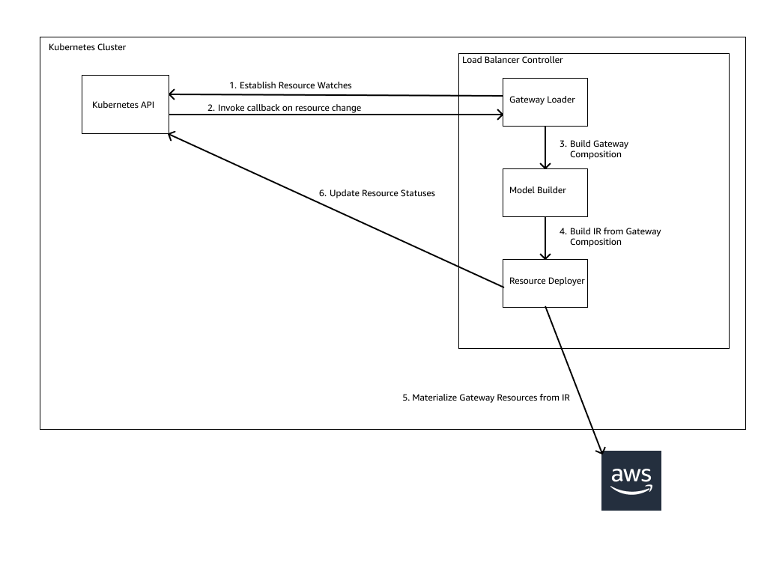 Figure 2: Gateway API controller reconciliation flow
This declarative approach means that you define your desired load balancing configuration once, and the controller continuously ensures that AWS matches that intent. This automatically handles drift and configuration changes.
Key features
This section walks through the key features of the Load Balancer Controller Gateway API support:
Enhanced customization
The AWS Load Balancer Controller eliminates annotation-based configuration in favor of well-defined Kubernetes Custom Resource Definitions (CRDs). This shift addresses the limitations of embedding complex data structures into annotation strings, which lack validation or IDE support. For example:
Before (annotation-based approach):
apiVersion: networking.k8s.io/v1
kind: Ingress
metadata:
  name: my-ingress
  annotations:
    alb.ingress.kubernetes.io/target-group-attributes: |
      deregistration_delay.timeout_seconds=30,
      stickiness.enabled=true,
      stickiness.type=lb_cookie
After (CRD-based approach):
apiVersion: gateway.k8s.aws/v1beta1
kind: TargetGroupConfiguration
metadata:
  name: my-app-tg-config
  namespace: my-app
spec:
  targetReference:
    name: my-service
  defaultConfiguration:
    targetGroupAttributes:
      - key: deregistration_delay.timeout_seconds
        value: "30"
      - key: stickiness.enabled
        value: "true"
      - key: stickiness.type
        value: lb_cookie
    healthCheckConfig:
      healthyThresholdCount: 5
      healthCheckInterval: 30
      healthCheckPath: /health
      healthCheckPort: "8080"
      healthCheckProtocol: HTTP
      healthCheckTimeout: 5
      unhealthyThresholdCount: 2
The AWS Load Balancer Controller introduces three CRDs for Gateway API customization:
- TargetGroupConfiguration: Configures target group properties including health checks, deregistration delays, and stickiness settings at the service level
- LoadBalancerConfiguration: Defines listener and load balancer properties such as subnet placement, security groups, and access logs at the Gateway or GatewayClass level
- ListenerRuleConfiguration: Extends HTTPRoute and GRPCRoute resources with AWS-specific routing behaviors including authentication through Amazon Cognito or OIDC providers
These CRDs provide schema validation, type-safety, and native integration with GitOps workflows. Configuration errors surface at apply time rather than runtime, which reduces operational overhead and improves infrastructure reliability.
Cross-namespace traffic routing
The Gateway API enables separation of concerns between infrastructure operators and application developers through cross-namespace routing. Platform teams provision shared Gateway resources while application teams manage their own Routes without requiring cluster-level permissions.
In this model, a platform team deploys a Gateway in a dedicated namespace with controlled access. Application teams in separate namespaces create Route resources that reference the shared Gateway. The controller automatically configures the load balancer to route traffic based on these distributed definitions.
This architecture enforces RBAC boundaries at the Kubernetes API level. Application teams manage routing logic for their services without access to infrastructure-level configuration such as subnet placement or security group assignments.
Automatic TLS certificate discovery
The AWS Load Balancer Controller extends certificate discovery from the Ingress API to Gateway API listeners for both L4 and L7 protocols. When a hostname is specified in a Gateway listener or Route hostnames, the controller queries AWS Certificate Manager (ACM) to locate and attach the matching certificate based on hostname matching.
The controller monitors ACM for certificate updates and automatically applies changes to the load balancer configuration. This eliminates manual certificate ARN management and reduces the operational complexity of certificate rotation across multiple environments.
These capabilities enable production-grade Kubernetes networking on AWS with reduced operational overhead and improved separation of concerns. The combination of type-safe CRDs, cross-namespace routing, and automatic certificate management means that teams can focus on application delivery rather than infrastructure configuration.
Getting started
For first time users, follow the installation guide. The guide sets up the necessary AWS Identity and Access Management (IAM) permissions and deploys the AWS Load Balancer Controller into your Kubernetes cluster.
To enable Gateway API support in your AWS Load Balancer Controller, first ensure the prerequisites are met. After that, enabling Gateway API support requires turning on a feature flag as described here.
Configuration example
This example demonstrates three key capabilities of the AWS Load Balancer Controller Gateway API integration: HTTP routing, HTTPS routing with automatic certificate discovery, and custom routing rules using ListenerRuleConfiguration. For a complete walkthrough including deployment steps and verification commands, refer to the AWS Load Balancer Controller Gateway API examples.
The example provisions an ALB with the following architecture:
- An HTTP listener on port 80 routing to a blue deployment
- An HTTPS listener on port 443 with automatic certificate discovery routing to an orange deployment
- A custom routing rule on the HTTP listener that returns a fixed response for the `/alb-response` path
Configuration overview
The configuration includes the following:
- GatewayClass defining the AWS Load Balancer Controller as the implementation:
# alb-gatewayclass.yaml
apiVersion: gateway.networking.k8s.io/v1beta1
kind: GatewayClass
metadata:
  name: aws-alb-gateway-class
spec:
controllerName: gateway.k8s.aws/alb- Gateway with HTTP and HTTPS listeners:
# my-alb-gateway.yaml
apiVersion: gateway.networking.k8s.io/v1beta1
kind: Gateway
metadata:
  name: my-alb-gateway
  namespace: example-ns
spec:
  gatewayClassName: aws-alb-gateway-class
  infrastructure:
    parametersRef:
      kind: LoadBalancerConfiguration
      name: lbconfig-gateway
      group: gateway.k8s.aws
  listeners:
    - name: http
      protocol: HTTP
      port: 80
      allowedRoutes:
        namespaces:
          from: Same
    - name: https
      hostname: "sample.com"
      protocol: HTTPS
      port: 443
      allowedRoutes:
        namespaces:
from: Same- LoadBalancerConfiguration for scheme or other gateway configuration parameters:
# lb-config-gateway.yaml
apiVersion: gateway.k8s.aws/v1beta1
kind: LoadBalancerConfiguration
metadata:
  name: lbconfig-gateway
  namespace: example-ns
spec:
  loadBalancerName: "my-example-gateway-alb"
scheme: internet-facing- ListenerRuleConfiguration for custom routing behavior:
# listener-rule-config-blue.yaml
apiVersion: gateway.k8s.aws/v1beta1
kind: ListenerRuleConfiguration
metadata:
  name: blue-lrc-config
  namespace: example-ns
spec:
  actions:
    - type: "fixed-response"
      fixedResponseConfig:
        statusCode: 404
        contentType: "text/plain"
messageBody: "customized text"- HTTPRoutes mapping listeners to backend services:
# httproute-blue.yaml
apiVersion: gateway.networking.k8s.io/v1beta1
kind: HTTPRoute
metadata:
  name: http-route-blue
  namespace: example-ns
spec:
  parentRefs:
    - group: gateway.networking.k8s.io
      kind: Gateway
      name: my-alb-gateway
      sectionName: http
  rules:
    - matches:
        - path:
            value: "/alb-response"
      filters:
        - type: ExtensionRef
          extensionRef:
            group: "gateway.k8s.aws"
            kind: "ListenerRuleConfiguration"
            name: "blue-lrc-config"
    - backendRefs:
        - name: service-blue
          port: 80
# httproute-orange.yaml
apiVersion: gateway.networking.k8s.io/v1beta1
kind: HTTPRoute
metadata:
name: http-route-orange
namespace: example-ns
spec:
parentRefs:
- group: gateway.networking.k8s.io
kind: Gateway
name: my-alb-gateway
sectionName: https
rules:
- backendRefs:
- name: service-orange
port: 80Deploy and test
To deploy this example, you need backend Deployments and Services. Create the following resources:
# deployment-orange.yaml apiVersion: apps/v1
kind: Deployment
metadata:
  name: deployment-orange
  namespace: example-ns
spec:
  selector:
    matchLabels:
      app: orange-app
  replicas: 1
  template:
    metadata:
      labels:
        app: orange-app
    spec:
      containers:
        - image: k8s.gcr.io/e2e-test-images/echoserver:2.5
          imagePullPolicy: Always
          name: echoserver
          ports:
            - containerPort: 8080
---
# deployment-blue.yaml apiVersion: apps/v1
kind: Deployment
metadata:
  name: deployment-blue
  namespace: example-ns
spec:
  selector:
    matchLabels:
      app: blue-app
  replicas: 1
  template:
    metadata:
      labels:
        app: blue-app
    spec:
      containers:
        - image: k8s.gcr.io/e2e-test-images/echoserver:2.5
          imagePullPolicy: Always
          name: echoserver
          ports:
            - containerPort: 8080
---
# service-orange.yaml apiVersion: v1
kind: Service
metadata:
  name: service-orange
  namespace: example-ns
spec:
  ports:
    - port: 80
      targetPort: 8080
      protocol: TCP
  type: NodePort
  selector:
    app: orange-app
---
# service-blue.yaml apiVersion: v1
kind: Service
metadata:
  name: service-blue
  namespace: example-ns
spec:
  ports:
    - port: 80
      targetPort: 8080
      protocol: TCP
  type: ClusterIP
  selector:
    app: blue-app
Wait for the Gateway to be provisioned:
kubectl wait --for=condition=Programmed gateway/my-alb-gateway -n example-nsVerify the deployment
Test HTTP routing to the blue deployment:
# Get the ALB hostname
ALB_HOSTNAME=$(kubectl get gateway my-alb-gateway \
    -n example-ns \
    -o jsonpath='{.status.addresses[0].value}')

# Test HTTP endpoint
curl http://$ALB_HOSTNAME
Test HTTPS routing with certificate discovery to the orange deployment:
curl -k https://$ALB_HOSTNAME -H "Host: sample.com"Test the custom routing rule:
curl http://$ALB_HOSTNAME/alb-responseFor more examples including NLB configurations, cross-namespace routing, and advanced customization scenarios, refer to the AWS Load Balancer Controller documentation.
Considerations
- Policy enforcement through GatewayClass: Platform teams define GatewayClass resources with LoadBalancerConfiguration settings that control subnet placement, security group assignments, and access logging. Application teams select from approved GatewayClass options without infrastructure modification permissions. This enforces organizational policies such as isolating internal workloads from internet-facing load balancers through Kubernetes RBAC.
- Standards-based portability: Gateway, GatewayClass, and Route resources follow the Kubernetes Gateway API specification. Core routing logic remains consistent across implementations. AWS-specific CRDs (LoadBalancerConfiguration, TargetGroupConfiguration, and ListenerRuleConfiguration) remain optional and isolated from core routing definitions. This enables portable application configurations with AWS-specific capabilities where needed.
- Operational visibility: The controller updates Gateway API status fields with real-time provisioning progress, resource identifiers (load balancer ARNs and DNS names), and error messages. This reduces troubleshooting time and eliminates direct AWS API queries to verify resource state.
- AWS service integration: The implementation integrates with ACM for automatic certificate discovery, AWS WAF for application protection, and AWS Shield Advanced for DDoS protection. Target group configuration, health checks, and access logs integrate with Amazon S3 and Amazon CloudWatch.
- GitOps compatibility: Type-safe CRDs with schema validation surface configuration errors during pre-deployment validation. Infrastructure as code (IaC) tools Flux, ArgoCD, AWS Cloud Development Kit (AWS CDK) for Kubernetes provide Gateway API support for declarative infrastructure management with automated drift detection.
Conclusion
The AWS Load Balancer Controller Gateway API support provides a standards-based approach to Kubernetes traffic management on AWS. You can adopt the Gateway API specification to gain role-oriented resource management, cross-namespace routing capabilities, and enhanced customization through type-safe CRDs while maintaining portability across Kubernetes environments. Whether platform teams are migrating from Ingress-based configurations or building new Kubernetes deployments, the Gateway API integration enables them to enforce organizational policies while empowering application teams with self-service routing capabilities. This implementation, in combination with native AWS integrations for certificate management, security, and observability, streamlines operational workflows and reduces configuration complexity. Get started today by enabling Gateway API support in your AWS Load Balancer Controller deployment. For detailed configuration examples and best practices, refer to the AWS Load Balancer Controller documentation.
About the authors

Alexandra Huides
Alexandra Huides is a Principal Networking Specialist Solutions Architect in the AWS Networking Services product team at Amazon Web Services. She focuses on helping customers build and develop networking architectures for highly scalable and resilient AWS environments. Alex is also a public speaker for AWS, and is helping customers adopt IPv6. Outside work, she loves sailing, especially catamarans, traveling, discovering new cultures, running and reading.

Zac Nixon
Zac Nixon is a Senior Software Engineer on the Elastic Load Balancing team, working on the control plane and Kubernetes integrations for Elastic Load Balancing products. His work focuses on distributed systems, networking, and cloud-native infrastructure. Outside of work he enjoys gardening, video games, and spending time with his dog and cat.