Networking & Content Delivery
Introducing tunnel endpoints for private access to network segments
AWS PrivateLink has introduced tunnel endpoints, which you can use to privately access a network segment in another AWS account. You might be a vendor or service provider whose software must reach applications and resources in a customer’s network. A tunnel endpoint connects you to them. Your customer can share with you the segment of their network where those resources reside, and you can tunnel into that network segment to access any resource located within it. The network segment is defined by the customer in the form of Classless Inter-Domain Routing (CIDR) ranges and serves as a perimeter for what the vendor can access. Resources located outside the perimeter can’t be reached by the vendor.
Tunnel endpoints also expand the resource configuration capability. Previously, to share resources with a vendor, the customer had to enumerate them individually by creating a resource configuration for each using IP address or DNS name. This was limiting for use cases where resources are ephemeral or aren’t knowable up front. With this launch, customers can now create a resource configuration for an entire network segment rather than for individual resources.
This is an advanced (300-level) post. It covers the new constructs, setup on the vendor and customer side, and what to plan for. It assumes you know Amazon Virtual Private Cloud (Amazon VPC) and AWS Resource Access Manager (AWS RAM), and Amazon VPC Lattice resource configurations and resource gateways.
Use cases
A tunnel endpoint fits when your service must reach into a segment of your customer’s network. For example:
- Security scanning – A scanner in your VPC runs periodic scans of every host in your customer’s subnets, including hosts launched since the last scan.
- Multi-tenant analytics and compute – An analytics service queries databases wherever your customer keeps them. A compute service reaches resources in your customer’s VPC, or egresses through it to a third-party data store on the internet.
- Integration services – An integration platform connects to whatever your customer deploys next.
- Access to AWS services through your customer’s network – Your workload reaches AWS services the way your customer’s own workloads do, for example Amazon Simple Storage Service (Amazon S3) through your customer’s gateway endpoint. Your customer’s existing access methods and policies still apply. The shared CIDR ranges must include the service’s addresses.
Providers and consumers
Two personas run through the rest of this post. The provider owns the network segment and shares it. The consumer runs the application that reaches into it. In the preceding use cases, you’re the consumer and your customer is the provider. Figure 1 shows the starting point.
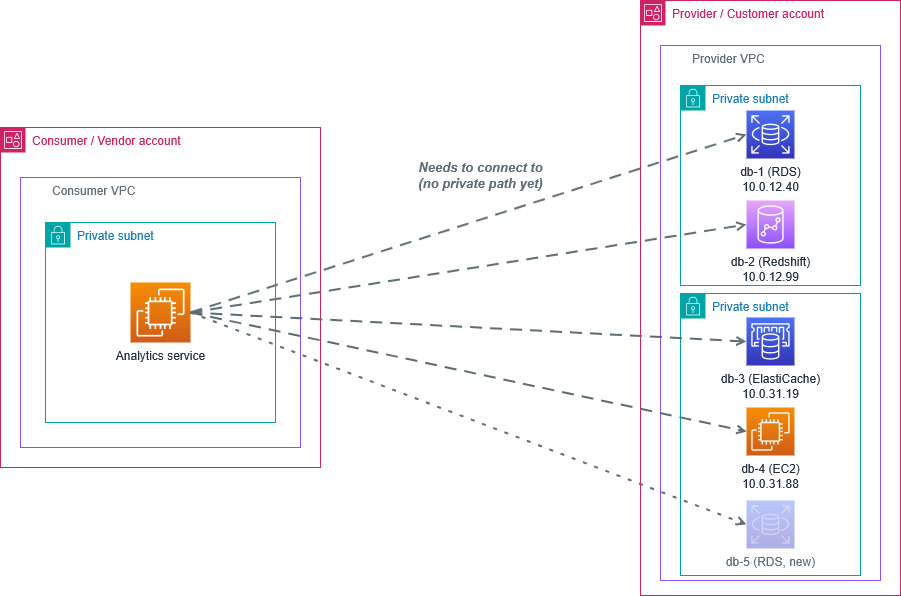
Figure 1: The connectivity need, not the solution. The consumer’s analytics service must reach data sources spread across the provider’s VPC. The provider owns the addressing and adds data sources over time, such as db-5, so neither side can list them all in advance. The dashed lines show connections the service needs, not paths that exist.
‘CIDR’ resource configurations
A resource configuration defines what a provider shares and which resource gateway carries the traffic. Previously, it identified one resource by IP address, domain name, or Amazon Resource Name (ARN). The provider had to know each resource before sharing it, which can’t work for a security scan meant to find hosts nobody has listed.
A resource configuration can now be of type CIDR, which represents a network segment as one or more IPv4 or IPv6 CIDR ranges. You choose the prefix length, so one configuration can describe a single host, a subnet, a whole VPC, or a wider range. When you share it, the consumer can reach any address inside those ranges on the protocols and ports you allow. That includes resources you create later, so one decision about what the consumer can reach replaces a request per resource.
A range of 0.0.0.0/0 (::/0 for IPv6) grants access to everything the provider VPC can reach. That includes networks connected through VPC peering, AWS Direct Connect, or AWS Site-to-Site VPN, and internet destinations through the VPC’s existing egress path. Share the narrowest ranges that cover the workload(s).
As with other resource configuration types, you attach a CIDR configuration to a resource gateway, set protocol and port ranges, and share it through AWS RAM. The gateway translates the source address of consumer traffic, so your resources see the gateway as the client. CIDR-type resource configurations have two constraints. The resource gateway’s DNS resolution setting must be IN_VPC, and consumers can reach the configuration only through a tunnel endpoint.
Tunnel endpoints
A tunnel endpoint is a new VPC endpoint type that gives a consumer access to the CIDR resource configurations shared with it. Like other endpoint types, it’s powered by AWS PrivateLink and is consumer-initiated. Connections (TCP SYN) can start only from the consumer VPC, not from the provider network.
As the name suggests, your client tunnels into the shared segment. The inner packet carries the application payload and is addressed to an IP in the provider’s shared ranges. Your VPC can’t route that address, so your client wraps the inner packet in a GENEVE header (RFC 8926). It sends the result to the tunnel endpoint on UDP port 6081. The endpoint removes the GENEVE header, translates the inner source to a resource gateway address, and forwards the packet into the provider VPC.
Linux supports GENEVE natively. You create a GENEVE device in L3 mode with a VNI of 0, whose remote is the tunnel endpoint’s IP address in your Availability Zone. You give the device an inner source address of your choice and route traffic for the provider’s ranges through it. Give the tunnel its own routing context so it doesn’t capture the instance’s other traffic. A network namespace provides that context. The following commands set up a tunnel in a namespace named tun:
The provider’s addresses exist only inside the tunnel, and the outer addresses route within your own VPC. As a result, the consumer and provider VPCs can use overlapping CIDR blocks.
DNS resolution through the tunnel
You can also resolve names through the tunnel endpoint as though your compute were in the provider VPC. Send DNS queries inside the tunnel to 169.254.168.253 for IPv4 or fd00:ec2:80::ffff:ffff:ffff:253 for IPv6.
This solves a problem that sharing addresses alone doesn’t. A consumer that serves many providers wants to run them all from one VPC. Each provider names its resources privately, in an Amazon Route 53 private hosted zone or on its own DNS servers. Two providers can both have a host called db.internal. Associating every private hosted zone with one VPC doesn’t produce correct answers. Sending the query through the tunnel does, because it resolves in the account that owns the name. Resolution follows the provider’s private hosted zones and its forwarding to resolvers elsewhere, including on premises.
How it works
In Figure 2, one shared range, 10.0.0.0/8, covers every data source, so a database the provider adds later, such as db-5, is reachable the day it’s created.
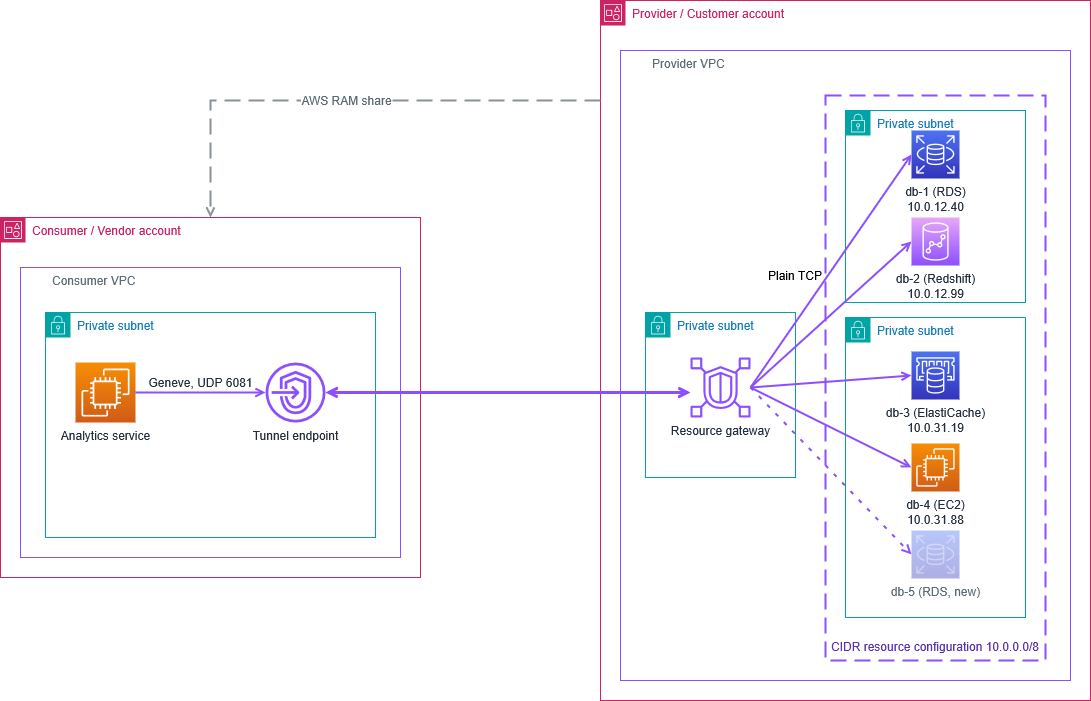
Figure 2: The consumer’s analytics service reaches the data sources in the provider’s CIDR resource configuration, including the new db-5, through one tunnel endpoint. The resource gateway delivers the traffic to each data source as plain TCP.
Figure 3 shows the setup on both sides and the traffic flow. The numbered steps that follow match the numbers in the figure.
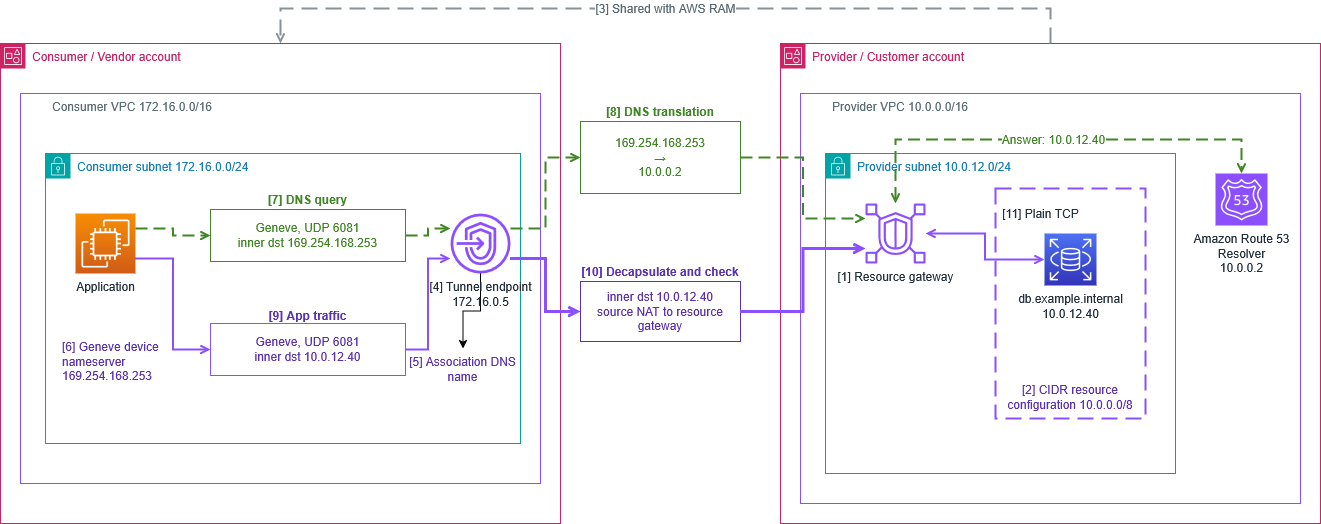
Figure 3: Setup and packet flow through a tunnel endpoint
Provider setup
- Create a resource gateway in your VPC with DNS resolution set to IN_VPC. You can’t change the setting after creation, and ARN resource configurations require PUBLIC, so CIDR and ARN configurations use separate gateways.
- Create a CIDR resource configuration on that gateway with the ranges, protocol, and port ranges the consumer can reach. For DNS through the tunnel, set the protocol to TCP_UDP and include port 53.
- Share the configuration with the consumer account through AWS RAM.
Consumer setup
- Accept the AWS RAM share and create a tunnel endpoint in your VPC, in subnets whose Availability Zones the resource gateway also uses.
- Look up the tunnel endpoint’s DNS name. It resolves to the endpoint’s IP addresses. Use the one in your Availability Zone as the GENEVE remote.
- Configure the GENEVE device and nameserver on your compute, as shown earlier.
Traffic flow
- The application resolves a name, and the query goes through the tunnel instead of to your VPC’s resolver.
- The endpoint forwards the query into the provider VPC, where it’s answered with an address in the shared range.
- The application opens a TCP connection to that address. The GENEVE device encapsulates the packets and sends them to the tunnel endpoint on UDP 6081.
- The endpoint removes the outer header and checks the inner destination against the shared ranges. If the address is inside them, the endpoint translates the source to a resource gateway address and forwards the packet. Otherwise, it silently drops the packet and the connection times out.
- The target receives an ordinary TCP connection from the resource gateway. Its reply returns through the tunnel to your inner source address.
The following AWS Command Line Interface (AWS CLI) commands perform steps 2 and 4, the two calls that use new parameters. For the full setup sequence, refer to Access network segments through AWS PrivateLink. The provider creates the configuration on the gateway from step 1, here with one IPv4 and one IPv6 range:
The consumer then creates the endpoint with the ARN of the shared configuration. The subnets set where the endpoint places its interfaces, and the address type sets the family of the outer packets:
Access control and logging
Step 10 is the access boundary. A consumer can’t reach anything outside the shared ranges, and the protocol and port ranges narrow access further. AWS RAM controls which accounts can create an endpoint for the configuration. If you remove a consumer account from the AWS RAM share, that account can’t create new tunnel endpoints, but its existing connections keep working.
Security groups, network ACLs, and firewalls in the provider VPC still apply to traffic from the resource gateway. The gateway uses many source addresses, not one. Reference the gateway’s security group or subnet in your rules rather than a single /32.
Access logs on the resource configuration record each connection a consumer makes. The sourceIpPort and destinationIpPort fields are the outer addresses of the encapsulated packet. The gatewayIpPort field is the translated source, and resourceIpPort is the destination inside the shared range. The following record is a DNS query through the tunnel (resource port 53).
No field carries the consumer’s inner source address. You can attribute traffic to a consumer’s endpoint, but not to a workload behind it.
Things to know
- Availability Zones must overlap – A tunnel endpoint’s subnets must be in Availability Zones where the resource gateway has an interface. An endpoint in any other zone still shows Available, but it has no network interface, and its association reports Inaccessible with the reason NoOverlappingZone.
- Keep traffic zonal – Point each instance at the endpoint address in its own zone. If that zone is impaired, failing over to an address in another zone takes consumer-side configuration beyond this post.
- Connections are consumer-initiated – The provider network replies through the tunnel but can’t open connections toward the consumer.
- Application traffic must be TCP – DNS is the only UDP traffic supported inside the tunnel. ICMP isn’t supported, so ping doesn’t work. Test with a TCP connection instead.
- Address families aren’t translated – To reach an IPv6 target, send IPv6 inner packets. The outer encapsulation is independent. The endpoint supports IPv4, IPv6, or dual-stack addressing, so any inner and outer combination works, with one GENEVE device per outer family.
- Names come from the provider – A CIDR resource configuration has no domain name of its own, so you resolve the names the provider already publishes. Private DNS names aren’t supported for tunnel endpoints.
- Fragments aren’t forwarded – The endpoint adjusts the TCP maximum segment size for the encapsulation overhead, but it drops IP fragments.
- Security groups apply on both sides – On the consumer side, the endpoint and the compute sending GENEVE must each allow UDP 6081 from the other.
- Quotas apply – Tunnel endpoints count against a per-VPC quota. For limits, refer to AWS PrivateLink quotas.
Availability and pricing
Tunnel endpoints are available in the AWS Regions listed in the launch announcement. You can create them with the Amazon VPC console, the AWS CLI, and the AWS SDKs. For pricing, refer to AWS PrivateLink pricing.
Conclusion
Sharing a network segment removes the per-resource handoff between teams when an application needs a new connection. The provider decides once which segment a consumer can reach, and can narrow or withdraw that access later. The consumer gets a stable path to everything inside the segment, DNS names included. To get started, refer to Access network segments through AWS PrivateLink.
Further reading
- Resource configurations for VPC resources
- Resource gateways in VPC Lattice
- What is AWS Resource Access Manager?