Networking & Content Delivery
Migrate Amazon CloudFront public origins to private VPC origins
Introduction
This post demonstrates how to migrate your Amazon CloudFront public origins to Amazon Virtual Private Cloud (Amazon VPC) origins using different strategies. You can also use VPC origins with cross-accounts to support security-first architectures.
When designing network architecture for CloudFront workloads, organizations must choose between centralized or distributed models. In a centralized architecture, a dedicated networking account hosts all CloudFront distributions and connects to origins across multiple resource accounts. Separate resource accounts host the origin infrastructure, such as Application Load Balancers (ALBs), Network Load Balancers (NLBs), or Amazon Elastic Compute Cloud (Amazon EC2) instances. In a distributed architecture, each resource account manages its own CloudFront distribution, and must manage its own origin infrastructures, creating self-contained workload environments.
You can use VPC origins with either centralized or distributed architecture models. Making applications private and separate from the public internet enhances your security posture, and you can make that happen with VPC origins, managing access controls at the CloudFront layer. This also reduces exposure to DDoS attacks on your origin infrastructure. There are several ways to enable CloudFront VPC origins on existing workloads. Picking the right migration approach depends on your current setup, business needs, and operational requirements. We’ll now look at different migration strategies and cover key considerations and best practices to help choose the best path for your environment.
Prerequisites
Before migrating your CloudFront public origins to private VPC origins, you need the following:
AWS account and permissions
- Necessary Amazon Web Services (AWS) Identity and Access Management (IAM) permissions to manage CloudFront and Amazon VPC resources.
- AWS Resource Access Manager (AWS RAM) (for cross account sharing)
- Verify that VPC origins are supported in the AWS Region and Availability Zone (AZ) where your resources reside
Resource configuration
- Establish network requirements for your private application resources. You can follow the CloudFront VPC Origin Prerequisites documentation. Secure origins with security groups to limit ingress connectivity only to CloudFront.
- Create the necessary ALBs, NLBs, or EC2 instances within Amazon VPC private subnets. These resources are configured as VPC origins.
- Configure HTTPS between CloudFront and the origin with valid SSL/TLS certificates and encryption controls.
Amazon VPC Block Public Access (BPA) configuration
- If you use BPA, then create Amazon VPC BPA exclusions for the entire Amazon VPC or specific private subnets. Refer to the Amazon VPC BPA basics documentation for configuration guidance.
Configure VPC origins
- Create a VPC origin using the CloudFront console or API. Use the resource owner account where you created the private application resources.
- Deployment of VPC origins might take up to 15 minutes.
Cross-account sharing (if applicable)
- Check if CloudFront and private resources are residing in different accounts. If so, then create and accept the resource share using AWS RAM before migration.
Testing and validation
- Verify that your private application resources (ALBs, NLBs, or Amazon EC2 instances) are production-ready and accessible from within the Amazon VPC.
- Test connectivity to your private origins from a test instance in the same Amazon VPC to confirm the application access.
- Validate that your application meets your performance benchmarks and serves content as expected.
Monitoring metrics
- Amazon CloudWatch metrics: Track 4xxErrorRate, 5xxErrorRate, and OriginLatency to identify any issues with origin connectivity or performance degradation.
- CloudFront logs: Review access logs for any origin connection failures, timeout errors, or unexpected response codes from your VPC origins.
- Amazon VPC Flow Logs: Verify that traffic flows from CloudFront to your VPC origins. Confirm that security group rules allow the necessary connections.
- Application logs: Monitor your origin application logs for any errors or performance issues that may indicate problems with the CloudFront integration.
Migration strategies
In this section we explore migration strategies for transitioning from public origins to private VPC origins with CloudFront. You must complete the prerequisites before implementing these strategies.
Strategy 1: Using CloudFront continuous deployment (recommended)
You can use CloudFront continuous deployment to safely test and validate changes to your configuration, and you can test the changes before promoting the staging environment to production. This blue-green deployment approach is the recommended migration strategy because it provides zero-downtime migration with built-in rollback capabilities. It also provides you with safe testing to validate VPC origin connectivity, performance, and functionality before affecting production traffic. This strategy is shown in Figure 1.
Continuous deployment creates a staging distribution that mirrors your production (primary) distribution. You can configure the staging distribution with the new VPC origins. The primary distribution continues serving traffic from public origins, and you can create a continuous deployment policy using Header-based or Weight-based type to distribute traffic to your staging distribution.
To get started and perform testing by tagging traffic with a particular header, enable the policy with Header-based type. You can then quickly resolve any issues that might occur during the testing phase. When your Amazon VPC, network, and application performance are validated and the issues are resolved, update the policy to Weight-based type.
With the Weight-based policy you can start routing a specific percentage (0% to 15%) of production traffic to the staging distribution. The percentage value can start small, and you can increase over time. When using Weight-based policy type, you can enable session stickiness. This ensures that a particular user session is maintained to a particular distribution until the viewer session is closed. When it is validated, promote the staging configuration to production with a single action. For a detailed walkthrough refer to Use CloudFront continuous deployment to safely validate CDN changes.
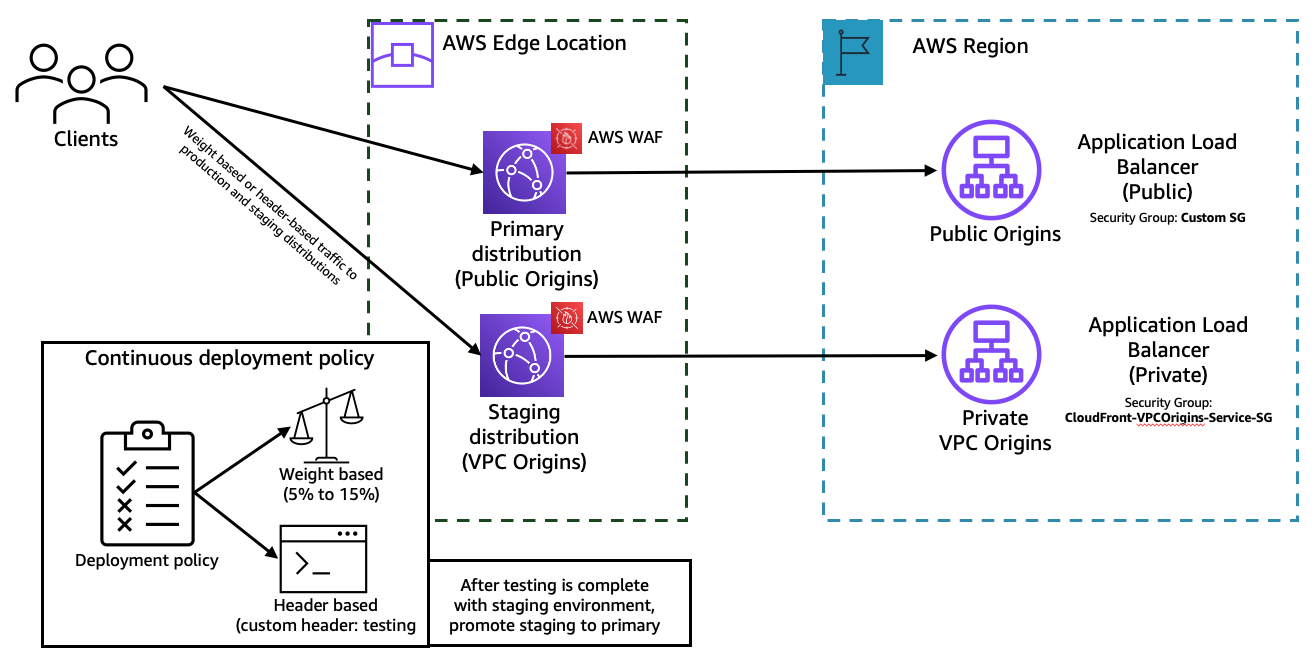
Figure 1: Migrate to private VPC origins using the CloudFront continuous deployment feature
Considerations with strategy 1
- Cache: The primary and staging distribution don’t share a cache. When CloudFront sends the first request to the staging distribution, its cache is empty and it begins caching based on your behavior configuration.
- Troubleshooting: If you encounter any issues during the migration, then reduce the traffic weight to 0% in the continuous deployment policy. Investigate the issues, resolve them, and gradually increase the traffic percentage.
- Session state: If you disable or enable continuous deployment policy, then CloudFront resets all of the sessions (including the active ones) and considers all of the requests to be new. This also applies when disabling and enabling session stickiness.
- Protocol support: HTTP3 isn’t currently supported for continuous deployment policy.
- Policy: When using a weight based policy, the weight can be a number between 0 and 15.
Strategy 2: Using CloudFront edge functions
On the existing CloudFront distribution, add the created private VPC origin as an Origin. Then create a CloudFront Function (sample code below) with a viewer-request trigger that directs the traffic to the VPC origin based on a custom header or weighted traffic split between public and private VPC origins. Other examples can be viewed at the amazon-cloudfront-functions sample on GitHub.
import cf from 'cloudfront';

const kvsHandle = cf.kvs();

// Configuration: Update these values to match your CloudFront distribution origins
const PUBLIC_ORIGIN_DOMAIN = 'your-public-origin.example.com';  // Replace with your public origin domain
const PRIVATE_ORIGIN_ID = 'your-private-origin-id';              // Replace with your private VPC origin ID

async function handler(event) {
    const request = event.request;

    try {
        const config = await kvsHandle.get('routing_mode', { format: 'json' });

        if (config.mode === 'header') {
            const routeHeader = request.headers['x-route-origin'];
            if (routeHeader && routeHeader.value === 'public') {
                cf.updateRequestOrigin({
                    domainName: PUBLIC_ORIGIN_DOMAIN
                });
            } else if (routeHeader && routeHeader.value === 'private') {
                cf.selectRequestOriginById(PRIVATE_ORIGIN_ID);
            }
        } else if (config.mode === 'weighted') {
            const hash = simpleHash(event.viewer.ip);
            if (hash % 100 < config.weight_percentage) {
                cf.selectRequestOriginById(PRIVATE_ORIGIN_ID);
            } else {
                cf.updateRequestOrigin({
                    domainName: PUBLIC_ORIGIN_DOMAIN
                });
            }
        }
    } catch (error) {
        console.log('Routing error: ' + error);
    }

    return request;
}

function simpleHash(str) {
    let hash = 0;
    for (let i = 0; i < str.length; i++) {
        hash = ((hash << 5) - hash) + str.charCodeAt(i);
        hash = hash & hash;
    }
    return Math.abs(hash);
}
The request routing mode is defined using KVS with key “routing mode” and values {"mode": "weighted", "weight_percentage": 70} or {"mode": "header”}. To start testing, associate the CloudFront function to the respective behavior, which forwards traffic to the public origin.
First, set the KVS value to {"mode": "header”}. Start testing by sending the request to CloudFront with the custom header x-route-origin with value public or private. You can quickly resolve any issues that might occur during the testing phase.
Validate the configuration, network, and application performance metrics. After resolving any obvious issues you can update the KVS to route traffic using weights {"mode": "weighted", "weight_percentage": 5}. You can start with 5% of the load being sent to private origin and increase the weight_percentage to 100%. When the private origin is receiving traffic and working as expected, update the cache behavior to use the private origin instead of the current public origin. Then, validate if the traffic is routed to private VPC origins. Once there are no errors, you can remove the CloudFront function from the cache behavior. Repeat the same process for other cache behaviors as well.
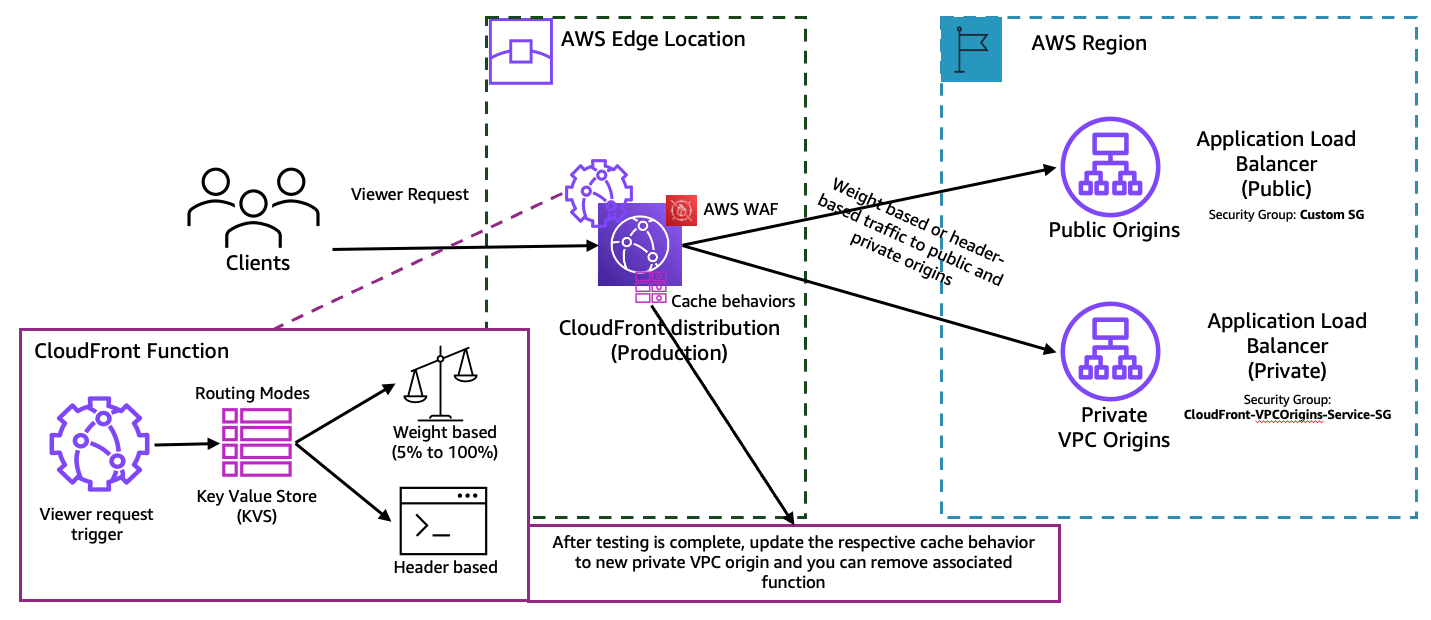
Figure 2: Migrate to private VPC origins using CloudFront edge functions
Considerations for strategy 2
- Caching: The distribution caches requests based on the configured cache behavior.
- Troubleshooting: If you encounter any issues during the migration, then reduce the traffic weight to 0%. Investigate the issues, resolve them, and gradually increase the traffic percentage.
- Origin configuration: If you want to configure more origin specific settings in the CloudFront function, then refer to Helper methods for origin modification. Unless specified, all settings are inherited from the origin configuration or the associated cache behavior configurations.
- CloudFront function: If you have an existing CloudFront function associated with the behavior, then combine the provided function by providing origin selection as a sub function that can be called from main function.
- KVS: It reduces complexity in the function code and you can use it to update data without the need to deploy code changes. For a detailed walkthrough refer to Introducing Amazon CloudFront KeyValueStore: A low-latency datastore for CloudFront Functions.
Strategy 3: Updating the existing distribution (in-place migration)
This in-place upgrade strategy involves directly modifying your existing CloudFront distribution to replace public origins with VPC origins. This approach can be the fastest migration method, but it requires careful planning and a maintenance window to minimize service disruption. This strategy is shown in Figure 3.
First, create a new VPC origin in your existing CloudFront distribution, then update the cache behaviors to route traffic to the new private origin instead of the public origin. When all behaviors are updated and validated, you can remove the old public origin configuration. This approach is ideal when you would like to test VPC origins in a pre-production or test environments. For a production environment, we recommend following Strategy 1. If you want to perform in-place changes to the production distribution, ensure you have a flexible maintenance window for your application. And be aware workloads can tolerate disruptions during the cutover.
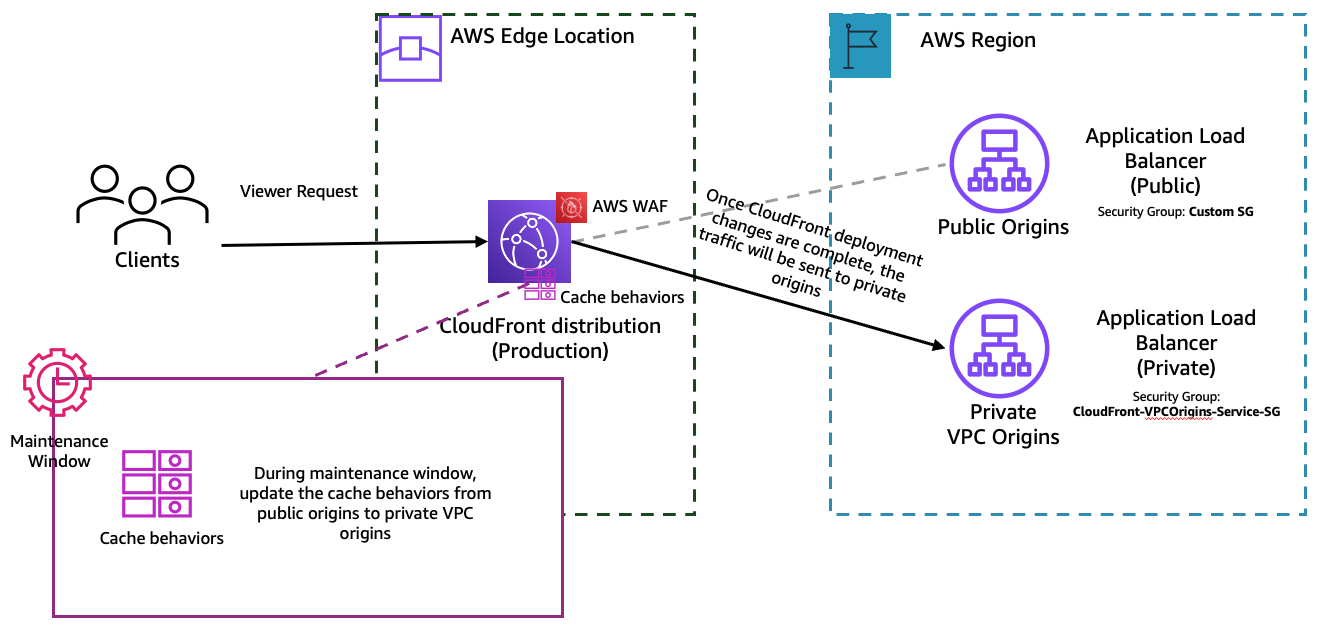
Figure 3: Migrate to private VPC origins by updating the cache behaviors (in-place migration)
Considerations for strategy 3
- Updating CloudFront distribution: When the new configuration is updated, CloudFront starts to propagate the changes to all edge locations. After your configuration is updated in an edge location, CloudFront immediately starts to serve content from that location based on the new configuration. Until then, CloudFront serves content using the old configuration.
- Service disruption: During the behavior update process, there may be the possibility of network or application related issues at your newly created resources, so ensure there is a flexible maintenance window for troubleshooting.
- Rollback complexity: Rolling back requires reversing behavior changes and potentially recreating the public origin. Document your original configuration before making changes.
- Testing requirements: Thoroughly test VPC origin connectivity in a non-production environment before performing the in-place upgrade on production.
- Behavior dependencies: If you have multiple behaviors with complex configurations, then update them systematically and validate each change.
Strategy 4: Migrate to private VPC origins for a multi-tenant distribution
Multi-tenant CloudFront distributions serve content for multiple applications, customers, or business units through a single distribution using path-based or host-based routing. Migrating these distributions to VPC origins requires careful planning to avoid disrupting any tenant while maintaining isolation and security boundaries. This strategy is shown in Figure 4.
For multi-tenant distribution, each tenant inherits settings from its parent distribution, and each tenant has its own domain. The origins are created and configured on the main distribution, which is used as a template to route traffic to tenants. Therefore, using an in-place migration can impact all tenants because the origins are shared between tenants.
The recommended approach is to create a new multi-tenant distribution with VPC origins, then associate each tenant with the new distribution. You can use this to test each tenant in isolation and migrate tenants individually to the new distribution with VPC origins.
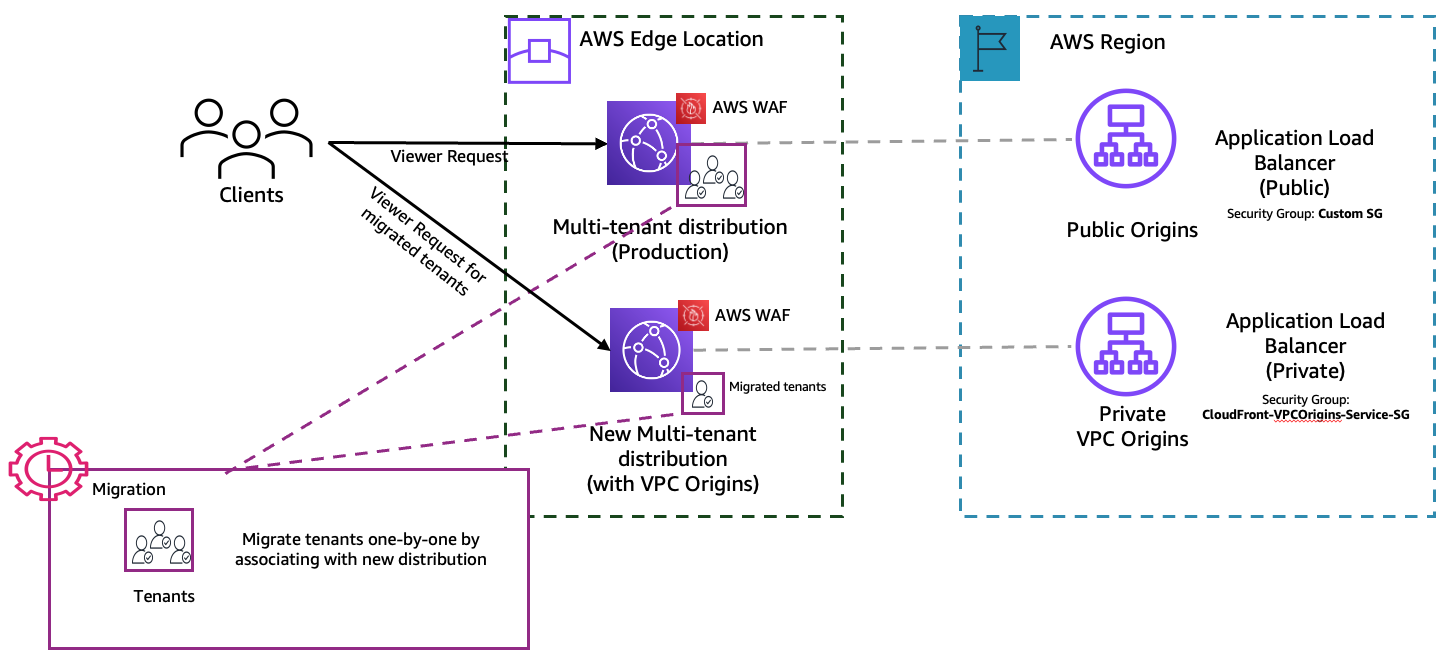
Figure 4: Migration of tenants to use private VPC origins in a multi-tenant distribution
Considerations for strategy 4
- Behavior organization: Ensure your behaviors are clearly organized by tenant with distinct path patterns or host headers to avoid confusion during migration.
- Cross-account complexity: If different tenants’ origins reside in different AWS accounts, then ensure proper VPC origin sharing through AWS RAM for each account.
- Testing per tenant: Validate each tenant’s migration independently before proceeding to the next tenant.
- Rollback planning: Document rollback procedures for each tenant separately, because you may need to roll back individual tenants without affecting others.
- Communication: Coordinate with each tenant or application owner to schedule migration during their preferred maintenance windows.
Other considerations
- Origin shield: If you were using Origin shield for public origins, then you can continue to use it for private VPC origins.
- Origin groups: If you’re using origin groups in your current CloudFront distribution, then you need to create new origin groups and configure behavior to map to the origin group as an origin.
- Layer 7 protection: AWS Shield Standard protects CloudFront distributions from a wide range of DDoS attacks. AWS recommends considering protecting your distribution with AWS Shield Advanced and AWS WAF intelligent threat mitigation mechanisms, such as Layer 7 DDoS mitigation rules, and bot control to protect your private VPC origins from Layer 7 targeted attacks.
- Quotas: Refer to the CloudFront quotas and, if necessary, increase quotas related to VPC origins before migration.
Cleaning up
To avoid incurring ongoing charges, delete the unused resources that were created for traffic routing and testing. Before deleting any CloudFront distribution, verify that all traffic has been migrated and DNS records have been updated. If you created test ALBs, NLBs, or EC2 instances for migration testing, then delete them if they’re no longer needed.
If you used continuous deployment (Strategy 1), then promote the staging configuration to the primary distribution. If you used edge functions (Strategy 2), then disassociate and delete the CloudFront Function and its KVS. If you employed in-place migration (Strategy 3), then remove the old public origin configuration. If you migrated a multi-tenant architecture (Strategy 4), then disable and delete the old multi-tenant distribution after migrating all tenants.
To verify that cleanup is complete, check the CloudFront console to confirm that test functions and unused distributions are removed. Furthermore, monitor AWS Cost Explorer for 24–48 hours to confirm that the charges for temporary resources have stopped.
Conclusion
Migrating to VPC origins enhances your security posture by removing public endpoints. You can manage access controls at the CloudFront layer. Each of the four migration strategies for transitioning CloudFront public origins to private VPC origins offers different trade-offs between migration speed, risk mitigation, and operational complexity. The right migration approach depends on your existing setup, business needs, and operational requirements.
Ready to get started with your migration? The first step is to have a good understanding of your current distribution setup. That will provide you with the knowledge you need to choose the strategy that works best for your environment. Visit the CloudFront VPC origins documentation for detailed configuration guidance and best practices.
For ongoing updates about CloudFront features and best practices, follow the AWS Networking and Content Delivery Blog. If you have feedback, then submit comments in the Comments section. If you have questions, then start a new thread on Amazon CloudFront re:Post or contact AWS Support.