Networking & Content Delivery
Powering predictable costs with AWS Direct Connect flat-rate pricing
In a traditional on-premises network, predictable costs have always been central to network connectivity budgets. Organizations relied on leased lines, Multiprotocol Label Switching (MPLS) links, and dedicated cross-connects. No matter how much data they moved, the bill stayed the same. As they rebuilt their architecture in the cloud, they gained the flexibility of pay-as-you-go pricing. That flexibility suits most workloads because there are no upfront commitments. However, workloads that move large, sustained volumes of data out of AWS to on-premises infrastructure see data transfer out (DTO) charges scale with outbound traffic. The variable DTO costs grow harder to predict and budget. Common examples include generative AI training and inference, medical imaging, video rendering, and large-scale data analytics.
To simplify budgeting, AWS Direct Connect now offers flat-rate pricing on 10 Gbps and 100 Gbps dedicated connections. This model applies a fixed cost with no per-gigabyte (GB) DTO charge from the AWS Regions in your selected tier. Tiers are organized by connectivity scope, letting you choose the tier that fits your traffic flow.
In this post, we explain how to configure Direct Connect connections using flat-rate pricing. We then walk through scenarios showing how to choose a tier based on your workload requirements, use flat-rate pricing alongside pay-as-you-go pricing, and convert existing connections.
What Direct Connect flat-rate pricing gives you
- Predictable fixed hourly cost: You pay a fixed price per connection or port-pair with no per-GB DTO charge for the Regions covered by your tier, making costs straightforward to forecast, budget, and allocate across teams.
- Built-in resiliency: Flat-rate pricing provisions connections as a port-pair by default on different devices or locations, making resiliency part of the offering rather than an added step.
- Choice and flexibility: With flat-rate pricing, you can also use pay-as-you-go pricing and choose the billing mode that matches your workload.
How Direct Connect flat-rate pricing works
Let us walk through how to create a new Direct Connect connection with flat-rate pricing.
Step 1. Choose a topology
When creating the connection, choose a billing mode and resiliency topology. Figure 1 shows flat-rate billing mode with High Resiliency topology, which provisions one connection across two different Direct Connect locations. For more details on resiliency topologies, visit the Direct Connect Resiliency Recommendations page.
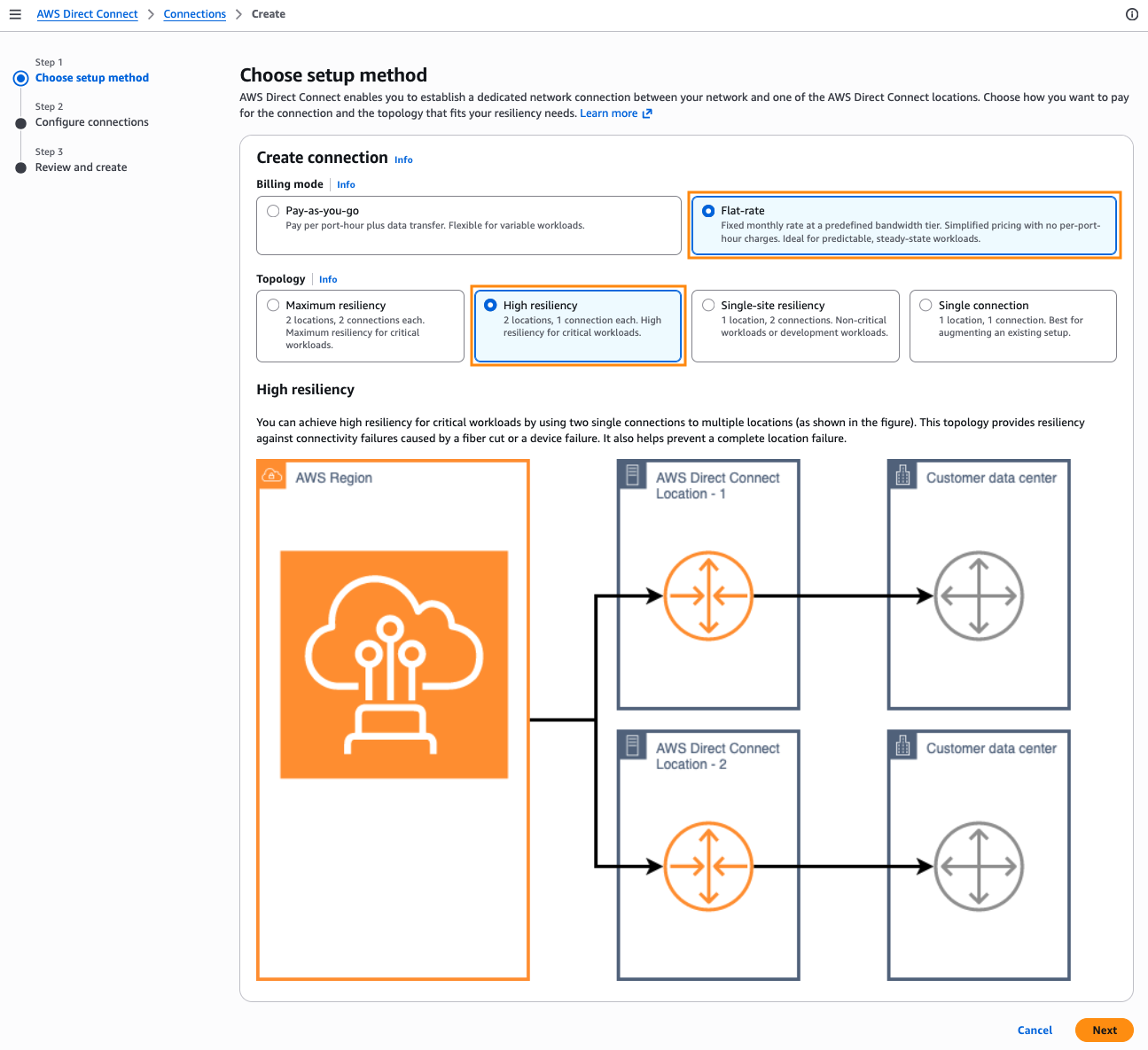
Figure 1. Choosing a billing mode and resiliency topology for a new Direct Connect connection
Step 2. Configure the connections
To configure flat-rate connections, choose 10 Gbps or 100 Gbps. Next, define a resiliency group, which is a logical grouping of connections that declares your intended resiliency topology. Each port-pair consists of two physical ports on separate devices within or across Direct Connect locations. In Figure 2, we create a resiliency group called analytics-prod-ap for a High Resiliency topology. You can also request a single flat-rate connection and pair it with an existing eligible connection by adding both to the same resiliency group, as covered in Scenario 1.
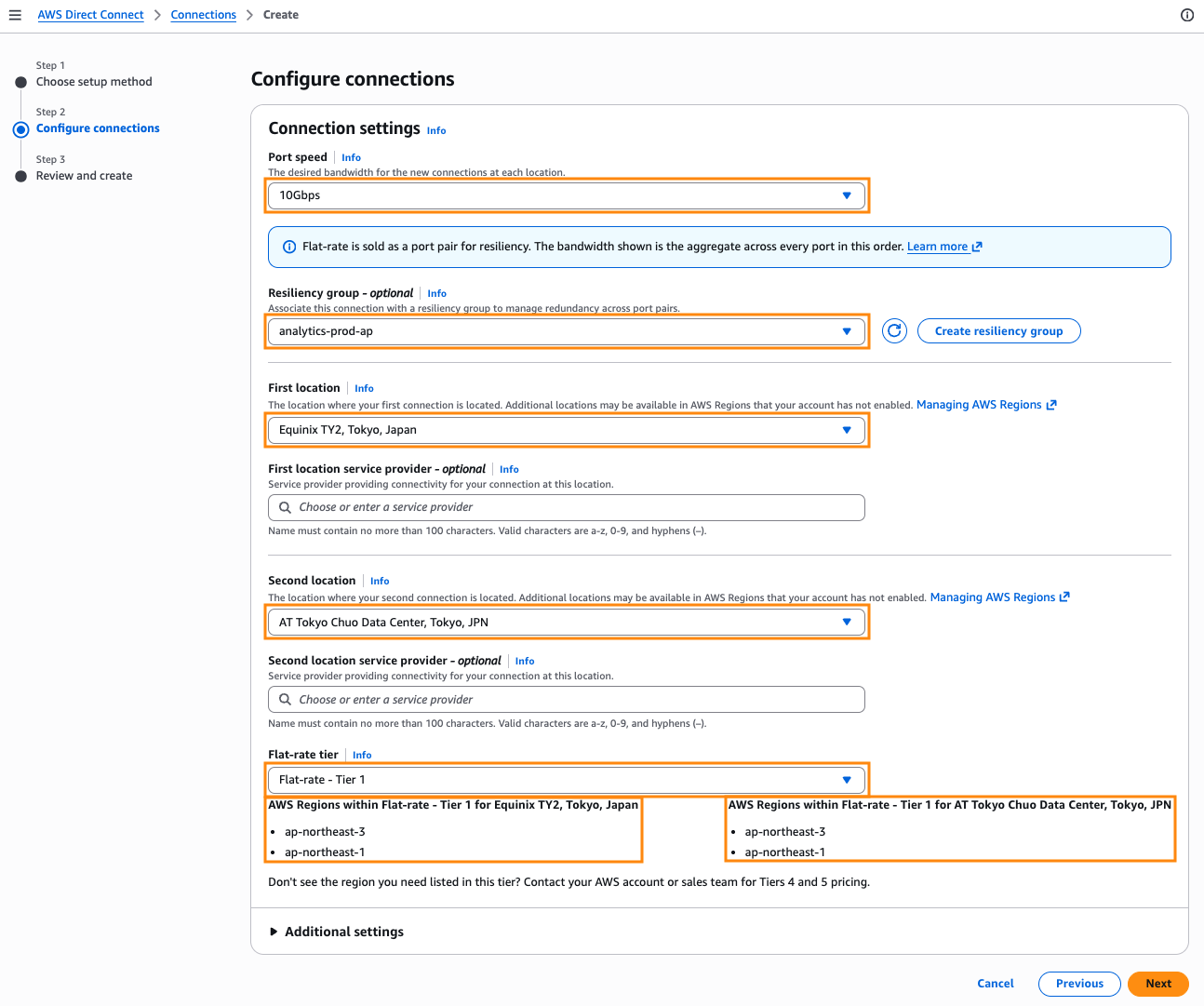
Figure 2. Configuring the resiliency group, locations, and flat-rate tier
You use the dual connections in Active-Active or Active-Standby configuration. Effective bandwidth equals one port. For example, a 10 Gbps port-pair delivers 10 Gbps, not 20 Gbps. If your workload needs more throughput than a single port provides, provision more port-pairs.
Flat-rate tiered pricing is based on the geographic scope of your connectivity. A tier defines the traffic path between an AWS Region and a Direct Connect location. You choose the tier that matches your traffic flow, with no per-GB DTO charges on that subscribed path. Traffic exiting through a non-subscribed geographic scope is charged at standard DTO rates. For details, visit the AWS Direct Connect pricing guide.
Step 3. Review and create
Review your topology, connection location, port speed, and billing mode, then choose Create (Figure 3). You now have flat-rate pricing on Direct Connect connections with a fixed hourly rate and included per-GB DTO for the Regions your tier covers.
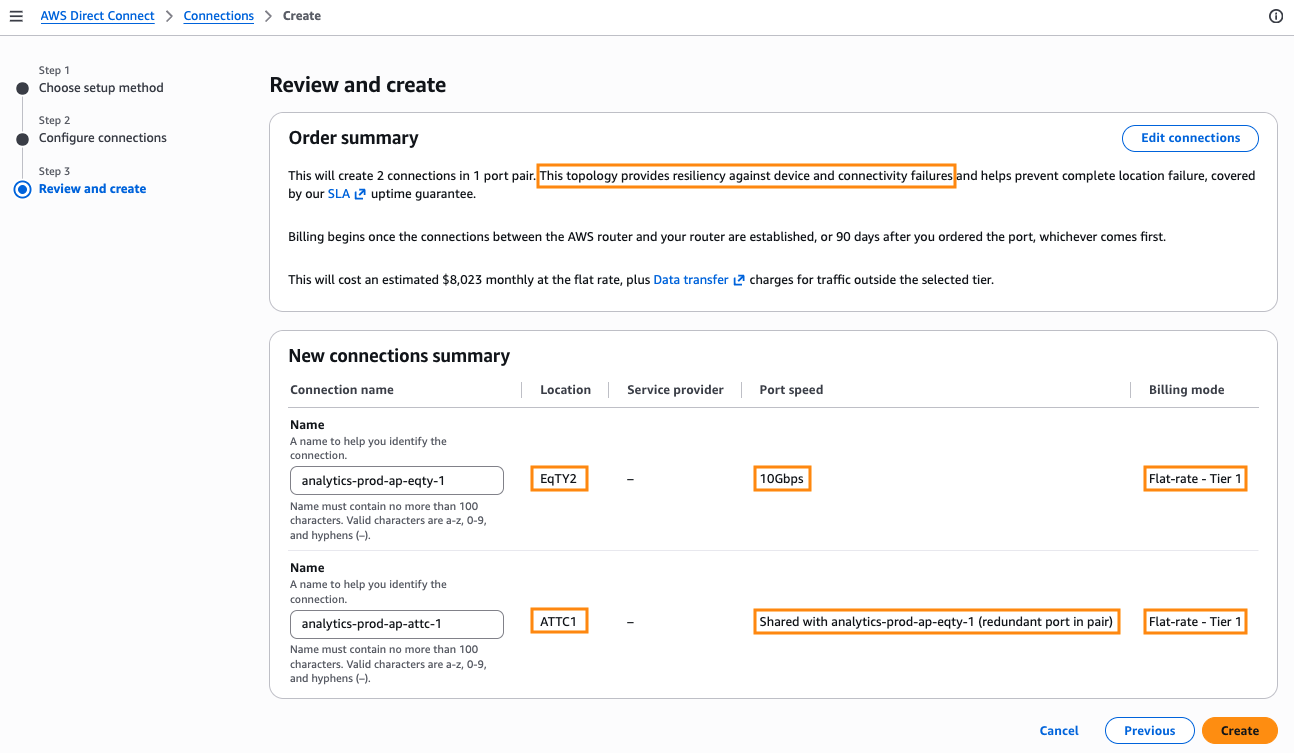
Figure 3. Reviewing the flat-rate connection order before creation
Practical uses of flat-rate pricing
These scenarios show flat-rate pricing in practice, from single-Region setups through multi-Region workloads, converting existing connections, and separating billing modes across accounts.
Scenario 1: Single-Region – Connect through a local Direct Connect location
Figure 4 shows a single-Region deployment with AWS Transit Gateway in us-west-2. Your on-premises systems connect to AWS through Direct Connect locations in the Seattle metro, and campus users pull data into local applications. For example, you run a large healthcare system where imaging studies live in AWS for durability and central management, and clinicians open them on demand. This workload shapes two requirements. Outbound transfer spikes in peak seasons which drive pay-as-you-go costs up, so you want a predictable bill year-round. Your users depend on that data, so you need to stay online through a fiber cut, device failure, or location outage.
You already have one Direct Connect connection at Digital Realty SEA10 in Seattle, WA. You create a second connection at TierPoint in Seattle, WA, and add both to a resiliency group. Since the source Region is in the same metro as your Direct Connect locations, you set the port-pair billing mode to Tier 1. You configure Active-Standby, so one connection carries traffic while the other stands ready in case of a failure.
Data transfer out from us-west-2 through these locations falls under the fixed hourly rate with no per-GB DTO charge. Inbound transfer stays free, just as with pay-as-you-go. You now have a predictable bill and resilient two-location hybrid connectivity to an AWS Region.
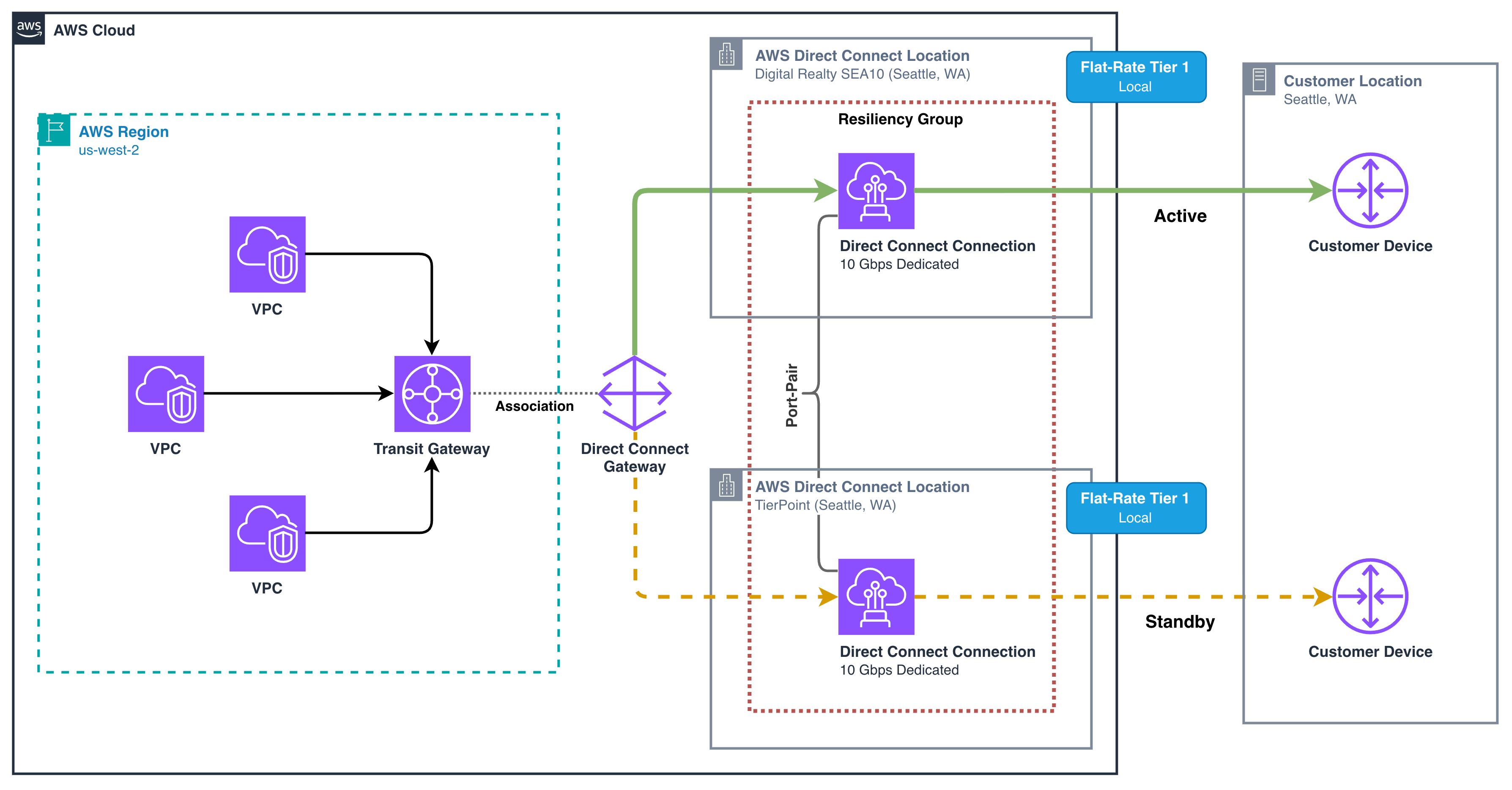
Figure 4. Single-Region flat-rate deployment across two Direct Connect locations in one metro
Scenario 2: Multi-Region – Choose a tier that covers all your workload Regions
Figure 5 shows a multi-Region network built on AWS Cloud WAN. Your Amazon VPC resources attach to a production segment and a Direct Connect gateway to a hybrid segment, with core network edges in us-east-1 and ca-central-1. Connectivity to your data center exits over transit virtual interfaces attached to the Direct Connect gateway. You run a linear channel playout operation that streams high-bitrate video from AWS to terrestrial transmission facilities across the United States and Canada. Playout runs in us-east-1 for the US market and ca-central-1 for the Canadian market.
You start with a port-pair at CoreSite VA1 in Reston, VA for us-east-1, and a second port-pair at Cologix MTL3 in Montreal, CAN for ca-central-1, both on Tier 1 flat-rate pricing. Each subscription covers the local path from its Region to its Direct Connect location, so steady-state traffic in each country falls under the selected flat-rate tier with no per-GB DTO charge.
You want a Maximum Resiliency topology across both Regions. If one Region is impaired, you serve that market from the surviving Region through the same Direct Connect locations. That cross-Region path exceeds Tier 1 coverage and falls back to standard DTO rates. You upgrade to Tier 2, which covers source Regions in the same general geographic area, such as a continent, and the Direct Connect locations that serve them. Traffic from us-east-1 and ca-central-1 through either location is now covered under one flat-rate pricing tier, so you can forecast the cost during normal operation and during a failover.
As you grow into other geographies, add port-pairs at local Direct Connect locations and, if needed, move to a higher tier which includes Regions from lower tiers. For coverage beyond published tiers, contact your AWS account team.
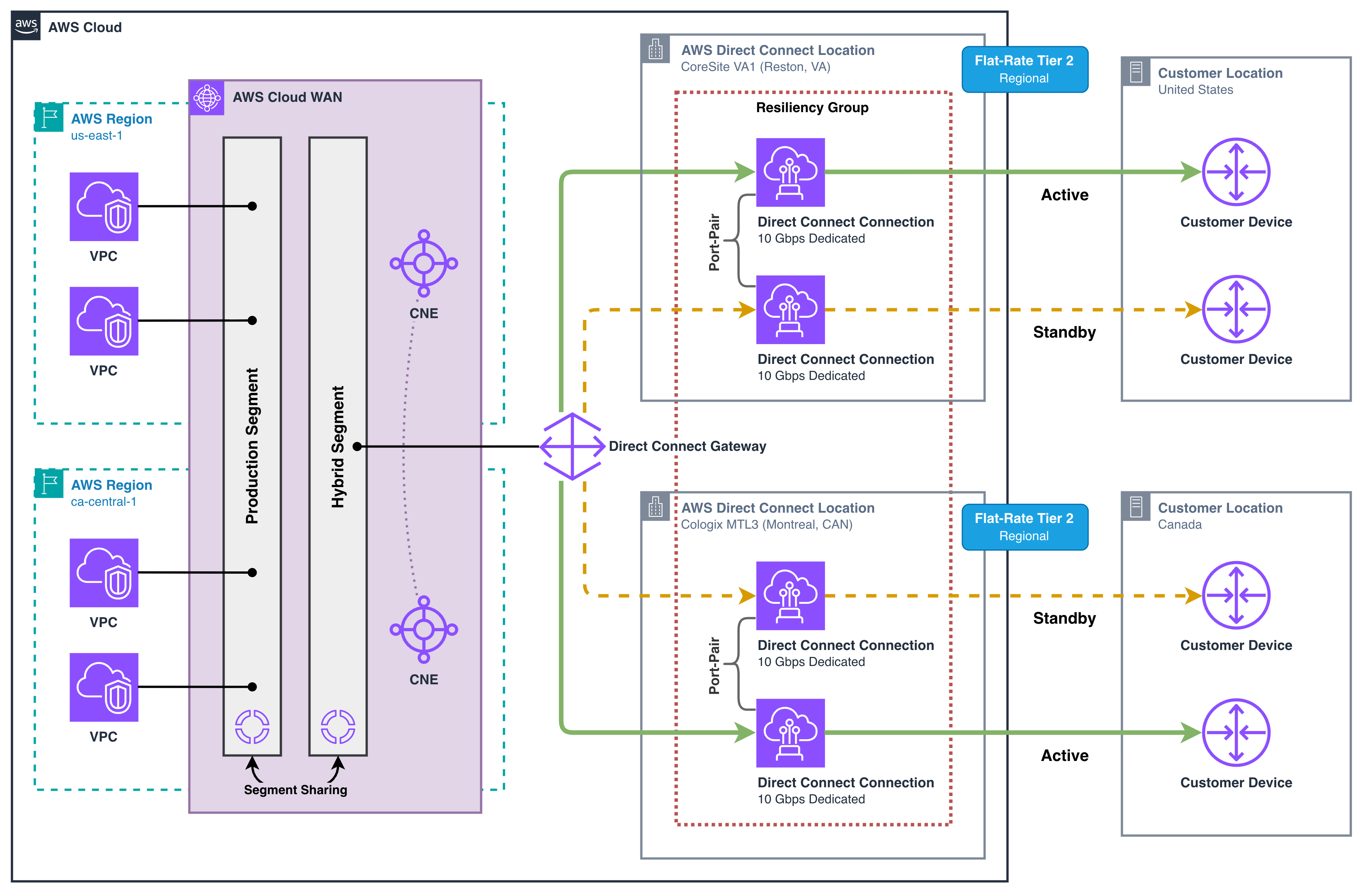
Figure 5. Multi-Region flat-rate deployment with Cloud WAN and regional port-pairs across two metros
Scenario 3: Convert existing connections to flat-rate pricing
You run a workload with large, sustained data transfer from Amazon Simple Storage Service (Amazon S3) to on-premises infrastructure on pay-as-you-go across a High Resiliency topology (Figure 6). You have two 100 Gbps dedicated connections in a resiliency group, one at Equinix LD5 in Slough, GBR and one at Telehouse West in London, GBR. You use an Active-Active routing configuration. Outbound traffic carries your datasets from eu-west-2 to your data center. As datasets grow, DTO keeps climbing, and you want a predictable hourly cost. You plan to convert these connections to flat-rate Tier 1, keeping the same topology and changing only the billing mode.
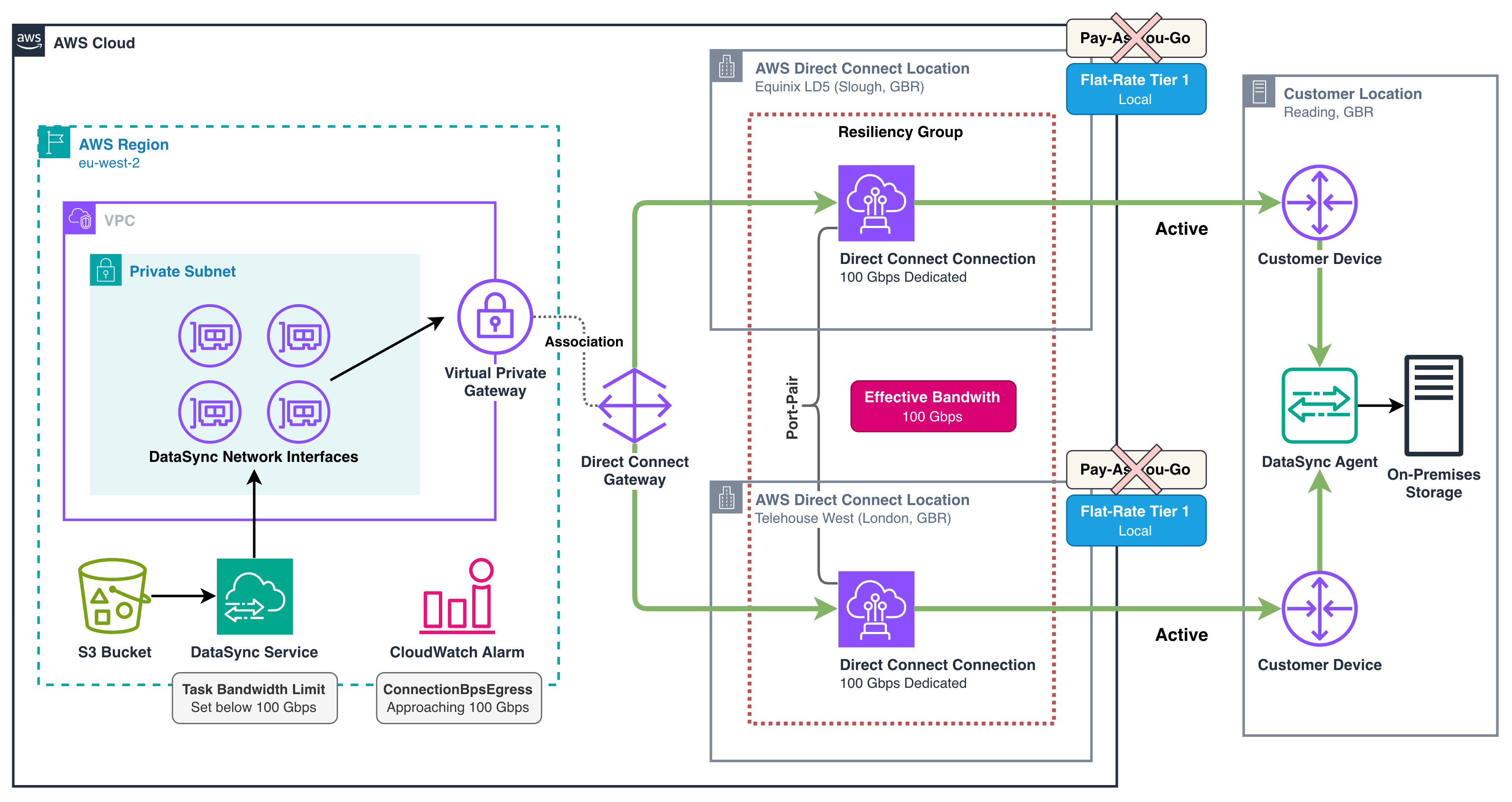
Figure 6. High-volume DataSync workload with Active-Active connections converting to flat-rate pricing
Under pay-as-you-go, you pay a port hour rate on each connection plus per-GB DTO, so the bill rises with outbound volume and becomes hard to forecast at sustained high volume. With flat-rate pricing, you pay one fixed hourly charge as a single port fee for the pair, with DTO included for the Regions your tier covers. Your cost stays the same regardless of transfer volume within your tier’s covered Regions.
After comparing the two options for your volume, you convert your existing connections at Equinix LD5 and Telehouse West to flat-rate Tier 1 instead of requesting new connections. Both ports keep carrying the same traffic in the same topology, and only billing changes, so traffic is unaffected. Figure 7 shows the Change Billing Mode dialog in the console. The UpdateConnectionsBillingMode action in the AWS Direct Connect API does the same programmatically. Conversion applies at the location level, so converting one connection to flat-rate pricing converts every connection at that Direct Connect location in the same account.
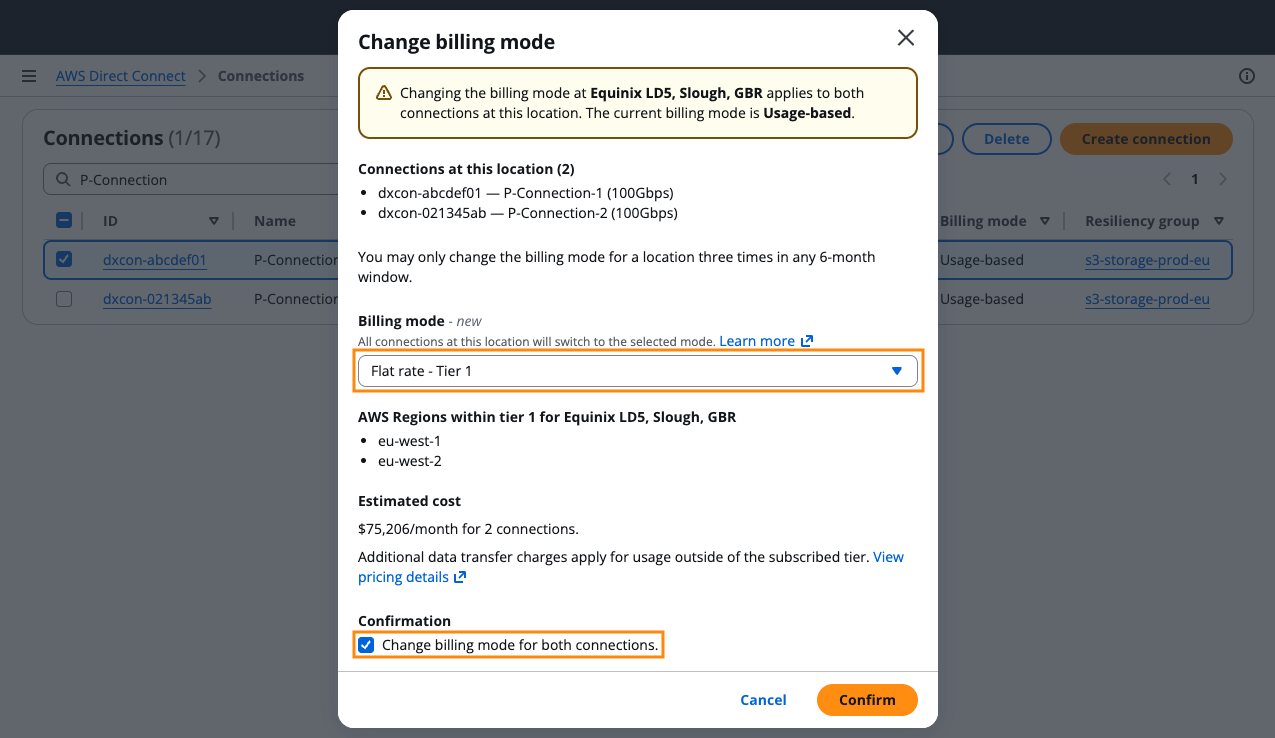
Figure 7. Converting an existing connection from pay-as-you-go to flat-rate in the console
Because each port-pair delivers single-port throughput in Active-Active mode, your two connections provide 100 Gbps of usable bandwidth out of 200 Gbps of total port capacity. A single-location failure still leaves one healthy connection at the surviving site, enough to carry the full load for that location. To stay within the 100 Gbps effective bandwidth, you move data with AWS DataSync and set a bandwidth limit of 100 Gbps on the task. You then add an Amazon CloudWatch alarm on the sum of ConnectionBpsEgress across both connections, set to trigger when aggregate use approaches 50% of total port capacity. This helps keep enough headroom, so a single-location loss does not exceed one port-pair’s effective bandwidth.
Scenario 4: Different billing modes at the same Direct Connect location
You may find that flat-rate pricing fits one workload but not another. Suppose you run a high-volume streaming workload with heavy, sustained traffic alongside intranet business applications that move far less data. Flat-rate pricing covers the streaming workload’s sustained traffic more economically, while the intranet applications’ lighter usage favors pay-as-you-go. Latency requirements and your existing colocation footprint mean both workloads run through the same Direct Connect locations, so you cannot separate them by location alone.
Billing mode is set per location within an account. To use different billing modes at the same location, separate the two workloads into two networking accounts in the same organization in AWS Organizations. You provision the streaming connections with flat-rate pricing in a dedicated networking account. The intranet applications stay on pay-as-you-go in your centralized networking account. In Figure 8, both workloads share the same Direct Connect locations and physical connectivity, with the streaming workload on flat-rate pricing and the intranet workload on pay-as-you-go.
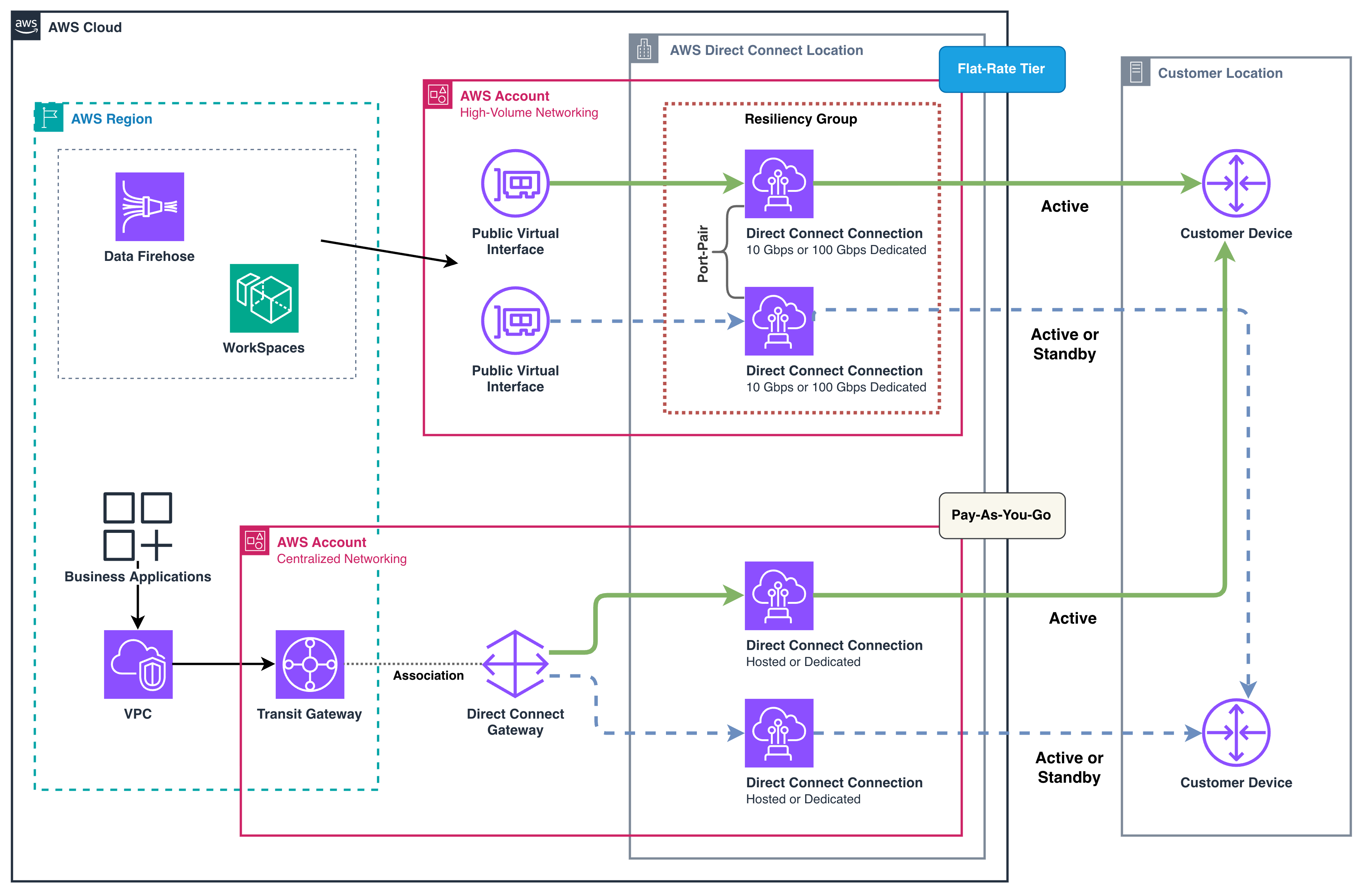
Figure 8. Separate billing modes for two accounts at the same Direct Connect location
Using your data to evaluate flat-rate pricing
Before switching to flat-rate pricing, start with the data you already have. Your traffic metrics and billing records help you decide whether flat-rate pricing is a fit for your workloads. The following steps walk through the CloudWatch metrics and cost data to review.
Analyze your transfer patterns in Amazon CloudWatch
Review the ConnectionBpsEgress CloudWatch metric for each Direct Connect connection. It records outbound bits per second, giving you a view of the traffic trend. You can apply the RUNNING_SUM() CloudWatch math expression to visualize cumulative DTO volume over the billing period. Figure 9 shows how to visualize peak demand and growth trends. Sustained high throughput, a month-over-month increase in cumulative volume, or unpredictable spikes are signals that flat-rate pricing is a fit.
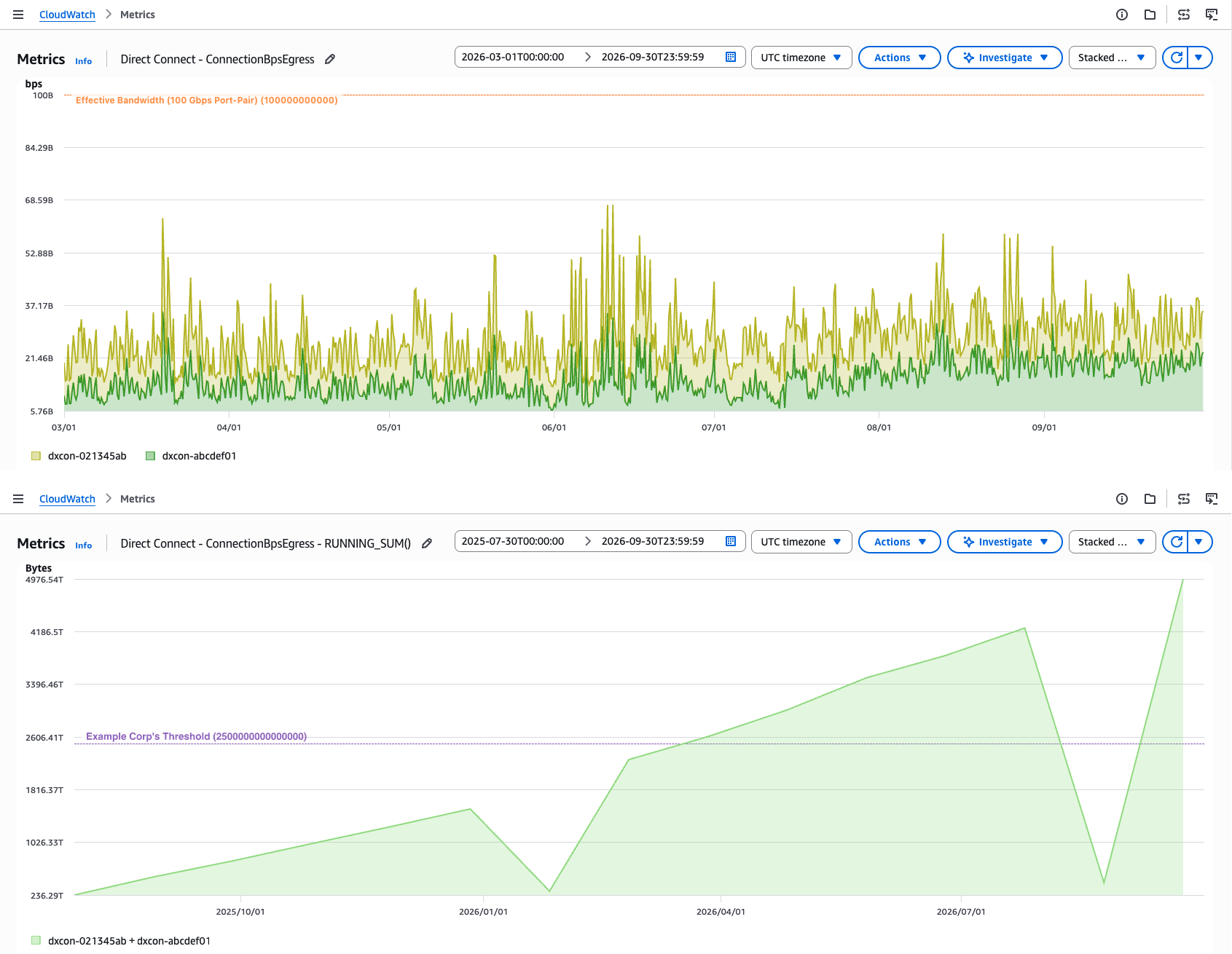
Figure 9. Monitoring Direct Connect traffic and cumulative data transfer in Amazon CloudWatch
Find your current spend in AWS Cost Explorer and AWS Data Exports
Use AWS Cost Explorer to see what you spend on Direct Connect DTO. For a more granular view, use AWS Data Exports where Direct Connect DTO appears as a usage type in this form:
{Region}-{DirectConnectLocation}-DataXfer-Out:dc.{#}
For example, EUW2-THNO2-DataXfer-Out:dc.3 is DTO at Telehouse West in London, GBR from eu-west-2. This breakdown shows transfer costs per location, which matters because flat-rate pricing affects all connections at a location. Figure 10 shows the cost and usage breakdown by month.
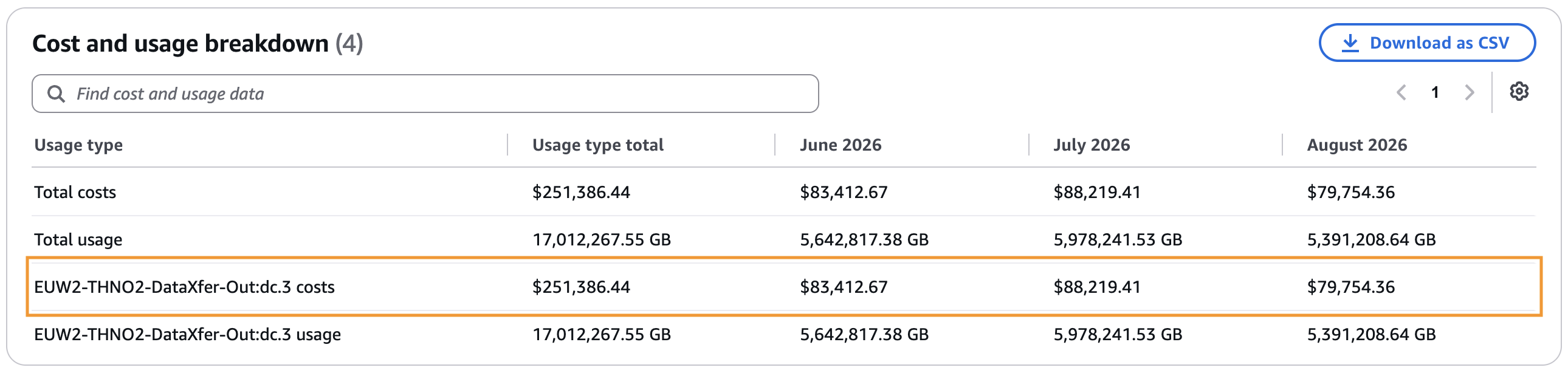
Figure 10. Monthly Direct Connect cost and usage breakdown in AWS Cost Explorer
Compare your average monthly outbound spend against the flat-rate price for your tier. Then divide that price by the per-GB DTO rate. When your volume consistently meets or exceeds that threshold, or your CloudWatch metrics trend upward, flat-rate pricing is a potential fit.
Considerations
- Dedicated connections only: Flat-rate pricing is not available on hosted connections.
- Multi-Region resources: A single connection can reach resources across Regions through Direct Connect gateways, AWS Transit Gateway, and AWS Cloud WAN. Review your tier before attaching a multi-Region resource and confirm it covers each Region you want included.
- Expansion to new Regions: Extending your topology to a new Region after provisioning might require a tier change. Traffic from a Region outside your tier is billed at standard DTO rates until you raise the tier.
- Charges billed separately: Other AWS service charges apply separately, including data processing in AWS Transit Gateway and AWS Cloud WAN. Data transfer on AWS Direct Connect SiteLink is not covered by any tier and is billed at standard rates.
- Provider fees: Cross-connect and colocation fees from your colocation provider or AWS Direct Connect Partner, and last-mile circuit charges from your network provider, are not included in the flat-rate pricing.
- Billing mode per connection: Within a single AWS account, all connections at one Direct Connect location must use the same billing mode. However, distinct locations in the same account can use different modes, so you can use flat-rate at one location and pay-as-you-go at another within the same account.
- Resiliency and SLA coverage: For resiliency, a port-pair is recommended but optional. If you have a single connection today, you can add another at the same location and associate both with the same resiliency group to form a port-pair. Choose Active-Active or Active-Standby. The second connection in the pair is included at no added charge. A flat-rate connection without a resiliency group is still governed by the Single Connection SLA in the AWS Direct Connect Service Level Agreement.
Conclusion
In this post, we showed how AWS Direct Connect flat-rate pricing replaces variable per-GB DTO charges with a fixed hourly cost for high-volume workloads. We walked through the configuration steps and explored scenarios from single-Region healthcare imaging to multi-Region video playout with cross-Region failover. We also showed how to convert existing connections and separate billing modes across accounts. With your CloudWatch metrics and Cost Explorer data, you can evaluate whether your transfer volume and growth trend support the switch. By choosing the tier that matches your traffic flow and pairing it with a resiliency group, you get a fixed hourly cost, built-in resiliency, and a bill you can forecast and more easily allocate across teams.
To get started, visit the AWS Direct Connect console and the flat-rate pricing page for current rates.
If you have questions, start a thread on AWS re:Post or contact AWS Support.