Networking & Content Delivery
Protect Amazon Route 53 domains during account lifecycle events: Best practices for domain governance in multi-account organizations
Domain governance in Amazon Route 53 can mean the difference between a routine account decommissioning and an unplanned outage. Picture this situation: your organization closes an Amazon Web Services (AWS) account, and five days later a customer-facing website becomes unreachable, email stops flowing, and SSL certificate validation fails. A domain that this account had registered with Amazon Route 53 went into suspension, and the pre-closure review missed it.
In multi-account environments, organizations often distribute workloads across dozens or hundreds of member accounts within AWS Organizations. Over time, domain registrations can end up in accounts originally created for specific projects or teams. Without a domain governance strategy, decommissioning one of these accounts can disrupt services that depend on the domain.
This post presents practices, grounded in the AWS Well-Architected Framework, that help you protect Route 53 domain registrations during account lifecycle events. It describes architectural patterns, preventive controls, and operational processes you can adopt to reduce the risk of accidental domain disruption.
The challenge
AWS Organizations supports account lifecycle management at each stage. Teams create accounts for new workloads, move them between organizational units (OUs), and decommission them when projects conclude. AWS provides APIs, automation, and governance controls for each stage. Plan ahead for the point where account closure meets domain name registration.
A domain is a globally unique ID. Unlike a compute instance or a storage volume, a domain carries years of reputation, customer trust, email deliverability history, and DNS configuration. If a domain is suspended because of account closure, the impact can reach beyond DNS resolution. It can affect email delivery, SSL/TLS certificate validation, and API endpoint availability.
The timeline is unforgiving: a domain is suspended 5 days after closure, deleted at day 35, and the account cannot be reopened after 90 days. AWS sends daily email warnings during the first 5 days, and AWS Support can reopen the account within the 90-day window, so these safeguards give you time to act. Even so, proactive governance that addresses domain risks before any closure is a more reliable strategy than reactive recovery.
One scenario merits special attention. Suppose an account’s root email address uses a domain registered within that same account. If you close the account, the domain suspension on day 5 can prevent delivery of the warning notifications. Verify that your root email addresses don’t depend on domains hosted in the same account.
The practices that follow help you address these considerations early, before any account closure begins, so that you manage domain risks by design.
What happens to domains when you close an account
When you close an AWS account that has domains registered with Route 53, a staged process begins. AWS sends daily email notifications for 5 days after closure and warns that it will suspend the registered domains. On day 5, the domains move to a clientHold status and become unreachable on the internet.
The next steps depend on the registrar. For domains that Amazon Registrar manages, AWS deletes the domains 30 days after suspension, which is day 35 from account closure. For domains that the Gandi registrar manages, AWS releases the domains when the account becomes permanently closed. After 90 days, the account is permanently closed, and you can’t reopen it.
If you reopen the account within the 90-day grace period, AWS either restores the domains or tells you that it deleted them. In some cases, AWS might still recover deleted domains. This recovery path is an important safeguard, but the practices in this post help you avoid relying on it.
The following table summarizes the account closure timeline and its effect on registered domains.
| Day | Event | Impact |
| 0 | Account closed | Status: PENDING_CLOSURE |
| 1 to 5 | Daily email warnings | Sent to root email address |
| 5 | Domain suspended (clientHold) | Domain unreachable on internet |
| 35 | Domain deleted (30 days after suspension) | Amazon Registrar deletes; Gandi releases |
| 90 | Account permanently closed | You can’t reopen the account |
Source: Amazon Route 53 Developer Guide, “My AWS account is closed or permanently closed, and my domain is registered with Route 53.”
Register domains in a dedicated networking account
Well-Architected: SEC01-BP01 (Separate workloads using accounts) and AG.DEP.5 (Standardize shared resources from a centrally managed account)
One approach to protecting domains during account lifecycle events is architectural. You separate domain registration from workload accounts. The AWS Security Reference Architecture identifies the Network account within the Infrastructure OU as the location for managing Route 53 capabilities. This account manages the gateway between applications and the internet, and it isolates networking services from individual application workloads.
When you register your domains in this central networking account, you separate domain ownership from the workload account lifecycle. The networking account is a persistent infrastructure account that isn’t a candidate for routine decommissioning. It has dedicated access controls, and an infrastructure or networking team owns it. It also carries protective policies that help prevent accidental closure.
Understand domain registration compared to hosted zones
In Route 53, domain registration and hosted zones are independent resources that can live in different accounts. Domain registration represents ownership of the domain name. A hosted zone holds the DNS records. You can register a domain in one account and manage its DNS records in a hosted zone in another account. This separation is the foundation of the subdomain delegation pattern.
Use the subdomain delegation pattern
Give application accounts a delegated subdomain hosted zone instead of ownership of the root domain registration. The networking account holds the top-level domain, for example example.com. In its hosted zone, it creates NS delegation records that point to the name servers of hosted zones in application accounts for subdomains such as app1.example.com.
With this pattern, closing an application account affects only its delegated subdomain hosted zone. The root domain registration, top-level DNS resolution, MX records for email delivery, and the parent hosted zone stay operational, because they live in the protected networking account.
Plan root email addresses
This architecture also addresses the root email consideration described earlier. When you centralize domains in the networking account, application account root email addresses should use a domain that isn’t hosted in the application account itself. For example, you can use your corporate email domain, which you manage outside AWS, or a domain hosted in the networking account. This approach helps maintain deliverability of account closure notifications.
Architecture: centralized registration with subdomain delegation
The following diagram shows domain registration centralized in the networking account, with subdomains delegated to application accounts. If you close an application account, only its delegated subdomain hosted zone is affected.
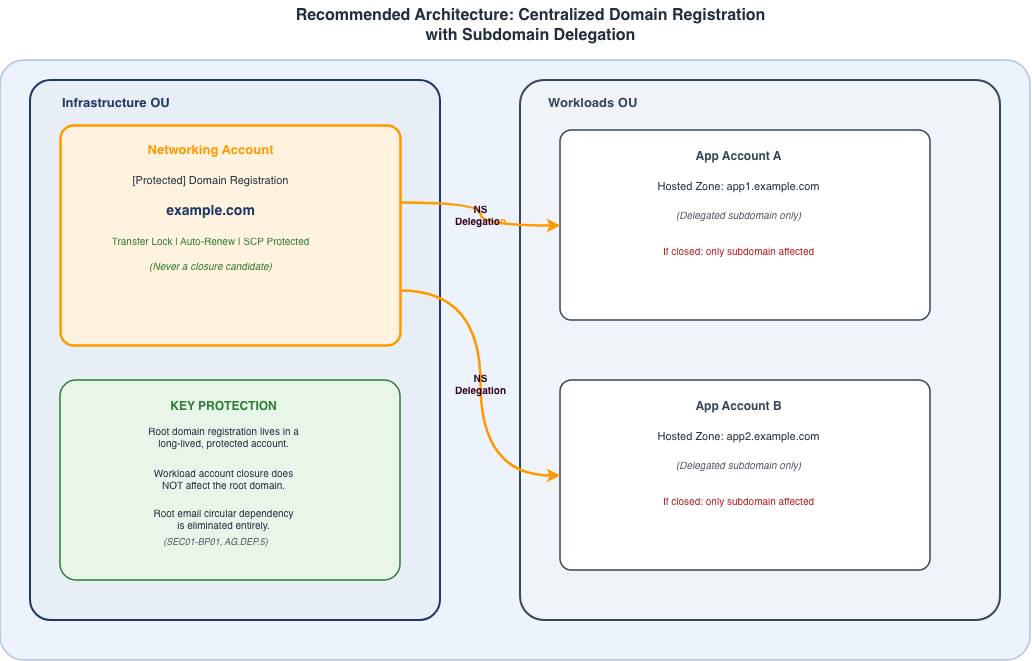
Fig1: Centralized Domain Registration with Subdomain delegation
Description: Image shows recommended architecture for centralized domain registration with subdomain delegation
Manage DNS at scale with Route 53 Profiles
For DNS management across many accounts, Amazon Route 53 Profiles give you a central management layer. A Route 53 Profile groups DNS configurations, including private hosted zone associations, Amazon Route 53 Resolver forwarding rules, and DNS Firewall rule groups, into a single shareable container. You can share profiles across accounts with AWS Resource Access Manager (AWS RAM).
For domain protection, Route 53 Profiles reduce the need for application accounts to build their own DNS infrastructure beyond a delegated subdomain hosted zone. That maintains a small DNS footprint in workload accounts, which lowers the number of accounts that need domain-related protective controls and streamlines your governance posture.
Restrict account closure with preventive controls
Well-Architected: SEC03-BP05 (Define permission guardrails for your organization)
In organizations operating at scale, teams typically start account closure from the management account with the organizations:CloseAccount API. The call can come from automation, an infrastructure team workflow, or a privileged administrator role. Service control policies (SCPs) don’t apply to principals in the management account. As a result, AWS Identity and Access Management (IAM) policies in the management account are your primary preventive control for account closure.
Primary control: IAM policies in the management account
Apply an IAM deny policy to principals in the management account that restricts the organizations:CloseAccount action when the target account carries a protective tag. Use a condition key such as aws:ResourceTag/HasRegisteredDomains: true to scope the deny to accounts that have domain registrations. This control blocks a closure attempt, whether manual or automated, at the point where it is most likely to start.
When automation closes accounts, for example an AWS Lambda function that a governance workflow starts, add the same tag-based deny condition to the automation role’s IAM policy. This step keeps automated processes from closing accounts that contain domains unless they go through an approved exception workflow.
Defense in depth: SCPs for closures from member accounts
Although it is less common at scale, a closure can also start from within a member account with the account:CloseAccount API. To cover this path, deploy an SCP that denies both account:CloseAccount and organizations:CloseAccount for accounts tagged with HasRegisteredDomains: true. Attach this SCP to the OUs that contain accounts with domain registrations.
The following SCP example denies the closure actions for any account that carries the protective tag.
{
  "Version": "2012-10-17",
  "Statement": [{
    "Sid": "DenyCloseAccountForDomainAccounts",
    "Effect": "Deny",
    "Action": [
      "account:CloseAccount",
      "organizations:CloseAccount"
    ],
    "Resource": "*",
    "Condition": {
      "StringEquals": {
        "aws:ResourceTag/HasRegisteredDomains": "true"
      }
    }
  }]
}
Note: This SCP pattern follows the documented examples in the AWS Organizations User Guide. Test it in a non-production environment before you apply it to production OUs. To confirm the tag condition evaluates correctly, attempt a closure on a test account that has the tag applied.
Protect tags from removal
Someone could try to work around the closure controls by removing the protective tag. To reduce that risk, add a second SCP that denies organizations:UntagResource for the HasRegisteredDomains tag key. Restrict exceptions to a dedicated automation role that you use only through an approved domain transfer workflow. This design confirms that the tag is removed only after you transfer the domains to the networking account.
Together, these controls form a layered strategy: an IAM deny in the management account as the primary control, SCPs for closures that start from member accounts, and tag-removal protection. This defense-in-depth approach reflects the guidance in the AWS Well-Architected Framework.
Turn on transfer lock and automatic renewal
Well-Architected: Reliability pillar
Beyond the decision of where to register domains, ongoing domain registration hygiene adds more layers of protection. Route 53 offers protective features that you should turn on for your production domains as a baseline configuration.
Transfer lock
Transfer lock sets the clientTransferProhibited EPP (Extensible Provisioning Protocol) status code on the domain, which helps prevent unintended transfers to another registrar. Transfer lock doesn’t prevent account closure, but it helps keep a third party from transferring the domain away during the suspension period that follows closure. Some top-level domains (TLDs) also support the clientUpdateProhibited and clientDeleteProhibited status codes.
Automatic renewal
Automatic renewal helps prevent accidental expiration from payment failures or administrative oversights. An expired domain follows a suspension and deletion lifecycle similar to the one that account closure triggers. Turning on automatic renewal is a configuration that reduces this risk. You can review and configure the setting in the Route 53 console under Registered Domains, or with the route53domains:EnableDomainAutoRenew API.
Transfer domains between accounts
For domains that already exist in workload accounts, Route 53 supports transferring a domain registration between AWS accounts. You generate an authorization request in the source account, and the destination account accepts it within 3 days. Keep the following points in mind when you plan a transfer.
- You can’t start a domain transfer within the first 14 days of the initial registration.
- The hosted zone doesn’t move with the domain registration. Create a new hosted zone in the destination account, which generates a new set of name servers.
- After you create the new hosted zone, update the NS delegation records in the parent zone to point to the new name servers, and then delete the original hosted zone.
- Before you remove the original zone, confirm that DNS resolution works correctly.
Establish an account closure governance process
Well-Architected: Operational Excellence pillar and COST04-BP02 (Implement a decommissioning process)
Account closure is a significant lifecycle event that benefits from a structured governance process. AWS documentation recommends a multi-step approach that begins well before you call the closure API. A clear process helps confirm that you identify and address dependencies, including domain registrations, before the account enters the closure workflow.
Use the Suspended OU pattern
A common decommissioning workflow begins when you move the target account into a Suspended OU. This procedural OU, described in the AWS whitepaper on organizing your AWS environment, has a deny-all SCP attached that stops further activity in the account. The Suspended OU acts as a soft close. This freezes the account, so your team can confirm that dependent services aren’t affected before you proceed with permanent closure.
Run a domain-specific pre-closure review
Before an account reaches the Suspended OU, run a pre-closure review that focuses on domain registrations. First, check whether the account has registered domains in Route 53. When domains exist, transfer them to the networking account before you continue. Next, check whether the root email address uses a domain hosted in this account, and if so, update the root email address first.
Finally, look for active hosted zones that other accounts delegate to with NS records. For any that exist, create replacement hosted zones and update the delegations before closure.
For broader account decommissioning considerations, such as Reserved Instances, cross-account IAM roles, and Savings Plans, see “Closing an AWS account” in the AWS Organizations documentation.
Differentiate governance by account classification
Match the level of governance to the account classification. Production accounts should require a formal change request, an approval workflow, and stakeholder sign-off before a closure proceeds. Non-production accounts can follow a lighter process while they still complete the domain-specific checks. Tag accounts with Environment: production or Environment: non-production to drive role-based access decisions.
Track domain resources through their lifecycle
Well-Architected: Cost Optimization, COST04-BP01 (Track resources over their lifetime), rated high risk if not established
Without a clear inventory of which accounts contain domain registrations, it’s difficult to make informed decisions about account decommissioning. Adopt a consistent tagging strategy that surfaces domain registration information at the account level. Useful tags include the following.
- HasRegisteredDomains, set to true or false, to record whether the account contains domain registrations
- DomainName, for example example.com, to record the specific domain names registered in the account
- DomainCriticality, set to high, medium, or low, to record the business criticality of the domains
- DomainOwner, for example infrastructure-team, to record the team responsible for the domain
These tags create an inventory that you can query with AWS Resource Groups and Tag Editor. They also drive the preventive controls described earlier, which creates a direct link between your inventory and your governance enforcement.
AWS Config can detect Route 53 hosted zones within accounts. Create custom AWS Config rules that check whether accounts with domain-related resources carry the protective tags. When Config finds a gap, it can start an AWS Systems Manager Automation runbook, for example to apply the HasRegisteredDomains tag when it detects a domain registration.
Monitor closure events with detective controls
Well-Architected: SEC04-BP01 (Configure service and application logging)
A layered strategy pairs preventive controls with detective controls that provide continual monitoring. IAM policies and SCPs block unsafe actions. Detective controls give you visibility into attempts, drift, and gaps in coverage.
Monitor account closure events
AWS CloudTrail captures CloseAccount API calls as management events. Create an Amazon EventBridge rule that matches this event pattern and sends a notification to your operations team. Even when the IAM policy or SCP blocks the closure, the EventBridge rule fires on the attempt. You gain a record of who tried to close an account and when, which supports security auditing and helps you find gaps in your governance process.
Detect configuration drift
AWS Config can continually check whether accounts keep the protective tags and whether domain configurations meet your organizational standards. Create custom Config rules that answer questions such as the following.
- Does each account with Route 53 hosted zones carry the HasRegisteredDomains tag?
- Is transfer lock turned on for each registered domain?
- Is automatic renewal turned on for each registered domain?
- Are the closure-prevention IAM policies and SCPs deployed correctly?
When Config detects drift, it can respond in two ways. It can start an AWS Systems Manager Automation runbook to remediate low-risk items, such as re-applying a tag. For higher-risk items, such as a missing IAM policy, it can send a notification for manual review.
Layered control strategy
The following diagram shows how the four layers work together to protect domain registrations.
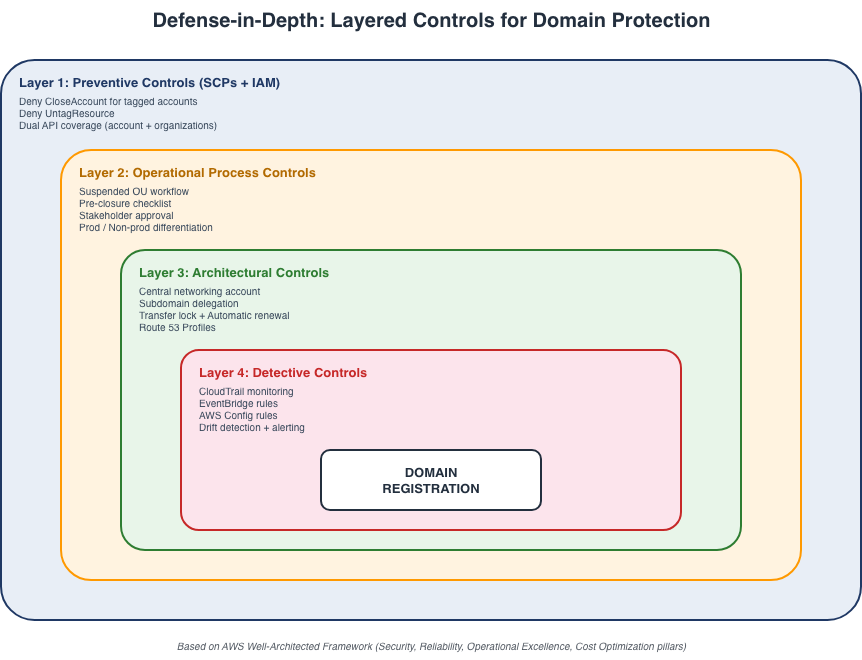
Fig 2: Layered Controls for Domain Protection
Description: Image shows how layered controls helps in protecting domain
Summary
The following table maps each practice to its Well-Architected pillar and the AWS services involved.
| Pillar | Practice | AWS services |
| Security and Reliability | Register domains in a central networking account with subdomain delegation | Route 53, Organizations |
| Security | IAM deny policy in the management account as the primary closure prevention | IAM |
| Security | SCP deny for tagged accounts as defense in depth | Organizations SCPs |
| Reliability | Turn on transfer lock and automatic renewal | Route 53 domain management |
| Operational Excellence | Suspended OU pattern with a domain-specific pre-closure review | Organizations, AWS Control Tower |
| Cost Optimization | Tag accounts with domain metadata for lifecycle tracking | Tags, Resource Groups, Config |
| Security | Monitor closure events and detect configuration drift | CloudTrail, EventBridge, Config |
Conclusion
Domain names are critical assets in your cloud environment. They support website availability, email delivery, API connectivity, and certificate validation. The practices in this post give you a layered approach. Architectural decisions reduce risk by design. Preventive controls block unsafe actions. Operational processes maintain human oversight, and detective controls provide continual awareness. Each control adds value, and together they help protect domain assets throughout the account lifecycle.
Recommended next steps
Apply this guidance in your own environment with the following steps.
- Inventory the accounts that have Route 53 domain registrations with AWS Config or Tag Editor.
- Plan a domain centralization effort to move registrations to a dedicated networking account.
- Deploy IAM deny policies in the management account for accounts that carry domain tags.
- Deploy the closure-prevention SCP as defense in depth for closures that start from member accounts.
- Confirm that transfer lock and automatic renewal are turned on for your production domains.
- Configure Amazon EventBridge rules to monitor CloseAccount events across your organization.
- Add a domain-specific pre-closure review to your account decommissioning workflow.
For more information, see the Amazon Route 53 Developer Guide, the AWS Organizations User Guide, and the AWS Well-Architected Framework.
About the authors

Yagya Vir Singh
Yagya is a Senior Technical Account Manager at AWS based in Nashville, Tennessee. He is passionate about monitoring and observability, cloud governance, cloud financial management, and generative AI. Yagya collaborates with enterprise customers to design and architect cloud workloads for scale and resilience.

Krishna Pramod
Krishna is a Senior Solutions Architect at AWS. He works as a trusted advisor for customers, guiding them through innovation with modern technologies and development of well-architected applications in the AWS cloud. Outside of work, Krishna enjoys reading, music and exploring new destinations.