Networking & Content Delivery
Securing zero trust access with AWS Verified Access and AWS Network Firewall
Organizations securing access to internal applications face a common challenge: traditional VPNs grant broad network access once connected, leaving applications accessible beyond their intended scope and lacking granular traffic inspection.
AWS Verified Access (AVA) and AWS Network Firewall (Network Firewall) provide a zero trust solution that addresses these challenges by combining identity-based access control with deep packet inspection. This approach delivers three key benefits: reduced scope of access through identity verification, granular access control without broad network access, and comprehensive traffic inspection including non-HTTP protocols.
AVA verifies user identity and device posture before granting access, removing the need for traditional VPNs. Network Firewall adds deep packet inspection to your inbound path, inspecting HTTP and non-HTTP protocols, matching traffic against intelligence feeds, and enforcing network-level policies.In this post, you will learn how to architect AWS Verified Access with AWS Network Firewall to examine both HTTP and non-HTTP inbound traffic using distributed and centralized deployment models.
Prerequisites
To follow along with this post, you need:
- An AWS account
- Familiarity with Amazon Virtual Private Cloud (Amazon VPC) networking concepts (subnets, route tables, security groups)
- Basic understanding of zero trust architecture principles
Traffic Flow through AVA
Before exploring the firewall architectures, understand how traffic flows through AVA for HTTP and TCP traffic. AVA supports the following endpoint types:
- HTTP endpoint
- Workloads fronted using Elastic Load Balancing (ELB)
- HTTP workloads accessible through an Elastic Network Interface (ENI)
- TCP endpoint
- Workloads fronted using ELB
- TCP workloads accessible through an ENI
- Workloads accessible through a network CIDR
- Amazon Relational Database Service (Amazon RDS) workloads
HTTP Endpoints
The following Figure 1 shows traffic flow for HTTP endpoints. The flow for a load balancer endpoint type is shown on the left and an ENI on the right.
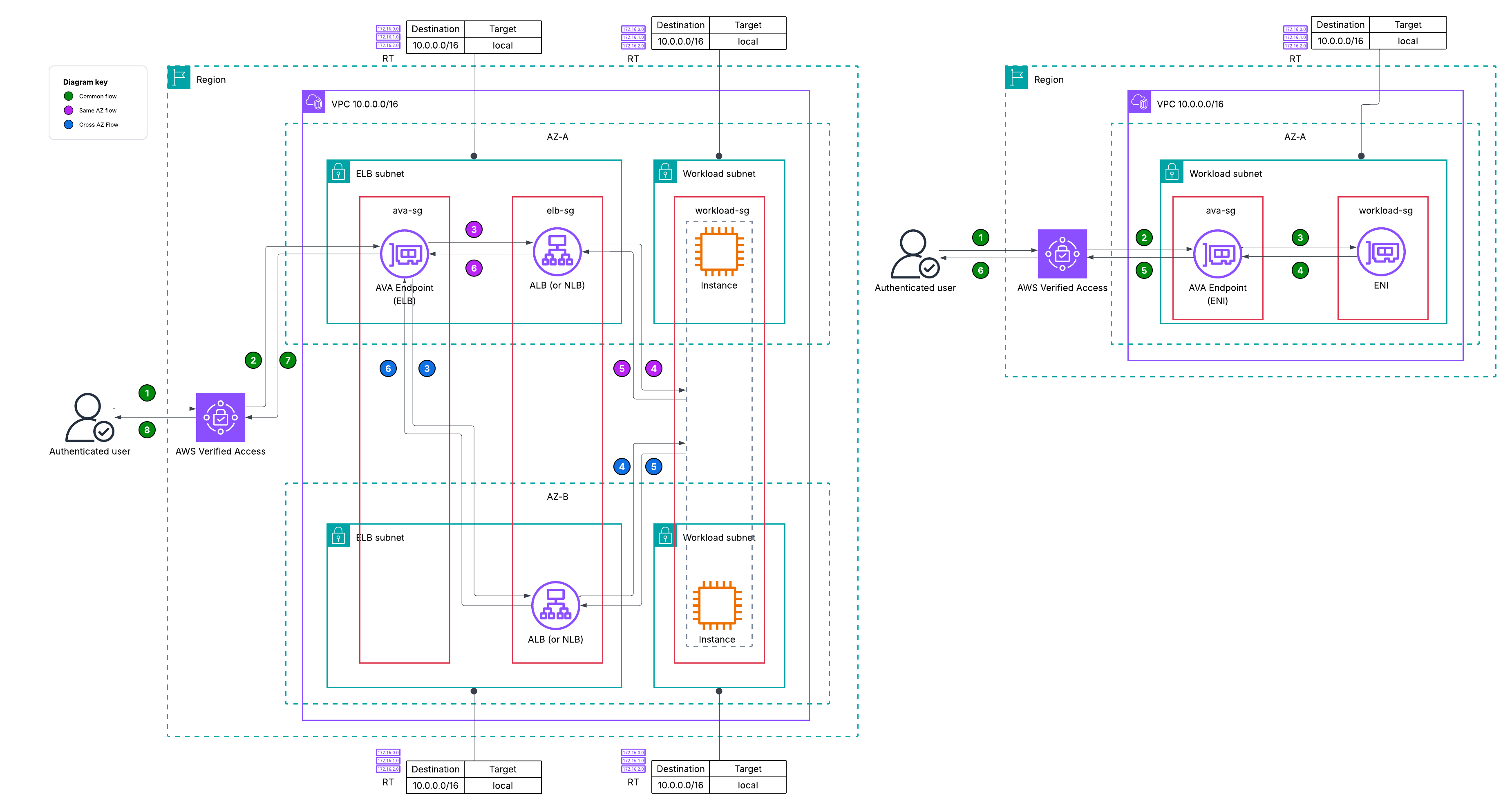
Figure 1: Standard AVA traffic flow for HTTP endpoints
You should deploy your AVA endpoints in at least two Availability Zones (AZ) when using an ELB as the endpoint type. After authentication your traffic will land on the AVA endpoint within your subnet. When your AVA endpoint resolves the DNS name of the target load balancer, it receives the IP addresses of the nodes across the AZs the ELB is deployed in. This means your traffic can enter through an AVA endpoint in one AZ and be forwarded to an ELB node in a different AZ on its way to the workload/application. If you have cross-zone load balancing enabled, the ELB node sends traffic to targets across AZs as well. You can also use security group referencing in this setup. The workloads’ security group allows traffic from the ELB security group which in turn allows traffic from the AVA security group. When using ELB as an endpoint type, you can choose to deploy your AVA endpoint in the same subnet as the ELB or in their own dedicated subnets.When you use an ENI as an endpoint type for HTTP endpoints, you deploy the AVA endpoint in the same subnet as the ENI. Your traffic will flow through the AVA endpoint to the ENI.
TCP Endpoints
Your TCP AVA endpoints use a private connectivity model. They don’t expose public IP addresses through DNS. When you query the DNS name of a TCP endpoint, the response contains no A records, which means you route traffic to them differently than HTTP endpoints. This is because your TCP endpoints require the Connectivity Client for AVA, which establishes a secure tunnel and handles DNS resolution and routing on your device. Without the client connected, you cannot reach the endpoint. Because of this behavior, you can place a firewall before AVA endpoints for HTTP traffic but not for TCP traffic. This post explores third-party firewall patterns later. The following Figure 2 shows traffic flow up to AVA, subsequent flow to the endpoint types is identical to that described in Figure 1.
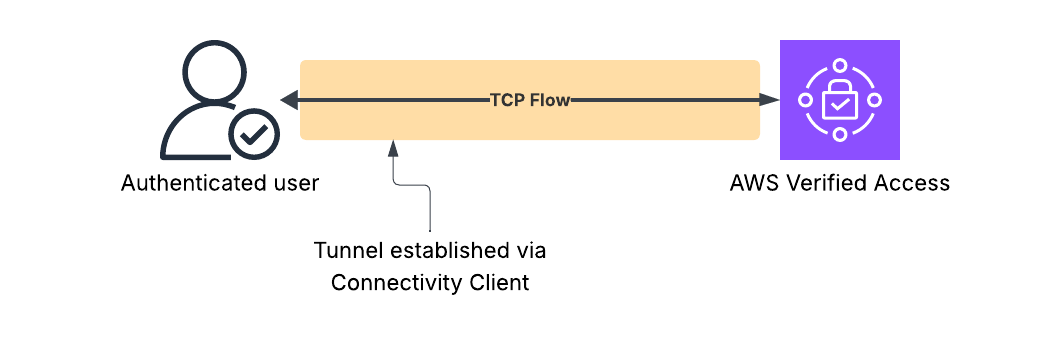
Figure 2: Standard traffic flow for TCP endpoints to AVA
You can also use security group referencing in this setup. When you are using the CIDR endpoint type, AVA places the endpoint in the same subnets associated with the IP CIDR range you select.
Key points
Review these key points from the above sections before moving to the firewall configuration section:
- You can select different subnets for AVA endpoints when using the ELB endpoint type, for both, HTTP and TCP endpoints.
- Your AVA endpoint is always deployed in the same subnet as the ENI when using an ENI endpoint type, for both, HTTP and TCP endpoints.
- You can select different subnets for AVA endpoints when using the Amazon RDS endpoint type when using TCP endpoints.
- Your AVA endpoint is always deployed in the same subnet as the subnets associated with the IP CIDR range when using a Network CIDR endpoint type.
- AVA endpoints perform source NAT.
In the following sections, you will learn how to insert a network firewall into the traffic path.
Firewall configurations
When you deploy an AVA endpoint using an ENI or a network CIDR, inserting a firewall in that traffic flow is currently not supported as the AVA endpoint is deployed in the same subnet as the target (ENI or CIDR). You can create an AWS PrivateLink enabled service of your backend application or workload and use that as a backend for AVA. With this approach you can inspect traffic between the AVA endpoint and the backend application, although that architecture is not in scope of this post.
You can choose to deploy a distributed firewall configuration or centralize these in an inspection Amazon VPC. In either configuration, you must deploy the AVA endpoints in their dedicated subnets. When you deploy them in dedicated subnets, you can use VPCs routing enhancements to route traffic through the firewall through its endpoints.
Your AVA endpoint performs SNAT on traffic before forwarding it to the target. This means your application (HTTP or TCP) sees the AVA endpoint’s ENI private IP address as the source and not the original client IP. To access the original client IP for HTTP traffic, you can use the X-Forwarded-For header that AVA inserts for HTTP endpoints. You must allow traffic from the AVA subnet CIDR in your target’s security group rather than using security group referencing, as the packet no longer preserves the original source identity.
Distributed deployment model
In the distributed deployment model, you deploy a firewall within the same VPC as AVA and your workload. You have two firewall placement options here:
- Immediately after the AVA endpoint
- Supported by ELB endpoint type (HTTP and TCP)
- Supported by Amazon RDS endpoint type
- After the ELB and before it’s targets
Immediately after the AVA endpoint
Firewall between AVA and ELB
Deploying the firewall between AVA endpoints and your load balancers adds an additional layer of inspection. With this configuration, you can enforce network-level security policies before traffic reaches your application infrastructure. The route table configuration for this is shown in the following figure, Figure 3.
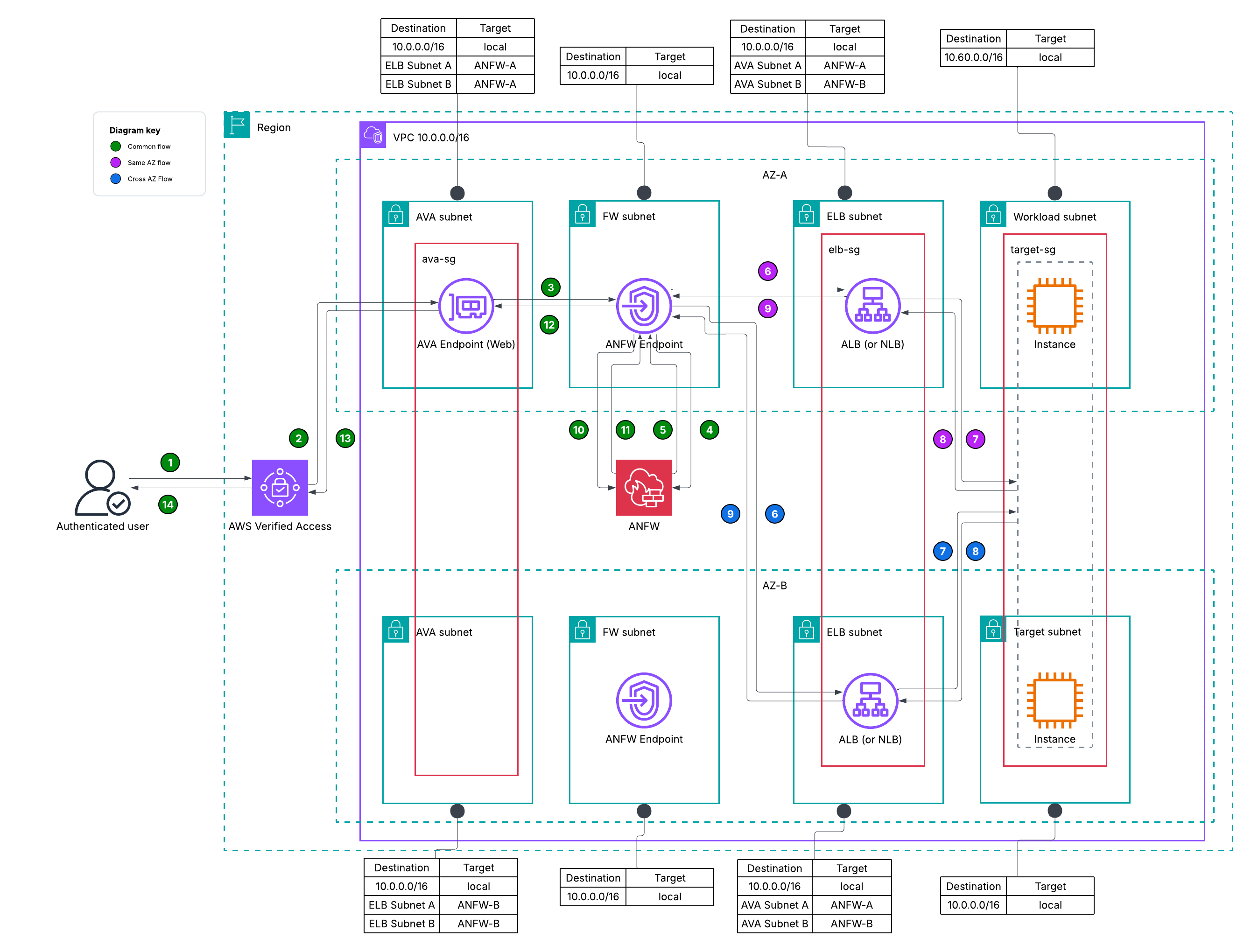
Figure 3: Distributed model – AVA > Network Firewall > ELB
You can follow the guiding principle of keeping inspection traffic local to the AZ. For example, whether AVA endpoint in AZ-A resolves an ELB from AZ-A or AZ-B, traffic should go through the firewall endpoint in AZ-A. With the return traffic, configure the ELB subnet route tables to return traffic through the same firewall endpoint as the source (AVA) AZ. For example, if the ELB in AZ-B is sending traffic to an AVA endpoint in AZ-A, it must send traffic through the firewall endpoint in AZ-A. This will keep your traffic flows symmetric.
Firewall between AVA and Amazon RDS
Your firewall routing configuration will remain the same for TCP endpoints when using ELB endpoint types. For completeness, the following figure, Figure 4, demonstrates the configuration for an Amazon RDS endpoint type.
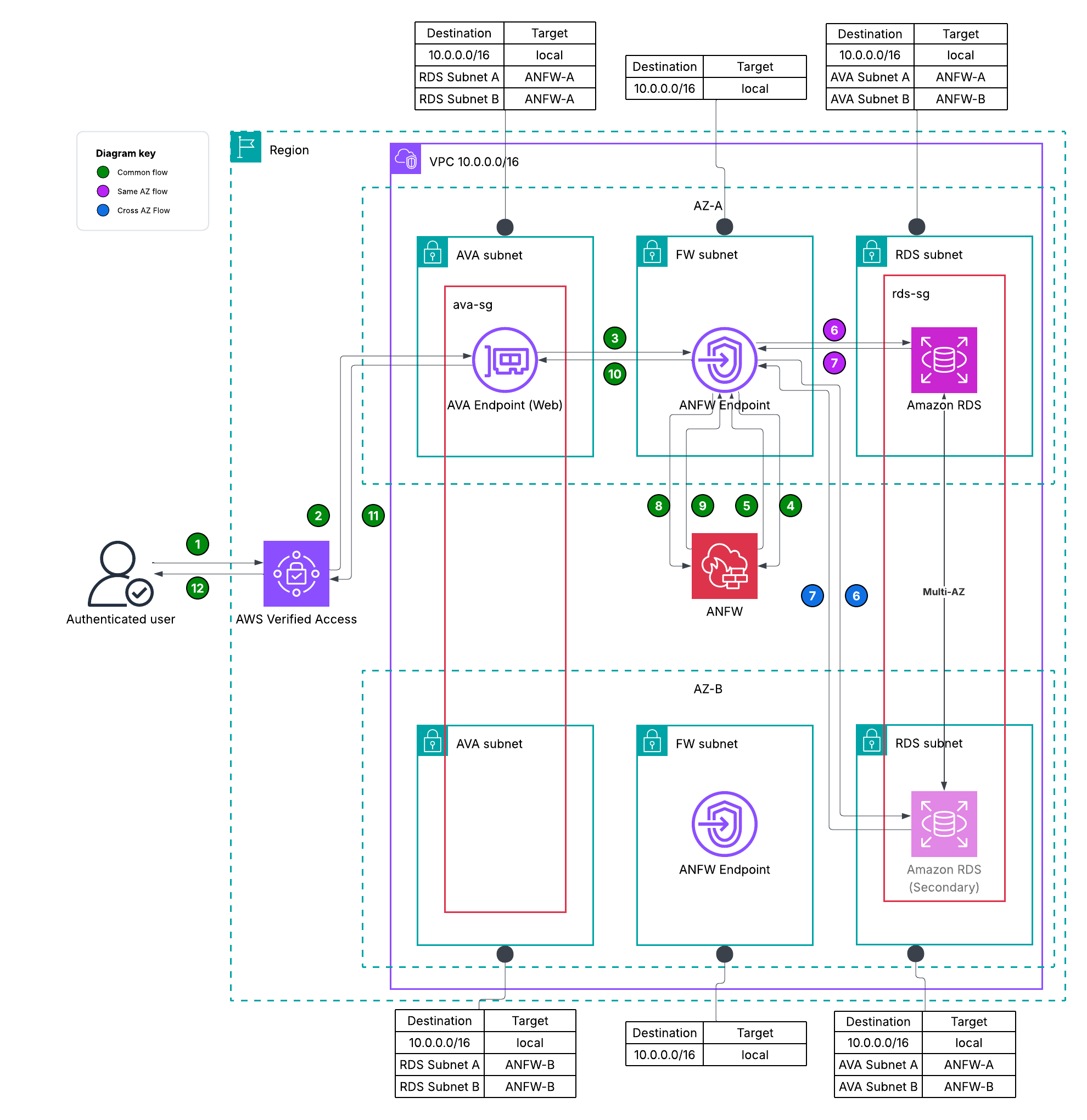
Figure 4: Distributed model – AVA > Network Firewall > RDS
Routing configuration shown above applies to the following Amazon RDS target types: Amazon RDS instance, Amazon RDS cluster, or Amazon RDS DB proxy including multi-AZ Amazon RDS deployments. Remember that your traffic to Amazon RDS may be using TLS. You can use Network Firewall’s flexible rules engine to inspect traffic and use Database Activity Streams to do further monitoring.
Firewall between ELB and the ELB target group
With this configuration you can terminate the TLS connection at the ELB and use the firewall to inspect decrypted traffic. If you are not using cross-zone load balancing for the target groups the route tables are simpler, the ELB route tables send traffic to the firewall endpoints in the same AZ to itself. With the same applying for return traffic from the targets. If you have enabled cross-zone load balancing (default behavior for Application Load Balancer) then there are two distinct flows after the traffic from AVA subnet lands in the ELB subnet:
- ELB is sending traffic to a target in same AZ
- ELB is sending traffic to a target in a different AZ
For the above two scenarios, you can keep your AVA route tables as is. Key routing decision is made by the ELB subnet route table and the target group subnet route tables shown in the following figure, Figure 5 avoiding any asymmetrical routing and inspection.
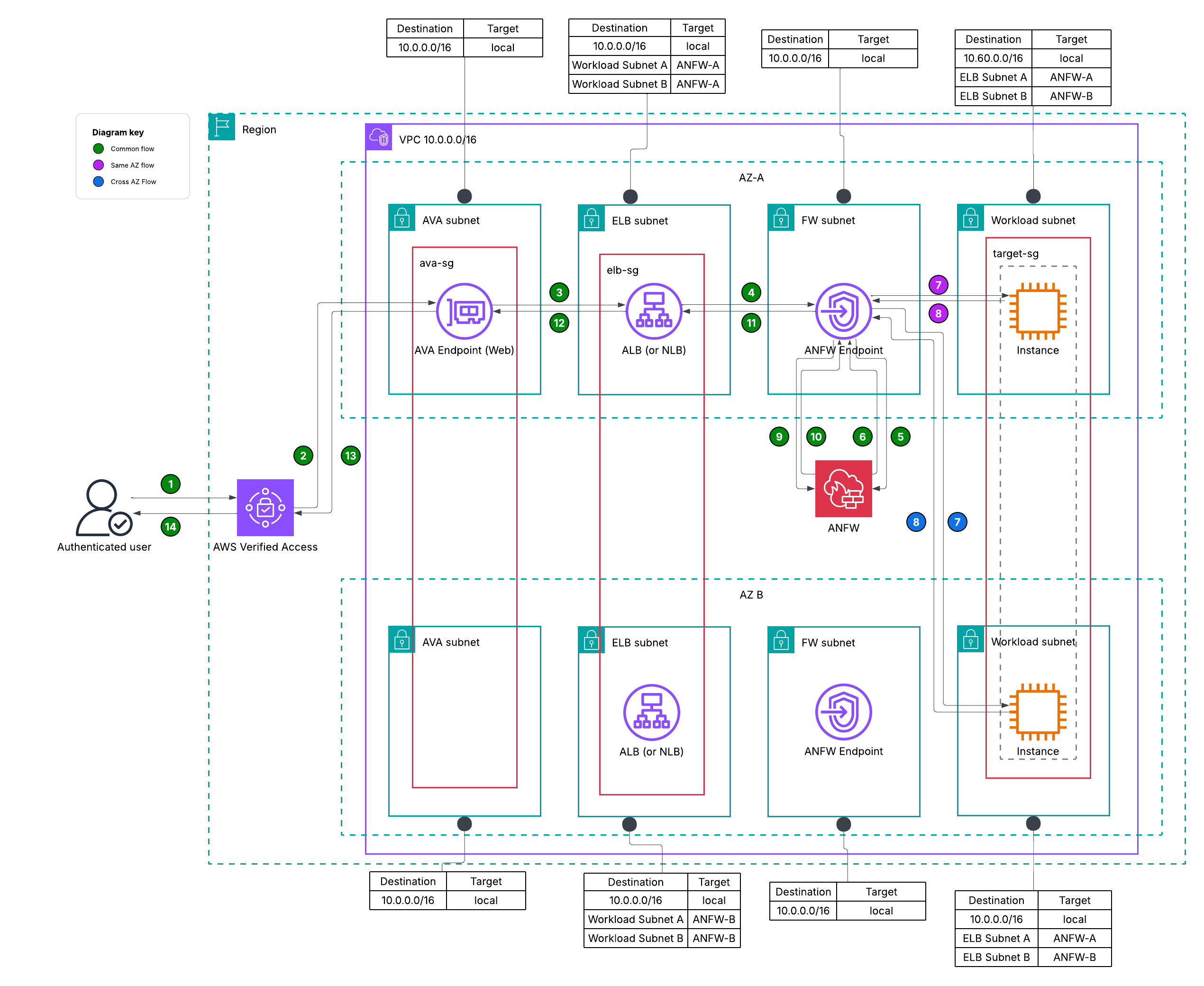
Figure 5: Distributed model – AVA > ELB > Network Firewall > Target
With the above routing configuration, you continue to maintain a symmetric flow of traffic through the firewall with or without cross-zone load balancing enabled. If your AVA endpoint resolves the ELB in a different AZ, the flow through the ELB in that AZ remains the same as shown in Figure 5. You are also following the same guiding principle of keeping inspection local to the AZ, avoiding inter-AZ traffic. Note that when using a Network Load Balancer (NLB), the above flow is only supported when using IP target type.
Dive deeper into the distributed deployment model. Key difference here is that traffic is entering through the AVA endpoints and not through an Internet Gateway (IGW).
Centralized deployment model
You have two options to centrally inspect traffic with for ELB (HTTP and TCP) or Amazon RDS endpoint types.
- Use Network Firewall VPC endpoint association to use a single, centrally deployed firewall in one VPC across multiple VPCs.
- Using an AWS Transit Gateway (TGW) :
- To inspect traffic between the ELB and its targets.
- When using an ELB as an endpoint type (HTTP and TCP), the AVA endpoint must be in the same VPC as the ELB, because of this, you can also use a TGW to inspect traffic between an ELB and its targets.
- To inspect traffic between the AVA endpoint and the Amazon RDS target.
- You must use the CLI or SDK to set up an AVA endpoint and it’s corresponding Amazon RDS endpoint in a different VPC.
- To inspect traffic between the ELB and its targets.
VPC endpoint association
The VPC endpoint association architecture is shown in the following figure, Figure 6.
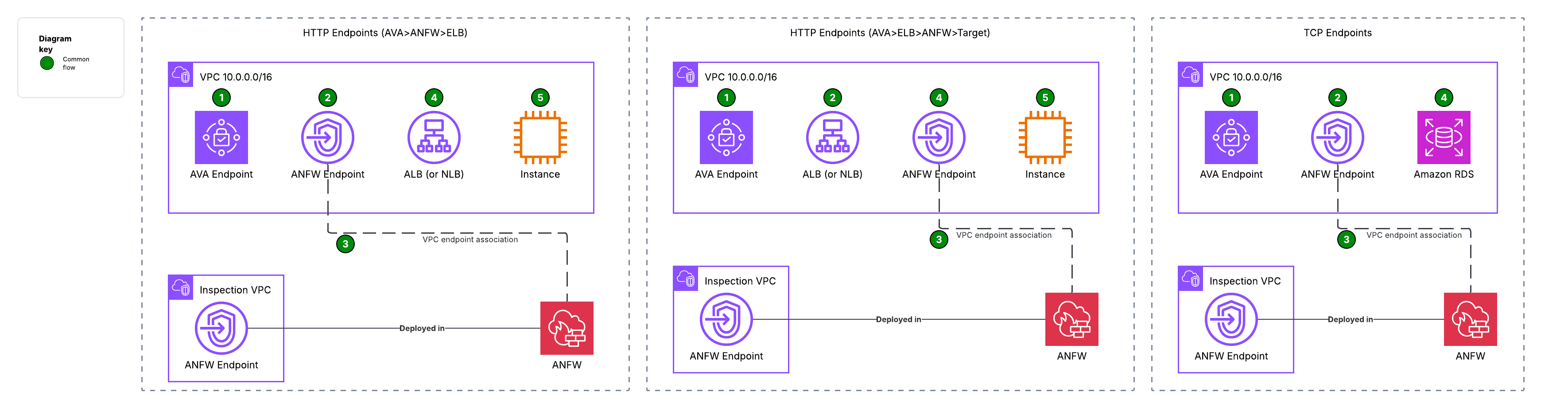
Figure 6: Centralized model – Network Firewall VPC endpoint association
For brevity, this example doesn’t show the route table configuration, follow the same rules outlined in the distributed model section. Refer to the Network Firewall quotas to understand how many VPC endpoint associations you can create.
Transit Gateway
The North-South: Centralized Internet traffic flow model covers routing traffic from an ELB to its target group. Key difference here is that traffic is entering through the AVA endpoints and not through an IGW.
Third party firewall configurations
You can also use your existing firewall appliances as needed. You can deploy your firewall behind an AWS Gateway Load Balancer (GWLB) and replace the Network Firewall endpoint with one pointing to your firewall. Note that VPC endpoint associations are not currently supported with third-party firewalls.
Considerations
- AVA endpoints do SNAT therefore you cannot see client IP addresses during inspection. Although you can use custom Suricata rules to log and alert on HTTP headers like x-forwarded-for.
- Use AWS WAF for application-layer filtering, before using a firewall where deep packet inspection is required.
- Network Firewall endpoints require a dedicated subnet.
- You cannot use security group referencing when a firewall is being used as a middlebox.
Conclusion
In this post, we showed how to architect AVA with Network Firewall to inspect both HTTP and non-HTTP inbound traffic using distributed and centralized deployment models. AVA and Network Firewall provide layered security, whether you use a distributed or centralized firewall model, allowing you to verify identity, inspect traffic, and help protect applications from being accessed publicly. You can balance security depth with operational simplicity based on your specific requirements through this architecture. To get started, see the AWS Verified Access documentation and AWS Network Firewall documentation. If you have questions or suggestions, leave a comment below.
Clean up
If you deployed resources while following this post, delete the AWS Network Firewall endpoints, firewall policies, and AVA endpoints to avoid ongoing charges. Remove any associated route table entries and subnets you created for testing.
Further reading
- Deployment models for AWS Network Firewall – Part 1
- Deployment models for AWS Network Firewall – Part 2
- TLS inspection configuration for Network Firewall
- Secure internet-based access to SaaS PrivateLink endpoints using AWS Verified Access
- AVA in multi-account scenarios
About the authors

Ruskin Dantra
Ruskin Dantra is a Solutions Architect based out of California. He is originally from the Land of the Long White Cloud, New Zealand and is an 18-year veteran in application development with a love for networking. His passion in life is to make complex things simple using AWS.

Sujan Bolisetti
Sujan Bolisetti is an Engineering Manager at Amazon Web Services, where he leads teams working on AWS Client VPN and AWS Verified Access. With over 10 years at Amazon, he specializes in VPN technologies, zero trust security, identity management, and secure remote access solutions. His work focuses on enabling customers to securely connect to their AWS resources through modern authentication and authorization frameworks..