Networking & Content Delivery
Use private domain-name targets with Amazon VPC Lattice
Most organizations run internal services that other teams need to reach, such as a payments API, an inventory database, or a message broker. Private domain-name targets with Amazon VPC Lattice let those teams reach the service by the private name it already uses. Those services are addressed by name rather than by address, because the name is what lets a service move, scale, or fail over without every consumer changing configuration. Those names live in private DNS zones and resolve only inside the network that owns them, which is deliberate. The difficulty is that consumers increasingly sit outside that boundary, in another network, another business unit, or a corporate data center. Joining networks means reconciling address space, agreeing on routes, and maintaining firewall rules, and that work grows with every pair you connect. Even after packets flow, the consumer still can’t resolve the name.
VPC Lattice removes most of the connectivity work. A resource configuration points at a target in your Amazon Virtual Private Cloud (Amazon VPC) network. You share that configuration through AWS Resource Access Manager (AWS RAM). Consumers in other VPCs and accounts then reach the target without peering, transit gateways, or route table coordination. Until now, a domain-name target had to be publicly resolvable. A name living only in an Amazon Route 53 private hosted zone or on an on-premises DNS server couldn’t be a target. VPC Lattice now supports private domain-name targets. Setting ResourceConfigDnsResolution to IN_VPC on a resource gateway sends the lookup to the DNS servers named in the Dynamic Host Configuration Protocol (DHCP) option set associated with the resource gateway’s VPC. Private hosted zones and Resolver forwarding rules both become valid sources.
This post covers choosing a resolution type and a DNS source, then two deployment patterns. It also explains what consumers must enable before the name resolves in their VPC, and which decisions you can’t reverse.
Choosing your DNS resolution type
A resource gateway is the ingress point into the VPC through which the resource is reached. The resource sees traffic arriving from a resource gateway address rather than from the original client.
ResourceConfigDnsResolution governs one thing: the resolver that answers the lookup for a domain-name target. It doesn’t change how consumers discover the name or how traffic is routed. PUBLIC sends that lookup to public DNS resolvers, which can’t read a private hosted zone or an on-premises DNS server. IN_VPC sends it to the DNS server of the resource gateway’s VPC, which by default is AmazonProvidedDNS, the Route 53 Resolver.
The service network and the resource configuration belong to an account and Region. Only the resource gateway sits in subnets, so its VPC is the one whose DNS answers the lookup. In Pattern 1 and Pattern 2, that is the producer VPC.
With PUBLIC, a resource configuration identifies its target by domain name or by IP address. The resource gateway resolves a domain name through public DNS resolvers, and an IP address needs no lookup. Figure 1 shows both.
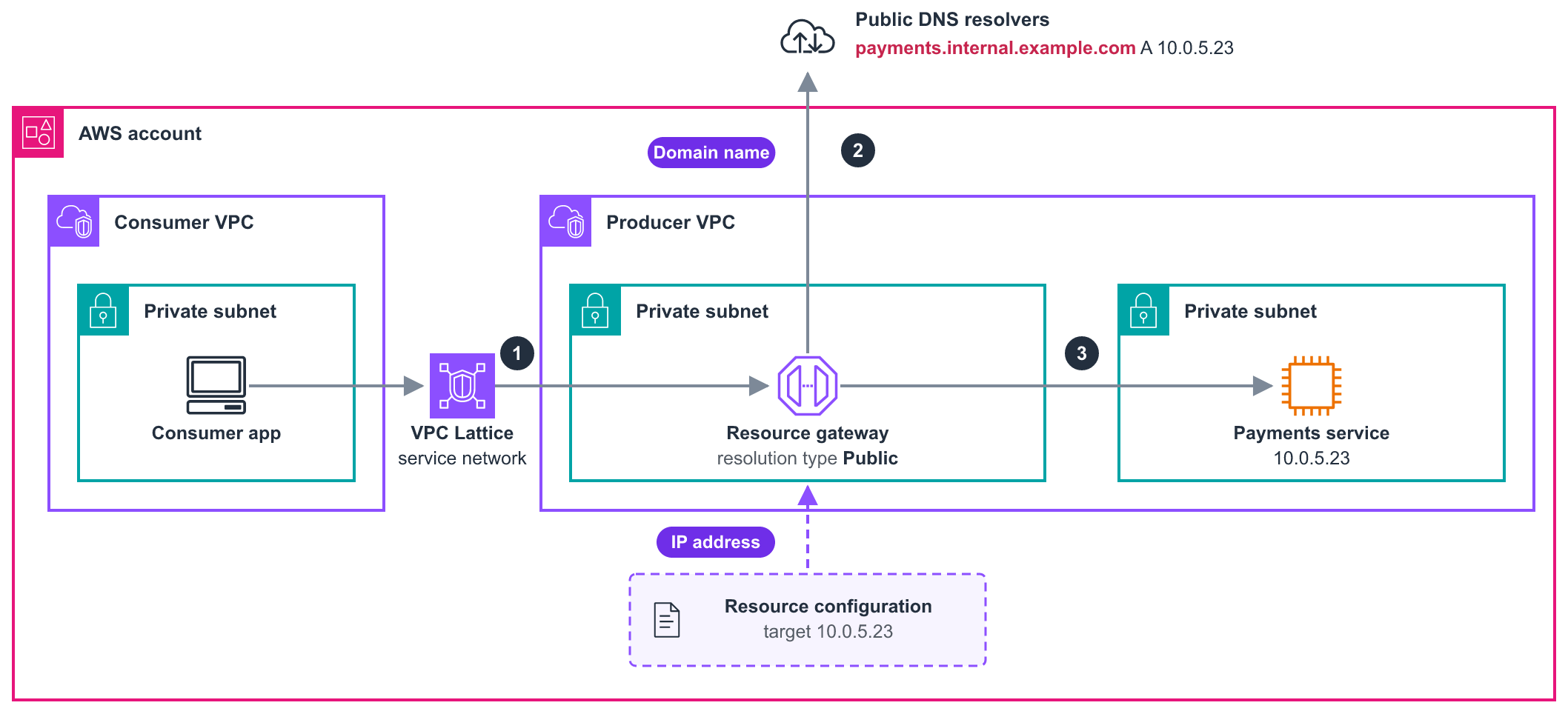
Figure 1: A resource configuration reached with the resolution type set to PUBLIC
The request follows these steps.
- The consumer app needs the payments service, which runs on an Amazon Elastic Compute Cloud (Amazon EC2) instance at
10.0.5.23in the producer VPC. The request enters the service network and reaches the resource gateway. - When the target is a domain name, the resource gateway resolves
payments.internal.example.comthrough public DNS resolvers, which answer10.0.5.23. When it is an IP address, this step does not happen. - The resource gateway opens a connection to the payments service on TCP port 8443.
The service also has an internal name, payments.svc.internal, which Figure 2 shows. That record lives only in a private hosted zone, and public DNS resolvers can’t read a private hosted zone. PUBLIC therefore needed either a second name published in public DNS, which is payments.internal.example.com in Figure 1, or the address written into the resource configuration.
Figure 2 keeps the same architecture but changes two things. The Route 53 Resolver answers the lookup, and the resource configuration names payments.svc.internal directly, so neither the second public name nor the pinned address is needed.
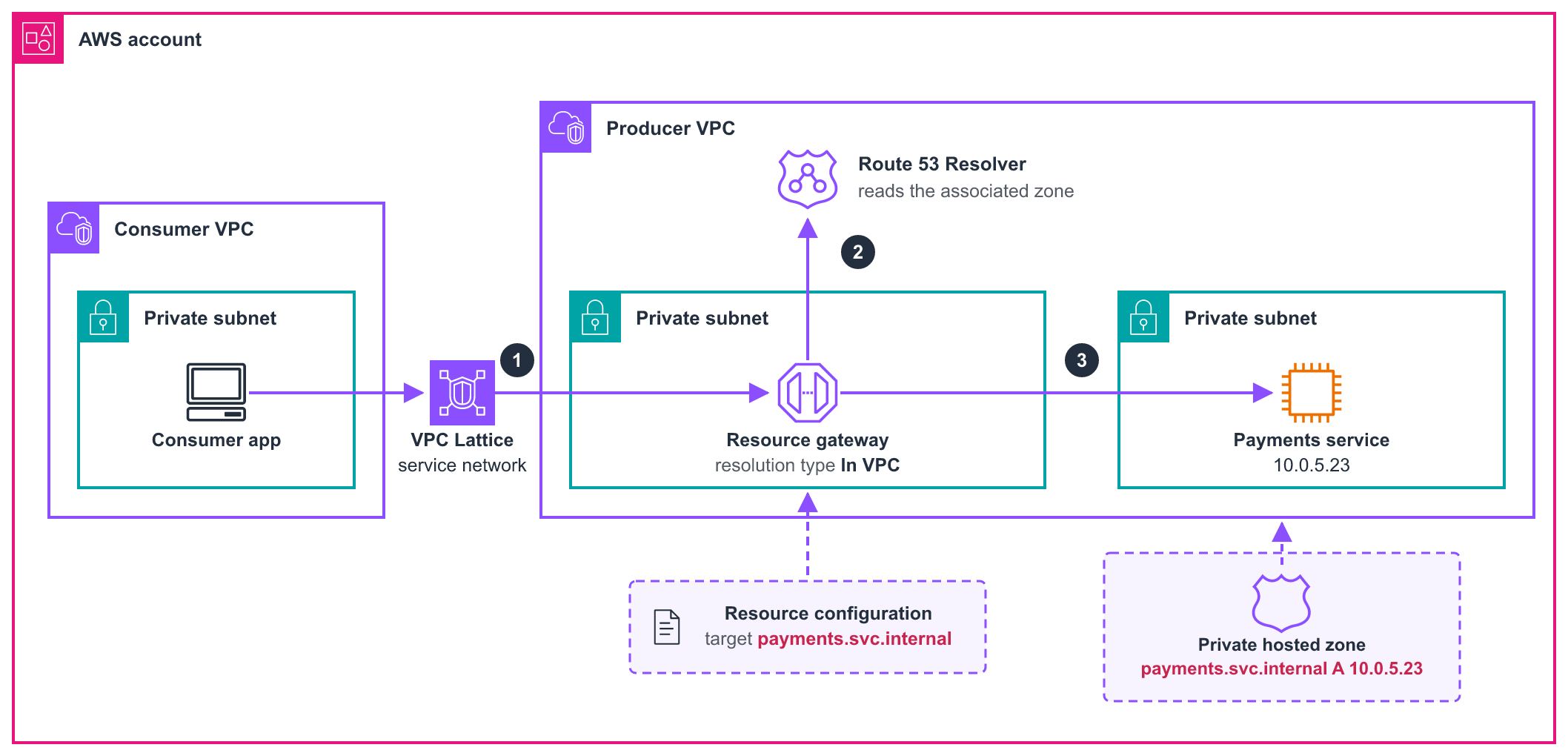
Figure 2: The same resource configuration with the resolution type set to IN_VPC
The request follows these steps.
- The consumer calls
payments.svc.internalthrough the service network. - The resource gateway queries the Route 53 Resolver, which reads the private hosted zone.
- The resource gateway opens a connection to the address the Resolver returned, on TCP port 8443.
The address now comes from DNS rather than from the resource configuration. An address change becomes a record update in your own private hosted zone, with nothing to edit in VPC Lattice. Keep the old address serving traffic until the change has propagated, because the resource gateway caches the answer like any resolver.
Decide ResourceConfigDnsResolution up front. The property is immutable, so switching modes means replacing the resource gateway. An IN_VPC resource gateway also can’t host resource configurations defined by an Amazon Resource Name (ARN). An Amazon Relational Database Service (Amazon RDS) database shared by ARN needs its own PUBLIC resource gateway. Both resource gateways can share the same VPC and subnets, and one service network can carry resource configurations from each.
Choosing your DNS source
Neither the resource gateway nor the resource configuration names a resolver, so the VPC’s own DNS configuration decides what resolves.
Figure 3 shows the two sources this opens up and the one VPC setting that decides which resolver answers.
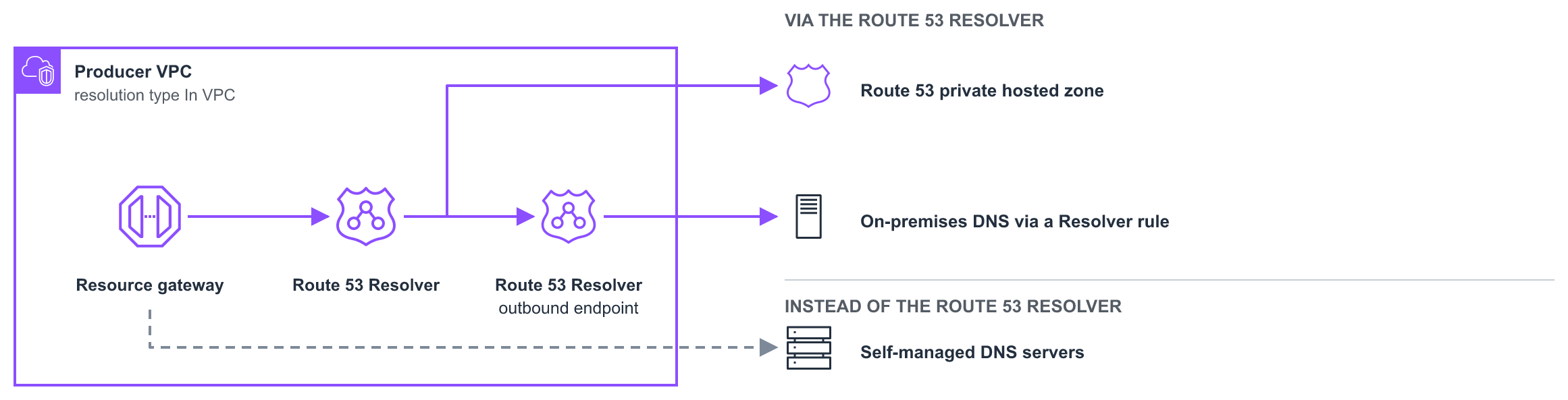
Figure 3: Deployment models that private domain-name targets unblock
Route 53 private hosted zones cover the most common case: internal services in a private zone associated with the resource gateway’s VPC.
Route 53 Resolver rules that forward a domain cover hybrid environments. Your VPC might already forward a domain to on-premises DNS over AWS Direct Connect or AWS Site-to-Site VPN. In that case, your resource gateway resolves those names through the same Route 53 Resolver outbound endpoint.
Both work together under the default AmazonProvidedDNS. For the same domain name, though, a Resolver rule takes precedence over a private hosted zone.
IN_VPC follows whatever the VPC’s DHCP option set names. If that set names your own resolvers instead of AmazonProvidedDNS, they answer, and the Route 53 Resolver is no longer queried. Private hosted zones and forwarding rules then stop applying unless those resolvers forward back to it at Amazon DNS (169.254.169.253). Check the option set before assuming a private zone will be read. A DNS server change in the option set takes 24 hours to reach a resource gateway that uses IN_VPC.
To predict the outcome, run dig for the name from an instance in the VPC that will hold the resource gateway. In Pattern 1 and Pattern 2, that’s the producer VPC. If that VPC resolves the name, a resource gateway in it will too. If not, the problem is the VPC’s DNS configuration rather than the resource gateway.
Solution overview
With the resolution type and DNS source decided, you can build the configuration. Two walkthroughs follow, one for each DNS source. Pick the one that matches where your name already resolves.
Both walkthroughs build the same three provider-side objects.
- A resource gateway that can resolve the name.
- A resource configuration that names the target fully qualified domain name (FQDN).
- A service network that you associate the configuration with.
Consumers attach to the service network. Only cross-account consumers need an AWS RAM share, and the same build works between VPCs in one account.
We recommend that the resource gateway span as many Availability Zones as possible. If consumers connect through a service network endpoint instead of a VPC association, at least one Availability Zone of the endpoint must overlap with the resource gateway. Both VPCs need enableDnsSupport and enableDnsHostnames set to true, because private hosted zones require them. The resource gateway’s security group needs outbound rules for the target’s protocol and port range but no DNS rule, because security groups cannot filter traffic to the Amazon-provided resolver. If your DHCP option set names your own DNS servers, egress rules must allow traffic to them on port 53.
Prerequisites
Before you begin, confirm that you have these accounts, resources, and permissions.
- Two AWS accounts, one producer and one consumer. A single account works if you only test the same-account case.
- Two VPCs, one producer and one consumer.
- A private DNS source that the producer VPC already resolves, either a private hosted zone associated with the producer VPC or a Route 53 Resolver rule.
- A running target at the address the name resolves that accepts connections on the port you share.
- Permissions for VPC Lattice, Amazon Route 53, and AWS RAM in the producer account, and for VPC Lattice and AWS RAM in the consumer account.
- AWS Command Line Interface (AWS CLI) version 2, configured for each account you use.
Pattern 1: A domain-name target resolved by a private hosted zone
A payments service in the producer account is registered as payments.svc.internal in a private hosted zone associated with the producer VPC. A cloud application in a consumer account calls it by that name. The producer owns the service network and shares it with AWS RAM, and the consumer reaches it through a service network VPC association rather than a service network endpoint. Figure 4 shows the request path.
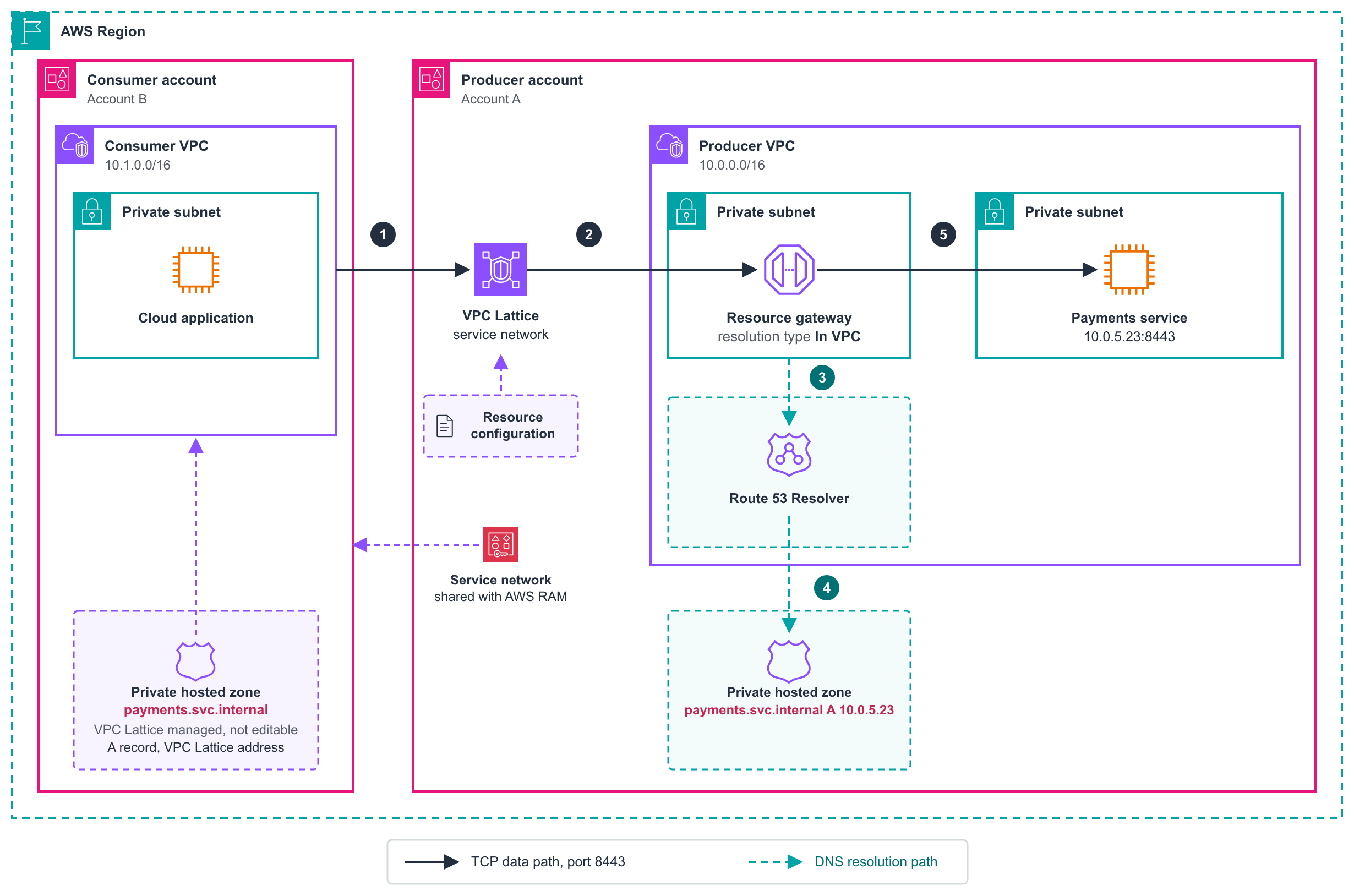
Figure 4: Resolving a domain-name target through a Route 53 private hosted zone
The request follows these steps.
- The cloud application calls
payments.svc.internal, which resolves through the consumer VPC’s private hosted zone to a VPC Lattice address. - The request enters the service network and reaches the resource gateway.
- The resource gateway resolves the target against the producer VPC’s DNS, which defaults to the Route 53 Resolver.
- The Resolver reads the producer’s private hosted zone and returns
10.0.5.23. - The resource gateway opens a TCP connection to
10.0.5.23:8443.
Five AWS CLI commands in the producer account build that path, and a cross-account consumer runs two more to accept the share. Create the resource gateway first.
The previous command returns the resource gateway ID, shown as rgw-0producer789 in the command that follows. Then create the resource configuration. --custom-domain-name is the name consumers dial, so setting it to the target’s domain name gives them the same FQDN. This command returns the resource configuration ID, shown as rcfg-0payments123 in the association step.
Create the service network that consumers attach to. The command returns the service network ID, shown as sn-0network123 in the commands that follow. This uses --auth-type NONE because VPC Lattice auth policies apply to services, not to resource configurations, so the setting doesn’t affect this resource traffic. On a service network that also carries VPC Lattice services, use AWS_IAM to keep IAM authorization on.
Associate the resource configuration with the service network, and enable private DNS so that VPC Lattice can create hosted zones in consumer VPCs.
Finally, share the service network. Every account in the share can associate a VPC.
If both accounts belong to the same organization and you turned on sharing with AWS Organizations, the share applies right away. Otherwise, the consumer account accepts the invitation first.
These two commands run in the consumer account. Find the resource share invitation the share created.
Then accept it. The service network becomes available in the consumer account, ready for a VPC association.
Pattern 2: A domain-name target resolved by on-premises DNS
An enterprise resource planning (ERP) application runs on premises as erp.corp.internal, resolved by corporate DNS. The producer VPC reaches the data center over a Direct Connect or Site-to-Site VPN connection. That connection attaches through a virtual private gateway (VGW) on the VPC, or through a transit gateway or AWS Cloud WAN when several VPCs share it. Figure 5 shows the request path.
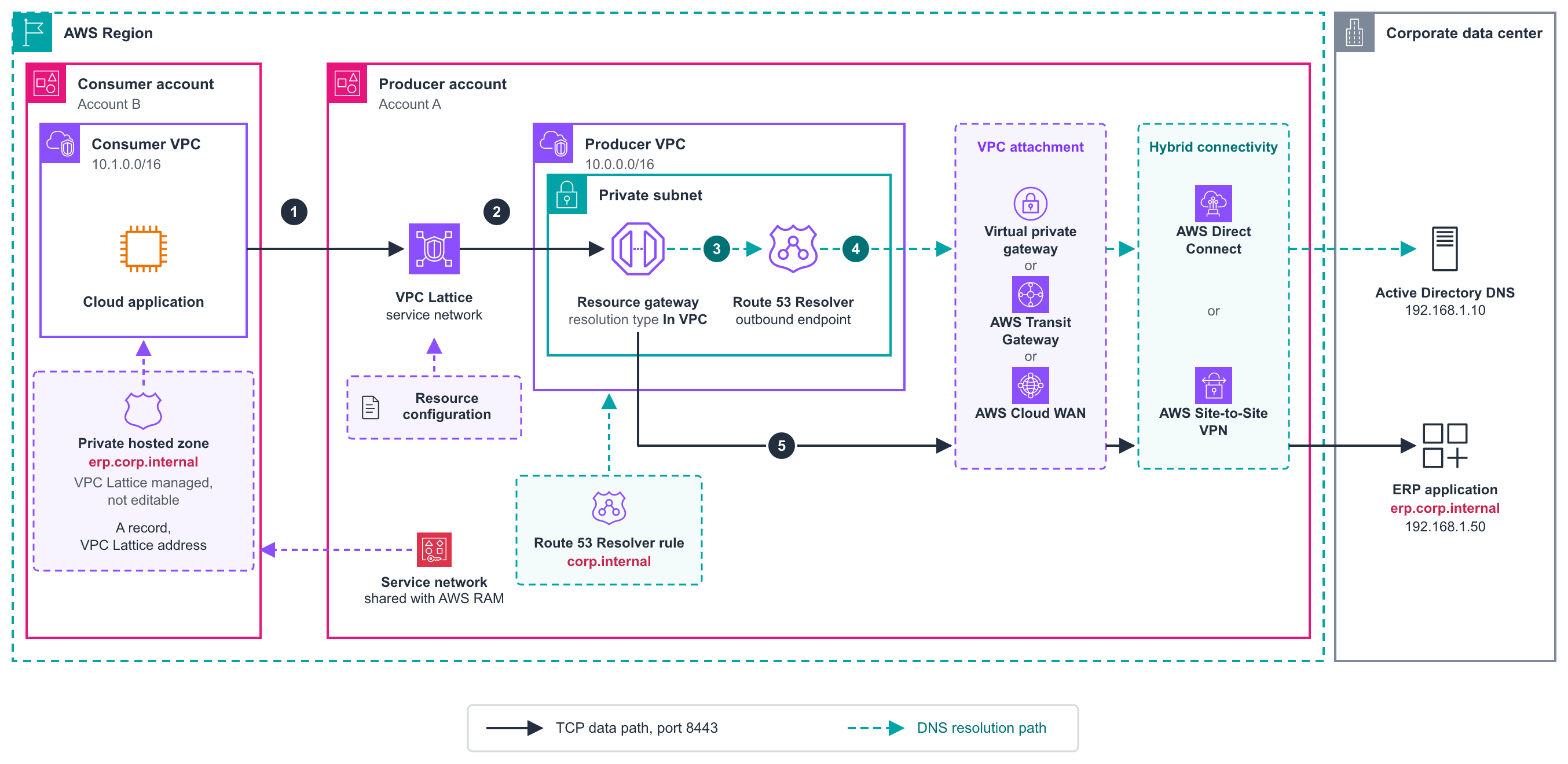
Figure 5: Resolving a domain-name target through on-premises DNS
The request follows these steps.
- The cloud application calls
erp.corp.internal, which resolves through the consumer VPC’s private hosted zone to a VPC Lattice address. - The request enters the service network and reaches the resource gateway.
- The resource gateway’s DNS query goes to the producer VPC’s Route 53 Resolver, where the Resolver rule for
corp.internalforwards it through the Route 53 Resolver outbound endpoint. - The query crosses the VPC attachment and the hybrid connection, and corporate DNS returns
192.168.1.50. - The resource gateway opens a TCP connection to that address over the same path, reaching the ERP application.
A FORWARD rule requires a Route 53 Resolver outbound endpoint. One endpoint serves multiple VPCs in a Region, and you can share the rules through AWS RAM. If you already run centralized endpoints, the producer VPC needs only the rule association.
The commands in Pattern 1 apply here as well. Use erp.corp.internal as the domain name and the custom domain name and set the port range to the port the ERP application listens on. On the consumer side, list erp.corp.internal in the specified domains.
Enabling resolution in consumer VPCs
The consumer side is the same for both patterns, because it is independent of how the producer resolves the target. For a consumer to resolve the shared name, payments.svc.internal in Figure 4 or erp.corp.internal in Figure 5, VPC Lattice creates a private hosted zone and associates it with the consumer VPC. VPC Lattice owns that zone, so it doesn’t appear in your hosted zones list and you can’t edit its records. Because that zone answers for the name throughout the consumer VPC, two settings control whether VPC Lattice creates it. Each side controls one setting, and each is fixed when its association is created.
Figure 6 shows which account holds each setting.
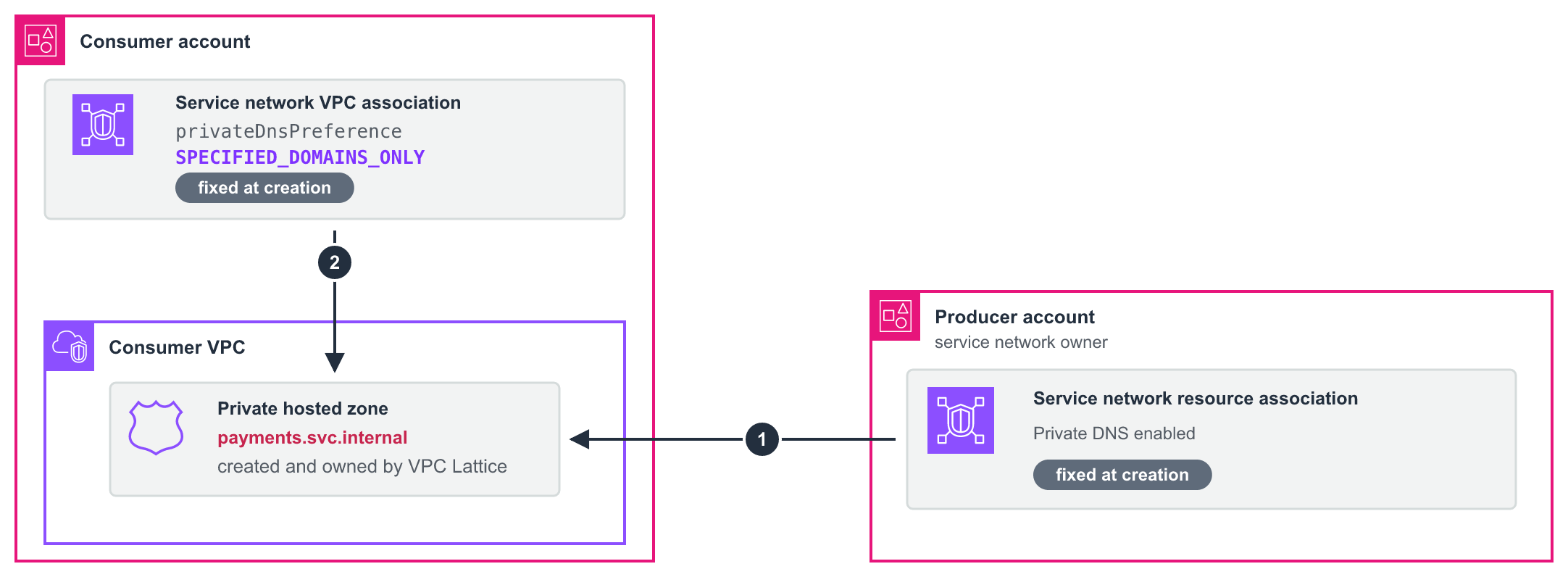
Figure 6: The two settings that decide whether a consumer receives a private hosted zone
The two settings work as follows.
- The service network owner enables private DNS on the service network resource association. Without it, VPC Lattice provisions no hosted zones for that resource configuration in any VPC.
- The consumer sets a private DNS preference that permits the domain. The default,
VERIFIED_DOMAINS_ONLY, creates a zone only for domains whose ownership the provider has proved through a TXT record that AWS reads from public DNS.Important: In our testing, a consumer that kept this default received no hosted zone and no error, and the name failed to resolve without warning. Confirm the preference before you rely on it.
A private name has no public zone in which to prove ownership, so the consumer lists the domains explicitly with SPECIFIED_DOMAINS_ONLY instead.
The other values are ALL_DOMAINS and VERIFIED_DOMAINS_AND_SPECIFIED_DOMAINS.
Scope the specified domains list with care. A wildcard such as *.svc.internal delegates an entire subdomain without listing each service.
VPC Lattice evaluates the preference when you create the service network VPC association, so changing it requires replacing the association.
To confirm provisioning, run aws route53 list-hosted-zones-by-vpc, which reports VPC Lattice zones with Owner.OwningService set to vpc-lattice.amazonaws.com. To see the address a consumer receives, resolve the name from an instance in that VPC.
Controlling access
Four controls decide who reaches a shared resource configuration.
- The AWS RAM share decides which accounts can reach your resource. When you share the service network, as the walkthroughs do, consumers associate their VPCs with it. When you share the resource configuration instead, consumers associate it with a service network they own.
- By default, consumers who receive a shared resource configuration can’t add it to a service network they can share onward. To permit onward sharing, pass
--allow-association-to-shareable-service-networkwhen you create the resource configuration. - The security group on the service network VPC association controls which consumer workloads reach the service network.
- The security group on the resource gateway controls which resources the gateway reaches.
Considerations and best practices
Review these considerations and design decisions before you build a private domain-name deployment.
| Consideration | Detail | What to do about it |
ResourceConfigDnsResolution is immutable |
Changing it replaces the resource gateway. | Decide the resolution type up front. |
| ARN configurations are incompatible | An IN_VPC resource gateway can’t host ARN-type configurations, such as an Amazon RDS database. |
Use a separate PUBLIC resource gateway. |
| IPv6-only subnets are incompatible | An IN_VPC resource gateway can’t use the IPv6-only IP address type. |
Use IPv4 or dual-stack subnets. |
| TCP only | TCP_UDP is rejected for domain-name targets. |
Set the protocol to TCP. HTTP, HTTPS, and gRPC run over TCP and work without changes. UDP workloads need a different connectivity option. |
| Custom domain name is immutable | It can’t be added or changed after creation. | Set it at creation, even if consumers don’t need it. |
| Consumer DNS preference is immutable | It’s evaluated when the association is created and not updatable afterward. | Decide before creating the association. |
Cost considerations
Private domain-name targets add no charge of their own. You pay only for the infrastructure underneath. On the VPC Lattice pricing page, a resource configuration falls under resources rather than services, and Amazon Route 53 is priced separately. Rates change, so model your own topology in the AWS Pricing Calculator.
- Resources associated with a service network are charged to the account that owns the network, because the charge follows the network rather than the resource. That makes the choice of which account owns the service network a billing decision.
- Data processing is charged to both the provider and the consumer for traffic to a shared resource.
- Resolver endpoints are charged if you take the forwarding-rule path and don’t already run them.
- NAT gateway charges apply if reaching your targets requires one.
Cleaning up
Resources associated with a service network are billable, so delete them when you finish. Work in reverse order of creation, because each object must be deleted before whatever it attaches to.
- Delete the service network VPC association in each consumer account.
- Delete the AWS RAM resource share.
- Delete the service network resource association, then the resource configuration.
- Delete the resource gateway after no resource configuration references it.
- Delete the service network.
- Delete anything that you built only for the walkthrough, such as the target instance, the private hosted zone, or the Resolver rule and its outbound endpoint.
VPC Lattice manages the consumer-side private hosted zone, so leave that one alone. Everything in step 6 is yours to delete.
Conclusion
In this post, we showed you how to make a private DNS name the target of a resource configuration. Consumers in other accounts reach it by that name, with no address pinned anywhere. Plan your resource gateway topology first, because the resolution type is immutable. Agree on the consumer’s private DNS preference before the association exists, because it determines whether the name resolves in the consumer VPC at all.
To get started, create a resource gateway with ResourceConfigDnsResolution set to IN_VPC, then point a resource configuration at a name your producer VPC already resolves.
See the resource gateway and resource configuration documentation, and the launch announcement.