Networking & Content Delivery
Using cross-account CloudFront VPC origins for multi-account private API Gateway architecture
In November 2025, Amazon CloudFront introduced cross-account support for Virtual Private Cloud (VPC) origins, which allows you to keep Amazon VPC origins and CloudFront distributions in separate Amazon Web Services (AWS) accounts. In turn, organizations with multi-account strategies can use VPC origins while maintaining their desired account structure. This enables a new architectural pattern for multi-account deployments of private Amazon API Gateway endpoints. Organizations can now distribute private APIs globally through CloudFront while maintaining security boundaries across AWS accounts.
AWS customers can now structure their environments using multiple accounts to achieve security isolation, governance, and operational boundaries. Organizations with multiple development teams require API architectures that support team autonomy, while maintaining unified access patterns.
Before the introduction of cross-account VPC origins in CloudFront, customers with multi-account AWS strategies faced architectural constraints when integrating private API Gateway endpoints with CloudFront. Organizations had to either consolidate their CloudFront distributions and API Gateway endpoints within the same AWS account, compromising their security isolation and governance boundaries, or deploy separate CloudFront distributions in each account, leading to increased operational complexity and higher costs.
With this new cross-account VPC origins feature, customers can maintain their multi-account security posture while achieving centralized distribution management. Development teams are now able to retain full autonomy over their private API Gateway endpoints in dedicated accounts, while networking teams can manage a single, cost-effective CloudFront distribution that serves all teams’ APIs through team-specific subdomains. This enables both operational efficiency and security isolation without compromise.
This post demonstrates a team-specific subdomain implementation that enables team isolation and centralized distribution management.
Architecture diagram
In this section, we examine the key components of team-specific subdomains with cross-account VPC origins for CloudFront distributions, as shown in Figure 1.
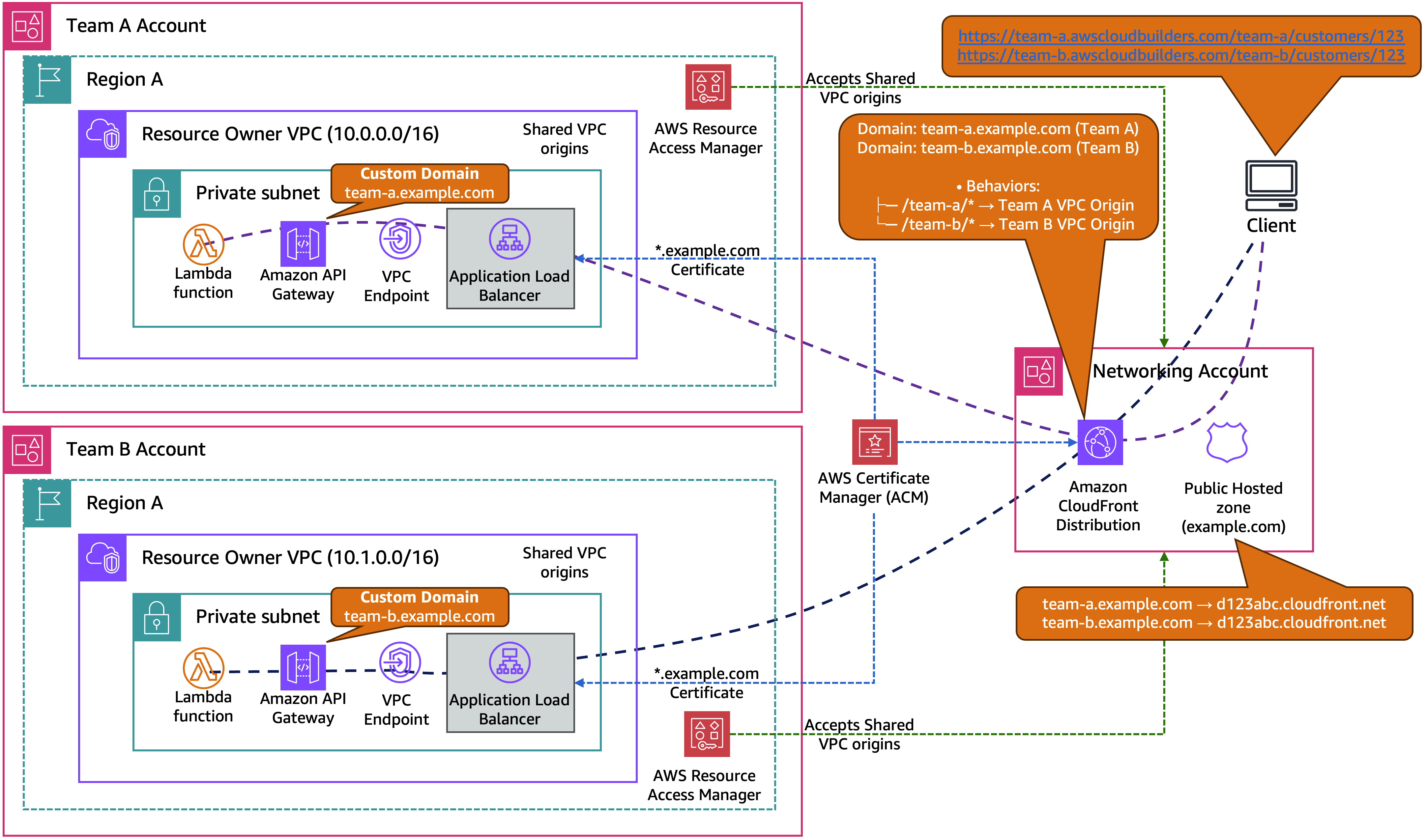
Figure 1: Team-specific subdomain architecture with cross-account VPC origins and Host header matching
The team-specific subdomain architecture provides a comprehensive solution for multi-team API management across AWS accounts. Each development team operates their own API Gateway with custom domains that precisely match their assigned subdomains (team-a.example.com, team-b.example.com). This provides seamless Host header validation throughout the request flow. The architecture maintains cost efficiency by using a single CloudFront distribution that serves both team-a.example.com and team-b.example.com instead of each team having their own separate distribution, which reduces infrastructure costs through shared distribution.
The solution provides flexible routing patterns where teams can access their own APIs through dedicated subdomains while preserving cross-team API access through path-based CloudFront behaviors. Teams maintain complete autonomy over their API development, deployment, and scaling within their own AWS accounts, while the networking team retains centralized control over global distribution, DNS management, and SSL certificate provisioning. Cross-account resource sharing is facilitated through AWS Resource Access Manager (AWS RAM), so that teams can share their VPC origins with the networking account while maintaining security boundaries. The architecture removes the need for complex header manipulation functions or Lambda@Edge implementations, resulting in streamlined operations and improved performance.
Solution overview
The following table provides a comprehensive breakdown of component ownership and responsibilities across the three-account architecture. It demonstrates how resources are distributed between the team accounts (Team A and Team B) and the centralized networking account. This clarifies which account owns each component, manages costs, and maintains operational control.
| Component | Team A account | Team B account | Networking account |
| Custom domain | team-a.example.com | team-b.example.com | DNS management |
| Amazon API Gateway | Private endpoint | Private endpoint | – |
| Amazon VPC origin | Resource owner | Resource owner | Resource consumer |
| AWS RAM | Share VPC origin | Share VPC origin | Accept shared origins |
| Amazon CloudFront | – | – | Single distribution |
| Amazon Route 53 | – | – | DNS records |
| SSL certificate (ACM) | *.example.com | *.example.com | *.example.com |
| Cost responsibility | API Gateway, ALB, Lambda | API Gateway, ALB, Lambda | CloudFront, Route 53 |
Prerequisites
Before implementing this architecture, ensure you have the following:
- Multiple AWS accounts: You must have at least two AWS accounts, one for your team’s private APIs and one for centralized networking management. This post demonstrates a three-account setup (two team accounts and one networking account) as an example, but you can start with two accounts and expand as your organization grows.
- Domain ownership: A domain you own and control (we use example.com as an example throughout this post).
- DNS management access: Ability to create and modify DNS records for your domain, whether hosted in Amazon Route 53 or with another DNS provider.
- SSL certificate: Request a wildcard SSL certificate for your domain (
*.example.com) in AWS Certificate Manager (ACM) in the us-east-1 AWS Region. You need to deploy this certificate in all three AWS accounts for CloudFront, Application Load Balancer (ALB), and API Gateway usage. - Administrative access: Appropriate AWS Identity and Access Management (IAM) permissions in all three accounts to create VPC resources, API Gateway endpoints, CloudFront distributions, and manage cross-account sharing.
Getting started
We’ll explain here the step-by-step implementation of team-specific subdomains with cross-account VPC origins. You can work across three AWS accounts: two team accounts (Team-A-Account and Team-B-Account) for hosting private APIs, and one networking account (Networking-Account) for managing the CloudFront distribution and DNS.
The implementation follows a logical flow: first establishing VPC infrastructure and private APIs in team accounts, then sharing resources cross-account, and finally configuring the centralized CloudFront distribution.
Step 1: Set up VPC infrastructure in team accounts (Team A, Team B)
- VPC setup: Create a VPC with private subnets across multiple Availability Zones (AZs) (use different CIDR blocks for each team)
- VPC endpoint: Deploy an execute-api VPC endpoint to enable private connectivity to API Gateway
Step 2: Configure private API Gateway in team accounts (Team A, Team B)
- Custom domain: Create a custom domain (team-a.example.com or team-b.example.com) with your SSL certificate, as shown in Figure 2
- Lambda functions: Deploy Lambda functions to handle business logic, serve API responses, and perform path transformation
- API Gateway: Create a private API Gateway with your API resources and methods, including a resource policy that allows access only from your VPC endpoint (restrict by VPC endpoint ID or source VPC)
- Base path mapping: Associate the custom domain with your API Gateway using base path mapping
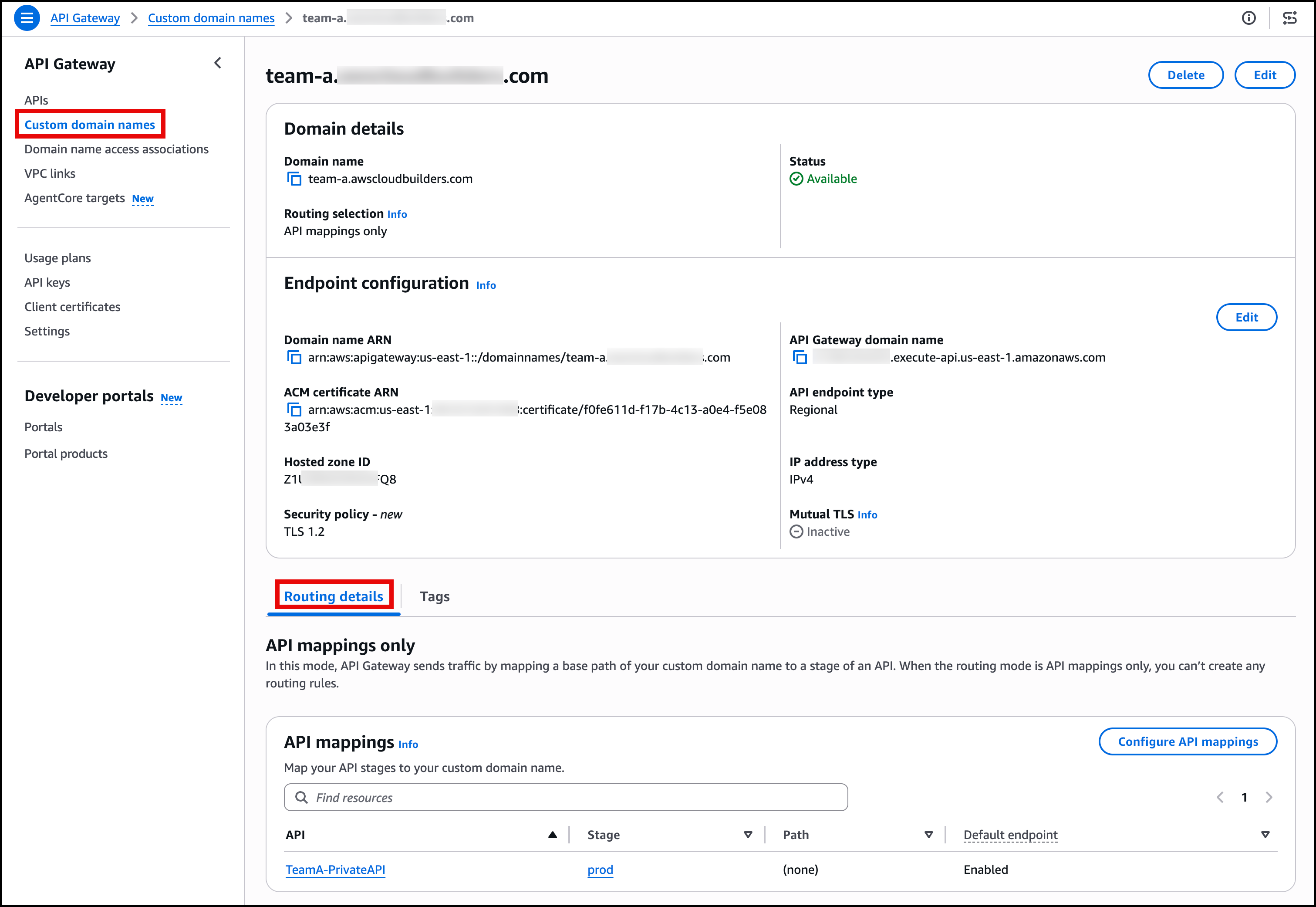
Figure 2: API Gateway private API configuration with custom domain setup
Step 3: Set up load balancer and VPC origins in team accounts (Team A, Team B)
- ALB: Setup up an internal ALB that targets the VPC endpoint network interfaces
- VPC origin: Create a VPC origin resource pointing to your internal ALB, configured for
https-onlycommunication, as shown in Figure 3
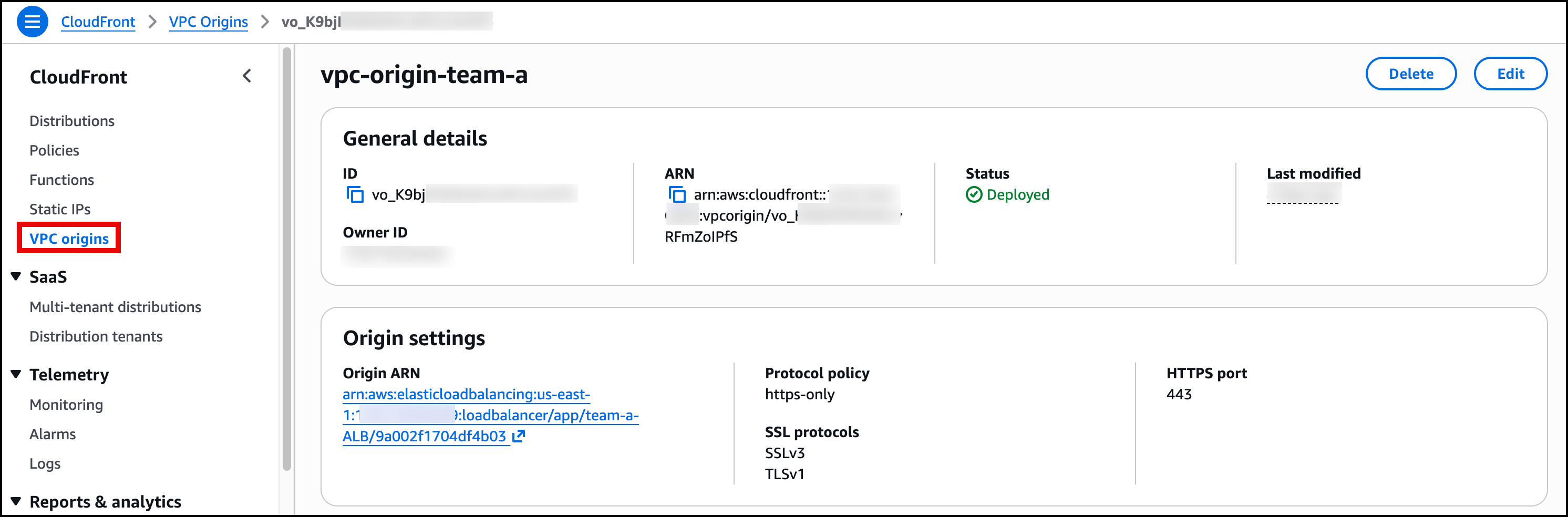
Figure 3: VPC origin showing ALB as an origin
Step 4: Share VPC origins with networking account (Team A, Team B)
- AWS RAM sharing: Share the VPC origin with the networking account using AWS RAM to enable cross-account access, as shown in Figure 4
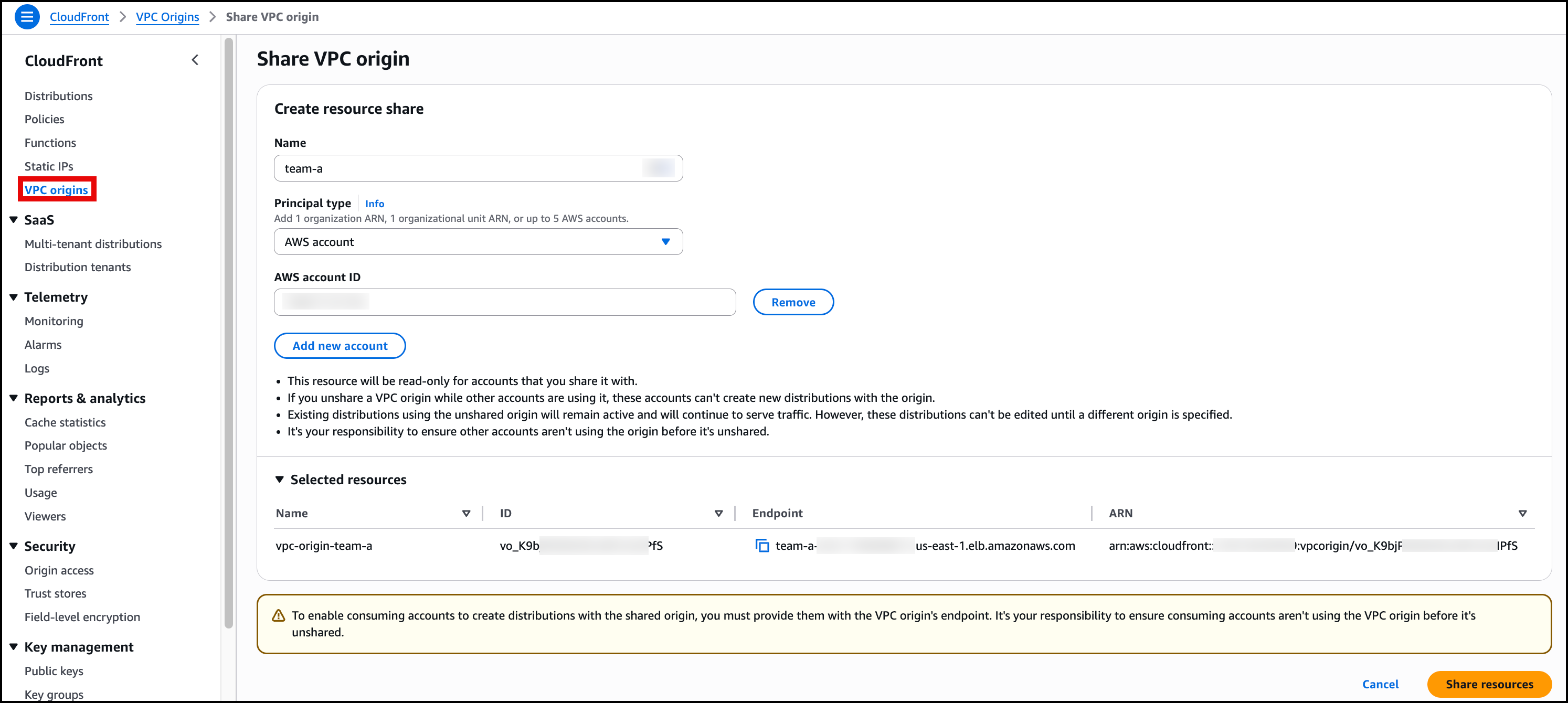
Figure 4: AWS RAM resource sharing VPC origin
- Verify sharing: Confirm the resource share is created and pending acceptance in the networking account
Step 5: Accept shared resources (networking account)
- Accept shared resources: In the networking account, navigate to the AWS RAM console and accept the VPC origin resource shares that were sent from both Team A and Team B accounts
- Verify access: Confirm both VPC origins are now available for use in CloudFront
Step 6: Configure CloudFront distribution (networking account)
- CloudFront distribution: Create a CloudFront distribution with Team A VPC origin as the initial origin (CloudFront requires at least one origin to create the distribution)
- Add second origin: Add Team B VPC origin as a second origin in the distribution
- Path-based behaviors: Create behaviors for
/team-a/*(routes to Team A VPC origin) and/team-b/*(routes to Team B VPC origin) with the following settings—(routes to Team B VPC origin) with the following settings:- Viewer protocol policy:
HTTPS Only - Allowed HTTP methods:
GET, HEAD, OPTIONS, PUT, POST, PATCH, DELETE - Cache policy:
UseOriginCacheControlHeaders - Origin request policy:
AllViewer
- Viewer protocol policy:
The default behavior with the path pattern of Default (*)automatically moves to precedence 2, as shown in Figure 5.
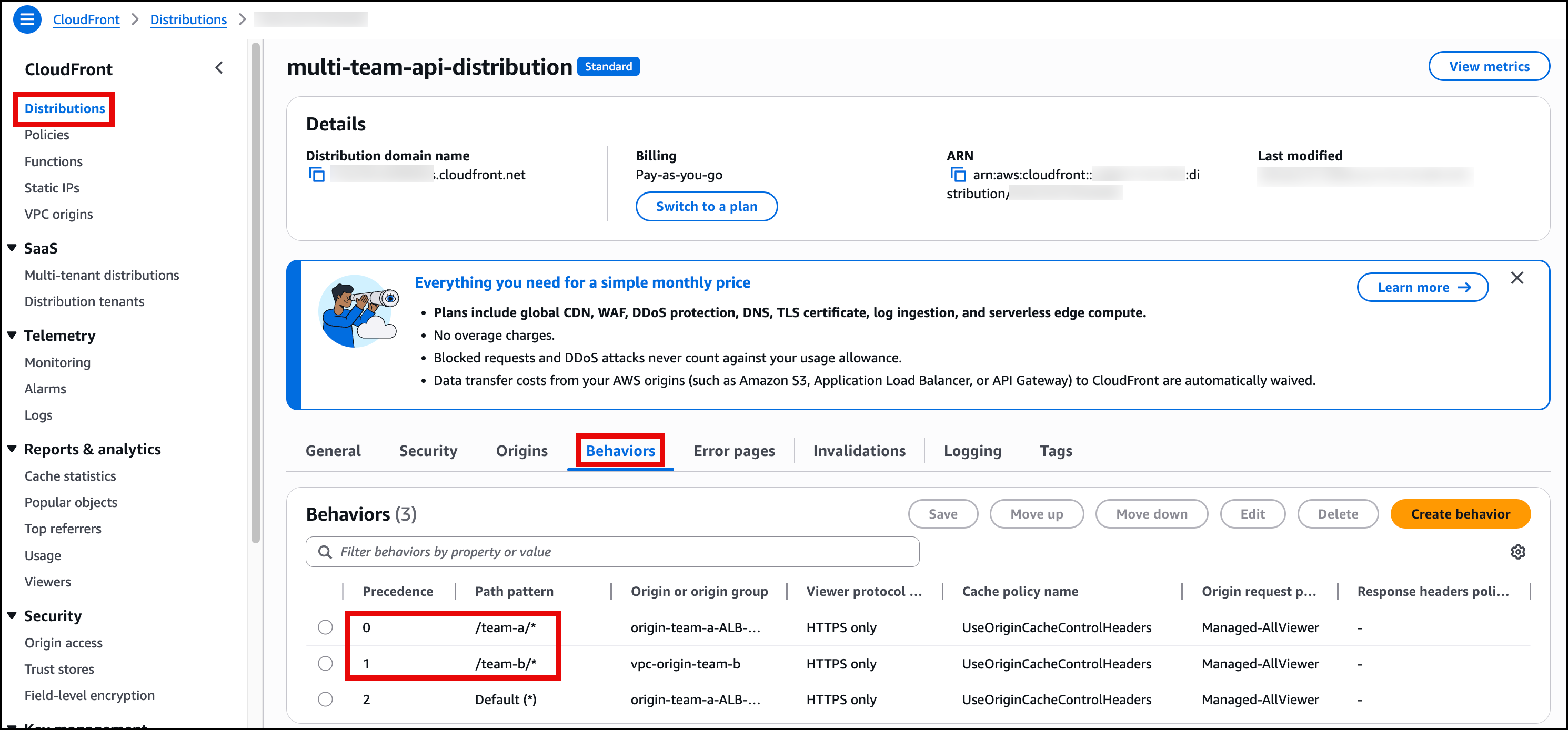
Figure 5: CloudFront behavior configuration showing path-based routing setup
- Configure domain and SSL: After the distribution is created, add domains to your existing distribution:
- Alternate domain names: Add both
team-a.example.comandteam-b.example.com - SSL certificate: Associate the wildcard SSL certificate
*.example.comfrom ACM (us-east-1)
- Alternate domain names: Add both
Step 7: Configure DNS records (networking account)
- DNS configuration: Create Route 53 A records with the Alias option pointing both team subdomains to the CloudFront distribution, as shown in Figure 6
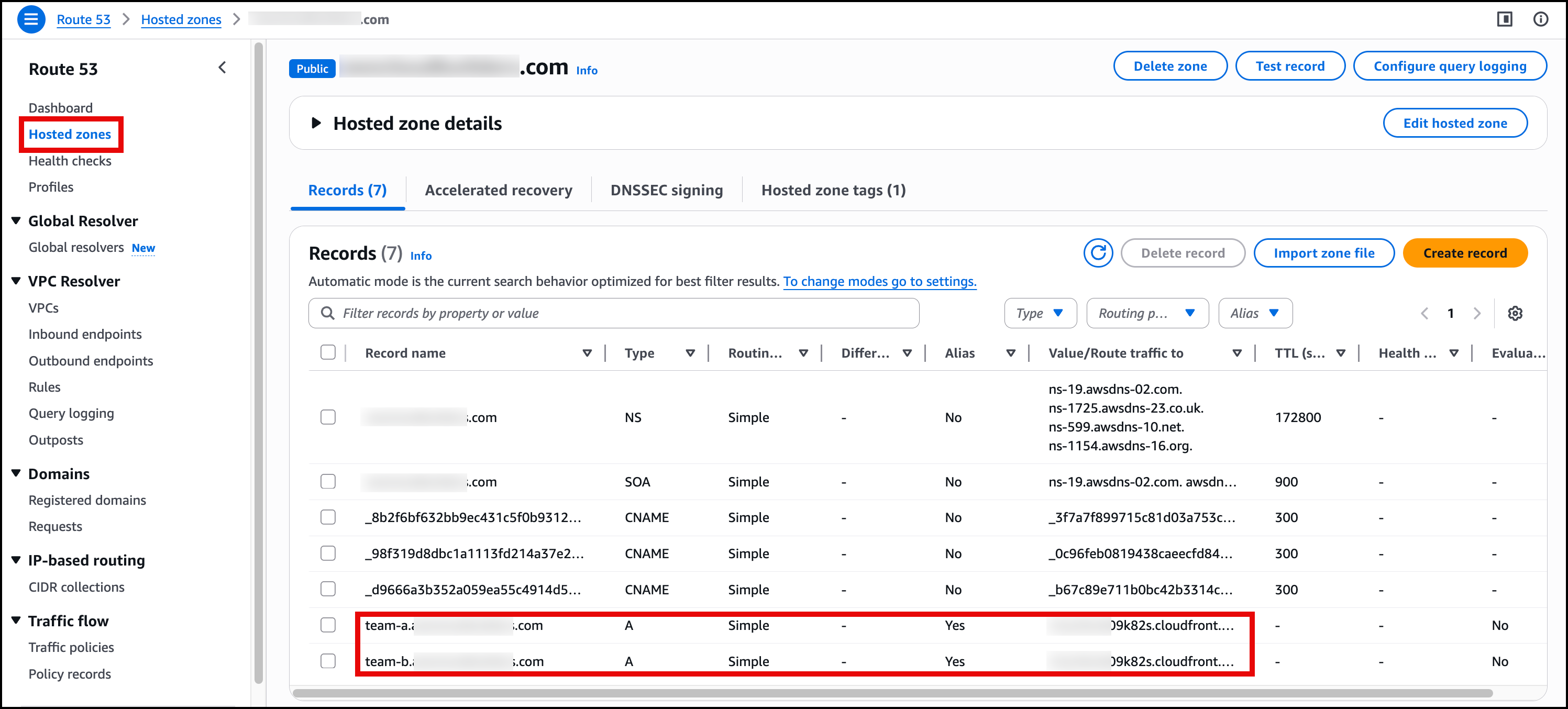
Figure 6: Route 53 DNS records showing CNAME entries for team-a.example.com and team-b.example.com
- Verify DNS: Test that both
team-a.example.comandteam-b.example.comresolve to the CloudFront distribution
Implementation testing
After deploying the team-specific subdomain architecture, confirm that direct team access works correctly, and also ensure cross-domain isolation is properly enforced:
Test team-specific subdomain access (should succeed)
curl https://team-a.example.com/team-a/customers/123
# Expected: {"customerId": "123", "team": "A", "data": "..."}
curl https://team-b.example.com/team-b/customers/789
# Expected: {"customerId": "789", "team": "B", "data": "..."}Test cross-domain isolation (should fail with 404/error as this confirms security isolation)
curl https://team-b.example.com/team-a/customers/123
# Expected: {"message":"Missing Authentication Token"} or 404 Not Found
curl https://team-a.example.com/team-b/customers/789
# Expected: {"message":"Missing Authentication Token"} or 404 Not FoundConsiderations
Resource sharing and deletion: If Team A and Team B Accounts stop sharing VPC origins, then existing traffic continues to function. To delete a shared VPC origin, you must follow this sequence: first disable the CloudFront distribution that uses the origin, then unshare the VPC origin through AWS RAM, and finally delete the origin resource from the source account.
Operational considerations: VPC origins are marked as “(shared)” in the networking account and can’t be re-shared. Each team maintains independent deployment cycles while sharing the global distribution infrastructure.
Cross-account monitoring: CloudWatch metrics are available in each respective account. Centralized logging can be configured through CloudWatch cross-account sharing, with AWS WAF logs and CloudFront access logs stored in the networking account.
Conclusion
Cross-account support for Amazon CloudFront VPC origins enables organizations to implement sophisticated multi-account architectures while maintaining team autonomy and operational efficiency. The team-specific subdomain approach solves host headers conflicts elegantly while optimizing cost through shared CloudFront infrastructure.
Using AWS RAM, organizations can now share VPC origins across account boundaries while preserving team structures and development workflows. This architecture pattern provides a foundation for scalable, secure, and cost-effective multi-team API platforms.
Get started today with the CloudFront VPC origins documentation and begin implementing team-specific subdomains in your multi-account environment.
About the authors

Salman Ahmed
Salman is a Senior Technical Account Manager at AWS. He specializes in guiding customers through the design, implementation, and support of AWS solutions. Combining his networking expertise with a drive to explore new technologies, he helps organizations successfully navigate their cloud journey. Outside of work, he enjoys photography, traveling, and watching his favorite sports teams.

Kunj Thacker
Kunj is a Technical Account Manager at AWS and is based out of Vancouver, Canada. He has an extensive background in Network and Infrastructure engineering prior to this role. He is passionate about new technologies and enjoys helping customers build, implement, and optimize their cloud infrastructure on AWS.