AWS Physical AI Blog
Rendering Digital Humans with Amazon EC2 Spot Instances
Amazon Web Services would like to thank the UneeQ Engineering team for their contribution to this post
Introduction
UneeQ creates AI-powered digital humans that engage in natural conversations while displaying realistic facial expressions through real-time high-fidelity 3D rendering. Running these compute-intensive workloads, built on game engines like Unreal Engine, is inherently complex. That complexity multiplies at scale: these applications carry specialized hardware and graphics requirements and distributing GPU capacity efficiently while maintaining availability and performance presents significant infrastructure challenges. The complexity increases further when dealing with containerized runtime environments that must simultaneously orchestrate user sessions, matchmaking, and streaming servers. Each experience demands intensive graphics processing on GPU instances, making fault-tolerant, auto-healing infrastructure management a fundamental requirement.

Figure 1: Sophie, an AI-powered virtual being
Key challenges include optimizing costs while managing session allocation across distributed resources and maintaining scalability for varying user loads. Traditional container orchestration alone is not sufficient; it requires specialized infrastructure to handle the unique demands of graphics-intensive applications, particularly when streaming real-time rendered content to users across different regions. Cost optimization becomes especially critical given the high expense of GPU instances, requiring a careful balance between performance requirements and resource utilization, all while maintaining the best possible user experience.
In this post, we explore how UneeQ built a custom solution to dynamically manage GPU resources across multiple regions using Amazon Elastic Kubernetes Service (Amazon EKS) and Amazon Elastic Compute Cloud (EC2) Spot Instances. The company uses Unreal Engine’s pixel streaming technology combined with its proprietary Digital Human Operating System and patented intelligent animation system, Synanim. Digital Humans can be deployed across web browsers and devices for applications including brand ambassadors, customer experience, and employee training across industries such as financial services, banking, healthcare, and education.
The Challenge: Dynamic GPU Workload Management
UneeQ’s Digital Human Operating System needed to efficiently manage GPU resources while ensuring consistent availability for real-time Digital Human interactions with end users. The key requirements were:
- Cost Efficiency: Drive down the cost per Digital Human through strategic use of Amazon EC2 Spot Instances, achieving the target balance of cost and performance.
- Flexibility: Different GPU instance types support different numbers of concurrent Digital Humans based on their specifications. A more powerful instance running four Digital Humans at a lower effective cost-per-session is inherently more valuable than a weaker one running two. UneeQ’s Group Manager needed to factor in this priority, ranking instance types by their effective cost to serve. Supporting the broadest possible range of GPU-enabled instance types was equally important to maximize Spot availability.
- Scalability: Automatic scaling based on conversation demand.
- Uptime: High availability for customer-facing deployments where dropped sessions are not acceptable.
Opportunity: The Adoption of Amazon EC2 Spot Instances
Amazon EC2 Spot Instances provide AWS customers access to unused EC2 compute capacity at steep discounts compared to On-Demand prices, with savings of up to 90% in some cases. For GPU-heavy workloads like real-time 3D rendering, where instance costs are a dominant operational expense, Spot Instances are a strategic imperative.
But unlocking those savings introduces real complexity.
Spot capacity is inherently dynamic. Availability fluctuates by instance type, Availability Zone, and region, sometimes changing every few minutes. To maximize Spot utilization, customers need to spread their workloads across as many compatible GPU instance types as possible. For UneeQ, that means supporting up to 11 different GPU-enabled instance types depending on the region.
Each of UneeQ’s Digital Humans has a graphic fidelity requirement that translates directly to a machine instance resource requirement. Each Digital Human runs on a designated pod in Amazon EKS, and the number of pods a single node can support varies based on the instance type, the power of the underlying GPU, and factors such as quality settings and rendering resolution:
- A g5.4xlarge can run 2–5 Digital Humans per node depending on resolution
- A g6.4xlarge can run 1–4 Digital Humans per node
- A g5.2xlarge can run 1–2 Digital Humans per node
This variability matters enormously for cost. If UneeQ needed to run 80 Digital Humans and did not account for the different capacities of each instance type, the result would either be over-provisioning (wasting money) or under-provisioning (degrading user experience).
Now consider the math. To run 80 Digital Humans using a mixed Spot fleet, the combination might look like:
- 12 g5.4xlarge Spot Instances running 48 Digital Humans (12 instances × 4 per instance)
- 9 g6.4xlarge Spot Instances running 27 Digital Humans (9 instances × 3 per instance)
- 3 g5.2xlarge Spot Instances running 6 Digital Humans (3 instances × 2 per instance
That’s 81 Digital Humans across a mixed fleet of 24 nodes, an optimal configuration. But calculating that manually, across multiple instance types, multiple regions, and constantly shifting Spot availability, is not operationally sustainable.
Challenge: Tuning Spot Allocation Strategies
AWS provides several native Spot allocation strategies out of the box, and for many workloads they are perfectly adequate. The lowest-price strategy allocates instances from the Spot pool with the lowest current price. The capacity-optimized strategy selects from the pool with the most available capacity, reducing interruption risk. The price-capacity-optimized strategy attempts to balance both, and diversified distribution spreads instances across multiple pools for resilience.
For straightforward containerized workloads where any instance type of a given size is functionally equivalent, these strategies work well. Implementers define their instance type flexibility, set the desired allocation strategy, and let AWS handle the rest.
But UneeQ’s workload breaks a fundamental assumption that underpins all these strategies: that all instances in the diversified pool are equally capable of running the same number of workload units.
Native Spot allocation strategies treat all nodes as interchangeable. They optimize for unit price or availability, but have no concept of workload density (the number of sessions each node can sustain). A g5.4xlarge runs four Digital Humans while a g5.2xlarge runs only two. This 2:1 density gap directly impacts effective cost-per-session and total replica count in Kubernetes. A cheaper instance that halves workload density is not cheaper. It doubles scheduling overhead and erodes the apparent cost advantage.
Furthermore, native strategies operate at the instance provisioning layer and have no awareness of the Kubernetes scheduling layer above them. They cannot coordinate Auto Scaling group sizing with Kubernetes replica counts, nor can they factor in cross-region Spot pricing dynamics to make intelligent placement decisions that account for both cost and capacity simultaneously.
This gap between what native strategies can reason about and what UneeQ’s workload demands is precisely what motivated the Group Manager, a custom orchestration layer that brings workload-aware intelligence to Spot allocation that AWS’s built-in strategies were never designed to provide.
The Flexible Solution: Group Manager
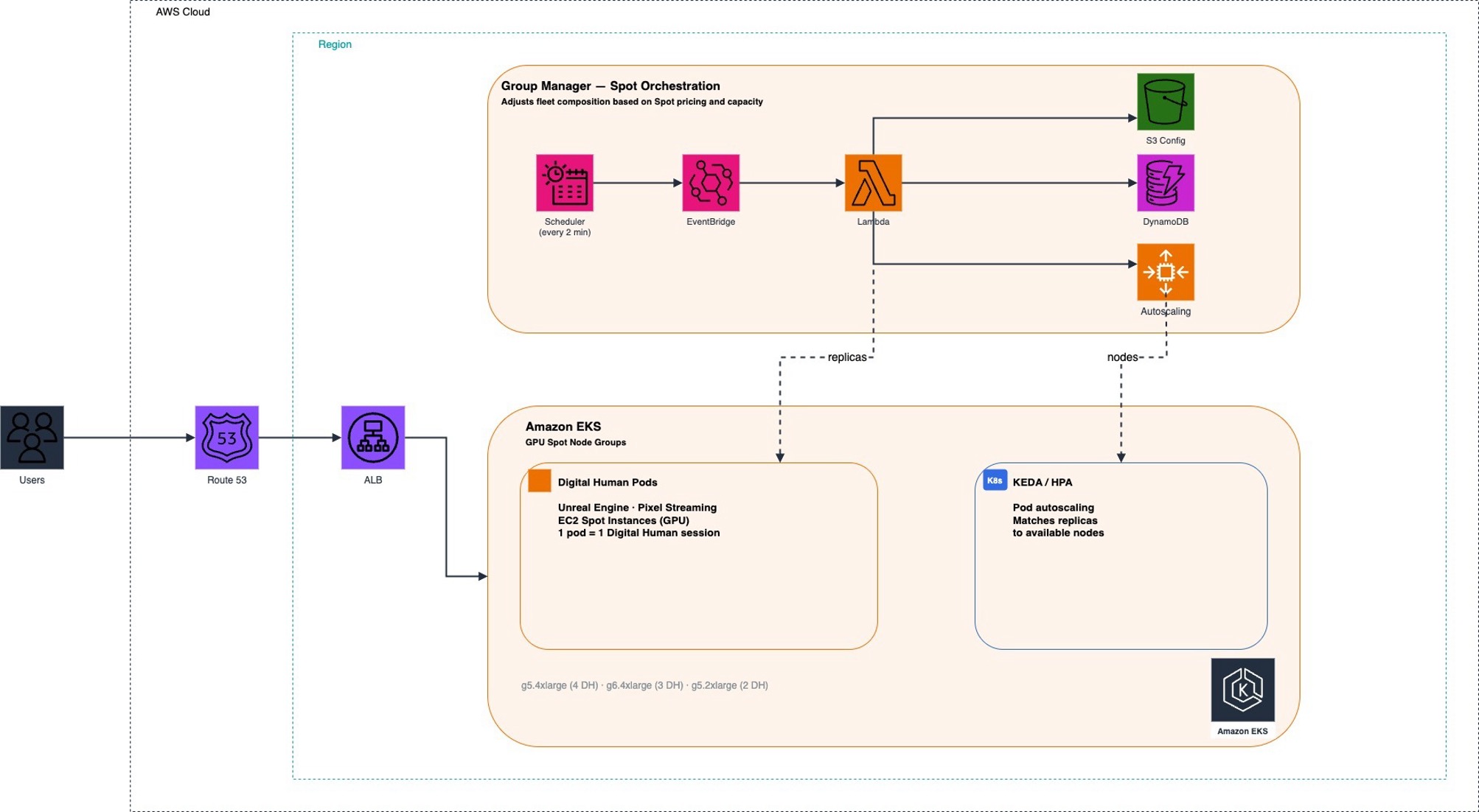
Figure 2 — UneeQ Digital Human auto scaling architecture
UneeQ built Group Manager as an AWS Lambda function that continuously evaluates GPU capacity across regions and instance types, then automatically adjusts infrastructure to maximize Spot utilization while maintaining the desired number of available Digital Humans.
Here’s how it works:
Every 2 minutes, an Amazon EventBridge scheduler triggers the Group Manager. It evaluates current Spot availability and pricing across supported instance types and regions, then:
- Adjusts Auto Scaling group (ASG) sizes based on a priority-weighted instance selection algorithm
- Updates Kubernetes deployment replica counts via Kubernetes Event-driven Autoscaling (KEDA) / Horizontal Pod Autoscaler (HPA) to match available node capacity
- Prioritises Amazon EC2 Spot Instances aggressively, terminating On-Demand instances as soon as equivalent Spot capacity becomes available
- Distributes workloads across regions based on configured priorities, maximizing both availability and cost efficiency
The Group Manager uses a JSON configuration file stored in Amazon Simple Storage Service (Amazon S3), which defines instance type priorities, maximum prices, pods-per-node ratios, scaling thresholds, and region-specific parameters:
JSON configuration example:
{

    "node_groups": {

        "gpu_cluster": {

            "deployment_name": "digital-humans",

            "namespace": "uneeq",

            "instance_types": {

                "g5.4xlarge": {

                    "pods_per_node": 4,

                    "priority": 1,

                    "max_price": "2.0"

                },

                "g6.4xlarge": {

                    "pods_per_node": 3,

                    "priority": 2,

                    "max_price": "1.8"

                },

                "g5.2xlarge": {

                    "pods_per_node": 2,

                    "priority": 3,

                    "max_price": "1.5"

                }

            }

        }

    },

    "scaling_parameters": {

        "evaluation_interval": 120,

        "min_nodes": 1,

        "max_nodes": 20,

        "scale_up_threshold": 0.8,

        "scale_down_threshold": 0.4,

        "cooldown_period": 300

    },

    "regions": {

        "us-east-1": {

            "enabled": true,

            "priority": 1,

            "max_instances": 50,

            "availability_zones": ["us-east-1a", "us-east-1b", "us-east-1c"]

        },

        "us-west-2": {

            "enabled": true,

            "priority": 2,

            "max_instances": 30,

            "availability_zones": ["us-west-2a", "us-west-2b"]

        }

    },

    "kubernetes_deployment": {

        "min_replicas": 1,

        "max_replicas": 100,

        "target_cpu_utilization": 70,

        "target_memory_utilization": 80

    }

}
Sample Group Manager JSON configuration
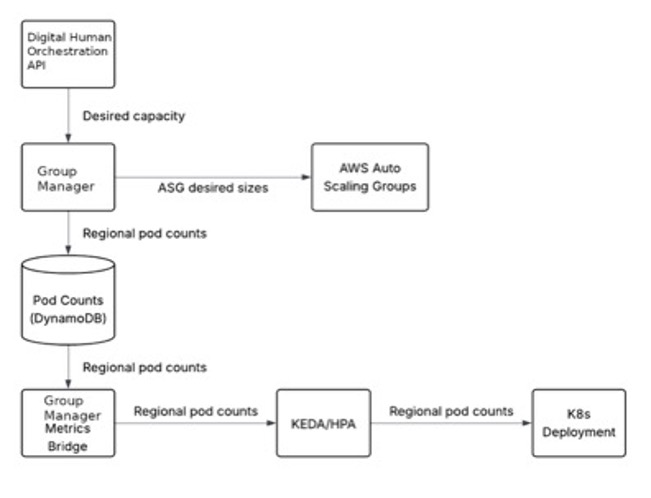
Figure 3: Group Manager Data Flow
The Priority-Weighted Instance Selection: Spot Intelligence in Practice
The real sophistication of Group Manager lies in how it approaches instance selection.
Not all GPU instances are created equal from a cost-per-Digital-Human perspective. A more powerful instance that can run four Digital Humans at a lower effective cost-per-session will always be preferred over a smaller instance running two. Group Manager encodes this business logic into a priority weighting system that ranks instance types by their effective cost to serve.
But priority alone is not enough; Spot availability is the wildcard. Group Manager continuously monitors which instance types have available Spot capacity and dynamically shifts allocation toward whatever combination delivers the target number of Digital Humans at the lowest cost. When a preferred instance type is not available via Spot, it cascades to the next priority tier rather than falling back to expensive On-Demand instances unnecessarily.
On-Demand instances serve as a safety net. They are provisioned only when Spot capacity is genuinely insufficient and terminated as soon as Spot capacity recovers. This aggressive Spot-first posture is what drives meaningful cost savings at scale.
Multi-Region Strategy: Maximizing Spot Availability Globally
Spot capacity does not just vary by instance type; it varies by region and Availability Zone. A Spot pool that is constrained in us-east-1 might be abundant in us-west-2. UneeQ’s Group Manager exploits this reality by operating across multiple regions simultaneously, with region-level priority weights that reflect both latency requirements and typical capacity availability.
Amazon Route 53 latency-based routing and Application Load Balancers (ALBs) play a critical supporting role here. As Group Manager provisions capacity across regions, Route 53 handles cross-region traffic routing by directing users to the lowest-latency endpoint. Within each region, ALBs manage load distribution across healthy instances, provide advanced health checking, and handle SSL/TLS termination. This ensures that the cost optimization happening at the infrastructure layer is completely invisible to end users.
The result is a globally distributed rendering fleet that automatically gravitates toward wherever Spot capacity is cheapest and most available, without any manual intervention.
The Outcomes: What Spot-First GPU Management Delivers
Since deploying Group Manager, UneeQ has achieved measurable improvements across every dimension that matters.
Reduced cost to serve — 30 – 55% cost savings per Digital Human.
Effective resource utilization — By making use of the most cost-effective Spot pools, UneeQ maximizes its chances of achieving the full 55% saving on cost per Digital Human, rather than settling for a 30% saving on less optimal instance types. The priority-weighted selection algorithm ensures workloads always gravitate toward the highest-density, lowest-cost instances available.
Improved resilience — UneeQ already maintains 99.95% uptime for its Digital Human platform. The move to Spot Instances was designed to preserve this availability, not compromise it. The system automatically falls back to alternative instance types and proactively spreads capacity across Availability Zones and regions, ensuring no degradation in uptime compared to a purely On-Demand compute approach.
Reduced operational overhead — What once required constant manual calculation and configuration now runs autonomously every two minutes, with Amazon CloudWatch providing visibility into the system’s decisions. This has freed approximately 15 engineer hours per month, allowing the team to focus on product innovation rather than capacity management.
Conclusion
In this post, we showed how UneeQ Digital Humans built a custom orchestration layer, the Group Manager, to dynamically manage GPU resources across multiple regions using Amazon EKS and Amazon EC2 Spot Instances. By combining workload-aware instance selection with aggressive Spot-first provisioning, UneeQ reduced the cost per Digital Human by 30–55% while maintaining high availability for customer-facing deployments.
The compute savings available through Spot Instances are substantial but capturing them requires moving beyond simple configurations. UneeQ’s approach demonstrates how to build the logic to navigate dynamic availability, mixed instance fleets, and multi-region deployments. By investing in a solution built on Amazon EKS, AWS Lambda, Amazon EventBridge, Amazon EC2 Auto Scaling, Amazon CloudWatch, and Amazon EC2 Spot Instances, UneeQ transformed GPU cost management from an operational burden into a competitive advantage.
For teams running similarly intensive workloads, whether game streaming, spatial computing, real-time rendering, or AI inference, UneeQ’s approach offers a compelling blueprint: define instance priorities by effective cost-to-serve, support the broadest possible range of compatible instance types, and let automation do the heavy lifting of matching supply to demand across regions.
The high fidelity of UneeQ Digital Humans remains consistent, with the significant cost efficiencies ensuring they can keep service costs low for their customers and reinvest in continuous quality improvements without increasing underlying infrastructure expenses.
To get started with your own Spot-optimized GPU workloads:
- Learn more about Amazon EC2 Spot Instances
- Explore Spot Instance best practices
- Review Amazon EC2 Spot pricing
- Ask questions and share experiences on AWS re:Post
If you have questions or feedback about this post, leave a comment in the comments section below.
If you have questions about using Spot Instances for GPU workloads, start a new thread on AWS re:Post.