AWS Physical AI Blog
Train VLA models with Hugging Face LeRobot on Amazon SageMaker AI
Introduction
Physical AI is AI that acts in the physical world. Where a chatbot generates text and an agent calls APIs, a Physical AI system perceives its surroundings through sensors, reasons about objects and spatial relationships, acts through motors and end-effectors, and adapts to conditions that differ from training. In robotics, vision-language-action (VLA) models are a common approach: a single model that takes a camera stream and a natural-language instruction such as “pick up the vial and place it on the rack” and outputs the motor commands that carry it out.
This post shows how to post-train a VLA model end to end on Amazon SageMaker AI, using Hugging Face LeRobot. As examples, we fine-tune NVIDIA’s GR00T N1.7, π₀.₅ and ACT, run the training on Amazon SageMaker Training Jobs and Amazon SageMaker HyperPod, and compare the robot’s behavior before and after post-training. We also show two ways to collect the demonstration data: classic teleoperation by a person, and an AI agent that operates the robot in simulation using the companion sample Simulation Robot Teleoperation Platform, in which an agent on Amazon Bedrock records labelled episodes without a human operator. The full code is in the accompanying repository.
As the running example we use NVIDIA’s learning path Train an SO-101 Robot From Sim-to-Real With NVIDIA Isaac: an SO-101 arm picks centrifuge vials from a table and places them in a rack, using a front camera, a wrist camera and the instruction “Pick up the vial and place it in the yellow rack”. NVIDIA recorded the demonstrations by teleoperating the arm in Isaac Lab and publishes them as LeRobot datasets on the Hugging Face Hub. The learning path also covers deploying on the real arm and strategies for closing the gap between simulation and reality; this post focuses on the training step.
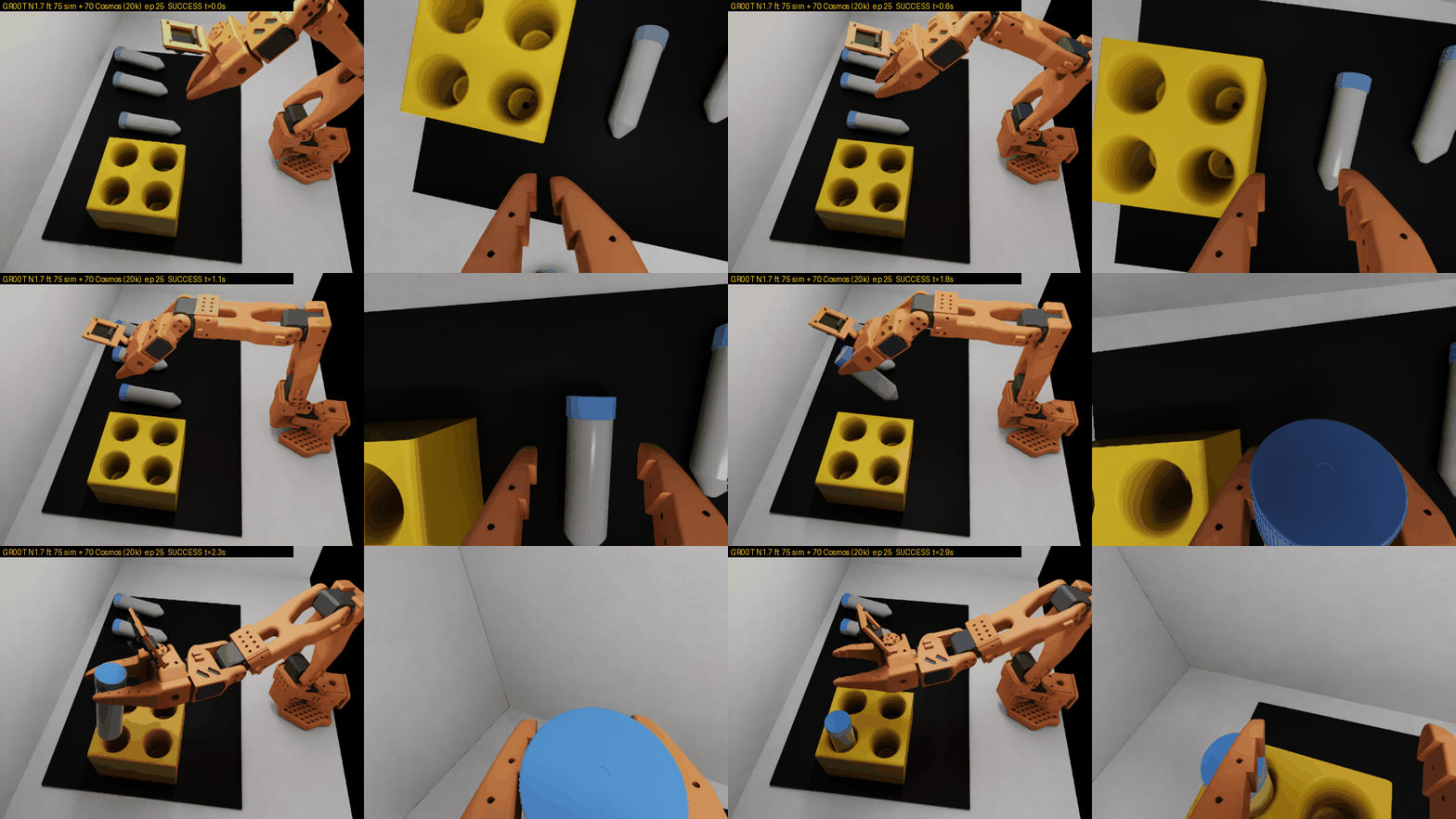
Video 1. After post-training — GR00T N1.7 reaches for the vial, grasps it, and places it in the rack (front and wrist camera views, episode 25, success at t = 2.9 s).
The vial task is only an example. The repository, the presets and the measurements in this post are meant as a reference for training VLA policies with LeRobot on Amazon SageMaker AI, for your own robot, task and dataset.
Why Amazon SageMaker AI for Physical AI training
Post-training a VLA model is infrastructure-heavy work. The runs are GPU-bound, they can stretch from minutes on a single instance to hours across several nodes, and the development pattern swings between two modes: short, frequent experiments while you settle on the dataset mix, the batch size, and which parts of the model to fine-tune, and longer runs that take a chosen configuration all the way to a usable checkpoint. Amazon SageMaker AI handles the infrastructure for both modes. It provisions the GPU instances, configures the drivers and networking, pulls your container, moves artifacts to Amazon Simple Storage Service (Amazon S3), and tears the compute down when the work is done. Amazon SageMaker AI offers two ways to run training, and this post shows both with the same container image and training script.
Amazon SageMaker Training Jobs are fully managed. Each job provisions its instances on demand, pulls the container from Amazon Elastic Container Registry (Amazon ECR), runs your training script, uploads the result to Amazon S3, and terminates everything when it finishes, so there is no cluster to operate and no idle compute between runs. Jobs scale from one GPU to multi-node distributed training (by default up to 20 instances per job and 5 days per job, both adjustable), and you can resume them from checkpoints in Amazon S3. This fits teams that want to run experiments, sweeps and production training without managing infrastructure.
Amazon SageMaker HyperPod provides persistent clusters orchestrated with Amazon Elastic Kubernetes Service (Amazon EKS) or Slurm, for teams that operate their own training platform and want Kubernetes or Slurm-level control. A health-monitoring agent runs on every node; when hardware faults, HyperPod reboots or replaces the instance and resumes the job from the last checkpoint. This resiliency matters most for large clusters and multi-day runs, where the chance of a hardware failure during a run grows with the number of nodes. HyperPod also provides observability dashboards and task governance, which divides a shared cluster into quotas and priorities across teams.
Choose Training Jobs if you want a fully managed service, and HyperPod if your team already runs Kubernetes or Slurm and wants a persistent cluster. Both use the same container image and training script.
Introducing Hugging Face LeRobot
We use LeRobot, Hugging Face’s open-source library for real-world robotics. LeRobot offers a hardware-agnostic, Python-native interface that spans everything from low-cost arms to full humanoids, together with the tooling to record, store, and share the data those robots produce. It is designed to make datasets and pretrained models easy to share across the community.
LeRobot organizes robot learning around a four-step loop:
- Teleoperate: a person controls the robot remotely, for example by moving a second “leader” arm that the robot copies, or with a keyboard or phone, to show it how to do the task.
- Record: each demonstration is saved as synchronized camera video, joint states and actions in the standardized LeRobotDataset format.
- Train: a policy network learns to predict the demonstrated actions from the camera images and joint states.
- Deploy: the trained policy runs on the robot and performs the task on its own.
Because the dataset format is standardized and streams directly from the Hugging Face Hub, you can train on an existing community dataset as easily as on one you recorded yourself, which is what we do here.
LeRobot also supports many policies through one command-line interface. It wraps established pipelines — NVIDIA Isaac GR00T, π₀ and π₀.₅, SmolVLA, and lightweight imitation-learning models like ACT — behind the same handful of CLI commands, so switching from a small ACT baseline to a full GR00T VLA is a change of one flag rather than a rewrite. Data flows in and out through the Hub with hf download and hf upload, training runs through lerobot-train, and evaluation runs through the same framework that recorded the data. This lets one container image train many different policies on Amazon SageMaker. This post uses LeRobot 0.6.1, the latest release at the time of writing.
Solution overview
One container image and one launcher script fine-tune various robot policies — tested with NVIDIA GR00T N1.7, π₀.₅, and ACT — on LeRobot 0.6.1, and they run unchanged on either Amazon SageMaker Training Jobs or Amazon SageMaker HyperPod, from a single GPU up to multiple nodes connected with Elastic Fabric Adapter (EFA). The repository has two directories, one per service:
lerobot-vla-training-sagemaker/
├── training-jobs/   # container image, SDK v3 launcher, train.sh, per-model presets
└── hyperpod/        # PyTorchJob template + launcher that runs the SAME image and train.sh on EKS
The design principle is that the training code never changes between backends (Amazon SageMaker Training Jobs or Amazon SageMaker HyperPod). A single Docker image carries LeRobot 0.6.1 and its dependencies, and a single entrypoint script, train.sh, runs inside the container: it reads the compute topology from the environment, resolves where the dataset lives, handles checkpoint resume, and then launches lerobot-train — directly on one GPU, or through accelerate launch for data-parallel training across many. The only thing that differs between the two backends is how the image gets launched: a Amazon SageMaker Python SDK v3 ModelTrainer call for a Training Job, or a Kubeflow PyTorchJob manifest applied with kubectl on HyperPod EKS. Each policy is described by a small preset file in training-jobs/src/presets/ (act.env, groot.env, pi05.env) that carries its --policy.* flags, its default batch size, and whether it supports LoRA, which keeps the model-specific detail out of the shared launch path. ACT, π₀.₅ and GR00T N1.7 are the policies we validated. To train another policy that LeRobot supports, such as SmolVLA, add a preset file with its --policy.* flags and pass its name to --model.
Example dataset
The code works with any dataset in LeRobot v3 format. For your own use case you would record demonstrations of your robot and task and point the training job at them with --dataset-repo-id, or --dataset-s3-uri for a dataset in Amazon S3. In this post we use the workshop as the example: its base dataset sreetz-nv/so101_teleop_vials_rack_left contains 75 teleoperation episodes, recorded in Isaac Lab, of the SO-101 picking up a vial and placing it in the rack. The workshop publishes one more dataset per sim-to-real strategy, and each is also a single flag change:
_sim_and_real: the 75 simulated episodes plus 5 recorded on the real robot, for co-training_augment_02and_cosmos_70: plus 7 or 70 Cosmos-augmented episodes
The Collecting a dataset section of the walkthrough below describes how to record your own.
Choosing a GPU
The instance you need depends on the model and on which parts of it you train. We ran each model on three GPU sizes: 24 GB (NVIDIA L4 in ml.g6, A10G in ml.g5), 48 GB (L40S in ml.g6e) and 96 GB (RTX PRO 6000 Blackwell in ml.g7e). The table shows what trains on each size and the peak GPU memory we measured on the example dataset (two cameras at 640×480) at the batch size shown. Datasets with more or larger cameras need more memory.
| Model | 96 GB (ml.g7e) | 48 GB (ml.g6e) | 24 GB (ml.g6 / ml.g5) |
|---|---|---|---|
| ACT | 15 GB @ batch 32 | 15 GB @ batch 32 | 15 GB @ batch 32 |
| GR00T N1.7 (projector + diffusion head, backbone frozen) | 41.5 GB @ batch 32 | 39 GB @ batch 16 | projector only (21.5 GB @ batch 4) |
| π0.5 (all weights) | 41 GB @ batch 16 | 40.5 GB @ batch 8 | LoRA (10.7 GB @ batch 4) |
ACT fits on all three sizes. On 48 GB and above, GR00T N1.7 trains its projector and diffusion head while its vision-language backbone stays frozen; on 24 GB only the projector fits. π₀.₅ trains all of its weights on 48 GB and above and uses LoRA on 24 GB. π₀.₅ keeps its weights in bf16, as in the LeRobot recipe (--policy.dtype=bfloat16).
As a starting point, we recommend a 24 GB GPU (ml.g6.xlarge or ml.g5.xlarge) for ACT, a single 96 GB GPU (ml.g7e.2xlarge) for GR00T N1.7, and a 48 GB GPU (ml.g6e.xlarge) or a 96 GB GPU (ml.g7e.4xlarge) for π₀.₅. The 24 GB options for GR00T and π₀.₅ train only part of the model and are for testing the setup, not for final runs.
Training time
The following table shows how long one 20,000-step post-training run on the example dataset took on Training Jobs. Use it to plan time and budget. It isn’t a speed benchmark. A step is one weight update, and each step processes one batch of samples. Each row uses a batch that fits in that instance’s GPU memory, so the runs process different numbers of samples. The projector-only and LoRA rows also train only part of the model, so each step does less work. To compare training speed, use the Samples/sec column.
| Model | Method | Instance | Batch size | Time for 20,000 steps | Samples processed | Samples/sec |
|---|---|---|---|---|---|---|
| GR00T N1.7 | Standard | ml.g7e.2xlarge |
32 | 3.4 h | 640,000 | ~52 |
| GR00T N1.7 | Standard | ml.g6e.2xlarge |
16 | 4.0 h | 320,000 | ~22 |
| GR00T N1.7 | Projector only | ml.g6.2xlarge |
4 | 2.8 h | 80,000 | ~8 |
| π0.5 | Standard | ml.g6e.xlarge |
8 | 10.9 h | 160,000 | ~4 |
| π0.5 | LoRA | ml.g6.4xlarge |
4 | 11.4 h | 80,000 | ~2 |
Samples/sec is approximate, calculated as batch × 20,000 ÷ run time.
A smaller batch changes the training result, not just the run time. At batch 4, 20,000 steps process one-eighth as many samples as at batch 32, and each update is noisier. How many steps you need depends on your dataset and batch size.
Multi-GPU and two-node EFA training run with the same commands on both backends, as shown in the Training a policy section below.
Walkthrough
The walkthrough has four parts. First you build the container image once and push it to Amazon ECR. Then you get a dataset: use a published one, record your own by teleoperation, or collect it in simulation with the agentic teleoperation sample. Then you launch training on whichever backend suits you using the same image. Finally you evaluate the resulting checkpoint.
A few prerequisites are common to both backends:
You need a Hugging Face token with the gates accepted for the GR00T and π₀.₅ backbones depending on which policy you want to post-train (nvidia/Cosmos-Reason2-2B and google/paligemma-3b-pt-224); ACT needs no token. Review the license of each base model before commercial use: GR00T N1.7 under the NVIDIA Open Model License (see the model card), and π₀.₅ under the Gemma Terms of Use.
You need an Amazon SageMaker execution role that sagemaker.amazonaws.com can assume, with permission to pull from Amazon ECR and read and write Amazon S3. And for multi-node EFA training you need a VPC subnet set and a security group that allows all traffic to itself, so the nodes can talk to each other over the fabric.
You build the image from the training-jobs directory. The Dockerfile starts from the AWS Deep Learning Container for PyTorch training and layers LeRobot 0.6.1 on top; a single script builds it for linux/amd64 and pushes it to Amazon ECR, printing the image URI you’ll pass to every launch afterward.
git clone https://github.com/aws-samples/generative-ai-on-amazon-sagemaker.git
cd generative-ai-on-amazon-sagemaker/examples/lerobot-vla-training-sagemaker/training-jobs
pip install "sagemaker>=3.22" boto3
export AWS_REGION=us-east-2
./build_and_push.sh                                      # builds + pushes to ECR, prints TRAINING_IMAGE_URI
export TRAINING_IMAGE_URI=<acct>.dkr.ecr.us-east-2.amazonaws.com/lerobot-vla:0.6.1
export SAGEMAKER_ROLE_ARN=arn:aws:iam::<acct>:role/<role>
export HF_TOKEN=hf_xxx                                   # needed for groot and pi05
With the image in Amazon ECR and those few environment variables set, each run is a single command.
Collecting a dataset
Training needs demonstrations in LeRobot v3 format, read from the Hugging Face Hub or Amazon S3. You can use a published dataset, such as the workshop’s datasets used in this post. You can record your own by teleoperating the robot, physical or in a simulator, with LeRobot’s recording tools; the workshop recorded its datasets this way in Isaac Lab. Or you can let an AI agent operate the robot in simulation and record episodes unattended. The rest of this section shows that last approach.
Agentic teleoperation in simulation
The companion sample Simulation Robot Teleoperation Platform uses an AI agent as the operator. One cdk deploy creates a GPU Amazon Elastic Compute Cloud (Amazon EC2) instance that runs the same NVIDIA Sim-to-Real SO-101 workshop scene used throughout this post, and a Strands agent on Amazon Bedrock drives the arm. The agent controls the simulated robot; it looks at the scene, picks a vial, stands it in a free slot, and records the episodes automatically. It calls manipulation primitives for picking a vial and placing it in a slot, each one verified against the simulator’s own measurements, and falls back to low-level gripper moves when a primitive declines the layout it is given.
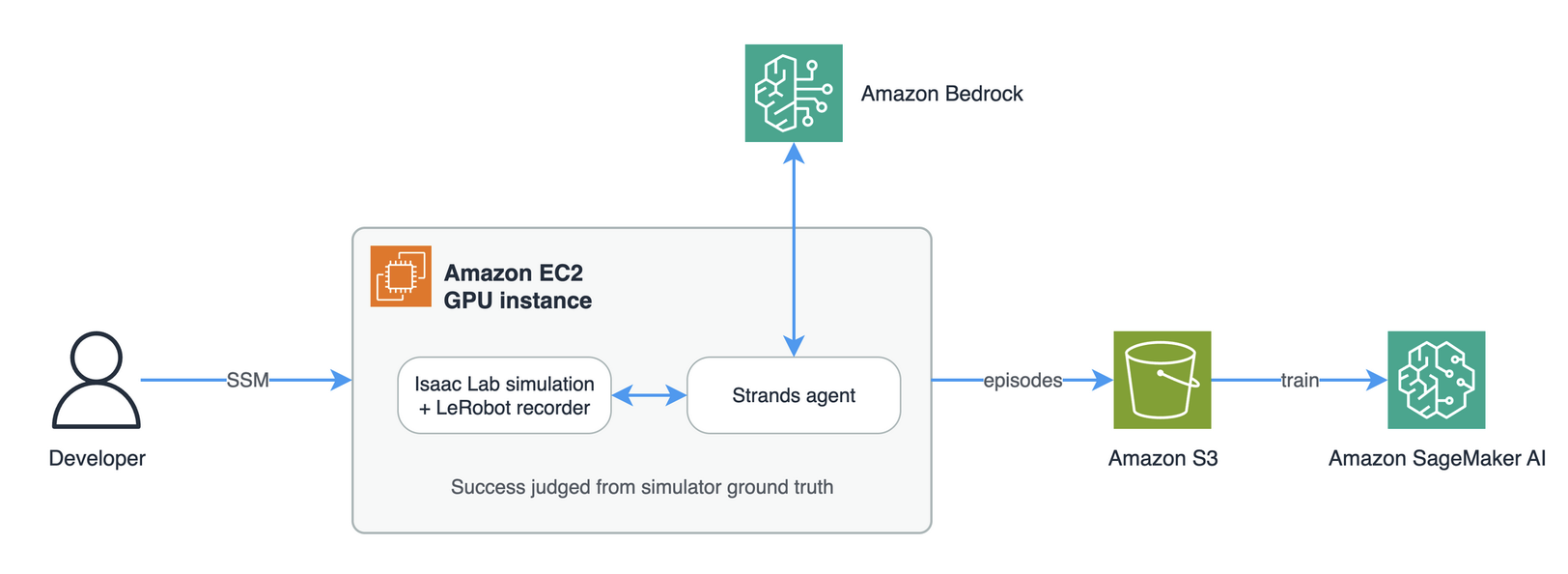
Figure 1. Architecture of agentic data collection with the Simulation Robot Teleoperation Platform.
The agent records episodes unattended. After the agent finishes, the episode runner checks the simulator’s ground truth: whether a vial that started on the mat now stands seated and upright in a rack slot with nothing still held, and writes that verdict into the episode’s manifest. Every episode is published to an Amazon S3 bucket with its label, failures included, so you can filter on the manifest when you build the training set.
A coding agent on your own workstation can drive the whole collection process: bring the simulator up, change the scene to randomize a batch, launch the run, and pull the results. The stack creates a least-privilege AWS Identity and Access Management role for that agent, scoped to the instance and the dataset bucket it needs, so the agent works through AWS Systems Manager with no long-lived credentials and no inbound SSH.
You need an AWS account with Amazon Bedrock model access enabled for the model you plan to use, the AWS Command Line Interface and AWS CDK CLI, and Python 3.9 or newer. The simulator, the agent and the recorder all run on the instance the stack creates, so there is no local GPU requirement and nothing else to install. Follow the instructions in Simulation Robot Teleoperation Platform repository to deploy it.
After the deployment, you drive the instance from your workstation over AWS Systems Manager. There is no inbound SSH rule and no key to manage. Start the simulator, confirm the environment server is answering, run the agent’s preflight, then collect episodes:
scripts/remote simteleop-up                 # simulator container + environment server, headless
scripts/remote simteleop-status             # 3 vials, 4 free slots
scripts/remote simteleop-agent --check      # dependencies, environment server, one Bedrock call
scripts/remote --detach ep1 simteleop-agent --episodes 50 --out /home/ubuntu/simteleop/runs/ep1
scripts/remote --wait ep1                   # ends with RESULT: n/50 episodes succeeded by ground truth
Each episode resets the scene with its own seed and builds a fresh agent with no memory of earlier episodes, so the episodes stay independent. Budget about three minutes per episode; mostly due to model latency. --model takes any Amazon Bedrock model id, so you can compare models as operators — the sample defaults to global.openai.gpt-6-astra and runs Anthropic Claude models with the same command.
Publishing syncs the dataset and the run logs to the stack’s Amazon S3 bucket:
scripts/remote simteleop-publish agent_vials_to_rack /home/ubuntu/simteleop/runs/ep1
scripts/remote --outputs                    # prints the bucket name
scripts/remote --stop                       # the GPU instance is billed while running
# The training launcher (next section) then reads the dataset straight from there:
python launch_training_job.py --model groot --instance-type ml.g7e.2xlarge \
--dataset-s3-uri s3://<ExchangeBucketName>/datasets/agent_vials_to_rackIf your robot is not an SO-101 or you want a different task, the embodiment-specific code is confined to three files: scene ground truth, the primitives, and the joint tables in the shared protocol. The repository also ships step-by-step skills for coding agents covering how to add a primitive, debug a grasp, and port the platform to another robot or scene.
Training a policy
On Amazon SageMaker Training Jobs
The Training Jobs path launches through launch_training_job.py, a thin wrapper over the SageMaker Python SDK v3 ModelTrainer. You choose a model and an instance type, and the launcher assembles the job, hands your source directory to Amazon SageMaker (which syncs it into the container at start, so editing the training script never triggers a rebuild), and submits it.
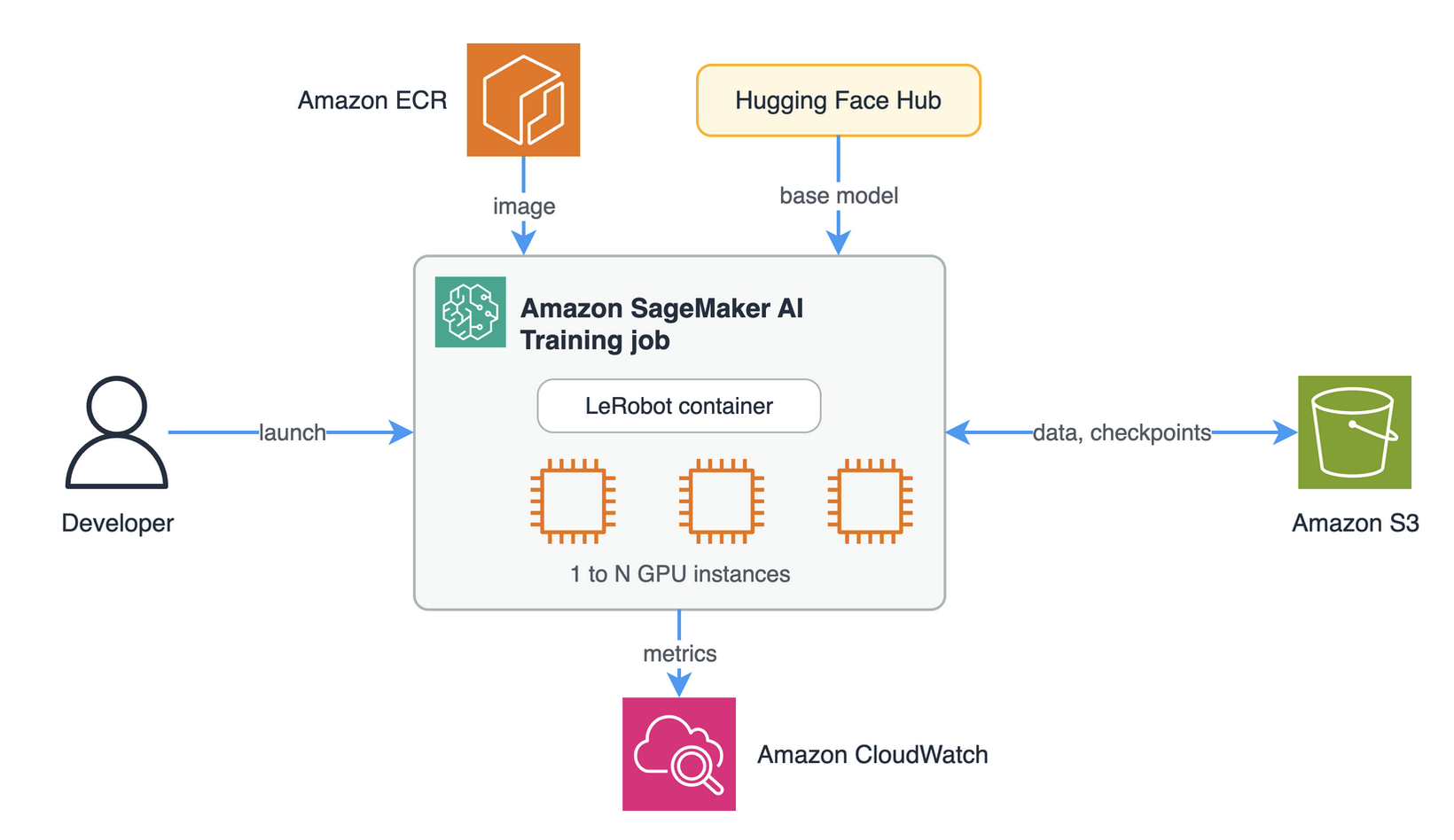
Figure 2. Architecture of LeRobot training on Amazon SageMaker Training Jobs.
On a single 96 GB Blackwell card, a fine-tune of any of the three policies is one line:
python launch_training_job.py --model groot --instance-type ml.g7e.2xlarge
python launch_training_job.py --model pi05  --instance-type ml.g7e.4xlarge
python launch_training_job.py --model act   --instance-type ml.g7e.2xlarge
Smaller GPUs need only a different instance type and, where memory is tight, a smaller batch or LoRA. A fine-tune drops to half batch on a 48 GB L40S, and you can switch on parameter-efficient fine-tuning with –peft:
python launch_training_job.py --model groot --instance-type ml.g6e.2xlarge --batch-size 16
python launch_training_job.py --model pi05  --instance-type ml.g6.4xlarge --peft --batch-size 4
Instead of a single instance type you can pass a comma-separated list in priority order. Amazon SageMaker starts the job on the first type in the list that has capacity. Use a batch size that fits the smallest GPU in the list:
python launch_training_job.py --model groot --instance-type ml.g7e.2xlarge,ml.g7e.4xlarge,ml.g6e.2xlarge --batch-size 16Passing an instance count above one, together with the subnets and security group that enable EFA, turns the same job into a data-parallel run across nodes:
python launch_training_job.py --model act --instance-type ml.g6.12xlarge --instance-count 2 \
       --subnets subnet-a,subnet-b --security-group-ids sg-xxxx
The dataset reaches the job in one of two ways: By default the container pulls the dataset from the Hugging Face Hub by its repository ID — a few hundred megabytes for the 75-episode dataset in this example, downloaded fresh at the start of each job. Alternatively you stage the dataset in Amazon S3 once and pass its URI, and Amazon SageMaker mounts it as an input channel before the container starts, so the run needs no internet access at all. To resume a run, launch it again with the same job name; train.sh reconstructs the latest checkpoint and continues, and any flags you add still take effect. Add --spot to use managed Spot training; if the instance is reclaimed, the job resumes from the last checkpoint in Amazon S3. --spot cannot be combined with an instance list.
Every job publishes its training loss, gradient norm, learning rate, and step timing as Amazon CloudWatch metrics, charted live on the job’s page and returned as final values when the job completes (see the loss chart in the evaluation section below); GPU, CPU, memory, and disk utilization are published under the same namespace. A small results.py helper summarizes status, wall-clock time, and peak GPU memory across a batch of jobs.
On Amazon SageMaker HyperPod (EKS)
Use this path if your team operates a HyperPod cluster, for example to share capacity across many jobs with task governance or to run large multi-node jobs with automatic node replacement. You don’t change any training code to switch.
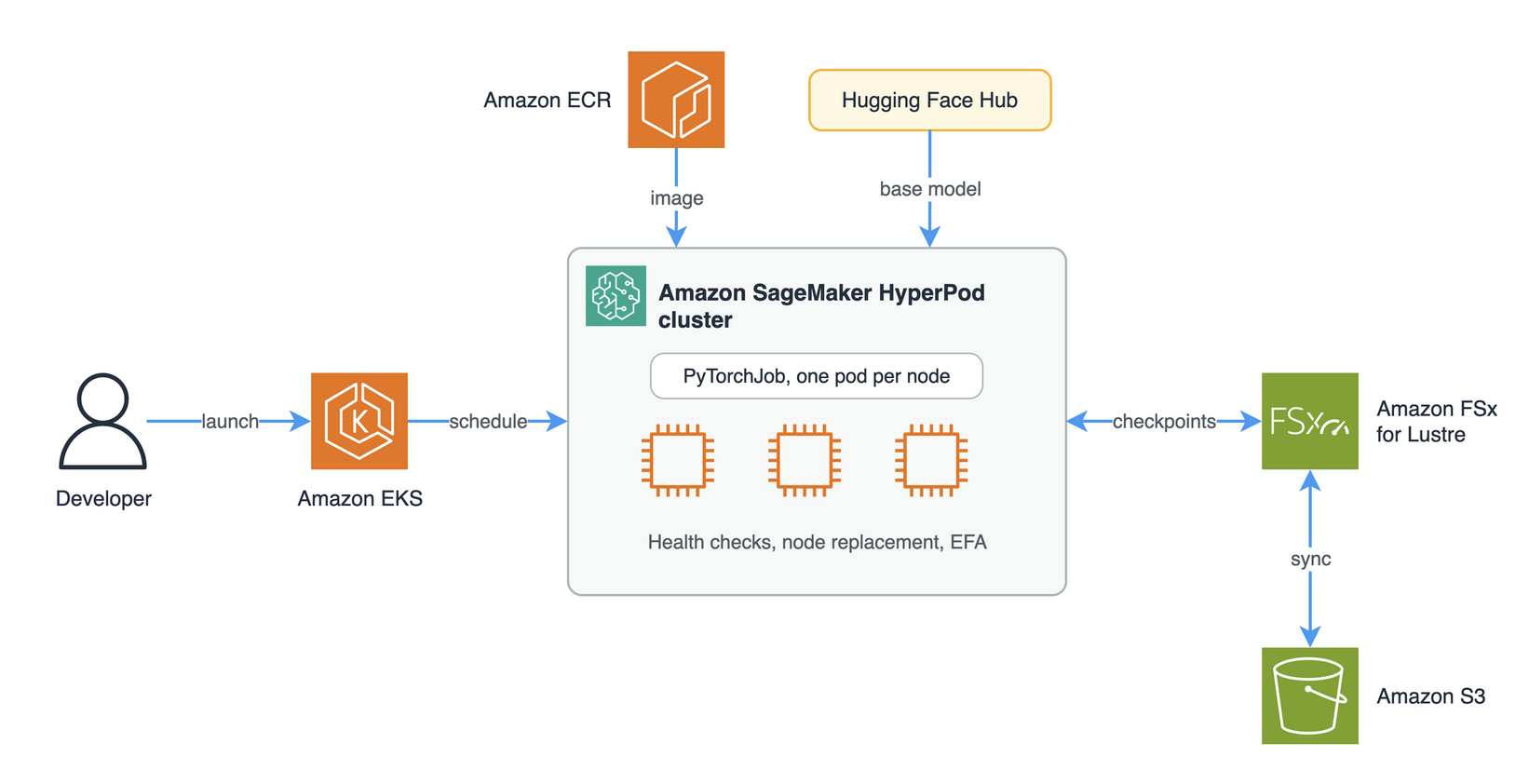
Figure 3. Architecture of LeRobot training on Amazon SageMaker HyperPod EKS.
The HyperPod path runs the identical image and train.sh, this time as a Kubeflow PyTorchJob on an Amazon EKS-orchestrated cluster: one pod per node, the requested GPUs of the node bound to that pod, accelerate launch inside it, and EFA interfaces requested for multi-node runs. The cluster needs the Kubeflow Training Operator and the NVIDIA and EFA device plugins — all standard on HyperPod EKS — plus a shared-storage PVC (default fsx-claim) where checkpoints and the Hugging Face cache live so that every pod and every worker reads the dataset from the same place. You reuse the Amazon ECR image from the Training Jobs build by passing it as IMAGE.
A launcher script renders the manifest for a given model, instance type, node count, GPUs per node (--gpus) and EFA interfaces per node (--efa), then applies it. You take the GPU and EFA counts from the Amazon EC2 specs of the instance type:
cd ../hyperpod
export IMAGE=<acct>.dkr.ecr.<region>.amazonaws.com/lerobot-vla:0.6.1 HF_TOKEN=hf_xxx
./launch.sh --model groot --instance-type ml.g7e.2xlarge                                # 1 node, 1 GPU
./launch.sh --model act   --instance-type ml.g6.12xlarge --gpus 4 --efa 1 --nodes 2      # 2 nodes × 4 GPUs, DDP over EFA
kubectl get pytorchjob
kubectl logs -f <job>-master-0
Under the hood, the Kubeflow operator injects the pod-level topology — master address and port, the pod’s rank, and the total pod count — and train.sh translates that into an accelerate launch across the right number of processes and machines. For multi-node runs the launcher adds the EFA resource request from --efa to the pod spec, and you can confirm the fabric is in use by looking for the Libfabric plugin line in the master log. When you’re done, scale the instance group back to zero, because HyperPod bills for every running node whether or not a job occupies it.
Run inference and evaluate the policy
With a checkpoint in hand, the question is whether post-training improved the policy. We answer it in three ways: the training loss, the open-loop predictions on held-out episodes and closed-loop rollouts in simulation.
The first signal comes from training itself. We watch the training loss and stop when it has fallen far enough and flattened, using the flow-matching loss on the predicted actions (L1 for ACT) as the quantity to minimize. Because that loss streams to Amazon CloudWatch throughout the run, we can read convergence directly off the chart and decide when a checkpoint is worth evaluating rather than guessing at a step count in advance.
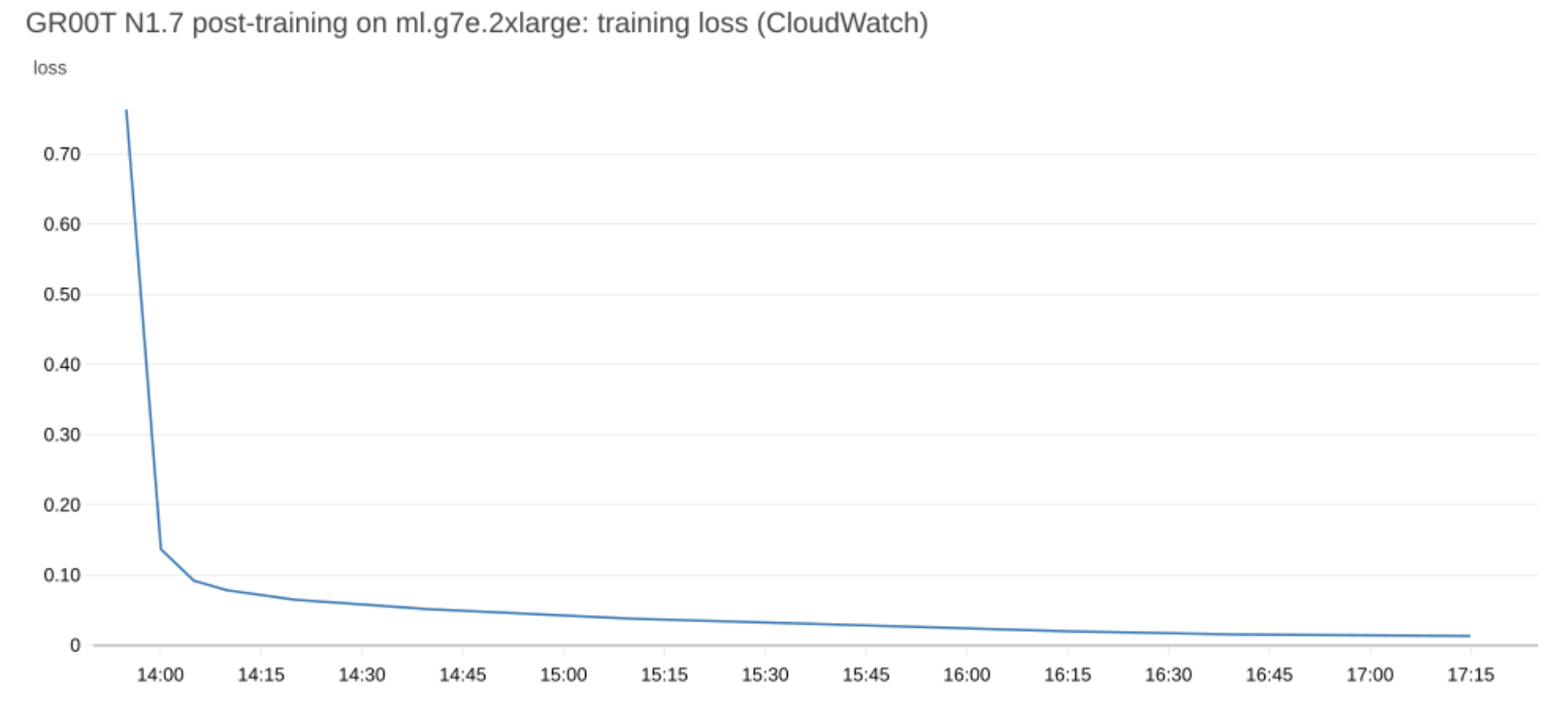
Figure 4. Training loss of the GR00T N1.7 post-training job, published as a Amazon CloudWatch metric by the training job.
The second signal is the model’s predictions on demonstrations it has never seen. We hold out the last five of the 75 episodes from training (--dataset.eval_split=0.06), feed the policy the recorded camera frames and joint states of each one, and compare the actions it predicts with the ones the operator commanded. Driving a kinematic model of the SO-101 with those predictions makes the difference visible: the base model’s arm takes the wrong poses and opens and closes the gripper at random, while the post-trained model’s arm follows the demonstration. Across the five held-out episodes, the action error (MSE) drops from 770 to 39, about 20x lower. These numbers are from the example dataset and will differ for other datasets and tasks.
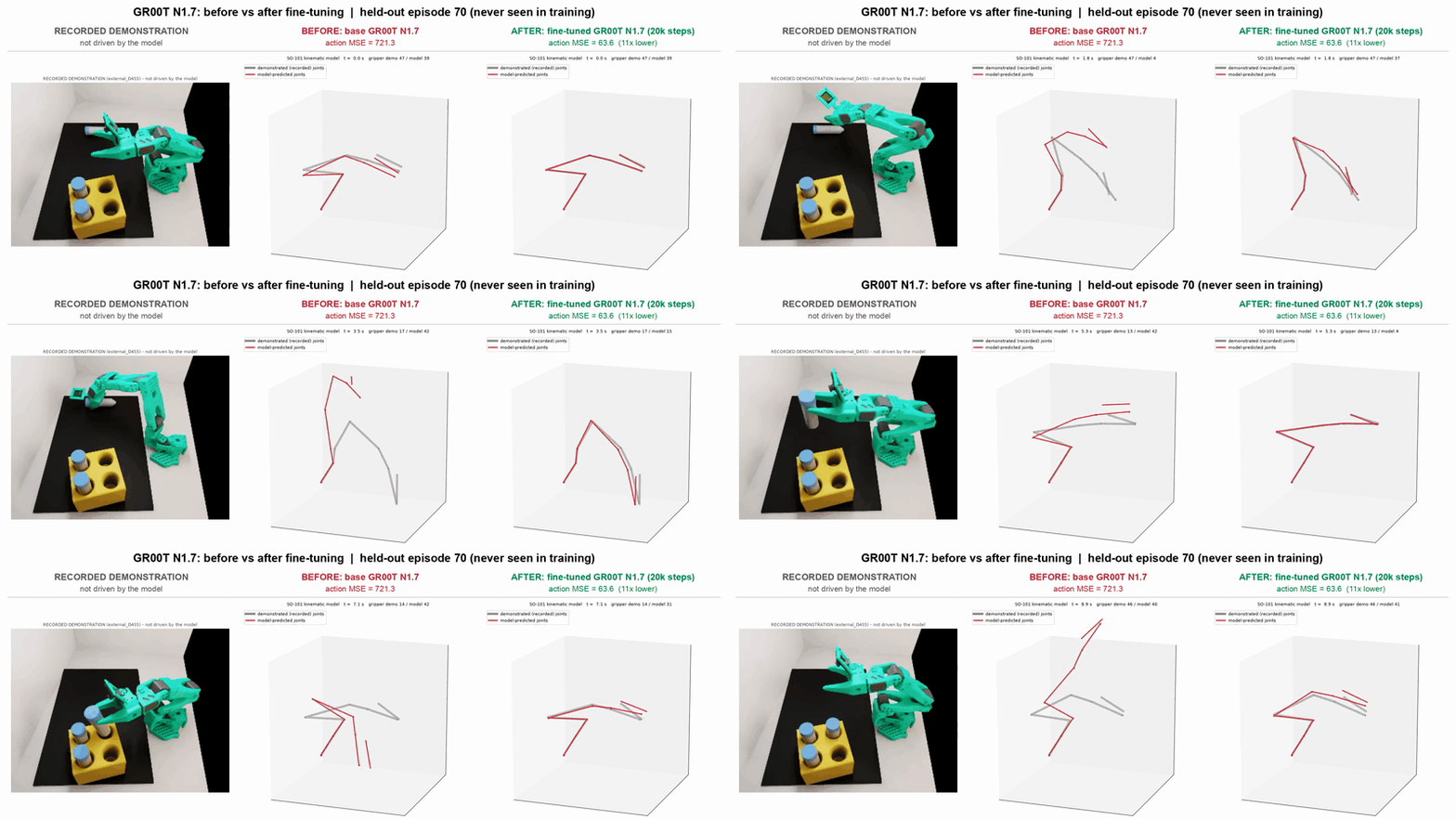
Video 2. Before and after post-training on a held-out demonstration (episode 70, never seen in training). Left: recorded demonstration. Middle and right: joint positions predicted by the base and the post-trained GR00T N1.7 (red), overlaid on the demonstrated joints (grey) on a kinematic SO-101 model.
The third signal is behavioral. We run the policy on the pick-and-place task and record what the robot does. The base GR00T N1.7 model is not able to control the robot successfully on this task. After post-training on the vial dataset, it picks up the vial and places it in the rack as shown in Video 1 in the introduction.
We evaluate the post-trained checkpoint in the same way as the workshop: closed-loop in Isaac Lab, with the Lerobot-So101-Teleop-Vials-To-Rack-Eval task. An episode counts as a success when a vial enters a rack slot before the time limit.
Each signal answers a different question. Training loss shows that the optimization converged, not that the policy can do the task. Open-loop evaluation compares predicted actions with recorded ones on episodes the model never saw, but every prediction starts from the recorded state, so errors do not compound. Closed-loop rollouts feed the policy’s own actions back into the simulator, which is how the robot will run on hardware, so they are the test that matters before deployment.
Cost considerations and clean-up
The two backends have different cost profiles: Amazon SageMaker Training Jobs bill only for the wall-clock duration of each job and shut the instances down automatically when it ends, so there is nothing to clean up and no idle cost between experiments. With --spot, Training Jobs bill at managed Spot prices. Amazon SageMaker HyperPod, by contrast, holds a persistent cluster, and it bills for every running node whether or not a job is using it. The most effective thing you can do on HyperPod is scale the instance group back to zero the moment your runs finish. On HyperPod, the FSx for Lustre file system that holds checkpoints and the Hugging Face cache is billed for its provisioned capacity whether or not nodes are running. To keep checkpoints in Amazon S3 without copying them by hand, link the file system to an Amazon S3 bucket with a data repository association, which exports new and changed files automatically (not available on Scratch 1 or Lustre 2.10 file systems). Delete the file system when you no longer need the cluster. Beyond compute, remember that trained checkpoints accumulate in Amazon S3 and that the container image sits in Amazon ECR, so prune the artifacts and images you no longer need.
If you also collected data with the agentic teleoperation platform, that stack bills an Amazon GPU EC2 instance for every hour it is running, whether or not an episode is in progress. Stop the instance with scripts/remote --stop as soon as a collection run ends, and destroy the stack when you no longer need it.
Conclusion
Post-training a VLA model does not require a custom training stack or a permanent GPU cluster. By pairing Hugging Face LeRobot with Amazon SageMaker AI, you get a pipeline where one container image and one training script fine-tune GR00T N1.7, π₀.₅, or ACT, or any other base model supported by the LeRobot framework on your dataset, run unchanged from a single GPU to multiple EFA-connected nodes, and run on fully managed Training Jobs or on a HyperPod cluster. LeRobot provides the training code, and Amazon SageMaker AI runs it. After a few hours of fine-tuning, the model completes the task in simulation. The full code is in the accompanying repository; to use it for your own task, point it at your LeRobot dataset.
References
- Companion sample for model training: lerobot-vla-training-sagemaker
- Companion sample for dataset generation: sample-agentic-simulation-robot-teleoperation
- NVIDIA learning path — Train an SO-101 Robot From Sim-to-Real With NVIDIA Isaac
- Hugging Face LeRobot — documentation and imitation-learning / train-a-policy guide
- Related AWS blogs: