AWS Security Blog
Architecting a secure landing zone in the AWS European Sovereign Cloud
The AWS European Sovereign Cloud is a new, independent cloud for Europe, physically and logically separate from existing AWS Regions and operated within the European Union (EU). It provides the same services, features, and APIs as AWS commercial Regions, but runs as a distinct AWS partition (aws-eusc), with its own control plane, AWS Identity and Access Management (IAM), billing, console, and service endpoints. Understanding the partition boundary is the key that unlocks correct answers to questions about billing roll-ups, single sign-on (SSO), cross-account roles, AWS Direct Connect, and image distribution. In this post, we show you how to architect a secure, scalable landing zone in the AWS European Sovereign Cloud. We cover account structure and governance, identity managed as infrastructure as code (IaC), centralized logging to a security and event management (SIEM) tool, data protection, network and perimeter design, secure continuous integration and delivery (CI/CD) and artifact distribution, and incident response. Throughout, we map the design to the AWS Security Reference Architecture (AWS SRA) and the AWS Well-Architected Framework, and we call out which behaviors are platform boundaries of a sovereign partition and which are configuration choices you can adapt.
If you are evaluating compliance readiness alongside your landing zone build-out, see the companion post Landing Zone Accelerator Independent Assessment Report for C5:2020 now available on AWS Artifact. This post covers how to align with C5:2020 criteria and provides an independent assessment report and compliance workbook, resources that complement the architectural patterns described here.
The foundational concept: EUSC is a partition
AWS groups Regions into partitions. Every Region is in exactly one partition, and each partition has one or more Regions. Partitions have independent instances of AWS Identity and Access Management (IAM) and provide a hard boundary between Regions in different partitions. AWS commercial Regions are in the aws partition, Regions in China are in the aws-cn partition, and AWS GovCloud Regions are in the aws-us-gov partition. The AWS European Sovereign Cloud is the aws-eusc partition, with its first Region in Brandenburg, Germany (eusc-de-east-1).
Some AWS services provide cross-Region functionality, such as Amazon S3 Cross-Region Replication or AWS Transit Gateway Inter-Region peering. These capabilities work only between Regions in the same partition. You can’t use IAM credentials from one partition to interact with resources in a different partition. There are practical differences that impact your architecture, shown in the following table:
| Dimension | Commercial AWS (aws) | AWS European Sovereign Cloud (aws-eusc) |
| ARN prefix | arn:aws: | arn:aws-eusc: |
| Console or endpoint domain | amazonaws.com | amazonaws.eu |
| AWS Organizations | One organization in the partition | A separate, independent organization |
| AWS IAM Identity Center | Instance in the partition | A separate instance in the partition |
| Billing | Consolidated in the partition’s payer | A separate payer and billing system (EUR currency) |
| Cross-partition features and services such as: sts:AssumeRole, VPC peering, Transit Gateway, AWS RAM, Amazon S3 replication | Cross-Region features and functionality | Not available across the aws and aws-eusc boundary |
Every AWS Region is sovereign by design: if you find yourself architecting across Regions, note that this partition boundary means that the centralization—one organization, one logging account, one identity source, one billing roll-up—is achievable within each partition. In the EUSC you operate an independent landing zone in aws-eusc that mirrors your commercial operating model. Where you need to bridge the two clouds (for example, a standard application CI/CD system in an AWS commercial Region deploying into EUSC), you integrate at the network or API layer with separate credentials for each partition, not with cross-partition trust. With these partition fundamentals in mind, the remainder of this post walks you through the considerations to build a production-ready landing zone in the EUSC. Each section addresses a critical layer of the architecture, starting with how to write partition-aware infrastructure code that works across both aws and aws-eusc, then moving into the organizational and governance controls that underpin everything else.
Cross-partition IaC
These Terraform and AWS CloudFormation IaC snippets demonstrate partition-aware Amazon Resource Name (ARN) construction—a pattern that helps ensure your infrastructure code works unchanged across AWS partitions (such as standard aws, GovCloud aws-us-gov, or European Sovereign Cloud aws-eusc).
In the case of using the same Terraform script from a commercial Region, ensure that arn:aws isn’t hard coded. This Terraform script derives the partition at deploy time so the same modules work in both AWS commercial Regions and the EUSC.
Account structure and governance
AWS Control Tower offers a straightforward way to set up and govern an AWS multi-account environment, following prescriptive best practices. AWS Control Tower orchestrates the capabilities of several other AWS services, including AWS Organizations, AWS Service Catalog, and AWS IAM Identity Center, to build a landing zone in less than an hour. Resources are set up and managed on your behalf.
We recommend following the AWS Security Reference Architecture (AWS SRA) multi-account model structure for a EUSC deployment. Use the management account only for governance, deploy universal security guardrails through service control policies (SCPs), resource control policies (RCPs), and service deployments (such as AWS CloudTrail) that will affect all member accounts in the organization.
Region-deny SCPs are commonly applied in commercial Regions, but aren’t required (at this time) in the EUSC because of the physically and logically separated nature of its design.
Other possible SCPs for the management OU:
- Service-level guardrails – Restrict which AWS services can be used, based on your compliance posture.
- Network perimeter controls – Enforce virtual private cloud (VPC) endpoints, deny public access patterns, and restrict egress.
- Encryption and key management – Require AWS Key Management Service (AWS KMS) managed keys for all data-at-rest services and enforce key policies aligned with your sovereignty requirements.
Note: As additional EUSC Regions or Local Zones become available, the partition boundary continues to enforce isolation from non-EUSC Regions. If you need to restrict usage to a subset of EUSC Regions (for example, only eusc-de-east-1 but not a future eusc-de-west-1), a Region-deny SCP would become relevant at that point.
Identity: IAM Identity Center as IaC, no direct payer access
IAM Identity Center is available in the AWS European Sovereign Cloud as an independent instance within the partition. You can connect it to your external identity provider (IdP)—Microsoft Entra ID, Okta, and so on—using SAML/SCIM, exactly as in AWS commercial Regions. If you already use Identity Center to federate in the commercial partition, you can point a second Identity Center integration at the same corporate IdP, so users keep one set of credentials. You manage permission sets, groups, and account assignments separately for each partition.
Manage permission sets and assignments as code
The following Terraform defines a permission set with both an AWS managed policy and an inline least-privilege policy, then assigns a group to a target account. Reproduce the aws_ssoadmin_account_assignment for each account or organizational unit (OU) mapping.
Because group membership comes from your IdP over SCIM, the IdP handles joiner, mover, and leaver, and access in EUSC updates automatically. No one receives direct access to the management account; all human access flows through IAM Identity Center permission sets assigned to non-management accounts.
Cross-account roles for governance, logging, and tooling
Cross-account roles within the EUSC partition work normally; this is how the logging and security-tooling accounts collect from workload accounts. Scope each trust policy to a specific principal and harden it with an external ID (for third-party tooling) and partition-aware ARNs.
A role in the aws partition can’t assume a role in aws-eusc (or the reverse).
Logging and monitoring: centralized in EUSC, exported to your SIEM
A sovereign logging architecture requires three things:
- A single, immutable store for all audit and operational logs
- A central security account that runs detective controls and correlates findings
- A reliable, in-partition path that feeds everything into your SIEM without data ever leaving the boundary.
In the subsections that follow, we walk through each layer: Centralized log collection in the Log Archive account, Amazon GuardDuty and AWS Security Hub administration through the Security Tooling account, and the pull-based SIEM integration pattern that keeps telemetry inside the EUSC partition.
Centralize logs in the Log Archive account
The Log Archive account holds the organization trail and a central log bucket as part of the landing zone. In the commercial AWS partition, global services like IAM route their CloudTrail events to us-east-1. In the EUSC, global services events are logged within the EUSC partition because the control plane is independent and located entirely within the EU.
Organization level detective services
GuardDuty and Security Hub are available in EUSC, but organization-wide auto-enable and some newer features might differ from commercial AWS features at any given time. Design the Security Tooling account as the delegated administrator where supported. If org-level auto-enable isn’t yet available, enable per-account through your IaC (AWS CloudFormation StackSets) so coverage is complete and code-managed. Treat the EUSC service and feature list as the source of truth and gate optional features behind a partition flag.
Network security and perimeter, including AWS Direct Connect
The AWS European Sovereign Cloud has its own sovereign AWS Direct Connect points of presence (PoPs), with dedicated networking infrastructure and connectivity from European providers, providing customers an autonomous network path into the partition. You terminate Direct Connect in a dedicated Network account and share connectivity to workload VPCs using Transit Gateway (with AWS RAM). A Direct Connect connection or Direct Connect gateway in the commercial partition can’t be extended into aws-eusc. To reach EUSC VPCs, you provision a separate Direct Connect connection that lands in the EUSC partition’s Network account. If your on-premises network already backhauls to AWS commercial Regions, you connect that network to EUSC with its own virtual interface or connection, or a site-to-site VPN. You don’t bridge the two AWS partitions through a shared Direct Connect gateway.
The following figure shows the recommended perimeter design in EUSC.
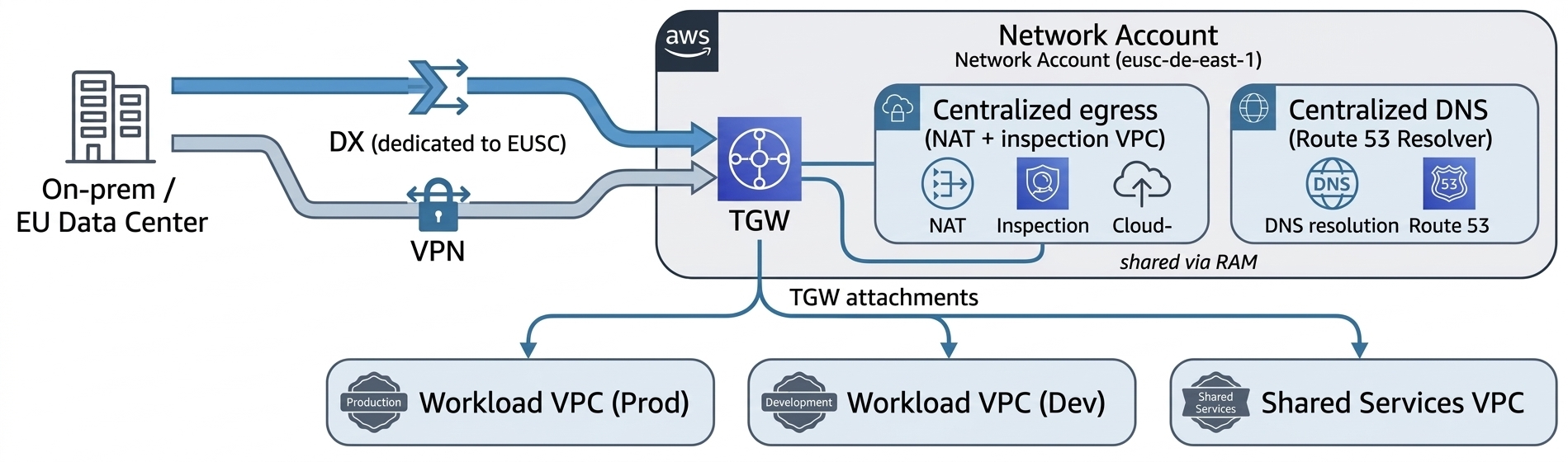
Figure 1: Recommended perimeter design in EUSC
The perimeter design includes:
- Centralized egress and inspection – Route workload egress through an inspection VPC in the Network account (gateway load balancer with your firewall of choice, or AWS Network Firewall. Keep workload VPCs private with no internet gateway.
- Private service access – Use VPC interface endpoints (VPCe) for AWS service calls so traffic stays on the AWS network within the partition. VPCe doesn’t cross partitions; expose any commercial-partition service to EUSC consumers over DX/VPN and an in-EUSC load balancer.
- DNS – EUSC has its own Amazon Route 53. For names that must resolve across clouds, use subdomain delegation or Resolver forwarding rules over your DX or VPN link rather than expecting hosted zones to be visible across partitions.
- Segmentation as code – Express segmentation with security groups referencing prefix lists and keep the EUSC IP ranges current from the partition’s published
ip-rangesfile in your firewall automation.
Data protection
AWS Key Management Service (AWS KMS) is available in EUSC; use customer managed keys for all sensitive data stores and enforce their use with SCPs and key policies. Where your residency or operational-autonomy requirements call for it, evaluate AWS KMS external and imported key material options available in the partition.
For workloads where regulation mandates that key material never resides within the cloud provider’s infrastructure, configure an AWS KMS External Key Store (XKS) in the EUSC Region. The XKS proxy connects AWS KMS to your EU-based hardware security module (HSM) (on-premises or hosted with an EU trust service provider); all encrypt and decrypt operations are performed by your external key manager. Note the trade-offs: increased latency, reduced availability SLA, and added operational burden. Reserve XKS for the subset of data where regulatory or contractual obligations explicitly require it.
The EUSC Region has achieved SOC 2, BSI C5 Type 1 attestation, and seven ISO certifications, including ISO 27001, 27017, 27018, and 27701. Reference these in your data protection evidence packages when demonstrating encryption-at-rest and key management controls to EU regulators.
Secure CI/CD and distributing images across the partition boundary
If you need to deploy existing images or binaries into EUSC (aws-eusc) from existing AWS commercial (aws) accounts, you can’t use cross-partition Amazon Elastic Container Registry (Amazon ECR) replication, Amazon Machine Image (AMI) copy, or Amazon Simple Storage Service (Amazon S3) replication. Instead, treat EUSC as an independent supply-chain destination:
- Container images – Build (or re-tag and re-sign) images and push to an Amazon ECR registry inside EUSC. ECR cross-Region replication works within the partition (useful as EUSC adds Regions or Local Zones), but the initial crossing from commercial is an explicit pipeline push using EUSC credentials. Sign images with a sovereign signing key and verify at deploy time.
- AMIs and images – Rebuild golden images in EUSC with EC2 Image Builder (run the pipeline natively in EUSC), or import virtual machine (VM) images using Amazon S3 in EUSC and
aws ec2 import-image. There is no direct cross-partition AMI copy. - Binaries and artifacts – Stage in an artifact bucket in the EUSC Shared Services account. Move packages across the boundary with
aws s3 syncor AWS DataSync over your DX or VPN, or using controlled export, then distribute within the partition using in-partition S3 replication to other EUSC Regions or Local Zones as they come online.
Remember that endpoints and ARNs use amazonaws.eu in the EUSC partition. IAM service principals always use amazonaws.com regardless of partition.
Replicating deployment code and pipelines
Run a native deployment plane in EUSC (AWS CodePipeline, AWS CodeBuild, AWS CodeDeploy, or your existing tool deployed in-partition) in the Shared Services account, with cross-account deploy roles into workload accounts. If a commercial-partition continuous-integration system must deploy into EUSC, give it separate credentials for each partition; the clean pattern is OIDC federation with two trust configurations, one for each partition, because no cross-partition role assumption exists.
For account vending and landing-zone-as-code, use Account Factory for Terraform (AFT) deployed in EUSC. AFT pipelines create accounts through AWS Control Tower, apply baseline guardrails, bootstrap the preceding partition-aware modules, and register OUs, giving you the accounts and account groups as code. Keep Terraform state for each partition in an in-EUSC Amazon S3 backend with an Amazon DynamoDB lock table; don’t share state across partitions.
The Landing Zone Accelerator on AWS (LZA) solution is an alternative deployment method that provisions a baseline security architecture and includes customizations for each partition, with consideration for service availability. A customized configuration baseline for European Sovereign Cloud was recently released and is accompanied by the LZA Compliance Workbook, which maps regional European security standards and international frameworks to over 200 security settings deployed by LZA.
Supported compared to by-design boundaries: A quick reference
| Capability | Status in EUSC | What to do |
| AWS Control Tower account vending, controls | Supported in-partition | Govern the EUSC Region; drive vending with AFT; re-register OUs after Region changes |
| AWS Control Tower–managed or self-managed IAM Identity Center | Configuration choice | Choose self-managed to own permission sets as code |
| Permission set creation and assignment as IaC | Supported | Manage with SCIM groups from your IdP |
| Identity Center single home and delegated admin for each partition | By-design behavior | Administer from one Region; non-issue in single-Region EUSC |
| Cross-account roles (governance, logging, tooling) | Supported within partition | Scope trust to specific principals and ExternalId |
| Cross-partition AssumeRole, VPC peering, TGW, RAM, Amazon S3 replication | Not available (security boundary) | Integrate at network or API layer with separate per-partition credentials |
| Billing roll-up across accounts and Regions | Supported within the EUSC org | Aggregate in a finance or governance account in-partition |
| Billing roll-up across the aws and aws-eusc boundary | Separate billing systems (EUR payer) | Keep cost analysis in-partition or in an EU-resident tool |
| Multi-Region image distribution (Amazon ECR, AMI, and Amazon S3) | Supported within partition | Push into EUSC first, then replicate in-partition |
| GuardDuty and Security Hub | Available—some org-auto-enable and features vary | Delegate admin where supported; per-account enable using IaC otherwise |
| CloudFront, Shield Advanced, Firewall Manager, Inspector | In planning at time of publication | Follow on AWS Builder Center (capabilities) for release updates |
Billing and cost governance
Roll up within the EUSC organization, not across partitions. Enable consolidated billing in the EUSC management account and deliver AWS Data Exports (Cost and Usage Report 2.0) to an S3 bucket in a dedicated finance or governance account in the Security or Infrastructure OU.
Set permissions so workload teams can query the curated data in that account; no one should be able to access the management or payer account directly. You can’t replicate billing data into the commercial partition; the EUSC has a separate payer (billed in EUR through the EU contracting entity).
Conclusion
Architecting in the AWS European Sovereign Cloud is, in most respects, architecting a second well-run AWS landing zone with one organizing principle that resolves nearly every design question: it’s an independent partition. Centralization of governance, identity, logging, and billing is fully achievable, but within the EUSC partition. The boundaries you encounter between commercial AWS and EUSC—no cross-partition roles, peering, replication, or billing roll-up—are the sovereignty guarantees doing their job.
Build the foundation as code. Use an AWS Control Tower landing zone driven by AFT, IAM Identity Center permission sets and assignments in Terraform federated to your corporate IdP, an immutable central log store, customer managed encryption keys constrained to the sovereign Region, and a Network account terminating a dedicated Direct Connect. Add a CI/CD plane that pushes images and artifacts into the partition with per-partition credentials. Keep every ARN partition-aware and every optional service behind a feature flag, and the same modules will serve both clouds.
To accelerate your build with additional enablement from AWS, explore the LZA Universal Configuration for European Sovereign Cloud on GitHub, which packages many of the patterns described in this post into a ready-to-deploy baseline. To complement your deployment with compliance readiness, the LZA Independent Assessment Report for C5:2020 evaluates how LZA’s security baseline maps to C5:2020 technical requirements, and you can download the report and the LZA Compliance Workbook from AWS Artifact.
Further reading
- AWS Security Reference Architecture (AWS SRA)
- AWS Well-Architected Framework and the Security Pillar
- AWS European Sovereign Cloud and European digital sovereignty and compliance overview
- Organizing your AWS environment using multiple accounts
- AWS Control Tower and Account Factory for Terraform (AFT)
- IAM Identity Center User Guide (EUSC)
If you have feedback about this post, submit comments in the Comments section below or start a thread on AWS re:Post.