AWS Security Blog
Introducing context-aware rules for AWS Network Firewall
AWS Network Firewall now supports context-aware rules, which match traffic by the AWS resources that send and receive it instead of by IP address. A rule can name a virtual private cloud (VPC), a subnet, a security group, or a transit gateway attachment. Rules that match on IP addresses have to keep up with every workload that scales out, is replaced, or moves. Short-lived workloads are the hardest to keep up with. A VPC-attached AWS Lambda function can scale out and start sending traffic before an updated IP list reaches the firewall. With context-aware rules, you can filter a function’s traffic by the security group attached to it.
With context-aware rules, you can:
- Write rules that follow your workloads – A rule that names a security group applies to each new resource whose network interface has that security group attached. A rule that names a subnet or VPC applies to each new resource that you launch in it. A rule that names a transit gateway attachment applies to traffic that enters through that attachment.
- Apply one policy across accounts – One context store tracks the resources in the accounts that attach to a shared transit gateway. A rule can name context from any of those accounts.
- See which resources are behind each connection – Your firewall logs record the resources on each side of a flow, along with their IP addresses.
In this post, we explain how context-aware rules work, set them up across accounts, and show what the logs record.
How context-aware rules work
Context-aware rules require transit gateway-attached firewalls, and they combine a control path and a data path (Figure 1). On the control path, a context store tells the firewall which AWS resources exist. On the data path, the transit gateway adds the context of the sender to each packet. The firewall brings the two together and matches that context against your rules.
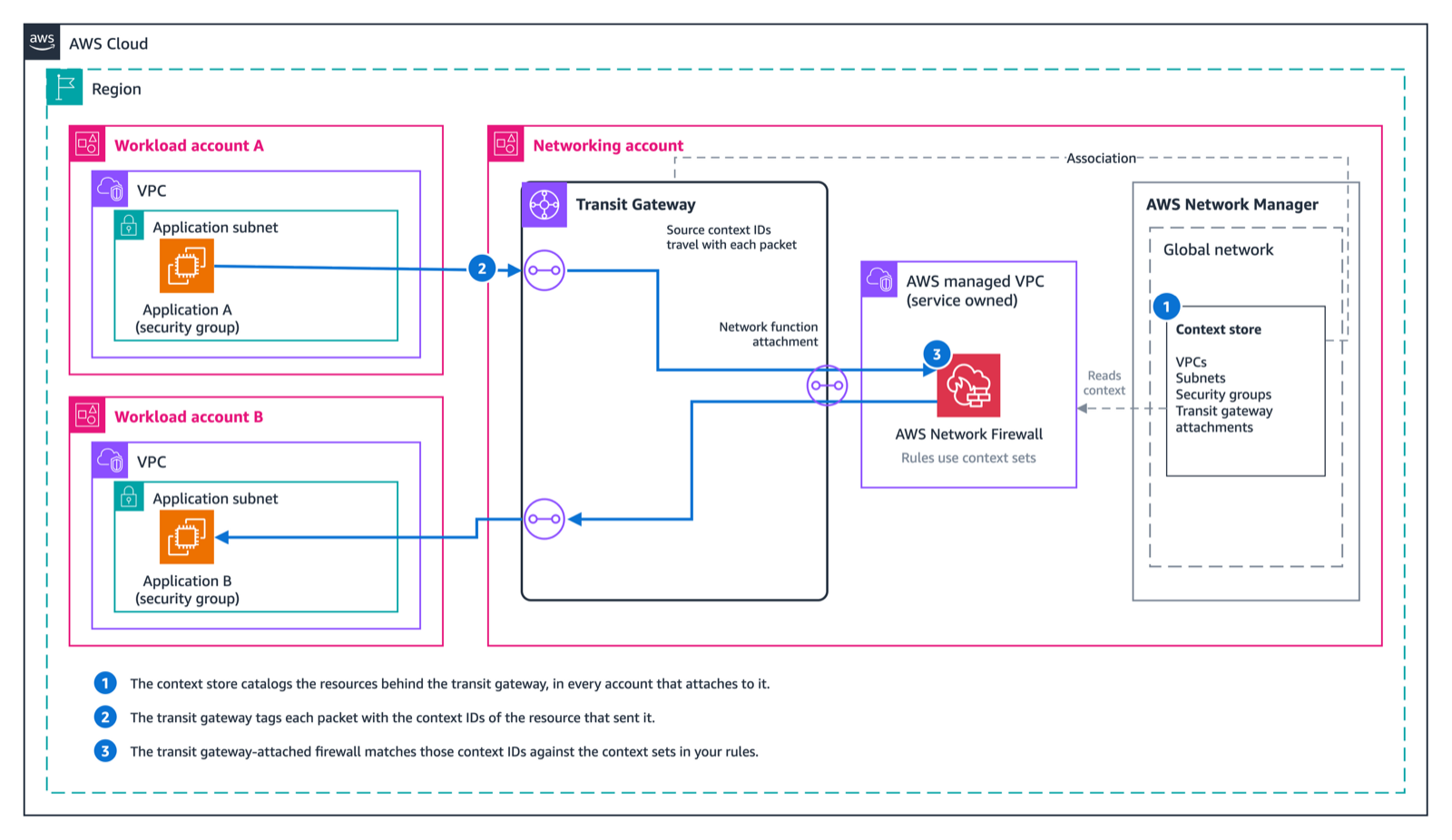
Figure 1: How context-aware rules work across accounts
A context store tracks your resources. A context store is a catalog of the AWS resources that can send and receive traffic through a transit gateway. You create it in AWS Network Manager and associate it with the transit gateway that your firewall uses. When you share the transit gateway with workload accounts through AWS Resource Access Manager (AWS RAM), those accounts create transit gateway VPC attachments to it. The context of those attachments, and of the resources behind them, then appears in the same context store. The context store is designed to keep the firewall in sync as you add and remove resources.
The transit gateway tags each packet. When traffic crosses the transit gateway, the transit gateway tags each packet with the context of the resource that sent it. That context is the sender’s VPC, subnet, transit gateway attachment, and the security groups attached to the sender. The firewall gets only the security group IDs, not their rules, so a rule that names any one of those groups matches.
The firewall matches context IDs in your rules. It reads the context on each packet and matches it against your rules. You group context IDs into a context set, a named rule variable that lists resources from the context store associated with the firewall. Then you use the set in the source or destination of a rule, in a Classic or Next Generation firewall policy.
Source context works with every protocol, because each packet carries the context of its sender. Destination context requires TCP-based rules, because the firewall learns the receiving resource from return traffic. For more details, see How context-aware rules work and Matching on destination context. AWS Transit Gateway also shares context with third-party firewalls through Gateway Load Balancer. For that setup, see Introducing resource context for firewall policies with AWS Transit Gateway.
Getting started
In this example, a central networking account owns the transit gateway and the firewall, and shares the transit gateway with workload accounts through AWS RAM. You complete steps 1 and 2 once, in the account that owns the transit gateway.
1. Create a context store. In the AWS Network Manager console, select or create a global network and register your transit gateway with it. Then create a context store and associate it with the transit gateway (). Network Firewall discovers the context store on its own, so there’s nothing to configure on the firewall.
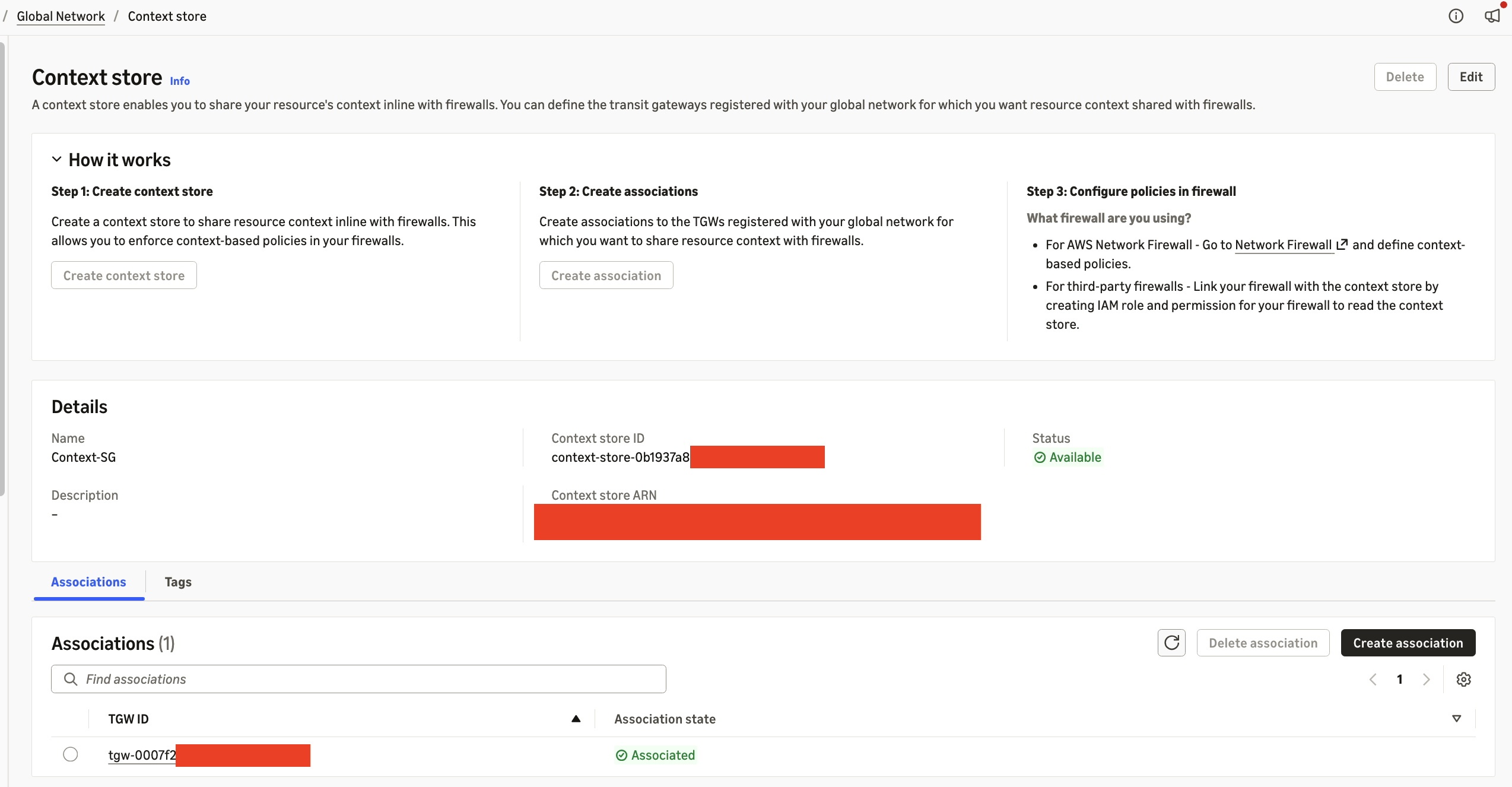
Figure 2: A context store associated with a transit gateway
2. Give Network Firewall access to the context store. In the account that owns the context store, create the AWS Identity and Access Management (IAM) role NetworkFirewallContextStoreReadOnly. Use the trust policy and permissions in Onboarding your transit gateway to a context store. You create the role once for each account that owns a context store.
3. Create a context set. In the Amazon Virtual Private Cloud (Amazon VPC) console, under Network Firewall, create a rule group. On the Rule group variables page, choose Create context set, select your context store, and select the resources for the set. One set can mix context IDs of different resource types, from the accounts in the context store.
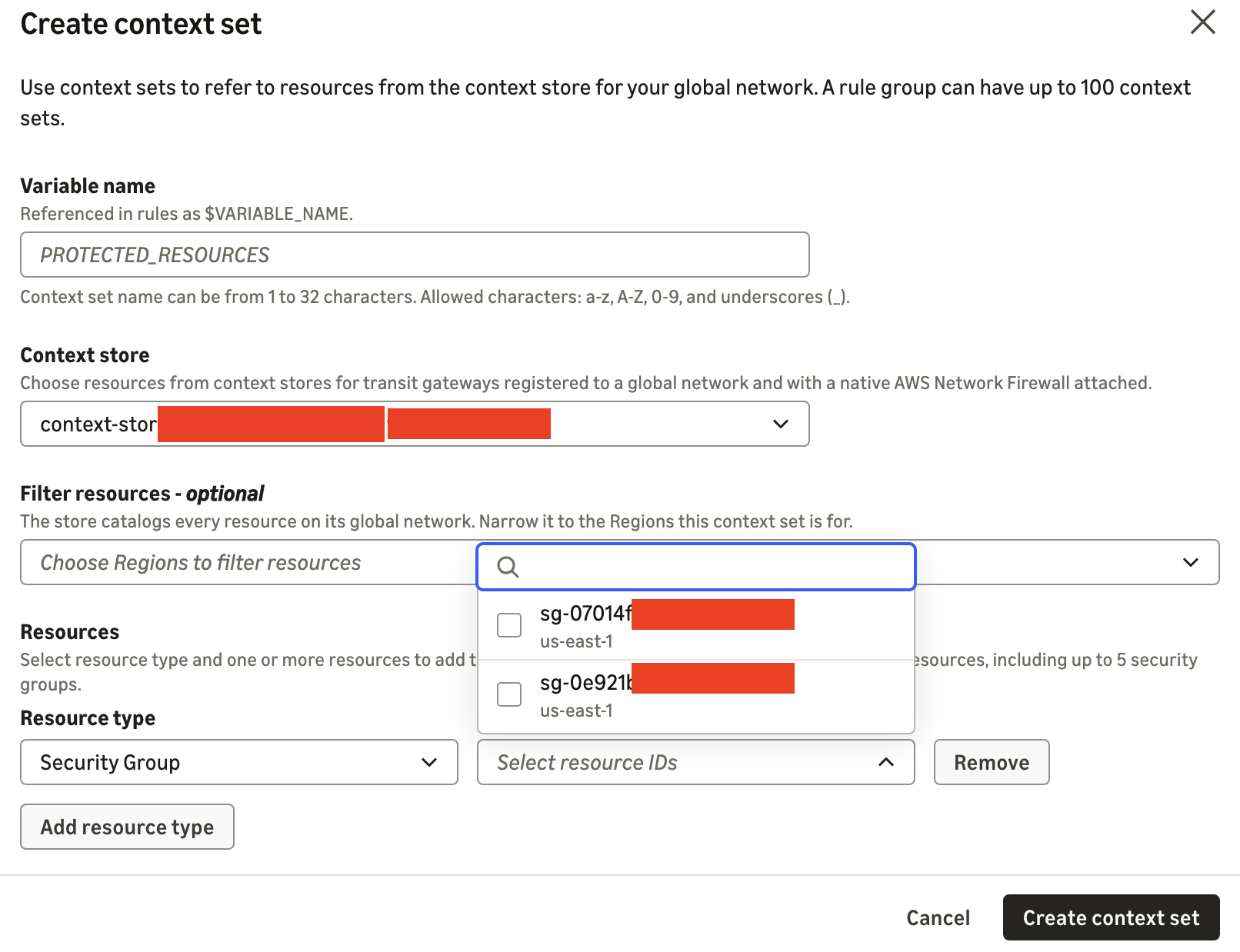
Figure 3: Creating a context set from the resources that the context store tracks
4. Check the sync state. Before you write rules, open the firewall’s details page and check the Context store sync state section. It shows the context store that the firewall discovered and its sync state.

Figure 4: The context store sync state on the firewall’s details page
5. Use the context set in your rules. The sample rule from Writing context-aware rules blocks SSH from PROD_RESOURCES to destinations outside your home networks. In a Next Generation firewall rule group, on the Configure rules page, use the Visual rule builder. Choose Drop and TCP. For Sources, choose Match specific criteria, select Context sets, and choose PROD_RESOURCES. For Destinations, choose Match specific criteria, select Destination IP, and enter $EXTERNAL_NET. Set the destination port to 22. Then add the rule group to your firewall policy.
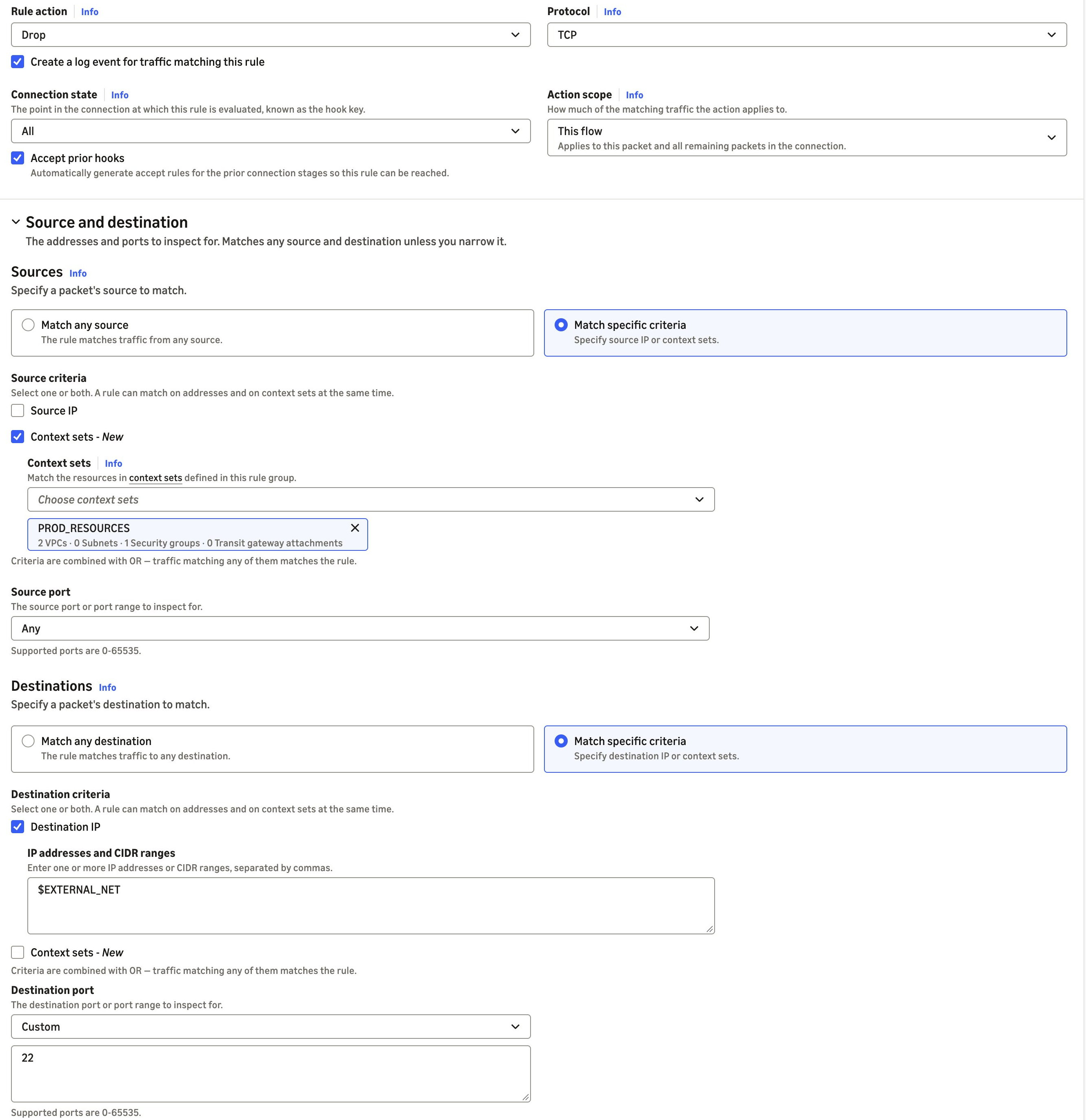
Figure 5: Choosing a context set as a rule’s source in the Next Generation rule builder
The same rule in Suricata-compatible syntax follows. drop:flow is the action and its scope, tcp:all the protocol and connection state, and the rest is the source, destination, and port. In raw rules, you reference a context set with $ and its name; in the console, you pick it from a list.
Because the rule names resources and not addresses, it covers each new resource that you launch in those VPCs or attach that security group to.
For Classic policies, the same rule looks like this:
What the logs record
After you associate the transit gateway with a context store, Network Firewall adds a context object to its alert log and flow log records. The following records, shortened, show one outbound TLS connection from an application instance to example.com, through a central egress VPC with a network address translation (NAT) gateway. A rule that references the application’s security group blocks the connection and writes this alert log record. The matched list names the security group that the rule matched.
The flow log record for the same flow_id lists the full context on each side. The src list holds the sender’s context IDs. Flow logs record this context for every flow, even when no rule matches it.
The dst list shows how destination context works for traffic to the internet. The firewall learns the destination from the response, and the response reaches the firewall from the NAT gateway. So the destination context is the egress VPC, the NAT gateway’s subnet, and the egress VPC’s transit gateway attachment, not the internet host. You can query these fields by context ID in Amazon CloudWatch Logs Insights. For example, you can see what an application already connects to before you write its rules. For the fields, see Context in your network firewall logs.
Availability and pricing
Context-aware rules are available at no additional charge. Standard AWS Network Firewall and AWS Transit Gateway charges apply to the resources that you use. For details, see AWS Network Firewall pricing and AWS Transit Gateway pricing. They work in the AWS Regions where both Network Firewall and Transit Gateway context sharing are available.
Conclusion
In this post, we showed how you can use context-aware rules in Network Firewall to match traffic on the context of the resources that send and receive traffic. A context store tracks those resources across the accounts that share your transit gateway, and the transit gateway tags each packet with its sender’s context. Your rules and logs then use that context, so your rules can keep up as workloads change. To learn more, see Context-aware rules in AWS Network Firewall.
If you have questions about this post, contact AWS Support or start a new thread on AWS re:Post.