AWS Storage Blog
Access Amazon S3 backup data directly using S3 Access Points in AWS Backup
AWS Backup for Amazon S3 now lets you access your backup data through Amazon S3 Access Points. You create an access point for a recovery point, and AWS Backup provisions an S3 endpoint with an alias that works anywhere you would use a bucket name. You can then read backup data using standard S3 APIs, without initiating a restore.
Organizations back up Amazon S3 data to protect against ransomware, accidental deletions, and data corruption. With access points, you can now use that backup data beyond recovery: keeping ML pipelines running, performing forensic investigations, serving compliance audits, and more.
In this post, we walk through creating an access point for an S3 recovery point and demonstrate reading backup data with familiar S3 operations like GetObject, HeadObject, and ListObjectsV2. We then show a real-world integration: redeploying a machine learning model on Amazon SageMaker using a model artifact pulled directly from backup.
How it works
When you create an access point for a recovery point, AWS Backup creates an S3 Access Point on your behalf and returns an alias. You can then use this alias with standard S3 read operations such as GetObject, HeadObject, and ListObjectsV2 to access your backup data. For the full list of supported operations, see Access points. You can create up to five access points per recovery point in an account. Access points work with both snapshot and continuous (PITR) recovery points. For continuous recovery points, you can specify a point-in-time timestamp to access your data as it existed at that specific moment. Access points work with recovery points in both standard backup vaults and logically air-gapped vaults, including data in warm and lower-cost warm storage tiers. You can create an access point using the AWS Backup console, the AWS CLI, or the AWS SDK.
Access points provide read-only access to your backup data, so there’s no risk of modifying or corrupting the recovery point itself. And while an access point is active, AWS Backup automatically pauses lifecycle transitions and blocks deletion of the associated recovery point, ensuring the data remains available for as long as you need it. This means teams can safely explore, validate, or pull data from backups without coordinating with backup administrators or worrying about the recovery point disappearing mid-workflow. There’s no charge to create or maintain an access point; you pay only for API requests and data retrieval from AWS Backup and S3.
Walkthrough
In this walkthrough, you create an access point for a recovery point that contains ML model artifacts, then use the access point alias to list objects, retrieve files, and redeploy a SageMaker inference endpoint, all without restoring the backup. The entire process takes just a few minutes and requires no changes to your existing S3-compatible code.
Prerequisites
- An AWS account with AWS Backup and Amazon SageMaker access.
- An S3 general purpose bucket with versioning enabled. (For this walkthrough, we use
demo-s3access-awsbackup. Replace with your own bucket.) - An IAM role that has the required permissions. You can use the managed policy AWSBackupAccessPointOperatorAccess, which includes permissions to create, describe, list, and delete access points. Alternatively, refer to Access points prerequisites for the minimum set of IAM actions.
- A SageMaker execution role with s3:GetObject permission on the access point ARN.
- The latest version of the AWS CLI.
Step 1: Prepare the model artifact
For the SageMaker example later in this walkthrough, you need a model artifact in your S3 bucket. This walkthrough uses a scikit-learn model trained on the well-known Iris flower dataset, which takes four physical measurements of a flower (sepal length, sepal width, petal length, petal width) and predicts which of three Iris species it belongs to: Setosa (class 0), Versicolor (class 1), or Virginica (class 2).
- Run the following script to train a
scikit-learnIris classifier and package it in the format SageMaker expects:
import joblib, tarfile
from sklearn.datasets import load_iris
from sklearn.ensemble import RandomForestClassifier

# Train
model = RandomForestClassifier(n_estimators=100, random_state=42)
model.fit(*load_iris(return_X_y=True))

# Package for SageMaker
joblib.dump(model, "model.joblib")
with tarfile.open("model.tar.gz", "w:gz") as tar:
tar.add("model.joblib", arcname="model.joblib")- Upload the resulting
model.tar.gzto your S3 bucket under models/iris-classifier/model.tar.gz - Navigate to the AWS Backup console and create an on-demand backup for your S3 bucket.
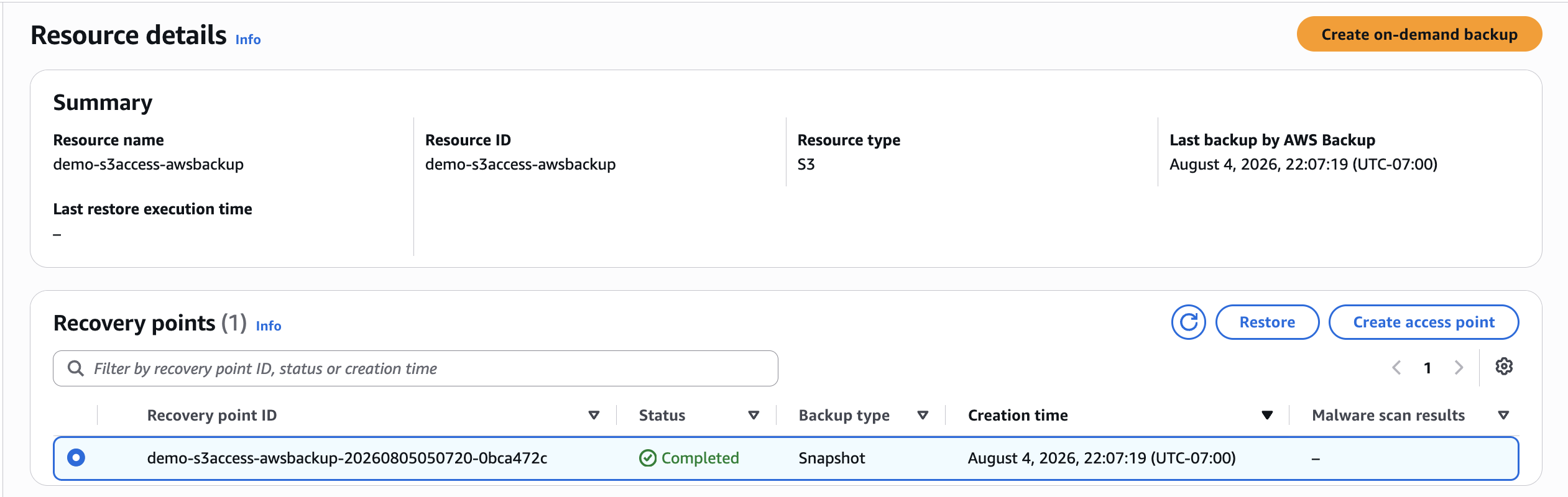
Figure 1: Recovery point for the protected S3 bucket
Step 2: Create an access point
- Navigate to either the Protected Resources or Vaults section of the AWS Backup console and find the recovery points of the S3 bucket that you backed up.
- Select the recovery point and choose Create access point.
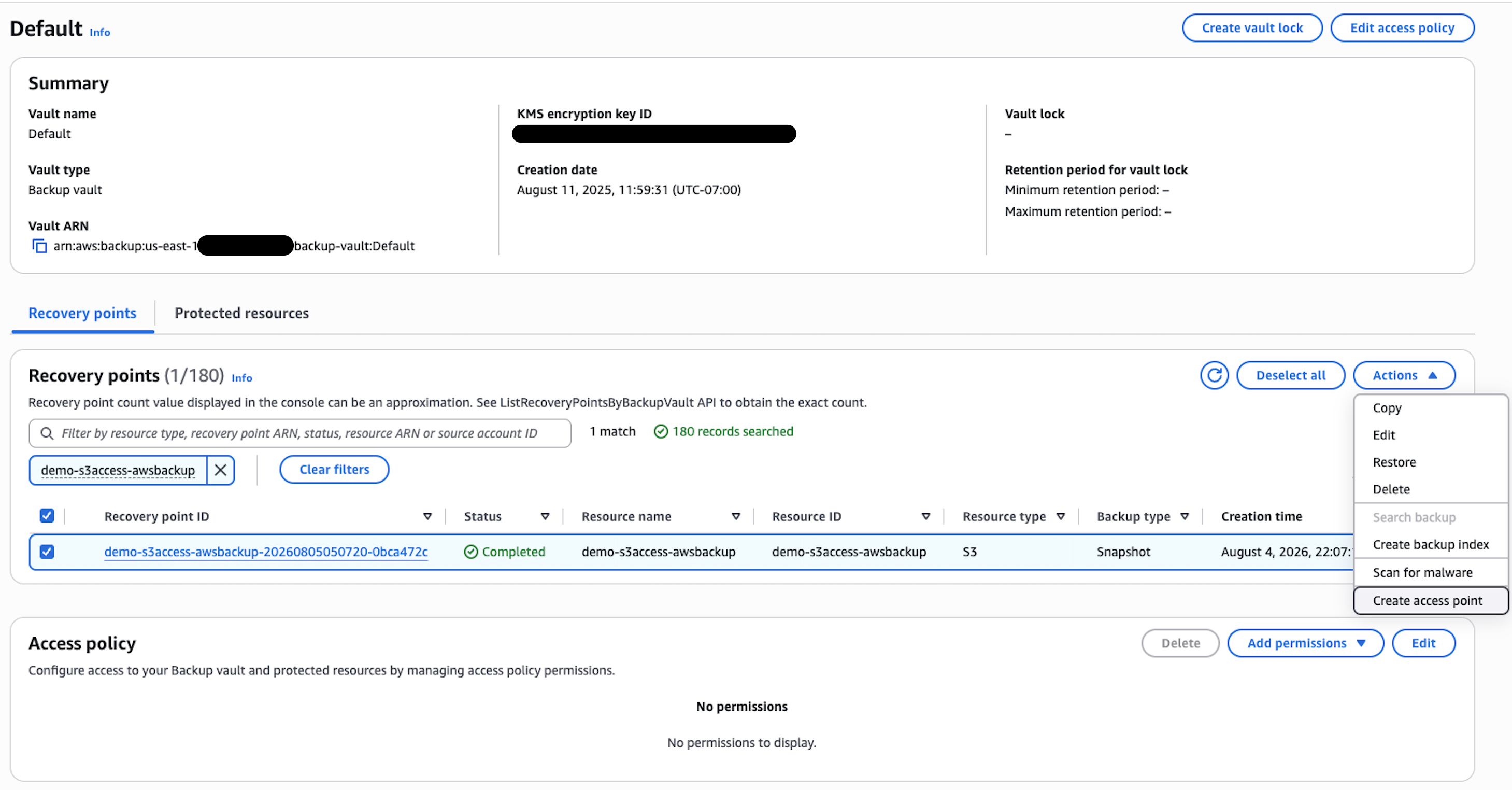
Figure 2: Create access point for the recovery point
- Enter the access point name
my-awsb-s3apand choose Create access point. In the pop-up, choose Continue. Optionally, you can add an access point policy to restrict access by IAM principal, VPC, or object prefix.
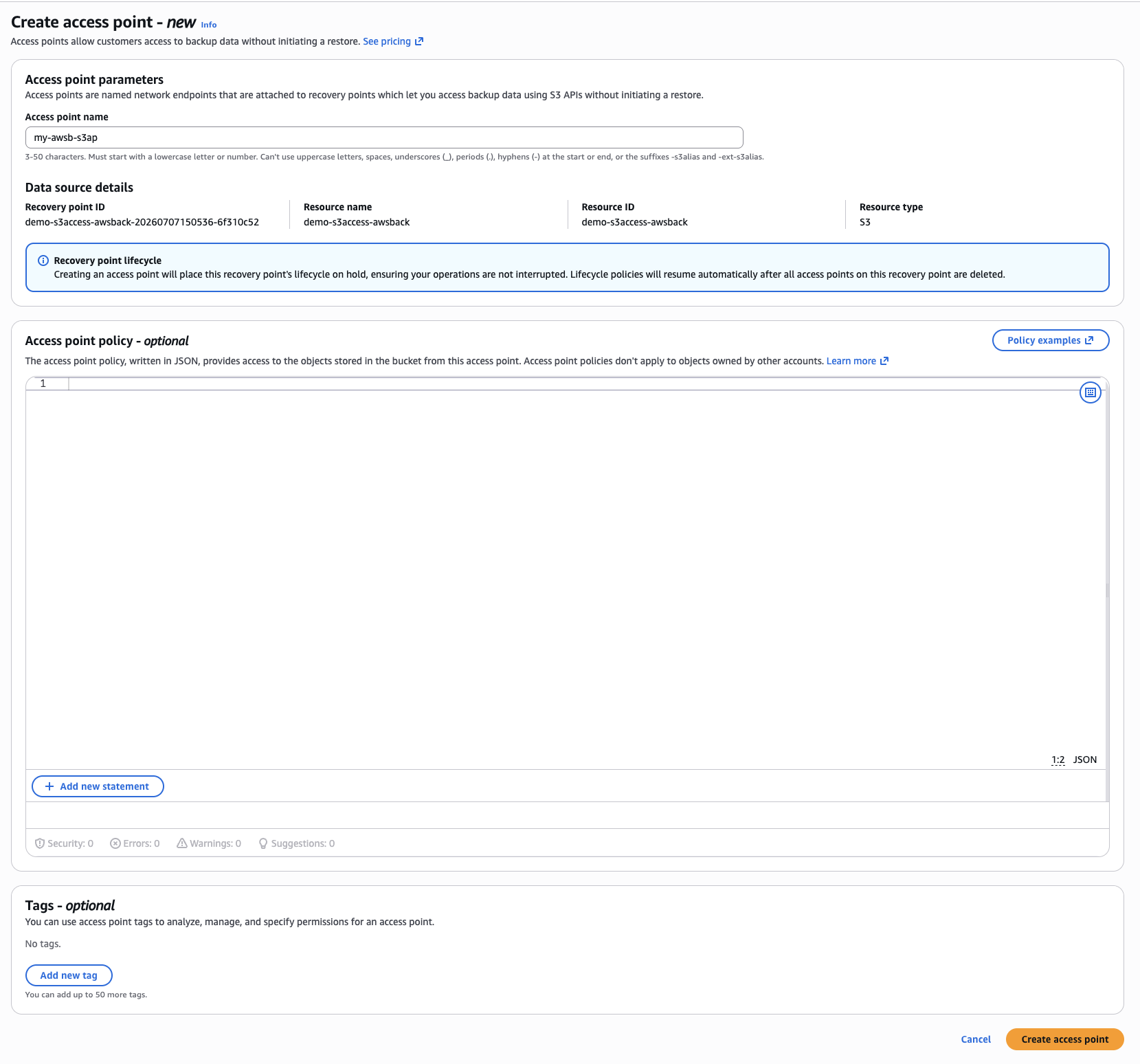
Figure 3: Access point creation screen
- After creation, navigate to the Access points page on the side menu. The access point status for your newly created access point should be Available.
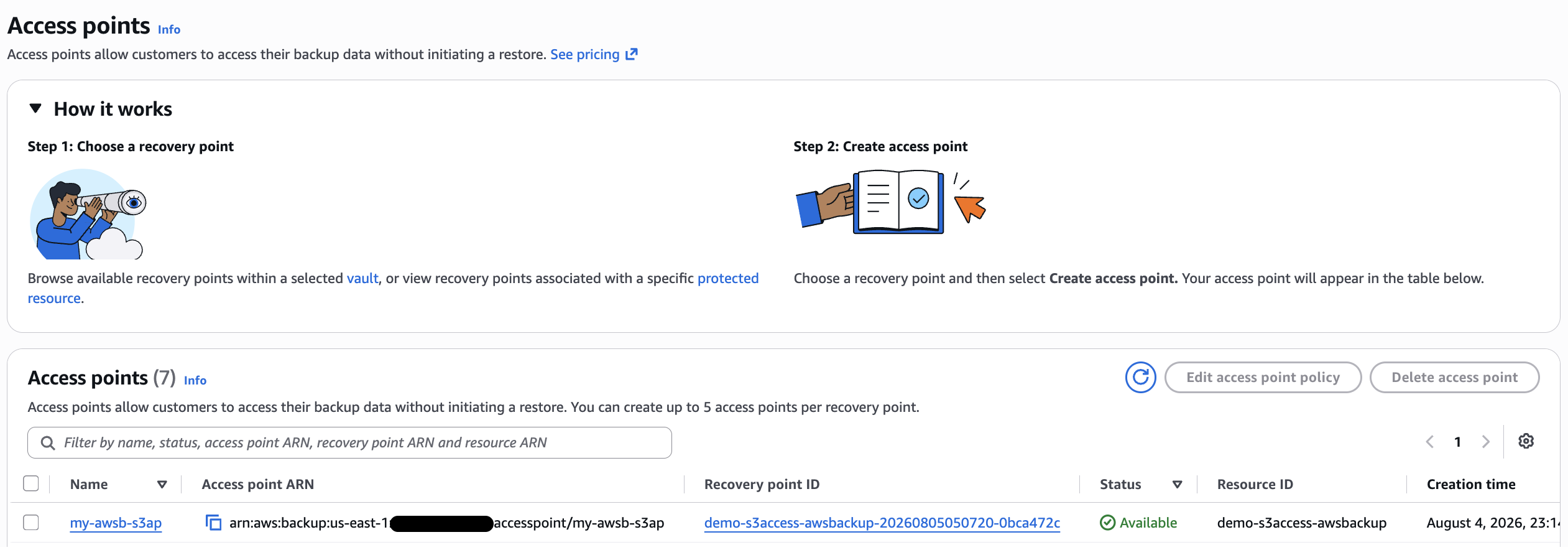
Figure 4: The access point in the access points list
- Choose the access point you have just created to view its details.
- Copy the S3 Access Point Alias, which you will use to read the backup data. Before using this alias with SageMaker, add an access point policy that grants your SageMaker execution role s3:GetObject permission on the access point, as shown in the following figure.
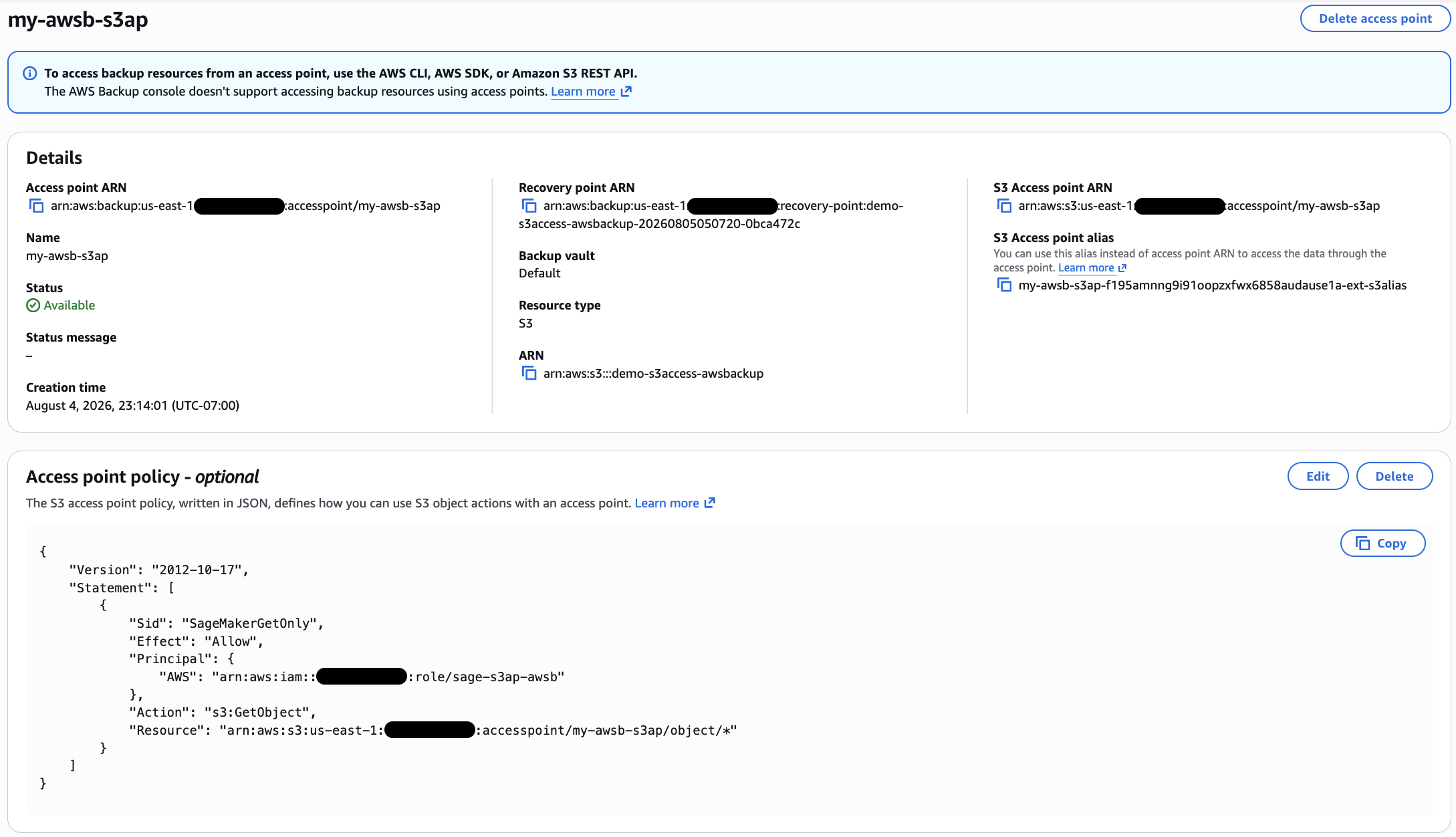
Figure 5: Access point detail screen, featuring policy
Step 3: Access backup data through the access point
With the access point in Available status, you can use the S3 Access Point alias with standard S3 APIs to read the backup data.
List objects:
$ aws s3api list-objects-v2 \
    --bucket "my-awsb-s3ap-f195amnng9i91oopzxfwx6858audause1a-ext-s3alias"

{
    "Contents": [
        {
            "Key": "config/training_config.json",
            "LastModified": "2026-08-05T04:58:20+00:00",
            "ETag": "\"0b625d96efacb678396fc19592ac27c3\"",
            "Size": 684,
            "StorageClass": "AWS_BACKUP_WARM"
        },
        {
            "Key": "models/iris-classifier/model.tar.gz",
            "LastModified": "2026-08-05T04:58:20+00:00",
            "ETag": "\"e40eba960fd955d17006276ef881c80f\"",
            "Size": 23432,
            "StorageClass": "AWS_BACKUP_WARM"
        },
        {
            "Key": "models/iris-classifier/evaluation_metrics.csv",
            "LastModified": "2026-08-05T04:58:20+00:00",
            "ETag": "\"27164003959e69d90124ffcc51ec6676\"",
            "Size": 224,
            "StorageClass": "AWS_BACKUP_WARM"
        },
        {
            "Key": "models/iris-classifier/hyperparameters.json",
            "LastModified": "2026-08-05T04:58:20+00:00",
            "ETag": "\"87273874dafe294df2e6546503cd34df\"",
            "Size": 460,
            "StorageClass": "AWS_BACKUP_WARM"
        }
    ],
    "RequestCharged": null,
    "Prefix": ""
}
Get a specific file:
$ aws s3api get-object \
    --bucket "my-awsb-s3ap-f195amnng9i91oopzxfwx6858audause1a-ext-s3alias" \
    --key "models/iris-classifier/model.tar.gz" \
    ./model.tar.gz

{
    "AcceptRanges": "bytes",
    "LastModified": "2026-08-05T04:58:20+00:00",
    "ContentLength": 23432,
    "ETag": "\"e40eba960fd955d17006276ef881c80f\"",
    "ChecksumSHA256": "AD/cZme5vMQgiAYbiURv2cfho5AomtSZFCDKVNODeE4=",
    "ChecksumType": "FULL_OBJECT",
    "VersionId": "null",
    "ContentType": "application/x-tar",
    "ServerSideEncryption": "aws:backup",
    "Metadata": {},
    "StorageClass": "AWS_BACKUP_WARM"
}
Check object metadata:
$ aws s3api head-object \
    --bucket "my-awsb-s3ap-f195amnng9i91oopzxfwx6858audause1a-ext-s3alias" \
    --key "models/iris-classifier/model.tar.gz"

{
    "AcceptRanges": "bytes",
    "LastModified": "2026-08-05T04:58:20+00:00",
    "ContentLength": 23432,
    "ETag": "\"e40eba960fd955d17006276ef881c80f\"",
    "VersionId": "null",
    "ContentType": "application/x-tar",
    "ServerSideEncryption": "aws:backup",
    "Metadata": {},
    "StorageClass": "AWS_BACKUP_WARM"
}
The access point alias works anywhere you would use a bucket name. Any application or AWS service that reads from S3 can use it with no code changes beyond swapping the bucket reference.
Step 4: Integrate backup data with Amazon SageMaker
To demonstrate how AWS services can use backup data through the access point, deploy a SageMaker inference endpoint that loads a model artifact directly from a backup recovery point. Pass the access point alias as the model data URL, and SageMaker retrieves the model artifact during model creation:
#!/usr/bin/env python3
"""Redeploy ML endpoint using model artifact from backup access point."""

import boto3

# ========== CONFIGURATION ==========
region = "us-east-1"
role = "arn:aws:iam::XXXXXXX1234:role/sage-s3ap-awsb"
model_data = "s3://my-awsb-s3ap-f195amnng9i91oopzxfwx6858audause1a-ext-s3alias/models/iris-classifier/model.tar.gz"
container = "683313688378.dkr.ecr.us-east-1.amazonaws.com/sagemaker-scikit-learn:1.2-1-cpu-py3"

model_name = "sklearn-iris-ap-model"
endpoint_config_name = "sklearn-iris-ap-config"
endpoint_name = "sklearn-iris-ap-test"
# ====================================

sm = boto3.client("sagemaker", region_name=region)

# Create model
sm.create_model(
    ModelName=model_name,
    PrimaryContainer={"Image": container, "ModelDataUrl": model_data},
    ExecutionRoleArn=role,
)
print(f"Model created: {model_name}")

# Create endpoint configuration
sm.create_endpoint_config(
    EndpointConfigName=endpoint_config_name,
    ProductionVariants=[{
        "VariantName": "AllTraffic",
        "ModelName": model_name,
        "InitialInstanceCount": 1,
        "InstanceType": "ml.m5.large",
    }],
)
print(f"Endpoint config created: {endpoint_config_name}")

# Create endpoint and wait for it to be in service
sm.create_endpoint(EndpointName=endpoint_name, EndpointConfigName=endpoint_config_name)
print(f"Creating endpoint: {endpoint_name}...")

waiter = sm.get_waiter("endpoint_in_service")
waiter.wait(EndpointName=endpoint_name)
print(f"Endpoint in service: {endpoint_name}")
Test the endpoint
To verify the model loaded correctly from backup, send measurements that are known to correspond to Versicolor parameters. If the model artifact was retrieved intact, it should return class 1.
$ python3 -c "
import boto3
runtime = boto3.client('sagemaker-runtime', region_name='us-east-1')
response = runtime.invoke_endpoint(EndpointName='sklearn-iris-ap-test', ContentType='text/csv', Body='6.2,2.9,4.3,1.3')
print('Predicted class:', response['Body'].read().decode())
"
Predicted class: [1]
Clean up
To avoid incurring additional charges, clean up the resources you created as part of this solution.
- Delete the SageMaker endpoint, endpoint configuration, and model.
- On the AWS Backup console, delete the access point (my-awsb-s3ap). A recovery point can’t be deleted while an access point is connected to it, so delete the access point first.
- Delete the recovery point from the backup vault.
- Delete the S3 bucket (demo-s3access-awsbackup) if it was created for this walkthrough.
Use cases for access points
S3 Access Points for backup data can be used for several use cases, such as:
- Disaster recovery and compliance – When recovery points are stored in an AWS Backup logically air-gapped vault, recovery teams can read data directly through a read-only S3 Access Point – verifying backup integrity, satisfying audit requirements, or accessing critical recovery artifacts during an actual event — without compromising the vault’s isolation or performing a full restore.
- Forensic analysis during incidents – During an active security incident, investigation teams can access backup data from a known-clean point in time for forensic analysis while the incident response team handles containment separately, so evidence gathering doesn’t depend on or delay the recovery process.
- Multi-tenant prioritized recovery – Independent service vendors (ISV) customers managing multiple tenants in a single S3 bucket can create separate access points on the same recovery point, each with an access-point policy that restricts callers to that tenant’s prefixes and objects, to give their highest-priority customers data access first.
- Media and entertainment streaming – Broadcasters and production studios can browse uncompressed, raw footage archives or supplementary B-roll clips directly from backup instead of restoring multi-terabyte project folders to active editing bays.
- Hybrid cloud data access – In hybrid cloud environments, organizations can’t access AWS Backup vaults or restore data directly to on premises. With S3 Access Points, they can selectively and securely read only the backup data they need over existing network connectivity.
Conclusion
With S3 Access Points for recovery points, you can read backup data directly using standard S3 APIs, in minutes, without initiating a full restore. This makes it practical to use backup data for DR validation, forensic investigations, compliance audits, or keeping production workloads running during recovery.
Access points in AWS Backup are available in supported AWS Regions. You can get started today using the AWS Backup console, AWS CLI, or AWS SDK. To learn more, refer to Access points in the AWS Backup Developer Guide.