AWS Storage Blog
AWS named a Leader in IDC MarketScape for public cloud object storage
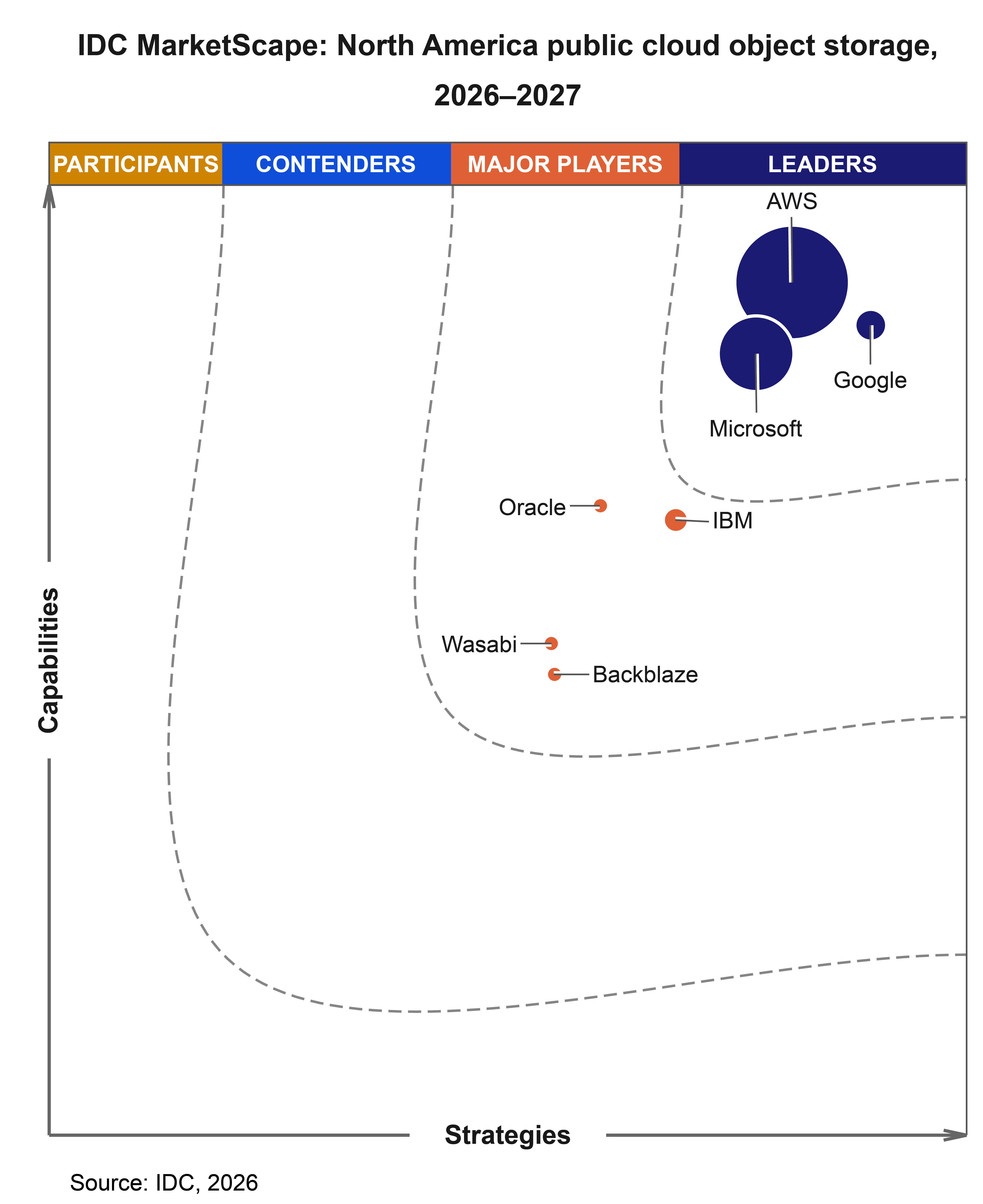
AWS has been named a Leader in the IDC MarketScape for North America Public Cloud Object Storage 2026-2027 Vendor Assessment (November 2026). IDC found that object storage is no longer just a place to keep data. Analytics engines, AI pipelines, and agents now read straight from the bucket, so the storage layer affects how those workloads perform. We agree, and believe this recognition reflects the more than 20-year track record of Amazon S3 and our commitment to building alongside customers as their needs change.
More than 20 years of building a foundation that grows with you
S3 launched in March 2006 with two simple operations, PUT and GET, built on five fundamentals: security, durability, availability, performance, and elasticity. Those fundamentals have not changed, and neither has our commitment to the applications you build on S3. Code written for S3 in 2006 still works today, unchanged, because we have kept the S3 API backward compatible through every generation of hardware and software underneath it. You can adopt new capabilities on your own schedule without rewriting the applications you already depend on.
Over those years, the S3 API has become a reference point across the storage industry. The backup, analytics, and data management tools your teams already use are built to work with it, and the skills your teams build carry forward.
Your applications also need to see the right data the moment they ask for it. S3 delivers strong read-after-write consistency automatically for all applications, at no additional cost. After you write, overwrite, or delete an object, the next read returns the latest version, and a listing of the bucket shows the change right away. This matters more as AI agents write results and read them back within the same task, with no extra code or database needed to keep them in sync. Our engineers use automated reasoning to prove that changes to S3 keep this guarantee in place. We design availability into every layer of S3 as well.
Scale works in your favor, too. You do not need to plan or provision capacity. S3 grows and shrinks automatically as you add and remove data, and a single object can be as large as 50 TB, so you can store virtually any amount of data for almost any workload, from website assets to model training datasets and data lakes. S3 holds more than 700 trillion objects and hundreds of exabytes of data, averages over 200 million requests per second for millions of customers, and added more objects in the past 12 months than it stored in its entire first decade. We design S3 so that scale benefits every customer. The more workloads S3 serves, the less their demands line up with one another, which makes S3 more reliable for everyone.
Your data outlasts your applications
“Object storage stopped being a commodity the moment workloads started reading from it directly,” said Dave McCarthy, group vice president at IDC.
I hear the same thing from customers. Our conversations about AI rarely start with models. They start with data: where it lives, how many copies exist, and how much work it takes to get it ready. Andy Warfield, VP and Distinguished Engineer at Amazon, wrote that as agents make new applications faster and cheaper to build, “applications will come and go, and as always, data outlives all of them.” The applications you run next year may not exist yet, but the data they will need is probably already in your buckets.
That idea shapes how we build S3. Our goal is for S3 to be the foundation for all of your data, whether you work with it as objects, files, tables, or vectors, and the data foundation for your analytics, AI, and agentic applications. You store your data once, we keep it safe, and any application, analytics engine, or AI agent can work with it where it already lives, including the tools that have not been built yet.
Durability is a culture, not only a number
S3 is designed for 11 nines of durability, and we are proud of that. But the number is the result of how we work, not the reason your data is safe. The 11 nines come from a statistical model of hardware, replication, and repair. Andy has written about one of the mechanisms that model does not capture: a human process called the durability review, which he describes as “every bit as important.” That is what we believe sets S3 apart. Durability is not a setting or a target we check once. It is a discipline that shapes every design decision, every code change, and every team that works on S3.
It starts with the physical design of AWS infrastructure. Every AWS Region consists of a minimum of three Availability Zones. Each Availability Zone is one or more discrete data centers with independent power, cooling, and physical security, located many kilometers from the others and connected by redundant, low-latency, encrypted networks. Most S3 storage classes store your data across a minimum of three Availability Zones by default. You get that protection from your first write, without configuring anything or paying for a second copy in another Region.
On top of that foundation, we treat every change as a question of durability. When an S3 engineer makes a change that could affect how data is protected, the change goes through a durability review. The review borrows the threat model from security: the engineer lists everything that could go wrong, then shows how the design holds up against each risk. Reviewers discuss risks and countermeasures separately, and they favor broad guardrails that protect against whole classes of problems over narrow fixes for individual ones. When the team rebuilt the storage layer that manages data on each disk, it wrote the new system in Rust for memory safety and paired it with an executable specification of how the system must behave. Automated reasoning checks every deployment against hundreds of millions of scenarios before it reaches production. Meanwhile, auditor services continuously inspect stored data and start repairs as soon as they find signs of degradation. That care extends to how your data arrives. The latest AWS SDKs calculate checksums as your data travels to S3, S3 verifies them before it accepts an object, and S3 adds a default checksum to new objects when you do not provide one.
Mechanisms only work when people own them. At Amazon, the team that builds a service also runs it. The S3 teams focus daily on durability, performance, and availability. Durability reviews hold every team to the same high bar, and automated reasoning gives engineers the confidence to keep improving S3 quickly without lowering that bar. When customers ask me about 11 nines, I tell them the number matters less than the culture behind it, because that culture is what keeps the number true as S3 grows and changes.
Secure is the default
Security is the top priority at AWS, and S3 is secure by default. When you store data in S3, you benefit from global infrastructure that is monitored 24/7 and designed to meet the security requirements of the most security-sensitive organizations. Every S3 resource you create starts out private, from buckets and objects to settings such as lifecycle and website configurations. Only the AWS account that created a resource can access it until you decide otherwise.
That private starting point supports the approach we recommend to every customer: least privilege. Instead of opening access broadly and then trying to take permissions away, you start with none and grant only what each person, team, or application needs to do its job. Access that you grant on purpose is easier to audit, and it limits the impact of mistakes or misuse. Picture a shared data lake that serves your finance team, your HR team, and a new AI application. With AWS Identity and Access Management (IAM), each of them begins with no access at all. You can give each one its own S3 Access Point with only the permissions it needs, and limit the AI application’s access point to your virtual private cloud (VPC) so the data can be reached only from your private network. Bucket policies set the rules for the bucket as a whole, by user, network, or application, even across accounts. Object tags carry your business context into those policies, so your finance team can read finance records while HR records stay with HR.
We have also kept raising the security of the starting point itself. In January 2023, S3 began encrypting every new object at no additional cost and with no impact on performance. A few months later, every new bucket began with S3 Block Public Access turned on and access control lists (ACLs) turned off, so access runs through policies that are easier to review. Since then, we have made it possible to enforce Block Public Access across every account in your organization with a single AWS Organizations policy, and new buckets now start with server-side encryption with customer-provided keys (SSE-C) turned off, so teams that need it turn it on deliberately. We applied each change to new buckets and left existing configurations in place, so your applications kept running while your security improved.
Automated reasoning helps you check your own access, too. IAM Access Analyzer uses automated reasoning to find S3 resources that are shared outside your account, so you can confirm that your policies do what you intended. For me, this is what secure by default means in practice: you start private, you grant access on purpose, and you can verify who has it.
One home for your data, from milliseconds to decades
Most organizations have some data that needs an answer in milliseconds and other data they must keep for years and rarely read. You can keep all of it in S3 and use one API to work with it. S3 offers eight storage classes, each engineered for a specific access pattern. S3 Express One Zone delivers consistent single-digit millisecond data access for your most latency-sensitive applications, S3 Standard covers everyday workloads, and the S3 Glacier storage classes let you keep data for years or decades at a lower cost, with millisecond retrieval available from S3 Glacier Instant Retrieval. When you do not know how often data will be read, S3 Intelligent-Tiering moves objects between access tiers for you, with no retrieval charges. Customers have collectively saved more than $6 billion in storage costs by using S3 Intelligent-Tiering compared to S3 Standard.
Store data once and work with it the way you need
If your teams work with data in S3, you may know this pattern. Your data lives in S3 because it is durable, scales without planning, and works with a wide range of tools. But some of the applications you depend on expect a file system, a table, or another specialized system. So your teams build pipelines to copy data out, run their work, and copy the results back. Every copy adds cost and another pipeline to maintain, and it creates a chance that two versions of the same data no longer match. Your teams end up spending time moving data instead of using it. We see this in genomics research, media and entertainment, machine learning, chip design, and scientific computing.
Removing that friction has shaped much of what we have built in recent years. According to the IDC MarketScape report, “Storing data once and working with it as objects, files, tables, or vectors also avoids paying for and synchronizing separate copies in specialized systems.” In S3, this is part of the storage service. Tables, vectors, and file systems are available today, built into the same storage that holds your objects.
If your teams run analytics, you probably already keep a lot of tabular data in S3. S3 stores exabytes of Apache Parquet data and averages over 25 million requests per second to that format. As customers adopted Apache Iceberg, they told us they did not want to run table maintenance themselves and that managing security for tables was hard. Amazon S3 Tables make Iceberg tables a built-in part of S3. S3 handles the ongoing maintenance that keeps your queries fast, and you query your tables with the engines you choose. S3 Tables deliver up to 10 times higher transactions per second compared to storing Iceberg tables in general purpose S3 buckets, and customers now store more than 2 million tables in S3 Tables.
If your applications expect a file system, Amazon S3 Files lets you mount an S3 bucket as a network file system. Your existing tools, scripts, and AI agents can read and write S3 data as files, and changes are stored back in S3, so there is no copy pipeline to build and no second copy to keep in sync. Your teams get the file access their tools expect, on the data that already lives in S3.
It works in the other direction, too. If your enterprise file data lives on Amazon FSx for NetApp ONTAP or Amazon FSx for OpenZFS, you can attach S3 Access Points to those volumes. Amazon Bedrock, Amazon SageMaker, Amazon Athena, and other services that work with S3 can then use that file data through the S3 API, while your teams keep working with the same files.
Help AI applications and agents find the right data
An AI application is only as good as the data it can find and understand, and the amount of that data keeps growing. S3 stores exabytes of data for AI model training, and that data has more than doubled in the last six months.
Amazon S3 Vectors lets you store and query vector embeddings directly in S3 for retrieval-augmented generation (RAG), agentic, and semantic search applications. As Andy points out, for text such as code or PDF documents, the vectors can take up more space than the data they index. Keeping all of them in memory or on SSD gets expensive quickly. S3 Vectors keeps large vector datasets at S3 economics, with up to 2 billion vectors per index and query latency under 100 milliseconds. Customers now run an average of tens of millions of vector queries per day.
Finding the right data also takes context. Amazon S3 Metadata keeps a queryable record of the objects in your buckets that updates as your data changes, so you can find what you need with a SQL query in Athena. With S3 annotations, you can attach the business context that explains what an object is, such as an AI-generated transcript, a content rating, or technical specifications, and update it at any time without rewriting the object. When you turn on S3 Metadata annotation tables, you can query annotations at scale, even for objects in the S3 Glacier storage classes, without restoring those objects or paying retrieval charges. AI agents can then use the S3 Tables MCP server to discover the right data in natural language, without a separate metadata database to keep in sync.
For me, this is the clearest answer to why customers choose S3. Andy has described S3 as “a living, breathing organism,” and customers are not buying software, they are buying a service they expect to keep getting better. Each new capability brings the durability and economics of S3 to a new way of working with data, and none of them asks you to give up what already works. S3 keeps changing so that your applications do not have to, and so that the data you already keep in S3 is ready for whatever you build next.
Learn more at AWS re:Invent 2026
If you are attending AWS re:Invent this year, these sessions show how to put these capabilities to work and cover the fundamentals of S3.
What’s new with Amazon S3… and now files! (STG346)
See the latest S3 launches, starting with S3 Files, which gives you file system access to your S3 data. The session also covers S3 Vectors, S3 Metadata, and S3 Tables, and how to put them to work.
Know your data: discovery, context, and AI agents in Amazon S3 (STG347)
Learn how S3 Metadata and annotations help you understand what you store, where it came from, and whether it is still relevant. You will also see how to give AI agents governed access to your S3 data.
Amazon S3 security and access control best practices (STG413)
Walk through a layered approach to securing S3, covering access control, encryption, and monitoring. You will learn which controls matter most as your environment grows.
Inside Amazon S3: How a one-page design reached planetary scale (INV510)
S3 launched in 2006 with design requirements that fit on one page. S3 principal engineers explain how those principles hold up today, from strong consistency at massive scale to how the team ships features without downtime.
Browse the full lineup for AWS Storage in the re:Invent 2026 session catalog.
Can’t make it to Las Vegas? Download the IDC MarketScape report to learn about how IDC evaluated the market, and look out for session recordings after the event.
About IDC MarketScape: IDC MarketScape vendor assessment model is designed to provide an overview of the competitive fitness of technology and service suppliers in a given market. The research utilizes a rigorous scoring methodology based on both qualitative and quantitative criteria that results in a single graphical illustration of each supplier’s position within a given market. IDC MarketScape provides a clear framework in which the product and service offerings, capabilities and strategies, and current and future market success factors of technology suppliers can be meaningfully compared. The framework also provides technology buyers with a 360-degree assessment of the strengths and weaknesses of current and prospective suppliers.
Source: IDC MarketScape: North America Public Cloud Object Storage 2026–2027 Vendor Assessment, Dave McCarthy and Jasdeep Singh, IDC #US51811024, November 2026.