AWS Storage Blog
How Allcargo Global migrated VDI workloads to Amazon FSx for NetApp ONTAP and FSx for Windows File Server using AWS DataSync
Allcargo Global (Allcargo) is a powerhouse in integrated logistics that drives seamless supply chain solutions through its key subsidiaries—ECU Worldwide, the world’s largest LCL consolidator with presence in over 180 countries. They offer end-to-end logistics powered by digital platforms such as ECU360, ensuring speed, visibility, and efficiency across borders. With a strong focus on innovation and a bold environmental, social, and governance (ESG) commitment to achieve carbon neutrality by 2040, Allcargo is redefining the future of smart and sustainable logistics on a global scale.
Allcargo users are heavily dependent on VDI to manage their email, chat, and business applications, which have experienced exponential data growth. It has approximately 70 TB of data using iSCSI, NFS, and SMB protocols, which is expected to double in the next 1–2 years. Allcargo sought to migrate their data from on-premises and was looking for a new storage solution to optimize their storage costs by archiving older datasets and providing their users with faster access to business applications. Allcargo needed a migration strategy to minimize disruptions to business users.
In this post, we examine how Allcargo successfully modernized their storage infrastructure using Amazon Web Services (AWS) solutions. They used Amazon FSx to seamlessly integrate with their existing systems (such as Active Directory, DNS, and DFS) and host VDI file share data. Using AWS DataSync, they efficiently migrated all of the data—including all metadata and user permissions—to AWS. The migration was accomplished with minimal impact on their workforce of 3,500 users.
Challenges
Although Allcargo had traditional on-premises Network Attached Storage (NAS) system with ample storage features for Virtual Desktop Infrastructure (VDI) systems, it often struggled during high-demand periods. For example, when numerous employees log in simultaneously in the morning or when there’s heavy data writing (such as Outlook cache updates), users experience delays and poor performance. Allcargo frequently faced other challenges, such as difficulty in scaling storage capacity and performance to match user growth and regular maintenance requirements for NAS hardware and software. Some of the other challenges include the following:
- Poor desktop responsiveness caused by outdated hardware, combined with an inability to expand resources to support a growing user population.
- Decreased SQL server efficiency during high-traffic periods.
- Regular service interruptions at regional data centers due to necessary hardware maintenance activities.
Solution overview
The following sections cover the customer environment, AWS Storage solution, and data migration solution in detail.
Customer environment
Allcargo operated with a global workforce distributed across three major regions: EMEA, NAMER, and APJ.
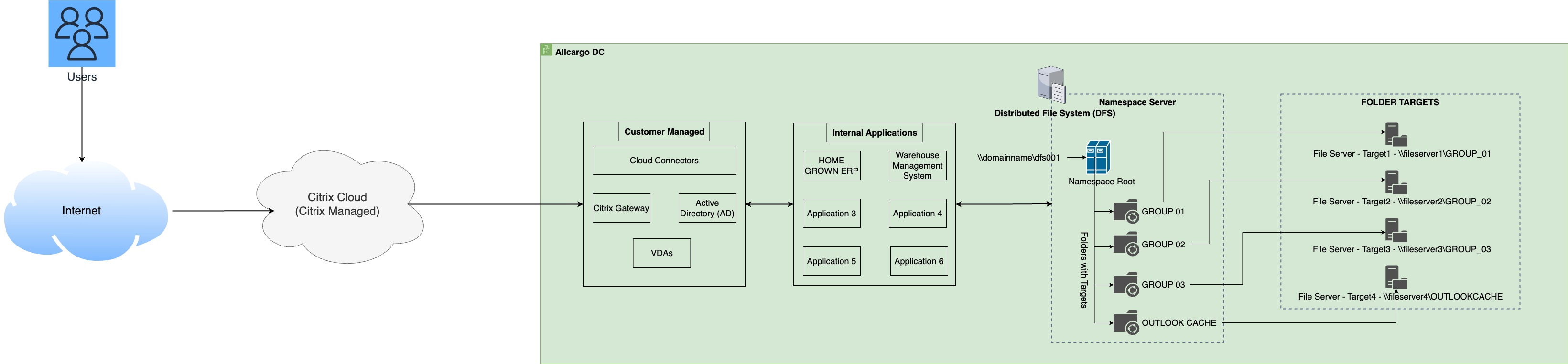
Figure 1. Allcargo’s legacy on-premises VDI architecture
To serve this distributed workforce, they maintained local data centers in each region, as shown in Figure 1. Their on-premises infrastructure setup included the following:
- Third-party VDI solution for all VDI deployments to cater to 3,500 internal users, and the logistics applications such as home-grown ERP, Warehouse Management System etc. are hosted on VDIs.
- VDI network file storage hosted on hyper-converged platforms in each data center.
- Primary file access through SMB protocol through DFS namespace (integrated with DNS) and limited NFS protocol access for Linux-based file shares.
- FSLogix implementation for managing profile containers and Outlook cache volumes, with peak write throughput reaching approximately 2 Gbps during business hours.
- High availability (HA) architecture using hyper-converged hardware and DFS namespace.
- Disaster recovery (DR) solution implemented through hyper-converged platforms on AWS.
- Centralized authentication and authorization through Microsoft Active Directory (AD).
Microsoft recommends maintaining a local copy of the users’ mailboxes on their respective VDI workstations to optimize Outlook performance for both Exchange and Microsoft 365 accounts. This local cache needs a dedicated volume (known as the Outlook cache volume) and demands significant write performance, typically measuring in Gbps.
AWS storage solution
After conducting network latency tests across various European locations, Allcargo chose the following regions:
- Primary region: EU (Frankfurt).
- Secondary/DR region: EU (Ireland).
The network infrastructure includes redundant 125 MBps ISP connections linking regional data centers (EMEA, NAMER, and APJ) to the following AWS Regions:
-
- EMEA: Frankfurt, Ireland.
- NAMER: Ohio, N. Virginia.
- APJ: Singapore, Mumbai.
These connections support both:
- The initial migration to AWS Cloud.
- Ongoing daily access to AWS services by users and on-premises applications.
To optimize performance for cloud-based workloads, Allcargo deployed an Amazon Elastic Compute Cloud (Amazon EC2) based domain controller in the Frankfurt Region (Figure 2), effectively extending their corporate Microsoft AD domain while reducing network latency.
Allcargo uses the third-party VDI solution for migrating the VDIs to the cloud and the end user accesses the logistics applications through VDIs. Each VDI is configured with r6i.xlarge, which can support up to 12-16 users per VDI on AWS. Furthermore, each VDI is configured with SMB shares (Home folder and Outlook cache). Allcargo maintained two distinct types of VDI network file shares, each with specific performance characteristics and purposes. The first type, Outlook Cache Storage, was dedicated to manage Outlook local caching and needed approximately 8 TB of capacity while maintaining a high average write throughput of 800–1,400 MBps. The second type, Home Folder Storage, serving general user data needs with a larger capacity of roughly 32 TB but operated with a lower average write throughput of 200–300 MBps. AWS provided two tailored storage solutions to address the customer’s distinct workload requirements:
- For the Outlook cache volume, AWS recommended Amazon FSx for Windows File Server, deployed in an AWS Single Availability Zone (AZ) configuration with 99.5% availability SLA. This solution featured 8 TB of SSD storage with 2,048 MBps throughput capacity, specifically optimized for high write throughput with SMB support, yet without DR or HA requirements.
- For home directory and general storage needs, AWS recommended Amazon FSx for NetApp ONTAP, also in a Single AZ deployment, but with a higher 99.9% availability SLA. This solution was configured with a 10 TB SSD pool for the high-performance tier (256 MBps throughput) while the capacity pool (fully elastic, cost-optimized storage) was used as a low-performance tier for 22 TB. The FSx for ONTAP solution offered built-in HA through dual file servers in the same AZ, multi-protocol support for both SMB and NFS, and automatic tiering for cost optimization. This solution was particularly well-suited for the customer’s mixed workloads, where approximately 70% of data was infrequently accessed.
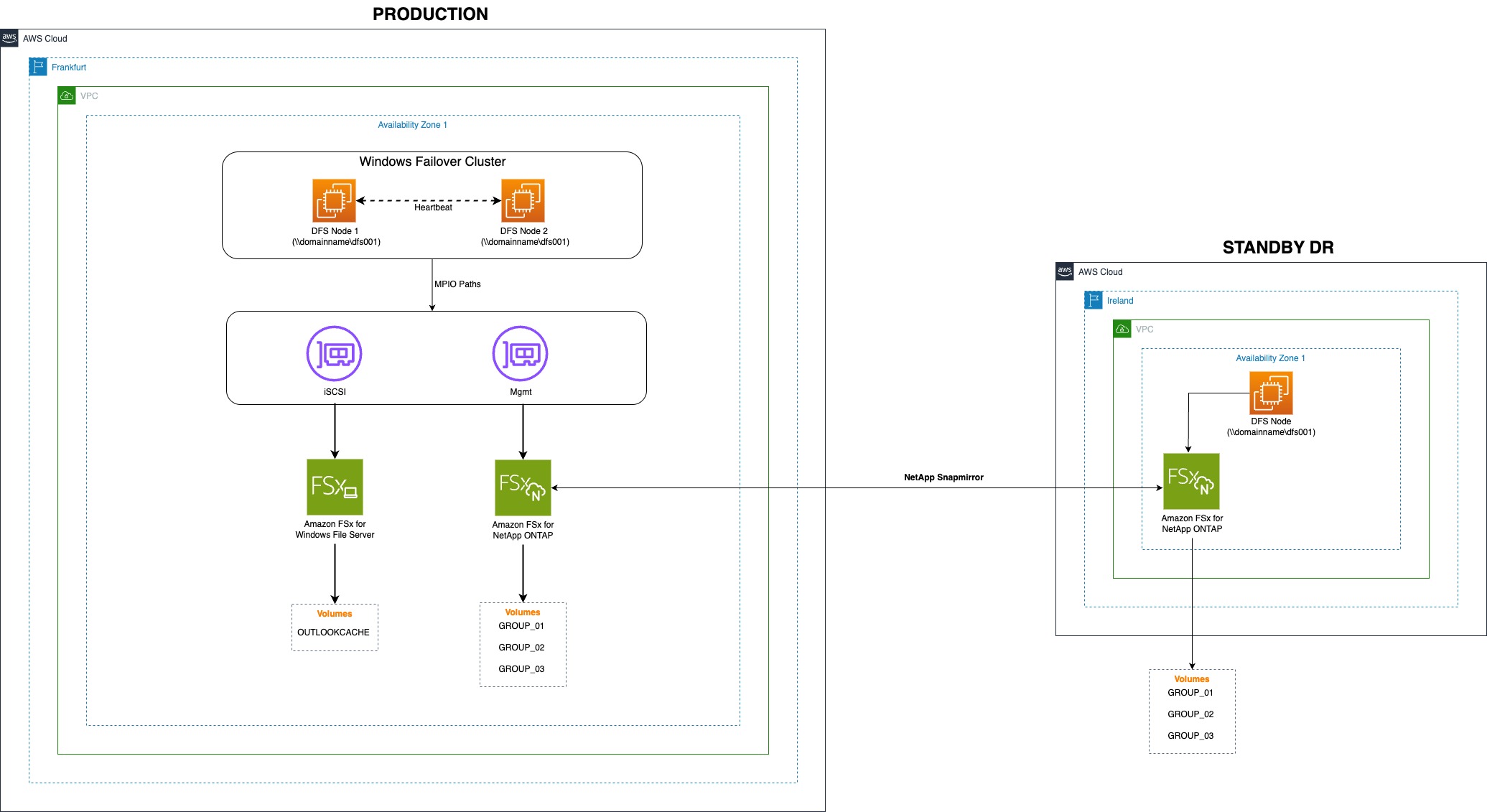
Figure 2. Amazon FSx storage architecture
Based on the user access pattern, the tiering policy (after migration) was set as follows:
- Volumes needing consistent low latency requirement: SNAPSHOT_ONLY.
- Volumes where the access pattern was not known: AUTO (cooling period of 7 days).
For more information, refer to volume data tiering in the FSx for ONTAP documentation.
Allcargo also deployed Microsoft DFS on Windows Failover Cluster using iSCSI protocol on FSx for ONTAP to provide a highly available and scalable file system backend for user-facing applications. The following DFS setup allowed Allcargo to deliver enterprise-grade file services with scalability, redundancy, and low-latency access across AWS Regions.
Cluster setup:
- Two Windows Server nodes are configured in a Windows Failover Cluster (WSFC) using Amazon EC2 compute.
- Both nodes are deployed in the same AZ to make sure of low-latency access to the shared block storage.
- Cluster heartbeat and quorum configurations make sure of HA and failover capability.
Storage configuration:
- Shared storage is configured using FSx for ONTAP, which supports iSCSI-based block storage/LUNs.
- iSCSI LUNs are connected to both cluster nodes using Multi-Path I/O (MPIO) for high performance and path redundancy.
- iSCSI LUNs are configured as Cluster Shared Volumes (CSV) to host DFS Namespace Root.
DFS role configuration:
- DFS Namespaces abstract physical storage paths and provide a single UNC path to users.
- The DFS Namespace role is installed on the Windows cluster.
- The DFS root resides on shared clustered storage to make sure of seamless failover and HA among two cluster nodes.
Allcargo also implemented a comprehensive data protection strategy using built-in Amazon FSx features. For disaster recovery (DR), they used NetApp SnapMirror (included at no extra cost for all FSx for ONTAP file systems) to replicate network file shares (~25 TB) from their primary site in the Frankfurt Region to their secondary site in the Ireland Region as shown in Figure 3. These replications occurred every 15 minutes providing a 15 minute Recovery Point Objective, assuring minimal data loss in the case of a disaster. Moreover, they established a daily snapshot routine using Amazon FSx snapshots feature, providing an extra layer of data protection. This dual-approach strategy made sure of both point-in-time recovery capabilities and cross-Region DR protection for their critical data. For data migration, the customer used AWS DataSync, which is a secure, online managed service that automates and accelerates moving data between on-premises and AWS storage services.
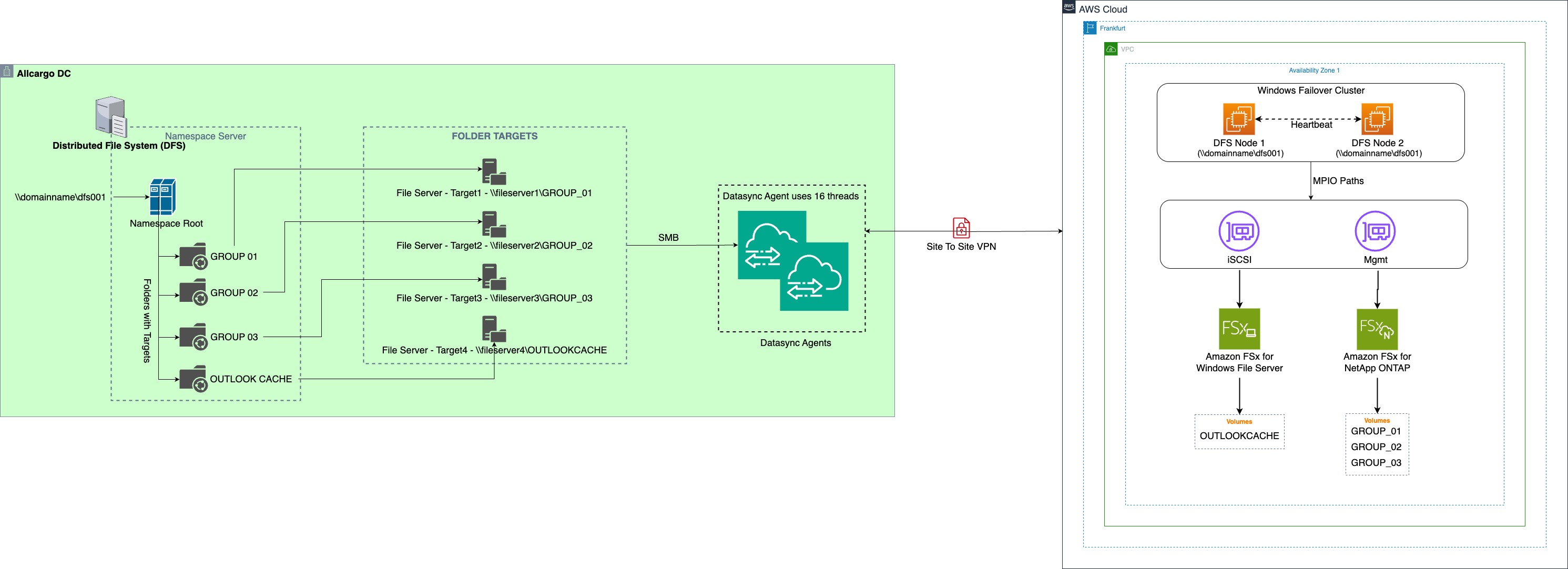
Figure 3. Data protection architecture
It automates the data migration tasks over prior methods of using Robocopy, WinRAR, or copying the files manually. Allcargo used the following data migration strategy:
- The Outlook cache volume does not need any data migration because a new cache builds automatically when users start using FSx for Windows File Server file share.
- The migration of general storage volumes was executed using DataSync, following a comprehensive three-phase approach outlined in this AWS Storage post. In the pre-migration phase, the team created backups of source files on the existing platform. During the migration phase, several technical adjustments were implemented:
- The FSx for ONTAP throughput capacity was temporarily increased to handle higher transfer rates, IOPS, and intensive data reduction operations (compression and deduplication).
- The volume tiering policy was temporarily set to “All” as explained in this AWS Storage post.
- Amazon CloudWatch monitoring was configured with an 80% SSD capacity alert threshold and dynamically updated SSD capacity (in increments of 2 TB) using a CloudWatch Alarm, Amazon Simple Notification Service (Amazon SNS), and AWS Lambda. For more information, refer to this FSx for ONTAP documentation.
- The migration used a batch-based approach, which allowed for the gradual scaling of SSD pool capacity and optimized cost management.
- Multiple DataSync agents were deployed to enable parallel DataSync tasks, with manifest files used for selective file transfer.
- Post-migration activities included reducing throughput capacity to match operational needs and adjusting volume tiering policies to their final configuration. This structured approach made sure of a smooth and efficient data migration process.
Benefits and results
The migration of VDI workload to AWS Cloud delivered the following significant benefits for Allcargo:
- Storage capacity and throughput can be scaled as per business demand at the click of a button.
- AWS manages hardware and firmware along with the availability of Amazon FSx in cloud, which allowed Allcargo users to spend time on business innovation.
- Allcargo configured 14 DataSync agents, which helped seamless migration of 32 TB of data with ~208 million files to FSx for ONTAP in 15 days.
- Performance improvements were immediately noticeable, with VDI machines rebooting faster and MCS catalog updates completing more quickly.
- Cost savings were substantial, including approximately $1.5M in annual savings from decommissioning their hyper-converged platform on AWS which was used for DR, as well as 23% more reduction in costs achieved through migrating non-persistent VDIs to Shared Tenancy and implementing VDI Auto Scaling with off-hours shutdown.
- The new infrastructure provided enhanced scalability, which allowed for on-demand adjustment of virtual desktops and flexible resource allocation. Despite operating in a single AZ deployment, the system demonstrated remarkable reliability with consistent uptime and no service failures since migration.
- Management processes were significantly streamlined, featuring faster hosting connections, quick Amazon Machine Image (AMI) image discovery, and efficient MCS catalog creation, while eliminating the need for more tools on the Cloud Connector server. These improvements collectively transformed their operational efficiency and cost structure.
Conclusion
In this post, we shared how Allcargo Global evaluated and implemented Amazon FSx suite of services to minimize the time and costs associated with managing on-premises file storage infrastructure, particularly for VDI workloads, which can grow rapidly. Transitioning to the fully managed shared storage solutions of AWS, users can easily deploy, operate, and scale high-performance file systems in the cloud. The solution discussed in this post allows you to mix and match different storage solutions to meet specific business needs through different data protocols. It also demonstrated how AWS DataSync serves as an efficient tool for migrating data from on-premises systems to Amazon FSx, highlighting the comprehensive approach of AWS to both storage modernization and seamless migration.
Thank you for reading this post. If you have any questions about the described migration solution, such as the VDI infrastructure, storage configuration, or data migration approach, please contact AWS for further assistance.