AWS Architecture Blog
How Convera built fine-grained API authorization with Amazon Verified Permissions
Convera processes billions in cross-border payment volume yearly for businesses and financial institutions worldwide. As their platform grew, they needed a robust authorization system that could protect sensitive financial data while maintaining operational efficiency across their global network.
In this post, we share how Convera used Amazon Verified Permissions to build a fine-grained authorization model for their API platform.
Background
As Convera’s service offerings expanded, they needed a scalable, secure, and auditable way to enforce role-based and attribute-based access control. Their goal was to make sure users, both internal and external, had access only to the resources and actions they were explicitly authorized for, while maintaining flexibility to adapt to evolving business needs. Initially, Convera explored building an in-house access control solution. However, they realized that implementing policy management, real-time authorization, logging, and auditing from scratch would require significant engineering effort and ongoing maintenance, diverting resources from their core business priorities. Convera chose Verified Permissions for implementing fine-grained authorization for their payment APIs. This choice was driven by the following factors:
- Direct integration with AWS services like Amazon Cognito and Amazon API Gateway
- Cedar policy language’s flexibility in defining complex authorization rules
- Ability to evaluate multiple attributes like user roles, transaction amounts, and geographic locations
- High-performance characteristics with millisecond-level authorization decisions
Given its flexibility and scalability, Verified Permissions became the foundational reference architecture for managing access control across two main scenarios:
- Fine-grained access control – Convera’s Payment platform serves diverse users including customers, internal staff, and machine-to-machine communications, each requiring specific entitlements based on their roles, organizational hierarchy, and context.
- Multi-tenancy controls – One of Convera’s most complex requirements was enabling multi-tenant access control while enforcing strict data isolation. Verified Permissions make it possible to define policies that dynamically evaluated tenant ownership, user roles, and contextual attributes.
The following analysis breaks down Convera’s implementation approach across their major use cases
Fine-grained access control
Fine-grained access control is a critical aspect of application security that makes sure users have precisely defined permissions, granting access only to specific resources or actions within an application. Using Verified Permissions, you can define a schema in terms of entity type, including attributes relevant to the authorization model and the valid combinations of principal types, resource types, and actions. Verified Permissions uses this schema to validate that a static policy or policy template is consistent with the application’s authorization model.
Convera implemented Verified Permissions for fine-grained access control across multiple user types and interaction patterns.
Customer access management
At the UI level, Convera used Verified Permissions to manage API access based on specific user characteristics. For example, in their financial applications, the visibility of transaction features like the modify payment parameters is dynamically controlled based on Verified Permissions policies.
The following diagram illustrates the user authentication decision flow for financial transactions.
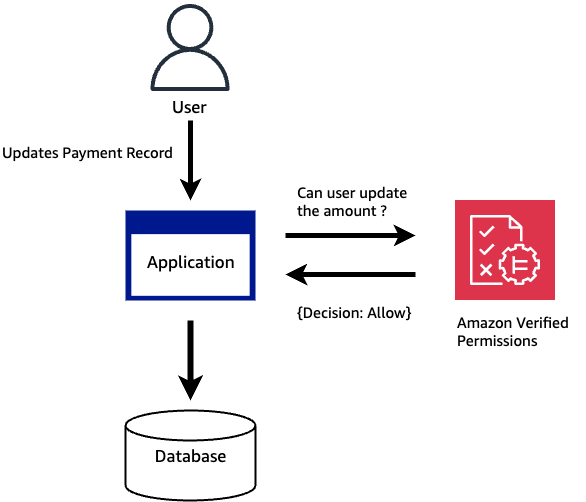
Figure 1: User Authorization Decision for financial transactions
The following is an example Cedar policy that can be used in conjunction with Verified Permissions to achieve this use case. This policy makes sure only authorized users with specific roles can see sensitive financial controls. The same policy must be evaluated at the API level when the actual transfer request is made. At the service level, the policy is designed to provide fine-grained access controls.
You can integrate the application with Verified Permissions through the API to authorize user access requests. For each authorization request, the service retrieves the relevant policies and evaluates those policies to determine whether a user is permitted to take an action on a resource given context input such as users, roles, group membership, and attributes.
The following figure illustrates the end-to-end architectural diagram of this implementation.
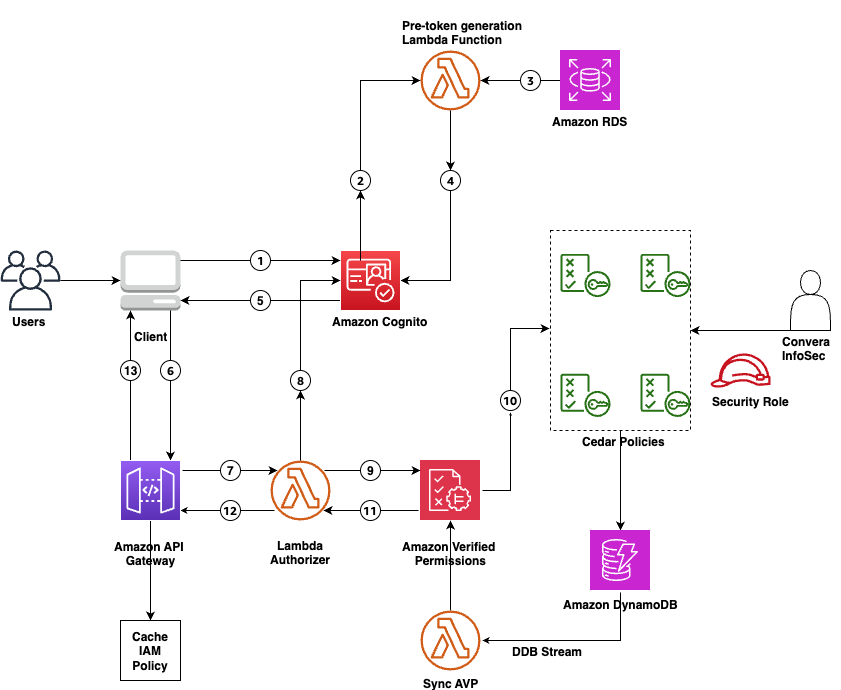
Figure 2: Fine-grained User Authorization control with Verified Permissions
The workflow consists of the following steps:
- Users initiate login through the client application.
- The client authenticates with Amazon Cognito.
- Amazon Cognito triggers a pre-token generation AWS Lambda function to get user roles.
- The Lambda function fetches user roles from Amazon Relational Database Service (Amazon RDS).
- The Lambda function enriches a JSON Web Token (JWT) with user role information.
- The enriched JWT with user roles is returned to the client application.
- The client application makes an API call, sending an authorization request to API Gateway through the enriched JWT.
- A Lambda authorizer validates the JWT and the role permissions from the JWT and makes a call to Verified Permissions.
- Verified Permissions reads access policies stored as Cedar policies and makes an authorization decision.
- Verified Permissions returns the authorization result to the Lambda authorizer.
- The Lambda authorizer, based on the authorization result, sends an AWS Identity and Access Management (IAM) policy that allows or denies the request to API Gateway.
- API Gateway either allows or denies the request to the client application.
- API Gateway caches the IAM policy.
The policy governance is owned by Convera’s infosec team through a strictly regulated IAM role. The changes to the Cedar policies are captured using Amazon DynamoDB Streams and continuously synced with Verified Permissions.
To improve speed, Convera created a two-level cache system, using the API Gateway built-in cache for authorization decisions and application-level caching for Amazon Cognito tokens. The Lambda function invokes Verified Permissions to authorize the request. If Verified Permissions returns deny, the request is rejected, and an HTTP unauthorized response (403) is sent back. If Verified Permissions returns allow, the request is moved forward. This multi-level caching approach successfully delivers sub-millisecond response times while reducing operational costs and maintaining security controls.
Internal customer connect applications
Convera was able to reuse the same architecture for their internal user access as well, such as customer service associates who need quick access to client information to provide efficient service while protecting access to sensitive data. Using Verified Permissions, a role-specific Cedar policy was created to achieve the following:
- Enable view-only access to basic customer profiles, including contact information and service history
- Restrict edit capabilities to specific fields, such as updating contact preferences or logging support interactions
- Block access to sensitive financial data or internal business metrics
In this flow, internal users authenticate through their enterprise identity provider (IdP), in this case Okta, through the Convera Connect App and obtain ID and access tokens from Amazon Cognito. Amazon Cognito, using a pre-token generation hook, customizes the access token with user attributes stored in Amazon DynamoDB. Although the Cedar policies are tailored for internal roles and responsibilities (different from customer-facing policies), the fundamental flow involving API Gateway, a Lambda authorizer, Verified Permissions policy evaluation, and decision caching remains identical. This architectural reuse meant Convera didn’t need to rebuild their authorization infrastructure, so they can use the same performance optimizations, security controls, and operational processes across both customer and internal user access patterns.
Extending the model to service communication
After successfully implementing Verified Permissions for customer and internal user access control, Convera recognized they could use the same architecture for securing service-to-service communications. Similar to how they manage user authentication through Amazon Cognito user pools, each client service is registered in their client configuration system, with Verified Permissions creating a dedicated policy store for service-specific permissions. Services authenticate through Amazon Cognito using client credentials (instead of user credentials) to obtain access tokens that carry service-specific attributes such as service identifier, tier, allowed operations, and rate limits.
The following diagram illustrates the machine-to-machine architecture for internal and external partner integration.
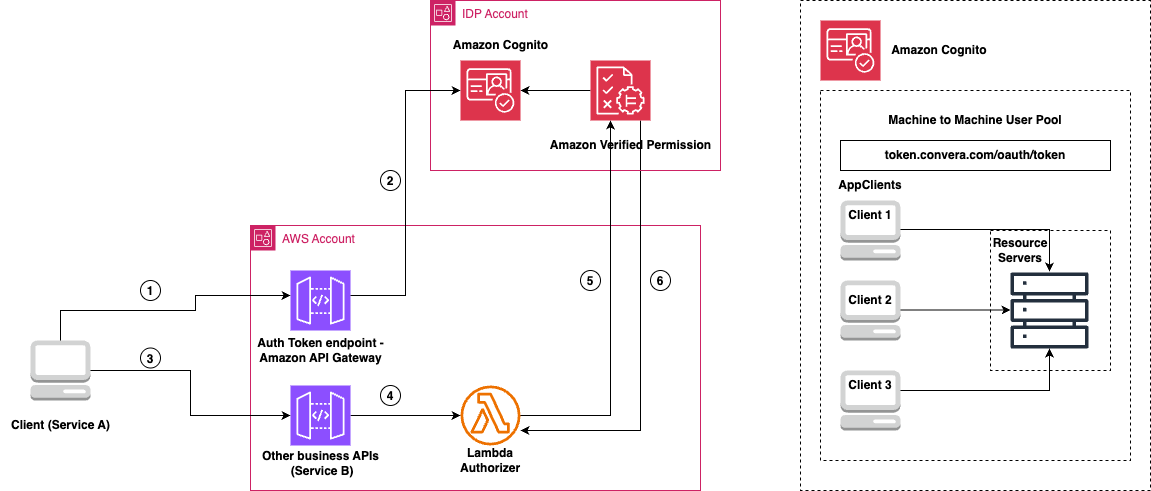
Figure 3: Machine to machine architecture for internal and external partner integration
The workflow consists of the following steps:
- Service A sends an API request to the authentication token endpoint in API Gateway, including its access token.
- The request is forwarded to Amazon Cognito, which validates the token from the machine-to-machine user pool.
- Service A, now authenticated, makes a request to the business API (Service B) through API Gateway.
- API Gateway forwards the request to the Lambda authorizer, which processes the incoming request and extracts the service context from the token.
- The Lambda authorizer sends the authorization request to Verified Permissions to evaluate it against stored Cedar policies. The evaluation considers:
- Service identity
- Requested operation
- Resource context
- Environmental factors
- Verified Permissions returns an allow or deny decision. If allowed:
- The Lambda authorizer generates an appropriate IAM policy.
- API Gateway caches the authorization decision.
- The request is forwarded to Service B.
- Future similar requests can use the cached decision.
Multi-tenancy controls
As Convera expanded to support multi-tenant software as a service (SaaS) integrations, they needed a way to implement tenant-specific access controls and data isolation. The challenge was to make sure each tenant’s users could only access their authorized resources while allowing tenant administrators to manage their own access policies. Convera used their existing Verified Permissions architecture with a per-tenant policy store approach to address these requirements.
Verified Permissions per-tenant policy store
Convera decided to use per-tenant policy store approach for the following reasons:
- Low-effort tenant policies isolation
- The ability to customize templates and schema per tenant
- Low-effort tenant onboarding and offboarding
- Per-tenant policy store resource quotas
The following figure shows the process of implementing fine-grained authorization control using Verified Permissions with a per-tenant policy store.
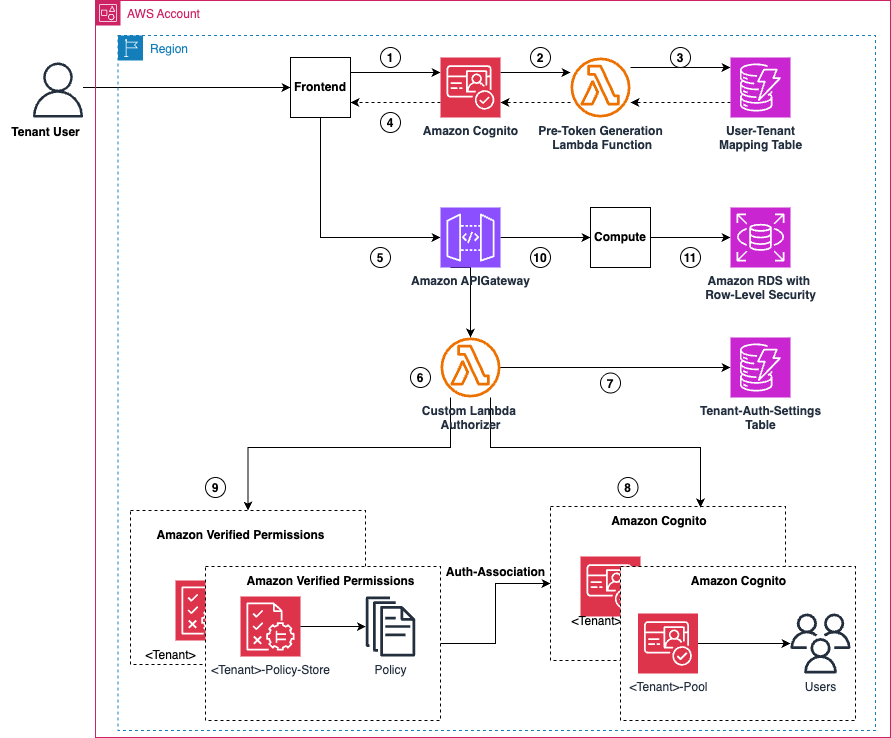
Figure 4: Fine-grained authorization control using Verified Permissions with per-tenant policy store
The end-to-end process flow consists of the following steps:
- The tenant-specific Amazon Cognito pool is created with a custom attribute called
tenant_id. The user logs in to the pool with user claims (for example,user_id). - Amazon Cognito uses a pre-token generation Lambda function that looks up the
user_idfrom a user tenant mapping DynamoDB table. - A DynamoDB table is maintained to map user and tenant configuration.
- The pre-token generation Lambda hook gets the
tenant_idback from DynamoDB, and adds to the customtenant_idattribute in the access token. - The user makes an API call to API Gateway with the enriched JWT.
- API Gateway validates the token and forwards the request to a custom Lambda authorizer.
- The Lambda authorizer function reads the
tenant_idfrom the JWT and looks up the associated Verified Permissionspolicy-store-idfrom a DynamoDB table. - The Lambda authorizer verifies the JWT for validity and claims with the Verified Permissions associated Amazon Cognito pool taken from the access token.
- If authentication is successful, it calls Verified Permissions to verify that the user is permitted to do the requested action.
- If allowed, Verified Permissions returns an IAM policy with Allow access (Deny-by-Default) and forwards the request to backend Kubernetes pods with
tenant_idin a custom header. - Backend services receive the
tenant_idand validate with Verified Permissions again (for zero-trust policy), creates a tenant context, and forwards to Amazon RDS. Amazon RDS is configured to accept only requests with specific tenant context and returns data specific to the requestedtenant_id.
The following are some examples of Cedar policies used for multi-tenant isolation:
Conclusion
In this post, we explored how Convera used Verified Permissions to build a sophisticated, fine-grained authorization model for their API platform. We discussed about how Convera was able to implement fine-grained access for their customers, multi-tenant SaaS integrations, machine-to-machine communication scenarios, and internal customer connect applications with the help of Verified Permissions. With Verified Permissions, Convera was able to achieve the following:
- Implement fine-grained access control across multiple use cases
- Enhance security with attribute-based access control across multi-tenant environments
- Improve scalability, handling over thousands of authorization requests per second with submillisecond latency.
- Increase operational efficiency, reducing time spent on access management tasks by 60%.
- Future-proof their authorization framework to adapt to evolving business needs
To learn more about implementing these patterns and best practices, refer to the Verified Permissions User Guide. For hands-on experience, we recommend exploring the Verified Permissions workshop, which provides practical examples and guided exercises.