Artificial Intelligence
From developer desks to the whole organization: Running Claude Desktop on Amazon Bedrock
June 2026: This post was updated to reflect Claude Desktop—which includes Claude Cowork, Claude Code, and Chat—is now available through Amazon Bedrock
Today, we’re excited to announce the full Claude Desktop experience on Amazon Bedrock. You can now run Chat, Claude Cowork, and Claude Code through Amazon Bedrock, directly or using an LLM gateway.
With Amazon Bedrock, you build within your existing AWS environment, maintain enterprise security and regional data residency, and scale inference. Inference runs in the AWS Regions you configure, and conversation history is stored locally on the device.
Each surface — Chat, Claude Cowork, and Claude Code — has its own policy key, so admins decide who gets what and when. Start non-technical teams with Chat and Claude Cowork, give engineering Claude Code, and broaden access as adoption grows.
With Claude Desktop on Amazon Bedrock, you can expand AI adoption to every knowledge worker in your organization:Chat for quick answers and thinking through problems, Claude Cowork for multi-step research across approved sources that processes files and returns finished deliverables, and Claude Code for engineers who want agentic coding without living in a terminal.
In this post, we walk through how Claude Desktop integrates with Amazon Bedrock and show an example of how knowledge workers use it in practice.
What is Claude Desktop
With Claude Desktop oin Amazon Bedrock, your users can delegate research, document analysis, data processing, and report generation to Claude from a desktop application. They get the full Claude Desktop experience including Chat, Claude Cowork and Claude Code. Features that require Anthropic-hosted inference, including Claude Design,Computer Use, and the Skills Marketplace, are not included because Claude Desktop in this configuration routes model inference exclusively through Amazon Bedrock in your AWS account. For a full feature comparison with Claude Enterprise, see Features on 3P.
Pricing is consumption-based through your existing AWS agreement and billing, with no seat licensing from Anthropic.
How Claude Desktop Integrates with Amazon Bedrock
Amazon Bedrock serves as the inference backend in your AWS account and supported AWS Regions.
Configuring Claude Desktop on Amazon Bedrock takes two steps. First, users download the Claude Desktop application on their machine. Second, your device-management system (such as Jamf, Microsoft Intune, or Group Policy) pushes a configuration to Claude Desktop that activates the inference mode, specifying the model ID and Amazon Bedrock Inference Profile, authentication method, and organizational policies. If your organization centralizes model access through an LLM gateway, you point Claude Desktop at the gateway URL through the same managed configuration.
If your organization already builds with Claude Code in Amazon Bedrock, Claude Desktop can use the inference setup.
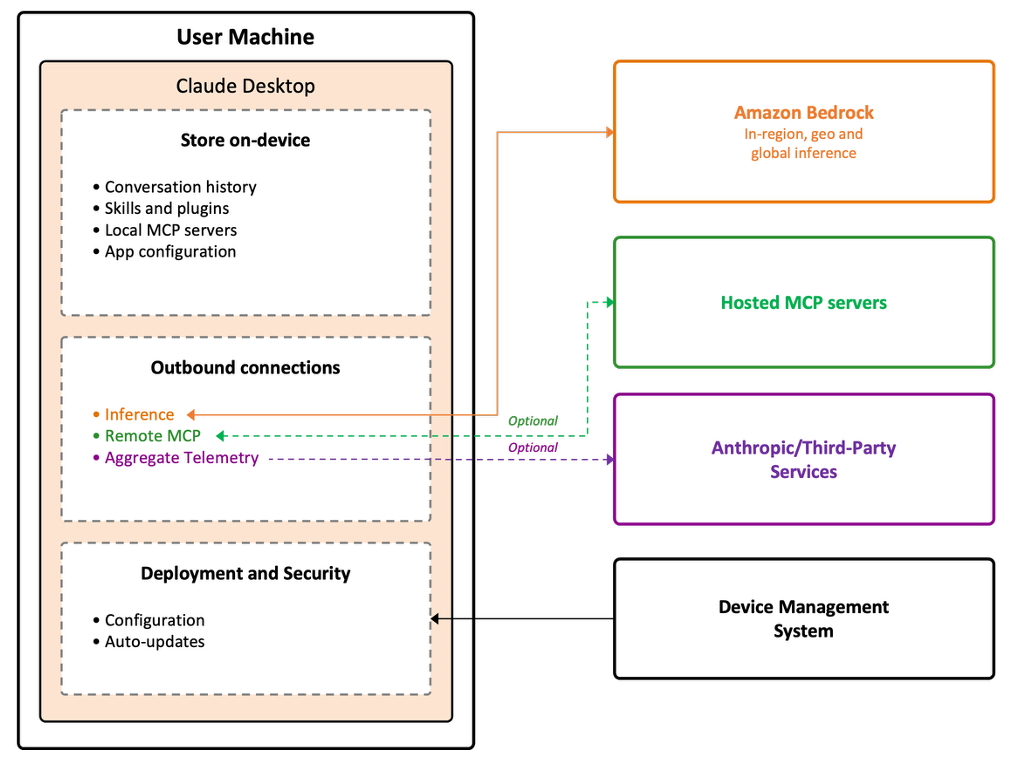
Figure 1: The following diagram illustrates the end-to-end flow
The application has three outbound paths, all under your control. Model inference goes to Amazon Bedrock in the AWS Regions you configure. MCP server connections, if configured, go to endpoints you approve. Anthropic receives only aggregate telemetry (token counts, model ID, error codes, anonymous device identifier), which can be disabled through configuration options.
Amazon Bedrock offers in-Region, geo cross-Region, and global cross-Region inference profiles so you can choose the right level of data residency for your organization.
Claude Desktop works with the AWS services you already use:
- Authentication through AWS IAM or Amazon Bedrock API keys
- Network isolation through VPC endpoints
- Observability, optionally through OpenTelemetry export to Amazon CloudWatch
- Audit through AWS CloudTrail
- Consolidated AWS billing, with granular cost attribution
For details on MDM configuration, credentials, MCP servers, plugins, and activating Chat, see the Claude Desktop Configuration Reference.
Claude Desktop in practice
With the integration configured, your users open Claude Desktop and start delegating work. Claude Desktop can connect to external data sources through MCP servers, giving Claude access to live documentation, web search, and other tools as it works.
For example, a product manager is planning a new notification feature for a university athletics app hosted on AWS. They have customer meeting notes that point in different directions, a set of project requirements, and limited time to reconcile them. They upload them to Cowork.
Claude compares the disparate inputs and synthesizes them into a single product brief. It evaluates the proposed approach, research alternatives, flags technical challenges, and backs recommendations with proof points. Connected to the AWS Documentation MCP server and a web search MCP server, Claude grounds the brief in current service documentation, market context, and competitor positioning.
Figure 2: The product manager turns meeting notes into a product brief with Claude Cowork
In minutes, the product manager has a structured brief grounded in current sources and ready for review. The same pattern applies to other knowledge workers. An operations manager can consolidate scattered documentation into an SOP. A finance analyst can turn raw data into a formatted monthly review. A research team can compile findings from multiple sources into a single report.
Conclusion
With Claude Desktop on Amazon Bedrock, you can expand AI adoption to every knowledge worker in your organization while keeping your data within your AWS environment. Claude Desktop is available on macOS and Windows in AWS Regions where Claude models are available on Amazon Bedrock. To get started, download Claude Desktop from claude.com/download and see the Claude Desktop Setup Guide.
Give Claude Desktop a try today and send feedback to AWS re:Post for Amazon Bedrock or through your usual AWS Support contacts.