What is Application Migration?
What is application migration?
Application migration is the process of moving applications from one environment to the other. Traditionally, applications were hosted in on-prem data centers or colocation facilities, creating inefficiencies in app scaling, upgrading, and maintenance. Application migration moves applications to a more flexible cloud-based infrastructure for improved performance and user experience. It involves setting up new deployment pipelines or even rewriting and redesigning applications to benefit fully from cloud services. Application migration requires proper planning and a systematic approach to minimize business disruptions.
What are the benefits of application migration?
Organizations choose to migrate their software applications from on-premise to the cloud for several reasons.
Flexibility
Migrating applications to the cloud allows organizations to easily access the necessary computing resources. Rather than powering their workloads with on-premise servers, organizations use cloud technologies to virtualize the required computing environment. For example, you can resize the computing capacity for your applications on Amazon EC2 to meet changing requirements.
Besides computing flexibility, cloud migration also helps software development teams deploy workloads closer to end users. The cloud environment’s distributed architecture improves application performance, as applications and data reside geographically closer to end users who consume it. Moreover, developers can easily install additional modules like load balancer and content delivery network (CDN) to further improve application responsiveness and availability.
Cost efficiency
Application migration lets organizations enjoy significant cost savings by minimizing capital expenditure. Rather than investing in and maintaining expensive computing equipment, organizations subscribe to cloud computing tools and environments on pay-as-you-go plans. Cloud providers fully manage operating systems, databases, and other IT infrastructure, significantly reducing licensing and infrastructure maintenance costs. Organizations can optimize costs and manage risks by scaling their digital offerings to end users.
Access to advanced technology
App migration goes beyond moving software applications from on-premise to the cloud. Some organizations shift their workloads to access cutting-edge technologies like artificial intelligence (AI), machine learning (ML), blockchain, and augmented reality (AR). You can offer improved customer experiences at a fraction of the cost. Companies explore new software strategies and remain competitive in growing markets. For example, companies can use AWS Bedrock to build and scale generative AI applications more effortlessly on the cloud.
Improved operations
Successful application migration helps software teams minimize disruptions that affect business revenue. The cloud architecture enables DevOps teams to set continuous integration and continuous delivery (CI/D) pipelines, which allows swift responses to bug fixes and feature releases. Migrating workloads to a cloud environment also improves availability, recoverability, data security, and more. For example, you can move applications deployed on virtual machines to containers with application migration tools. Containerized apps are easier to replicate across cloud environments, ensuring service availability.
What are application migration strategies?
Organizations adopt different strategies when they migrate applications to the cloud because of underlying technical complexities, computing requirements, and changing business needs.
Rehost
Rehost, or lift and shift, involves moving an application from its current environment to the cloud without modification. In this strategy, you use cloud migration services to move many applications to their new environment without interrupting service delivery. With a properly planned strategy, rehosting means that users can continue to access their workloads during the migration.
Replatform
Replatform, or lift and reshape, is an approach that takes an application off its existing platform and moves it to the cloud. With this method, you perform some optimization to ensure that the application benefits from cloud features in the new environment. For example, you can shift an SQL database currently hosted on a physical server to Amazon RDS for SQL Server with automated hardware provisioning, maintenance, and scaling. You can also move entire VMs to the cloud by encapsulating them with containers. This reduces efforts to modify current software setups when you’re shifting between environments.
Refactor
With refactoring, or lift, tinker, and shift, you can use cloud-native features when you’re migrating applications. When you’re refactoring, you can make considerable changes to the application’s code base. Also known as rearchitecting, this strategy is suitable for decoupling workloads from physical platforms. Refactoring requires sufficient planning, implementation, and testing to ensure that the revised software is functional despite considerable code changes.
Repurchase
Repurchase is an application migration strategy that involves discarding existing software modules and replacing them with newer cloud-supported versions. Organizations use this strategy when they buy new software in the cloud marketplace because it’s more financially sensible than rearchitecting legacy systems. When you repurchase applications, you benefit from the software as a subscription (SaaS) model. Cloud-based applications also offer features that are built specifically for cloud environments, such as remote access, serverless deployment, and self-managed servicing.
Retain
Retaining is a strategic move when you don’t have the budget or resources to move the application to the cloud immediately. It can also happen if chained dependencies mean that the application has to remain in its current on-premises environment for a certain period until other software modules have been migrated. With retaining, cloud bursting strategies support the utilization of cloud resources if the on-premises infrastructure is at capacity.
Retire
Retiring involves discontinuing the support of an application instead of moving it to a new environment. You might retire an application if there are no business benefits for moving it to the cloud. For example, some applications are no longer in use but continue to consume on-premises computing resources. This approach is also viable if your software vendor has discontinued support for the application. After retiring, you can build new cloud-native applications from scratch or purchase new SaaS solutions that better meet your requirements.
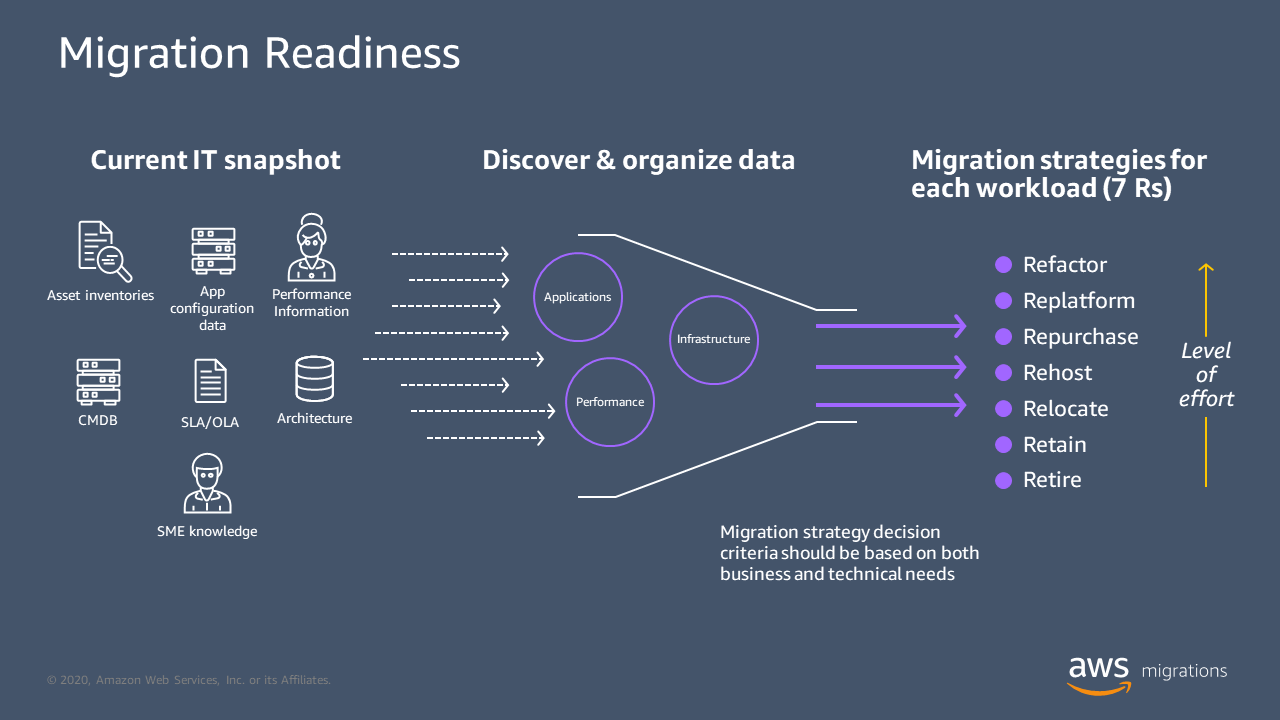
The following diagram explains how migration readiness works, from the current IT snapshot, to discovering and organizing data, to the preceding migration strategies.
What is the application migration process?
Successful application migration requires a well-coordinated strategy among various stakeholders. The following steps can help you migrate applications to the cloud.
Conduct a technical audit
Assess your existing applications, tech stacks, data movement, and business goals to identify the benefits and potential risks of migration. This provides an overview of the scale and impact of migration on your organization and daily operations. It also helps you identify cloud providers that offer the necessary technologies to simplify, manage, and automate your migration project.
Plan the migration
Next, visualize the final outcome and work backward to bridge the technical gaps between the current and new computing environments. Analyze the factors that are influencing the process, including technical, business, and security considerations. Then, assemble an application migration team to implement and facilitate the planned changes. Application migration is complex and requires a multidisciplinary team of system administrators, software developers, data engineers, security officers, and other IT specialists.
Choose a migration strategy
Decide which migration strategy best suits your organization’s goals, priorities, and resources. For example, you can retain specific applications on in-house servers while shifting others to the cloud. If you’re moving multiple workloads to the cloud, you might choose a phased migration to allow room for remediations and service continuity. We also recommend factoring in the timeline required to implement each strategy.
Test adequately
Create a test environment so that your migration team can rehearse the process before transitioning. Conducting adequate testing prepares your team for possible challenges and follows through with confidence. Review the test results to ensure that data integrity, application behavior, and system functionality remain unaffected in the mock migration.
Perform application migration
After you’ve finalized the plan, move the workloads to their new environment in stages. A phased cloud migration approach provides stability and continuity to application users. Ensure that the migration team is available to handle technical issues that arise. At the same time, inform all users about the process, duration, and anticipated challenges.
Monitor migrated applications
Continue to observe the performance of your applications after you have shifted them to the cloud. Alert the migration team for disruptions, data integrity issues, or any irregular behaviors that affect service delivery. Revisit and refine the application migration planning process if necessary to optimize future workflows.
What are application migration best practices?
Application migration is a complicated process that consumes considerable time and resources. These are best practices that make migrating apps more manageable.
- Get all stakeholders on board to support the migration effort. Convey the benefits, goals, and motivations to the entire team to ensure everyone shares a common understanding.
- Engage an external IT partner to complement your in-house migration team if necessary. Application and data migration requires skillsets that some organizations don’t possess.
- Back up all files, databases, and apps in the existing environments as a contingency measure. Use the backups to roll back changes if you encounter issues when migrating.
- Start conservatively by migrating small numbers of non-critical workloads. Then, automate the process where possible to scale future migration.
- Retain the test environment to allow testing of subsequent changes and improvements. This ensures migration teams can validate future configurations safely before pushing them to production.
How can AWS help with your application migration needs?
AWS Application Migration Service allows organizations to automatically move their applications from servers with supported operating systems to the AWS cloud. You can migrate and modernize your on-premise and cloud workloads, as well as access AWS-supported features like disaster recovery and license conversion.
- AWS Application Migration Service reduces migration costs by providing a common tool for various applications.
- You can migrate workloads to multiple AWS regions to improve accessibility, resilience, and compliance.
- AWS Application Migration Service supports non-disruptive tests and allows switchover to production workloads within minutes.
Get started with application migration by signing up for an AWS account today.
Next Steps on AWS
Browse all cloud computing concepts
Browse all cloud computing concepts content here:
Did you find what you were looking for today?
Let us know so we can improve the quality of the content on our pages