What Is Media Asset Management (MAM)?
- What is Media Asset Management (MAM)?
- What are the benefits of media asset management?
- What are the use cases of a media asset management solution?
- What are the common capabilities and features of MAM systems?
- What is media asset management workflow orchestration?
- What is the difference between VAM, DAM, and MAM?
- What is digital asset management (DAM) software and where is it used?
- What are video asset management and video digital asset management, and where are they used?
- What is MAM software, and where is it used?
- How can AWS help with your media asset management requirements?
What is Media Asset Management (MAM)?
Media asset management (MAM) is the process of organizing media files, such as images, audio, and video, for efficient discovery, retrieval, and use. Media files are challenging to classify and sort due to their data properties, but well-cataloged assets support reuse, search, and cost-effective delivery to end users. A MAM system centralizes the storage of rich media content, including metadata. With a MAM, you have access to the tools that you need to edit, process, tag, and distribute image, audio, and video files.
What are the benefits of media asset management?
Collaborating is challenging when media assets are organized into different, unlabeled folders and directories with minimal context. For example, a photo of an organization’s office space might be stored in a folder called "Launch campaign" because it was taken at the launch of the new office. However, if the HR team wants to use the same photo for a recruiting campaign, they might not be able to find it easily. Searching for office space or office photos in the file storage directory doesn’t help if the photo has a default name like img_o693.jpg.
MAM supports digital asset organization by creating a software layer on top of your asset storage layer. It maps underlying image assets to meaningful names, tags, and metadata. MAM offers the following benefits.
Organization
Your files can reside anywhere in the storage layer, either on-site or in cloud-based storage. MAM ensures that all files and their associated data are accessible from a single location. The MAM makes your files instantly available through a single portal, accessible via an API and a user interface.
The MAM, as a single source of truth for data, is efficient not only for human organization but also for machine organization and processing. For example, by setting up permissions for different users and groups, you can share relevant files with the relevant people and applications, protect your IP, and encourage least-privilege permissions.
Easy search
Searching for the right digital media assets is easier when a MAM solution is in place. You can search and segment files in a way similar to how you search and segment customers in customer relationship management (CRM) software. With MAM, you can attach metadata tags to media files so that they’re searchable by categories such as upload or publication date, title, themes, people involved, department, and more.
Analysis across digital files
With MAM’s ability to search and segment rich media assets based on their metadata, you can analyze media files across an entire database. For example, in a TV show database, you can determine the percentage of foreign-language shows, the best-rated US-produced shows, the number of episodes of a particular show featuring a particular actor, and so on.
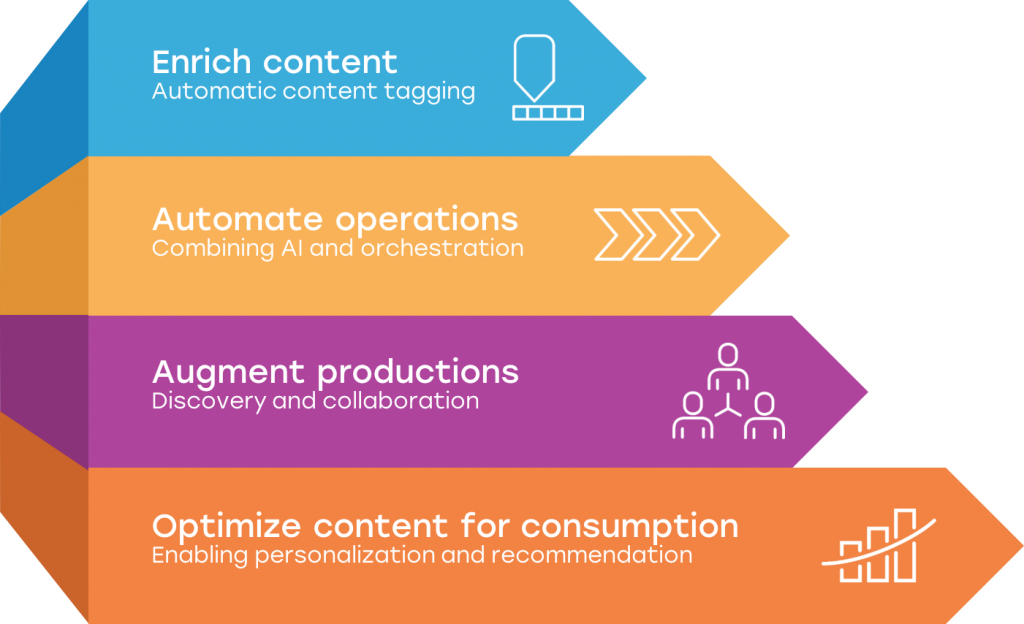
The following image summarizes MAM’s benefits: enriching content, automating operations, augmenting productions, and optimizing content for consumption.
What are the use cases of a media asset management solution?
MAM solutions have historically been used across the media and entertainment industry because of their significant media file cataloging needs. However, now all organizations produce, store, organize, and manipulate media content. MAM is highly useful for content management and production, which makes it an asset for marketing departments, internal training, and other media-rich business functions. For example, you can use MAM to store, tag, and organize:
- Various versions of ads, campaign materials, and other creative assets
- Training videos, marketing content, product demos, lectures, and other educational materials
- Product photos, video demos, and other related media assets for online sales
- Videos of talks, presentations, and promotional materials
- Simulations, experiment photos, and documents related to research and development
With MAM, libraries, museums, and archives can digitize, catalog, and distribute their collections to the public or specific audiences. Medical institutions can store and organize medical imagery, videos, and related content. The use cases for MAM are as varied as the assets that it can support.
What are the common capabilities and features of MAM systems?
MAM solutions feature the following to enhance efficiency and usefulness.
Additional file data
With MAM software, you can add your own metadata to files for better organization. For example, consider the task of organizing a library of video files from TV shows. Each file may include an associated length, frame rate, and audio channels. However, you need additional data elements, such as title and date filmed. Without these data elements, you’re forced to watch lengthy manual playbacks to understand the main content and category. Additional data points such as season, episode, director, producer, cast, and guest appearances support broader search use cases.
Automatic file ingestion
MAM software can automatically ingest all files stored in known storage locations with predetermined media formats (for example, WAV and MP4 audio and video files). It can also automatically detect currently unlisted metadata. For example, if you connected a video processing solution to the MAM, it can automatically process a video file and identify the actors to include in the metadata.
Integration
MAM software typically integrates deeply with popular on-site, cloud storage, and processing services, such as Amazon Simple Storage Service (Amazon S3) and Amazon Rekognition.
Connecting the MAM software with these types of integrations makes it much more powerful than a simple media cataloging solution. You can manipulate the underlying files to make them more useful.
Playback, viewing, and editing
Most MAM solutions offer playback and viewing for video, audio, and images. Some solutions offer deeper in-app editing, including tools for video production.
What is media asset management workflow orchestration?
The biggest benefit of a MAM system is its ability to automate tasks and orchestrate workflows. Being able to do this across digital files that are typically difficult to manipulate, store, and manage makes life much easier.
For example, using workflow orchestration, you could build out workflows where:
- Every new audio file that contains a certain person’s voice is also added to a backup file storage solution
- Video content that depicts violence or inappropriate language is automatically sorted to require age-verified user access permissions
- Photos are watermarked before you can distribute media files to external parties
Many MAM systems include built-in workflow orchestration tools, while other solutions offer only an open API for building your own automations.
What is the difference between VAM, DAM, and MAM?
Along with MAM, you might also encounter the terms video asset management (VAM), video digital asset management (VDAM), and digital asset management (DAM). Although these systems do overlap, they each serve different purposes.
What is digital asset management (DAM) software and where is it used?
DAM software helps organizations manage digital assets such as images, presentations, selected video files, and documents. Unlike a media asset management system, which is designed for complex video and multimedia files, most DAM systems focus on organizing and distributing assets to a business.
DAM systems let you build a centralized content library, allowing teams to store, categorize, and access digital assets in a single solution. Features like auto-tagging and granular access control help you maintain control over your growing media libraries and improve management of your digital content.
Although many DAM solutions can store video files, they’re not fully optimized for editing workflows, support advanced delivery workflows used by production teams, or generate proxy files. If you need these features, then media asset management (MAM) platforms are a better choice. DAMs are best for structured content management within your business.
What are video asset management and video digital asset management, and where are they used?
VAM systems and VDAM solutions focus specifically on managing video files. These solutions typically include deep integrations with the video production process, such as advanced editing. Many VAM solutions can integrate multiple elements, multimedia files, and workflows from different third-party vendors.
Unlike broader digital asset management platforms, VAM tools often support frame-level indexing, timecode tracking, and advanced editing integrations. That means you can combine multiple multimedia files and workflows from distinct vendors into a single production pipeline. VAM systems can handle large volumes of data efficiently, making them well-suited for complex video files.
VDAM is part of video management within a DAM solution, offering functionality similar to a standalone VAM tool.
What is MAM software, and where is it used?
A media asset management system integrates DAM software and more specialized VAM platforms across the full asset production lifecycle. MAM can manage video and multimedia files, but it adds to that by supporting a rich array of other media formats. You can use MAMs to manage assets across the content lifecycle, with capabilities like metadata indexing, automated tagging, and seamless integrations with editing tools that help better connect to your existing tech stack.
A media asset management system focuses heavily on managing assets through production and distribution, making it a must for most organizations that produce large numbers of rich content files.
How can AWS help with your media asset management requirements?
Amazon Web Services (AWS) offers artificial intelligence (AI) services you can integrate into your MAM or DAM systems to enhance efficiency. For example:
- Amazon Rekognition offers pretrained and customizable computer vision (CV) capabilities to extract information and insights from your images and videos
- Amazon Rekognition Video generates object, scene, activity, celebrity, text, and face analysis metadata so that you can automatically index large archives of video assets and make them easily searchable
- Amazon Transcribe converts speech to text for audio analysis
With Amazon Rekognition Video, Amazon Transcribe, and end-to-end serverless AWS solutions such as Media2Cloud, you can seamlessly curate, filter, and monetize archives from tape to a MAM system.
Get started with media asset management on AWS by creating a free account today.
Browse all cloud computing concepts
Browse all cloud computing concepts content here:
Did you find what you were looking for today?
Let us know so we can improve the quality of the content on our pages