What Is Network Topology?
- What is network topology?
- What are the types of network topologies?
- What are the benefits of network topology design?
- What is a physical versus logical network topology?
- What is network topology mapping?
- What are some network topology design considerations?
- How can AWS support your network topology requirements?
What is network topology?
A network topology is the design of a computer network’s components, including nodes, devices, and transmission lines. A network topology outlines how the devices communicate on the network, guiding the specific protocols, hardware, and software needed for implementation. The popularity of each network topology varies, based on whether the network is a local area network (LAN), a wide area network (WAN), a cloud network, or part of the internet. Various network topology patterns fit specific circumstances. Physical network topology describes the hardware in the network, whereas logical topology describes the design arrangement of the network components. Understanding network topology allows you to understand how to scale networks and build resilient networking infrastructure.
What are the types of network topologies?
You can use various network topologies to build cost-effective, high-performance, and scalable network architectures. Here are some common network topology design patterns.
Point-to-point topology
Point-to-point topology connects two nodes with a single link. It is the simplest form of network topologies. Both nodes can exchange data without concerns of interference from other devices.
Bus topology
Bus topology uses a single cable to connect all network devices. The bus, also known as the backbone, is similar to a major expressway where traffic branches in from smaller roads. When a device transmits data, the bus allows it to flow in each direction until it reaches the destination. Because of its simplicity, a bus topology is cost-effective and easy to set up. However, the bus topology is prone to network disruptions. If the central bus fails, the entire network stops working. The bus topology is also not scalable. As you add more devices, the bus becomes more congested, resulting in data collisions that degrade network performance.
Ring topology
Ring topology connects every device in a circular loop, with each device directly connected to two neighboring nodes. When a device sends data, it travels in one or both directions, passing through each node on its way to its destination. Intermediary network devices act as repeaters, passing the data until it reaches the intended recipient. A ring topology is simple to set up, but difficult to scale. If you add more devices, latency might increase because the data packet must take more hops to reach the destination.
Star topology
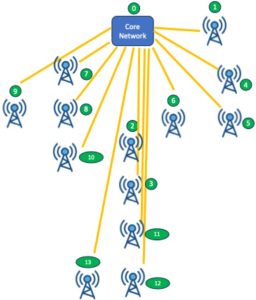
A star topology connects multiple devices to a centralized switch. In a star topology, a central switch coordinates data transfer by routing data packets it receives to their destinations. For example, an Ethernet setup uses a star topology to connect multiple computers to a network router. Star networks are suitable for devices that are located close to each other. They are also more robust compared to bus topologies because a failure on a single device or cable doesn’t affect the entire network. However, the network’s performance is highly dependent on the central switch. If the switch fails, all devices on the network cannot transmit or receive data.
Tree topology
Tree topology combines star and bus networks to form a hierarchical network structure. Network architects use tree topologies to prioritize and manage devices in different departments. Similar to star networks, a tree topology uses a hub to coordinate data transfer. Additionally, it expands the network by branching into layers of secondary hubs.
Mesh topology
A mesh topology connects multiple devices through individual data paths. In a mesh topology, every device can send data to another device through an individual channel. The mesh topology is common for applications that require secure and reliable data transmission. Mesh networks support two types of data transfer methods.
- Routing: The sender calculates the shortest path to the destination and uses it to transmit data
- Flooding: The sender sends the same data to all adjacent network nodes, which flows toward the destination
Mesh topology networks don’t rely on centralized switches to route signals to their respective destination. As such, mesh networks are more resilient to faults because there is no single point of failure. If a device, network interface, or cable fails, you can perform remedial work without disrupting ongoing communication. Because each node connects individually to another, you can reduce data risks during transmission. In addition, securing the data channel is more straightforward.
However, configuring and managing mesh networks at scale requires significant effort. For example, adding a new node to a wired mesh network requires installing multiple cables and reconfiguring the network.
Hybrid topology
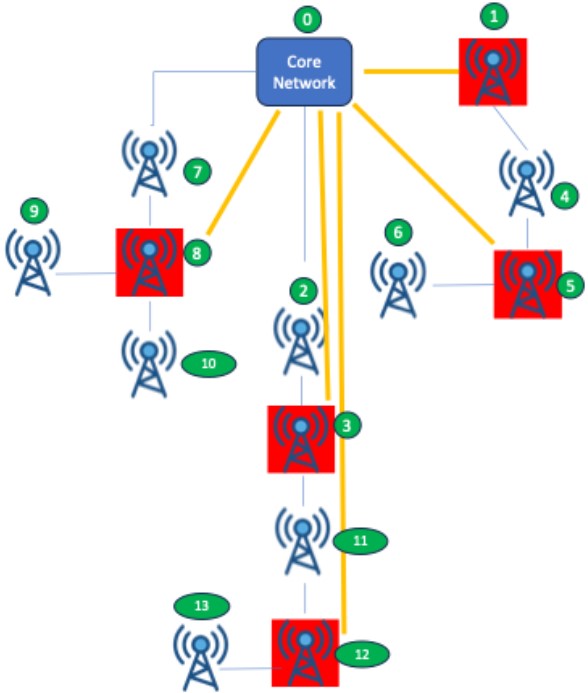
Hybrid topology uses two or more network topologies to form an integrated network architecture. Depending on the business needs, you can combine different topologies. For example, you use ring topologies to connect computers in various departments. Then, you use a mesh topology to integrate these departmental networks for reliable performance and security.
What are the benefits of network topology design?
These are the benefits of creating a strategic network topology design.
Optimized networking
Choosing the right network topology helps you overcome network bottlenecks, leading to lower latency and higher throughput. Many organizations start their local area networks (LANs) with a simple network topology. However, as usage grows, they migrate to network topologies that support complex device connections that provide consistent transfer rates. For example, an organization might initially build its network with a star topology but later migrate to a mesh topology to improve performance.
Enhanced fault tolerance
Some network topologies, such as ring and mesh networks, are designed to be fault-tolerant. They are more robust to network disruption and facilitate troubleshooting more effortlessly. For example, when a device fails, the star network topology enables devices to continue exchanging data. That way, you can provide reliable services, reduce downtime, and maintain business continuity.
Scalability
Organizations often face challenges in adding more computers, networking interfaces, and devices as they grow. When the traffic of devices outgrows the capacity of an existing networking infrastructure, you experience a data traffic bottleneck. By reconfiguring networks into appropriate network topologies, you can manage costs, expand network coverage, and optimize network performance without requiring a major infrastructure overhaul.
What is a physical versus logical network topology?
Physical network topology refers to how devices are connected physically in a network. Meanwhile, the logical network topology describes how data flows from one device to another until it reaches the destination.
When designing physical network topologies, you consider cable type, hardware selection, routers, and network protocols. Some network protocols require specific types of physical topologies. For example, modern Ethernet uses fiber optic or twisted pair cable, which you can arrange in a star topology. Meanwhile, some Internet of Things (IoT) deployments use a wireless mesh topology that allows devices to transmit data through multiple interconnected nodes.
In cloud computing, you have virtual networks that rely on logical network topologies, regardless of the underlying physical topology.
The choices you make in both physical and logical topologies are important in improving network performance, enhancing network reliability, and reducing infrastructure costs.
What is network topology mapping?
Network topology mapping is the process of documenting both physical connections between network devices and the data flows among them. It produces network topology diagrams listing information on the location of each device, the topology used, cabling details, device relationships, and more. Network administrators use software tools to create network topology maps. Then, they use the diagrams containing physical and logical arrangements of devices to isolate faults, troubleshoot systems, and improve network performance.
What are some network topology design considerations?
When designing network topology, consider these factors to balance cost, performance, scalability, and security.
Bandwidth
Determine the bandwidth your devices currently use and the network capacity you will need as usage grows. Some applications, such as video streaming, might require a low-latency network and be less tolerant to traffic bottlenecks. In such cases, choose high-performance topologies such as a star or a mesh. Meanwhile, IoT systems that transmit smaller sensor data packets can use ring or bus topologies.
Location of resources
Different network topology requires specific configurations of hardware, cabling, and networking interfaces. Therefore, list the resources you currently have and consider physical limitations that might hinder interconnectivity. For example, choosing a mesh topology for large areas of separated computers can incur significant cost and extensive cabling work.
Security
Some network topologies, such as star and tree networks, allow you to implement security protocols more easily to help protect sensitive data. For example, you can enable a firewall at the hub and segment networks to strengthen network security. On the other hand, you can use the mesh network’s dedicated data path to enhance data privacy.
Redundancy
Choose fault-tolerant network topologies for mission-critical applications. Network architectures such as mesh and star are less sensitive to node or path failures. Devices can still exchange data even if one or several connected devices fail. In addition, consider the ease of identifying and troubleshooting network issues in a specific topology. For example, you can easily be alerted to node failure in a star or tree network.
Cost versus complexity
When choosing network topologies, consider the total cost of ownership throughout the usage lifecycle. Consider installation, budget for maintenance, upgrades, and expanding the existing network to fit new devices. A network topology that suits an organization in the initial stage might no longer be feasible as it scales.
How can AWS support your network topology requirements?
AWS cloud services allow you to build virtualized network topologies in the cloud or connect to your on-premises networks for a hybrid topology configuration.
AWS Cloud WAN provides a central dashboard for making connections between your branch offices, data centers, and Amazon Virtual Private Clouds (Amazon VPCs).
AWS Direct Connect is the shortest path to your AWS resources for a hybrid topology. While in transit, your network traffic remains on the AWS global network and never touches the public internet.
Amazon Virtual Private Cloud (Amazon VPC) gives you full control over your virtual networking environment, including resource placement, connectivity, and security.
Get started with building your ideal network topology with AWS by creating a free account today.
Browse all cloud computing concepts
Browse all cloud computing concepts content here:
Did you find what you were looking for today?
Let us know so we can improve the quality of the content on our pages