AWS Architecture Blog
Multi-region disaster recovery for Amazon API Gateway WebSocket APIs
WebSocket connections power some of the most interactive experiences on the web: financial trading applications streaming live market data, collaborative editing tools where multiple users work on the same document, gaming leaderboards updating in real time, and IoT dashboards monitoring thousands of devices. These applications depend on persistent, bidirectional communication between clients and servers.
Real-time applications using WebSocket connections face a unique challenge during Regional outages. WebSocket connections are persistent and bound to a specific AWS Region. A Regional failure severs every active connection. For applications that also maintain shared state across those connections, such as a live auction or collaborative editor, users lose both their connection and their session context. This post presents a design pattern for multi-Region disaster recovery with Amazon API Gateway WebSocket APIs that reconnects clients and restores state automatically during failover.
In this post, you learn how to build this pattern using Amazon Route 53 for DNS-based failover, Amazon DynamoDB Global Tables for cross-Region state replication, a canary health probe for traffic-independent failure detection, and client-side reconnection logic to recover from Regional failures while preserving application state.
Solution overview
This pattern creates an active-passive multi-Region architecture where the primary Region serves WebSocket connections and automatically fails over to a secondary Region during a disaster. The core idea is separating application state from the connection itself, so the client can restore its session after reconnection.
The architecture deploys identical WebSocket API stacks in two Regions, a primary and a secondary. Both Regions share application state through DynamoDB Global Tables, so the secondary Region is consistently ready to serve traffic. A single custom domain name fronts both Regions. Amazon Route 53 failover routing policy directs traffic to the primary Region under normal conditions. When the primary becomes unhealthy, Route 53 automatically shifts DNS resolution to the secondary Region. Clients reconnect to the same domain and resume operations without changing their configuration.
Figure 1 shows the architecture and the normal operation and failover flow.
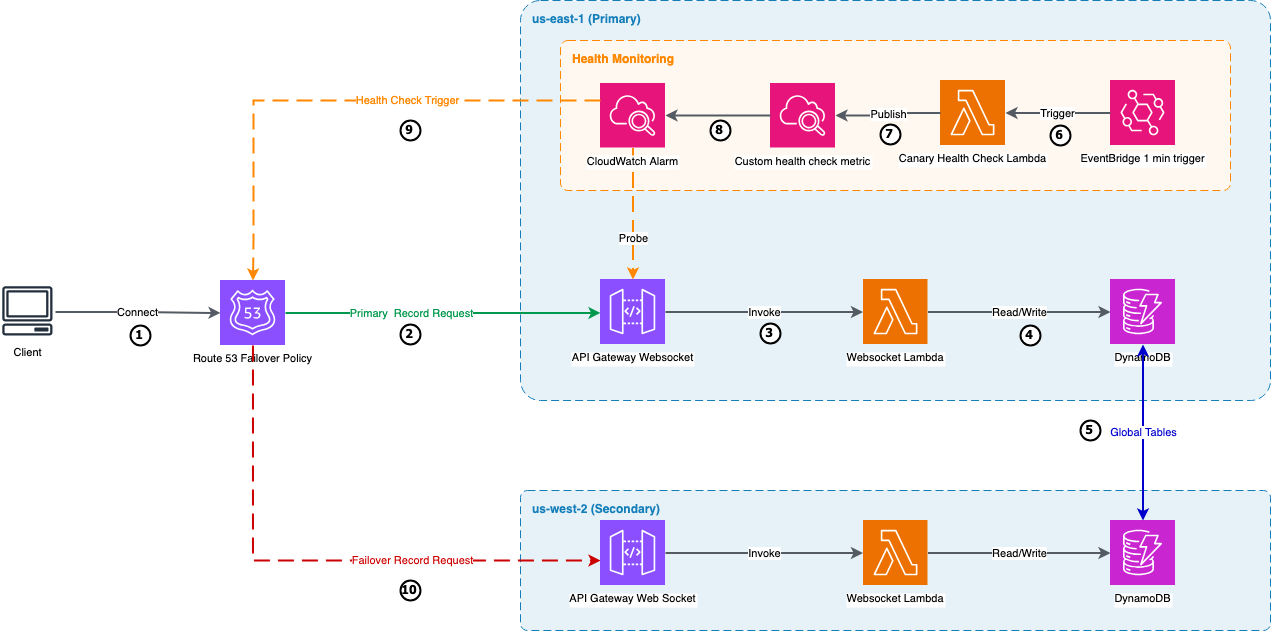
Figure 1: Multi-region WebSocket API failover architecture
- A user opens the application, which establishes a WebSocket connection to the application’s domain name.
- Amazon Route 53 resolves the domain using a failover routing policy. Under normal conditions, it returns the primary Region’s endpoint.
- The WebSocket connection reaches API Gateway in the primary Region, which invokes an AWS Lambda function for each connection event and message.
- Lambda reads and writes application state to DynamoDB. Connected clients receive updates through their open WebSocket connections.
- DynamoDB Global Tables replicates the application state to the secondary Region asynchronously, keeping it ready to serve traffic.
- Independently, an Amazon EventBridge rule triggers a canary Lambda function every minute.
- The canary opens a WebSocket connection to the API Gateway endpoint, sends a heartbeat, and publishes the result as a custom Amazon CloudWatch metric.
- A CloudWatch alarm evaluates the metric. If the canary reports consecutive failures or stops publishing, the alarm fires and the associated Route 53 health check marks the primary as unhealthy.
- Route 53 detects the unhealthy primary and begins resolving the domain to the secondary Region instead.
- Clients reconnect through the same domain, now reaching the secondary Region, and recover their application state from the local DynamoDB replica.
Prerequisites
To follow along with this post, you need:
- An AWS account with permissions to create Amazon API Gateway, AWS Lambda, Amazon DynamoDB, Amazon CloudWatch, and Route 53 resources.
- A domain name with a hosted zone in Amazon Route 53.
- AWS Certificate Manager (ACM) certificates for your domain in both the primary and secondary Regions.
- AWS Command Line Interface (AWS CLI) v2 installed and configured.
- Node.js 18.x or later (for the client application).
Deploy the solution
The complete source code and deployment instructions are available on the GitHub repo. The repository includes AWS CloudFormation templates for the WebSocket APIs, canary health probe, and a React client application with the reconnection logic described in this post.
The demo application
The sample application is a real-time auction where multiple users bid on an item simultaneously. Each bid updates a shared counter through WebSocket messages, and connected clients see the current bid in real time. The application displays which AWS Region is serving responses, making failover visible during testing. Although minimal, this pattern represents real-time workloads where multiple clients share mutable state over WebSocket connections: chat applications, collaborative editors, live dashboards, or multiplayer games.
Managing connection state across Regions
WebSocket connections are persistent, but the application state built on top of them is what matters during failover. As users interact with the application, the server builds up session data tied to their identity. When a failover occurs and the client reconnects to a different Region, that session data needs to be available for the experience to continue uninterrupted. This solution stores state in DynamoDB Global Tables, which replicates it to the secondary Region asynchronously, typically within a second. Because this replication is asynchronous, writes that occur immediately before a failure may not reach the secondary Region. For most applications, this window is small enough to be acceptable.
After failover, the client reconnects and restores its state. In this demo, the client sends a getState message after reconnection to retrieve the latest application state from the secondary Region’s DynamoDB replica.
Production applications add two considerations on reconnection. First, clients authenticate again: WebSocket APIs authenticate on the $connect route, so after failover the secondary Region re-authenticates the client through a Lambda authorizer. Deploy that authorizer in both Regions so reconnecting clients can authenticate against either one. Second, to restore state, identify the user from the validated token, such as the sub claim. Key the stored state by the user ID rather than the connection ID, which changes on every reconnect. Applications model session state in different ways, so adapt this to your design.
If your application uses a relational database, you need to set up similar cross-region state replication. For instance, Amazon Aurora Global Database provides sub-second replication latency across Regions. Note that Aurora requires promoting a read replica to primary during failover, which typically adds 1–2 minutes to the recovery process. This promotion can also be automated based on a CloudWatch alarm action.
Heartbeat
Both the client and the canary use application-level heartbeat to verify their WebSocket connections are alive. At a regular interval, they send a lightweight message and expect an acknowledgment. A missing or invalid response signals a broken connection. The client uses this to trigger reconnection. The canary uses it to drive the Route 53 health check. This mechanism is described in RFC 6455 and is the standard approach for WebSocket connection health monitoring.
The client code snippets in this post use react-use-websocket, a React library that provides built-in support for reconnection and heartbeat. You can implement the same patterns in other WebSocket client libraries or languages.
Detecting regional failures automatically
When the primary Region becomes unavailable, Route 53 needs to detect the failure and redirect traffic to the secondary. To do this, the solution creates a health check that actively monitors the WebSocket endpoint. A Lambda function called the canary, deployed in the primary Region, powers this health check. It probes the endpoint every minute by opening a WebSocket connection, sending a heartbeat message, and confirming it receives a valid response. The canary publishes the result as a custom CloudWatch metric (App/WebSocketHealth, dimension ApiId): 1 for healthy, 0 for unhealthy.
A CloudWatch alarm monitors this metric and treats both failures and missing data as unhealthy (TreatMissingData: breaching). After two consecutive unhealthy datapoints, the alarm fires and the associated Route 53 health check (configured with InsufficientDataHealthStatus: Unhealthy) marks the primary as down. Route 53 shifts DNS to the secondary Region.
Failback works through the same mechanism. When the primary recovers, the canary starts succeeding again, the alarm clears, and Route 53 shifts traffic back. For production workloads, consider asymmetric thresholds: use a low threshold (two datapoints) for fast failover and a higher threshold (over five) for slower failback, which helps prevent flapping if the primary is unstable during recovery. A DNS time-to-live (TTL) of 60–120 seconds provides a good balance between fast propagation and lookup efficiency.
Client reconnection strategy
When a connection drops, the client needs to reconnect without overwhelming the recovering service. The heartbeat described earlier handles detection in most cases. If no messages arrive within the timeout window, the library closes the connection. However, the backend can be degraded rather than fully unreachable. For example, API Gateway returns error responses when the Lambda function is throttled, so the connection remains technically open while the application is non-functional. To handle this, the client tracks consecutive failed heartbeats: responses that aren’t the expected pong message. After 2 consecutive failures, the client force-closes the connection and triggers reconnection. With a 30-second heartbeat interval, this detects a degraded backend within 60 seconds.
After the client identifies a broken connection, it begins reconnecting using exponential backoff with full jitter, a pattern described in the AWS Architecture Blog post Exponential Backoff And Jitter. The reconnection interval doubles with each attempt, and full jitter randomizes the actual delay within that window. This spreads reconnection attempts over time, helping prevent a thundering herd where many clients retry simultaneously and overwhelm the secondary Region the moment DNS shifts.
After each successful reconnection, the client requests the current application state from the server. Because the client reconnects to the same custom domain, Route 53 resolves it to whichever Region is currently healthy. The client doesn’t need to know which Region it’s connecting to. The server includes the Region in its response, and the application can update its UI or logging accordingly.
Failover in action
To see the full failover sequence, start the client application and connect to your WebSocket endpoint:
Open the application in your browser and note the serving Region displayed in the UI.
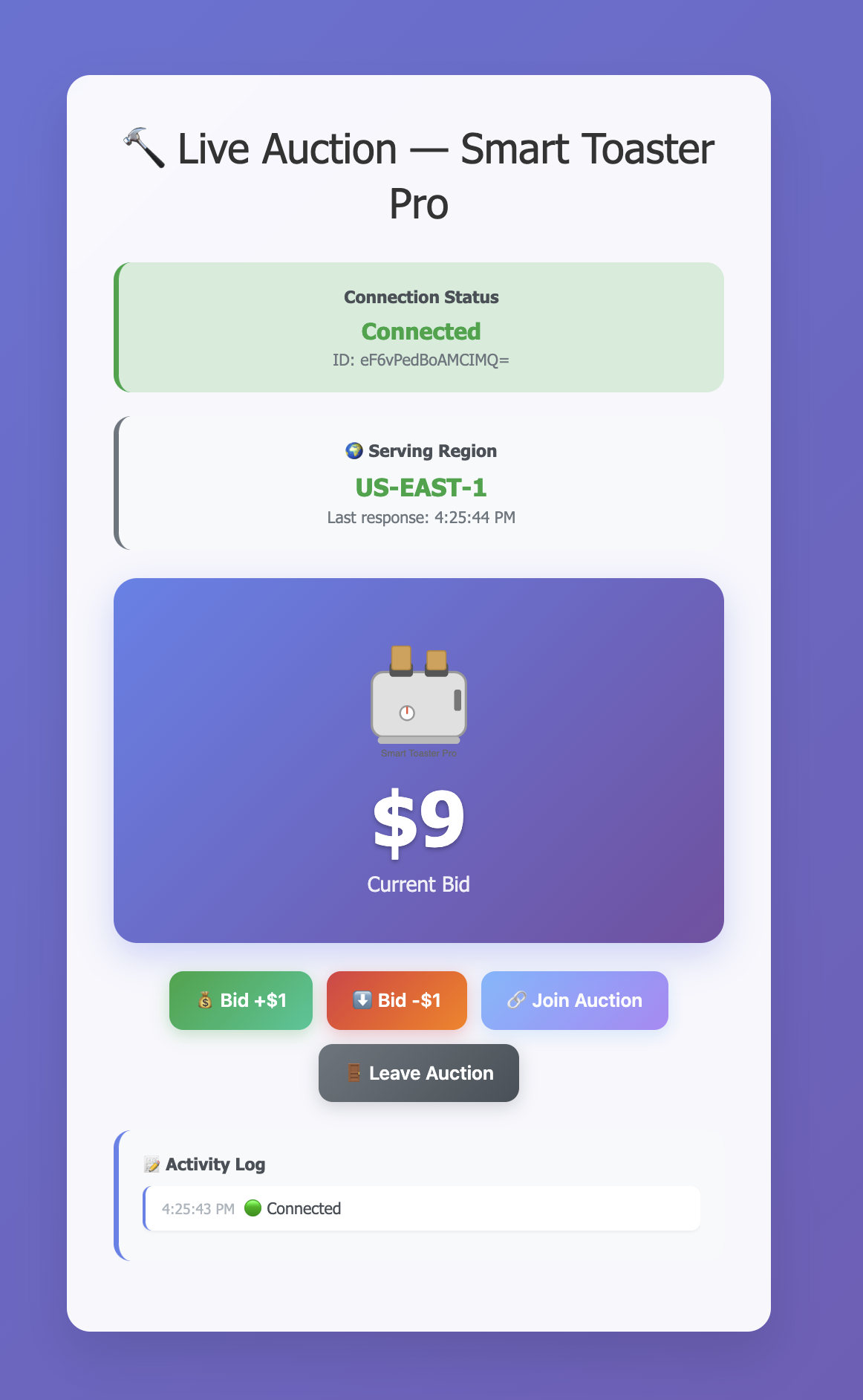
Figure 2: Client connected to the primary Region (us-east-1)
Next, simulate a failure by setting the primary Lambda function’s reserved concurrency to zero, which prevents it from processing requests:
Within about two minutes, the canary detects the failure after two consecutive failed probes at one-minute intervals. Route 53 then marks the primary as unhealthy, and DNS begins resolving to the secondary Region.
The client detects the dropped connection and begins retrying with exponential backoff and jitter.
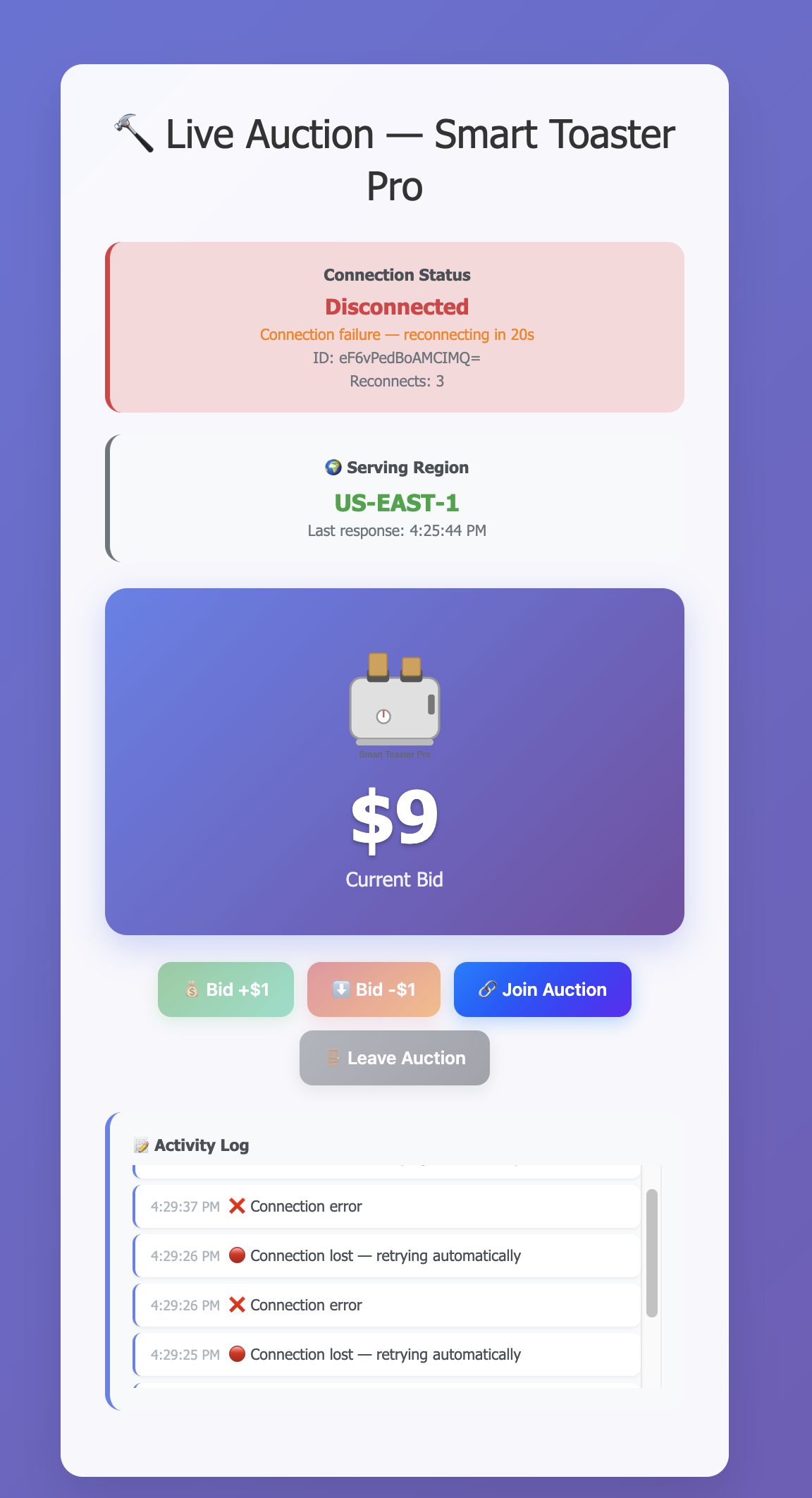
Figure 3: Client detecting failure and reconnecting with exponential backoff
When DNS propagation completes, the next reconnection attempt reaches the secondary Region. The client requests the current state, recovers it from DynamoDB Global Tables, and the UI updates to show the new serving Region.
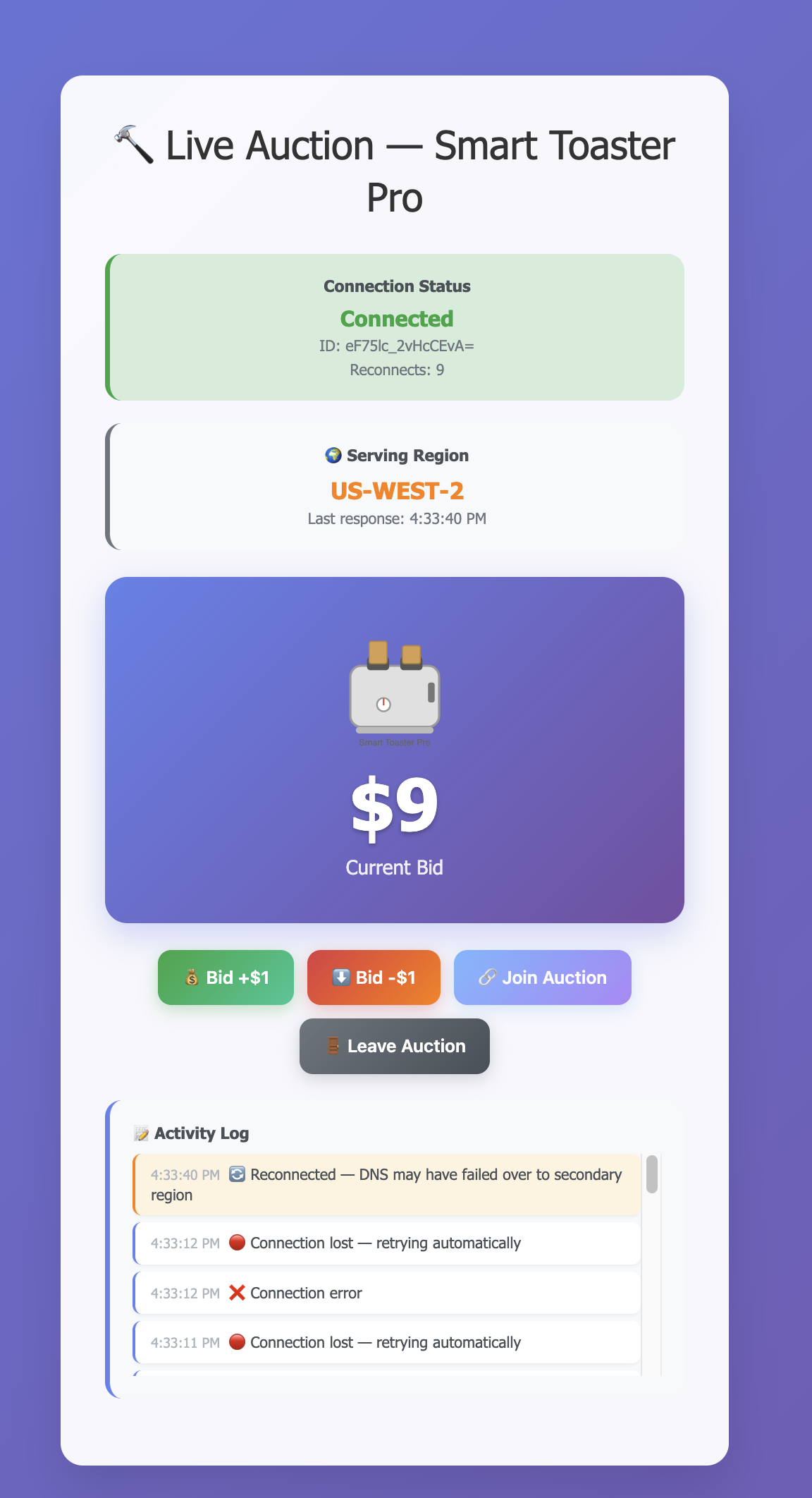
Figure 4: Client after failover to the secondary Region (us-west-2) with state preserved
When the primary Region recovers, the canary confirms that it’s healthy again. After the alarm clears, Route 53 shifts DNS back and clients reconnect to the primary through the same automatic process. No manual intervention is needed for failback.
Clean up
To avoid ongoing charges, delete the resources created during this walkthrough:
- Delete the CloudFormation stacks:
- Delete the Route 53 failover records and API Gateway custom domain names manually from the console.
Conclusion
In this post, you learned how to build a multi-region disaster recovery pattern for API Gateway WebSocket APIs. By separating application state from the connection itself, you can restore sessions automatically after a regional failover. This pattern applies to real-time applications where WebSocket continuity matters. Adapt the health check thresholds, reconnection timing, and state recovery approach to fit your workload.
To learn more about the services used in this solution, refer to the following resources:
- Amazon API Gateway WebSocket APIs
- Amazon DynamoDB Global Tables
- Configure custom health checks for DNS failover
- Exponential Backoff And Jitter