AWS Cloud Financial Management
Implementing Proportional Reserved Instance and Savings Plans Chargeback with AWS Billing Conductor
Organizations that centrally purchase AWS Reserved Instances (RIs) and Savings Plans (SPs) can save 30–72% on compute and database costs compared to on-demand pricing. However, distributing those savings accurately back to the teams that consumed them — known as commitment-based chargeback — remains one of the most common challenges in multi-account Financial DevOps (FinOps).
When you use AWS Billing Conductor (ABC) to produce pro forma billing, you have full control over how costs are presented to your member accounts. By default, commitments purchased at the management account level are managed separately from ABC billing groups. Pro forma bills for your member accounts reflect on-demand equivalent costs. This design gives you a clean baseline, but it also means that a team running steady-state Amazon Elastic Compute Cloud (Amazon EC2) workloads might not immediately see the USD 2,000 Savings Plans discounts they benefited from that month in their pro forma chargeback. The good news is that ABC provides the flexibility to customize your pro forma billing to reflect these savings, which sometimes requires additional configuration beyond the default setup.
In this post, we walk you through an automated pipeline that calculates the exact dollar savings each member account received from management-held RIs and SPs and injects those savings as proportional credit adjustments into ABC. This gives you an accurate, auditable chargeback number for every account, every month.
Scope: This solution is designed for organizations where commitments are purchased exclusively at the management level and member accounts do not own their own RIs or SPs. The solution assumes your management account is positioned outside all ABC billing groups, the recommended architecture for centralized commitment purchasing.
In this post, you will
- Deploy an automated RI/SP chargeback pipeline using an AWS CloudFormation template
- Learn how the pipeline calculates per-account savings using Amazon Athena queries against AWS Cost and Usage Report (CUR) 2.0 data
- Understand how AWS Lambda functions inject proportional discount credits as Custom Line Items into ABC
- Validate pipeline output using dry-run mode before applying credits
- Automate monthly execution with Amazon EventBridge
Who this post is for
This solution is designed for:
- FinOps practitioners managing multi-account AWS Organizations with centralized commitment purchasing
- Cloud architects building automated chargeback pipelines
- AWS Partners and Managed Service Providers (MSPs) who need to fairly allocate discounts across customer accounts
We assume familiarity with ABC concepts (billing groups, custom line items, pro forma billing) and AWS CloudFormation, basic Python and AWS Lambda experience.
Solution overview
When you use ABC, RI and SP benefits are scoped to billing groups. However, when commitments are purchased at the management level (which is outside all billing groups), the ABC pro forma domain has no visibility into those discounts at all.
This solution bridges the gap using three layers:
- Data layer — AWS Cost and Usage Report (CUR) 2.0, cataloged with AWS Glue and queried through Amazon Athena, provides the ground truth on exactly how much each member account saved from management-held RIs and SPs.
- Calculation layer — An Athena SQL query (embedded in credit-injection Lambda function) identifies all CUR 2.0 line items where usage was covered by RI or SP discounts (
SavingsPlanCoveredUsageandDiscountedUsage), then calculates the exact dollar savings per member account by computing the difference between on-demand cost and the discounted effective cost. - Injection layer — AWS Lambda reads those savings amounts and creates flat Custom Line Items (credits) in ABC for each member account, reducing their pro forma bill by exactly the discount they received.
Deployment is fully automated through an AWS CloudFormation template that provisions Lambda functions, IAM roles, an Amazon S3 audit bucket, an AWS Systems Manager (SSM) parameter store, and an Amazon EventBridge schedule. Figure 1 shows an overview of the solution architecture.
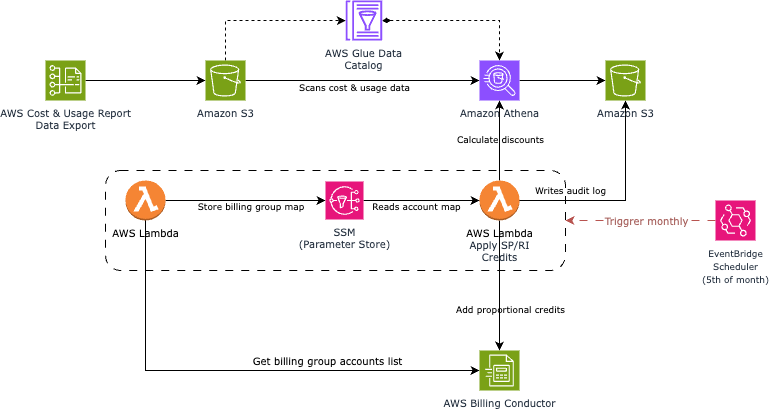
Figure 1: Solution architecture
This approach works for any number of member accounts, billing groups, and commitment types. It requires no changes to your existing ABC billing group structure or pricing plans.
Prerequisites
As noted above, this solution assumes the management account is outside of all billing groups. Before you begin, confirm the following are in place:
1. CUR 2.0 data export configured
AWS Data Exports (CUR 2.0) must be enabled on the management account with:
- Daily granularity
- Resource IDs included
- Parquet output format to Amazon S3
If you have not set this up, see Creating a standard data export.
2. AWS Glue crawler cataloging CUR data
An AWS Glue crawler must be configured to catalog the CUR 2.0 S3 prefix into the AWS Glue Data Catalog, making it queryable through Amazon Athena. For setup details, see Adding an AWS Glue crawler.
Note: After the crawler runs, verify your Athena database and table are accessible by running SHOW COLUMNS FROM your_database.your_table in the Athena console. The following columns are required for the savings calculation:
| Column | Purpose |
|---|---|
line_item_line_item_type |
Filter for SavingsPlanCoveredUsage and DiscountedUsage |
line_item_usage_account_id |
Identify the consuming member account |
pricing_public_on_demand_cost |
On-demand equivalent (what the account would have paid) |
savings_plan_savings_plan_effective_cost |
Actual cost after SP discount |
reservation_effective_cost |
Actual cost after RI discount |
savings_plan_savings_plan_a_r_n |
Identify which Savings Plan provided the discount |
reservation_reservation_a_r_n |
Identify which RI provided the discount |
3. ABC billing groups are configured
Member accounts must already be assigned to billing groups in ABC. Accounts within a billing group must not own their own RIs or SPs.
What the CloudFormation template deploys
The CloudFormation template provisions two Lambda functions (one to map accounts to billing groups, one to calculate and inject credits), two least-privilege IAM roles, an encrypted S3 bucket for audit logs, an SSM parameter for storing the account-to-billing-group mapping, and an EventBridge rule for monthly automation. The EventBridge rule deploys disabled by default so you can validate output in dry-run mode before enabling it.
Note: The stack deploys with DRY_RUN=true by default. This allows you to validate the full pipeline output before any Custom Line Items are created in ABC.
Deploy the stack
You can deploy using the AWS Management Console or the AWS CLI.
Option A: Deploy from the AWS Management Console
- Download the CloudFormation template from GitHub.
- Open the AWS CloudFormation console.
- As shown in Figure 2, choose Create stack, then With new resources (standard).
- Under Specify template, choose Upload a template file, select the downloaded YAML file, and choose Next.

Figure 2: CloudFormation console — Create stack
- On the Specify stack details page:
- Stack name:
risp-chargeback-pipeline - Figure 3 shows the stack parameters page. Fill in the parameters as described in the table below.
- Choose Next.
- Stack name:
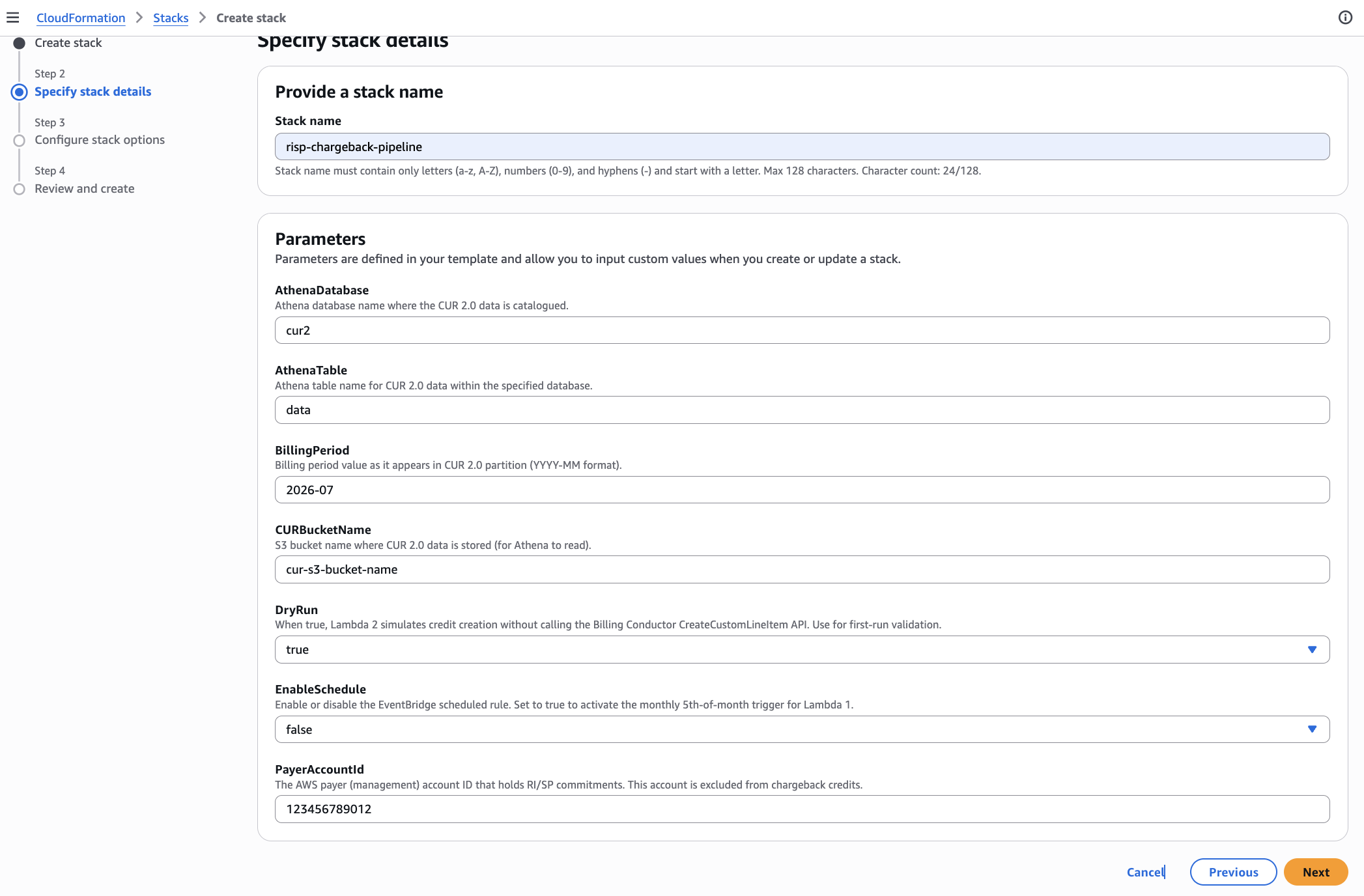
Figure 3: Stack parameters
- On the Configure stack options page, keep defaults and choose Next.
- On the Review page, check the box I acknowledge that AWS CloudFormation might create IAM resources with custom names, then choose Submit.
- Wait for the stack status to show CREATE_COMPLETE (approximately 2–3 minutes).
Option B: Deploy using the AWS CLI
Run the following command from AWS CloudShell or a local terminal with configured AWS credentials:
aws cloudformation create-stack \
  --stack-name risp-chargeback-pipeline \
  --template-body file://risp-chargeback-cfn.yaml \
  --parameters \
    ParameterKey=PayerAccountId,ParameterValue=123456789012 \
    ParameterKey=AthenaDatabase,ParameterValue=cur2 \
    ParameterKey=AthenaTable,ParameterValue=data \
    ParameterKey=CURBucketName,ParameterValue=your-cur-bucket-name \
    ParameterKey=BillingPeriod,ParameterValue="2026-07:" \
    ParameterKey=DryRun,ParameterValue=true \
  --capabilities CAPABILITY_NAMED_IAM \
  --region us-east-
Monitor progress:
aws cloudformation wait stack-create-complete --stack-name risp-chargeback-pipeline
Template parameters
| Parameter | Type | Default | Description |
|---|---|---|---|
PayerAccountId |
String | (required) | Your 12-digit AWS management account ID |
AthenaDatabase |
String | <athena database name> | Glue database containing your CUR 2.0 table |
AthenaTable |
String | <athena table name> | Table name within the Athena database |
CURBucketName |
String | (required) | S3 bucket where CUR 2.0 data is stored |
BillingPeriod |
String | <yyyy-mm:> | Billing period in CUR 2.0 partition format (YYYY-MM:). Verify your CUR 2.0 export uses this partition format. |
DryRun |
String | true | Set to true for simulation mode (no credits created) |
EnableSchedule |
String | False/true | Set to true to enable the monthly EventBridge schedule |
Important: The BillingPeriod parameter uses the CUR 2.0 partition format with a trailing colon (for example, 2026-07:). Update this value each month, or enable the EventBridge schedule for automatic monthly processing.
How the savings calculation works
The core insight is straightforward: the savings an account received equals the difference between what it would have paid at on-demand rates and what it actually paid after the RI or SP discount was applied.
Savings = pricing_public_on_demand_cost − effective_cost
The credit-injection function (Lambda 2) embeds this Athena SQL query internally and runs it automatically when invoked. The query calculates combined SP and RI savings per member account for a given billing period using CASE WHEN expressions to compute both discount types in a single pass:
-- Proportional RI/SP Savings per Account
SELECT
    line_item_usage_account_id AS account_id,
    ROUND(SUM(CASE
        WHEN savings_plan_savings_plan_a_r_n <> ''
        THEN CAST(pricing_public_on_demand_cost AS double)
             - CAST(savings_plan_savings_plan_effective_cost AS double)
        ELSE 0 END), 4) AS sp_savings_credit,
    ROUND(SUM(CASE
        WHEN reservation_reservation_a_r_n <> ''
        THEN CAST(pricing_public_on_demand_cost AS double)
             - CAST(reservation_effective_cost AS double)
        ELSE 0 END), 4) AS ri_savings_credit,
    ROUND(SUM(CASE
        WHEN savings_plan_savings_plan_a_r_n <> ''
        THEN CAST(pricing_public_on_demand_cost AS double)
             - CAST(savings_plan_savings_plan_effective_cost AS double)
        WHEN reservation_reservation_a_r_n <> ''
        THEN CAST(pricing_public_on_demand_cost AS double)
             - CAST(reservation_effective_cost AS double)
        ELSE 0 END), 4) AS total_discount_credit
FROM ${AthenaDatabase}.${AthenaTable}
WHERE billing_period = '${BillingPeriod}'
  AND line_item_line_item_type IN ('SavingsPlanCoveredUsage', 'DiscountedUsage')
GROUP BY line_item_usage_account_id
HAVING SUM(CASE
    WHEN savings_plan_savings_plan_a_r_n <> ''
    THEN CAST(pricing_public_on_demand_cost AS double)
         - CAST(savings_plan_savings_plan_effective_cost AS double)
    WHEN reservation_reservation_a_r_n <> ''
    THEN CAST(pricing_public_on_demand_cost AS double)
         - CAST(reservation_effective_cost AS double)
    ELSE 0 END) > 0
ORDER BY total_discount_credit DESC
How to read this query:
sp_savings_credit— UsesCASE WHEN savings_plan_savings_plan_a_r_n <> ''to identify SP-covered usage rows and calculates the difference between on-demand cost and SP effective cost. Covers all four SP types: Compute, EC2 Instance, SageMaker AI, and Database.ri_savings_credit— UsesCASE WHEN reservation_reservation_a_r_n <> ''to identify RI-discounted rows and calculates the difference between on-demand cost and RI effective cost. Covers all RI-eligible services: Amazon EC2, Amazon RDS, Amazon Redshift, Amazon ElastiCache, and Amazon OpenSearch.total_discount_credit— Sums both SP and RI savings into a single column per account.HAVINGclause — Filters out accounts with zero or negative total savings (edge cases from data anomalies).ROUND(..., 4)— Rounds all amounts to 4 decimal places for precision without floating-point noise.
Figure 4 shows the Athena query output. The output is a chargeback credit table — each row tells you exactly how much to credit each member account in ABC.
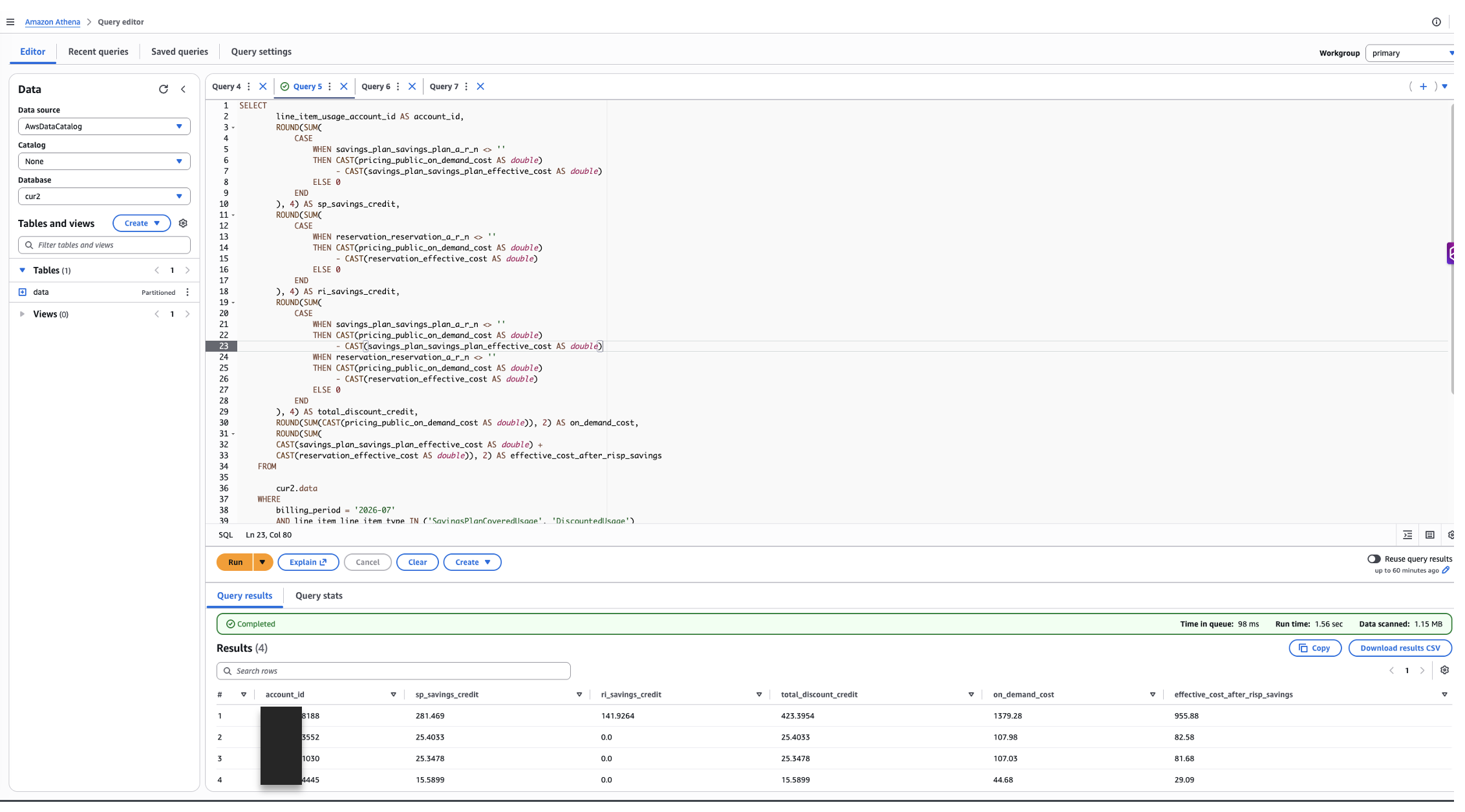
Figure 4: Athena query output – per-account savings breakdown by Savings Plans and Reserved Instance discounts
Tip: To manually verify the savings numbers, you can copy the SQL query shown above and run it directly in the Amazon Athena console as shown in the screenshot above. Open the Athena query editor, select your CUR 2.0 database, paste the query (replacing ${ATHENA_DATABASE}, ${ATHENA_TABLE}, and ${BillingPeriod} with your actual values), and choose Run. The results should match the output from Lambda 2.
How the pipeline logic works
The deployed pipeline operates in two stages, each handled by a separate Lambda function.
Stage 1: Account-to-billing-group mapping (Lambda 1)
ABC Custom Line Items are scoped to a billing group, not directly to an account. Before injecting credits, the pipeline needs to know which billing group each member account belongs to.
The billing group mapping function (Lambda 1) calls the Billing Conductor API to build a lookup map and stores it in SSM Parameter Store.
Key code — mapping logic:
def build_account_map() -> Tuple[dict, int]:
    """
    Iterates all billing groups and their associated accounts.
    Excludes the management account (it holds commitments, not in any billing group).

    Returns:
        account_map  : {account_id: billing_group_arn}
        group_count  : number of billing groups found
    """
    bc = boto3.client('billingconductor', region_name='us-east-1')
    account_map = {}
    group_count = 0

    # Paginate through all billing groups
    bg_paginator = bc.get_paginator('list_billing_groups')
    for bg_page in bg_paginator.paginate():
        for group in bg_page.get('BillingGroups', []):
            group_arn = group['Arn']
            group_count += 1

            # Get accounts in this billing group
            response = bc.list_account_associations(
                Filters={'Association': group_arn}
            )
            for account in response.get('LinkedAccounts', []):
                acct_id = account['AccountId']
                # Exclude management — it holds commitments but shouldn't receive credits
                if acct_id == PAYER_ACCOUNT_ID:
                    continue
                account_map[acct_id] = group_arn

    return account_map, group_count
Figure 5 shows the SSM parameter after Lambda 1 runs. The function stores the resulting map as a JSON string in SSM Parameter Store at /chargeback/account-billing-group-map. This avoids redundant API calls when Lambda 2 runs.

Figure 5: SSM Parameter Store — the account-to-billing-group mapping populated by Lambda 1
Stage 2: Credit injection (Lambda 2)
Lambda 2 (ApplyRISPCreditsFunction) is a self-contained pipeline: it runs the Athena savings query directly, loads the SSM account map, then creates a Custom Line Item credit for each member account in its corresponding billing group. You simply invoke it with a billing_period and it handles the rest.
For each account, it creates two separate line items — one for SP savings and one for RI savings — so the audit trail is clean, and each discount type is independently traceable.
Key code — credit creation:
def create_custom_line_item(
    bc,
    account_id: str,
    billing_group_arn: str,
    billing_period: str,
    billing_period_range: dict,
    credit_amount: float,
    credit_type: str   # 'SP' or 'RI'
) -> dict:
    """Creates a single flat credit Custom Line Item in ABC."""

    item_name = f"{credit_type}-Credit-{account_id}-{billing_period}"
    description = (
        f"Proportional {'Savings Plans' if credit_type == 'SP' else 'Reserved Instance'} "
        f"discount credit for account {account_id}, period {billing_period}. "
        f"Sourced from payer-level commitments."
    )

    if DRY_RUN:
        """Credit amount in USD"""
        logger.info(f"[DRY RUN] Would create: {item_name} | Amount: ${credit_amount:.4f}")
        return _result(account_id, credit_type, credit_amount, 'DRY_RUN', item_name)

    try:
        response = bc.create_custom_line_item(
            Name=item_name,
            Description=description,
            BillingGroupArn=billing_group_arn,
            BillingPeriodRange=billing_period_range,
            ChargeDetails={
                'Flat': {'ChargeValue': credit_amount},
                'Type': 'CREDIT'
            }
        )
        return _result(
            account_id, credit_type, credit_amount, 'SUCCESS',
            item_name, arn=response['Arn']
        )

    except bc.exceptions.ConflictException:
        # Idempotency: line item already exists for this period
        logger.warning(f"Custom line item already exists for {item_name}")
        return _result(account_id, credit_type, credit_amount, 'ALREADY_EXISTS', item_name)

    except bc.exceptions.ThrottlingException:
        # Retry with backoff
        time.sleep(2)
        return create_custom_line_item(
            bc, account_id, billing_group_arn, billing_period,
            billing_period_range, credit_amount, credit_type
        )
How the credit works: The ChargeValue is a positive number with Type set to CREDIT. ABC interprets this as a reduction to the billing group’s pro forma bill. No offset to the management is needed — the management is outside all billing groups, so its commitment costs exist only in the standard AWS bill domain.
Built-in safeguards:
The credit-injection function is designed to be safe to re-run at any time. It prevents duplicate charges, gracefully handles API throttling, and validates its own output before finishing—so a single miscalculation cannot silently propagate into your pro forma bills.
Validate with dry run
The stack deploys with DRY_RUN=true by default, allowing you to validate the full pipeline without creating any Custom Line Items.
Step 1: Run Lambda 1 to build the account map
- Open the AWS Lambda console.
- Navigate to the
BillingGroupMappingFunction. - Choose Test, use the default test event (
{}), and choose Invoke. - Figure 6 shows a successful test result. Verify in the response that your accounts are correctly mapped to billing groups.
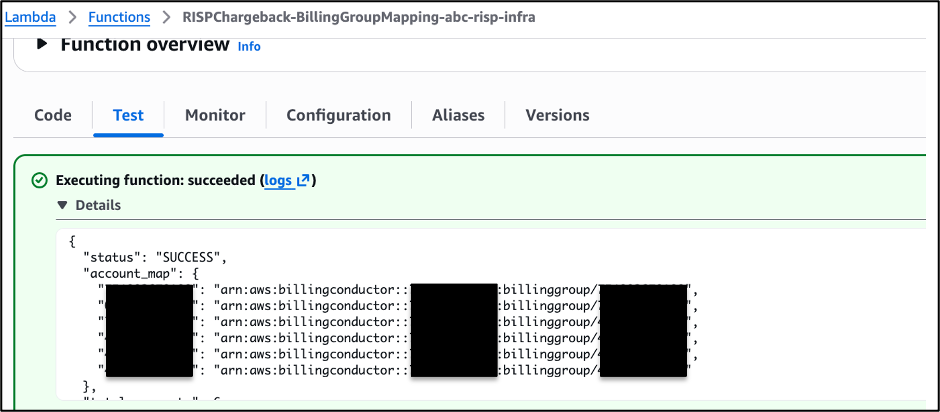
Figure 6: Lambda console – BillingGroupMappingFunction test result showing account map
Step 2: Run Lambda 2 in dry-run mode
- Navigate to the
ApplyRISPCreditsFunctionin the Lambda console. - Choose Test and provide the following test event (Lambda 2 runs the Athena query itself — you only need to specify the billing period):
{"billing_period": "2026-06"} - Choose Invoke and review the response.
A successful dry-run response looks like:
{
"billing_period": "2026-06",
"dry_run": true,
"dry_run_simulated": 42,
"skipped": 1,
"failed": 0,
"validation": {
"total_athena_savings": 18450.00,
"total_credits_applied": 0.0,
"message": "DRY RUN - no credits applied. Review simulated output."
}
}
Step 3: Verify dry-run results
Review the following:
- All expected accounts appear in the output
- Credit amounts align with your CUR data expectations
- No
failedentries in the response - The
total_athena_savingsvalue looks reasonable for your organization’s RI/SP portfolio
Go live and automate
After you are confident in the dry-run output, switch to live mode by setting dry-run as false and enable automation.
Disable dry-run mode
Update the Lambda 2 environment variable using the AWS CLI:
aws lambda update-function-configuration \
--function-name ApplyRISPCreditsFunction \
--environment "Variables={PAYER_ACCOUNT_ID=123456789012,SSM_PARAM_NAME=/chargeback/account-billing-group-map,AUDIT_BUCKET=risp-chargeback-audit-123456789012-us-east-1,DRY_RUN=false,ATHENA_DATABASE=cur2,ATHENA_TABLE=data,ATHENA_OUTPUT_LOCATION=s3://risp-chargeback-audit-123456789012-us-east-1/athena-results/}" \
--region us-east-1
Or update directly in the Lambda console: navigate to Configuration → Environment variables → set DRY_RUN to false.
Enable the monthly EventBridge schedule
The template deploys an EventBridge rule that triggers the pipeline on the 5th of each month at 8:00 AM UTC. This timing allows CUR 2.0 data to finalize (typically by Day 3–4) before processing begins.
Enable the schedule:aws events enable-rule \--name risp-chargeback-monthly-schedule \--region us-east-1
Or set EnableSchedule=true when deploying/updating the stack.
Execution order:
Lambda 1 — Builds and stores the account-to-billing-group map in SSM
Lambda 2 — Reads Athena results, applies credits, validates totals, stores audit log to S3
Tip: For production environments, consider chaining Lambda 1 → Lambda 2 using AWS Step Functions for robust error handling and retry logic.
What your accounts see — before and after
| Metric | Before (ABC default) | After (with chargeback credits) |
|---|---|---|
| Member account pro forma bill | On-demand equivalent only | On-demand minus proportional RI/SP credit |
| Management visibility into distribution | None — discounts absorbed silently | Full audit trail in S3 per billing period |
| Chargeback accuracy | Overstated (doesn’t reflect actual cost) | Accurate to within USD 1.00 of actual effective cost |
| Manual effort per month | N/A (no mechanism existed) | Zero — fully automated pipeline |
Figure 7 shows SP and RI credits in the billing group detail view.

Figure 7: Custom Line Items in ABC — SP and RI credits visible in the billing group detail view.
Cost estimate
This solution incurs minimal ongoing costs:
| Service | Monthly Estimate | Notes |
|---|---|---|
| AWS Lambda | < USD 0.01 | ~2 invocations/month, each <30 seconds |
| Amazon Athena | Free tier + USD 0.01 – USD 5.00 | Depends on CUR data volume (billed at USD 5/TB scanned) |
| Amazon S3 (audit logs) | < USD 0.01 | ~1 KB per account per month |
| SSM Parameter Store | Free | Standard parameters at no charge |
| Amazon EventBridge | Free | Included in free tier (1 rule, 1 invocation/month) |
Estimated total: Less than USD 5/month for most organizations. The primary cost driver is Athena query scans — using Parquet format (which CUR 2.0 outputs by default) significantly reduces scan volume.
Limitations and considerations
- Scenario scope: This solution does not support member-account-owned commitments (see Scope in the introduction).
- Single billing period: Each pipeline execution processes one billing period. You can only backdate a custom line item to the immediately preceding billing month. You cannot apply them to historic months further in the past.
- Credit granularity: Credits are applied at the account level, not at the resource or service level. If you need service-level breakdown within an account, you can extend the Athena query to include
product_servicecodegrouping. - CUR data timing: CUR 2.0 data might take 24–48 hours to finalize after month-end. The EventBridge schedule targets the 5th of the month to allow sufficient processing time.
- Rounding: With many accounts, the sum of individual credits might differ from the total savings by up to USD 1.00 because of floating-point rounding. The validation step flags this if exceeded.
Cleaning up
To avoid ongoing charges, delete the CloudFormation stack when you no longer need the pipeline. The Custom Line Items already created in ABC are not deleted when you remove the stack — they remain in the billing period they were created for.
Note: The S3 audit bucket has a DeletionPolicy of Retain by default to preserve audit logs. You must empty and delete the bucket manually if you want to remove all resources.
Conclusion
Centralized RI and SP purchasing is a best practice for maximizing discount utilization – but without proportional chargeback, the cost visibility gap can erode trust between FinOps teams and business units. Deploy the solution today by downloading the CloudFormation template from GitHub. Start in dry-run mode to validate savings calculations against your CUR 2.0 data, then enable EventBridge automation for hands-off monthly execution. For more details on custom line items and billing group configuration, see the AWS Billing Conductor User Guide.